 Problems? See this thread at archive.org.
Hey guys,
I have a Y470 with Win7 64bits. I'm wondering something. Is it normal that in games such as HoMM6 and Assassin's Creed 2 I get only around 15-20 FPS at the lowest possible settings and at native res? My GPU switch is on and maked as ''preferred'' in Nvidia settings. If I try to lower the resolution it doesn't change anything in term of FPS (which sometimes means that it's the CPU that is bottleneck - which would surprise me in this case). I tried several drivers including Lenovo ones (v296.73 is the newer one I believe). Any thoughts?
-
***Bump***
-
That isn't normal, i have owned a y470 since last year (august). I can play most current games with medium to high settings (sleeping dogs, amazing spiderman, battlefield and borderlands 2)....I have the i5 processor and nvidia 550m....make sure the power plan is set to high performance and go to nvidia control panel...
go to manage 3d settings and click program settings...click the add button and find program files (x86)...go to the installer folder of one of the games and click the game launcer (for example, fifa 12 launcher would be fifa.exe).. after u select the game launcher, you will directed back to the nvidia control panel....change the selected graphics processor, choose "High-Peformance Nvidia Processor" (image will be posted below) and click ok. Always make the switch is on before you start or launch a game
p.s. Some games don't recognize the optimus switch or technology, so I sometimes have to set to the Nvidia card manually with the Nvidia control panel...if these instruction don't work...install the latest nvidia update for our card and make sure to choose to do a "clean install"
![[IMG]](images/storyImages/nvidiasettings2.png)
-
double post ; delete please.
-
Thanks a lot for the reply!
Unfortunately I tried that before and it didn't change anything. There must be something else. My guts tell me that it's not a hardware related problem. I'm about to throw this laptop out of my window!!
Could you check your bios alphanumeric number version for me please? According to Lenovo's website I have the bios for win 7 32 bits, but I have win 7 64bits.... But I hate risking a bios change if it's gonna be useless.
Thanks! -
According to those threads it is a widespread issue :
Lenovo Ideapad Y470 Gaming FPS Lag - Lenovo Community
Y570 - Why do games run better off my battery and ... - Lenovo Community
I bought this lap around 6 months ago but only started playing with it now... I was not aware of all this crap. Oh well
-
Ok problem solved!!
It had indeed something to do with the processor like the lack of impact of resolution change would suggest.
There seems to be a problem with the cpu turbo or something. All I did is to put 99% max processor power in the advance options. It's also probably why some people had better performance on battery than plugged in. Hope they will fix it with a bios update...
Now I get 50-60 fps in AC2 instead of 15-20....kind of a major change! -
I forgot to mention that..I did a clean install windows as well and also disabled lenovo's energy management since the processor speed fluctuated randomly at times...I disabled turbo completely as well and set mine to 90% max processor...my highest is 80 degrees through most games that I play..
-
My GPU max temp is 96 degrees; a little more than anticipated.
Could you still check your bios alphanum version number for me please? -
Acccording to DirectX Diagnostic Tool(dxdiag), my BIOS is "InsydeH20 Version 03.60.4147CN32WW(V2.10)"..those were my cpu temps btw..I haven't checked my gpu temps before (what program do you use to check?)
-
Hey thanks a lot for the info; for mine it says 2.08 so I guess it's not up to date, I try to update to see if there is improvement for the cpu issue.
I use MSI Afterburner. It's free and I think it's still one of best be around. -
your gpu temp seems a bit high..What games are you exactly playing..I just played Borderlands 2 on high settings with vsync and amazing spiderman at medium settings with vsync and the gpu's highest temp was 74 degrees after an hour of each...i know bf3 might push the gpu temp a bit higher than these two games.
p.s. I think you need thermal paste or something...do you have warranty btw -
Right now I'm playing Assassin's Creed Brotherhood, which as most Ubisoft games it seems badly optimized and push the GPU a lot. But yeah 96 degrees is quite high, and I'll check with other games to see if the same happens.
I'm not sure about the warranty as I bought it while I was living in the US and now I'm back to Canada... I've been a little out of the laptop market for a few years but normally a laptop gpu and other components should be able to bear it until around 105 degrees, so yeah I'm not really comfortable with that 96 degrees. -
I don't get it. According to this thread Y470 / Y570 Update BIOS v2.10 - Lenovo Community , your bios version (2.10) is unofficial??? From where did you download it?
-
I had to send it in to lenovo a couple of months ago because I messed up my motherboard while trying to change the thermal paste (the cpu used to hit 90's often during games)...Lenovo fixed it in two weeks and I assume they updated the bios as well..I have never really paid attention to the BIOS version or updated it before.
P.s. how is the assassin creed series, I want to play it but I feel I am too far behind and a lot to story to go through (i got distracted by sleeping dogs (amazing game and story) )...I'm waiting for the new assassins creed since it seems to deviate from the previous ones. -
For the information of other Y570 owners, I'd like to add to the issues that many people seem to be having with the Y570 laptop. My experience was random crashes when trying to play Battlefield3. I tried tweaking the game graphics settings, and even many of the suggestions in this thread. However, I finally was able to play the game without any crashes at all after doing:
1. Uninstall the latest Nvidia drivers (3.06) and installing 2.96 drivers. This led to the game having the same issues that many people reported... the stuttering when on AC power. So...
2. Installing Throttlestop and putting a tick/check in Disable Turbo. This led to the game being rock stable with relatively decent performance... even after a marathon 4 hours of gaming yesterday. Max temperatures on the CPU was 86C on a very warm night here in Sydney.
Hopefully that will help other people with what is otherwise a great performing laptop for the money. -
So how is your temp now that Lenovo sent it back to you? When I play I hit 96 degrees and it does not go higher than that.
The AC serie is really good. You really should start from the beginning; you have 4 games of pure joy before ACIII. ACIII won't really deviate from the previous one, it's still the same story-line. -
Hey guys, it has been a while since I have posted on this forum. My experience with my Lenovo Y570 has been great. Although I have one slight problem. Whenever I overclock my videocard (800/1800), my heatsink fan slows down and it really affects my game performance. The only fix I know of is re-installing the Lenovo Energy Management feature. Anyone know how to fix this? Because I really need to keep this overclock permanent for Battlefield 3.
-
The highest temp I hit on gpu is 72 degrees (prince of persia 4, nba2k13,fifa13 , amazing spiderman and web of shadows) at high settings with vsync...The highest cpu temp is 81 degrees after hours of gaming.. I know temperature in the room can also affect how hot the computer gets (its 70 degrees here)
p.s. Here are battelfield 3 results after an hour of multiplayer( with recommended settings)...
![[IMG]](images/storyImages/afteranhourofbattlefield.png)
-
This is a rare issue but I have a Y470 and overclocking never affected how much the fan spins...I suggest you clean the fans with canned or try another overclocking app like (nvidia inspector)..The lenovo energy has given me nothing but problems..I disabled it a while ago by using a program "ccleaner" to disable the energy management part of the program...here is a screenshot...
![[IMG]](images/storyImages/disableenergymanagement.png)
p.s. I also lowered my maximum processor rate to 90% which stops the turbo boosting heat and lag issues...I hope this helps..
![[IMG]](images/storyImages/processorrateissue.png)
-
Hello! I'm thinking of buying a Y570 laptop but would like to know one thing first, I hope you guys can tell me about it. I had an old N200 3000 series Lenovo laptop and I liked the fact that the exhaust vent had a really fast access to it when it was in need forcleaning (just had to unscrew two screws on the bottom of the laptop and remove a little slider). So now I'm looking for a laptop with the same easy/fast access to the fan. I see that the bottom of the Y570 opens in a way so the fan is visible but am not sure if I can clean it. Would anyone maybe have a photo of an open bottom pad from the Y570 so that I can see if cleaning the fan is possible that same way as on my old Lenovo? I'm also thinking about G770 and G780 instead of a Y series Lenovo, what do you think? Thanx!
-
To make things a bit clearer, here's what I mean - in photos.
My old Lenovo was easy to clean - I used a little piece of paper and pulled it through that opening between the fan and the exhaust holes:
![[IMG]](images/storyImages/3000-n200.jpg)
G770 looks like this (not sure about Y570 and G780, please tell me about it if you know) - seems there's a piece of tape covering the opening (is underneath really an opening like in my old Lenovo so it can be cleaned just the same?):
![[IMG]](images/storyImages/g770-uprasej-use-za-use.jpg)
Please tell me. Thank you!
-
Hey guys, I'm looking for anyone who plays Battlefield 3 on Lenovo Y570. What driver is the best for it? The newest driver is giving me stuttering issues.
-
Nevermind my two posts up there, I found it out myself.
-
good video but is there another that just shows what to do for re-doing the thermal paste?
edit: nm...just read elsewhere that you need to disassemble _everything_ to get to the cpu/gpu
http://download.lenovo.com/UserFile...novo Y470Y570 Hardware Maintenance Manual.pdf - page 62 -
I am prepping to do the GPU thermal repasting tomorrow. Any helpful hints from others that have already done the process?
-
For the people that have replaced the thermal paste, do you really have to almost completely disassemble the laptop and pull the motherboard out to do it? If so, was any part difficult? I know how to apply paste so I'm only worried about putting it back together.
-
I am also looking to replace the thermal paste in my laptop. (y470)
Hoping to find a guide explaining how to do it. -
I've done it. You don't have to disassemble the whole computer. Just undo the back panel covering the CPU/GPU. In order to extract the heatsink, you have to break the plastic tabs holding the heatsink down. I used pliers and a hot knife. Take all the screws out and make sure you clean the old paste off well.
You may have to do it a few times to get the right amount of paste on. My computer had a huge glob that was not transferring heat very well to the heatsink.
I went from high 90s temps to low 80s using AS5 paste. I would say the right amount of paste is about the same as quarter of a pea or the size of the tip of a pen.
Good luck! -
Hello, new to the forum, made an account so I could share a mod I made to my Y570. I was tired of having my logitech unifying receiver (for keyboard/mouse) sticking out of the side and taking up a USB port. I know it's low profile, but sometimes a man just has to mod the things he owns before he can consider it his. I also wanted to fit an XBee radio module + USB adapter inside the laptop (I use it for sending serial data wirelessly for my hobby projects). I noticed that there was quite a bit of room under the little door on the bottom (I don't have whatever card that could go there). So I bought a mini USB 2.0 hub (sorry, no link ) for about $8 and opened it up and removed some of the connectors so I could get it to fit. I also removed the USB board that has the 3.0 ports and the wireless switches and took off one of the connectors to run wires to the hub. From there I ran wires back to a connector I soldered/hot glued back into place on the board minus the connection. I've had a lot of confusion when I try to explain this, so I'll try to be clear: I have wires coming from the original port going into the USB hub, and then from the hub I took one of the outputs and brought it back to the physical location of the original port. Then I sent wires out to another connector to connect the XBee board and plugged the logitech receiver in. I had to remove some plastic that was in the case that was meant to screw that card I don't have into, really easy to do with wire cutters once the case was opened. I also put tape over the bottom side of the original USB board to prevent any accidental shorts (the USB hub lies mostly underneath the card). So now my mouse/keyboard receiver is inside my laptop where it doesn't stick out and I still have four USB ports that I can access from the outside and another one I can access by opening the little door on the back and removing the XBee (plus the unused fourth port on the hub, but that would take some work to get to). I "downgraded" one of the outer ports from 3.0 to 2.0 by doing this, but since I don't even have any USB 3.0 devices and I gained three more ports than I had I thought it was more than a fair tradeoff.
Anyway, thought I'd share with you guys because there's good stuff on this thread and I thought I'd contribute. And no mod posts are complete without build photos, so here you go:
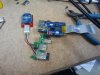
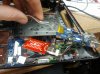
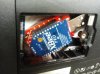
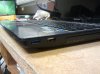
Also I want to look into replacing the keyboard with the backlit one from the y580, but I can't find one anywhere. If anyone has any ideas that would be great (I know, try customer service. But I don't want to have to try and convince them that I own a y580 and I want a replacement keyboard and no I don't want to send it in I want you to send me the keyboard). And as far as powering the backlight, I just happen to have an extra internal USB port...
-
to do the thermal paste, you will have to disassemble most of the laptop. use the Youtube video above and you can skip a couple steps such as the HDD brackets, LCD removal and leaving the mobo in the chassis.
just take your time. i was intimidated the first time but i had to disassemble/reassemble it again later and i felt comfortable. there are a couple small screws here and there
my re-pasting job went fine. temps dropped 15-20c but after my job, my connections for the USB card and touch sensors at the top stopped working. also my optical drive worked but refused to read any media afterwards. i'm not too sure what's going on as the connections to the mobo feel solid, but it doesn't matter now as i've sold my Y570 for a beautiful Sager P150EM
good luck guys. the same guy who did the disassemble video also put up a reassembly video -
So, I am a few weeks out of warranty and of course the left hinge on my Y470 is now loose. Anyone have any info. about how to tighten/replace it? I recall seeing a tear-down video one time, but can't seem to locate it now.
Thanks in advance. -
Hey guys, noob question here.
I wish to upgrade my Lenovo Y570 08626PU with a 5GHz dual band WiFi card. Has anyone here done that? Will it void my warranty? Are only certain cards compatible? And lastly, is the Bluetooth card linked with the existing wifi card (Intel 1000)? -
The bluetooth card is separate, based on my experience when taking it apart.
-
I cleaned and applied arctic silver 5 to the heatsink. You do have to disassemble the entire thing. I didn't have to break anything to remove the heatsink, perhaps that's an alternative way to do it. It took me about 3 hours but only because my work laptop decided to stop playing the youtube video and the internet connection at courtyard marriotts suck.
-
*not the entire thing, obviously you don't have to remove the bracket from the hard drive or disassemble the screen, but you have to do pretty much everything else lol.
-
@Bartimaeus938
Nice work there mate! Maybe you can find a way to fix the static-sound-problem too?
Have anyone tried Far Cry 3 on the y570? How is it running and what is your specs? -
What about higher-than-normal temperatures? Should I reapply thermal paste on my Y570's Core i7 2670QM? I'm getting 80 Celsius under heavy load.
-
Mine ran mid 90's stock and mid 80's after I redid the paste with the same processor.
80 is pretty good IMO. Be happy with that. -
@Bartimaeus938: I took the time out to register for this forum just to congratulate you on a job well done. I've been casually thinking about different ways to internalize a Unifying receiver, but your solution is perfect. I'm upgrading to a Y500 next week and selling my Y570, so I won't be able to implement your mod, but I'll be looking to do something similar to the Y500. Especially since it only has 3 USB ports. Thanks again sir, simple yet brilliant!
-
I have y470 for almost a year and I'm planning to replace the horrible and excessive thermal paste that Lenovo applied to the CPU and GPU. Just one quick question. When I looked at the hardware reference manual, I don't get the "b" position in the wireless radio switch in the diagram. For someone who replaced the thermal compund in their y470/570, are your wireless radio switch position in the "on" or "off" position?
-
Edit:
Y470/Y570 owner's with Windows 8:
Can you please let me know when Lenovo uploads a fully compatible and working Lenovo Energy Management for Windows 8.
The latest version 8.0.2.20 does not work with the touch panel (volume, theater and fan control), Lenovo is looking into the problem and will be fixing this soon.
Thanks in advance, -
Hello to everyone im knew to the forum,but i have a question that i can't find an answer for it.I own a Ideapad Lenovo y570 but i want to change the video card with something more powerfull then the GT555m 2gb and i can't find wich graphics cards are compatible with this laptop and what i can use,like gtx or something.
-
Welcome. Sadly you won't be able to change/upgrade the graphics card on this laptop because the gpu is soldered on the motherboard.
-
There is no chance at all? i thought that the intel video card is soldered to the motherboard? and the Nvidia GPU can be removed.
-
I am really sorry to dissapoint you. You can only upgrade your gpu if your laptop has an mxm slot, which only very few laptops have.
-
Thank you.So what are my options to get better performance from this card? any ideas or sugestions?
-
You could try to overclock it. It may not give much more performance (0-20% maximum probably) but it can give you a few fps extra in a game which can make a difference between playable and unplayable. Does your laptop have an expresscard? If it has (which I doubt) you can look at an external gpu (egpu).
-
Well to be honest i don't know dude haha.How can i check if you can tell me?
-
I looked it up, sadly it doesn't have one. Only option left for an egpu is to pull out your wifi card and use that slot but that's just too much hassle in my opinion because you'll have to open up your laptop every time to connect the egpu and it won't be a huge performance increase. Only reasonable option left is overclocking if you don't mind doing that.
Lenovo Y470 and Y570 Official Owners Thread
Discussion in 'Lenovo' started by nightspearx, May 10, 2011.


