Problems? See this thread at archive.org.
Is there anyone here who has the 512GB SSD version, and could tell me what make & model the SSD is? They've just started selling the Y70 Touch in the UK now, but only with a 256GB Drive (I presume SSD). I'm wondering how the Crucial MX100 512GB drive compares to the one in the 512GB Drive in the Y50?
-
-
Any idea if they'll offer an update with the GTX970m or GTX980m now that they have been released?
Anyone else disappointed with no 4k / UHD laptops for GTX970M / GTX980M launch? -
As I know, 800 series are for mobile (example laptop's) and the new 900 are desktop version. They are with same architecture.
-
That was the case until the other day: GTX 900M series officially announced by NVIDIA!!!
-
Anyone else had to get rid of that VisualDiscovery crap?
If you don't know about it, it's a mal/adware pre-packaged with all the bloatware already installed on the Y50 (probably on more models too).
That's just really low on Lenovo's part. -
so I did a fresh install and the problem went away, but I kinda lost all my files which is fine since I don't have much important. however now I can only boot with legacy mode rather than UEFI, which is I think is a mistake I made when I used rufus to make the bootable usb. I loaded the iso, it auto changed to NTFS and I didn't change it back to FAT32, should I just make another one with FAT32 instead and reinstall again so that I can boot with UEFI?
-
When you use Rufus, make sure you have it install to the flash drive with a GPT partition, not MBR file partition.
-
guys, how do u all faced the throttling issue with gaming temp over 70 celcius? can it be fixed?
-
The turbo boost is turned off once the temps touch 65-70.... Throttle stop should help you solve that...

-
Hello! I am a new member here and recently I just got my Lenovo Y50 - i7, 4GB 860m, 16 Gb of RAM, 256 GB SSD. Sorry if these has been answered but, 1. I have only roughly 135 GB of space on the SSD which is a dissapointment - is this normal, SSD users? I knw there are those windows and other stuff but it takes up so much space that i have only 135 to use. And 2. Where do I find in my system if I have Chi Mei or AUO screen? Thanks in advance for answers
-
Device manager > monitor > events
You should find it there
-
in events,, hardware ids
-
Damn seems like i have the chi mei... Well never mind... What about the sdd?
-
Hi its really not that bad.. Check this out.. Should help improve it
Display Calibration - Lenovo IdeaPad Y50: http://youtu.be/Z35VlFz_7kg -
Hello, It is me again, today I decided to test the DVD burner that came with it, i wanted to play some movies through it but it doesnt work? powerdvd says that powerdvd for desktop is not installed. Help please
thank you. All i need to know is how to get it running.
*I have BSplayer installed... so If it is possible to run it through this program instead of the powerdvd one. -
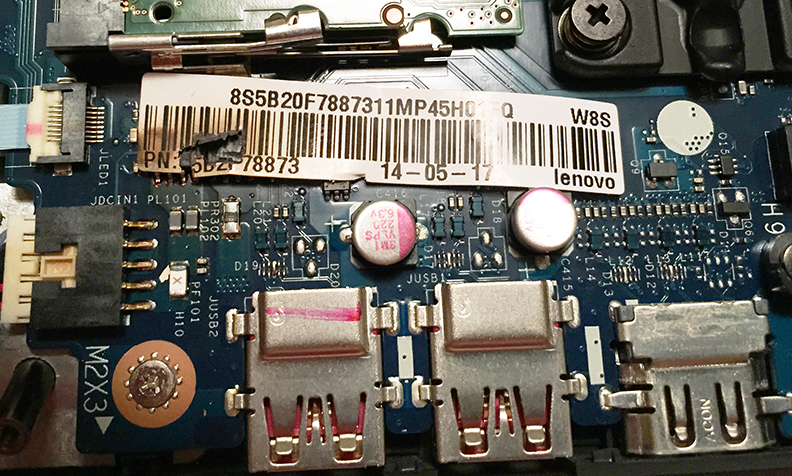
Just got hit for the third time with USB 3.0 ports that get so hot that it actually "shuts out" all attached USB devices. It always happens when I've had the laptop off the A/C plug for a while, then plug it back in. When I do that, it won't charge until I've rebooted 2-3 times, and then the heat rises.
I then popped off the back and saw this:
![[IMG]](images/storyImages/IMG_0144.jpg)
Attached Files:
-
-
I hope your warranty hasn't expired yet
-
Hello all,
I just received my Lenovo Y50 in the mail today. I ordered the 2.5 GHz, 15" screen, 512 GB SSD (non UHD and non touch version). I have turned it on, installed some programs and removed some unwanted bloatware, but I have noticed a few issues that I have questions about:
-I read all the reviews about the mediocre screen quality, so I knew what I was getting in that regards. However I wasn't prepared for how dim it was...using it in my normally lit office, I struggled to read the screen. I mostly fixed the issue by nearly maxing out the brightness...is this normal???? I would think that having the brightness in the default middle position should work fine...
-While fiddling with the screen settings, I noticed that the screen refresh rate is fixed at 60Hz....does this mean the FPS for games is also 60? Again is this normal?
-Just by performing simple functions, like removing unwanted software or letting it sit idle, I've heard significant noise from this computer, I think the fans.. Again is this normal?
-The CPU output seems capped at 2.5Ghz, but isn't there a 3.5 turbo boost function? When I have the resource monitor or CPU status opened, I see that 2.5GHz is the max output amount. Where does the turbo boost come in?
-I also hear a frequent 'clicking'. Nothing mechanical or physical like parts grinding, but the sound that a CPU makes when its computing. I hear this even when the computer is at an idle. It's not obnoxiously loud or anything, just weird that it makes that noise when nothing is going on ( i say that but i wonder if the default software, like MCaffee, has something to do with it).
Other than these issues, the computer seems to work fine thus far.
I was hoping to test out it's gaming abilities with the likes of red orchestra 2 and IL2: Cliffs of Dover....we'lll see how it does.
I was planning on elevating my computer on stands for these games to improve the airflow, has anyone had overheating issues with this computer? Is a cooling pad necessary for prolonged gaming?
Any feedback would be appreciated. -
The fans tend to do that when the laptop is idle. I don't think anyone has found a fix for it yet.
-
The screen is a bit on the dimmer side....
Most laptops screens are 60hz displays.... The y50 isn't any different
But the fps won't be limited to 60 coz of that.... If it is being limited to 60.... It's coz the nvidia experience is capping it... You'll have to check your nvidia experience and increase that...
Turbo boost won't kick in until its needed...
That said... The y50 turns turbo boost off at 65-70C.... You can change that by using throttle stop...
Haven't had any clicking sounds on mine.. But others have reported similar cases .. -
But is yours so dim that you had to adjust the brightness to nearly max level (for viewing in a normally lit room)??? I mean it almost seems like my screen is half lit in the default settings.
-
I'm just curious if anyone has discovered whether this option in the BIOS actually works or is to just troll the consumer base for some sick reason? I know the y510p could circumvent it by adding the second gpu... Would the same apply to this machine perhaps?
I have the Y50-70 non-touch, w/4GB 860m on the newest BIOS version for reference sakes. -
Do any of you guys have issues with videos in chrome lagging when full screened? My girlfriend has the 4k 256gb ssd version from the microsoft store and it lags horribly in chrome. It works perfectly fine in firefox and internet explorer. I read about disabling the pepper flash player in the plugins section of chrome, but that didn't help either. Any help would be great. Thanks.
-
Yea.. My screen is almost full brightness... Now I've learnt to deal with around half brightness.. But I turn it up during movies or gaming on power ...
Y50 is turning me into a cat
-
Any updates on new ISP screens? 4K resolution? I'm talking about ones that I can install on my base model.. Also is there a way a base model can get a touch screen involved? I doubt it right?
-
Well, I've been absent from this thread for quite some time. I saw a 4K Y50 at frys - it looks great.
On another note, my Newegg daily email showed up with a $1000 Y50. I don't know what KlickOnline's current prices are at, but compared to Lenovo's site, it looks like a good deal!
Lenovo Y50 (59425944) Gaming Laptop Intel Core i7 4700HQ (2.40GHz) 8GB Memory 1TB HDD 8GB SSD NVIDIA GeForce GTX 860M 2GB 15.6" Windows 8.1 64-Bit - Newegg.com -
Hi, I could not find the part of this thread with the keyboard problem when you wake the laptop up from hibernation or sleep. The speed of holding the key or holding backspace is drastically slowed when it wakes up. Dont you guys know where the problem is? I think it was somewhere here in thread but no way to find it. Sorry for causing problems in this thread and thanks in advance for your answers... I think this has something to do with BIOS.
-
Unfortunately there is no definitive solution for the keyboard problem at this point..
-
yep, keyboard bug is very annoying. my current fix is to unplug my USB mouse dongle and plug it back in, which seems to return keyboard back to normal rate.
-
Thats sad to hear... And also... I am playing a game League of Legends, and I have the Laptop for one week now. Since then it randomly shutted down for no reason during the game, very suddenly. It happened the first day and today. I start league and when I am in game, then it just shuts down. As I said, i have it for 1 week - 1st day and today makes it twice per week. Otherwise it just works fine for me, no problem. I have i7, 256 GB ssd, 16 GB ram. I play it with plugged cable. And it shuts down only the first minutes of the game, not like somewhere in the middle. I guess i can tell when its gonna shutdown because my character does not response to the spell or abilities i tell it to do and then BAM its down, keyboard lights off and black screen... should i return it or where is the problem? Is it the game since it happened to me only thru League?? *I played more league games on this pc, probably 6 or 7 and it happened on the two of those games.
* to make it more specific, I play other game like battlefield 4 on ultra and this never happened to me during this battlefield game, only during league of legends... I might keep it for few more day and NOT play league to see if it shuts down anymore, if it doesnt it lies in league. -
I heard that compared to the 4k Toshiba, Lenovo 4K seems to have horrible yellow color issue and 48Hz is locked down with no way to fix it?
Yam25 likes this. -
Checked overheating ?
Maybe your PSU can't support your hardware ?
Try changing Nvidia drivers and checking for suspicious system processes and stealth viruses.
Try lowering the resolution and character quality as well. -
Thanks for answering. No it's not over heating, definitely not. I have the newest Nvidia Drivers installed, checked it with avast, there should not be any viruses (It happened on the very first day, just few hours after unboxing, so that might not be the possibility) I tried lowering it using the optimal settings in Nvidia. The only thing I didn't get is the PSU part? Can you explain further?
*I played Battlefield 4 for roughly 3 hours today without any drops. Note that this happens only during League, i checked the league support/forums and found people with the exactly same problem. So does it lie in League or my Laptop? I will need quick answers to decide whether to return it (exchange for a different Y50) or to try and fix it so I dont have to bother returning it. -
PSU= Power Supply Unit, aka the laptop brick. Your laptop specs seem pretty normal for a Y50, so I don't think that's an issue.
Have you checked your CPU and GPU temps? Try downloading OpenHardwareMonitor , run it, and play your games. When it crashes or whatever it does, check the max temperature tab. If temperatures are over 90-95c, it's overheating. -
So I bought my Lenovo Y50 in July and for two months it's been perfect, but, recently, the hard drive area's been beeping and then I'm forced to shut it off. What should I do?
-
I was experiencing the same issue until someone suggested me doing as following:
1. Go to Desktop, right click and open Intel Graphics Properties
2. Click on Power
3. Graphics Power Plans --> Maximum Performance.
This did it for me, let me know if it works for you! -
Unfortunately. Yes on both.
-
No troll here, but limited options: switchable graphics = optimus (intel igp+nvidia 86m) and uma option = intel IGP only. Wait, no option for nvidia only? Nope...the way I understand it, the nvidia chip sends all images to the intel igp for the laptop screen in optimus mode (default). On the other hand, I believe that everything sent through the hdmi port uses the nvidia chip by default (correct me if I'm wrong).
-
Anyone want to lend Lenovo their machine so they can do testing to fix the keyboard issue? :laugh:
Re: Y50 Windows 8 : Keyboard response too slow aft... - Page 4 - Lenovo Communityheibk201 likes this. -
Hi, i need to stress again, that no, it is definitely not over heating, I wrote on the game support to ask for this problem and the supporter is trying to resolve it now... I will see further ahead... and why would not my PSU support it, it can run other games why not this one?
-
Hello all,
I have recently bought y50 lenovo with touch screen 1080p hd screen for doha, qatar.
I am facing big problem as my laptop screen is not displaying anything.
I tried to connect through hdmi and its giving output on my tv.
The issue is with the screen and right now i am traveling outside my country and i hav not registered my invoice to lenovo but i have the serial no of my machine.
Any solutions for the time being or possible causes of my laptop screen not working?? -
Has anyone here been able to swap the wifi card for a better one, my Y50 is using a Qualcomm Atheros card and its not really good.
-
i swapped to intel 3160. Not much better unfortunaly
-
Hey guys, does anybody know if it is possible to controll the fans of the y50 because when im watchig movies or when im surfing the web its quite anoying when the fan spins (im a bit noise sensitive
)
With speedfan it isn't possible, and with "Notebook Fancontrol" You need to create a config, and I have no clue how to do that. What I saw was that the fan doesn't spin until it reaches 41C so if we could raise that number to 50C perhaps we wouldn't hear it in idle or under light load. Do you think it would require a BIOS mod to do that or would it just require a config for "Notebook Fancontrol", because with the Lenovo Energy Management software it is also possible to control the speed for cleaning the fans. -
Hi Guys,
For those interested, Lenovo has provided an official response about the Y50 UHD's refresh rate being locked at 48Hz. Sounds like there won't be a solution forthcoming anytime soon and we will just have to live with 48Hz.
Re: Help Y50 4k UHD 48hz locked refresh rate and l... - Page 8 - Lenovo Community -
owh so it is swappable? urs was an atheros as well? is there any other wifi card that we can swap?
-
you need a modded bios, I swapped the realtek with an intel 7260 and the speed/latency are much more consistent but the range is pretty much the same, you need the m2/ngw form factor
-
so the only options I have is intel 3160 and 7260?
-
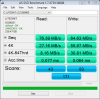
I recently bought the Y50-70 Touch from the Microsoft Store and the SSD on my laptop is really slow.
Can anyone respond if they have had similar issues and if they managed to fix it? I am not based in the US or I would have sent the laptop back right away.
Screenshot attached.
-
is it actually slow or just on as ssd benchmark? I just tried it and I get low value as well while crystaldiskmark and hdtune gives me around 400mb/s
Lenovo Y50 Owners and Information Thread
Discussion in 'Lenovo' started by kingfirejet, Jun 5, 2014.