 Problems? See this thread at archive.org.
when you copied it did that make the one key work If so I'll do that.
-
Hi all I have recently purchased y50-70. looking at another post I decided to change its display. I wanted to know what was best among b156han01.2 vs lp156wf4 SPB1
-
Was anyone able to fix the hissing noise that is produced when using headphones?
-
I fixed it by rolling back the driver once.
-
what driver? how?
-
Not sure what has changed or if it did...after installing Geforce experience on my y50 from best buy (purchased last Saturday) it downloaded the new NVidia driver and it installed correctly at least from what I could tell.....everything is working. I was under the thought you had to use Lenovo graphics driver only...maybe something has changed lately.
any ideas guys why it loaded the new driver without an error..
and I am still dealing with the slight pause or freeze during heavy gaming once in a while tried most everything..really happens during Grim Dawn like the graphics is trying to catch up with the processor or vise versa...
thanks and you guys have been very helpful and informative
bckh4 -
You can click the button to start up and have 4 options but if u choose the recovery, it does not work.
-
Open Device Manager, go to this spot:

Right mouse click, go to properties
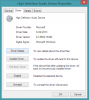
Click Roll Back Driver. If it's grey, try going to the RealTek site and downloading their latest one. If there's still fuzz, try rolling it back then. Good luck! -
That freeze is your hard drive spinning up. Guessing you don't have an SSD--that would definitely fix it. If you can't do that, there's also a power setting that turns off the hard drive after ____ minutes. Make that either never or after a few hours.Let me know if the power setting fixes it--curious.
-
Sigh.. Somehow managed to buy the wrong 7260 and now I need to do a second return to Amazon. Non PCI-E cards should be accepted by the bios... Getting pretty frustrated.
-
Hi, so I just noticed today the area around the SIDE of one of the SPEAKERS (the left one) the black part (the aluminium) of the red part (which is a bit deeper) is scratched, the black color is scratched out and i can see a silver part of it, it is quite noticible since it's bright silver, but its quite small too. Any ideas how to fix it? I will pics if you need it... It really bothers me :/ thanks in advance for reply (I need to know if i can sort of "repaint it" with the same shade of color or fix it somehow)
BTW - it's MOST likely scratched from my Belkin Cover - dam you zipper!!
-
FYI latest intel driver fixed scaling issues for games (intel 4600hd driver / manual installation).
Later!PsylentStorm likes this. -
Yeah, my laptop has some scratches along the edges from the zipper...not all cases are made equal. ):
Maybe try filling it in with a bit of sharpie--it may be just enough for you not to notice it. -
The scaling is an Intel fix, not nvidia?
-
Just got my Lenovo Y50 and there's a lot of bloatware from Lenovo. How do I do fresh install for Windows 8.1 ?
-
WARNING: CONDESCENDING CONTENT BELOW
http://lmgtfy.com/?q=freshly+install+windows+8.1
Sorry, couldn't resist
Basically, the easiest way is to make a system recovery disk, wipe the hard drive, and boot with the disk (or flash drive) inserted, then follow the steps.Last edited: Feb 8, 2015 -
Link please?
-
Guys i also noticed something else with my laptop. When I connect the HDMI out to a monitor/tv the audio in a lot of videos is much quieter than what it was with my Windows 7 older Y570. I cant seem to find any solution for this. If i use the internal speakers, its fine but it only occurs with the audio from the HDMI out. Any suggestions?
-
I Rolled back the realtek drivers, and the hissing is greatly reduced, but it's still there! And in this configuration the audio volume from the speakers and subwoofer is much lower.
Any other ideas? -
Hrrmm...I always use earbuds and my current ones are pretty high impedance, so I don't hear any fuzziness...It might be as good as you're going to get...maybe try uninstalling the Realtek driver completely and see if you can still hear sounds. I'm not even sure you need it...
-
Is there any way to get the Dolby digital plus software to work with hdmi. It boosts the volume quite a bit with the internal speakers but I have not been able to get it to work with hdmi. I got some audio volumes that are much lower and I am trying to find a way to boost it. I know it can be louder because it is when I plug in my old windows 7 laptop
Also under playback devices for the tv/monitor it shows intel display driver. Why no nvidia? If I look at the properties there is no enhancement tab for loudness setting. Is there anyway to get this? (Realtek manager shows nothing for it either). -
Any idea on how to sort of "repaint it"? :/ its really just a tiny scratch but I am sort of a perfectionist... i just really hate that scratch! I should try using a black car paint? Since it's tiny and the black shades would be different, it would not be as noticeable as it would be a large scratch :/
-
Could you show me a picture maybe?
-
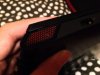
Here it is, sorrry its not quite visible on this pic but trust its bright silverish -
Someone else mentioned using a black marker to help make scratches harder to see. You can find the closest color you can, then mark it, and if it's too dark just rub it a little (with a towel or something maybe?) until it lightens up. Haven't tried it myself but simple enough I will try if I ever keep a laptop long enough to actually scratch it lol
-
Lol i was actually thinking about black car paint or black nail/matte color i will see what i can do about this... Damn this zipper, i am thinking about returning the cover or buying a larger bag, you see i am a student but the laptop with cover on barely fits my bag which might result in pushing in the zipper and scratching it, thanks for and idea to be honest, i never thought about using a marker
but my concern is -- isnt marker glossy? I am trying to make it matte and lightly black as the original :/
-
Wow, OCPD much :thumbsup:
Maybe this?
Krink - K-72 Water-Base Permanent - Matte Black - Black - Marker - image, buy
Or this, applied with a q-tip very lightly?
Black Matte Nail Polish | eBay
But THIS might be the best option of all:
http://www.amazon.com/Testors-Enamel-Paint-Marker-Black/dp/B000PY8850
Actually that last one would probably be perfect. Useful for other stuff too. I love Testors enamel markers Didn't know they had flat colors...cool...
-
Are this scores consider to be good?

-
How about all of us who have noticed this flickering brightness problem when selecting text chime in and vote at the top of the Lenovo forum thread for this problem Then maybe Lenovo will pay attention and fix it. Thanks!
-
I am really having a hard time trying to resolve this issue. So when I plug in a monitor (with speakers) I get very low volume and I am unable to use the Doly Digital Plus software to boost the sound (like you can for the internal). When I look under the playback Devices, for my internal speakers, it shows its using the Realtek High Definition Audio. However, for the monitor that I plug in, it shows Intel Display Audio. I cant seem to boost the sound anywhere. If I look under the properties, there is no enhancemen tab.
Now my question is: Is there anyway to get the Realtek Audio Drive Or the Nvidia to be used over the HDMI? Also is there any way I can boost the volume/sound with the Dolby Digital Plus software? I know the monitor can be much louder because when I plug in a older laptop, it is. Please help. -
Realtek
Go down to the driver for "ATI HDMI Audio Device". Download and install--this might work, no promises
-
Just tried it. It says no driver was supported from this package
-
Hey people,
does anybody know if I can replace the FHD screen on the Y50 with a 4K UHD screen? same connectors and all?
i heard it's possible to downgrade from 4K to FHD so i'm guessing it's possible -
It was worth a shot...shucks, I don't know...
-
Hey guys. Anyone else experiencing their spacebar getting stuck sometimes only on the left side? Getting kind of on my nerves, how easy is it to pop it off and clean it?
-
Guys, i desperately need help!
I installed the intel and nvidia most recent drivers on my lenovo y50. The thing is: When i change the settings on the nvidia control panel and set them to use the dedicated graphics, they simply go back to the standard configuration. I simply cannot change anything in the control panel and my games are using the integrated card! How can i fix this? -
I think i am not going to change it, with this driver the hissing isn't as intrusive, the sound is lower but clearer, and i do have some bass.
Then there's led for the other audio input, i didn't notice it before, as the other driver doesn't light it up. -
Since the last Nvidia driver the brightness control seems to be broken:
both the keyboard shortcuts and the settings screen brightness doesn't work.
How can I fix it, and does anyone else have the same problem? -
Huh, didn't realize that LED doesn't work with the newer driver...
-
Has anyone had problems w/ USB 2.0 hubs frequently disconnecting and reconnecting when plugged into ANY of the USB ports (2.0 or 3.0)? I have a DLink hub that always disconnects and reconnects. I've googled around and it seems the problem could be due to MS's implementation of the USB 3.0 xHCI drivers, but I can't override them w/ the Intel drivers since even when I disable driver signing and edit the Windows 7.0 INF files that come w/ the drivers, Win 8.1 still states that I "have the latest drivers". Any ideas??
Windows 8 and Intel USB 3.0 Host Controllers | Plugable -
Update: figured out the problem...had to manually select the usb 3.0 from the list of devices; then I could install...problem w/ reconnects/disconnects solved....
-
So I did the color manual adjusting that someone posted several pages back. However, what I want to know is there any way to get the Chi Mei to show accurate colors? like in some games, things are a different tine (e.g. blue is a bit purplish). If not, is it really worth getting a B156HAN01.2 ?Will I see a really big difference? Because I can get one locally here for 139.99. Also how easy/hard is it to install a new lcd?
-
Anybody able to dual boot Windows 7 and windows 8 ? Both in UEFI ??
If so, how ? -
hi. can anyone give a step by step guide on how to upgrade the sshd to ssd without reinstalling the OS as much as possible because i want to use the win8.1 license of the y50 and also i use some of the bloatware that comes with the y50. sorry for bad english.
-
Search for samsung EVO 840 in this thread. It's the most recommended SSD out there. It comes with software that has an instruction manual that tells you everything you need to do, step-by-step. Very easy.
-
Anyone else have issues manually updating their Intel 4600 video driver? I installed the latest driver for the Intel 4600 from Lenovo's downloadable drivers ( 10.18.10.3496), then decided to manually update the driver using the latest one provided by Intel ( 15.36.7.64.3960), but when I try to manually install the Intel driver it says that the Intel 4600 has the latest drivers installed.
Anyone have any suggestions? -
What up guys, I just came here to tell you my results from the sudden shut down thing, if you read my posts. Since I updated my BIOS it has not happened, not even once, not even while gaming Assassins Creed Unity for few hours. So... Success? It's been only roughly 3 or 4 weeks since then but yeah... i might just consider it as a fix
have a nice day, btw any news on the keyboard responsiveness after sleep mode thingy?
-
Hi,
I wonder if you could help me with two problems I have with my Y50-70. (I'm not English so if you could keep it simple in your questions / answers: D So I can not do effective research in this tread)
Several times a week, he shut down in one shot. Maximum 2 minutes after startup. Even if it is connected to the power supply.
Anyone know how to solve? I can not send in warranty because I bought it in the US but I live in Europe ... I also opened slightly to change the hard drive.
I have another problem. My screen always fits the window. If I am on a web page, and then I change my screen puts 1/2, 1 seconds and change colors.
Thank you very much for your help
:hi2: -
No news...someone supposedly sent in their machine for Lenovo to do tests but I haven't heard back and I think the keyboard thread was deleted... :/
-
Can someone guys post a picture how the things look like under the hood? Is there any way to use with HDD + SSD?
Lenovo Y50 Owners and Information Thread
Discussion in 'Lenovo' started by kingfirejet, Jun 5, 2014.


