Problems? See this thread at archive.org.
To get Lenovo energy manager working in win10 just install the Lenovo energy manager soft for windows 8.1
-
-
Yes I have got this too I have the i7-4710 @2.50GHz 16GB 4k (This is really not necessary to know) I have not found a solution to this yetLast edited: Oct 17, 2015
-
Is there anyway you can see each core temp in the taskbar?
-
Try to use the older driver. Before I was using the 358.90. After I used the 355.98 nvidia driver everything is normal again.
Sent from my D5803 using Tapatalk -
i also got blue screen when starting a game with 358.50 driver, and that cause my start menu and action centre to malfunction, had to reinstall windows to fix it and i had since stick with 355.98 version
-
Ok so something happened yesterday that is really worrying me. I saw some black horizontal lines that randomly flashed across the screen a couple days ago. Yesterday it was black and red lines and much more frequent then suddenly the screen turned a shade of red, then went back to normal. Then again more violent lines then red that stayed 5 minutes. Then from then on the screen was fine. Anyone ever see anything like this?
-
does anyone know how to unblock bclk on y50??????
Dose lenovo Y50 Supoort Kingstone HyperX Impact 16 GB DDR3L @ 2133 Mhz????
Can I use Liquid Ultra on cpu or gpu????Last edited: Oct 22, 2015 -
Right now i am using driver version 358.5 and i havnt had a blue screen in a while now. However, when i play borderlands 2. I would tab out, and when i go back in the game. The game and screen would lag and act out a bit, and i would get a notification that display driver has failed and has recoveredz and i would have to restart comp because it wont let me click on anything on the desktop. So far i have just been avoiding that problem by closing the game if i wanted to go out. :|
-
Yeah i also had the same problem before. That's why I changed the driver to the older one. After I changed the driver everything is normal again. No driver crash or whatsoever.
Sent from my D5803 using Tapatalk -
Add me to the list of people hating on the latest Nvidia driver, 358.50.
I upgraded and suddenly all my games would lock, crash, and then the notification would come up that the driver failed. I figured Windows had gotten all screwey so I clean re-installed Windows 10 and still the exact same problem. I'm currently working on rolling back to 355.98.
Do not use the 358.50. 355.98 is stable and perfect. -
Yeah the latest Nvida driver got some serious issues. #Rollback
Have anyone seen the new Lenovo y700? -
If i wanted to write notes on screen using some sort of stylus, has anyone ever tried this/ can suggest a regular tablet stylus vs a digitizer, or if i should just forget the whole idea.
-
Anyone notice the new BIOS 3.04? 10/22 release
Summary of changes
==================
General Information:
9ECN44WW
Add
1. Implement OKR/PBR function
Modified:
1. None
Fixed:
1. None
WTH is OKR/PBR -
My guess:
OKR - OneKey Recovery
PBR - Push Button Reset -
Ok so I have a HUGE issue I need help with. A lenovo rep promised me the screen hinge issue was no longer a problem before I bought my laptop, as my version was manufactured in june this year. So my screen started flickering with horizontal black lines, and then turned red a few weeks ago. Yesterday it fell a few inches and part of the screen popped out, but there was 0 damage and i popped it back in, w/e no problems. This morning in class it was fine. I open it now in my second class and the top right corner was tinged red like before. Then the screen goes tinged red and doesnt go back. There is a after image, even on startup, and now to cap it all off the supposed "solved" hinge problem just popped out. I am deployed/learning in the middle east and bought it in the US. i am CRAZY worried none of this will be covered by the limited warranty, especially because it fell. I have a thread on the lenovo website, that shows this has been going on a while, and the mails from the Lenovo rep promising me that all the problems were fixed. Do you think they will send me a replacement with all this evidence?
-
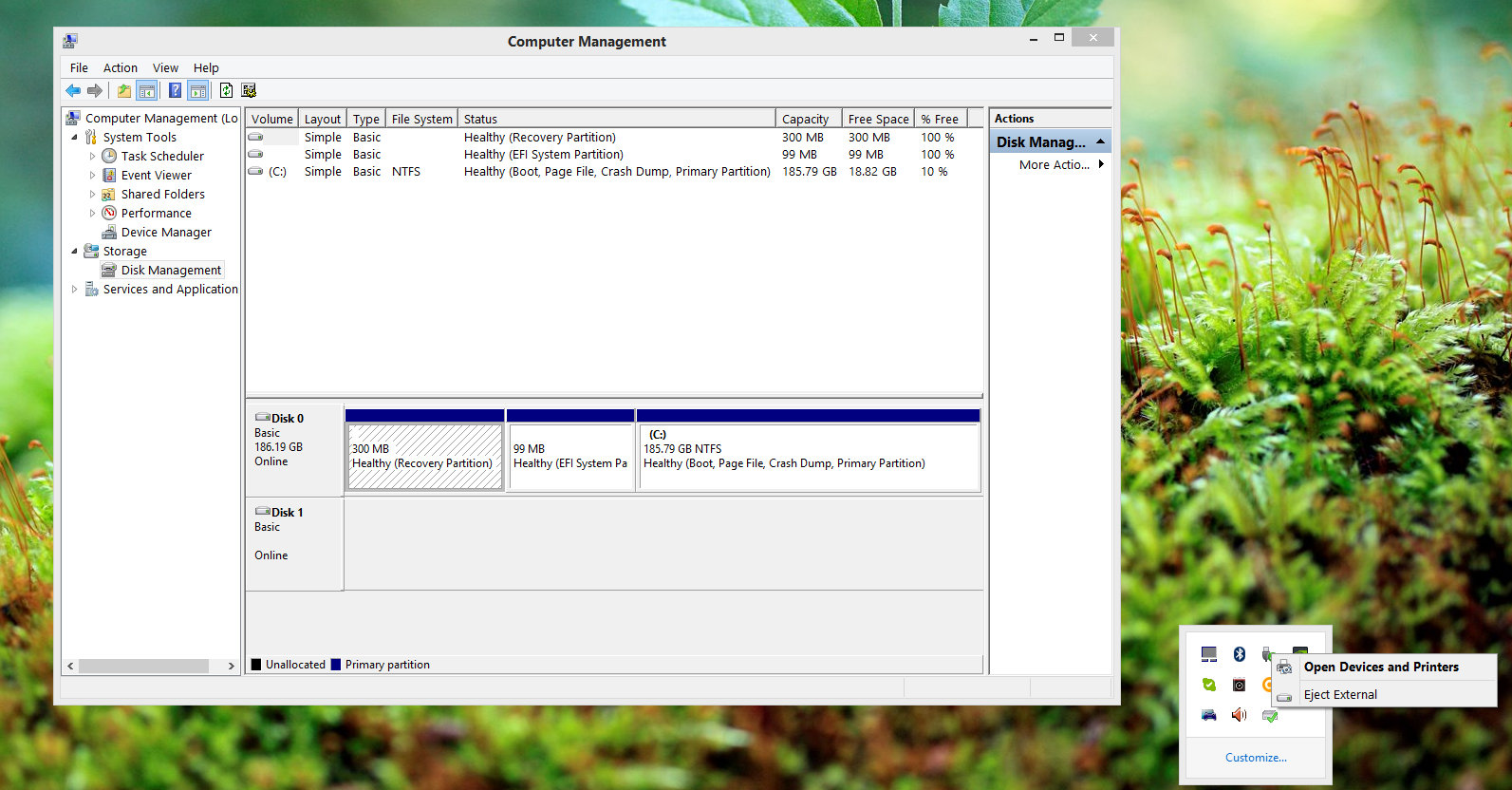
Very bad news. My stock 1TB sshd is dead. Blue screen appears and system won't boot anymore. Before this, laptop runs with some blue screens and freeze for seconds sometimes. Bios not recognize hard drive and windows 8.1 no detect this sshd when i plug with external enclosure. Laptop was all the time on desk. Now I run Win on very old 200GB hdd. And waiting when price will drop on ssd, probably on Black Friday.
-
This what I see in windows, hdd is still spinning.
Attached Files:
-
-
Still rocking 356.04, it has been stable for weeks on mine. All of the 358 drivers (incl the Oculus ver.) just crash or freeze the Y50-70 when games are open. At first I thought my Dualshock 4+input mapper were the problem, then I realized every driver from 358.xx was doing the same.
-
I got a problem. I have a y50 512 ssd model, So basicly I had 100 gb left so I decided to deleted some movies from u torrent. Deleted about 40gb, went to recycle bin and emptied it and and now hard disk is showing only 30b for free disk space??? Help
-
I was opening the back cover for a regular cleanup when I stripped one of the screws and now I'm unable to open it. Anyone got suggestions on removing the stripped screw? The screws on the laptop are awful, they strip like butter.
-
Screw extractors. I had to use one on my Y50 for the exact same reason.
I bought this one on Amazon and it did the job:
http://www.amazon.com/Moody-Tools-58-0670-Extractor-Reversible/dp/B000JCT3W0/
Once I got the screw out I replaced them with these:
http://www.laptopscrewsdirect.com/12-x-m2-x-5mm-laptop-screws-354-p.aspKeiDash likes this. -
Thanks for the links, didn't need the screw extractor since I managed to get the screw out with a bigger screw driver and some force but I'll have to order the replacement screws.
-
I know that i'm not only person having problems with these Nvidia drive updates.
The last have been absolute garbage! -
just stick with older driver~
-
Hi guys, just bought my lenovo y50 (2015) few days ago, and I've some questions.
I'm used to work with IPS screen, and I was very happy to see that lenovo used IPS screens for the lenovo y50 2015. I were disapointed since the first time I used it : the brightness is sooo low ! I saw a lot of people who changed their screens, but they had the lenovo from 2014 with the TN screen.
Any of you have the FHD lenovo 2015 and changed the screen ? Do you get a better brightness ?
I've been really disapointed with the touchpad. First, the right-click gesture with two fingers definitely does'nt work. On w7, I use a soft to be able to use that. On w8 and w10 I was able to turn it on with a regedit modification. The slidding on the touchpad is also really bad (I'm comming from a MBA so ..) If only I could change it for a glass touchpad ...
My question about the touchpad is, have you been able to change the physical right click for a left right click ? I mean for both physical buttons have a right click ? Because of the position of the touchpad, I make a lot of mistakes between left and right click.
Thanks,
Julien -
Ok, i have the Lenovo y50-70. i7410HQ 2.5ghz (to 3.5ghz) 860m 4gb, 16 gb ram, replaced stock ssd with samsung 850 pro 1tb, windows 10 (an upgrade from 8.1, i didn't do a clean installation), the normal 1080p monitor (the monitor i got on this laptop was not the initial one that was released, which was 'very poor', from the general consensus i got, it was the v2 one)
had the laptop for about 6 months now, awesome laptop, however temperatures were quite high initially.
change thermal paste with arctic silver 5, using throttlestop 8.00 at 2.6ghz (orginally wrote 2.8, was a typo sorry), undervolted with intel XTU at -83.007125mV and reduced multipliers (1,2,3,4 cores) all to 3.00 ghz. conversation battery mode, fans cleaned with lenovo settings once a week, latest bios (the october one), high performance with min processor power management plugged in at 30% and max plugged in at 90%. using cooler master ergostand iii at max fan setting. using nvidia driver version 355.98 ( i heard the october one messed up with the optimus tech; and not tried the 9/11/2015 version yet [ninth of november] ). removed the filter thing on bottom of laptop. msi afterburner OC +130 core clock mhz and +350 memory clock mhz. disable bluetooth. dolby digital plus is messed up, versions are different (i dont use it). i tried the cooling mod on this forum which removes the two 'shield' things that block the vents at the back of the laptop, wasn't successful in removing them, they were glued down way too good. nvidia control panel set phsyx configuration using 860m (of course), global settings: https://i.gyazo.com/9d8d739e6f9f061f5ff694522b1facf4.png and https://i.gyazo.com/167228c5c65369a607d9e6889f3a2f04.png with virtual reality pre rendered frames set at 1. to get adaptive v sync as an option (since i could not choose it from the drop down list before), i downloaded guru3d nvidia inspector: https://i.gyazo.com/363f4db39efefed2d56eb4ee1c606dc6.png click the screwdriver button next to driver version, then https://i.gyazo.com/0dcbdb58f7938b58f9ef6fe3b618249e.png under sync and refresh, choose force on for vsync then adaptive for v sync tear control. i am not actually sure if using adaptive v sync makes any difference, but i thought it's just cool to have the option there now.
everything is stable so far with the settings above (mainly the undervolt in cpu and OC in gpu) no bsod or game crashes.
max temps i get for CPU is up to 70°c of the heavier games (gta 5, dying light, h1z1, zombie army trilogy). anything higher and long time gaming causes the WASD keys to warm up, and this eventually erodes my skin on my index and middle finger (lol), and my threshold temps are pretty much anything below 70°c. GPU temps never hit over 65°c.
fps i get is great, of course i don't run everything in ultra, as i tend to prefer to adjust some settings myself (such as blur, shadow quality, water quality; generally anything that i don't mind being lowered and does dramatically affect fps) and i get pretty much 60+ fps in all the games i play at 1080p resolution. the one exception is h1z1, but this is still an early access game. I'm unsure if v-sync should be on, as i've heard a few things about it being on or off.
build quality was good and i never had any issue with the hinges. wifi is good but it's a shame it doesn't have 5ghz support
good luck with your setups and feel free to ask anything.
//Alex
P.S.
a majority of the settings i have above was with recommendation from this facebook page who provided very helpful feedback and info. feel free to check them out. they provide good updates for the y50-70 and gaming stuff in general
https://www.facebook.com/gamersunited.global/posts/368041386719808Last edited: Nov 16, 2015m1ko, DAXTER619, Jmunandar and 1 other person like this. -
Hello
I purchased a lenovo ideapad Y50 with nvidia 960M and win10 today. it is very glitchy, slow, and the nvidia driver crashes all the time even when the machine is idle. It does not recover and the system automatically restarts. The BSOD error is DPC_WATCHDOG_VIOLATION. Happens around every 15mins after startup
Very frustrating for the 1st day.
I am considering a clean windows 10 install. Is there a guide on how to do this?
Many Thanks -
A bad HDD might be causing this in which case OS reinstall won´t help. Since the laptop is new I´d ask for RMA.
A guide for clean W10 install here - http://forum.notebookreview.com/threads/nbr-windows-10-clean-installation-guide.781178/ronferri likes this. -
Bad HDD is not something i can prove to the computer shop while the laptop is starting up normally, except really slow. But to those blokes it is "normal". my 4 year old HP dv6 operates faster and smoother on windows 7.
Can I RMA directly to the Lenovo dealer in the country if any? or shud it be thru the shop i bought it from?
EDIT: The system is very laggy, and hiccups a lot. You know when you open an app that requires you to click yes for admin authorization? it takes a while for this question to pop up after i double click on the app, the screens turns black for like 7secs, before it proceeds to launching the program. not what im expecting for an i7-4720HQ and 16GB of RAM! I mean those same apps run much faster on my 4 year HP Dv6 i7-2630, 8GB RAM! Thoughts? -
where can i get a bios update for the lenovo Y50? the Lenovo support page is not loading...
-
Definitely sounds like a bad hardware, my bet is still on the HDD. How old is this laptop? Normally you can return it to the shop in the first 1-2-4 weeks(depends on the country). No idea if you can deal directly with Lenovo.
Latest BIOS can be found here, but I don't think it would help, besides, if the laptop is new then you probably already have the latest version.ronferri likes this. -
I bought it yesterday, it is a brand new Lenovo y50
The HDD is a 1TB WDC...i will try to make them replace it with a samsung HDD on Monday..hope they accept else im literally screwed. I waited 4 years to upgrade my old laptop and i get this?!! -
Hi, i really like the settings that you have used on XTU and Nvidia settings. Would it be possible for you to post pictures of you throttlestop settings?
-
hi buddy,
my throttlestop settings:
https://i.gyazo.com/ab7e325ecd1bed3660a4189bc6b1c4ab.png
just to note, the 67°c in the max temps on the right is using 26T (2.6ghz). I notched it up to 27T when im browsing the internet, watching youtube, but i use 26T for gaming. Also, the 2.8ghz i originally wrote in the big post was a typo, i meant 26T, apologies for the error.
i got XTU down to about -92mV, system was somewhat stable. i tried -100mV but pc crashed about 1 minute into playing H1Z1.Jmunandar likes this. -
Thanks
-
Hey, has anyone updated the nvidia driver to the 11/9/15 version 358.91. Anyone know if there's any problems with it.
-
Anyone know why Lenovo removed the latest bios from their web page ?
The bios is 3.03 with date of 23 October while 3.03 was released much earlier
And they even released 3.04 bios after this one in october and I'm using it now but it got removed from the page and replaced with the older one but with new date
Sent from my m8 using Tapatalk -
i read on the nvidia forums that the 358.91 again does not fix the optimus issues for the 860m. stick with 355.98 haham1ko likes this.
-
I was thinking of selling my Y410p which is custom painted and upgraded to get a Y50 that has a 4K screen, but I don't like the fact that you can't take the battery out. I have both, the 9 & 6 cell battery for my Y410p. That might be a deal breaker... besides, I think my current laptop will out perform the Y50 with the upgrades I have on it. The main feature I wanted is the 4K screen. My current setup is in my sig.
-
I actually have the 960m version. Or does it not matter since its pretty much just a renamed 860m
-
I've seen a video of a dude stripping the laptop down, and i saw him take out the battery, but im not sure if he put it back in or not. Dont know if this helps haha.
-
jack53 said: ↑
I was thinking of selling my Y410p which is custom painted and upgraded to get a Y50 that has a 4K screen, but I don't like the fact that you can't take the battery out. I have both, the 9 & 6 cell battery for my Y410p. That might be a deal breaker... besides, I think my current laptop will out perform the Y50 with the upgrades I have on it. The main feature I wanted is the 4K screen. My current setup is in my sig.
That is not quite what I meant. Are you going to do that on a airplane or when your battery runs down on a trip and their is no outlet?
I like it when you just have to slide a couple buttons/levers and out comes the battery and in goes the backup/extra battery.m1ko likes this. -
Oh thats what you meant, i thought you were talking about replacing the battery if you ever have to. Got it.
-
The 860/960m of the y50 dominates the 750/755m of the y410p as a GPU. Sure SLI will put up a much better fight, but the y50 still has the graphical edge. In pretty much every other regard however the y410p has it beat. I mean it has 1 hard drive bay for crying out loud, and no optical bay either haha. "Thin and light" smh.
-
It's so upsetting. I made a purchase of a Y50 manufactured on 7 September 2015, with the 960m NVIDIA GEFORCE GTX, only to learn that it still sports the very poor Chi Mei TN screen. I had thought all the new models carried the IPS screen. However, being in Singapore, I don't have many options of better configurations at this price point (I could get the Yoga 500 for the same price, but this Y50 has better specs), so I guess I'll have to live with the bad screen. Apart from boosting saturation, are there any other tips for how to make the screen a bit more tolerable? My main use for the laptop is watching/editing multimedia.
-
Hi, I stripped 2 screws on my laptop on the back case. It is the middle one and the top left one. There is absolutely no oher way of taking it out other than DRILLING it. Is it a good idea tho, to drill it? And if so, can someone get me step by step tutorial on how to drill it? I want to drill it the way so that the thread will not be damaged and can be replaced with a new screw. Thanks ahead.
BTW. i bought the 1mm drill bit which fits the screw, not the head. i also have the extra screws which I will use. I am drilling because i bought larger SSD which I MUST replace. I have also tried all the other methods such as sticking my screw driver to it with a loctite and the rubber band. The screw is pretty tight. Thank you all ahead for any kinds of suggestions and tutorials on how to drill. -
Also, does anyone know, what kind of STOCK SSD is inside lenovo? I remember someone mentioning Samsung Evo 840.
Lenovo Y50 Owners and Information Thread
Discussion in 'Lenovo' started by kingfirejet, Jun 5, 2014.