 Problems? See this thread at archive.org.
Is anyone having problems with their OSD and the hotkey functionality? After a while of hibernating and powering back on, the brightness controls no longer function. Same seems to happen randomly with the volume hotkeys. Extremely irritating and requires a restart to fix. I've also lost the entire network hotkey functionality, pushing it used to give an option of disabling the wireless and other radios, but now it doesn't function at all anymore. In an attempt to fix the issue I updated the BIOS firmware to the latest release, as well as the OSD software package. I now no longer have any OSD functionality, pushing the hotkeys will work for a while (before breaking as mentioned previously) but there is no OSD indicators at all anymore. I tried reinstalling the OSD package but no dice.
My screen also seems to be developing little bright spots in it. I wish I had sent this back for a refund but there was no other 1920x1080 14" laptops out there that could compete in terms of feature set. In retrospect I should have settled for one of the others anyway given these QC problems.
-
Mine is expected to arrive in 3 working days. Configuration: i7-4600U Processor, 8GB RAM, 256GB Solid State Drive, FHD non-touch, Nvidia GT730M Graphics, 7260AN Wireless.
Unfortunately I’ve chosen the Intel Dual Band Wireless 7260AN instead of the 7260AC. Most people here are going for the AC.
Can someone tell me which main differences exist between the two? Intel’s site doesn’t even show the 7260AN alternative and Lenovo couldn’t help either.
Since I am not in a hurry I might return this one and place another order with the AC alternative this time. -
The AC version supports 802.11ac WiFi standard. If you have a matching router, it would allow you to get speeds faster than using the "n" standard (which both of the cards support). Most people don't have "ac" routers but it's the future so it's better to be prepared since the price difference between these cards is neglegible.
-
Thank you y.a.k. For me this is an important difference. I will go through the trouble of ordering a new notebook and returning this one.
-
FYI, some people have had trouble with the AC card, particularly with N routers (including me). My AC card works everywhere I have tried it, other than at my office (which has N routers, though my home has a different N router and it works there). I was able to get it to function at work, but I had to have the WiFi card turned on for max performance in the power settings.
Sent from my RM-820_nam_att_100 using Tapatalk -
Thank you msweig. Perhaps that's why lenovo offers such hugely different wireless card speeds at basically the same price. I hope to also hear from other posters' experience with the AC card.
-
Hey.
Let's say you just want as much screen size and battery as possible. Is this laptop the best bet even considering the trackpoint problems? I just want to use it for school running around all day . Biggest appeal seems like never would need to plug in. Ever.
Are there better options for 13+ inch screen and that good of battery life + easy to swap battery?
I heard that it has wifi problems. Are those resolved?
02 - Reviewing my Lenovo Thinkpad T440s (VEDA 2014) - YouTube -
I have this problem, but not the larger problem you describe. The volume hotkeys do not work if you're looking at a youtube video in Firefox at least, haven't tried it in other browsers. You have to change the focus to the address bar or something.
The brightness thing happens very occasionally, but when it does it's a PITA. -
As far as I can tell, my AC7260 card is FINALLY working with the Lenovo drivers that were recently released, after trying every update of the Intel drivers for a long while. Judging from the threads I was in for that problem, it seems to be largely resolved, since I see no new complaints.
-
Given this device's ports, if I want to stick two full sized HDMI ports into this device, what is the easiest way? Thru docks, cables to conver stuff, etc
I see things like docks on the internet, splitters, and diplay port to HDMI and it is confusing to me what is the most elegant and cheap way to plug in two full sized hdmi into this directly or indirectly -
If I don't plan on opening the device up, what would be the most negative things I would notice about the device aside from the trackpoint/trackpad?
-
Hi,
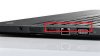
I am an owner of T440s since yesterday. When plugging in an ethernet cable, I noticed that the upper part of the base cover, over the ethernet and vga ports, goes up (i.e. a gap between it and the baseplate is getting wider). After the cable is unplugged I can push this upper part back what makes a faint squeak. Upon further inspection I noticed that it is very easy to push this part of the upper base cover over up and make a quite large opening between it and the baseplate. Could you please confirm that it is a normal "feature" of T440s or should I contact my Lenovo dealer?
I hope it is clear what I wrote above ;-). Actually, a photo below shows what part of the upper base cover can be easily pushed up:
-
there is no such opening on mine; the top is firmly attached so far as I can tell
-
Did you remove the base cover yet? Looks like a broken hatch to me.
-
Yes, base cover was removed, but it did not seem there was any broken hatch. Actually, according to some videos on Internet there is no hatch in that particular place. Here are real photos of this possibility to push the upper part of the case. In all other places it is not possible to do something like that. First photo shows a gap between base cover and the upper one. The other one shows no gap - to remove the gap I simply pushed the upper part of the case back.


-
As a T440 non-S owner, I can say that I do not have this gap. On a semi-rugged ultrabook, that sounds like it could become fairly serious... I'd send it in if you can.
-
Got mine Wednesday - the HUS code I think, so i7, 8GB, 256GB SSD, FHD non-touch.
Prefer Windows 8, did the upgrade with the supplied DVDs...took a long time, fresh install seems like it would have been a lot faster.
Looks like I got the LG screen. Like how it looks once Windows display scaling was turned off (I like small font). The funny thing, is the bezel around the screen feels "lumpy" when sliding your finger across it, at the bottom and right edges, but not the top or left..not sure what that's about.
Replaced the 4GB RAM stick with an 8GB one, for 12 total. Removing the bottom cover was way too difficult!
For the past 6 months I've been using a T420 at work (which is acceptable once it got an SSD and enough RAM)...updating its internals was so much easier. Overall the T420 seems a bit better built also.
Hadn't used a Lenovo before that, so the past few months was my first introduction to Trackpoint. I like it on the T420, with the dedicated buttons, here...not at all.
It's been said a million times, but clicking the whole touchpad is awful.
My suggestion to anyone not set on Trackpoint - just forget that little red nub is there, and use the Touchpad by itself. If the Trackpoint is a must-have, stick with a [2,4,5]30 and wait for the [2,4,5]50's to come out, which hopefully return some dedicated buttons up there for the Trackpoint users.
I've never really used a Touchpad before so there is a learning curve I'm going through...slowly getting the hang of it, but haven't tried doing anything too tricky yet (like right-click drags) - hopefully will be able to figure it out when the time comes.
This keyboard is Great! I'm sort of a keyboard snob on desktops, using only mechanicals with MX Reds or Browns - while this isn't that good, it's the best I've ever used on a laptop.
Do the BIOS trick to swap the Fn and Ctrl button locations, well worth it!
Used it for about 6 hours last night, got it down to about 10% left - that was with a full install of MS Office, lots of new-OS patches, and a few other heavy apps. Bought this over the competition (HP Elitebook) because of the battery life - so far very pleased, and that's with the smaller 3-cell external. -
Mine does the exact same thing. I wouldn't worry about it.
-
hi all, i received my t440s one day ago, a huge disappointment, in addition to the noticeable gap between the base and its cover on the right side, the screen was left with liquid stains and slight scratches, looked like it's been used and wiped afterwards, although it was sealed and was advertised brand new! such awful experience!! have you experienced similarly?
-
Throwing a feeler out there, PM me if there is interest and I'll post in the buy/sell forum.
I bought a Surface Pro 2, so my T440s doesn't get much love at all. Thinking of parting with it. Don't want this to read as an ad, but it here are the top line details:
i7, AUO touch, FHD, 12gigs RAM, 256 factory SSD, AC wifi, 3-cell. Panel is perfect, no pixel issues. It's in mint condition. Has 2.8 yrs left on the depot warranty.
I just don't use it enough to justify keeping it around. Let me know if you have any interest and if so, I'll take the time to write up a post with pics.
It works perfectly with none of the many issues people seem to be posting here. I just prefer the SP2 for travel since I am already lugging a work issued X230t. -
Hello there
I have one question and i really need answer from anybody that maybe did this,doesn't matter what Thinkpad it was ,t430 ,x240 ,t440 or any other.
What i am interested is ,did somebody ever compare 3G(wcdma ,hspa ,hsdpa) signal of notebook(wwan) with smartphones 3g signal?Which one has better reception.
I putt Option GTM671 in my 900x3c and i tried about 15-20 antennas but non of them can do what iphone5 antenna can do.Iphone 5 constantly keeping better signal end even better speed.
Samsung 900x3c is completely from aluminum ,only part from plastic is between hings where antenna is ,so putting antenna in screen is impossible+there would be no effect.
Knowing that Thinkpad have wwan antenna in screen does that giving them better signal then smartphones? -
hotsauce
It would be a pleasure to take a look at the photos :thumbsup: -
Dammit, i was going to order today and the (small) sale is over.
-
Hi guys,
I need a help with the LG screen issue (sorry for binging this up for the billionth time )
)
Could owners of the t440s with LG screens (and everyone else) share their thoughts on whether I should go for FHD or stick to HD+ (1600 x 900)?Is it worth paying extra $120?
How bad is LG spot light effect and overall quality for everyday office work, internet browsing and occasional movie?
Cheers -
I tried the following and so far it seems to have improved things a lot. I have not noticed the hotkeys failing to work anymore after powering up from hibernation. Hopefully the problems are fixed.
I uninstalled the power management driver, the power manager utility, and the OSD package and then restarted win7. After that I downloaded the latest available of these three drivers/utilities from the lenovo site and installed the driver first, then the power manager utility, and finally, the OSD, restarting each time. Finally, my hotkeys all work again (including the wireless button), and there is no longer an issue with the osd and hotkey functionality ceasing to function after a random number of powerups from hibernation. In addition, this seems to have also fixed the volume control hotkey focus issue that happened when playing youtube videos in firefox (before, I had to click the webpage outside the video for the volume hotkeys to resume working, and now they seem to work fine without requiring that step any more).
Does anyone know how you get the statistics/figures on your battery capacity degradation? I tried the "reset battery gauge" thing and it doesn't at all do what it says. -
The FHD Touch T440S I just received has this display:
Mfg P/N: SD10A47275
FRU P/N: 00HM075
Description: Sting FRU Touch LCD ASM Victory
It has heavy lightbleed from bottom of screen, visible during boot process.
Who make this panel? What are my options? I have onsite warranty/service -
All Touchscreen used in the T440s until now are from AUO, so I guess yours is too.
THat light-bleed is normal for the AUO display. As you say, it is visible during boot, but in Windows not really. -
My T440s post was deleted. You can find it in the marketplace.
-
If anyone wants some battery life numbers, I have some numbers. For both tests I used Google Chrome refreshing Overclock.net - An Overclocking Community every 15 seconds. Both tests had display brightness at 40%, Wi-Fi of course on, bluetooth off. Both times the units were fully charged and then I let the test run until the computer was at 5% battery.
I have the 3+3 cell battery combination.
Ubuntu 14.04 64-bit: 7 Hours 44 Minutes
Windows 8.1 64-bit: 5 Hours 30 Minutes
That extra 2 hours has been a life saver for me. I no longer need to carry my charger on campus. Pretty happy I switched to Ubuntu from Windows (I would have had to next year anyway since I am studying Computer Science & Engineering). Driver support is far superior, the OS is much more fluid and normal feeling than Windows 8.1, and I no longer need to use 3rd party apps to get work done. SSH and all that stuff is already on the OS so I don't need to use PuTTY and whatnot.
Pretty awesome that I didn't need to install a single driver in Ubuntu as well. Touchpad, SD card reader, graphics, and everything else work flawlessly as soon as I install the OS. Even detected my printer and installed the drivers automatically. -
This has been a huge win for me as well. I'm using manjaro and I find it hard to believe how much better it runs compared to win 8.1 on the same machine. Super stable, everything works, no unexplained issues, excellent battery life etc. I've never had a linux machine as good as the T440s.
-
I agree. Every negative thing about the T440s for me has been due to Windows 8.1. I'm fairly new to Linux, since I am a new Computer Science and Engineering major and we are using it for ssh purposes in my C programming class. Got into ubuntu and I love it. Seriously simplifies everything. And there are packages and alternatives for literally everything. I am EXTREMELY impressed. When I go back to college after this weekend I am installing Ubuntu on my desktop as well.
Give Linux a try on the T440s people, it is phenomenal how nice it makes the machine run. No more driver issues! -
Does anyone have any experience running 7 on this machine, and perhaps comparisons to 8.1 on it? (I'm not talking about the usual UI stuff.)
-
Interesting performance. Out of curiosity: are you using any energy optimisation tool like "laptop mode tools" or the likes?
-
We deploy these at work with Win7. They run. We flatten and reimage them without the bloatware. Nobody has complained about the OS functionality, just the goofy trackpad. The trackpad doesn't run well with the stock 'pointing device' Win7 driver, the Synaptics driver is an absolute must.
I haven't tried Win8.1 on these yet, but the T540p has given me zero issues (aside from HiDPI). I wasn't aware the T440s had problems. I'll need to see if we have any more T440s' available at work and check it out. -
FWIW: At least when I tried it, the stock win7 driver didn't seem to run well on most recent touchpads (although I've seen older HP ones, say 2006-2011 - before the Probook 6460b's, that are fine). The pointer curve on my x120e is really off with the stock win7 with the touchpad, and the trackpoint doesn't work very well either. Do you guys usually deploy the same base image across lots of different models? (The school district I'm in does that - drives me nuts because you really need palm rejection on 6460b and 6470b's, and the generic driver lacks that.)
What kind of battery life are you guys getting on these under 7?
As for issues, I recall reading that the touchpad and 7260AC drivers had issues before (seems most people are running 8.1 - likely not an 8.1 specific issue though), but that's been ironed out. Just wondering if there are any quirks in 7 but not 8.1, though it wounds like there aren't. -
Well, 5 days later it seems that updating to the latest driver and software packages have in fact NOT fixed the extremely annoying issues with the hotkeys. I just had to reset the machine due to the brightness controls once again ceasing to function in windows 7 after a hibernation startup. Once this happens, there is absolutely zero way to recover the brightness functionality other than a hard shutdown and restart. That's completely unacceptable. The problems with the volume control not working when watching youtube videos also remains. It doesn't happen as often as it did before but it still does happen. The wireless hotkey still works and has had no issues.. for now.
I wish I could dump this thing but there's nothing else on the market with 1920x1080, two batteries, and as low weight. It's pretty sad when my compaq nx7010 laptop from 2005 was more stable and reliable. It NEVER had issues with the hotkey buttons breaking, they always worked. It's basic common design sense, just have dedicated hardware buttons for this stuff instead of this buggy software/shared function key nonsense. -
My T440s shipped today. Did it really take any of you 7 days to receive? Seems ridiculous.
-
For what it's worth, I've had brightness controls glitch in win7 on my x120e a few times. F keys don't work, and Windows Mobility Center shows nothing about brightness. Simply opening and closing the lid (with that set to do nothing) works for me every time.
-
Seven days to ship from China, pass through customs in Kentucky, and then get to your home? That's in line with the three Thinkpads I've ordered. Not bad at all.
-
ah.. china. -
Ordered one this morning, and the site says estimated ship date 2014/6/9. (Currently released to manufacturing) Does this seem a bit long to any of you? (They claim 5-7 business days.)
-
What's a good way to clean these grease stains in the trackpad? A humid microfiber cloth doesn't do the job, It's getting damn ugly...
-
Windex works for me. -
(Most) Windex contains ammonia, and ammonia corrodes electronics, which is not something you want on your expensive new computer. Use something specifically made to clean electronics.
-
I use isopropyl alcohol mixed with water to clean the keyboard and touchpad. Does a pretty good job. As orev mentioned, I would avoid ammonia-based cleaners. They may also damage coatings in addition to electronics.
4minuteslate likes this. -
hi is there anyway to check specs after purchase made @ lenovo outlet? my part number is PN######-20AQCTR1WW. I just don't want them to give me a different specs laptop with mine just ordered.
-
Welp, guess i'm finally joining you guys in the owner group
I got a Core I5 4300, FHD, 500GB/16GB Cache, AC, 3+3wHr.
I'm eagerly waiting to see if I got a LG screen or AUO as the parts lookup page doesn't show anything for the screen (oddly enough). Should get it tomorrow!
-
Thanks everyone,
I used a mix of water + isopropyl alcohol and now it looks brand new
-
Would high end configurations on the t440s allow it to run League at 60 fps on low at 1080p? I'm thinking of getting one for college, but I want to be able to play League as well. Also is the display without touch matte? I heard the display was semi-glossy but I wasn't sure if it was just multitouch.
-
Intel hd 3000 built in my i7 2720qm can run lol at 30ish fps at low settings seing how hd 4600 has triple the performance i dont see why not.
Sent from my C1905 using Tapatalk
T440s Owner´s Thread
Discussion in 'Lenovo' started by ibmthink, Oct 18, 2013.


