 Problems? See this thread at archive.org.
I think he was saying how very hard it is to upgrade the T440s because you are only allowed to remove 1 RAM instead of 2.
This makes the T440s impossible to upgrade. /s
He also doesn't like the clickpad because he used it before and knows he definitely doesn't like it. /s again.
-
I'm fairly certain that both WLAN and WWAN cards are still whitelisted, though, making their upgradeability limited...
-
You are both wrong. Lenovo lists only the external battery and trackpoint cap as self service CRU meaning those are the only APPROVED end user customizations. HP APPROVES end user modification of WAN, WWAN, SSD/HDD, battery, RAM, and I think there is also a slot for m.2 SSD also.
I don't hate Lenovo, in fact I loved there older designs. x230t is a great design. The t410 that are available for use at my school are great. But the recent changes are terrible and remove most of what makes them enterprise grade and "ThinkPads". Like I said, I was looking at the t440s until something MUCH better got announced.
I don't need to have used the t440s trackpad to know I do not like single button trackpads. I like to have physical buttons. It is a personal preference regardless of "how good" one may be. It is not that I found something that did not work correctly that Lenovo could have fixed on theirs. It is a personal preference in design. Just like I prefer non-chiclet keys like the old ThinkPads, but alas nobody makes new computers with them so that is something I had to sacrifice. -
Will it be possible to boot from a M.2 SSD? Intel has a few M.2 ssd's. This would save around .15lb weight.
-
The UK prices are usually just swapping the dollar and pound signs right? Which sucks for UK residents, but this gives us an idea of how much the T440p costs (about $980+). The T440p is also the real successor to the T430 I believe, while the T440s and T440 both serve to replace T430s/T431s.
-
If the T440s starts at $1149 then I'd expect the T440p to start at a similar price (before discounts). The regular T440 is now the el-cheapo model

However, I also have a horrible feeling that Lenovo is gonna gouge us on T440p "upgrades" like FHD screens, GPU and faster CPUs. If the HP offerings were not so expensive I'd already have made up my mind. -
The days when you could replace almost everything other than battery with 3rd party products on TPs are long gone. Accept it and move on.
-
The manual displayed instruction for replacing the WLAN card. It is using M.2 so you would need to buy one that is M.2. I bought a L440 for my brother and I also got bought a M.2 WLAN (Intel 7260 AC) so I will find out if it is possible to switch out WLAN card but I don't have a reason to believe it won't. Intel is providing the drivers and Lenovo is already using a Intel 7260 N card inside the ThinkPad.
-
So the MECHANICAL clickpad is NOT a PHYSICAL button?
Also, can you explain why you prefer non-Chiclet keyboards? I would understand more if you prefer mechanical keyboard (I use a CM QuickFire TK) but what does a non-Chiclet keyboard offer beside best in class dust and crumb collection? -
The other parts are optional service CRUs, they are also approved to be replaceable for customers, but more difficult than the Self Service CRUs (well, you have to unscrew some things => Terrible difficult, isn´t it?)
Your wrong, the new design is much better chassis-wise and easier to maintain than the old design. Try to clean the fan of a T410 or a X230t, you will have to take apart nearly the hole Notebook. With the T440s, you just unscrew the bottom and you can access the fan.
Besides, calling the X230 Tablet, which had so many flaws and design issues, a great design...
Yes, this should be possible. The 2nd M.2 slot still should have the SATA connections, since Lenovo sells them with Cache SSDs, and if you can use Cache SSDs, normal SSDs should also be possible..
Yes.
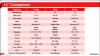
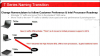
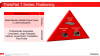
-
I'm slightly worried by the reports of T440s being incompatible with Samsung 840 PRO. Do you guys know if anything like this happened before (with any other ThinkPad + SSD drive combo)? Is it possible that some drives simply won't work because of some sort of blacklist? Or do you think it's just a firmware problem for some 840 PRO drives and it'll get resolved quickly?
I want to order the SSD before my laptop arrives and I was kind of set on buying Samsung 840PRO, but considering some people have problems, I'm not so sure anymore, even if the reports of people having problems are coming from only one Chinese forum.
And why is this compatibility matrix a little weird (no compatibility) for SSD Internal drives + T440s/p (there's only compatibility for storage adapters). Are these simply old SSD drives from other laptops that aren't compatible with T440s/p?
http://support.lenovo.com/en_US/detail.page?LegacyDocID=ACCS-GUIDE -
Huh.
What I was referring to is the fact that *all* ThinkPads over the past decade had a whitelist of WLAN/WWAN cards, and would not boot with a non-IBM/Lenovo card, unless a modded BIOS was applied...I don't see them changing this practice...so you'll need a card with a FRU # or a modded BIOS if you want to upgrade... -
So now i decide to replace my x230 with t440s. 500gb ssd. Fhd. Delivery time cca 14 days. I hope it is good decision
.
P. S. I used Old T series (4:3) then X series. x61. X220. X230. I like this notebooks very much. Mainly size and IPS display. I dont like t410s. T420s. I am looking forward for new Fhd. IPS screen and smaller dimennsions of t440s. -
Where did you order it? It doesn't even show T440 on Lenovo.com..
-
gonna get mine tmr
i7-4600U, 8GB, 500GB+24GB, FHD IPS non-touch, 730m 1GB -
Finally ordered it! I've waited for so long
-
What the heck, where did it go on sale now? Is this places it was already being sold or a new place?
Funny I posted a few days ago about how busy I was which was preventing me from being too obsessed with the release date for this laptop, but then yesterday I upgraded Ubuntu and it borked a bunch of stuff, I need a fresh start with no dedicated GPU more than ever now. -
I am saying I like to press a separate physical button below the trackpad (when using trackpad for nav) or above it (when using trackpoint). I do not want to press the trackpad itself. The physical buttons above the trackpad are different than pressing the entire trackpad because they have edges and clear differentiation between the two along with smaller button areas. I do not want to press an entire trackpad down.
I have never enjoyed the gap in space between the keys on chiclet keyboards. I type with a "glide" between keys and the chiclets have sharp edges which causes me errors.
I am looking to purchase a mechanical keyboard for my desktop since the logitech I have now is crap and I can barely type anything on it.
My mistake, I misunderstood optional CRU and that they do not void warranty. That is good that end user can upgrade these. I do not know about specific design shortcomings of those laptops, but I like the physical design from a visual and from the features I stated I like (non chiclet keyboard, buttons not just trackpad, etc). x230t is great for the convertible design. -
I also have the same concern as you in regards to the 840 Pro SSD possibly not working. I tried to upgrade the SSD on my ThinkPad X301 and it would not work. There were some workarounds but I could not get them to work. Maybe there is a whitelist?
Hopefully we'll hear more as it seems a few people have the same upgrade in mind (moving to the 840 Pro). -
Reports? I thought it was just one report from one individual in China, using one840 Pro? Have there been more more reports, on more than one 840 Pro? Is it the drive or is it user installation error? Has another 840 Pro been tried? Has another Samsung 840 series SSD drive been tried to rule out Samsung or that line of SSDs.
I don't know much about SSDs but I thought compatibility had more to do with software, size/connectivity. -
Regarding the numerous reports about the 840 not working, I can't read Chinese so I don't know for sure what is being discussed. As the Chinese thread is growing I assume it's more than one user.
In the past, Lenovo had a hard-coded white list of aftermarket upgrades that would work. Only parts directly bought from Lenovo would work. Ensured them a nice healthy profit in the upgrade department. There were some workarounds and gray market upgrades but it took quite an effort to hack the system.
Let's hope things are different this time and we can add and change parts as we please. -
Why do that to yourself? Don't assume. If you translate the page you can find out for certain. When I did a few days ago peopl were asking the user questions not also mentioning that experience. What are the chances that not only more than a few people ordered the T440s in CHina, received it, and all then out of those who ordered an Ssd, and then of those ordered the 840 pro, the more expensive model, and all are not working. Lol. Just don't do that to yourself.
Also what white list are you talking about? Didn't Thinkpads and other companies become popular because they are allowed easy user upgradability with different parts. The only accessories I heard to use caution on were the power cords and batteries. And that has changed. Relax. Let's worry about ship times instead lol. -
Might just as well be a Samsung related problem, not Lenovo.
Samsung takes the cheap route almost everywhere. So far almost everything made by Samsung that I bought broke down in one way or the other:
-Videocards with Samsung RAM died (due to RAM problem)
-Samsung Monitor had a suddenly broken DVI input (and had terribly inputlag; worst buy!!!)
-Samsung HDD with rust (on frame) under paint (never seen with other brand drives exposed to same environment)
In the past we've seen all kinds of strange incompatibility issues with Samsung harddrives, like the ones the disappeared out of RAID arrays, for example... -
I'd be curious to know what the exact roadblock on upgrading the SSD on your X301 was, but that's an issue for a different thread.
As much as I'm not keen on Lenovo's course of action lately, I don't see them implementing a HDD/SSD whitelist. They've been getting enough heat over WLAN/WWAN whitelisting as it is, and I'm certain that they remember the amount of vitriol that was spilled on IBM regarding their whitelisting (and not a complete one at that) of hard drives on just one generation of ThinkPads... -
Subject for a different thread, but just go with an Intel SSD, they're a slightly lower value for the money but have always worked more reliably on Intel-based laptops.
-
They aren't less value for money, depending on what weight you put on reliability.
-
![[IMG]](images/storyImages/uut9.jpg)
can someone confirm this? the right button is top right only? no bottom right too like what we're use to? -
I hope that the SSD issue will be clarified soon. I plan on replacing the hard drive with a 256gb SSD, preferably the Samsung Pro. Otherwise, Intel is next, but it's slightly smaller.
-
Not sure why you say to "relax" and "not worry". It wasn't even worth my time to translate the page from Chinese to English so not sure why you thought I was so concerned.
Just google ThinkPad Whitelist and you'll see hundreds of posts with people's ThinkPad's being locked down to certain hardware. That's the reason people started making custom BIOS's.
Here is a sample of the whitelist issue:
Remove whitelist check / add ID's to break hardware restrictions mod requests. -
I've upgraded my Thinkpad's SSD from 40GB to 80GB then to 120GB (all Intel) and now 240GB (SanDisk Extreme II). I don't think Lenovo has a SSD whitelist, at least on the T420 and SL400.
-
Lenovo never had a whitelist for HDD/SSD, WLAN/WWAN only.
It was in the IBM days when a "non-approved" hard drive (on R52, T43/p and X41/T only) would trigger a "2010" boot error, but the machine became fully functional after you pressed the Esc key.
lead_org likes this. -
I thought I was replying to jbordon who started his post saying "I'm slightly worried by the reports of T440s being incompatible with Samsung 840 PRO"
woops.
But then you said "As the Chinese thread is growing I assume it's more than one user." Minus the worry part. I was just wondering what the point of bringing up an 840 SSD in relation to the T440s post if as far as you know (since you haven't translated) only one person has(or had) the issue. -
Only one way to find out I guess =P Ordered the Samsung 840 PRO which will arrive in a few days, I'll let you know if there were any problems after I get my T440s. =]
ibmquality and nicolaim like this. -
hope you can return the ssd without any loss, this problem should be real now
-
just got mine, very nice
![[IMG]](images/storyImages/giUn9sk.jpg)
![[IMG]](images/storyImages/YMSqRRL.jpg)
![[IMG]](images/storyImages/HrJWuNW.jpg)
![[IMG]](images/storyImages/a1jPt0L.jpg)
but mine has no docking port though
-
Congrats! Nice pictures...
Yes. Thats because you have a T440s model with nVidia GPU, as we can see in the las picture, since there are two heatpipes. Also, there are much more venting-holes at the bottom, also there were the Dockingport should be.
T440, T440s with nVidia GPUs have no Dockingport. T440p, T540p and W540 have a DockingPort in all versions. -
Why would the problem be real now? =P
If it doesn't work I'll simply put the 840PRO in my PC and put the SSD from my PC into T440s. =] -
just try when u get it, but be careful with the data
i installed a m5pro, works great now -
Hi jbordon,
Can we ask where you're from and how you ordered your T440s? My reseller said they just spoke with Lenovo and they said the T440s would hit the retail channels mid December.
Thanks
Sent from my SAMSUNG-SGH-I747 using Tapatalk -
Just a clarification regarding the HDD whitelist in the T43 generation (the only to have such a thing). IBM added it because they wanted to use PATA drives and the chipset already moved to SATA so they added a chip to do the conversion. This meant they couldn't guarantee the compatibility with all the different PATA drives and so they added a warning during bootup that you could dismiss by pressing Esc.
-
Does the T440s with nvidia have onelink?
-
No, it does not have any Dockingport. Maybe thats the reason why it isn´t available with nVidia graphics in the USA. At the moment, only students in HK can buy those nVidia models.
-
I'll do it on a fresh drive and freshly opened T440s, so it shouldn't be a problem. I have all my work backed up in a cloud anyway.
I'm from Slovenia. I first contacted Lenovo in the start of September and they said it should be hitting the resellers in early October so I simply emailed all the resellers on Slovenian Lenovo page and asked them about the availability of T440s, most said they have no idea when it'll come, one said in the coming week and I asked him if he could notify me when the offer will be available, even if it's not on the site yet. He did so via email and I ordered it immediately. -
can someone confirm this? the right button is top right only? no bottom right too like what we're use to? -
No, thats not right:
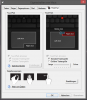
-
Can you shed some light on battery life with stock 2x3cell batteries? wifi on / web surfing usage..
I'd be so glad to know the results from an owner himself -
thanks, can you do top right AND bottom right?
-
If I want, yes. But since the TrackPad is disabled in the BIOS, I would have to reactivate it there first.
-
Is it possible to get smth like this for thinkpads? Especially T440s?
This is from ZBook 14 spec sheet.It's nice to google the methods/procedures and check all the numbers it withstands. For instance: Drop (Method 516.6 Procedure IV), 26 drops - 48-72 in height on to 2in plywood - non operating.
From lenovo t440s website, it withstandsSo I guess it doesn't withstand drop tests unlike Zbook. If this is true this Thinkpad is not that rugged really :/
Maybe sb got more info on this? -
thank you for nice photos
T440s up on Lenovo website (IPS Screen, 1080p)
Discussion in 'Lenovo' started by bdoviack, Jul 8, 2013.


