Problems? See this thread at archive.org.
That's good to know! Hopefully that happens to us both.
-
-
Same thing with the payment happened to me, what someone else said was that they just put a hold on your account to make sure you have the money/credit to pay for it, but then they don't actually charge your account until it ships.
-
Having followed this thread since page 1 back in the summer (and some people still don't have theirs yet), up until a month ago I was absolutely certain to be buying a T440s. But the closer I got to ordering it, the more I focused on the little technical details.
And then over the weekend I finally cracked and ordered a MacBook Pro (15"). The basic reason is that once I had priced everything up (and I'm not looking at a top-spec model) the rMBP was actually cheaper, as well as being technically, spec-wise, better. For example, more RAM (and running in dual-channel mode) and a PCIe drive. I realised that the T440s - as well as the future X3 which is what I was hunting for (rumours of) when I came across this forum months ago - carries a premium for its portability and ruggedness, but my situation is that I don't take my laptop to work with me; I don't walk from meeting to meeting with my laptop in hand, running on a battery for as long as it'll last. So paying for portability at the expense of technical specs seemed the wrong way to go.
I absolutely loath Apple as a company, but the conclusion I came to (and believe me when I say that I lost a lot of sleep over this, even after making the order, and even now it wouldn't take much for me to cancel it) was that it would be irrational for me to not buy the rMBP - I'd be not buying it simply because it was Apple, not for any technical reason.
I actually think that if Lenovo hadn't made some of those stylistic changes, such as removing the physical buttons and replacing it with this 'clackpad', then the ThinkPad would perhaps have been a more attractive proposition. I even gave serious thought to buying an X1 but 18 months after that was launched, and with by-now-outdated specs, it still costs more than the latest-gen rMBP.
However, I will be running Windows on it full-time. I may have bought their hardware but I don't want to be part of their eco-system.nicolaim likes this. -
What I found strange was that the hold was placed for a few days, and then taken off. I would've thought the hold would stay in place till shipment and then be charged?
-
Hi Guys - just got my t440s on the weekend... had a few days to play with it.
1) I got 2 Pro docking stations for both work and home, and man are they different to the older docks. They are SO hard to put your laptop in, every time I put new PC in the dock I think I am damaging it.... happens on both docks... anyway I hope I get used to it.
2) There is an issue with external monitors... I have the exact same set up at home and work sometimes when I put the T440s in the dock, the screen seems kind of blury.... I think it might be a windows 8.1 thing according to some research.,..
But appart from the above - THIS IS THE BEST PC I HAVE EVER OWNED... no way I am sending this back to Lenovo.. as me and my T440s have bonded... -
Sold my 15 rMBP to get a T440s the retina resolution is nice in OSX and i loved it but in Windows no professional program (IDE) worked good with DPI Scaling. All icons looked blurry and the whole menu was out of line. In OSX there is a massive scroll lag in eclipse it feels like working with a pentium III. Maybe in 5 Years when QHD resolutions are common. For me the rMBP was just an overpriced surfing and mailing machine :/
-
Hmmm... this is slight cause for concern as I regularly use Visual Studio, and the scaling was already a concern before I ordered it.
Well, all I can do is try it out on arrival and see how much I like or dislike it. In the worst case, Apple allow it to be returned within 14 days.
Anyway, let's not taint this T440s thread with rMBP posts. -
Hi guys there is a tempprary fix to this issue....just youtube: "windows 8.1 screen blurring" its not ideal - but works OK. Microsoft should get this fixed soon.
-
Maximum configuration with Full HD Matte screen.
It was super expensive (damn, Macbook Pro 15 Retina costs cheaper for the same config), but I do not really have time right now to replace HDD with SSD myself and so on.
IMHO T440s is the Best 14" windows laptop which you can get on the market right now. The price is unbelievably high, but anyway I am very satisied. -
Thanks everyone for this thread, it's been very helpful. I just pulled the trigger on this configuration - with some phone haggling, I got it down to $1260 (it was $1340 through bn gold site):
Total memory 4GB PC3-12800 4GBBS+0DIMM
Hard drive 256GB SSD SATA3 eDrive
Battery 3cell LiPolymer 23.2Wh Front
WiFi wireless LAN adapters Intel 7260 BT ACBGN
Wireless WAN accessories MBL BB upgradable, future use
AC Adapter and Power Cord 45W AC Adpt2 US (2pin)
Battery 2 3cell LiPolymer 23.2Wh Rear
Camera 720p HD Camera
Display Panel T440s 14.0FHD WWAN
Pointing device T440s FPR,dock
Preload Language W8 64 English
Preload OS Windows 8 64
Preload Type Standard Image
Processor Intel Core i5-4300U on MB
Security Chip 2 Security Chip Enabled
Selectable Warranty 1 Year Depot or Carry-in
Shipping Country USA
Software Application NONE
Storage Adapter No M.2
System Unit T440s Intel i5 vPro1 4GB
System expansion slots No Smart Card Reader
I figure I can upgrade the RAM myself for a fraction of Lenovo's cost. I was too afraid to attempt an HD to SSD upgrade myself though after reading of the complications some have encountered here. One thing that surprised me is the "no smart card reader" - I thought this was standard? Though I don't have a real need I suppose. -
Don't you have to do all the same things to get access to the RAM as you would for the SSD?
-
My issue was time and drivers. Ordered the standard SSd which came out to about $70 more than buying a Samsung ssd on my own. I don't have the time right now to worry about drivers working and any mistakes (such as ssd not working) so I got the standard ssd model. Memory will require me to undo the base but that is essentially plug and play. Plus the premium for the memory iss over $140. That is insane.
Sent from my SAMSUNG-SGH-I337 using Tapatalk -
What drivers are you talking about? You should not need any special drivers. The purpose of a standardized piece of hardware (sata in this case) is to have one driver for the interface... The only way it won't work is if it doesn't fit or/and bios would have a white list of ssd drives, which I doubt it's the case...
Besides price, another reason(for me at least) to not buy an ssd from lenovo or any other laptop maker is that who knows what kind of drive they will put there(cheap/lower quality and/or refurb?!). Unless it has a separate warranty from manufacturer. -
The time it takes to download drivers. If for some reason drivers somehow did not work for whatever random reason. If I made a dumb simple mistake. And just like the other parts (battery,memory etc) of the laptop I was not concerned about the SSD they put in there. It is from Lenovo which made my laptop so I wouldn't question. if it is a new computer then it can't have a refurbished SSD.
-
You do need to remove the cover for both, but from what I've read here once you've done that access to the SSD is more difficult, and it seems like connecting it is more difficult with the 16mb cache drives needing to be disconnected (not sure about this though?). Also at least one report here of someone being not able to reboot their machine after upgrading drives so they can only put it into sleep. If you read through these threads you'll find quite a few people reporting it's a significant headache.
-
You just end up needing to disable dpi scaling which would probably make things impossible to read on a rMBP. But maybe you can just do the 2:1 scaling and have it be perfect?
-
Meh both the SSD and RAM are pretty easy to install once you have the back off. Just getting the back off the first time is annoying, but subsequent times it becomes easier. But for me the most annoying part was cloning Windows (mostly because I spent 5 hours failing to clone the hard drive and ended up doing a clean install). Clean install is actually pretty fast and if you use the Lenovo System Update it installs all your drivers for you automatically. Still, it's definitely more hassle than having the SSD built in.
-
And now the hold is back! Well that's gotta be a good sign!
-
Anyone order last Monday or Tuesday during the Doorbuster sale. I know the estimated ship date was about a week. My order went through last Tuesday (ordered Monday after 9pm) and it said my estimated ship date is December 4th. Would that mean I get an email the morning of the 4th or the morning of the 5th? Anyone have a December 3 ship date? Funny, I am so used to Lenovo actually shipping sooner but estimating further out.
-
I ordered on Monday, 25th November and my ship date was also 4th December. Nothing has changed on the order site and I have not received any email either. Though I did receive a 10% next purchase coupon since I signed up for the email alerts thing on ther website

-
I ordered at the same time but with a different sale in my local country. My ship date is December 17... What config did you get? I ordered 4600u/12gb/512gb SSD/6 cell.
-
Is anyone else getting delayed delivery notices for T440s? I placed my order on 11/23 and they estimated a ship date of 12/3. Today I got an email saying simply that my order was delayed. When I checked the order status page it now shows a ship date of 12/13, a 10 day delay. Is anyone else having the same problem and is there any explanation for the delay?
-
I have a December 4 ship date, no email yet. It still says Dec 4 on the order status page, hope it doesn't get delayed. Ordered on 25/11.
-
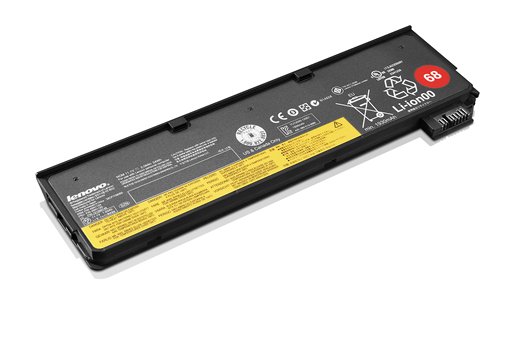
Does anyone know if the battery can be charged without being attached to the laptop?
Sent from my iPhone using Tapatalk -
You need one of these:
ThinkPad External Battery Charger - Overview -
The pin configuration on the new batteries looks the same as previous Thinkpad's. Just use a previous round tip ac adapter.
It is the pin configuration as previous models. Charger should work fine.Attached Files:
-
-
Really disappointment with Lenovo's after sales service. My order has been delayed by 12 days, will ship on 12/16 now.
This is really unreasonable, I wasn't even informed about the delay. -
I was looking into grabbing the T440s with the IPS screen during Boxing Day but I have a few questions:
1. The white spot problems that were existent on the IPS screens for the X220/X230, are they occurrent on the T440s and the X240? X220 IPS display problem - weird bright spot on th... - Lenovo Community
2. How bad in performance are the new ULV processors compared to the previous generation?
3. The difference between the T440, T440s and the T440p is that the first is the normal one, the "s" is the slim one with IPS, and the "p" has an upgradeable CPU + IPS. Is that about it?
Thank you in advance! -
My T440s has one of these white spots that is quite noticeable and a couple others that you really have to look for. Lenovo is replacing my screen. On our second one, I did not notice any of these issues, but had the first screen replaced for a row of dead pixels. The replacement screen seems fine.
-
Extremely disappointed here as well. My ship date was moved from 4th Dec to 16th Dec with an estimated arrival date of 23rd Dec. No email notification either. I would say somebody try to find the email of their senior management and complain to them. This is absolutely the worst kind of customer experience
Our Company - Canada
-
That really sucks as I was hoping the problems had been fixed. It seems to me that the IPS screens on the Thinkpads have some significant quality control issues, at least from what I've been reading. I'm happy to hear that you were able to get the screen replaced, others (from the thread I linked) were not so lucky.
I think I'm gonna end up waiting for the X240 with the FHD screens to come out. Hopefully they come out in time before Boxing Day but who knows. -
It's irritating that both mine came with issues, but given that only one of the three screens I've seen had the white marks, and Lenovo is willing to replace the one that has them, I wouldn't let it sway my opinion from this laptop. Overall the screen is very good and I'm liking my unit more and more the longer I use it.
-
I have a T440p. It also comes with an optical drive (DVD burner) and the Ultrabay that can be used to fit with another HDD or SSD. More powerful CPUs, higher capacity for RAM at 16gb max (no soldered RAM) and discrete graphics that's at least 3x faster than Intel's. Also the clickpad isn't noisy, as I've repeatedly heard report of by T440s owners. And I believe it's less expensive than the slim model.
The downside, other than being boxy looking (if you care about appearances), are it's heavier (though not "heavy" compared to average consumer laptops), no Power Bridge battery, so if running on batteries, you'll have to plug in or shut down to swap battery packs. No touchscreen option (yet).
Sent from my Galaxy Nexus using Tapatalk -
If I order it now, the estimated ship date is 12/12/13. So why did I bother ordering so early?
My estimate is 12/16. -
Lenovo's estimates are a mystery to everyone, including probably Lenovo. I ordered a T440p last month and at the time of the order the estimated ship date was Dec. 7 (about 10 days). Then when I got the confirmation email and went to check the order the following day, the estimated ship date was Dec. 16. Felt like a case of shipping bait-and-switch. I can only hope the actual ship date is closer to the original estimate and there have been plenty of reports of order status suddenly changing to "shipped" earlier than expected.
-
My ship date was moved also to a 12 days later (11/26 to 12/4). However, I am not surprised. The estimated ship date of a week after purchase I felt was to early. I ordered my first T440s November 7 and that took 14 days to ship. Wouldn't expect that as more people learned about the laptop and with the holidays that the ship date (order to door time) to be the same around 3 weeks. Tis the season. Tis life.
-
Why Lenovo Why!? I can't wait anymore. Another 20 days to get the laptop is too much.
-
Man that's weird, cause my order just changed from shipping on the 18th to shipping on the 11th
-
have you played any games on your thinkpad yet? i'm curious how the gt 730m is performing because i've heard its a weaker version of the 730m in the thinkpads. Have you played games like League of Legends, Dota2 or Starcraft2 with the native FHD resolution? When these games would work decently on at least mid settings that would be enough for me
-
Hahaha... I think Lenovo employs a person to pull random dates out of a hat
-
FWIW SC2 ran pretty poorly at low at 1080p for me, but that was with Intel. So I would say if that matters to you and you're in a place where you can get nVidia then definitely go for it. I was surprised because looking at benchmarks online even the Intel HD 4000 runs SC2 pretty well but I guess maybe benchmarks aren't run at 1080p and low usually, or they're paired with a stronger CPU. However, I have been playing a bit of Hearthstone and that works wonderfully (though it's not really graphically intense at all, but it still looks great).
I think LoL / Dota 2 are less CPU dependent than SC2 so they should work better (and then, obviously if you have the GT 730m it will be much better too). -
Hmm - I got a notice saying that my shipment was delayed, but oddly my ship date still hasn't changed - in fact, it's today! I'm hopeful that it's ready, although realistically that may be a little too optimistic.
Yes, both LoL and SC2 are fairly light games as graphics go - even the integrated HD 4400 is sufficient to play them at decent framerates. I just tested SC2 on a regular HD4400 T440s yesterday; it gets about ~40 fps on medium, and much more on low settings. The 730m should be able to handle medium without a problem. -
No, I haven't yet, but I'll load a couple of these up soon and report back. I suppose I could run on Intel graphics first, then switch over to nVidia for a good comparison. Hopefully I have time soon...
Sent from my Galaxy Nexus using Tapatalk -
Are your laptops shipping with the HM86 or QM87 chipsets?
-
QM87 (didn't realise a reply had to have at least 10 characters. Weird)
-
wow this thread just reached 300 pages!
-
I think I've pretty much decided on the T440s and was curious if anyone has determined what model the 256GB SSD ATA3 drive is? I noticed the difference in upgrading to it is only about $205 + tax. Is it a decent drive they put in there? Would it be better to just grab the Samsung 840 Pro 256GB off Amazon for $220 + tax.and do it myself, or worth it to just have Lenovo warranty it?
Also, can anyone attest to the quality of the 1920x1080 FHD IPS (NON-Touch) screen? Is it grainy at all or have that screen door effect, especially when viewing whites?
Any and all info is truly appreciated!
Thank you in advance! -
You'll get a Liteon M6S or a Samsung PM841. These are OEM versions of better know drives - Plextor M6S and Samsung 840 (Non-pro). There are reports of the T440s bricking the 840Pro. I've got a 512GB Pro sitting in its box as I'm too scared to try it until some positive reports come back. The 840 EVO is confirmed OK if you're happy with a TLC drive, which I'm not.
It's a fantastic display. The only downside is some backlight leakage on pure black backgrounds which is a minor irritation IMO. -
Thank you for easing my fears on the display. As far as the SSD goes, i think I could live with the regular 840 (seeing as Im coming from an 830 in my current laptop) I guess it only makes sense to upgrade if I want more storage, like a 512GB SSD. Not sure Im ready to pony up or have a need for that though. Do you know what other brands work that have good performance / price ratio?
T440s up on Lenovo website (IPS Screen, 1080p)
Discussion in 'Lenovo' started by bdoviack, Jul 8, 2013.