 Problems? See this thread at archive.org.
How was I complaining about the gtx860m? I didn't intentionally use the intel card to play mc either. All I did was link it to the shortcut instead of the minecraft.exe, which I realized and fixed. Your sarcasm is not appreciated as I was only trying to troubleshoot like many other ppl on this forum, thanks :hi2:
-
Can someone confirm their firestrike score on 3dMark Demo? I'm getting 3627 with the updated driver. Anyone know the best NVIDIA settings for gaming or what I can change to make it higher?
-
Moral of the story.. Go to Klick to buy, and never trust Lenovo reps for ANYTHING!
-
how is this when with the Asus G550JK-DS71? I'm down to two choices now..Y50 or the Asus? How these two brands compare build quality wise and stuff?
and can someone confirm me the specs in newegg for Y50? they say it has an intel 7260..as far as I know none of the Y50 models come with that card..and they give a external External DVD+/-RW too it seems
-
It all comes down to 2 things, Gaming and Portability
Gaming
If you plan to game both are suitable for gaming with the GTX850m and GTX860m, but with the GTX860m having a 35% overall better performance.
High End Games (BF4,AC4, Watch Dogs, Crysis, Metro 2033/Last Light) = Go for the Y50 for max performance and High to Ultra Settings 60FPS.
Mid-Low End Games (Left for Dead, Team Fortress, Call of Duty, other Steam Games, etc) = Go for the N550JK for High Settings in all those games.
Portability
This might be hard to determine, but the N550Jk is 6 pounds (2.72kg) and the Y50 is 5.7 pounds (2.58kg). I have a Lenovo Y500 and its 6ish pounds, but it isn't too much a hassle to bring. I have it in a backpack all the time though, I never carry on hand. You'll notice the weight when you hold them though.
Bonus Trait: Screen
If you're focused in Digtial Art, Design, Photography, Film, or 3D modeling, the N550JK with the IPS Panel screen will be more suitable for those tasks than the Y50's less vibrant TN panel screen, however, you could wait to July to see the Y50's 4K option being avaliable for an even better display (We still don't know if the 4k screen is IPS, TN, or PLS though).
If you like gaming in the best performance possible: Y50
If you like gaming in the best quality possible: N550Jk
My Choice:
I was in the same boat as you. I researched for a couple months now and decided for the Y50 for its performance, weight, touchscreen, and reliability. I have the older Y500 so I trust its reliability, but Asus is also a very premium brand. I plan to game very hard on it and use some for Photoshop, but I don't care much about the screen.Alias and s0ysauce45 like this. -
You were never supposed to linked it to minecraft. Javaw is your target.
You would have found the answer much earlier if you tried GOOGLING.
http://.com/?q=how+to+set+nvidia+graphics+for+minecraft -
Because nvidia GPUs throttle on battery power to save energy. If it was using intel hd graphics, you would be getting much better fps but take note your battery would run out even faster.
-
Thank you very much! that answered all the doubts I had I use it primarily for university work (Programming,Virtual Machine) and of course gaming...
I'm leaning towards Y50 now..I don't think I'll notice the screen quality difference since I haven't used an IPS screen before..4K is useless in a 15.6" imo..and I don't really want a touch screen either.
Unless Asus release their G551 which has same specs like Y50 before end of July I'm getting this
again thank you very much for your response
-
Anybody know how to raise the contrast on the Y50? Help is much appreciated
-
Right click on desktop>Intel graphic properties > Display
Sent from my iPad using Tapatalk -
Thanks, what settings did you find to look the best?
-
Take this with a bit of a grain of salt - but my rep at Lenovo says he has confirmed that the 4K display is an IPS display. He's been wrong before (not his fault, though, just the information he receives) - so this shouldn't be taken as fact at this point. But he says he is pretty sure because he sees the regular Y50's as TN on their internal specs, and the 4K's on his internal specs as IPS. He says the internal specs are more accurate than past information he's received from manufacturing contacts. *cross fingers!*
-
Use the windows colour calibrator tool.
Because all panels are not the same.
Sent from my iPad using Tapatalk -
I think I accidentally deleted the OneKey program.. So that means I can't use my Y50 in picture mode? Any way for me to recover it?
-
I think we all take info from the reps with a truck full of salt at this point xD but that is promising news at the very least. Any word on other 4k models? like the 4k touch for example.
Sent from my Nexus 5 using Tapatalk -
Use the Lenovo settings software, the option is there.
It'll be under video mode.
Sent from my iPad using Tapatalk -
I have been emailing a rep the past couple weeks and she just emailed me saying that it is an IPS display as well
-
Umm as soon as I linked it to minecraft with the nvidia gpu, it works fine as it constantly gets over 200 fps now. (must be some fluke then right?)
Whenever I use the intel hd graphics like in the beginning it only gave 30-40 fps until I switched over to the nvidia gpu so your argument is invalid.
I also don't get why you're arguing over this when I have already fixed the problem.
-
I own a base model and it's going back to Lenovo.
I waited months for this laptop to be released and finally delivered to my house.
I don't consider myself a screen expert and I do not feel like my expectations and demands for screen quality are very high.
After over a week of trying to adjust to the screen and convince myself that it wasn't that bad, I decided to return the laptop.
The screen was just unbearable to me, the colors seems completely dull and washed out, increasing the brightness only burned my eyes and made the colors look even more faded, particularly the blacks looking more white/grey. The viewing angles were also unacceptable and even reading web pages while laying in bed became a chore.
For comparison the screens I have grown accustomed too over the years are, my Samsung 22" 1680x1050 TN monitor, my Dell 23" 1080p IPS, and my 1366x768 MacBook that's about 6 years ago.
Link to Models:
Samsung: SAMSUNG 226BW Black 22" Widescreen LCD Monitor - Newegg.com
Dell: Dell S2340M Black 23" 7ms (GTG) Widescreen LED Backlight LCD Monitor 250 cd/m2 1000:1 - Newegg.com
MacBook: Cheapest base model, don't remember exact year. Maybe 2007.
The Dell blows it out of the water, the Samsung is infinitely better and even the old crappy resolution MacBook looked more pleasing to me than the Y50 display.
I will keep my options open with the 4k screen Y50 but ultimately for my next purchase I will probably go for something a bit smaller and make screen quality the biggest priority even if it means sacrificing performance.
Maybe having these mid grade monitors over the years and having owned a macbook even though it was low resolution has made my expectations higher when it comes to buying a new laptop. I don't know. You be the judge.
All I can say is I cannot recommend this laptop because of the shortcomings with the screen.
I hope this has helped people trying to make a decision.
Have a good day gents! -
so you are saying you can't stand a laptop just because of screen and you don't recommend to people because you think others will be as picky as you are?
nt bro
I hope you realize the majority of guys never used an IPS display before, and I hope you can run BF4 on ultra with your mac without a meltdown
peace -
Crap...can someone with the Y50 Touch describe the glossy screen? Looking at kingfirejet's video reviews it looks significantly nicer than the matte version but now I'd like some more opinions. Who else has a Y50 Touch right now?
-
It sounds like a big problem is the matte screen. The anti-glare matte screen makes a HUGE difference with less colors, brightness, vividness ect. All Macs, including imacs/ipads/iphones since... forever... have had GLOSSY screens. It sounds to me like people are mostly unhappy with the fact that the screen is matte.
A true comparison would use the Y50 Touch glossy screen. Does the glossy Y50 Touch screen hold up well against a glossy Dell or Macbook screen? A side by side picture with the Y50 Touch and Macbook would be helpful!BlazeHN likes this. -
I'll give more of a review in the coming days, but my initial perspective on the matte screen is this:
It's matte. Colors don't pop like they do on glossy displays--that's just how it is. Vertical viewing angles suck, but they're not the worst I have ever seen. Horizontal angles really aren't horrendous. Colors are not super vibrant, but I actually prefer this screen's colors to the TN display on my Razer Blade Pro. Also, unlike a lot of other matte displays, this matte display does not suffer horribly from the grainy, sparkly effect seen on some matte displays. (Think MSI GT60, GS70, most things from Chi Mei [except their 13.3 1080p on the w230st]...even my Blade Pro to some extent). Backlighting is obvious on the edges, especially on dark backgrounds, but I have seen a lot worse than this display.
Keep in mind, I've used Razers, cMBP, rMBP (my work pc) and numerous Sagers, but do not do any sort of professional video or photo work that would necessitate a high gamut display. My only real complaint is in the vertical viewing angles. Also, using the lenovo settings to change the video mode to Movie or Photo eliminated a lot of the washed out look. One more thing---the brightness goes very dim. I'm excited to try it out in the dark.KlickOnline, heibk201 and PsylentStorm like this. -
He is not being picky, I have a 4 year old T410 and the screen is 10x better on that then the Y50, I am currently on the phone with Lenovo and was told it was a manufacturing defect and they are replacing with higher grade screens. We shall see as most of what comes out of support is not true. Who cares about BF4 when you cannot bear to read text on this abysmal screen.
All said I am trying to find a reason to keep this laptop, as there are so many great things about it! Its like having a girlfriend with a great body and personality but her face looks like it slammed into a few parked cars.
UPDATE: Not a defect, just a terrible screen looks like the laptop is going back. -
Good Lord, now this is what scares me. Being accustomed to a 95% gamut screen for 3 years and switching over to 57%. Thanks for your input. I really have to think long and hard before pulling the trigger.
-
Since we're on the topic of screens, what do you guys think about the idea of hooking up the Lenovo Y50 to the ASUS 28" 4k UHD dIsplay? I know the Y50 is a rather nice laptop, but does it have enough power to run an external monitor like that? would the battery life suffer? Is it even possible?
By the way, I have the 16gb, 512mb SSD, 4700HQ version. If that makes a difference. -
The 1.4a hdmi output can only do 30hz at 4k. Other than that, battery life shouldn't suffer to badly.
-
Just canceled my order for the 512 GB version.
I ordered it on June 1st and the estimate shipping date is 6/24 by the customer service rep. But today it becomes 7/10.
I really don't understand why this happens because now in Lenovo Canada, the shipping estimate date is 10-12 business days, which means ppl order now should get it earlier than me! I am so disappointed and don't want to purchase any Lenovo product. -
Ranquet, (or others):
Can you look quickly to see what your monitor device ID is?
Control Panel -> Device Manager -> Displays -> Generic pnp monitor properties
Details Tab, and hardware ID...
For example, Mine reads: Monitor\CMN15C4
(Which is a lower quality Chi Mei N156HGE Monitor...also used in the Lenovo T540p, Dell M4800 and 15" Vaio T series)
I'm not surprised to see this monitor end up in the Y50...Most buyers are looking for stats (1080p) and while this display fulfills the stat, it doesn't do much else. I do have to say I've seen much worse that this display, but it is certainly not amazing. -
On the contrary, I have a matte screen on my clevo (sig) as well but its very clear, sharp and has vivid colors.
-
This is one of the best 15" displays available to be honest, and it isn't cheap...more than $100 over the N156HGE if you were to replace it. I loved it on my P150em.
-
yeah.. its just price/specs wise, Y50 is great.. It's just that screen..
Sent from my HUAWEI P6-U06 using Tapatalk -
Mine is also a CMN15C4, I want to keep this laptop though is Lenovo using other displays?
-
I haven't seen any displays used besides the ChiMei, but the AUO B156HW01 would likely be an easy replacement...I know dissatisfied users of the M4800 swapped with the AUO. If I decide to keep this machine, I will very strongly consider it for $130. The B156HW01 is a much better panel, and is the low gamut version of the display used in daryideal's Clevo...the B156HW04 is the high gamut backlit version, but I'm not sure it would fit in the lid. These are pretty much the best TN displays you can get...and there are still the hardcore folks that want TN because of response time compared to IPS.
-
Mine reads: Monitor\CMN15C4 -
I'm still awaiting my order from 05/26 to ship, but I was curious what accessories everyone has looked into.
I know being a brand new release that there aren't any made for Y50 products out there. But what I'm really interested in is a second or third AC adapter at minimum. And not a universal one. With my current laptop I have one cord for my desk, and another cord for the living room behind furniture.
Searching Lenovo's website, they weren't recognizing the Y50 as an option for accessories. Is anyone certain that an existing AC adapter they offer would be compatible with the Y50? -
Interesting, you can find those displays on Ebay for $60 are they that much better?alaskajoel likes this.
-
Thanks for the info, all evidence points to the fact that the 4K panel will be an IPS/PLS display. Lets hope they will not disappoint.
If true the only low end spec left will be the 3series Inter WiFi adapter, hopefully some top-tier configurations with the Intel 7260 chipsets are not that far behind. -
hello..
I found this deal on newegg..is it worth it? and is newegg trustworthy? I don't want 4K or touchcreen..but I'm not sure wether this is worth the money..
Lenovo Y50 (59425944) Gaming Notebook Intel Core i7 4700HQ (2.40GHz) 8GB Memory 1TB HDD 8GB SSD NVIDIA GeForce GTX 860M 2GB 15.6" Windows 8.1 64-Bit - Newegg.com -
That's the exact build I have. It comes with a dvdrw drive, which is nice. Got newegg premiere as a trial in case I decide to send it back.
-
Are you satisfied with it so far??
and does it have the intel 7260 card like it says in specs???
and how is the screen quality?
thanks in advance
-
YES. Much better. Look up reviews for Sager 15" (p150em, hm, etc). notebook check and anandtech both speak highly of those displays (at least versions 1 and 4)
For $60 I might give it a whirl myself. -
I think it's a great piece of kit to be honest. My comments on the screen have been pretty long winded the last couple pages. I don't find it completely abominable, but I'll probably try to replace it with an AUO variant if I can snag one on ebay for $60. The other thing I'm not a huge fan of is the Hard Drive. If I keep it, I'll end up replacing it with a 1tb 840 Evo or something I think.
Yes, it does have the 7260 like it says in the specs. I have been very impressed.
I'll go over it in more detail when I write a better review, but I'm also impressed with the touchpad. The y510 touchpad was very difficult for me to get used to, and ended up being a deal breaker, but this one seems much better. I very much like the texture of the pad, and while sensitivity is not up to scale with that of a macbook pro, two finger scrolling and three finger swipe for forward and back have not failed me yet....which is typically my biggest complaint with touchpads.Earlcooo likes this. -
How's WiFi transfer rate on 802.11ac and latency while gaming? Is it good enough to replace the Ethernet port for gaming?
-
The hardware manual for the Y50 lists 3 different model numbers for the 1080p screen, as can be seen in this screenshot:
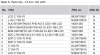
As we can see from testimony here on this thread, the Chimei is allegedly horrendous. The AUO, as I mentioned around 3000 posts ago, is apparently the same as the one in the Z510. To save you the click, here's the screen shot of what to expect from the AUO (hint: it's trashy):

However, the BOE might actually be good, because based on my own research on panelook.com and news about BOE, nearly all of their new 1080p (as of a year ago) utilize their own "Advanced Super Dimension Switch" (ADS or ASDS) technology, which allegedly produces very good viewing angles, quality.
When heibk201 said that the touch model would get BOE, Lenovo had my order. When we found that heibk201 misread his source, and that the touch wouldn't necessarily be the BOE, I cancelled my order. I'm glad I did.
Can any touch model owners check your Device Manager monitor hardware ID to confirm?
Thanks
EDIT: Don't get me wrong, the AUO VA panel on my Samsung Ativ Book 8 is amazing. The AUO cited in the Y50 hardware manual is apparently crap. The point is that if you are going to attempt a screen swap, don't just get any AUO.
Secondly, according to the hardware manual, swapping the screen on the Y50 requires you to disassemble a whole lot (heatsinks, speakers, etc), and will obliterate your warranty, on top of being incredibly annoying. -
Now here is the kicker, I wonder if Lenovo will replace with the BOE if we send our laptops in, that way we don't have to shell out $100 for a replacement https://www.usalaptopscreen.com/?se...nufacturer=Boe+Hydis&part_number=HB156FH1-401
I may call them tomorrow and ask, I will lose my system for 7 days but if I can figure a way to keep it then I am game. -
I still think the touch model all came with the boe screen. I have seen y50 with chi mei AND AUO on the nontouch models but none came with boe so far
@kingfireJet
Can you get hwinfo and check your monitor serial number? -
I have the y50 touch and here is what is says in my hardware ID : MONITOR\AUO36ED.
So whats the verdict on it? To me personally I think the screen looks beautiful, everything is very sharp and the colors don't looked washed out at all (maybe due to the gloss?).
Viewing angles seem like the matte version though. Overall really happy with my y50 touch.
Temps for those interested (after about 30 min of CS:GO max settings & playing tons of LOL max settings as well):
cpu 74C max, gpu never goes higher than low 60's.
Although its not needed, I have Cooler Master Notepal x3 and it cools my cpu down to 64-68C! gpu temps are lowered by about 3-4C. -
are you serious? you mean to tell me all these reviews didn't sway you from buying it in the first place? sigh...Sandbag likes this.
-
the verdict is located in the post right above you. The screen shown in the picture is what you have. guess its all personal opinion, but that doesn't look pretty at all to me...
Y50 Thread
Discussion in 'Lenovo' started by Jobine, Jan 4, 2014.


