 Problems? See this thread at archive.org.
It's a Windows 8 setting, my Y50 had the same issue. Can't remember offhand but it's in one of the control panels (probably display). There's an option for changing app scaling, and you want to turn that off. I have no idea why Lenovo would ship this laptop with that enabled, as it makes programs look ridiculous and I'd imagine they've already gotten tech support calls about it. I love the hardware this laptop offers (aside from the atrocious screen, but I use an external so no biggie), but Lenovo needs some serious help on the software side.
-
Hmmmm that's weird. Are there any major issues using non activated Windows?
-
Here are some comparative shots of the screen. Y50 on the left, Shark 3 on the right. This was while running FurMark.
Apologies, only had my Note 3 with me, and I'm not a professional photographer.
"Ideal" viewing angle
![[IMG]](images/storyImages/Y50_Shark3_Level.jpg)
Viewed from blow the screen (looking up/screen tilted away from you)
![[IMG]](images/storyImages/Y50_Shark3_Below.jpg)
Viewed from the right
![[IMG]](images/storyImages/Y50_Shark3_Right.jpg) Last edited by a moderator: May 6, 2015uniguard likes this.
Last edited by a moderator: May 6, 2015uniguard likes this. -
I found the settings but no matter what I change the UI is either really small or super blurry. This is really annoying since I'm trying to use photoshop which doesn't even have the blurry option and is too small to use. I really hope someone can help me with this problem...
-
thanks it gives an idea. what is the model of this version. and did you adjust the screen. or it is on default. a couple of owners warned default settings are horrible.
-
The Y50's screen is just on default. However, for some reason, mine came "adjusted". Those in this thread mentioned changing brightness to 0, contrast to 50 and gamma to somewhere between 1-1.2. Mine was already at those settings.
This is the base model (check my review - it's the same one). It's the AUO panel. -
Hey guys, I'm back (temporarily)! I've been playing around with my laptop and screen settings for a while now, and decided to share my results. I've had the laptop for over two weeks and am not seeing it through rose-tinted glasses any more. That said, I still stand by the majority of what I said in my initial review: this laptop is really good and with a few display tweaks (that I will elaborate on) and touchpad tweaks (just enabling some multi-finger gestures and maxing sensitivity), I was able to fix some flaws and make it super great.
Oh, I was also finally able to replicate the keyboard problem some of you noticed, but only on my 'X' key. Specifically, when I was playing Metroid Prime and charging my gun beam (by holding down 'X' with my key config), the shot released early just because I had moved my finger closer to the top/corner of the key - the key was still down but did not register until I shifted my finger back to the centre. I then tested every key on my laptop and the rest reacted perfectly no matter how I pressed them; since 'X' is hardly a key that is used often and it still perfectly registers for me 99% of the time or 100% of the time if I am deliberate about pressing it, this is an extremely tiny flaw. I now believe that some of you have had this sort of problem with some other keys but honestly I think the issue has been exaggerated. It really isn't that bad. That or I just got lucky; I dunno.
Now onto the display! After using the computer for a while with the default display settings, I did start noticing that the colours were a tiny bit pale. At first I just tried lowering gamma but then the display felt too dark. And increasing contrast too much destroyed detail and made everything look unnatural. Nevertheless, I was finally able to find a configuration that works really well (for me, anyways)!
In my opinion, my display looks nicest by far with the following settings:
1. Video mode (accessible through the Lenovo Settings app) set to cinema. A lot of you guys suggested photo/picture mode, but subjectively to me it makes the colours look overly saturated and really artificial. And objectively it causes massive black crush and removes details from images, making the screen not even seem like a FHD panel. Meanwhile, the normal and music modes (which seem exactly identical to me) are indeed sort of pale and bland like some people have complained. Cinema mode is right in between and hits the sweet spot, in my opinion.
2. Brightness set to the default 0. Higher or lower values looked too pale or dark to me, respectively.
3. Contrast boosted up a bit to 52 (instead of the default 50). Any higher starts causing black crush and ruins the natural look of the colours.
4. Gamma set to the default 1.0. Slightly higher values seem to boost picture detail but they also lower how much black text stands out on white backgrounds. Since I do a lot of reading and writing on my laptop (like most people, haha), it's not worth it to me. 1.0 gamma is pretty good and still shows a good amount of detail on cinema mode.
Keep in mind that I have the Y50 Touch with the AUO36 screen panel. You guys can try my display settings on the matte display and see how they look, but no promises that it will be better than previously suggested settings. Since my panel is glossy it looks vivid enough on cinema mode but maybe on the matte display photo mode is indeed best. I dunno: try it out, haha.
I fixed my Google Chrome text blurriness by going to the .exe, clicking Properties, and selecting "Disable display scaling" for it. I believe this can be done globally as well but some programs actually look better with it: Internet Explorer is particularly well optimized. Anyways, if I run into problems with different programs I can change this setting for them on an individual basis.
Oh yeah, I've read about the 48Hz cap on the 4K models and am super glad I got the Touch model instead, lol. I'm actually pretty happy about it because it means I have zero regrets, though I know that's selfish, hahaha. The 48Hz cap is just totally idiotic and almost completely ruins the point of having a graphics card like the Nvidia GTX860 in the first place. A ton of weaker computers like the Asus N500 or Dell XPS 15 or sometimes even the rMBP would be able to provide better framerates...That just sucks. Maybe Intel will release a driver update that fixes everything or maybe not. Anyways, who knows when both that will happen and Lenovo will add Touch capability to the 4K Y50s - maybe never, lol. My screen is nice enough and definitely has no problems with IPS glow, image retention, or crappy refresh rates. I can live with poor vertical viewing angles.
Finally, I can again say that the touchscreen on my laptop is awesome and really cool to use. Cooling is well designed and my laptop has never gotten hot so far, regardless of what I've thrown at it. And the design and build quality are really outstanding. As I see it, for this price point there really is no competition. The screen isn't as nice as on a rMBP or Dell XPS 15, but after the adjustments I made I really like it. Touch is cool and colours are pretty vivid. Some of the keyboard complaints are indeed legit but they only affect a few keys max and are only a small effect anyways. Overall, the keyboard is really great regardless of this; typing feels really good and the backlight and numpad are awesome. And everything else about this laptop is pretty much a pro. CheerCake, KlickOnline, Xentar712 and 3 others like this.
 -
I check the box that says let me choose the scaling level for all my displays and check 125%. Works for all 15" displays. 13" its kinda small
-
If you use the Windows 8 pro iso with a machine with a basic key, it won't automatically pick up the key. You can temporarily use any valid Pro key and then re-enter the embedded key when you activate and it will downgrade Windows back to basic. That embedded key will never work during an installation of the wrong version. If you want to have it automatically pick up the key, the version installed must match the key.
-
I've tried this. It's actually built into the Intel Graphics settings under advanced. Also if you right click on the taskbar icon, you can access it there. It doesn't work. Any resolution you choose whether it be larger or smaller will result in an error saying it is beyond the bandwith. I chose 1920x1080 @ 30Hz and it gave the error - pretty much proves Intel locked it down. They have done this with almost every laptop I have purchased, my m11x being the only exception.
Thought I'd say, I put in my RMA request yesterday. It's a REALLY nice laptop but $1700 is a bit much for a handicapped panel and I'm not chancing them "maybe" fixing it. While I'm sure I could live with it, I also take into consideration resale value since I go through laptops so frequently and I'm not sure how well the value would be if competitors all have 60Hz panels. I'd much rather have the FHD but am not willing to replace the screen myself and void all warranty. Lenovo needs to get it together, so hopefully between returns and Brian's voice, they will get the message. I'll still be lurking here to see if they ever do fix it, but not as much. I'm in no rush for a new machine so I'm probably going to readdress my options in Sept when Asus's models are coming out. If Lenovo fixes the issue and the price is still competitive, I'll certainly be rebuying it.Oranjoose, rupeshwar, XxxKing YBxxX and 3 others like this. -
Does Klick Online price match Y50 models?
-
If you live in the US, they will most likely price beat haha
-
I think you have to email Brian for a big NBR member discount price
Sent from my Nexus 5 using Tapatalk -
Ok, thanks. How would I go about emailing him?
-
When gaming, how noticeable was 48hz compared to 60hz in your opinion? Was it that debilitating, or are you strictly concerned with resell value?
-
I think its really up to the individual how much 48hz compared to 60hz effects them... 48 is definitely playable for the vast majority of games, including fps and the types of games where it will be the most noticeable. However, in such type games, you will inevitably at a disadvantage compared to users that have standard 60hz screens. Hell people play on 120hz and 144hz monitors! For me, 48 vs 60 is something I definitely would notice from time to time. Maybe not a huge difference, but enough of one where I would get annoyed from the thought that I'm getting lower than expected frame rates.
Sent from my Nexus 5 using Tapatalk -
It's incredibly small for me when I do that. Almost unusable
-
I would like to direct your attention to the Lenovo Y50 Owners and Information Thread which was created by member kingfirejet almost exactly one month ago.
This thread here has been tremendously successful as a pre-release thread for the Y50, while we were all waiting for Lenovo to deliver. As is very common with pre-release threads for popular notebook models, it received thousands of posts before many (or all) facts were known about the Y50, including much speculation and discussion. It also contains a certain level of "noise" which, too, is common for pre-release threads. The size and popularity of this thread is beyond dispute. But newcomers will have to plow through some 6,000 posts before they get to real owner's experience, which makes it less useful as a source of information.
The Owner's thread was created to "start over" with genuine owner's experience and information sharing, now that Y50s are in the hands of members. It was discussed among mods at the time whether we should simply close this pre-release thread in order to move traffic over. But we decided back then to keep it open, so as not to force over current traffic from this thread that has little to do with owner's experience (where to buy, how much discount, general chat etc). Also, closing a very busy thread would be an unseemly heavy handed action.
But now there is increasingly more owner's experience being posted here, including some great reviews, the 4K refresh rate discussion, just to mention some. Some great posts are being posted both here and in the Owner's thread -- which is actually against NBR forum rules, but is very understandable given the current overlap. Don't worry, this is not about slapping anybody for cross posting. I CAN be nice when I want to
But we would encourage you to increasingly post owner's experience and information sharing in the Owner's thread in order to avoid having two overlapping discussions, and so as to keep information density high in that thread. I favor still keeping this thread open for general chat, discussion of deals and delivery times and discounts etc. There is nothing wrong with such talk, but it doesn't belong in the Owner's thread.
When you have reviews or other insightful posts, we particularly encourage you to post them in the Owner's thread and post a link to them here. That will BOTH avoid cross posting AND continuously raise awareness of the Owner's thread.
We would expect this pre-release thread to gradually become more quiet and eventually for all (or most) traffic to go in the Owner's thread, at which point we can close this one. Such is the usual and natural way of forum threads.
Feel free to let us know if you have thoughts on this.
Thank you for listening. Now happy 4th for those of you in USA. It's party time
-
I'll post my answer in the other thread
-
Ok well since I have 8.1 pro installed right now is it possible to retrieve the original embedded key? If not do I just need to reinstall using the right iso?
-
Use wpkey. Then click on activate Windows and enter that key. You might have to check the msdm box because one of those keys will be the one you originally entered.
-
Just bought my y50 in malaysia. It comes with a is qualcomm atheros AR956x wifi network adapter.
Can someone comment about this wifi card? Should I change to ac3160 or ac7250? -
I've never even heard of that WiFi card
but its very hard to change WiFi cards because you need to find one with the specific FRU number provided in the hardware manuel. Idk how well that card performs.
Sent from my Nexus 5 using Tapatalk -
Couldn't get that work. I ended up finding the "right" iso and installing that. Everything is activated now
-
What's the "right" one?
-
Can someone more technologically fluent take a look at this article in regards to forcing a higher refresh rate through a custom resolution (referring to the 48hz problem on 4k)
https://software.intel.com/en-us/articles/custom-resolutions-on-intel-graphics
I tried reading through it but honestly I cannot for the life of me understand like half of it. The guy seems to have been able to bypass the Intel restriction though, I think
-
Hi, I'm planning to upgrade another 8gb ram. Can I know which ram is compatible? 8gb 1600hz ddr3 pc3-12800 1.35v, 204 pin or 240? Or both will work?
-
The bezels around the matte screen is very prone to scratches.... But I like the anti glare screen.
-
He's changing the inf file and/or EDID in the registry to trick the system into thinking it has a different display attached. You can override this on some systems but the Y50 doesn't have the proper override path. You can try to hack the inf like he did but I didn't want to experiment that far. If you change the EDID somehow, it would be necessary to have the info on a panel with the resolutions you want.
-
sorry. i think i read this a couple of pages ago from xentar's but i'm unsure so i have to ask, if i use an external screen, would i be able to enjoy the higher refresh rate of my external screen/monitor or do i still have to suffer that 48hz cap?
-
Really hope some official news about the 48hz on the 4k version arrives soon. I'm so done with waiting
-
I've been reading about the y50 on this thread and various other sites over the last couple weeks trying to decide whether or not to buy it, and now that it's coming time to make a final decision I thought I'd ask couple questions myself.
Although the UHD version currently has that 48hz limit, is there any chance this will be resolved? And if I'm not a FPS gamer, would the 48fps limit even really matter (for games more along the lines of The Sims)?
Also, if I decide to not go the UHD route, would it be better to just buy a touch model rather than the sub-par matte screen model? I really don't need nor care for the touchscreen capabilities, but if besides that it's simply a better quality screen than the non-touch model, I'd gladly spend the extra bucks. -
For games like the Sims I don't think it would matter much, though I haven't played it before so I'm not totally sure.
The matte and glossy FHD versions both have the EXACT same screen panels. The "advantages" of the glossy over the matte is simply the "normal" advantages of any glossy vs matte screen. Glossy will probably have somewhat more vivid colors in exchange for terrible glare and reflections. Just look up any video comparing glossy vs matte screens -
If you don't play any FPS then you might as well pay the 30$ more and get a superior screen.
-
The screens suffer from poor colour reproduction and bad viewing angles. Glossy partly solves the first problem. Nothing you can do about the viewing angles.
-
Hey guys. So the Y50 has just begun to get listed at different e-tailers here in Denmark, but Lenovo has decided to put the i5-4200H in the "base" model, which is a hyperthreaded dual-core running at 2.8 GHz stock and 3.4 GHz turbo. I was just wondering if anyone happened to have a model with those specs? I'm interested in knowing how much lower the FPS will be compared to the quad core i7 4700HQ or i7 4710HQ.
-
I doubt it. I got the base touch screen i7 Y50 for $1149.00 - 10% discount (mover's coupon) + tax from Best Buy. It comes w/ the external DVD drive also. Klick isn't even close....
-
Look at this thread for dual core vs quad core for gaming.
http://forum.notebookreview.com/sag...dual-core-vs-quad-core-gaming-benchmarks.html
From what I read not too much of a difference unless your into RTS's which are more CPU dependent.therongguy likes this. -
Seems like BF3 and BF4 can make good use of extra cores as well. Didn't expect the difference to be so dramatic though. Might have to reconsider which model I will get...
-
So I am looking to purchase a laptop for work purposes (and some gaming on the side). I currently have a HP Z800 desktop that has two (old) graphics cards and displays 5 screens (4 1200x1600 and 1 2560x144).
I have a good spending fund
I need a machine that won't be to loud for my co-workers since we work in in short cubicles.
I need a machine that has performance for VMS
I want a machine that has some sweet performance playing games
I want a nice display that I can show off to co-workers
I want a slim profile
I am considering using a usb 3.0 Dock to get 2 extra monitors
Currently in the running are these three laptops:
Lenovo Y50 4k IPS (256 SSd)
Lenovo Y50 4K (59425943) Gaming Notebook Intel Core i7 4700HQ (2.40GHz) 16GB Memory 256GB SSD NVIDIA GeForce GTX 860M 2GB 15.6" Windows 8.1 64-Bit - Newegg.com
MSI GS60 Ghost Pro-095 870M(1TB HD, 2x128 mSata SSD)
MSI GS Series GS60 Ghost Pro 3K-095 Gaming Notebook Intel Core i7 4710HQ (2.50GHz) 16GB Memory 1TB HDD 256GB SSD NVIDIA GeForce GTX 870M 3GB GDDR5 15.6" Windows 8.1 64-Bit - Newegg.com
MSI GS70 Ghost Pro-212 870M(1TB HD, 3x128 mSata SSD)
MSI GS Series GS70 Stealth Pro-212 Gaming Notebook Intel Core i7 4710HQ (2.50GHz) 16GB Memory 1TB HDD 384GB SSD NVIDIA GeForce GTX 870M 6GB GDDR5 17.3" Windows 8.1 64-Bit - Newegg.com
USB 3.0 Dock (External Monitor)
ThinkPad USB 3.0 Dock | Lenovo | (US)
What are you opinions? I am posting this on the three boards so I can figure out what everyone thinks. -
I'll just say this before the moderators do : you aren't supposed to cross-post.
Yes, I'm being "that guy".
That being said, those are three different laptops. Screen size isn't the same, GPU is different. The 870m will run pretty hot in the MSI.
You'd probably do better to post a thread in the" what notebook should I buy" forum. -
I would take a look at the Asus n550jk
It has a nice sleek and professional look. -
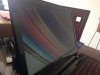
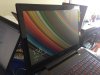
Just received and installed my AUO B156HAN01.2. I bought it here New Original LCD Screen Matte 30 Pin 034 15 6 034 B156HAN01 2 Toshiba Satelite L50A | eBay
I wanna share some images comparing the screens:
As you can see this panel is great, the colors are more vivid, the viewing angles are great, the black level is awesome.Default chimei AUO B156HAN01.2 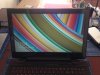
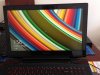
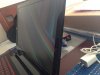
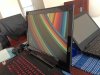
 CheerCake, KlickOnline, fragpic and 9 others like this.
 -
Wow, very nice indeed! I'm thinking someone can make some decent money doing this on the side for all Y50 owners that want a better screen installed that would rather have someone else do it for them.
-
Hey Brian, any word on the 48 hz thing from lenovo yet? This wait is driving me crazy
@test
Do you know the color gamut on that screen? It does look insanely better though -
Nope, but we're just coming off a holiday weekend so giving it some more time .. Trust me, as soon as I get any word back I'll put it here ASAP!
-
Spec sheet says 72% NTSC, so pretty good.
Y50 Thread
Discussion in 'Lenovo' started by Jobine, Jan 4, 2014.


![[IMG]](https://dl.dropboxusercontent.com/u/13051822/Y50_Shark3_Level.jpg)
![[IMG]](https://dl.dropboxusercontent.com/u/13051822/Y50_Shark3_Below.jpg)
![[IMG]](https://dl.dropboxusercontent.com/u/13051822/Y50_Shark3_Right.jpg)


