 Problems? See this thread at archive.org.
I just ordered a Y580. It has a 500GB HDD, but I would like to add a 256GB SSD to it. Is this something I can add, or do I need to replace the HDD? Would I be able to get an mSATA and just plug it in and go, or would I get a regular SSD? I am sorry, but after reading the posts I am a bit confused with what my options are.
Thanks for your help!!
-
If you want to add an SSD you can move the HDD to the ODD using a caddy and in that way you keep your HDD but lose the ODD. I suggest buying a msata ssd and in that way you keep everything. Yeah, is as simple as plug and play. Then you can install OS on that msata ssd.
Sent from my GT-S5830L using Tapatalk 2 -
Thank you so much!
-
Does anyone have issues with the keyboard? I get some pretty terrible response from the backspace key. It doesn't like being hit anywhere but dead center. I find myself hitting it harder than usual and typing with a bit more gusto...
-
So to reiterate the 2 options like soulkyo said are
1. Take out the HDD, take out the optical drive, get an ODD caddy, move the HDD to the optical drive bay and put an SSD where the HDD was.
2. Get an mSATA SSD, put it in the mSATA port using a screw (you probably have to get your own screw since the laptop and most mSATA SSD's don't come with the screw). This one is just more convenient because you don't have to take out multiple components.
You can do a clean install on either SSD no matter which option you pick. -
I am going to be ordering my Y580-209942U in the next few days. I am wanting a "thin" power supply to put in the case. I know it comes with a 120W adapter, but it appears that a 90W is sufficient. Can anyone confirm this? I currently own a iGO 90W and am hoping I don't have to repurchase.
-
And does anyone know of any extended battery options? Or do I just have to get a second battery? I was hoping to get a 9 cell so I can get 5 solid hours out of the machine during travel times.
I actually bought this laptop because I'm going to be working in Ethiopia for about six months. Testing out the battery power, I'm estimating about 3 hours which is pretty bad.
Is there any way to set the settings to either slow down (throttle?) the processor or shut of the gpu during battery saver mode? I'm hoping to get something like 5 hrs out of it for light internet use and word processing with music through headphones.
Thanks for any help! -
You can go to the NVIDIA panel and set global preferences to thh integrated GPU to save power, go to Lenovo power management or click on the battery and go to settings and set it so that it'll turn off your screen after a few minutes, etc..., and also extend battery life by making your computer stop charging after a certain percentage.
On average I can get at least 4 hours out that way. -
I'm getting about 4.5 to 5 hours in normal usage and brightness at 20 percent on the 6 cell with light usage (internet browsing, word processing, etc.). I don't think they've released a 9 cell yet that's compatible for the Y580. I switch to power saver mode in the energy management settings to help with the battery life.
Sent from my PG86100 using Tapatalk 2 -
I hope we do see a 9 cell, I would like to not have to charge the laptop for 2 days

-
yes, this lenovo kb is stiffer than any of my previous laptops.
i have to sorta pound the keys too.
it's also the first laptop i've owned with island keys, and i hate the smaller key size. my nail sometimes hits the plastic between keys. -
Every time I play 3D games, the GPU driver seems to crash and recover like every 5 minutes. Error Logs report instances of Kernel-Processor-Power (EventID 37) and instances of the nvlddmkm driver crashing and recovering.
Is this due to the temperatures? I used HWtemp and the HDD was very high at about 60 Centigrade peak, the CPU ~70-80, same with the GPU.
On my previous laptop, the GPU reached upwards of 90 Centigrade without a hiccup and that for almost 3 years before I got a cooler. The y580 crashes, sometimes even it goes so far that the system becomes completely unresponsive and I have to reset using the power button.
I have :
- installed 306.23 drivers (chose fresh install when asked by the installer)
- propped up the laptop ~1.5 inches, but it hasnt really helped temps.
What can I do to fix this? Will a cooler like the U3 prevent it if it is temperature related?
Thanks!
EDIT: It has only been acting up for about three weeks, before that it ran games fine. -
Battery life isn't earth shattering with these things, that's for sure...
...but, then again battery life isn't really the point of the Y580.
I had wanted a laptop that could easily double as class/games duty (without having obnoxious LEDs everywhere) but the battery life is severely limiting its benefit for school.
-
probably has nothing to do with temps. Your temps are like what I get.
are the crashes noticeable while playing games? i.e are you getting bsod every 5 minutes?
which games have you been playing the last 3 weeks?
are you stock?
have you tried going back to the original drivers- 295.xx ? and if you did, is the nvlddmkm.sys file version correct for the corresponding driver?
Try uninstalling the driver, and manually delete all the nv* files in the system folders/subfolders . keep them in the recycle bin.
Then install the nvidia driver.
what exactly are you doing when your system is 'completely unresponsive' ? see if there's a correlation to something.
On any computer, sometimes I will play a game that completely freezes, and I can't ctrl alt del out of it. I have to hard shutdown. I view this as normal.
One other time the computer became unresponsive while opening a file, and it turned out there was a cluster of bad sectors on the hard drive.
If nothing else seems to fix it, I would restore my pc to clean Windows install condition just to see if crashes still happen, and rule out the gpu.
you can definitely extend battery by locking the cpu to its lowest p-state, which runs the lowest voltage. It's still plenty fast.
in the advanced power options settings, change highest cpu power to 10% when using battery. -
I have to share the same sentiment, as this too is my first experience owning a laptop with island keys. I hate it when it fails to register a keystroke if I just so happen to press the edge of the key down while typing fast. I never experienced such a problem using my 6910p, HP's business line sporting a traditional keyboard.
-
I was finnaly able to get my hands on the Notepal U3 from a site which is not so mainstream. I will be testing it soon and I will report to you guys and show you the temeprature difference without the cooler and with the cooler. Stay tuned!
UPDATE:
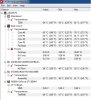
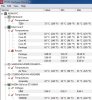
So here are the before U3 and after U3 temperatures of my Y580. The HDD SSD and graphics card are all getting cooler but the CPU is getting a little bit hotter. Im guessing maybe the air is blowing towards the CPU. None the less the CPU is still waaay out of it's max temperatures. Im very please with the U3. It took my HDD which is the thing I was worried about from 61 to 47 degrees Celsius. Very please with it!
Here are the photos:
Without U3
With U3
-
The crashes are very obvious. They happen in two ways, depending on the game. In MW3/MW2, the PC just crashes. With this I mean the picture freezes, no buttons respond, and I have to do a reset with the power key.
In Just Cause 2 and all others, the driver crashes and then recovers. What I see is a blinking screen that goes black and after ~3 secs goes back to normal gameplay. In these games the crashes happen every 2-10 mins, and start after about 10 mins of gameplay.
I've been playing Just Cause 2, MW3, MW2, Black Mesa, Fallout New Vegas.
I'm stock windows that came with the PC. Crashes happened on 295.xx and on 302.26 (or something). I can try rolling back.
I also ran chkdsk and i resulted in no errors.
I can try rolling back.
Also, Ill try what you said about the nvlddmkm.sys.
Thanks
Your "without" temps are almost exactly like mine. I'll probably buy one soon too , that temp difference is huge.
EDIT:
I was playing minecraft, and the game would sometimes freeze for a split second, although the fps was well over 100. Eventually, the game crashed and reported"
"The NVIDIA OpenGL driver lost connection with the display driver due to exceeding the Windows Time-Out limit and is unable to continue."
Perhaps this is why my games crash even though the GPU temp is fairly low?
I know there are some registry keys I can change to change or set this value higher, but could this have any bad effects? -
where did you place the fans? did you place one below the hard drive vent?
google search shows that the nvfslkdjfldsif.sys is usually due to time out. However, you need to find out if it's hardware related.
i would still clean install windows with 295.xx drivers, then stress test with furmark and games, and if it still crashes, rma it. -
No problems with unresponsive keys here. I love the keyboard except for the left side of it being a bit noisier (due to being unsupported by anything... because thats where the cpu fan is). The keys are ergonomically shaped and actually give me feedback, unlike the vast majority of laptop keyboards. HP is especially bad, as the keys dont stick up far enough or offer enough tactility, just makes for an uncomfortable typing experience. It's not last-gen Thinkpad keyboard but its still good keyboard.
-
I got mine yesterday
Full HD screen is amazing - what isn't amazing is touchpad - if Lenovo made a version with low end gpu like gf 610-620 and better touchpad they would have amazing seller in 700-800 eur range. -
610-620 would be terrible GPU's for this kind of laptop. I think one of it's selling points is it's a GTX. I'm sure in the 700-800 euro range a laptop with a crappy trackpad but GTX will outsell a lower GPU with good trackpad.
Good trackpads are better for business laptops or ultrabooks which use that kind of portability. -
Sadly you are right probably - informed buyers that care about screen, keyboard, battery life and touchpads are small minority.
-
Hello, I just bought the y580 this week, and I'm loving it so far, except for one thing: the battery life. I'm only getting about 1 hour 45 minutes out of the battery on power saving mode, at the most, 2 hours (according to the battery time-til-dead indicator) I haven't had a chance to use it those full 2 hours to see if it's accurate or not, but I'm assuming it is. I'm not doing anything too major on it, just browsing and email. Is this a sign of a bad battery? I've looked around and saw that people could watch at least a full length movie with a full battery charge and have some left over. I'm not too sure that the battery life would last through a movie. Is the battery indicator even accurate?
also: I made sure that the Nvidia settings on the gpu are set to choose for the best situation, I'm guessing it uses the GPU during graphic intensive situations and the integrated card for everything else. I'm also using power saving mode. -
Just got the first drop out of the way.
Laptop just slipped off my lap and fell right on the floor. Not a scratch and everything still seems to work.
Hopefully there isn't another haha.
Wow really?
I got 3.5 hrs with wireless off. I was using some music editing software, so that could explain that. Only did that for half an hour after that internet was off. I was just doing light word processing.
Weird. I guess I'll get a better estimate as the battery runs out and is charged a few times.
I have to try this. How much slower does it run?
At most I'll be doing pretty much anything but gaming when I'm unplugged. Maybe some light photoediting or music producing. I guess I can create a new mode where I drop it to 10 percent and use that just for browsing and typing or something.
Would you still be able to watch a movie on this setup?
Edit: Trying the 10% thing. I might bump it up to 25% depending on how things run. This is the setting for just very basic usage so lets see how things go.
Also, I just set my the intel gpu to the preferred card through the NVDIA setting. I'm adding things on a program to program basis to run on the NVDIA. Is there any way to set default gpu based on the power mangement option? I.e. I want NVDIA default when running on max power, but the intel as default when running on lowest power settings. -
I'll do that, but I need the laptop for college so I hope its not hardware related. Besides, the laptop played games fine (the same ones that crash now) for weeks.
-
Hi,
I just bought a new Y580 and it's great. I just can't seem to find the option in the Synaptics driver to auto-disable the touchpad when an external mouse is connected. When I Googled a bit, I found an old link that referred to changing a registry setting. But that didn't work.
Does anyone here know how to do it? -
I googled a bit and couldn't find anything, it looks like some synaptics drivers have this option and some do not.
You can however, press Fn+F6 to disable or re-enable the touchpad, and frankly that takes less than half a second. -
It does only take half a second but it would be even better if it just did it automatically Oh well... not the end of the world if I have to disable it manually each time.
-
Anybody upgraded to the newest Nvidia Drivers 306.23? After doing the upgrade on two Y580 and rerunning Windows Experience Index, both graphics and gaming graphics scores dropped from 7.2 to 6.8 on both machines. Reverting back to the Lenovo factory drivers brought the score back up to 7.1.
Anybody know what's up with that? -
Anyways, just wanted to say my 3rd Y580 arrived today from Amazon. 3rd time is definitely the charm because this one is flawless.
The first one had a defective trackpad, the 2nd replacement came with a defective GPU. Couldn't load any games without major artifacts on the screen, then crashing 5 minutes in.
Overall, I am loving this machine so much right now. Build quality is excellent! Screen quality is fantastic! They just need to get their QC under control. -
I wouldn't call it excellent build quality.
it still creaks everywhere. My lcd bezel crackles whenever i move the lid a little.
Also the metal area above the battery compartment squeaks when i push on it slightly.
i don't care much though, cuz i know i won't care after 2 months anyway, as long as everything is working. -
The build on mine is fine, no creaking unless I really look for it (meaning I'm moving random parts of my laptop just see if there are creaks). I think that it just depends on how yours was built and it is up to QC to see that the laptops should be a certain standard.
-
Wondering if anyone else has this issue. When the laptop has critical battery, the screens turns off but the computer, the fan and power light, is still on. It then doesn't respond to any keys or clicks until I manually restart it. This has happened a number of times and once after the black screen, I saw a BSOD before it restrated. What could the issue be?
-
one of these days, i'm gonna record a video and throw it on youtube.
I haven't had a cheap laptop in recent years whose lid didn't creak for a split second when I close it.
it's not the hinges. it's the plastic. too many parts clamped together, flexing.
might be the heat too, causing expansion contraction of the plastic. I even hear popping noise from the plastic after the laptop has been shut off.
@Shadester9
what did you set critical battery action to? If it's hibernate, then that might be broken.
I completely disabled hibernate by running powercfg /hibernate off.
hibernate eats too much space, and I don't see its benefit over regular sleep, considering you have a battery plugged in. -
Most lilkely you got a defective unit. I noticed the first Y580 they sent me had a creaking lid, trim around the LCD screen was a little loose and made noises when touching it, the trackpad felt loose and made noises when tapping on it. The case didn't feel quite solid and creaked when I held it at a corner, I found out a few of the screws at the bottom were completely loose from the factory. The 2nd unit was "almost" perfect, everything was nice and tight except the trim around the LCD also seemed a little loose and made noise when touching it, but the GPU was defective.
The third one, which I am typing on at the moment is absolutely perfect, no creaks, all trims fit perfect with no noise. I can hold it from any corner and it won't creak, not a sound. Feels rock solid actually.
If you want to talk about bad build quality, the HP DV6T Quad Edition I sent back twice was the pinnacle of crap. -
No creaking on my unit either unless I'm purposely trying to make it creak. Pretty solid unit in my opinion. accidentally dropped it on marble floor last night while moving it from my kitchen and only noticeable sign of damage is a faint scratch on the bottom left corner.
Sent from my PG86100 using Tapatalk 2 -
Ok let's face reality, this laptop has a cheap exterior. No1 in their right mind that has ever owned any other laptop can say otherwise. I love this thing but in terms of Build quality I really have to be delicate with it. I have to watch how to lay my bag flat so that the books don't actually sit on it.
And also the LCD I need to be very careful how I open and close it so that I don't squeeze the screen. Any slight squeeze I see the LCD stress marks. When I had the Samsung I actually tried to get those marks and I couldn't.
I miss the build quality I had with the Samsung, but in terms of performance this laptop trumped it!
Amazing components, but crap exterior sums it up.
In summer I will be moving on to Eurocom Laptop (possbily in winter if I get the cash)
-
I guess I don't have much experience with laptops, but the build quality seems fine to me
Either way, these laptops aren't meant to be thrown around or jumped on
I'll always be careful with my laptop. For the money I paid I feel like I got a very good laptop. I like the looks and it doesn't feel very 'plasticy'. And sure you can hear some creaking if you try to bend it a bit, but so what. As long as it does what it's supposed to do and doesn't break (provided you handle it with care, as is always wise to do with expensive electronics), all should be well
-
There's a difference between durability and quality. A laptop is a portable PC. It's meant to handle random jitters and shakes that come with transportation.
And i doubt any machine would resist a jump.
It just seems like you give the laptop credit where it doesn't deserve. It's a great laptop in performance but very nerve wrecking when transporting.
This is the difference between handling a plastic cup and glass one. Our's is a glass cup
-
I commute to and from work five days a week to downtown Chicago with the Y580 in my backpack which also happens to contain 5 pounds worth of books and papers for work. I don't use a laptop case anymore since I got sick of zipping it in and out of the case and I would say it's been able to handle the random "jitters and shakes" with ease. For the record, I did use to own a Macbook pro before I bought the unit, so quality wise, yes the Mac wins hands down, but I wouldn't call this fragile, but your mileage may vary.
Sent from my PG86100 using Tapatalk 2 -
Hi Guys, I know this is owners thread but who know better than you about this laptop, right? I've been saving my money for quite some time and I wan't to buy great laptop which will last for some time. Right now I can't decide between y580 and Asus N56VZ... The thing is that I don't like touchpad on y580, excuse me but it feels ty. Is there maybe any way to improve it? I've been reading this thread, some people have trouble with cooling, right now I have HP 4515s and it's hot as hell please tell me this is not case with y580?
-
Well, that all depends on what you intend to use that laptop for. In normal use (i.e. no gaming or cpu intensive tasks) it stays very cool and you can barely hear the fan. As soon as you start gaming the fan spins up and it gets a bit warm. I haven't done any serious gaming on this laptop yet so I'm not the best judge as to how hot it can get, but do keep in mind the physical limitations of such a small space and that laptops will inherently get hot under stress.
That said, there can be a significant difference between laptops of course A friend of mine has an HP laptop and when she's just surfing the web it gets pretty hot to the touch (not the case with the Y580).
If you plan on doing a lot of gaming, then maybe someone else here can tell you a bit more (sorry), as that's not the primary purpose of this laptop for me. However, I can tell you a lot about the screen, which is excellent. It's in my opinion better than the one on the N56VZ (except for the fact that Y580 is glossy, which can be a disadvantage in bright environments, the N56VZ is matte). The color reproduction is quite good for a laptop panel. I mean, it's definitely not a 10-bit panel, or even an 8-bit one for that matter, but that's the case with most laptops out there except for the Dell Precision and HP EliteBook lines. The panel is 6-bit and I did some color calibration yesterday using a colorimeter and it's pretty good at mimicking the sRGB color space (which is great for color related work, such as editing photographs).
The touchpad, well I've been using it for a couple of days now and it took some getting used to, but it's not that bad as many people say it is (but again, this is just my opinion). I've gotten used to it pretty quickly (but I will still always prefer a mouse to any touchpad out there as I think in general that a touchpad is not the most ergonomic way for moving a cursor around the screen). The touchpad only gets a bit finnicky if you have moist/sweaty fingers, because then it won't glide as smoothly (the surface should have been slightly more rough to allow proper gliding). So in short, there are better touchpads out there, but in my opinion it really isn't as bad as people make it sound.
Just my 2 cents... hope it helps.
-
Thank you for your time and effort I really appreciate your answer. When and if I buy this laptop I'll write a few sentence how I see it
-
You should check out the heat thread if you're worried about cooling. Most people say it's a non issue and when I play Skyrim my GPU has only hit around 65 degrees celcius.
-
@Blade91
It gets a bit hot but nothing to worry about internaly OTHER than the HDD. The CPU GPU and SSD (if u buy one with it) never get too hot. The only worrying thing is the HDD and u can check a few pages back my temperatures without gaming and with gaming (Counter strike global offensive). I suggest you buy a cooler for gaming and use it when gaming. The Cooler Master NotePal U3 is really great. My HDD is not atleast 5 degrees cooler than its max. Which is about 10 degrees less than what i was getting without the cooler.
Also the left side of the keyboard when the heatsink is gets a little bit WARM to the touch. -
I mean. I dropped mine off my lap and on the floor and I'm still using it. Wooden floor too.
That said, while using mine on the train, the screen was wobbling. Anyone have any solution or fixes to this? It worked better in some angles, but on most of those angles, I couldn't see the screen
I had the n56vz. I returned that before I bought this. I like the design and build of that machine way more than i liked this one but the asus has issues with thermals. I was recording 98C on the cpu when playing Half Life 2. No bueno...
This one runs way cooler. Sure, the palmrest can get a little warm at times, but it's never anywhere near that hot on the inside, so I suppose it's cooler on the outside as well.
Honestly, there are a few things I'd change on this machine (i.e. better screen attachment so it doesn't flex) but the heat dissipation is pretty durn good.
That said, if the Asus didn't have the heating issue (some reviews mention this as well), I wouldn't have ever bought this machine. Perhaps there's a difference between models of the n56vz, but I'm not sure. I've also heard of people who had no issues with the heating so... It baffles me how terrible the qc on these laptops is.... -
I have never seen a laptop this big whose screen did not wobble.
Even in those expensive ultrabooks, the screen wobbles when you push on it. Intel put out a video recently, introducing their touchscreen windows8 ultrabooks, and they wobble like crazy when you use the touch. -
Thank you all! I have one more question, if HDD gets too hot what can happen? Do you get shutdowns or performance lack?
-
The only complain I have is the seagate momentus is so slow. Saving a 250mb powerpoint file takes longer here than my old dv6 sandy. But I can replace it with a WD Scorpio next time.
-
In case of GPU drivers i suggest using the old saying - don't fix what isn't broken - in other words don't mess with them unless one of games gives you problems
So far it served me well in my 18+ years of pc gaming
Y580 Owners Thread
Discussion in 'Lenovo' started by Syed117, Jun 21, 2012.


