Problems? See this thread at archive.org.
PS - this little snippet confirms you are right, and I and Beth are wrong... Glad you did the chat.
Lenovo IdeaPad Y580 Best Coupon & Prices found at Dealzon.com
-
Yeah me too me too

-
So my order's status was updated to "In Production" which moved the estimated ship date further back 2 days. Now it also shows a estimate delivery date of November 1. Did anyone else have to wait a month for their Y580 when purchasing from the site? Or am I just one of the unlucky few?
-
My 40992NU was "in production" for 2 days. I ordered it 10/4, it shipped 10/8. I received it from North Carolina today.
-
how long was your estimated shipping time when you first ordered?
-
First impression - the screen is very nice. I prefer it in movie mode. Man the FHD screen really makes it pop. It is a little bit more widescreen looking then the apple which I was afraid of, but oh well. I haven't tested out the sound with some real tunes but I will soon.
The trackpad complaints are valid, but not a big deal. It does feel cheap especially when compared to Apple (I got used to the two finger right click quite quickly).
Wifi synced up with my network no problem. Now to move my files from my desktop and retire it before it dies completely!
PS - the website says DVD/Bluray Combo under ODD, but I DEFINITELY have a DVD/RW and Bluray combo FWIW -
The first date they gave me was 10/13 which was odd seeing as how it was a Saturday.
-
Ah well mayhaps it's a model thing? Or that when I got my Y580, it was $480 off regular price. So possibly a surge of sales in that specific model could contribute to the massive delay. Ah well, nothing more to do than wait it out!
-
To those asking if this has a blue ray drive, it does not. Those are RAMBO drives.
DVR-RW/BDROM means it burns dvds and plays blue ray discs. Sometimes manufacturers throw in spare parts to get a build out, but this isn't the same as say swapping ram brands.
I've had this laptop about a month now and I really like it. It does what it needs to and with the power saver profile set to 10% cpu, I can get 5-6 hrs of web browsing/document writing, which is good for my needs.
If I had to do it all over again, I would have considered the y480 as it's cheaper, lighter, and probably gives an hour more battery life. However, it does come with the lower res display (not an issue at 14 inch) and the lower 650M card (also not really an issue).
I do think that the unit will probably have a little more heat as the parts are more 'smushed' but the switch of the GPU was probably done to reduce power draw and heat.
All in all, the only issues I have is with creaking and such due to build quality, but it's not a big deal.
I think that the keyboard and trackpad 'break in' a little bit after a few weeks use. I rarely even notice keys misfiring now and i used to have a lot more issues with it.
I'm happy with the purchase. I think that this machine will last me a good 3-4 years. If anything, I'll dock it and get an ultrabook when I head to grad school. It should be more than fine in that setting.
There's going to be no big difference in performance between the 3610 and 3630. Intel just does it to move units. The chips are the same with a 100mhz clock speed difference. It would be a big deal if it was a single or dual core on a phone or if it was something on the GPU, but with a processor that's already as powerful as this, there's honestly going to be no noticeable performance difference.
The difference will come with the next generation when the processors are *slightly* more powerful but will draw less power, which is awesome. The biggest improvement will be to the iGPU which will be comparable to a mid level laptop gpu. This will translate to less use for the dedicated GPU and better battery life
Next years laptops will be pretty epic. -
Even after sending my laptop back and them replacing the mobo, BF3 still crashed, with even log reading "Display driver nvlddmkm stopped responding and has successfully recovered." I told them they should replace the GPU, after all the GPU and the mobo are still seperate on laptops (I think?). They probably reattatched the old gtx660m and simply put in a new mobo. I'm still on the 306.23 drivers, so Ill try upgrading again. Overheating is not the issue as I played the game for like 2 minutes before the crash, and the fan did not even spin up to full RPM.
Ill have to see if the issue is limited to BF3 or if it is all of the games again.
Wish me luck! -
i think i told you already, the gpu and mobo are not separate. the gpu is soldered to the mobo. it's not something you can just 'reattach'.
that's why they replace your whole mobo rather than trying to re-solder the gpu.
for testing, you need to go back to a fully clean Windows install, stock 295 drivers, with nothing else running in the background, no garbage software, no extra gpu monitoring apps or anything.
Also update to latest directX, and set power options to Lenovo Dynamic graphics.
I don't buy that you can get two bad mobos in a row, so i'm convinced it's a software problem. -
With BF3, it isn't a computer issue it was an Nvidia driver issue which was rectified with a new driver that just came out today. So yea, it wasn't Lenovo's fault or even a faulty GPU it was the drivers. -
Quite a lot of poeple had the same issue with crashing BF3, but this was fixed with yesterdays drivers update. I managed to play for more than 5 hours without a crash!
-
There was wrong information posted below saying that Y580 can not be shipped with a BlueRay-burner in general by Lenovoa: This is wrong!
At least in Germany the Y580 can be ordered as a configuration called FGE for 1.099 . The data sheets of the main shops like amazon.de, cyberport.de, notebooksguenstiger.de do sell this machine with those features:
- I7 3610
- 8 Gig Ram
- 32 GB Msata SSD
- GTX 660
- 1 TB HDD
- BlueRay Burner (!!!)
I can confirm this as I bought one as well but must admit that I never burned a Blueray (as I do not have one).
-
Billy,
It still is not clear if it is a blu-ray burner, only says it is a dvd burner
Anyway my order is place for the 45U, so no more fretting.
Is there some sort of checklist to run to see if there are any glaring problems? The reason I ask is that my friend would be getting this laptop in the US and would be getting it to India in a month or so, so I thought she could some verification to make sure that everything is ok. If someone can post some items to check it would be much appreciated.
Thanks,
Ananth -
Yeah, as you can see my expertise stops with laptops
My bad on not remembering correctly.
I upgraded to 306.97, directX (don't think any updates were available) and am having artifacting in MW2 even inside the main menu straight after launching the game. Freezes a few seconds after loading a map, using Ctrl+Alt+Del and hitting cancel in the resulting screen to go back to MW2 fixes the freeze, artifacts remain.
I'll try restoring completely to stock like you said, and update this post once I've tested games.
Update:
Reinstalled Windows, tested with MW2 and Borderlands on 295 drivers. No AV running, no bloatware running, and on Dynamic Graphics. MW2 and Borderlands both show artifacts on even the main menu right after starting the game, but not in cutscenes. These artifacts (if I can call them that) are small rectangles filled with static-like grey shading that blink rapidly across the screen completely randomly. In MW2, the screen also tears from center to the outside sometimes. Both games have issues where reflections from specular map appear purple, this is fixed when I turn off specular map, artifacts remain. MW2 freezes after maybe 30 sec, and Borderlands likes to do the same. MW2 can be unfrozen with ctrl+alt+del, artifacts and tearing remains. The tears are black/grey lines or rectangles that appear in portions of the screen periodically for a fraction of a second and then disappear.
After I upgraded to 306.97 (clean install) the same issue persists.
In NVIDIA control panel, settings are at default. I also tested the games again with performance mode on "Single Display performance mode" and "Prefer Maximum Performance."
Although the games crash, in event log no warnings are shown of the GPU crashing. Sometimes however this appears:
"The speed of processor 7 in group 0 is being limited by system firmware. The processor has been in this reduced performance state for 66 seconds since the last report."
Event ID 37 "Kernel-Processor-Power"
I googled a bit and it seems like this can appear due to heat, but I am fairly sure that my CPU wont overheat two mins into a game where 1 minute and thirty seconds were spent in the main menu? -
I think you should see if you can get a new laptop from them. It sounds like you're throttling for some reason.
-
I would suggest that the VRAM of your GPU is partially damaged or you GPU is damaged.
Even with overheating this would not be normal as the thermal protection would shut down the notebook. -
My initial windows update out of the box fails. Ugh. Fixit can't fix it and I have tried several times.
-
Funny thing is the mobo was replaced a week ago. If nothing else turns up I guess its another phone call to Lenovo support.
Does it return an error? -
Sounds like you have the same bad gpu.
Can you even be sure the repair shop replaced the mobo last time?
Here's what i would do-
open up the access panel, and use a permanent marker and make a mark somewhere random on the motherboard, and remember where.
if you get it back from the shop, and the mark is still there, that means they didn't change the mobo. -
On the sheet that came back with the laptop it reads:
"Parts used in repair: Mainboard" and below that:
"Technician Comments: Replace(d) defective mainboard. Unit passed all functional and hardware tests."
I'll call Lenovo tomorrow and shoot for getting a completely new unit. Perhaps that is possible. -
Billy,
Just wanted to bring to your attention the monstrous bad luck.
The 45U is now 1231.65$ (after B&N) as opposed to the 939$ it was yesterday. However the PU is still at 939$.
Did our chats alter them to the fact that there is a burner in the 45U?
I am devastated
Ananth -
There are several ones that fail. I will see if I can find the codes.
-
Dude! Why didn't you buy it yesterday? Well, now you get to but the PU and see if your chat rep was right or wrong!
-
I just did a one key restore and now none of the updates will install. WTH?!!?!
-
Was this aimed towards me? I did not understand what you meant, hence I asked
-
sorry - no. meant to quote the fellow that asked me if I got an error when trying to do windows update.
The one touch restore on this thing is awesome. Factory fresh is 6.5 minutes. That's ridiculous! -
I had to install all of mine one by one. PITA, but it worked!
-
I am on my second 1-button restore. Looks to be working. I am crossing my fingers!
-
I've spent three days gradually reading this thread and I've taken in all of your fellows' useful information. For those of you with knowledge, advice, and answering persistence- thank you much. This thread is quite comprehensive on all matters related to the Lenovo IdeaPad Y580. My laptop ships on October 13th. None too soon because my current one is absolutely horrible and is nearly unusable at this point. Just to reflect on the tips I've gained from the thread, I'll shortly explain what I plan to do once I get my computer.
I have a 240GB OCZ Agility 3 that I will swap in place of the 1TB hard drive it comes with. There is no mSATA drive included. Once I have Windows 7 Ultimate installed (a gift for beta testing Windows 7) and deemed the environment stable, I will then use a universal 12.7" hard drive caddy for a 2.5" drive to transplant the 1TB in the optical disk drive bay. The SATA III connection for the solid state drive will utilize its full potential speed, while the (old) DVD drive's SATA II connector should suffice for the 1TB 5400 rpm hard disk. At this point in time, I do not need to spend the extra money on an mSATA drive if it is more expensive than regular solid state drives. After determining that my Agility 3 has all of the drivers and updates working, I will then format the 1TB so that it is allocated and doesn't include a superfluous install of Windows on it.
A couple of questions that I will still have going into this plan include:
Will the OKR partition be spared on the 1TB when formatting from inside the OS?
Can OKR be downloaded from Lenovo on a new hard drive?
Will the DVD bezel truly be disconnectable, and be able to reattach to the universal caddy?
It is interesting to see the desire and commitment from other people displayed here for better understanding their laptops. I hope the community here continues to provide technical competency for our Y580s. -
Is it the one where it tries to install, restarts, then it says fail to configure, restarting?
-
Will the OKR partition be spared on the 1TB when formatting from inside the OS?
Depends on how you format the drive. There are 3 partitions on it. You can just format the biggest partition, and then keep the LENOVO and LENOVO_PART partition (the first is for drivers/apps, the second for OKR).
Either way, if you're going to place it in a caddy, I'm a bit uncertain how it'll work out. The OKR partition will be on a drive that's connected to a different SATA port. So that OKR button might not function anymore, since I think it's hardwired to tell the BIOS to boot from a specific partition connected to a specific port.
I personally just installed an mSATA as I wanted to keep the bluray player in it.
Can OKR be downloaded from Lenovo on a new hard drive?
Yes it can. There is a thread here where link626 posted a link to download OKR engineering edition so you can create a new OKR partition if you wiped the whole drive. Go here:
http://forum.notebookreview.com/ide...hanging-partition-size-y580-maybe-others.html
Will the DVD bezel truly be disconnectable, and be able to reattach to the universal caddy?
Can't help you here
-
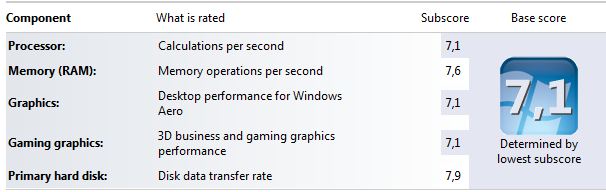
Upgrade to mSata SSD (read 550MB/s, write 505MB/s) managed to get the maximum score
Average boot time is now under 20 sec includes typing in password (previously i was between 50-70 sec).
Does anyone know how much could be this boot time affected by encrypting the system drive with TrueCrytp? Thanks!Attached Files:
-
-
Thank you for the input. I had already seen that particular post by link who is very helpful btw, and am considering my options. Now I know ahead of time that I can't accidentally erase the drivers and OKR. I may just copy the those partitions to my Agility 3 so OKR should work flawlessly. Again thank you for your valuable help.
-
Very very and unfortunate.
But the PU is still all that I want. So I should be fine !!! -
I would test that first before making that assumption, if I were you Good luck!
-
I'd say sell the OCZ (has a VERY BAD reputation of suddenly crapping out when you have all your priceless data on it) especially using it as a main drive.
mSATA's aren't that much more expensive, I paid $179 for my 256GB Crucial M4 mSATA which registers and maxes out Windows WEI score of 7.9.
Since the Y580 has a full SATA III 6gbs mSATA supported slot, there is no reason to lose your optical drive in this case. Heck even those super duper Clevos and Sagers don't even support SATA III speeds with their mSATA slot. The Y580 is truly fantastic in this regard.
You will love your Y580, it does everything exceptionally well. I am a tech freak and go through 2-3 laptops every couple months, just to try and find a sweet spot. I think the Y580 will be a keeper for me, I was very close to placing an order for a Custom Sager NP9150 with a HD7970m, but with all the Enduro issues I cancelled that idea, also finding out the mSATA slot on those things only support up to SATA II speeds, which will definitely bottleneck a fast SSD. -
Is anybody running 2 x 500gb in RAID 0 plus an SSD (or is this even possible)? If so, do your 500's need to be a matched pair?
-
our motherboard is hm76. does not support raid.
-
yes. there's a fix. you have to install one specific update first, then the rest will come.
-
Yep, I saw. Before I found that solution the other update was install each one individually and restart the computer. Took a while but it worked for me.
-
Yeah. I did that too. There was a lot of cursing involved.
-
I had same problem with updates. There is one update you must install by itself to stop the computer from reverting back; it is KB2647753. Please install this by itself. Reboot and continue to update. This fixed the problem for me.
Good Luck,
Dave -
Hey guys I have a question. Are you planning on updating to Windows 8 using the 14.99 dollars option? I'm thinking on doing that. Do you know what will or won't work with the new OS? Like, for example, OKR7 most likely won't work, I think....
Sent from my GT-S5830L using Tapatalk 2 -
i was wondering if when you put your battery in "battery protection mode" is it ok to leave you charger in when it hits 60%??? please help i dont want to ruin my laptop battery?
-
I think that's the point of the battery protection mode. It doesn't charge your battery so you don't overcharge it when you hit 100% and keep it plugged in. I keep it plugged in. Greetings.
Sent from my GT-S5830L using Tapatalk 2 -
My wireless card is so slow, as in latency. My old acer laptop with atheros connects instantly and never becomes this slow.
-
i got my y580 and was wondering can it be overclocked.. will the temps be too it and will i get any performance boost out of it??
Y580 Owners Thread
Discussion in 'Lenovo' started by Syed117, Jun 21, 2012.