 Problems? See this thread at archive.org.
Optiarc BD RW BD-5750H
That's what it says in my device manager.
-
google is your friend
that's a bluray burner
and so is yours. What made you ever doubt you had a bluray burner..... it says "BD RW" clear as day.
BD-5750H | Sony Optiarc
I would rather have the sony than my matsh ita, which is chitty just like its name suggests.
I think the sony one has disc quality scan feature, while the mats hita and LG do not. -
Been following this thread for a bit and I decided to join in. Lots of good info here. Anyway FWIW, I just finished a chat with a Lenovo rep:
Lenovo: How can I assist you today?
Me: my question is do any models of the ideapad y580 come with a blu-ray burner? specifically the IdeaPad Y580 Laptop - 20994NU
L: No, as of now there is no model in Lenovo, which comes with Bluray burner.
M: ok for the IdeaPad Y580 Laptop - 20994NU, does this optical drive burn DVDs/CDs and read Blu-ray?
L: Yes, this comes with Blu-ray /DVD Combo
M: and the Combo drive burns DVDs and CDs?
L: Yes
L: Exactly
M: so what is the difference between a Blu-ray /DVD Combo and a Blu-ray/DVD-RW which other y580 models have?
L: I am sorry for the wrong information, the Blu-ray/DVD-RW an also burn Bluray discs
M: ok thank you for the information
This is just as recent posts have suggested. Frustrating that this info is not obvious enough for us to make an informed purchase. Now I have to decide if I actually need a Blu-ray burner. -
So basically which models come with blu-ray burner?
-
I inferred from the rep's answer, that it is any model that has a Blu-ray/DVD-RW instead of Blu-ray/Combo
-
Mine is 209942U
Which has "HL-DT-ST BD-RE BT20N" -
I did not say I doubted. I said I did not know. And according to the rep at lenovo.com that I chatted with, none of the y580s from their site supposedly came with bluray burners.
Regardless, that picture you show looks nothing like mine, and it does not say bluray writer on it. Alas, I am very happy that it does if I ever decide to use it... -
So the Mata we have is not a blu ray burner?
-
Can somebody explain what does this mean?
-
Sorry for my bad english.
It's very simple: the Y580 only accepts wifi card which are in a whitelist of the BIOS. If a card is not in the whitelist it will not work.
Dual-band wifi card supported by Y580? - Lenovo Community -
does this also mean that y580 wifi wont work in certain networks?
also ive seen some Y580 owners say that their wifi gets very poor reception . hav some other owners faced this issue? -
so correct me if i am wrong, keeping the battery in "battery protected mode" does not harm the battery if you keep it plugged in?
please respond i dont want to ruin my battery!!!!! -
OMG! Have you read any of this forum?
I just posted a few threads back that the Mata in the 45U is a Blu-Ray burner.
billycuth posted that in his NU he has a Sony Blu-Ray Burner.
And vatch3173 posted that his 42U has a Blu-Ray Burner. -
Hi all,
Getting ready to purchase my Y580, and have decided to go with the "20994PU" model as opposed to the "20994NU" model. The plan is to install an larger mSATA drive, and I figured I would save about $100, and get the one without a pre-installed mSATA drive (plus, 500GB is plenty of storage room for me at this point in time. I don't need the 1TB drive).
As you can imagine, my question revolves around the screw that I need to attach the mSATA drive to the motherboard. Reading through this thread, a lot of people have already done this, and they used a M2x3 laptop screw. This being my first notebook purchase, I don't have an older one laying around that I can scavenge a screw from, so I'm planing to purchase a screw from laptopscrews.com.
Anyways, there are a few options for a M2x3 screw, and I was hoping someone could help me determine which specific one would work best for attaching the mSATA drive to the motherboard. Here is the link:
M2x3mm Wafer & Pan Head Computer and Machine Screws
If someone can suggest me which one would work best (maybe by giving the Item #), I would greatly appreciate it. Or, if there is another place, like Amazon, that it would be better to get the necessary screw from, a link to that product would work as well.
Thanks so much! Everyone posting in this thread seems very willing to help! -
laptopscrews shipping is a ripoff.
for the price of shipping, you can get 100 of these screws on ebay
1 screw would only require a 45c stamp. but you can't even buy 1 screw without paying $5 shipping. -
I just unboxed my Y580 and there is no Windows 7 disk? I was going to install an msata and do a complete wipe and reinstall Windows 7 on the msata....but no disk? What should I do?
Thanks! -
Ah, good call. To be honest, I never made it past the product page to even see how much shipping was.
But I do have good news. The Network Admin where I work said that I am welcome to any screw that they have lying around, and helped me find a M2x3 screw that should work. We actually found two: one with a flat head, and one with a head that tapers down to the threads. Is one optimal over the other? -
I wouldn't worry about 5200 rpm drive. Just add in an mSATA and use the 1TB drive for backup. Easy peasy!
-
Link,
I guess that the HL-DT-ST BD-RE BT20N is the LG then, right?
What does the 'disc quality' feature do?
Pleasant surprise I guess. Heh. -
I decided to just clone the HDD to the SSD, but.....the computer is not detecting the Mushkin 240gb card I installed. The BIOS detects it as the first drive in it's sequence, so the computer knows it is there! But when Windows 7 starts I cannot see it as a functioning hard drive.
Did I do something wrong or what would I need to do to this puppy to work?
Thanks so much for your help!
Craig -
no one includes windows discs anymore.
Official Windows 7 SP1 ISO from Digital River « My Digital Life
download it, make a usb drive, or burn it. Then activate it using the sneaky way (google it), or use the windows key under your laptop.
if it screws in, that's all that matters. Pick the prettier one, or the one made of gold. -
Ha..I figured...
Man, I am getting old. I used to build my own desktops piece by piece, install all OS, and now I am 37 years old and WAY out of the game....getting old sucks... -
Building desktops is easy.
Laptops... not so much. Hard to do too much stuff with those at home. Besides, costs are way too prohibitive to do much yourself. -
so correct me if i am wrong, keeping the battery in "battery protected mode" does not harm the battery if you keep it plugged in?
please respond i dont want to ruin my battery!!!!! -
Does anyone know if there are any extended batteries available for the y580 yet?
-
That's correct!
But if it's just going to be plugged in all the time, you might as well just take it out... -
Not sure if everyone has seen this:
Windows 8 Upgrade
This is the Windows 8 installation information for Lenovo IdeaPads.
Note that it lists which Lenovo applications will not be compatible with Windows 8 and that Lenovo recommends doing a Clean Install of Windows 8. -
I have not seen any, nor do I think that Lenovo will make one. I do not believe they made any for the Y470/570 (the predecessor). I think it is Lenovo's policy to not provide extended batteries for their IdeaPad line. Having extended batteries is a reason to purchase their ThinkPad line. (Too bad they look so bad.)
-
Hi, I am considering buying this laptop after seeing a few deals on the web, in particular:
[Comp] Lenovo IdeaPad Y580 w/i7-3630QM/1080p/8GB/500GB/GTX 660M/BR $899 + 5.25% Cashback... - RedFlagDeals.com Forums
But I was wondering before I purchase if all 3 of these laptops that are listed include a built in camera. Thanks!
-
i'll be sticking to windows 7.
That is a big loss of functionality. OKR will probably still work by booting with the okr button, after setting up with okr disc.
I need energy mgmt for battery protection mode.
Newegg lists a Windows 8 version of y580. I wonder if any of those preinstalled software are in it. -
any chance connect y580 to 120hz benq xl2410 monitor? i'm thinking to sell my ivy desktop,and go for y580,but the only thing is the 120hz gaming
-
In General, using 3D on an Nvidia Graphics is no problem. But 120HZ gaming wont be able on the y580.
Though it is very powerfull, for 3d gaming it is MUCH too slow. For 3D Gaming i would recommend at least a GTX 680M or GTX 675M SLI or even better. I think i dont have to mention it because you already have experience with 3D but 3D halfs the performance (60fps -> 30FPS in 3D). The Laptop does not have this much power in store to give you a nice 3d experience. -
is anyone an authorized dealer here for this notebook? like in the HP threads there is someone, a customer representative answering queires? Because I want to ask how I can order for the middle east, for UAE to be exact? anyone here who owns this laptop and lives in DUBAI?
-
Yeah. I'd think that you'd still want a desktop for those kinds of demands.
I can't even imagine how much cooling you'd have to have on a notebook to get all that to work. -
thanks alex,
The thing is,i don't want it for 3d gaming,just for the 120hz refresh rate,connected to my benq 2410.
the last year playing bf3,using Hd7970 and handle about 80-120 frames during gaming,so its a bit difficult for me to downgrade at 60hz refresh rate.
anyway i need laptop due to travelling every 2 weeks,i think y580 is the best choice for that money.. -
im really dont understand whats wrong with this laptop!!!
why we cant install the OS on the SSD? i've remove the pre-installed windows im insert my windows 7 cd, and im see only one disk (the 1TB DISK) to install the OS, and the questions is:
1: how many physical Disks its on this machine?
2: can i replace the ssd with one other ssd of my choice ( like this? ) SOLID STATE DISK OCZ AGILITY4 SATA3 2,5" 256GB
3: is there anyone who has install the OS to the SSD Disk? HOW YOU CAN MAKE IT?
thanks and really sorry for my bad english -
did you order the msata ssd ?
Put everything back to normal and boot into bios. Do you see the msata ssd and TB hdd listed ? -
just got my headphone plug died no sound no mater what ...
they just replace the motherboard on this machine..
oh I'm glad I got a offer for at home tech support.. no more sending to depot
because they going to do it again.. motherboard exchange. but at home now.
everything else work fine. so I can still use the laptop and wait for tech to show.
maybe I will take my ps3 gaming headset (it's usb) for now -
best way to fresh install Win7 on a msata ssd is to have it boot as a lone drive..
take the other drive out. and try your install again..
now does your system came with a msata? if yes you need to convert it to a simple disk. -
Currently Optimus and 120 hz output ist not working together since there are some nasty problems for nVidia in the driver part of writing into the IGP framebuffer what must happend for Optimus. Perpahs the Y580 can output a 120 hz when you deactive the nvidia card but no 120 hz output with both cards active. That is the reason why some Clevo, Alienware or Asus Ivy Bridge Notebooks are not using the Optimus technology.
120 hz output at Ivy Bridge: The HD4000 is working without a other GPU OR the output ports are connected direct to the nVidia GPU and so no Optmus. -
Test the microphone and usb port next to the headphone jack.
do they work?
the headphone jack is on a daughter board connected to the mobo by a cable, so maybe it's either a loose cable, or a bad daughter board. -
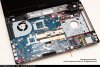 the mic input don't work.
the usb work.
maybe it's a lose cable like you said. since there is a tech coming
I'm not opening the case.
Thanks
PS. since the usb work could be a bad card?? or ? -
I'm having an issue with the Y580. When I put the computer to sleep by closing the lid, I often come back to see it turned off. When I turn it on again, it tells me it wasn't shut off properly.. This has happened multiple times, but usually when I close the lid at night and come back in the morning. Can anyone deduce the cause? Anyone else had the problem?
-
check your event viewer logs.
you have the battery plugged in always? and battery works? -
No, I plug out the charger as soon as it hits 100% and then repeat when it's low. I never leave it plugged in overnight either.
-
If you're doing that, just put it in battery protection mode.
-
yeah, you're going to kill your battery using it so much
-
Hello all... great forum here. Always good to see people helping each other out.
I'm a new Y580 owner. I got the 2099-4HU version about a week and a half ago. I've been following through this thread, and seeing a lot of posts on batteries and a lot of debate over Blu Ray burners... but I have a new question that I'm not seeing answered much yet... probably because Windows 8 is not in Retail yet. I did see some comments recently about upgrading to Windows 8 and some of the functionality that will be lost. But sacrificing some of that functionality, I'd like more input or suggestions about moving to 8.
I've got Windows 8 Pro installed, and have the drivers updated (I think).. but I noticed that my "Windows Experience Index" took a big hit... and the lowest score is because of the Graphics card... at a score of 5.9. I was getting 7.2 on Windows 7 after updating to the most recent Nvidia patches.
I have the latest Nvidia on Windows 8 now... as well as version 9.17.10.2867 on the Intel card. I'm curious what other people are seeing or if anyone has suggestions for getting higher ratings in Windows 8. I've already tried changing the settings to use the GPU as the default instead of auto-detect. That made no difference.
Thanks -
I wouldn't concern yourself with ratings especially by the Windows Index since it generally isn't reliable (it gave my hard drive on my Y580 the max 7.9 score, my hard drive isn't fast it's 5400 rpm and if this is is the max score then how is it supposed to score SSD's, with a magic impossible 8.0?). Any rating a windows index gives I'd take with a grain of salt.
What really matters is if your machine performs up to your expectations and if you want a real rating or review go look up some reviews online. They are a lot more representative, informative, and in general accurate compared to what the Windows Index gives which basically just scans your system and gives a flat score based on what your components are (rather than how they perform).
Regarding Windows 8 I'm not sure if there is any noticeable loss or increase in performance but then again it's not in retail yet. -
Yep, my SSD is showing 8.0, but that's because in Windows 8, the Max score is now 9.9.
I'm going to have to assume that because they raised the max, that it doesn't mean all the other numbers are now skewed.
But in general, I do agree... that score is a very poor benchmark. I'll have to check some other tools to see what I can find out to compare with.
Thanks.
Y580 Owners Thread
Discussion in 'Lenovo' started by Syed117, Jun 21, 2012.


