 Problems? See this thread at archive.org.
Hey all! Recently got my Y580 and I'm freaking loving it! Glad to have joined this crew.
-
actually the True Image 2013 can backup all the 6 portions but I didn't do a clean install because I don't have the windows8 serial and I'm afraid I will lose it !
-
I recently upgraded my Y580 to Windows 8 but now I'm getting graphical errors. For example, when I try to run XCOM: Enemy Unknown, the startup screen looks like this:

So Nvidia Tray tells me my 3D Graphics look like this:
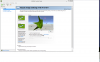
http://i.imgur.com/w66tP.png
Anyone know how to fix this? -
Sounds like you have a graphics card issue. I had that issue too on Win 7. Sent my Y580 sent back for repairs and they replaced my motherboard. btw. i also tried out the newest driver and the ones in between, still didn't work (if that was helpful). It takes at least a week to receive it back once they receive it.
-
Hey guys! Have had my windows 8 y580 with 750 gb hard drive and 8 gb RAM for about 3 weeks. I love it except I have just started to get a wi-fi problem. It started three days ago, where I would lose internet even though the wi-fi indicator still shows. I thought nothing of it at first but now I am barely able to use internet and it lasts all of 5 minutes even if it is literally right by the modem. It happens at both my home and school wi-fi and all other devices (phone, other laptops) use wi-fi fine, so I know it's the y580. Are there any drivers that didn't come with it and I should download or update or is it more serious? Please help!
-
Hey Y'all. So i've recently taken the plunge and purchased the Y580(running windows 8). I've additionally purchased a 500gb Samsung 840 ssd with the intent of using it as my primary drive. My only concern lies in swapping the HDD for the sdd. The model i've purchased contains a 750gb hdd and a 16gb mSATA and i'd like to ideally swap the hdd with the sdd whilst keeping the 16gb mSATA for extra storage space. But given that Lenovo uses the hdd in conjunction with the mSATA there doesn't appear to be a straightforward way to clone the hdd and transfer that clone on to the new ssd. Given the mSATA is only 16gb I assume it's only used for caching, so could I go into the BIOS and disable using the mSATA for caching and then just take a clone of the primary hardrive? Or is it suggested that I just perform a clean install of windows 8? I'm rather new to all of this so any help or guidance in the right direction would be hugely appreciated!
-
If the Y580 is like the Y500 then it doesn't have RAID support which is required for Intel RST so the caching is done by software and the software that came with my Y500 is Diskeeper Express Cache. So there is nothing special you need to do at least in the bios level to accomplish what you are trying to do. Probably just need to reformat the 16gb mSATA. Maybe someone who has done this can chip in but 16gb is nothing in the grand scheme of things. I would be more interested to see if the 16gb mSATA would increase the system speed while in cache mode working in conjunction with your SSD. Personally, I'm going to eventually replace the 16gb mSATA with a 256gb unit and run Windows / Apps off of that and use the 1TB 5400 rpm HDD for storage.
-
HI guys
im about to drop the ball on ordering this
im wondering though
i would really like to utilize my dual band network in my house i paid for the router and everything and really would like to show it off to my roomates so they can see its worth having the speed upgrade
BUT as i have been reading and skimming through this website and lenovos support forums i have come up with the answer
You need a modified bios in order to get certain cards to work on the lenovo y580 to get the dual band features...
along with that the card that ships with the computer is apparently terrible and im not to excited about that spending good money on a laptop and i would like to have it tricked out to the best possible combo of components...
So does anybody know which dual band cards would work with this power house..
I would like to go with bigfoot cards because well i like em used and my brother has used them in his laptops forever in a day and ya blah blah
If anybody would like to just post links to other forums and such or how to do bios stuff much appreciated...
I am new to this site and have read the rules and regs and such and i think that this is one site i will be sitting on for quite some time next to lenovo and overclock.net
Thanks guys for all the posts and questions and answers -
Cheers for the insight. Only decision now is whether to clone the Lenovo hdd out of the box or do a clean windows 8 install on the ssd. I've seen that most on this forum suggest a clean install, my only concern is obtaining all the necessary lenovo drivers for windows 8 and retaining the functionality of OKR. There's allot of info for doing a clean install for windows 7 on the y580 but not so much on windows 8. Any suggestions?
-
As for which dual band card will work, I can't say. There is a modified BIOS out there located here: Lenovo Y580 / Y480 'unlocked' BIOS versions
I haven't tried it however. -
Has anyone upgraded to the new BIOS BIOS Update for Microsoft Windows 7 (32-bit, 64-bit) - IdeaPad Y480, Y580 and then upgraded to Windows 8 afterwards? I just wanted to make sure it worked. I am planning on upgrading to Windows 8 this weekend and didn't know if I should upgrade the BIOS before I upgraded the OS. Any thoughts?
-
I had the then latest BIOS 39 when I installed Win 8. I've since upgraded to 40. If you have a choice, upgrade the BIOS before Win8 IMO.
-
3610 with 16 Gb RAM here. Works great. Haven't used more than 6 Gb yet. Need to spin up a couple more VM's ;D
-
I'm seeing between 38 & 44 with minimal use (using CPUID HWMonitor)
-
Hi guys, just picked up a Y580 and I am loving this thing!
One concern I had is with the bezel around the screen. I know that the Y580 doesn't exactly have the best build quality ever, but I can't help but feel bothered that the gap near where the camera is located is a bit loose. If I push against the bezel, I can see that there's a moving gap between it and the aluminum top and will wiggle a few millimeters. Is this normal for all the Y580's? I'm mostly worried about something getting inside that gap, it's also a bit noticable since it's at the point that I use to open and close the lid.
View attachment 90626 -
Somewhat the same issue for me with my Y480 which seems to have the same chassis. There was some excess glue near the seams and part of the left side bezel is somewhat "loose". I guess that there is a slight gap between the exterior plastic and the interior of the frame so I feel it move when I push against it. It makes a little "click" noise.
I don't think it's anything to worry about, as long as it doesn't completely separates itself from the frame.
As a separate question, do you guys have any issue with a slight "bending" of the laptop keyboard near the left end keys(F1,F2,F3,W,Q,E,R). It's not exactly return worthy and I think it's a design defect and something unique to my specific laptop.
Found a video of the issue : http://www.youtube.com/watch?v=AdC70BUCx6Q -
I got the y580 yesterday and so far loving it...i got it from Amazon Germany as I live in madrid and there was no FHD in MAdrid.
SOme questions:
1.-How do you know if you are running on the intel graphics or the Nvidia 660? I was playing Dark Souls (with DSFIX) an was not getting that high results, so perhaps I was not using the 660
2.- I need to change some keys as the german keyboard is not the same...what is the best way to do this?
3.- I installed a SSD CRUCIAL 256 so I did a fresh install of W7. Any good lenovo apps that came with the computer? Anything useful?
4.-what is the one key recovry install...is it wirth it?
5.- When Im playing some games, I get like a icon on the bottom right that shows up related to the music...i think it comes from the lenovo theatre...ny way to remove t?
6.- Should I upgrade to the new BIOS?
7.-Any interesting tip on this post? it i relly long so I could not read everything
Many thnks for your time answering the questions -
I get graphical issues in games like Mirror's Edge and Prince of Persia. Just a lot of graphical glitches and textures flickering and whatnot. Anyone else had this issue?
-
Yea, i had that issue anytime i was gaming. Called lenovo support, shipped my Y580 back for repairs, and received it back a week later.
-
Let me know if anyone can help...thanks
-
I don't want to have to send it in for repairs because last time when I sent it in at the end of June, I got my replacement on September 9th. Their support team is absolutely horrid. Could it possibly be a software issue?
-
How do I remap the special buttons like for example the onekey theater button? Also, can you remap some keys to become the mouse pad on off key?
-
1. You can check by enabling the "GPU Activity Icon" under the Desktop menu in the Nvidia Control Panel. I find that is not always truthful though, so if I think a game is running too slow or likely using the Intel card I will manually set the .exe file to use the Nvidia card under Program Settings in said Control Panel. I would try that with Dark Souls.
2. German keyboards swap the Z and Y keys or something right? Check your keyboard setting under the Windows Region and Language Options and make sure it is set to English US keyboard layout.
3. The only useful one is OneKeyTheatre I reckon, it enables the OSD for function keys and the display presets referred to in question 5. After a clean install I didn't bother reinstalling OneKeyRecovery software as the button doesn't work without the recovery partition anyway.
4. As above, it's useless with a clean install if the recovery partition is gone, I would assume with your new SSD this is the case, unless you cloned it over.
5. Press the Video Camera button on the top right of your keyboard and select one of the presets, Normal or Movie (recommended, IMO brighter colours, etc.). You currently have it set to Intelligent, which is why it switches automatically.
6. It can't hurt, the one before last was useful actually because it fixed a bug with the Windows memory test, which you will need if you suspect your RAM is faulty. Be careful though and follow all of the precautions included in the program documentation.
7. ???
On a separate note:
I have something to ask other clean installers here. I never noticed it before but I have now found that my Bluetooth device is non-existent (running Win7 x64 HP). The drivers can't be installed because the device does not exist under Device Manager. It is "On" in the FN+F5 menu though but it can't be seen by other Bluetooth devices! It never bothered me before but I am looking at getting a Bluetooth peripheral soon and it would be really handy to use the onboard device and not have to buy a separate dongle. There are a few posts around on the Internet about the issue but none really offer a solution that has worked for me. Any help would be great! -
I had the same problem as you did. After installing Lenovo's bluetooth drivers while doing a clean install, the bluetooth icon never showed up in the system tray. I remember that you have to manually "enable" it once under windows first before seeing it in the tray. Try enabling it under Control Panel\Network and Internet\Network Connections.
-
Thanks for your time, very useful.
I run the 3D MArk 06 like 3 days ago and got 14850.
I updated the drivers, etc and now im getting 14550. Is this normal? '
Unfortunately there are not that many D11 games so I usually test with ·d Mak06...what ratings are you guys getting with the latest drivers? -
How long does it take to ship? I ordered it over a week ago and it still hasn't even shipped yet...
-
Just wondering but, I recently received this laptop from Newegg. I am afraid to open it though, because I was looking through some other computers at a local Best Buy and I like how other notebooks can be held on your lap easily (without discomfort from the weight/design) and that kind of stuff. I'm considering returning it and getting a thinner and lighter laptop.
Can anyone tell me if the laptop is still easy to rest on your lap for a while without discomfort? I really like the specs I got on it but I'm not 100% sure, and I don't want to open it to try for myself because Newegg doesn't accept returns (only replacements) on opened laptops.
Thanks. -
Thanks.
The issue with mine though is that I cannot even find a device. It supposedly doesn't exist. I can't enable under it Network settings as you suggest because for all intents and purposes, it's not there! I was never able to install Bluetooth drivers in the beginning for the same reason.
Could it be possible I don't actually have a Bluetooth module in here? All of the documentation says I do but it is very odd. Did they even have any models without it? It is something I assume to be standard with pretty much all laptops. -
I'm still having connection problems. On both my home and school networks I get fast wifi speed but no internet access. When I run the Manual Diagnostics Tool it says I failed the ping test and no response to the DHCP server. Again, I'm running Windows 8. Is anyone else having this problem?
-
I follow this thread since a few months and i am interested in the y580.
I have a question considering the cleaning of the fan.
I heard that the y580 has a function included (dedusting mode) which cleans the fan.
Has anyone of you tried that out? How does it work? Is this really usefull or is is just useless?
How do you clean your fans? (if you are not using this function). -
I was going by memory, but I do know that I had to "enable it" somehow. Is it off when you press FN+F5?
-
I've come here for latest driver and utilities from Lenovo for Windows 8, specifically Lenovo's Energy Management for Windows 8 (which is not working correctly for my IdeadPad models) and OneKey Recovery for Windows 8 from upgrade.
If anyone can keep posting latest uploads for drivers and utilities from Lenovo for Windows 8 this would be really helpful.
My Y570 thread is pretty much obsolete and since this thread and Y500/400 series thread is up alive I may as-well ask for the request here.
Thanks in advance, -
No, it always shows as on, the icon is glowing, etc. I have tried toggling it on and off, scanning for hardware devices in between (though it should pop up automatically regardless), toggling off and rebooting, then toggling on, the works. Nothing happens.
I have a related question concerning that FN+F5 menu actually. It appears that the glowing, highlighted Wi-Fi and Bluetooth icons on the left are clickable and should do something: open a menu, adapter settings, etc. Neither of them do anything when clicked on my laptop. What are other's experiences there? -
I, myself torn between pick y580.and y500. Do the y580 with Optimus will stay in long run(wear and tear and use less power) compare to y500(gpu on full time). My laptop will serve as desktop laptop at home plug-in full time.
Sent from my GT-I9300 using Tapatalk 2 -
Hi guys, has anybody tried installing Expresscache (SSD caching SW) on y580? Since I installed my own mSSD I was wondering if I could just install it with no problems.
-
Hi guys, first time posting here but it looks like a great source of information
I got myself a Y580 a week ago and have had some annoying niggles with it since day one. I got over most of them but this one is make or break for me..
I installed the new 310 nvidia mobile drivers and everything was going perfectly til I restarted my pc, whereupon the nvidia drivers removed themselves from the taskbar and from the desktop context menu. I installed the drivers again and again, when I restarted, the control panel dissapeared.
I went ahead and fully removed the drivers, put back the 306 drivers that originally came with the laptop and now my GPU doesn't throttle or turn off anymore. In fact it seems to run at 805 mhz core no matter what! If I switch to battery it'll briefly downclock to 405mhz but go back up 10-15 seconds later.
This has had a drastic effect on my battery life. Where I could get 5-6hrs of internet browsing and light MATLAB use before, I'm now getting 2 hrs tops even on power saving mode.
Has anyone had this problem, and if so; how should I go about fixing it?
Thanks in advance. -
The "wear and tear" on a GPU being on constantly would be extremely negligible and not worth worrying about IMO. Think about desktops using high-end graphics cards constantly. They will usually last a good 4-5 years or more in most cases. Having said that, I just have my Y580 on automatic settings so that it will use the Intel GPU for low-intensity use and the Nvidia GPU as required when games, etc. kick in (or I will manually set it if the automatic detection doesn't work). It is very, very rarely used on battery and set to Lenovo Dynamic Graphics (max. performance).
I would imagine most users will be upgrading/have upgraded to a new laptop by the time components give out to be honest.
Given your intended usage though, if it will truly be 24/7 plugged in at home, you can build yourself a desktop that will kill the Lenovo on performance and viewing comfort (better screen) for the same or less than its cost, why do you need a laptop? Something to consider.
Isn't that the same type of thing as Lenovo's RapidDrive? As in, it uses a small mSATA as cache in combination with a mechanical drive to boot the OS/programs faster.
If that's the case, then I am not sure why you would actually need it? If you can put your entire OS/apps on the mSATA drive, it will be much faster than using it as cache.
If you only have a small SSD though, I think RapidDrive would be a better solution than ExpressCache as it is designed for these systems. -
i working outstation and will bring along the laptop back home 3~4 times in a year.
based on your suggestion, means should go for Y500
instead of choosing y580 c/w optimus and not worth worrying if GPU on full time, thanks for help. -
To answer your question, clicking either icon in Lenovo Wireless Device Settings (FN+F5) does nothing for me as well. Did you check whether the bluetooth driver is enabled under device manager>bluetooth radios?
-
I don't have anything in the Device Manager.
I believe I have "solved" the issue though... After looking through the Hardware Maintenance manual at the various FRU components, it seems there are indeed network cards in some models that do not have integrated Bluetooth. So I guess I have one one of those (BCM4313). What a disappointment! -
That sucks, here's my BT hardware ID (from HWiNFO):
[Port6] : Broadcom Bluetooth 4.0 USB --------------------------------------
[Device Information]
Device Manufacturer: Broadcom Corp
Product Name: BCM20702A0 -
Hey there,
just got my new Y580 .. i am satisfied with the build quality and performance, BUT i also have the problem of the loose, rattling keyboard in the upper left corner. As i know i am not the only one with this problem, does a solution to this exist? -
Just to give an update to you guys I went to Y580 Wifi Problems - Frequently drops to 'limited ... - Lenovo Community and downloaded the Intel wi-fi Connection Utility that the user mentioned. So far no problems. Looks like I can get back to enjoying this beastin' laptop
-
Does opening up the y580 void warranty?
-
To change HDD or add more memory or mSATA SSD? Nope.
-
haha well the laptops just making weird noises and i think its just the fan, maybe it might be loose or theres something in the fan.
do u know if i can tamper with the fan or does it void warranty cuz you cant upgrade it -
Who is going to know unless you leave a "I was here" sticker if you send it back for repair. I bought the Y580 when it had Win7 on it and I don't recall anyone mentioning any warranty stickers. Needless to say, you will have to disassemble your Y580 to get to the fan to fix your issue unless it was something that merely dropped in there, you may be lucky and shake it out. The only thing I've seen is that you have to be careful when removing the keyboard, as you don't want to tear the keyboard/mouse cable.
-
Guys, three questions:
- best settings for far cry 3 single player? cause this thing laaags on ultra in 1080p
- any special trics on gpu overclock? or just install msi afterburn and all is ok?
- any way to overclock cpu? -
Has anyone successfully run 3 displays under Win 8? (Laptop screen, HDMI, VGA)?
-
Hi all!
i searched a lot to find a workaround for 3D gaming on the Y580 but i had no luck.
maybe i helped some of you with this informations i collected the last hours.
Lenovo IdeaPad Y580 is NOT Nvidia 3D Vision compatible!
You can't switch Nvidia Optimus off or deactivate the Intel HD Graphic.
Not in Windows nor in the Bios...also no chance with an unlocked Bios.
The HDMI port sends the signal to the intern Intel-Chip so there is no way
to use Nvidia 3D Vision with this notebook! Its an hardware problem an there is no software solution.
You can try other software to render 3D for games like TriDef3D (good solution but expensive coz of Hardware-ID bounded serial)
or iZ3D (outdated and also from nvidia) but 3D-Vision is a way easier.
For 3D Movies you don't need any software because your 3D-TV does the rest.
....too bad i already bought this notebook a few month a go!
thanks for the stupid construction. nvidia optimus sucks without an option to deactivate it.
greetings
satyam
Y580 Owners Thread
Discussion in 'Lenovo' started by Syed117, Jun 21, 2012.


