Problems? See this thread at archive.org.
Hello,
Is anyone else having problems with extrememly slow internet and degraded performance? Everything recently started performing terribly. This is happening on Windows 7. Im trying to avoid reinstalling windows due to dual booting. Thanks.
-
Do you game a lot or leave your laptop on for long periods of time? If you do I'm guessing it's because your HDD is degrading due to the heating issues in the Y580.
On that note, though i loved my Y580 the HDD finally died on me. I always meant to repaste the bad thermal job but never got around to it resulting in an average of around 55-60 degrees Celcius on my HDD temperatures. Finally when my HDD failed and everything would take over an hour to start up and even then it wouldn'nt even work. I've replaced it with a Y500 which has a superior cooling system. My hard drive never goes above 45 degrees Celcius even under gaming load.
Moral is yes after some time spent with the Y580, HDD will probably fail unless you find a cooling solution. -
That's unfortunate. Mine has been running pretty much 24/7 for the past 8 months. Lots of gaming as well.
It's on a cooler master U2. Fingers crossed, but things are fine for now. Have all my files backed up just in case. -
I bought my laptop around 3 months ago, the HDD never gets over 45 degrees and I am not using any cooler.
-
I bought mine 6 months ago, they may have improved the thermal paste job since then but definitely earlier models had very sloppy work done resulting in higher termperatures than normal.
-
Can anyone tell me where im supposed to apply my thermal paste? I know cpu and gfx but thats it, also can anyone let me know if its possible to get an ssd now with the os on it?
is it even possible to put new thermal paste onto the cpu and gfx lol -
IIRC ExpressCache is designed more for the smaller mSATA drives (<64 GB) to intelligently cache the most heavily used programs in tandem with a mechanical drive. Lenovo RapidDrive is Lenovo's version of the same concept.
If you are using your mSATA as cache, it's worth a shot. However, I don't really see the point of it if you have done a complete Windows install on your SSD. It should be plenty fast booting Windows and loading programs as is. -
Hi,
I have been actively using my y580 only recently and I am noticing some strange stuff.
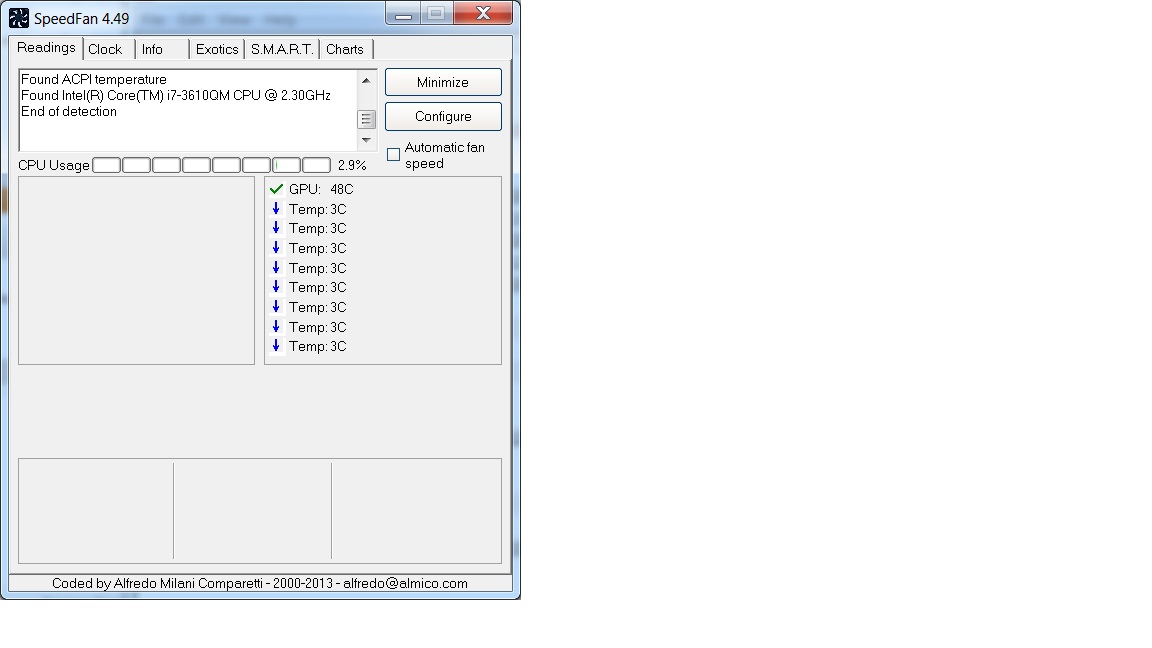
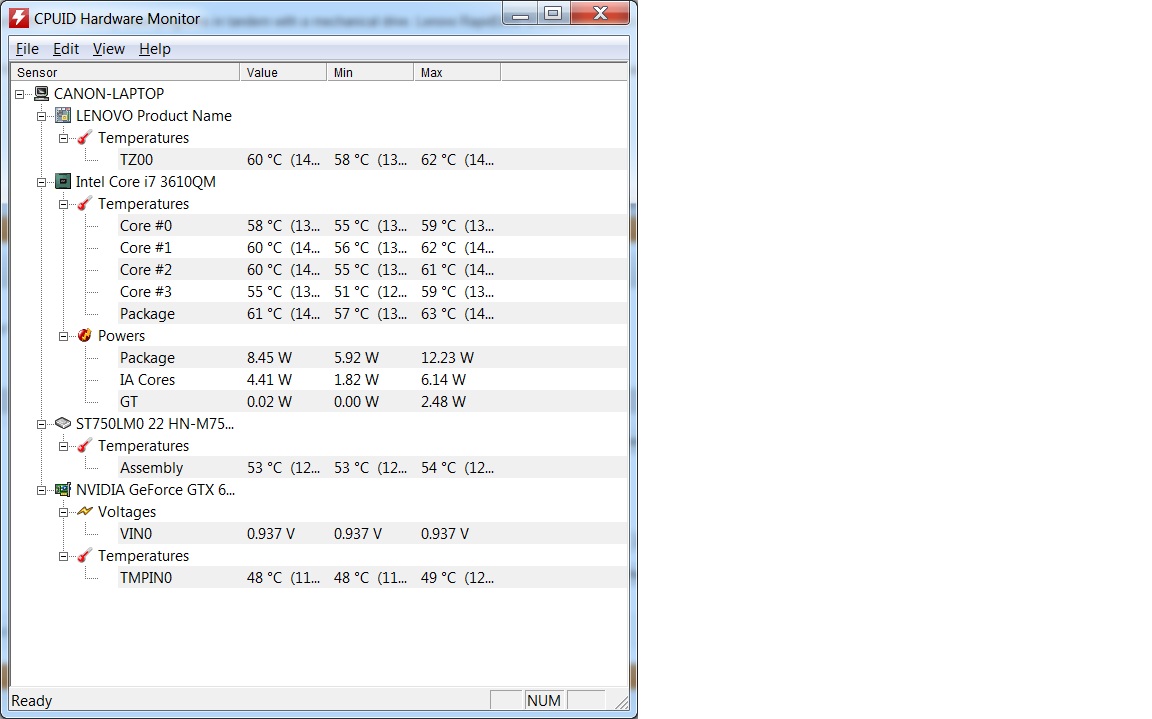
I installed cpuid hwmonitor but there were no fan speeds reported. So I went on to install speedfan which also does not report any fan speed. So I am confused, how do I know if my fan is even working, it is far to quiet.
I have attached SS of both the program running.
I also notice HDD temps running at 54. I am surprised because I have a 256GB mSata SSD and that has my games and OS, that should leave the HDD pretty cool right?
Cause for worry yet?
Please let me know your thoughts.
Also what temps are normal - I am playing DayZ (arma 2) and my core temps are at around 82 and GPU temp is also at 78. So are those normal and for my information, what are the limits allowed?
Peace
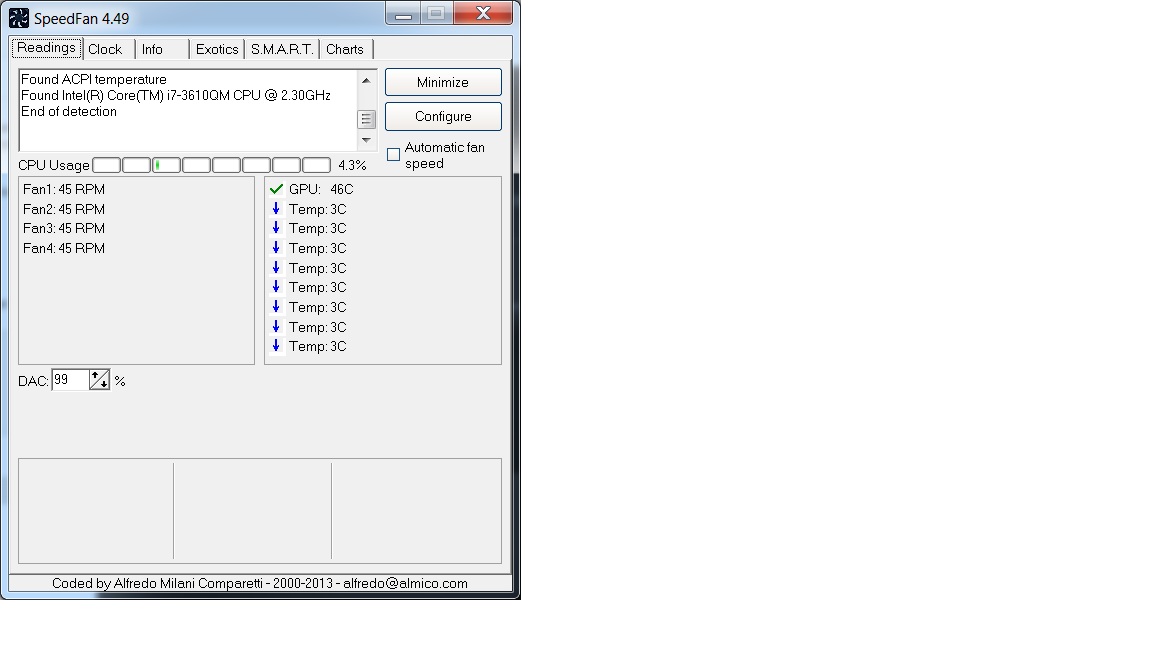
EDIT : I just did a fan dust extraction and I did hear the fan spinning, now I dont even know if something is wrong . Attaching a SS of speed fan now showing speeds, I am thoroughly confused now, please help sires!
Also could it have anything to with power setting, I am on power saver with some setting changed in 'advanced'Attached Files:
-
-
Mine Y580 shows no fan speeds using SpeedFan too. And yes, the computer is dead quite on idle or when using browser (most of the time).
Try to play a game or run multiple videos on HD. Be also aware of the power options, if you have Power Saver options ON, it could reduce your CPU & GPU frequencies rather than boost your fan speeds.
PS: Don't use Power Saver. Use Balanced. It's Power Saver when there is no load and then it switches to High Performance on load automatically. -
Hello, does anyone hears humming high pitched noises coming from the laptop when you put in Sleep mode ?? Mine does, and these sounds are synchronous with the blinking of the power light. If I unplug the adapter (run on battery) the sounds stops. The battery is NOT charging when the sound is present !
Please test and report. Thanks. -
Thanks azislo. Your quote has some one else's message, so I did not realize you were responding to my issue
I did play dayz (arma2) and temps were alarming - high 80s for my CPU, low 80s for my GPU and HDD was at 60
Thats what got me scared and thinking that the fans dont work.
I got one doubt though - what be the power options, when I put load (evident with the temp spikes), shouldnt the fans kick in. Even then speed fan records nothing. So I was worred considering a hardware fault.
Will change my power options but I think I should invest in a notepal U3, what do you think?
Peace -
No that's just a design flaw of the Y580. They placed the processor cores and GPU right next to the HDD so if any of those components heat upm the extra heat will also pass onto the HDD. Here are my temps from gaming and mind you they are too high to be safe (though I am also running my OS and programs off of the HDD not an mSATA SSD)
If you are looking for a replacement that is around the same size and power, go for the Y500. Its performance is actually better and the cooling is improved. I didn't screenshot temps this time but when I checked, my HDD was 40C even though everything else was around 65C. -
Thanks voozers but I am not sure about a replacement.
See I live in India and a friend of mine got me the Lenovo Y580 from the US, so I am not even sure if I can go to Lenovo out here.
Plus I do love the specs of the Y580.
Do you think a cooling pad as a solution to all this?
There are many other who still seem to think the high temps are being blown out of proportion, so I am actually a little confused
Peace -
Yea there are a few solutions. Those temps were actually posted with a Belkin cooling pad but I know it's not the best cooling pad. I've heard good things about the U2 cooling pad so you can try to check that out. The best solution if you don't want to replace it is to reapply thermal paste to your laptop. Besides the design flaw, the factory also did a pretty sloppy job of applying thermal paste. I know in this very thread people have successfully reapplied some paste and got their temps to drop as much as 10C. You should try searching this thread to find those instructions or search the forum overall.
Be careful when you do this since it can be a delicate procedure and messing up can cost you your laptop. If you don't trust yourself to reapply, I'd recommend finding a specialist or laptop shop to do it for you. -
@voozers
I did see that thread on reapplying thermal paste ( http://forum.notebookreview.com/ide...580-arctic-mx4-much-better-cpu-hdd-temps.html)
And yeah, you are dead right - no way I am doing that. I am sure o screw things up, let me see if I can get some lenovo people to help but I dont think much of their service out here. Its a dump
I am thinking of getting a U3 - I dont mind the extra space as this is more of a desktop replacement for me, I guess 3 fans beat 2 any day right?
Thanks for your suggestions - what about the fan part? aiszlo did say that he too was facing the same issues as me but I did see in Syed117 screen shot, he did get the fan speed - wonder what that is.
Peace -
HEllo, Im really happy with my lenovo, installed a SSD of 256 and it runs great. But I have a problem. I travel a lot, and when I am at the airplane and try to play a game (like UFO:enemy unknown 2012) the computer starts to lag a lot. I have it on lenovo graphics.
I know that it is not designed to run on battery for games, but is there any solution to this? I searched the lenovo forums and there is a lot of people with this issue...anyone found a solution?
By the way, what BIOS version you have? when i type msinfo32 it says I have the 2.7 ...is that the last one? -
I am not sure about your battery problem but that BIOS is old, the latest version is 40.
Here is the download link BIOS Update for Microsoft Windows 7 (32-bit, 64-bit) - IdeaPad Y480, Y580
Peace -
I dunno. It only boosts up the clock speeds of both gfx card and cpu when plugged in
-
Can anyone test this ? It only takes a minute ... thanks !
-
Mine is put to sleep regularly, no high pitched sounds at all. You might want to listen to the power brick even when the laptop is on. Sounds like you might have some coil whine coming from the PSU.
-
my device makes no sound while in sleep mode with ac plugged in.
-
the gpu unit takes a lot power. the battery can not handle the power demand so the speed is limited when you run on battery. same with other gaming laptops.
-
Thanks ilal2ielli and makaber for your answer. Like you said, the sounds comes from the PSU, it's the coil whine. I will go to the service department (probably not now, because I have a lot to do) in my country and try to get it replace, will post a response what will happen.
-
I've repasted with Noctua NT-H1 and while playing BF3 my GPU temp is still at 94 and CPU at 95. I am using a laptop cooler. Any other ways I could bring the temp down?
-
I really want to buy this product... But aside from the amazing specs offered at unrivaled prices, reliability seems to be an issue with a lot of Lenovo users.. It seems like everywhere someone is complaining about a Lenovo defect. Is it just me? or am I right? I have a reason to be concerned because I'm about to drop $1,000+ on a Lenovo Y580. I just want a laptop with a Full 1920x1080p HD screen and good battery life for school, and a respectable graphics card. This Lenovo Y580 seems unbeat in terms of price but can I expect to own it for several years down the road? Will it bhavet any major problems? I'm kind of scarred because Recently my Hp dv6t quad edition laptop has been giving me blue screens of death 1.5 years after purchase after spending $1,300+ on it >.<.
Lenovo owners. What do you think of this laptop?
One of my concerns is the 1tb 5400rpm SATA hard drive, (which isn't available in 7200rpm) Is this a big issue, and will it make a big difference in windows startup time/speed? -
Personally, I have had zero problems ever since I bought it four months ago.
Most laptops come with 5400rpm so it shouldn't be a concern. I'm planning to buy an msata ssd to be used for windows, apps and games and use the 1tb to store data. Try getting a model with an SSD because it will be cheaper than buying an SSD separately. -
I have had zero issues regarding my Y580, I have been more than happy with its performance, design, battery life and overall construction. One minor issue is the track pad/buttons, but do not let that set you back from buying it. I am currently a student, and this fits my needs of work/gaming pretty well. Obviously it would be awesome to play all games on maxed settings on a laptop, but for under $1k you really can't beat this thing. I looked at the Y500 as well, however battery life was a bit more important than another graphic card!
I installed a Crucial M4 256gb mSata SSD to be used as the primary OS hard drive, which works out very nicely for boot up times and a few games. I use the 1TB drive that came installed for my downloads and programs that do not require as much attention. Overall I am satisfied with the performance to price ratio of this machine. Hope that helps! -
Hi, I was wondering if it was possible to upgrade my intel wireless card with a bigfoot killer card? I understand that it is not in the whitelist and it would require a hacked bios but I have not managed to find anyone with a Y580 with a Killer card.
-
I can confirm that my Y580 makes the soft, high pitch beep while in sleep mode with the AC plugged in.
-
The battery is charged to 99% and still charging. It never get to 100%. it's still charging and stuck at 99%. I didn't let it remain at that situation more than 20 min. I often plug it to power and battery setting is in protection which allow battery to charge to 60%.
what's the problem and how can I solve it? I once let it to discharge to 5% and charge it to 99%. -
I also don't use a battery a lot, and last week i discharged it to 40% and then I wanted to fully charged it, but it also stopped on 99% like you said ... I had it plugged in for about 15 min, when it was on 99%, but the thing didn't go to 100%.
I also use battery protection mode all the time (permitted charge only to 60%). Have you found any answers so far ??
EDIT: (I have found some articles about Battery Gauge Reset - http://forums.lenovo.com/t5/ThinkPad-Edge-Knowledge-Base/How-to-perform-a-battery-gauge-reset/ta-p/679889
please report if you try to reset it.) -
I got one of these from the outlet......seems a good deal new with 1080p screen and 16gb ssd but the video card says its a GeForce® GTX 660M LE Graphics I cant find anything on it being a LE? Anyone know anything about this?
-
Lenovo discontinued 580? Wonder why
-
According to the 3DMark benchmarks, the Y500 generates 50% more 3DMarks than the Y580 (3550 vs. 2400), and costs the same. Now, it's not quite as versatile, because (a) You have to lug around a 2nd cartridge for your second graphics adapter, and (b) I heard that the 2nd adapter is not active when running on battery power. Still, if you released a new innovative product that was 50% faster that your existing product, for exactly the same cost, WITHOUT heating problems on either 1 OR 2 graphics adapters, and with the same features (FHD display available - HIGHLY RECOMMENDED, MUCH BRIGHTER AND MORE CONTRASTY, 1 GB drive, 32 GB caching flash drive, etc.) wouldn't you want to direct your customers to the much better deal you were offering in the Y500? I think that's why they have discontinued the Y580.
-
As far as I can get, it's not harmful. Charging lithium battery to 100% make their lifetime lower, some company force it to never reach full-charged easily. Also it's better to sometimes discharge and full charge the battery if you don't use it/ be in protection mode which cause that chip (memory) of battery keep battery percentage correctly.
note that I read somewhere every time the battery is gauged the amount of charge it keep, reduced even sequential repeating of gauging result that.
anyway, I didn't get any response except from you (&myself) about this issue, I appreciate other Y580 owner participate. -
Hi everyone,
I was hoping to find the pages where there was discussion on reinstalling my onekey recovery over my mssd 32gb cache and 1tb hdd. It originally came with a 750gb hd but I wanted to upgrade as I was running out of space. I looked through 148-150 but wasn't sure if there were updated info/tips as there's a lot of pages here to cover. Any link or pointers would be greatly appreciated. -
I took would like to know about this, there is barely any information on it. I talked to a couple Lenovo reps and asked if it was a misprint, but they both actually said the LE is actually more powerful than the standard 660M. Dunno if that's actually true or not.
-
That's not true. LE has always denoted lower performance parts for both Nvidia and ATI/AMD. So the GTX 660M LE would be weaker tha a normal 660M.
There's not much information available for this LE variant but all the information I've seen seems to indicate that it is essentially a GT 650M, which identical to a GTX 660M except for lower clocks and voltage. Makes we wonder if they're simply taking the parts for the Y400/Y500 and putting them in the the Y580 since that latter has been EOL for a while now. -
The Y580 is back on the Lenovo website...says build time is about 4 weeks.
I wonder about the processor...the FHD 1920 x 1800 version says only: Processor (2.40GHZ 1600MHZ 6MB). It's still witht he NVIDIA GeForce GTX660M 2GB video card. -
CPU is the i7-3630QM, same as it's always been.
-
Hello!
I have just ordered a Samsung 840 Pro 256 GB SSD. I intend to replace the stock 500GB 7200RPM harddrive that came with my Y580 with it. However, I have never done anything like this before (replacing a laptop's HD).
Is there anything special I need to know/do? I have already backed up all of my data. Is it as simple as removing the old hard-drive, replacing it with the 840 Pro, and then installing Windows and all of that? I am also going to back up all the applications and drivers that are on the "Lenovo" partition of my current HD, and install those on the new hard-drive.
Am I missing anything here? If any of you guys who have already done this could provide me with any additional tips/advice, I would greatly appreciate it! -
Anyone have that cheap $6-$8 optical drive hard drive caddy they sell on ebay?
like this one....... SATA to SATA 2nd HDD HD Hard Drive 12 7mm Universal Caddy CD DVD ROM Optical Bay | eBay
Anyone do speed test on this? Is there a bottleneck? -
Guys, can anyone know what PLL (Clock Generator) is installed on the Y580?
-
Can anyone suggest a good wifi card for the y580? The wifi on it right now is just terribad... If the cards arent really good maybe someone can suggest a usb wifi adapter?
Also thinking of buying an ssd, but I am unsure as to how to move my Windows 8 to the SSD and have my old harddrive in the caddy -
so what is your best 3D Mark 11 score ?
-
Hi everyone, this is my first post. I have Y580 (4 months old) which was working fine until i messed up with the harddisk and finally lost everything including Onekey Recovery and the Lenovo_partition (OEM).I recently went through some issues with my computer which prompted me to start fresh with a new Windows install. I received a recovery disk from Lenovo, and went through the reinstallation process.
The recovery disks are not fully functional. When I go through all the recovery disks, it tries to run "MoPS" and then goes on to state that "MoPS failed," proceeds to open a command prompt window, and at this point, went on idel, which meant the recovery disks did absolutely nothing. -
Hi everyone, this is my first post. I have Y580 (4 months old) which was working fine until i messed up with the harddisk and finally lost everything including Onekey Recovery and the Lenovo_partition (OEM).I recently went through some issues with my computer which prompted me to start fresh with a new Windows install. I received a recovery disk from Lenovo, and went through the reinstallation process.
The recovery disks are not fully functional. When I go through all the recovery disks, it tries to run "MoPS" and then goes on to state that "MoPS failed," proceeds to open a command prompt window, and at this point, went on idel, which meant the recovery disks did absolutely nothing. -
Ah really? I think hollow is a better word for it really, not rattling as such. I guess if it's a common issue there's not point point getting it replaced then. Where else has this been reported? Because I've followed this thread since the beginning and only seen upper-left-corner-flex mentioned once, so i was a tad panicky![/QUOTE]
That's definite a problem...common...I got mine replaced for that issue...should be design/engineering issue... -
how to type the little 1/4 beside 0 in lower right corner?
-
My laptop list: Acer 5920g (2007) (weak gpu) > Acer 5930g (2008) (cheap construction) > Dell Alienware m11x (2010) (weak cpu) > HP Pavilion dv6 6070er (gpu died) > Lenovo Y580 (2012).
All these models had some cons, that’s why I got rid of them, but Y580 is perfect. Really!
Fair price, good screen, perfect processor and powerfull GPU with stylish and strong design, good battery life and very-very good sound. I can say that this is the first time I’ll be using Laptop for more than one year. I see no successor and no need in replacement. I’m playing games, watching cinema, working with photos and doing some office stuff on it. I got rid of desktop and all is perfect.
I’m really, really happy with this machine. Never thought I could get such satisfaction.
Y580 Owners Thread
Discussion in 'Lenovo' started by Syed117, Jun 21, 2012.