Problems? See this thread at archive.org.
So lena , what you been up to these days ? alien is another overpriced crap.
-
-
Well I appreciate that reply, but I still do not know how to download them, on ATI driver website, I can only get 9.9..
-
10.1 , 10.2 are not compatible with MM and are not meant for the mobility GPU , go into the desktop section if you want to download it.
Or use this modded one : http://forum.notebookreview.com/showpost.php?p=5894920&postcount=6270 -
That's what I was considering death, however in the enviornmenr I'm in I am severely lacking when it comes to tools unfortunately, though I'm halfway tempted to get dremel so I can do a minimalistic mod to the bottom of the laptop, as for the massive amount of holed you've drilled I think I might show a bit bore restraint =P , though you have the right idea, the only thing is I'd like something more than passive cooling, for part of my gpu mod. I may just consider taking the damn plate off when I'm using it on a flat surface.
Imagine doin that with your 25cm fan, talk about cooling! -
Apologies.
Try the links for your OS in the OP here:
http://forums.guru3d.com/showthread.php?p=3467229
One of these should get you up and running happily on the 10.3 betas, they've got Mobility 4 series support so they should work 'out the box'.
Enjoy
-
My temps are damn low with my cooler on , even when gaming sometimes temps don't go above 55. I think it's a success but like you said , I might have done too much
But at the same time things needed to be done as most of the time I play games on 545/900 (even if not needed) .. just a peace of mind I would say.
The grill on the cover holds the air flow back too , get rid of it. -
So I installed the ones on that site and now I have catalyst 9.7.. cool
-
Ignore that, the driver revision itself is newer which is the important bit, the CCC variant they've used for testing is older/uncertified which is why yours erroneously reads 9.7 *some people have reported it saying 10.1 or whatever there old version was as well* (This pre-release was sent to a load of journo's so they probably wanted a CCC revision they knew was 100% stable).
If you check the driver package it should say something like 8.70.3.....
The older drivers were 8.63/58 or similar -
Hi Guys...
First Post to you "overall-well-knowing" Guys!
Wanna replace the thermal pad of the northridge, its wrecked. Don't know which one i have to get, means don't know how thick it is exactly...1,0 or 1,5mm. Can't remove the sink once more without replacing the pad i think, thats why i'm asking you now. -
You should be able to pick up a suitable thermal pad for a few quid at most on ebay, grab one of each and you should be covered.
-
I replaced mine with MX-3 , working even better than before.
-
Thanks Guys...
@d2tw
no no...missunderstoud...not the paste...the Northbridge-Pad.
A suitable..yeah...that's what i need....but which fits exactly?
1,0mm or 1,5mm...i don't know... -
They're not expensive so if you're not sure get a couple, the common widths are 0.5, 1 and 1.5. I have some 2.5 as well but thats very rarely needed
-
Like Alex said, do a search on eBay for 'Thermal Pads' in the computer sub-catagory. They're dirt cheap, so order both sizes. Never know when the one you didn't use may come in handy for something else!
-
That's what i did , i replaced mine with thermal compound.
it's 1.5mm i think.
As long as it's a non bleeding compound like MX-3 or ICD7 , it's fine .. thermal pads aren't that good anyway.
PS: IF you are in the UK , you can get them from chilledpc.co.uk , they got 1mm ,1.5 and 3mm. 1mm should do.
same price as eBay. -
Answers: $5
Good Answers: $10
Correct Answers: $20
Well-researched Answers complete with reference: time and materials
Dumb looks are still free.
-
What everones trying to say is you don't need to have a thermal pad, I use arctic silver for everything in my laptop and it works great, lowers temps and everything, the only reason why s pad would be a good idea is it's s permanent solution, compared to paste which needs to be replaced regularly. It's up to you, cooling vs no hastle. Pase will not harm your components as it's non conductive.
-
Agreed, Auto's basically just summed it up, Paste will eat a pad in thermal transfer performance anyday, although there is occasionally some good pad releases,
-
Will you start following this thread please ? or you want to go on the shelves again ?
All under your eyes , there's even pictures. what more do you need ? -
Gassoline, and lots of it!
He did answer the question with an appropriate response kapros, it'd be wise to follow i probably will swap the pad with thermal paste because the NB is getting fairly hot, and i don't like throttling my machine up to max when encoding!
-
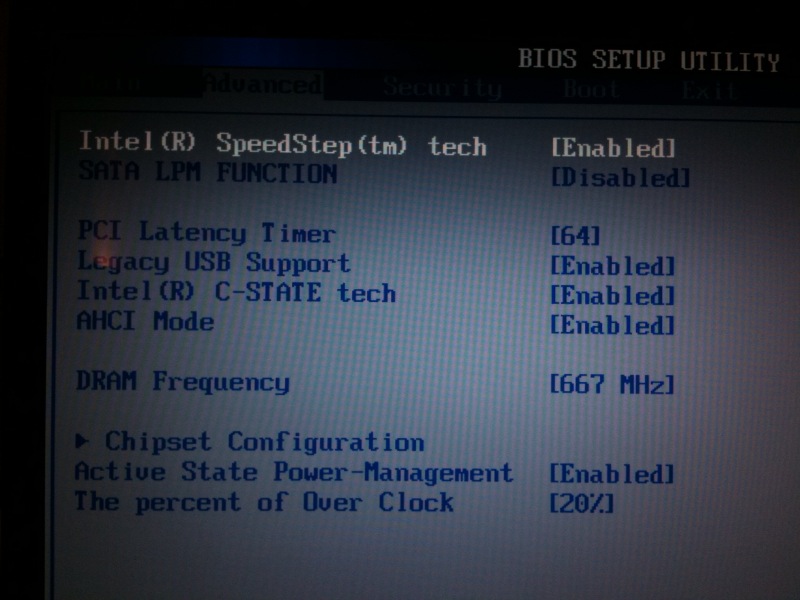
ram still running at 667 if i set it to 800 with 24% overclock pc still restarts even with g skill ram helpppp ?
So maybe its not the OCZ ram is there particular seting i should apply in the bios settings please help anyone with gt725 ?? -
Would you happen to have any ideas about my RAM issue with 667 ?? -
Hmm indeed i am quite stumped to hear of this issue, It surely can't be ram, so i'l pin the blame on the CPU or RAM, are you using a q9200, sorry i forget alot?
-
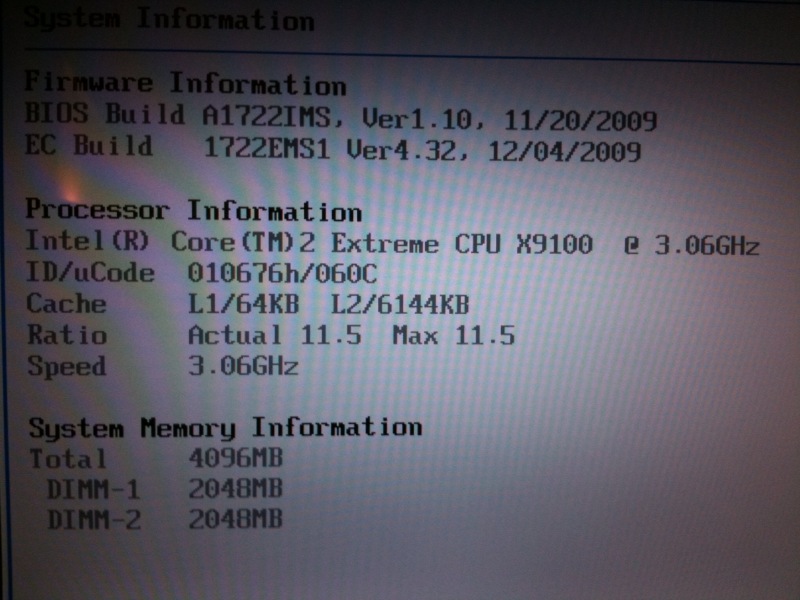
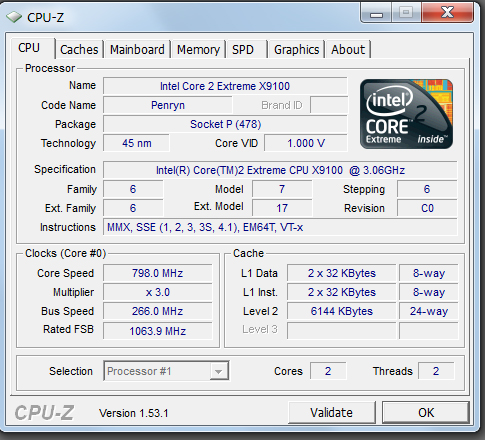
Intel core 2 extreme x9100 ( idare not press the overclock button as it goes up proper
I mean is there anything i nthe advanced bios I am not doing right ???
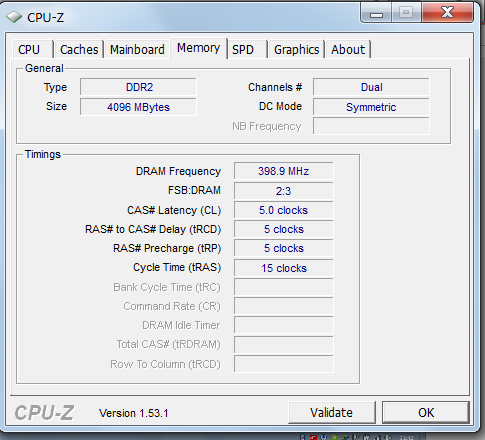
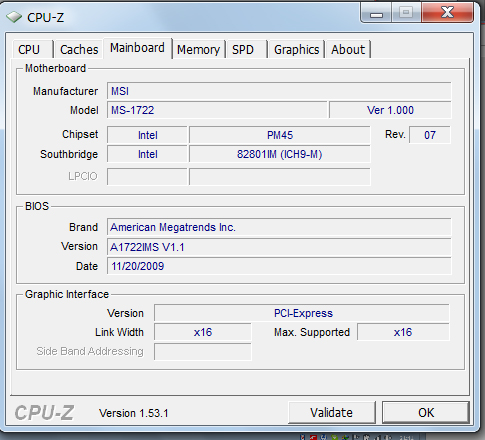
PHOTOS CPU Z BELOWW -
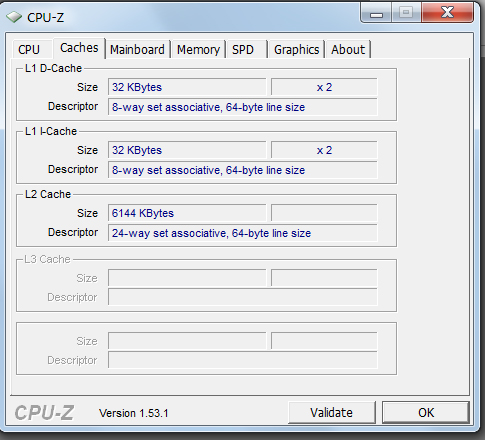
Helpppp RAM STILL ACTING UP EVEN WITH G-SKILL POSTED CPU-Z
-
No i think your doing everything perfectly, have you tried the latest bios?
I think you have a processor that is actually rejecting the OC, or somethings crashing out because the increment values are throttling up to high to fast, i have this problem with the GPU (It has to "Warm up" as i say).
Other then that i'm pretty lost for suggestion unless the motherboards having trouble with the new FSB (I'm sure this could be possible, right?)
The alternative is, go to my OC thread, and flash that old bios, and use set fsb to overclock (See if its willing to even budge?)
But i'm not sure how much support that bios has for processors, be careful!, also do you have the p8600/p9500 still? test that maybe? -
Why you GPU core and mem that low ? and why you CPU frequency is @ 798.0mhz ?
What you been doing exactly ?? and please take your time and relax !
Also do you know that it needs to be plugged in and high performance for it to work ?
Have you tried it on 20% ? -
Is there anything to tweak in the advanced bios settings ? Please if you could let me know exaclty what should be on and off etc.
THANK YOU -
Will you answer our questions/suggestions or do you know what exactly the prob is ?
-
I have it plugged in and have tried it at 16,20 and 24 percent respectively all working. However when the RAM is set to AUTO or 800 it goes up.
I can confirm that when I first unlocked the bios with ALT/Insert it was by default set to 16% with 667 on original RAM -
What you mean by "it goes up" ? BSOD ?
-
yes it freaks out restarts the works
sahll i take a photo of my bios settings ?
and post ? -
Na that's fine , how about on 20 & 800 ? still craps out ?
What you encountered , I experienced it with my stock transcend , but not with the upgrade.
Try 20% and 800 and let me know
E: It's fine , nothing wrong with the settings. -
going to try but please view my bios setting photos to see if anythign wrong
not working still going crazy at 800
-
It's the ram that can't handle it as I don't see any other culprit, just use it on 667 if it works fine.
Only way to be sure is put your P9500 in and give it a go , like cata said.
And why the hell is you CPU clock @ idle 798mhz ? even your GPU clocks are low. -
Which slot is for our headphones? the 3rd one?
-
firsted and second simultaneously mark
headphones primarily the first though, -
all good it seems that this processor dont like to run. the ram at 800 when overclocked, lesson learned, anybody in the market for some ram , no seriously let me know ?
Interesting it seems that the OCZ is more stable with this PRocessor overclocked at 24% 667 then the G-SKILL. Talk about changing the Bar.
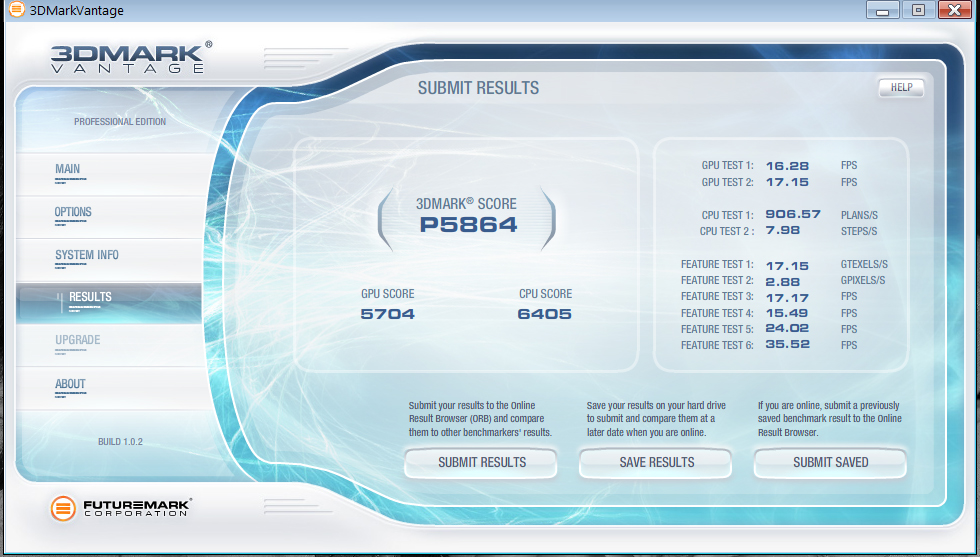
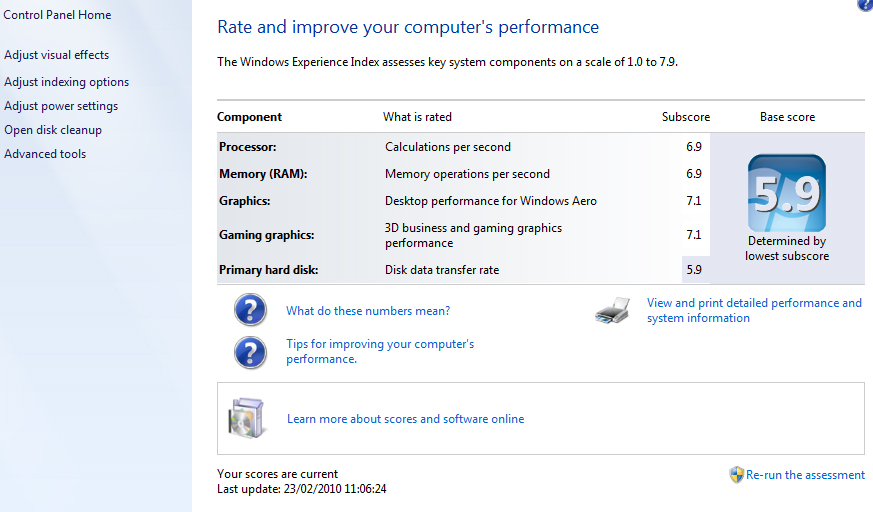
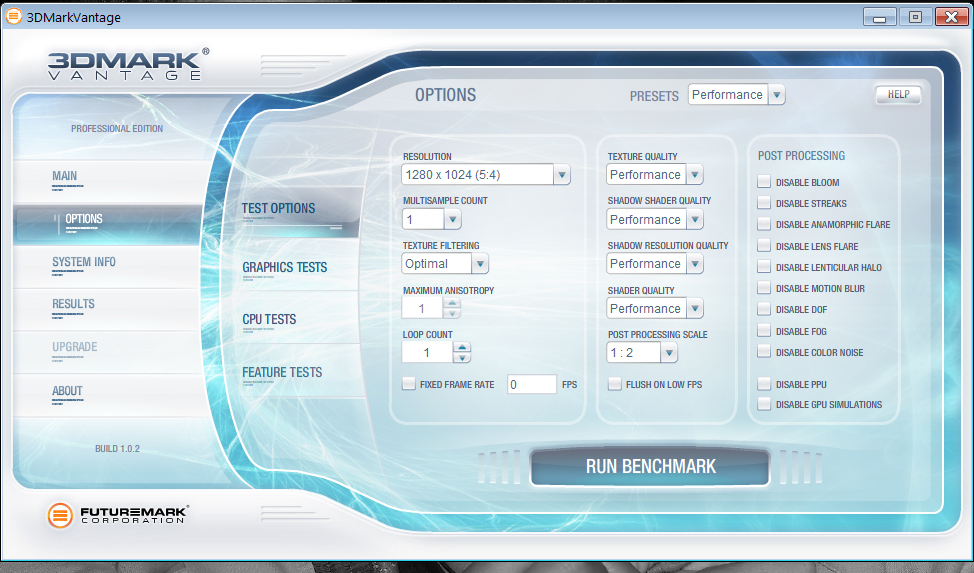
Anyway decided to put the OCZ in again running at 667 and 24% stable. Here are some benchmark and windows screen results so far.
Many Thanks AllAttached Files:
-
-
Run one on default "performance" with/without Turbo off. Set CCC to high performance etc etc tweak everything apart from 3DMV itself and you will see a gain in points.
Put it on eBay or the NBR's Marketplace. No point for people in here getting another pair of "transcend" -
i wouldnt mi d havi g an option to even disable the oc in bios that way i can run my ram at 800 fsb
-
It's simple , use the barebone BIOS.
-
Your ram won't even work at 800MHZ?
Even without the OC??
Try a barebone like dead says, i think thats the best idea, -
diesel if youre willing to post some screenies i may have some ideas about your processor problem.
grab cpuz screenies of your machine oced for me plz @667 and whatever you can get @800, i gotta feelin that your fsb is getting a little bit too high which is making things unstable. -
Anybody researched this RAM ?
http://www.ec.kingston.com/ecom/con...ingston.com/ukroot&ktcpartno=KHX6400S2ULK2/4G -
Why a Kingston ?
Good advice (and it's free) , try what been suggested to you instead of burning your money on a 3rd set of RAM.
There's 3 people willing to help you here , Cata , Auto and myself. What IF for some reason it doesn't work for you , what you gonna do ? Buy a fourth set ? -
Here is a screen shot with 16% overclocking.
Interestingly enough I am noticing a patern where even i games it gets jerky every so often when overclock is on, but if its off it seems to perform a lot more stable. I have decided to go for a faster hard drive as well to see if this will resolve anything (western digital 640 gig 2.5 5400 rpm tooo sloww) getting Seagate 500 gig 16mb 7200 rpm.
Was also researching this ram have you heard anything?? (Don't know if it will help me any but looks amazing)
http://www.kingston.com/hyperx/products/khx_sodimm.asp
KHX6400S2ULK2/4G 4GB 800MHz Low-Latency DDR2 CL4
(Kit of 2 - 2GB)
THANKS FOR HELPING..Attached Files:
-
-
True, I am getting a bit aggrevated of buying and selling, its driving me up the wall. Anyway I am refraining from buying anything just yet, and would appreciate the help. Plus i do feel that the number 1 bottle neck is the Hard Drive as it really is very slow (everything else is 7.1 on windows report and the lowest common denominator is 5.9 which is the current hard drive)
THANKS
PS: Anymore photos I need to post let me know -
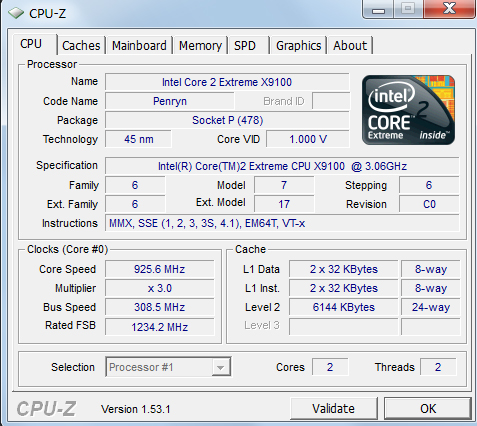
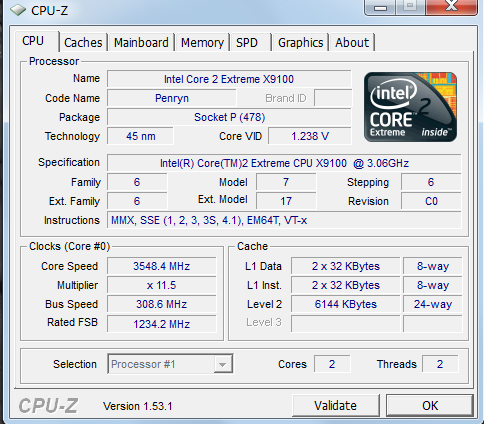
I've been going on about your clock speed for some time now ...Why is it that low ??? (Does that not bothers you at all) .Still low with turbo on ! did you lock it properly ?
Mine everything is on 7.2 apart from the HDD which is at 5.8. WEI is Irrelevant anyway and useless.
HDD is not the bottleneck here , it won't even make a noticeable differences when it comes to gaming.
CL4 Sodimms are more expensive than CL5 , but slightly faster. Not sure if it's worth the extra £ regarding it.
We are here for that , all you have to do is co orperate (hard I know)
-
IS this the speed u are reffering to, I have been monitoring it, it jumps from 950 to 3200 etc ??
jsut jumped to 2468 then back down again is that normal ?Attached Files:
-
-
Its not the Ram, its the CPU or Mobo, i also run 5400rpm HDD toshiba (Fairly cool, but slow ish i think 30 to 80mb min and max speed, and 111mb burst speed.) Games won't jitter because of the HDD.
Also the GPU has assigned RAM, it is slightly possible that the speed increase in ram is leading to strange behaviour on other components (But i doubt it.)
So heres what your going to do, forget this RAM, its not going to do anything and a 3rd set will prove useless (I'm fairly sure.)
Go on ebay and order a p7350, they're mega cheap, and this would be the best way to confirm what the problem is.
If the clock is low it could also be power issues, go to CPU-Z .... Hmm actually,
It could be a possible power issue.
Or your CPU is damaged (Somewhere along the lines) or maybe incorrectly seated??
We should be able to re-throttle your machine up with RMCLOCK by setting multiplier high but vcore usage low,
Go and download
http://cpu.rightmark.org/download/rmclock_235_bin.exe
http://www.flipfire.net/download/rtcore64.zip (If your using a 64 bit OS.)
Then refer to this guide (As i don't have the time at the moment to write my own)
http://forum.notebookreview.com/showthread.php?t=235824
When you follow the guide through and come to this screen,
![[IMG]](images/storyImages/step3x.jpg)
Set the last multiplier, and IDA active and activate the power plan, this should actually let your machine throttle up, if you randomly bug out then go ahead, turn IDA off, and select a lower multiplier.
(Set all of the multiplier vcores to 1.000V , or the lower in the drop down menu, this way we should be able to throttle up the machine)
But if you are able to play games with stuttering, its actually seeming like a possible issue with the CPU, As i say, the p7350 is very cheap, and will suffice until we nail this problem.
-->*OFFICIAL: MSI GT725 Owner's Lounge*<--
Discussion in 'MSI' started by faisalhero, Feb 4, 2009.