 Problems? See this thread at archive.org.
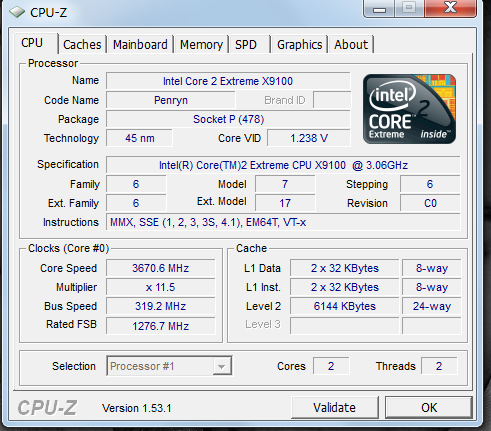
If turbo is ON , it should stay fixed , let's say @ 3.6 (depending on the % you set in the bios) The 1st 4 digits shouldn't move at all.
Is that screenie with turbo on ?
EDIT : This time follow !start downloading.
-
-
I wrote half of it wrong so i had to change,
Its not a power fault, but i think in regards to overclocking it could be, i wonder if IDA has a higher voltage bump that we could actually use to throttle the core to max multiplier at an increased voltage (But processor stable) .
I think its working fine though, but i do believe its the CPU being a bit temprimental for the overclock, which is why i think a cheap p7350 would help,
Is the X9100 OEM/ES/QS/MAGIC/BANNANA/LOLWUT? -
What about the P9500 ? he still got it , could try with that. It's OEM.
What bugs me is how low it is .. shouldn't be that low -
FIXED FIXED FIXED, through something so stupidly simple I am embarassed yet relieved
START, CONTROL PANEL, Power Options, Change Plan Settings, Change Advanced Power Settings, and always always ensure that Power Processor Management is on 100% for on battery and on 100 % plugged in for Minimum and Maximum Power State, that way it does not let Win7 Manage the Processor Cycling.
Now I wonder if i should be trying out hte overclockign again seeing as I have changed the settings ????? and hte processor is not fluctuating anymore ??
NOTE: OC'ing with OCZ RAM Still didn't work at 800 doubt that the other one will but myPC has spead up aready and no fluctuations YEAHHHHHH
-
Here is the Proof stable and constant
Attached Files:
-
-
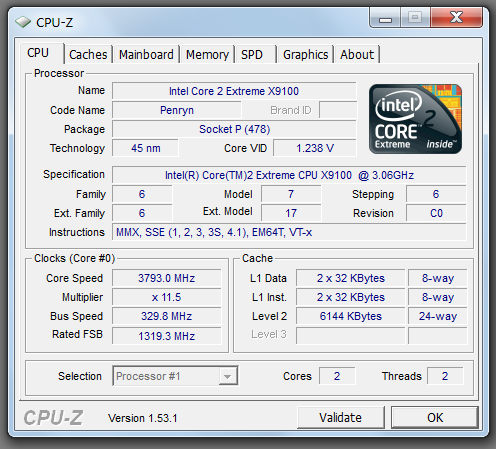
Awesome ! Now Overclock that thing ! what's the top speed on 24% ? 4.1?
-
Why isn't it in high performance mode anyway?
I'm lost, 3.6ghz stock? -
Good question ! been wondering the same thing too , you use it on battery most of the time or what ?
It's an extreme CPU and stock is 3.06 Dude imagine the juice you can squeeze out of that thing !!!
That's a screenie with turbo on. Check the FSB -
Here is the 24% OC SCREENSHOT AT 3793.0 I CAN FEEL THE POWERRRRRR
Attached Files:
-
-
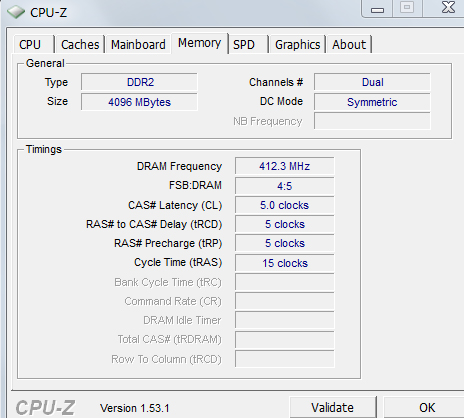
Nice , how about 24% screenie of the memory tab.
-
Memory Tab.......
Attached Files:
-
-
Mine is at 415 - 2:3(stay fixed with or without turbo) when turbo is pressed. Anyway I still think should should have gone for the kingston. They don't call it high performance for nothing.
You should test both set of rams using your P9500. And see what that does.
Or using Setfsb.
Only thing that worries me from beginning was the clock speed , which are now back to normal.
If you don't wanna test the rams etc then case is closed ! everybody can go home
-
IM HAPPY SO FAR ALL IS STABLE, IF I CANFLOG ALL MY OLDER STUFF ALA EBAY THEN I MIGHT TAKE A STAB AT THE KINGSTON RAM FOR S AND GIGGLES WITH THE PAYPAL CASH BUT FOR NOW IM GROOVY.
MANY THANKS,
THIS PROJECT HAS BEEN WELL FUN
New Hard Drive did the trick BE WARNED STAY WELL CLEAR OF WD 640 GIG 5400 RPM 8MB cache it is slow as molassess ! -
LOL MY REALTEK CARD CANNOT HANDLE HIGH VOLUME, WHICH SOD OF A FAIL WENT AND PUT IT IN MY DAMNED MACHINE!??!
But seriously, my audio is cutting off when its being pushed hard haha, that sucks big time. -
Get an external soundcard
-
USB/External DAC ftw
-
Good evening (or morning) everybody.
I feel that its the only place that I may find someone who can help me. I`m really counting on this one.
I`ve just run into a big problem. My AC Adapter for the GT725 has just died - the battery suddenly stopped charging and it refuse to do so on any power socket that I have available at my home. Its not even 12 months since I`ve bought it.
As I need my laptop to be working tomorrow and the battery has just died I went to google to search for the replacement and all I could find was shops in the US or UK and not so many of them, that offered it.
The problem is that I live right now in copenhagen and - here it comes - dont speak danish at all, so my search for some danish shops selling the spare ac adapter failed miserably. Its actually really difficult to find a shop offering a laptop itself and they dont seem to even have heard about GT725. Mine was not bought in denmark.
But after investigating the adapter itself I found out that the model name is ADP-120ZB BB and it was made by Delta Electronics Inc. I googled this guy out and found out that I can buy chargers with the same model name, but for ASUS. My question is - will it work? Will my battery suffer from it? If it will work maybe there is something better then the Delta that would work longer and that I could invest in?
Really counting on you guys and thanks a lot for reading this post.
-
The Realtek card didn't seem that bad though, i can't believe its crashing out like this, atleast i can run audio from the 4850, should have 0 issues with that.
Performance has been getting slack on my machine lately especially IE, maybe Flash 10? But i'm hating the problems i've been having.
-
That's really strange cat, I haven't heard of anything like that, is it just the speakers that are cutting out or is it the headphone Jack? Try different drivers, use drivercleaner from guru3d, and do a fresh reinstall.
Zwirek,
you don't need an exact replacement if you Need it immediately, goto your nearest electronic store and bring just your brick, you can get a generic 120w adapter for your laptop with no I'll effects to it's actual performance. The same can be said about your battery.
It is possible that the battery could be damaged if your brick shorted out. But you won't know until you replace the brick. Just google the word for replacement and take that to the store. -
These two will work - the cheap one is used, the other is a shop in Lyngby (Copenhagen)
http://www.dba.dk/universal-lader-baerbar/id-64643808/
http://www.sentronic.dk/product_inf...d=149&osCsid=b7e5419dca6538cae8ea9c3faf694101 -
Thanks a lot for your help.
-
It could also be a grounding issue (Had an adapter completely disable a laptop but it was functioning!)
Is it a 3 pin adapter or 2 pin, i believe the third is to ground current and if its not there, then the machine could be going scits with things it can't ground.
It was the audio jack that was cutting out but i've never experienced it like that, next time it happens i'l put it back on lappy speakers to see if its funny like that but i just though, forget it,
Plugged in my N900 and enjoyed some premium sound from that haha. -
Ebay is your friend:
And here is your adaptor ( I bought one from them 2 as I like having one in the office and one at home
http://cgi.ebay.co.uk/AC-Adapter-Ch...Computing_LaptopAccess_RL?hash=item2c507856a2 -
Thanks a lot for this. Bought it.
In denmark couldnt find anything close to home. Lyngby is too far and they dont have it on the stock. They wanted to sell me a 90W universal one by saying that the voltage is what is really important. I didnt go for it.
Ive made a "risky" deal and ordered one from other company in the uk- http://laptop-battery-adapter.com/delta-19v-6.3a-120w-ac-adapter.html
Hope it will work. If both will then I`ll have two.
-
thats exactly the same one, they all come from the same factory pretty muxh also belkin does a multi connect laptop mains charger now all u need is the end bit which is converting from uk/us to european 2 prong which should be easy enough to get locally. the ebay one worka perfectly for me
take care... -
Just use the powerchord from your old adapter
Funny how its usually cheaper to buy something from Hong Kong than in your own city...
You were right not to buy the 90w universal one: It would work fine in all 2D programs, but not enough power to play 3D games. I use the one from my ASUS (70 watts i think) when surfing etc. in the sofa - too lazy to pull out the MSI one
-
Upgrading ATI 4850 video card 512MB version , plausibe ? possible ? Where can we get them, is the card proprietary or a standard format ? And ould the heat sinks touch the same place etc ?
Interested in what others have to say about this-------- -
Standard Format
No HE tab
MXM 2.1 or 3, or 2.1 type * people will fill you in.
Upgradable to AW 4850 1GB,
GTX 260m (Not worth it)
GTX 280m? (Unknown.) -
How ?, Where ?, Who ?, Tell me all please.
THANK YOU
MAN I LOVE THIS FORUM
-
Take it apart, look at the connector.
You will see if it's MXM 2.1 or 3.0.
3.0:
http://www.mxm-upgrade.com/Tech_30.html
2.1:
http://www.mxm-upgrade.com/Tech_13.html -
Is it on the actual white bit where it connects or on the video card MB ??
THANKS -
It's type 3 2.1 , Only one that will work is the Alienware 1Gb version like Cata said. The rest won't work.
The 280 is a 3.0 -
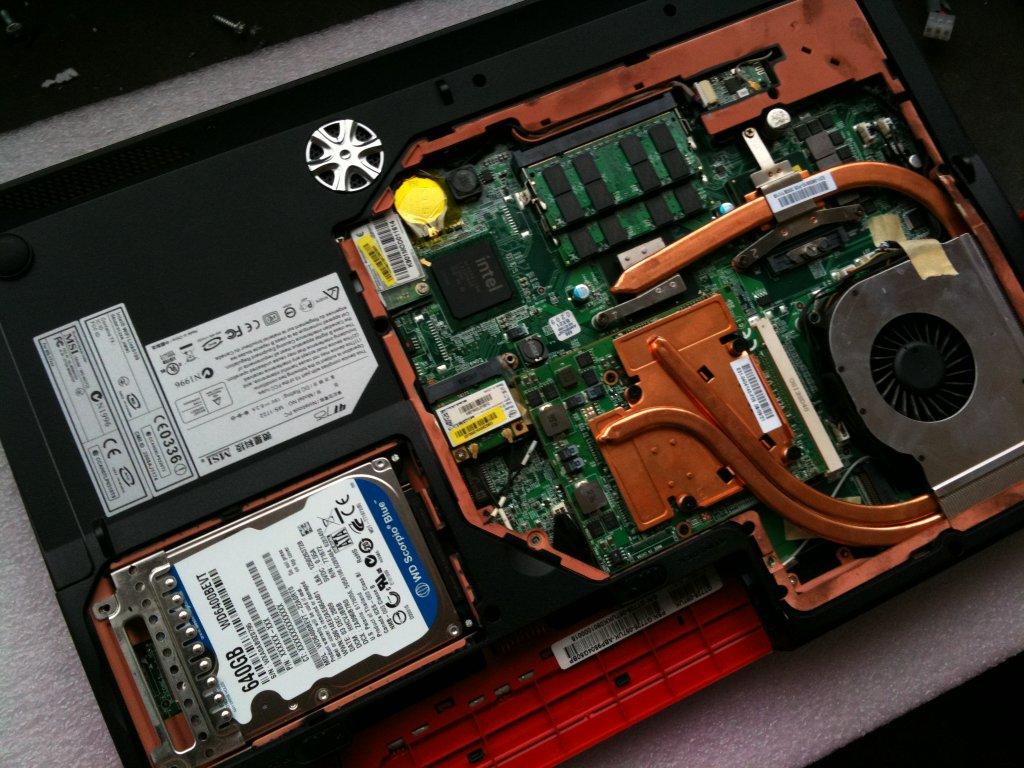
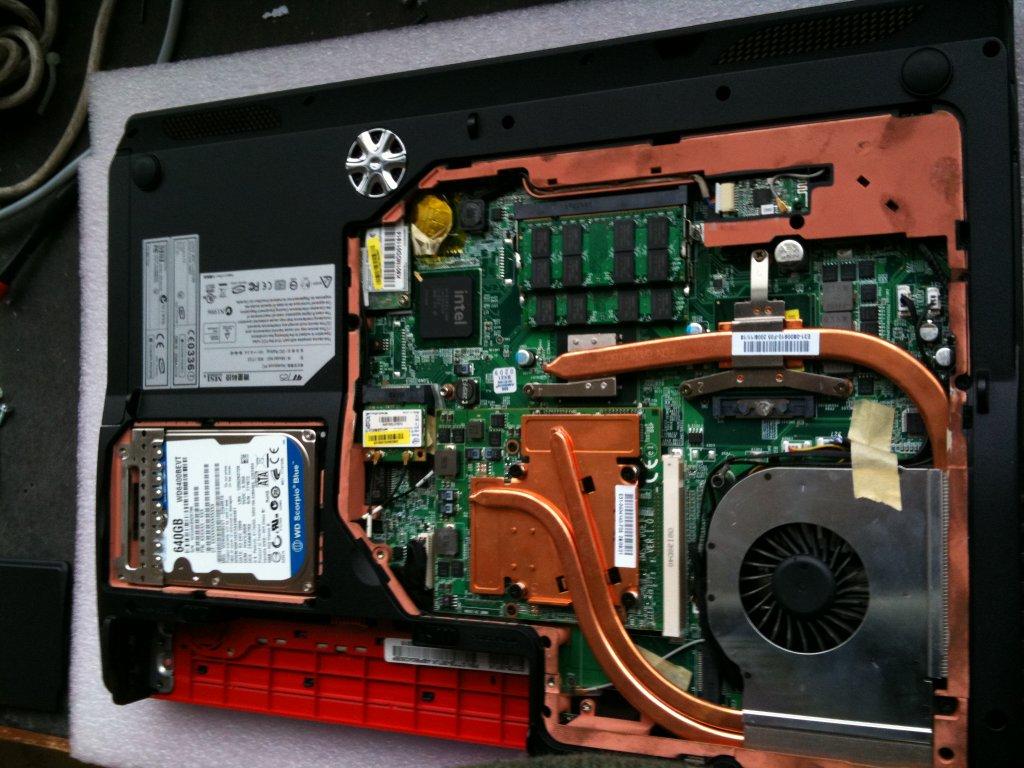
Here are the photos think its type 3 ? Not sure
Attached Files:
-
-
Type 3 - 2.1
EDIT : Is that HDD of yours a 2.5" ?
II : nvm it is , looks big though
-
I ditched that HD in the end put in a 500 gig seagate 7200 RPM with 16 MB CACHE (it flies), This one is my external HD now for data and downloads etc.
(PHOTO IS A BIT OLD) weeks
so type 3 - 2.1 then thanks -
That's a 280. Would love to play around with one of those .... a shame it's not a 2.1
http://forum.notebookreview.com/showthread.php?t=459564 -
cant see that one on the site for some reason ?
(4850 AW 1 gig)
http://www.mxm-upgrade.com/Tech_30.html
can find it there, probably not looking in the right place.
OR HERE
http://www.mxm-upgrade.com/Store_13.html -
what site ?
EDIT : @ 2729.3
![[IMG]](images/storyImages/captureez.png)
II : Get in touch with Alienware , or search ebay & NBR. That's the only way to get it. + it's a rare item. Best of luck. -
The guy got in touch with me hes like not too much difference from the 512 to 1 gig etc,
The person I am reffering to of course is from the MXM Technical Dept. Kris Verbeeck, but he may have a point, oh well stick to 512 then. -
The only difference is the memory , which newer games will take advantage of.
IF I'm upgrading , it will be to an Nvidia card as I want PhysX. -
Gah forget Nvid, and psyx doesn't boost much anyway,
Guess whos laptop got dropped again,
I swear it wasn't my fault! my foolish mate had the laptop bag open and it slipped out,
Again hit the ground very hard, i was actually in minor shock, looked at the area of impact, no dent no chip,
Powered it up, no damage 1 bit,
Dismantled it to find if anything is a bit odd here and there or out of place,
Nothing.
While i don't have confidence on the laptops outside, how on earth is it still running.....
Oh i just checked that my hyundai ram is actually made by Hynix (Which i know to be very reliable).
The main difference between vram will really impact at 1080p res, -
Not for boost but the eye candy. Stop torturing the Advent !
is it coz you want a new one ?
-
Haha i dont actually, i just want it to last a while, but i mean its still working and being butchered :S
Did you hear, the GT660 is apparently a 3d gaming rig :S. -
It will still serve you for some time , stop the abuse
Yeah ! seen it and love it ! but the 660 is a 15" right ?
It looks cheap , cheap plastic .. hardware-wise it's awesome though. -
Haha true,
I'm just happy my replacement ram was high timing hynix eats the consumer junk for breakfast!
-
your best bet is to just get in touch with some alienware owners and ask them if they have any 4850s or if they can buy them from alienware. You have to have an alienware to be able to buy the cards....
so i suggest making friends, or.... ask one of the m17x owners who are selling theirs if they want to part with one, theres a guy selling his right now who has two masters in there, so you might be able to make a deal with him....
as for 1gb, its a future proof solution on top of it actually being a perfect fit for my wuga screen.
the larger and more complex the textures get, the more ram will be needed, this also gets larger with different video effects, and you take those and their vram requirement and that scales depending on the size of the res for obvious reasons, 512 "should" be enough, although my tests show it bumping up against the 480mb range, and that was with older games, newer ones might push into that 1gb territory.
i for one like to future proof something, especaially when it costs me $500+ -
I future proofed,
With my lovely naff resolution and my 1080p with its upscaler
-
500 bucks ouchhhh !
so can u point me to the direction of da individualz den plz
-
I had my Q9200 running @ 3ghz but one of the core couldn't handle the torture.
CPU Stable @ 2962.8 & RAMS @ 493.7 .. Kingston went over1000 without crashing
![[IMG]](images/storyImages/capture1er.png)
![[IMG]](images/storyImages/capturerp.png)
-
like i said man those buggers sell like hotcakes, and theyre a rarity, so that makes it even more of a problem, look for the 3870s also, cause theyre troopers as well!
@death,
now see if you can undervolt and save some volts with your amazing new clockspeed.
-->*OFFICIAL: MSI GT725 Owner's Lounge*<--
Discussion in 'MSI' started by faisalhero, Feb 4, 2009.




![[IMG]](http://img716.imageshack.us/i/captureez.png/)
![[IMG]](http://img35.imageshack.us/i/capture1er.png/)
![[IMG]](http://img85.imageshack.us/i/capturerp.png/)