Problems? See this thread at archive.org.
is it 6-6-6-18 ? I think Cata is your man when it comes to ram
-
-
My stock is running at 5 - 6 - 6 - 18.
I occasionally drag them back to 5-5-5-15 though, -
I lowered mine to 4-4-4-12 last time .. didn't noticed a thing
Even tried on 3 ... personally , don't touch the rams unless it's on desktop. Notebook is pointless .. just OC the CPU and the ram frequency should increase anyway .. making the whole process fast and simple. -
Theres some bandwidth increases, at that low, your speed will actually be very nice,
But yeah, the performance is not really noticable, thus why people aren't a big fan of DDR3 yet, but i think mandrake got some top end DDR3 and response/transfer speeds/latency delay was twice the speed of DDR2800, which i have to say amazed me quite a bit. -
yeah i notice that ddr3 is like at cl8 slow ? if im not mistaken
ok done ( 5.5.5.15) but the ram is still coming up as 6 6 6 18 in cpuz does that mean i didnt really do anything ?, Or that the computer says nooooo -
Dead, are you telling me we can manually set our timings?!
howd i miss that....
Honestly at 5.5.5.15 im fine, the main thing i want to do is force my ram to 1000mhz constantly, instead of having to oc to get there, if i can do that ill be happy.
as for a decent comparison between dualcores and quads i can safely say that i agree now in the power of even the "timid" q9000, ive been working in premiere cs4 and playing some games lately and i haven noticed considerable decreases in speed since putting my t9400 back into my main machine, it just doesnt have enough power to keep up, even when its oced to 3.13ghz.
im even more tempted to get a new quaddie but i think im gonna wait till the gx740 is available in a barebones for a decent price. then i think ill sell both my laptops and upgrade. -
Yes you can manually set it through the bios.
Agreed for the ram oc , that would be sweet ! Need to drop a word to svet and see if he can come up with something.
Diesel, CPUz is not that accurate , don't rely on it.
@cata , in his G73 ? Or the alien he had before that ?
I think it's the 1333mhz one ... Would be nice to oc that thing
-
His g73 was topping read/write speeds of 11 gig and latency of like 20 ms... mines like 60 i think. at 5-6gb read/write.
If i recall ^^. -
1333mhz I believe
I want a G73 , that's the only machine that got my attention so far.
So who is using the 10.3a ? Seen any performance gain from the preview ? -
I'm still using the ones posted a while back
I'm not too interested in the G73, but nothing this year has like really grasped my attention, The GT660 looks nice, has a nice feature set but the price and chasis, alittle off throwing, and a non DX11 compliant gpu lol.
I think i've turned my attention to pure quality sound this year.
-
You need to try the 10.3a , better performance than the preview.
The 660 does caught my attention for a little while ... Was put off by the cheap looking plastic , hardware is sweeeet though.
I love the stealth look of the 73
-
I have a question regarding the speakers on the 725. When i installed 7 on the computer i was intially happy using the bundled driver for the soudcard. But on closer inspection it displayed the sub a seperate speaker. As you can only have one speaker the sub wasn't working.
I installed the full realtek package from MSI. the second speaker disapeared and the sub started working - though it is disapointing, nothing compared to toshiba's sub set up.
Anyway, with all speakers now working i now tried to get 5.1 working. I refused to work. I tried change through the realtek software, and through windows (which i believe is drawing down the same options anyway). Though now i can select Stereo, Quadrophonic, and 5.1 when i try to run the demo speaker check on any of the "surround" sound options both the left speakers/both right speaks sound off for front left and right respectively on the demo. But there is silence for left and right rear and the sub.
Am i right in think this laptop doesn't have true 5.1. Just 2 sets of left and right and sub? or am i missing the option that makes this work?
Either way what we have isn't 5.1, its 4.1 as we have no center speaker! -
Its not 5.1, its stereo,
The subs good when configured with natural bass and powerful enhancement.
We have so many useless features that dont work, granted HDMI out possible supports it. -
We should be able to get 5.1 with external speakers using the 4 headphone/mic/aux jacks on the right side of the laptop. Havent tried it though as I have an external sound card.
Blazin -
Which external do you use ? Is it worth it ?
-
I use a M-Audio Fast Track http://www.studiospares.com/Audio-Interfaces/M-Audio-Fast-Track-USB/invt/363670
as I do a lot of recording/sequencing, so the internal soundcard just wasn't up for it. And yes it was worth it for me, but if you don't need it for music production, its probably not worth spending that much.
Blazin -
Can I advise that you install the gt725 windows 7 drivers via msi s website as I noticed that windows drivers do ot work correctly !
-
Hey, got BFBC2 Yesterday, and now, when i play, i have ~60fps, but there, how can i explain, black boxes turning on and off, kinda like a black flare... its really annoying.
Anyone else got that problem or know how to fix it? -
The machine wont handle 5.1 with a headphone and line out jack, its possible someone could program a quad configuration to work between the two outputs,
The realtek pannels show SPDIF and stuff like that, don't know if we have anything else for it,
The alternative is an external sound card (x-fi blaster blah blah or mayb something pcmcia?) -
actually cat, 5.1 is possible with the four ports combined, its listed as 6 channel audio. however you will lose the option to use an external mic, since that jack will be assigned to an audio port.
analouge 5.1 is really a dated option as its much easier to get an spdif connection to your soundsystem, or use a TOSlink cable and run optical
-
Really? i use USB mics and stuff like that, but i didn't know it could be used as 6 channel,
Are you sure? lol headphone, line out, microphone, line in, is there anyway to get this going?
Do our systems support SPDIF or TOSlink ability? (Sorry i know nothing about the main outputs, but this is something i really wan't to know ! )
Cheers man! -
I'm not sure how many of us are running 10.3 drivers yet (I'm still on Mobility Modded 9.12 waiting on the official release), but check out this article on Tom's Hardware http://www.tomshardware.com/news/catalyst-radeon-catalyst-10.3-driver-eyefinity,9934.html
All I can say is Wow. I was just looking forward to official mobility support, but it looks like it's a game changer in benches and performance as well. Not just fringe titles and brand new games either... L4D 1/2, Far Cry 2, Crysis, Dirt2, and the list goes on. -
@Cat,
our systems do indeed support all those i listed, as well as TOSlink and Spdif, those both work out of the port closest to the firewire port. i dont remember which are used for analouge and in what order, but its split up into channels
ie 1 jack for front left/right, rear left/right, center/sub.
i think the fourth is used also but im not sure... or it might be that the toslink/spdif port or the mic port is left alone. but im not sure. i have however used analouge surround sound to great effect. for a while i had a 4.2/5.2 system that was maybe a little bit too powerful for a dorm room.
12'' 200w sub, 8" 120w sub, 4/5 100w channels, all RMS rated.
i recently configured them into DTS using TOSlink and theyre amazing, i really miss em right now.
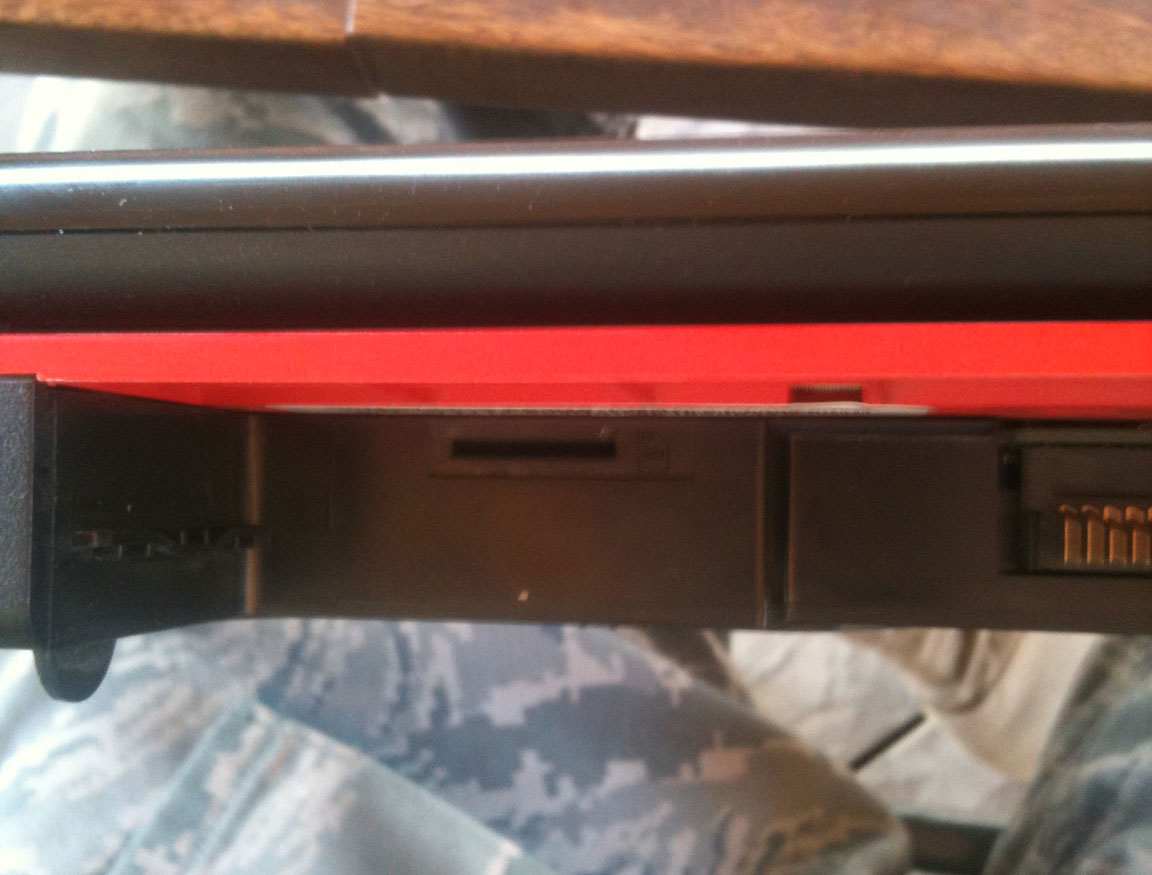
Another interesting tidbit. I'm quite suprised (well...not really this is the swiss army knife equivalent laptop) to find that our machines have support for sim cards... go figure right?
if you'll direct your attention to a small 1inch or approx 2.5cm long strip on the back. Underneath it you will find the following as displayed in the attached photo. Now what I'd like to see is if theres actual pins in there or if theres just a mounting spot on the laptop for a sim card bracket, if thats the case, a simple mod and a bit of solder, and we could have a mobile fleet of 1722s.Attached Files:
-
-
Aha, that makes me very happy mate, thanks for telling me
,
Hmm thats interesting, i shall check my machine for that aditional slot!,
Do you just activate the analogue ports with the realtek pannel?
EDIT:Elec, you sir are a star, +rep.
I'm very very very happy at these features which totally slipped me by... -
Huraaaay great news,
GX740 drivers are working with the 725, well some are for me,
The most interesting one is REALTEK! the HD audio installed flawlessly, we now have equaliser control!! woohoooo!! -
Hi all,
I'm new here, although I have the GT275 for a long time...
I have some doubts and I was hopping that you guys could help me.
Here is the deal, I bought a Home Theater (Phillips 3576/78) and it comes with 2 digital audio input ports, one coaxial and the other optical. So, my question is: Which should I use, and which cable (and connectors) should I buy?
Before I read this thread, I was going to buy a regular coaxial cable and one adapter RCA -> P2 Mono, to plug into SPDIF (headset) entry on notebook and connect to coaxial audio input of my HT. But reading this thread, I'm get confused... Is the digital output of MSI GT275 optical? 'Cause seems that optical cable (in USA I think you call TOSLink), has a connector a little smaller than P2 connector that appears to be the connector of SPDIF input on notebook, and it also came with a plastic 'trapeze' around it.
p.s.: If the text is confused, I can explain it more... English (as you can see) isn't my first (nor second) idiom
-
Why don't you use the one on Realtek's website ? it's 2.45. The Gx is 2.38 and the one for the 725 is 2.28.
It has the EQ as well. -
DAMIT DEAD, YOUR ALWAYS RUINING MA LIFE.....
Haha, didn't know that bud cheers man,
Xbell, i think the bottom one is what you need but don't count me on that, wait till elec comes, hes the audio man (After teaching me that the machine supports much more then meets the eye....)
Welcome to NBR by the way.
-
Hi guys, sorry for jumping in mid discussion again.
Basically my Advent 6555 laptop is going all to hell; I've managed to update to the MSI GT 725 AMI BIOS (v1.10) and latest Camera/EC/VGA firmware, both of which I downloaded from the MSI website.
Unfortunately since then the touch sensitive hotkeys have totally re-assigned themselves and are no longer working. My wireless function has switched itself off - whenever I press the touch sensitive wireless hotkey now a message pops up saying that I can assign a program to it but no mention of my wireless capability! Accordingly I have no way at all of turning on my laptop's wireless capability - clicking 'enable'/'disable' via the Windows network conections control panel does NOT work. HELP!
Does anyone here with an Advent 6555 or otherwise know how I can get my wireless capability active again?!
I note alot of you are mentioning lots of tweaking options in the BIOS - is this only possible with the actual MSI GT725 model and NOT the rebranded Advent 6555?! I'm wondering if I've completely screwed my laptop by flashing its BIOS/Firmware with the MSI GT725's?!
Any constructive comments/solutions would be very much appreciated!
I also seem to be suffering with a power issue whereby I can't power on when the mains adaptor is plugged in... I've trawled the net for solutions but the only answers I find point to the suggestion that my laptop's nackered - any ideas?! -
Ok , you can keep the BIOS it's fine. The touch sensors and stuff is related to the firmware. All you need to do is revert to the advent's one.
Which one did you flash last ? If it's the firmware , it should be on the USB key you have used (If you have used the MSI HQ Tool).
As for the power issue i'm sure it's related to the notebook itself and not the flashing.
@Cata , no prob man
-
Dead, i hope that isn't an image of your brain scan
,
For the touch pannel, take the battery out and power cable, then hold the power button 30 seconds, see if the touch pannels going dohicky lol,
As for the bios, you probably do wan't to revert to the advent bios lmao,
The 6555 is definately the 1722 by msi, garanteed, even the MSI bios key thing picks it up as an MSI machine, -
Na
, it's a Chinese dude head , he got screwed for cheating at Counter Strike. They knifed his head in !.. He's alive and kicking though.
http://www.computerandvideogames.com/article.php?id=239999
I'm pretty sure he will have to revert back , as the layout has now changed .. everything is mixed up. He now has turbo feature without the actual touch thingy
-
the audio used in this laptop and all the other rebrands is the same, they all support optical and SPDIF,
Optical uses a TOSlink cable to connect to the laptop, which is what i use, its awesome, and gives great sound quality. A TOSlink connector can be purchased on ebay for about 1 GBP or $1.50 ish USD. That combined with a random optical cable i got from the local electronics store and i was in buisness.
As stated before you can get DTS and Dolby II out of the optical connection, as for my amp, ive only been able to get 48khz, though i suspect thats the amps fault.
As for anyone getting drivers for ANYTHING on this machine, you dont have to use the msi provided drivers, as theyre outdated and basically the same as the drivers provided on the websites of the manufacturers of these components, just write down the part name and goto their website to download the newest drivers.
And speaking of drivers, you can now download a tool called catalyst mobility downloader, and you guess it, it downloads the latest catalys mobiliy drivers, it gave me 10.3 and quite fast too. Im not sure if its a beta or full relase version but it installed without a hitch. -
10.3 should install without modding bud,
Thanks for the detailed description of the ports, i gave away some 5.1's because i lacked this feature, i had planned on using hdmi out to transfer audio to my tv and then use my tvs optical out haha, i 'm very happy about this array of ports and features the msi has,
As for the research regarding the so called sim slot, mine is blocked off, i will atempt to take the sticker off today, and maybe check the interior of the machine to see if there is anything there or not.
I'm ok with slightly outdated drivers to be fair though, MSI support is nice, they release drivers that are reliable and stable in my oppinion, so its nice just to have a collection in 1 place.
Thanks again auto. -
Oh dear I had exactly this problem last May, with my first MSI GT725 UK210. Tried bios flash, firmware etc:
Sent it back to the retailer, fortunately it was less than a month old, and was replaced with a new one direct from MSI since it was tested as a general hardware fail, so seems there may have been a hardware failure, the control strip just completely died, everything including the wi-fi connection just wouldn't respond.
I did allow the machine to get very hot on my lap, blocking the exhaust vent on the right side, can't say for certain, but wonder if this was responsible. -
Hmm depends what ya were doing fishlice, i use the machine on my lap regularly, but yeah this is either bios or hardware for sure.
-
Now I have another doubt... Can I use a coax cable to connect my Msi GT725 to my Home Theater? If yes, what connector should I use on my laptop (P2 mono, using an adapter RCA Mono->P2 Mono)?
ps: I know optical should be better, but my Home Theater (Philips 3675/78) has both input optical and coax (SPDIF I guess), my TV has only optical out, so in order to use both inputs from my HT, I have to use the SPDIF connection. -
As you been trolling this forum for ages , you should know that no one has disassembled their notebook so far.. why ? that's because it's not needed.
And most of the 725 users are not obsessed about doing stupid non related stuff with it .... it's good as it is.
And why are you still on about temps .. how many times do we have to tell you that your temps are fine ? Why you kept going on about it ...
We even told you that room temperatures plays a role in all that ... not everybody will get the same temps no matter what they do !
They say it's hard to find a needle in a haystack ... well , that's a myth ... as it's not difficult to distinguish you from others. -
Yep , i think i'm being too polite. As a fact , i am smarter .. i don't go on about the same thing over and over again.
I'm very scared .... -
WHQL is out ! Downloading now ..
EDIT: Do not download ! it's for the desktop only.
EDIT II : It's alive ! http://support.amd.com/us/gpudownload/windows/Pages/radeonmob_win7-64.aspx -
Damit dead,
Cheers man, upgrade commencing in a few.
-
No prob Mine still says 9.12 and it's pretty much the same as 10.3a
-
Upgraded, seems fine, been doing some borderlands.
Dead, you think a mini pci-e ssd will work with out machines as the primary boot device? -
Does yours say 10.3 or whichever you had before ?
Well , in theory it should if the bios allows a mini pci-e as boot device .. when it comes to msi , don't bet on it
Do we have enough space for full or half pci-e ssd's though ?
We need to check underneath the keyboard , heard there's one there .. -
Help Guys.
The battery of my GT725-212 is down. Don't take more charge.
I don't know what happened.
One day the AC adapter is charging the batt and i hear a sound.
A smooth "tlec".
And after this the notebook can't power on with battery.
Only power on in AC adapter.
The notebook detect the battery, but can't charge.
My Question:
I can use this models of batt without broken my notebook?
http://www.replacement-laptop-battery.com/search.php?keywords=bty-m68&images.x=0&images.y=0
Because i can't see everywhere in USA the battery with the specifications native (10.8V 7800mAH).
Help me!!!!! -
http://www.rkcomputer.net/rkcnotebooks/index.php?l=product_detail&p=137
Pricey though ...
And use this to check your wear level http://www.hwinfo.com/download32.html -
Dead2th3world,
this site (rkcomputer.net) is trustworthy?
The hwinfo don't speak nothing about the smart battery. Why? -
Yeah RK is kool ..
What do you mean ? You can't see anything in the battery tab ? -
You make me laugh ! Have a look at my sig .. and that score is with 9.12 on 550/900 and not 10.3
What you trying to do exactly ? Get a life .......
Why you trying to copy me all the time ? why you want to do everything I do ? all the harassment .... what's up with you really ?
-->*OFFICIAL: MSI GT725 Owner's Lounge*<--
Discussion in 'MSI' started by faisalhero, Feb 4, 2009.