Problems? See this thread at archive.org.
Hi, yes You can upgrade to GTX 970m but if you will buy with Clevo needs driver modification or you need flash it with MSI vbios.
-
-
I was told from rjtech support that the p150sm-a and p170sm-a models have a different vbios than the p377sm-a models. Does it matter which one I order?
-
I would go for the P377SM version for non optimus systems.
-
I was wondering if it would be possible to use the GTX570m heatsink interchangeably? What I am trying to find out is if I could I use my GTX570m heatsink on the GTX970m granted I used the dremel technique to modify it accordingly. My main concern is the processor on the 570m is more of a rectangle shape and the 970m is more of a square shape.
-
The core contact area is fine, it's the posts that meet the VRM circuitry that's the issue.
-
Well that's good news. I should be able to saw the posts down with my dremel. No?
-
Are you sure about that ? Omega told me MSI Vbios only recognize haswell cpus, and wont log on windows with something else. I just bought a 970m MSI ( gt 72 upgrade kit ), so you are saying it will be plug and play ? -
Hi, you have also a few different bioses form Msi for example gt70 are different from gt72 even inside laptops its the same gpu
 i have booth of them so always you can tried, first at default vbios then you will make a backup old one and tested which one it will works for you
-
Ok perfect. Ty for your answer. I may come back to you, if you could send me GT70 one if you don't mind.
-
Does anybody know if the GTX460m will work in a MSI GT780DXR? I want to buy the GTX970m, but unfortunately I don't have enough money to do that. I'm looking for a cheaper option so I can get my laptop working again.
-
Just recently replaced my defective stock Elixir RAM with G.Skill. I took out 2 X 4 GB sticks of Elixir RAM and replaced it with this:
http://www.newegg.ca/Product/Product.aspx?Item=N82E16820231472
No more RAM issues now. The RAM is very easy to access - the hardest part was figuring out that the RAM sticks were covered by 2 black plastic sheets.
Temperatures seem pretty hot, and I'm going to replace the thermal paste next. Just ordered 5g of Promalitech PK-3. -
Hi, Yes GTX 460m it will work with GT780.
-
Very cool, thanks for the confirmation.
-
Does anyone know where I can find a list of all GPU's that are compatible with the msi gt780dxr?
-
There is not one really, most 6xx cards, 770M and the 970M/980M is perhaps the best vague guide.
-
Alright thanks for the heads up. Can you confirm whether or not the gtx470m is compatible with the msi gt780dxr? My laptop had a gtx570m heatsink, and since my heatsink will not work on a gtx460m i'm considering buying a gtx470m.
-
The 470M is the same physical layout as the 570m but the bios IS different and I can't remember if it was ever tested, something is tickling the back of my brain saying no, but I am not sure.
-
I think you're right. I found this list of compatible GPU cards off some german site. http://msi-forum.de/index.php?page=Thread&threadID=107088 About half way down the page, his alias is "cap bolt". Not sure how official it is, but hey i'll take it.
-
Now I just need to find me a gtx460m heatsink. They seem very rare.
-
-
Hey guys. Just to let you know. I upgraded my 780dxr with a 970m coming from a GT72 official upgrade kit. It's fully plug and play. No need to mod drivers, change vbios or anything. Everything works flawlessly.
http://www.3dmark.com/3dm11/9494798
http://www.3dmark.com/3dm/6064720
Max temp according to MSI Afterburner while benchmarking so far : 59c
edit after 30mns of unigine 4.0 : max temp 71c
Runs hotter than my previous 7970m.
Just modded my 570m heatsink and it fits perfectly.Last edited: Feb 28, 2015everythingsablur, smitty123 and lonelywolf90 like this. -
Awesome thanks for the link!
-
Hey edryer, congrats on your success! I was considering doing this. Is there any way you could share with me your heatsink modification process? I too have a 570m heatsink. As for tools, i'm guessing I will need a dremel?
Also have you had any luck with your temperatures? -
I made exactly what was done in the other thread. There isn't much difference between 570m heatsink and 780m heatsink. I sanded down the exact same part shown on the pictures. On this 570m heatsink, you have to sand down around 1.5mm. As for the tool, i used a 2$ file.
For the temps, even if it's hotter than my previous dead 7970m ( best card ever ), i can't get up to 74c on 30mn furmark ( 7970m was around 68c on 30mn furmark as well ). No OC applied yet.
-
Very cool and interesting, do you happen to have a link to that guide? Also, 70c isn't horrible, no? I mean it's not ideal, sure, but still not bad. Are you using your stock fan? Is it possible to upgrade?
-
Thread here : http://forum.notebookreview.com/threads/the-official-msi-gt60-70-970m-980m-upgrade-thread.765058/
Yeah temps are not bad, but i was just used to never be above 68c while playing on my 7970m ( undervolted + overclocked ). It's psychological only ^^
And yes i'm using stock fan. And yes you can check with majster to get new fan refresh. It lowers the noise but doesn't provide better temps. -
Yeah, the aluminium is pretty easy to work with, with a file you will get better looking results than with a dremel type tool too.
-
-
Hey guys, I just ordered a gtx970m! Hopefully everything works out. I'll keep you all posted.
I was going to ask if anyone had any experience with the stock cooling fan in the gt780dxr. During the trouble shooting process I unplugged everything inside and out of the computer (memory, cpu, gpu, hard drives, battery, and disconnected the cmos). When I plugged everything back in, (except the gpu because nothing will power with the gpu in) everything worked except the fan. It did not run.
Does anyone know if reseting the cmos stops the fan from working? Or if the fan will not run without a gpu installed? -
It may be the EC getting confused, I would just keep an eye on it when you put the new GPU in it.
-
Thanks for your input, will do.
-
A friend of mine is willing to upgrade his GT780R, he is currently running a gtx 560m. I have a spare gtx 680m pulled from an alienware, do you know if it is compatible?
-
guys just wondering if this RAM is going to work the GT780DX, one out of three of my RAM broke and I need a replacement
http://www.newegg.com/Product/Produ...tm_medium=affiliates&utm_source=afc-Skimlinks
or if anyone have a suggestion, please let me know. -
Yes it will, though the stock ram is likely 1600 CL11 unless you bought something else. That stick should get slowed to match the others.
-
This is my Ram https://imgur.com/TjivPb5
1333 ML11,
would this be a better replacement ? http://www.newegg.com/Product/Produ...1342&cm_re=1333_laptop-_-20-231-342-_-Product -
After replacing thermal compound on my laptop, idle temps have dropped 10-20 Celsius on GPU and CPU. Was my first time applying thermal paste, so not sure how close it was to an ideal application of it.
I get 40 C CPU and 50 C GPU in idle conditions. 58 GPU and 50 CPU under conditions with Speedfan, one tab of chrome (this site) , Skype open. -
Forgot the older systems were slower. Yes that matches your current ram. The faster stick should work too.
-
Sounds good to me, i could be interested in such an upgrade, do you have a link for where you got the kit ?
-
I'm from france, bought it on LDLC. You can buy any msi GT72 upgrade kit in your country.
-
i googled and not found where to buy, only articles on it.
So lil help guys ? -
@smitty123
GT72 GTX970M upgrade kit($699.99)
http://www.memoryexpress.com/Products/MX55546
Stores in Canada
http://www.memoryexpress.com/Stores
GT72 GTX980M upgrade kit($815.00)
http://www.hidevolution.com/parts/nvidia-gtx-980m-8gb-upgrade-kit-for-msi-gt72.html
HIDevolution (Evolution Computers inc) is located about 20 miles from downtown Los Angeles:
2377 Crenshaw Blvd Ste 130
Torrance, California 90501 USA
These kits come with a GT72 heatsink that's useless for a GT78x series and it's part of the cost of the MSI upgrade packageeverythingsablur likes this. -
Thank you my friend !
When you say the heatsink is useless in the gt780, you mean as is but can be filed down to fit ?
Edryr said he made it work, i think we need clarifications on that.
-
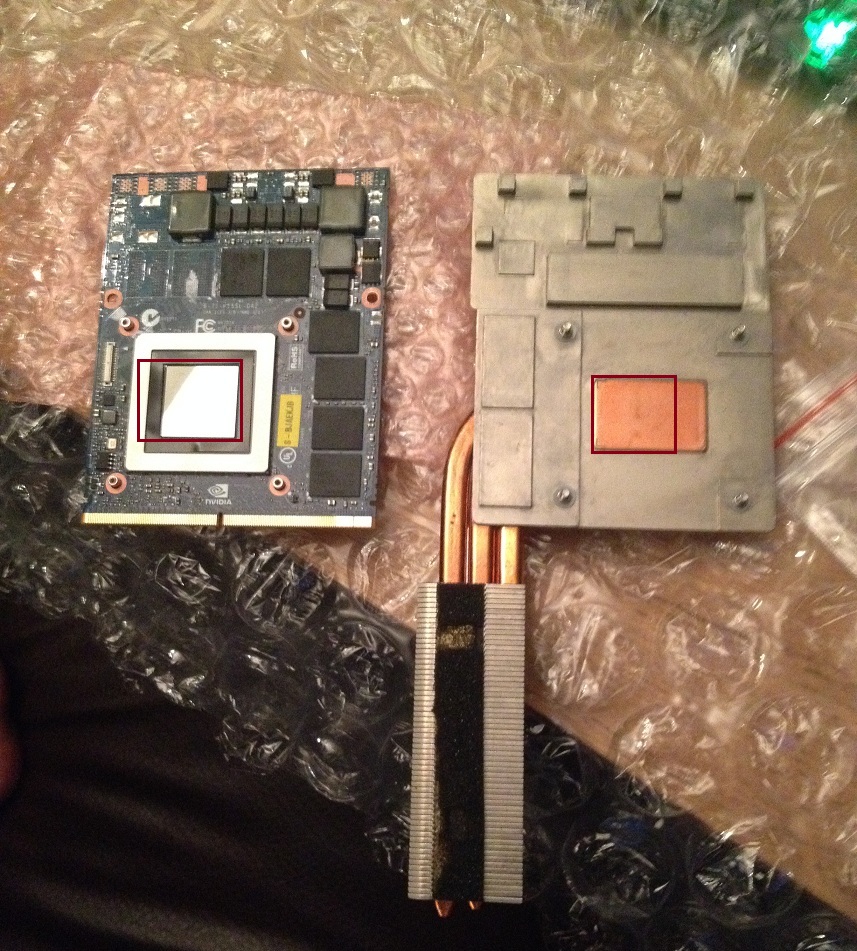
Hey guys, I received my 970m card today. Do you guys think it would be okay for me to use my old gt570m heatsink with this card? (given I dremmel the correct areas on the heatsink so it fits, and apply thermal pads accordingly) My biggest concern is that the GPU processor is square and the copper on the heatsink is rectangle. Would this create issues? I've attached a picture of the 570m heatsink and the 970m card.
-
if we go with the picture , do the copper rectangle and die have the same height ?
Idk if the width of the copper will be a problem but if it doesn't stop the copper from almost touching the die, it should be ok. Could file it to remove some width. -
Hey, I can't seem to find "search this thread" feature anymore. Any help as how to do that?
If not, any help on this: I just removed my screen after my second hinge caved in (being the sole hinge for the past 3 months, as I was too lazy to order a new one and thought "it kinda works for now"), so now I'm just using the base with an external screen and we'll see where that takes me (at least until I can order new hinges and a new back plate for the screen. But after turning it on for the first time after the removal of the screen I can't seem to get my wireless going. Is the wireless card somehow connected to the screen?
edit: If it is connected are there any ways to keep the card going without the screen? -
The shape,size,heat pipes and fins are for the dual fan layout of the GT72
https://www.google.com/search?q=MSI...m-gt72-gs60-gs70-thread-4837915.html;1377;919
A GT780DX GTX570M heatsink can easily be filed down or dremel tooled. -
The copper rectangle and the die have the same height.
Your statement below that question was confusing to me. The copper on the heatsink is designed to touch the die, no? -
-
![[IMG]](images/storyImages/95048-12eab6dd681dbc2133de1de0cbde9055.jpg) I outlined the projected processor and copper heatsink placement.
I outlined the projected processor and copper heatsink placement.
Attached Files:
-
-
yes it should touch the die, i was refering to the size of the copper rectangle on the heatsink being wider than the die itself and may touch the white square around the die and prevent it from making contact.
if it does you may have to file the copper where it touches the square. if you can pass a sheet of paper between the die and copper it may be needed to just file the part that touches the square, a few millimeters to make contact.
check to be sure it makes contact.
--->The Official MSI GT780/GT783 Owner's Lounge<---
Discussion in 'MSI Reviews & Owners' Lounges' started by -=$tR|k3r=-, Jun 9, 2011.