Problems? See this thread at archive.org.
How do you remove the display frame?
-
It came with the drivers DVD.
Remove the two rubber at the bottom corner and remove the screws. once the screws is removed gently pry up the frame from the inside edge. -
Just a random question, do any of you use the touchpad, or do you use your mouse ? I never used the touchpad, and cant imagine using it while experimenting with Photoshop for example, or gaming. I guess its good for some weekend web browsing

Also, does this laptop support all mice ? Never had a laptop, which is obvious, so i am wondering if there might be any problems when connecting my Roccat Kone+.... I would like to make a small color disco some time
-
I never use touchpad and yes, it can't work with photoshot. need to use mouse for more accurate movements. PC makers been lazy to invent something new to replace touchpad that's why iPAD attract so much attention.
Laptop supports all mice with USB or Bluetooth. -
I don't know why MSI makes this driver so hard to find, but here is the download link for the Sentelic driver. I needed to install this to get full functionality of the touchpad, although I never use it. I just wanted it so I have the option to have it automatically disable the touchpad when a usb mouse is plugged in.
Sentelic touchpad driver -
Does anyone have a recommended notebook cooler for these?
Also are there any extended battery or external battery pack recommendations? Occasionally I try and get some work done when I am flying so being able to get say 6-8hours would be awesome. This would be just word processing, reading PDFs, and maybe having to power a USB mouse but probably not, nothing that would tax the system at all. -
Hey everybody, I'm new to this forum, I just wanted to know if some of you knew where I can pre-order the msi gt780dxr-405US, the only place I found was on excaliberpc here: MSI GT780DXR-405US 17.3" SteelSeries Gaming Notebook. MSI GT780DXR-405US, but I never used this site before so I'm not sure on pre-ordering it there, Thx in advance
-
Can someone put here the links to the latest drivers updated?
Nobody has had heating problems yet?
Do the latest units have fixed the problem with the keyboard and touchpad? -
I bought mine from Excaliber.
-
Keyboard has been pretty much improved, No idea about the touchpad though.
No overheating claims so far. -
Thx xMAR99 for the quick reply
-
so... do you think that there is not defective units left out there? or at least are just a few of them that still have this keyboard issues?
-
Apologies for the cross post (also posted this in the new PowerPro thread), but it would be very helpful to figure this out today so I can start contacting vendors tomorrow to get this show on the road...
So I'm looking at buying either a GT780DX or a 1761 barebones, and I'd like to make sure I understand what the differences between the two are (other than about $150).
The 1761 has the same keyboard as the GT683R while the GT780DX has the steelseries keyboard.
The 1761 doesn't have the turbo boost function, but this doesn't prevent overclocking.
The 1761 doesn't have MSI branding on it.
Am I missing anything else?
Also, how big a difference does the SS keyboard make in terms of typing feel, is there any benefit to it other than the cool backlighting and the different layout for the bottom row of keys?
Thanks in advance,
James -
You've pretty much got it, other than that the 1761 doesn't come with some of the core components and windows. I think they both have the same chicklet keyboard feel, but I don't have the barebones to compare.
-
Also, I heard all chassis brushed aluminum has been replaced with plastics. If I am not mistaken, I believe the 1761 does have the TDE function. Can anyone confirm any of this? I am getting mixed info from various sites.
-
There are batteries and other accessories on reseller's sites usually. I don't think you really need a notebook cooler. The turbo fan option basically does it for you and the angle and height at which the laptop also aides in cooling. I know there is an accessories page on powernotebooks.com that sells batteries, I bought mine from there and it shipped quite fast.
-
It looks like the brushed aluminum is still there, but it could be a plastic copy i guess.
-
So it comes back to the difference in the feel between the keyboards then. If it's just backlighting, there's no way I could justify the cost increase to go with a GT780DX. If there's a substantial feel difference, I might be able to justify it.
If someone who has had their hands on both versions could shed some light on the relative difference, I'd appreciate it. -
Remember that you have the 3 years warranty and 1 year global and No Oops! Besides the warranty, including a copy of win in your system, will let your diference to around 150~200... i think is worth the diference, you have the actual brand, the warranty, the backlit keyboard and a couple of games too.
Its all to you but i think the diference is not so big, maybe is just me... -
That's a good point about the warranty, I didn't take that into account.
Windows is a bit of a wash for me, I have access to free licenses via MSDNAA as I'm currently a student.
I'm not quite following you on the 'couple of games' part however, could you clarify that a bit? -
The 1761 is all plastic but it does have TDE function as well as the Turbo Fan:
Attached Files:
-
-
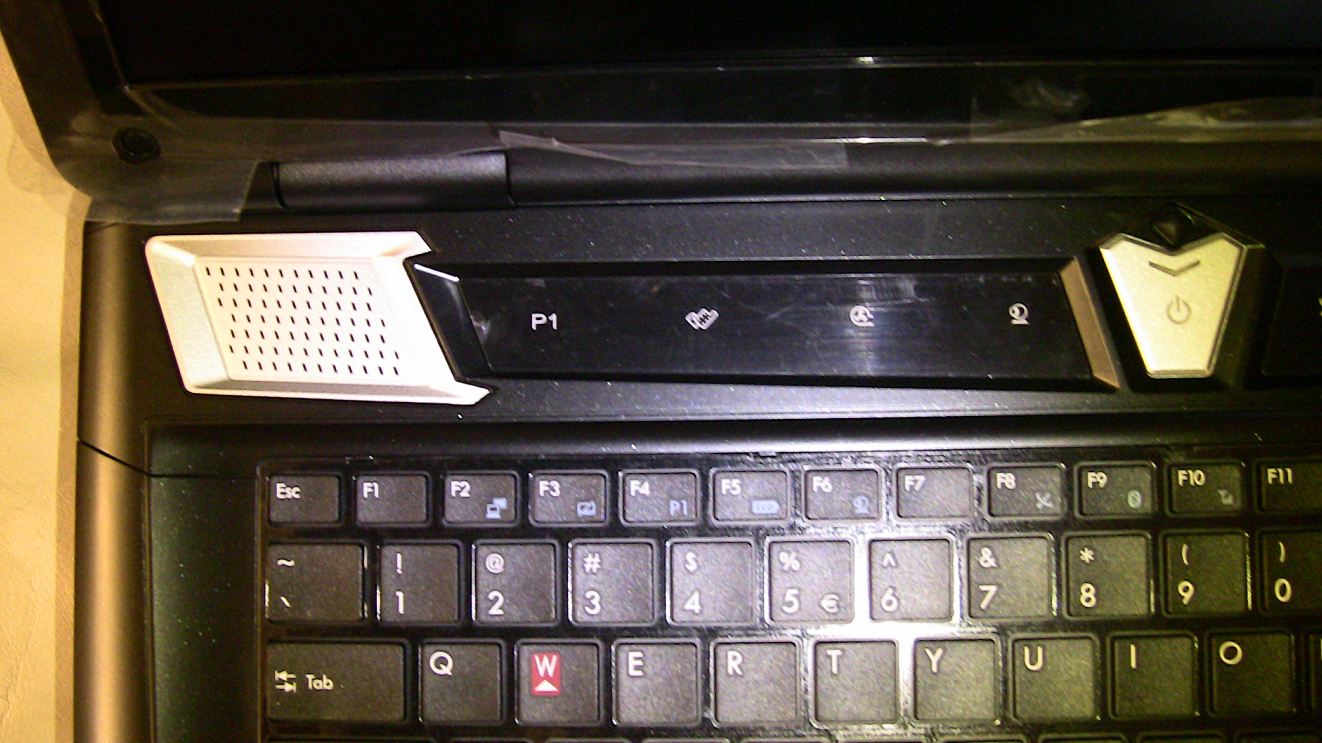
The MS-1761 DOES NOT support the TDE (turbo drive engine) by the turbo button softkey. TDE is Proprietary ONLY to MSI branded notebook models. Cooler boost is functional and activated by the softkey. P1 on the barebone is a Programmable quick launch key and not a TDE function softkey.
-
It might be just me, but those 150 bucks +/- are very very well justified by all the "on top" things you get with the MSI branded laptop. I will never buy Barebone as you gonna miss a lot of features there. Even if u wont use some of those, some time, you might want to use it. And you never know when that time comes.
You can customize the laptop. Choose 2x500 HDDs, or even one HDD, go with DVD ( as i did for quite a good discount ), and get only 4/8 GB of RAM. If after that, the price is still going to be high, then you can choose different model, right
All in all, i would choose MSi branded laptop any time over the Barebone one. -
I have not received mine yet, but is suposed to have two licenses for games, dont know which they are, but actually, dont know if the DX or DXR comes with these games... Ask to someone that have received it already and could tell you right...
I'm a student too, but not there in USA, and i can get a license, but is borrowed to me for some time, so i decided that would be a lot better have my own copy, so that was another reason on buying the msi and not the barebone... -
Tommorow it's purchase time
, going to get it from powernotebooks with this setup.
MSI GT780DXR-X8
-8gigs of ram
-1TB (500+500) of HDD space
or should i get a 500gig/4gig SSD hybrid, and a 500 instead and keep windows on the 4 gig of SSD, granted it is enough space for windows 7. Or should i just get 1.5TB of HDD instead?
-6X Blu-Ray Reader/8x Super Multi Combo Dual Layer DVD +/-R/RW CD-R/RW Drive (LG CT21N).
-Intel® Centrino® Advanced-N 6230 802.11a/b/g/n WiFi + Bluetooth™ 3.0+HS Combo Card. This upgrade due to the wifi network that the university uses, i'm not certain the other card is compatible with that network.
Should i get diamond thermal paste or will i do well without it, at my appartment i got a cooling pad.
This setup will cost me, including 25% import tax 2000 USD with the current pricing on powernotebooks. Any changes that you would do? or does this seem like a good setup? -
Demon2k3....I would get the thermal compound paste.
and for all the people who are trying to save several dollars by not getting the actual MSI models. TDE is awesome! I love the extra cooling feature & it makes a huge difference when gaming. -
Yes! In the case of the GT780DX, I must agree 100%. The 1761's lessor warranty, lack of TDE, backlit keyboard, and all plastics instead of the brushed aluminum would be a deal breaker for me. To me, the brushed aluminum alone, makes the GT780DX worth the extra pennies..... very stylish & sexy!
-
Well, Welcome to the Party!
As far as a thermal paste upgrade, in early testing the stock paste (MX2) seems to be effective and does its job. It's a personal preference, but for added peace of mind, I opted the IC Diamond.
On a notebook such as this, I would add an Intel 510 SSD..... but that's just me. You'll LOVE it!
Best of luck, and we hope to see you as an Owner soon!
-
I've just ordered it from powernotebooks, went for 1 TB (2x 500's) as and SSD is WAAAAAY outside of my pricerange as is currently. Waiting for donald to send me the quota now so i can make the transfer. Really looking forward to trying this beast out. I might however when i do get more funds in sweden purchase a SSD and replace the main HDD with one when the price drops.
this is the setup i decided to go with
I am really happy with this setup truth to be told, lacking a SSD perhaps, but it's a beast compared to my current laptop. -
Question though Rob...... can a 1761 user install the MSI nVidia OC Tool, and then program the P1 button for this? Will the TDE function work then, or does the OC Tool only work in concert with the S-Bar software? Or, is TDE proprietary by virtue of some difference in hardware?
-
@ Demon2k3
I can tell you are excited......
Enjoy!
-
Take a look at this topic:
MSI 1761 Barebones -
TDE is active through the firmware, current barebone firmware does not support TDE as it is a branded feature. If it is not a feature in the firmware installing the OC tool and S bar will not work. You will receive a pop-up asking you to program the P1 key when pressed.
-
Rob,
Can you explain in more detail your RKC barebone exclusive VGA Bios and your overclock tools. I am curious how your offering differs from MSI's non-barebone version. -
Thanks for the speedy reply Rob!
Ahhhhh, so it's in the proprietized firmware..... so if possible, instaling GT780 firmware would be a work-around to this?
Thanks again.....
-
Hello All,
I am returning back after few days. I was busy with my GT780DXR . After three+ weeks of usage I would like to say that the laptop is just amazing. On top of that on Ken's suggeston I took this glossy screen with 90% blah blah and I have no regrets. I had no throttling issues whatsoever. I have really tested it to it's fullest extent. What I need now is a processor upgrade which will make this beast close to my desktop.
I have nothing to complain about except occasional jumping of touchpad pointer. It was not that bad and I found a solution myself by pressing the lock touchpad Hardware button leaving it like that for few seconds and then enabling back the Keybad solved the issue. I am not sure if this method will work on other laptops. I tried the registry patch from the first page of this forum. I had a discussion with Ken and on his suggestion I uninstalled Sentellic drivers version "mtp_stl_8.8.3.0_al00" leaving Win 7 default drivers. It worked but once in a while my touchpad will have same jumping cursor behavior although it was less frequent. Recently I was experimenting with other drivers from MSI website namely "mtp_stl_9.0.4.8_w700" with a registry patch. It's working fine until now.
I would really like to thank Ken for more than adequate handling of this issue and response + guidance in real time.I really appreciate his help not only as seller of my laptop but asa good advisor. I have also found many friends here in this forum who are really keen to reply back in no time.
Soon I will be going on a vacation and I would like to know feedback of you guys regarding laptop bags that are good to carry this sweetie (although heavy) and a nice mouse. My old Microsoft mouse is not as fancy as this lappy.
Can you guys recommend me some really good mouse that goes with it?
Cheers -
I tested my touchpad (not extensively) and everything seems fine..... but I use a wireless mouse most of the time, so the touchpad pretty much remains disabled.
I have found THIS mouse, and THIS bag make great companions to the GT780, but I guess it really boils down to personal preferences. These and other user recommendations can be found in the lead post of this thread.
Enjoy!
-
No, the GT780 branded firmware will not install on the MS-1761 barebone product.
-
I fully agree with the glossy display upgrade. I know a lot of people like going with a matte screen because it reduces reflection, but I have not had one issue with reflection in any sort of light. Yes, if the screen is on something dark it will show some reflection, but not nearly enough to distract me. Thanks Fourier for giving me feedback on it, and thanks Ken for supplying the screen to me!
As for a bag, I personally like the Wenger brand backpacks and I think the most recent model is like $65 on newegg. I've had a Wenger 15" backpack for almost two years and it's still in tip top condition. I just got a new 17" Wenger backpack and it is a bit heavier (due to the computer mostly), but very comfortable. If backpacks aren't your thing, Wenger makes some decent side carrying bags as well.
On another note, has anyone tried the newest Bios update? Does it seem to help in anyway? I probably won't update it unless the new Bios does something significant. Otherwise, I'm going to be safe and stick with this Bios because it seems to do the job just fine. -
The Laptop was delivered to MSi repair depot on Friday morning Sept. 23rd. I am hoping for a fast turn-around for the replacement BluRay drive.
-
I upgraded my Bios. Usually I take the first plunge as soon as something comes out. No issues so far. Only thing was to use /x key with
AFUDOS E1761IMS.30C /p /b /n /r while flashing the BIOS from command line else usual ROMID mismatch comes back.
Regarding the BAckpack yes Wenger is really good. My eyes were on this
http://www.wardow.com/delsey-quarterback-laptop-backpack-197620-00.html
I will have a look at wenger and what Stryker has suggested.
Thanks and cheers -
And the notebook fits well in this backpack? Let me know which model this is, and I'll add it to the list in the 1st post.
Thanks
-
GA-7316-06F00 is the model number. It fits my notebook fairly easily, but there's not much room to spare which could be a good thing. There's plenty of other pockets too! I don't plan on carrying around my notebook a lot, but it's nice to have in case I go on vacation or something.
-
@Striker - Yes. All those feature can not be missing. Its gaming laptop for god sake
I bought a BELKIN Messenger 17" Black/Red case for the laptop and ASUS ROG Shuttle 17" for school, even though its a laptop backpack, it still got sh..load of space and lots of pockets. So i guess i am set.
I really enjoy the color matching. Asus ROG = Black/Red, Belkin the same. Then just set red color in breath mode for the keyboard and same for my Roccat Kone+ and i am totally 100 and 10 percent set ! -
I bought a Targus Drifter II and it seems to fit really easily, i cant really tell cause i didnt see it yet, but my friend told me it was fine.
-
-
Hi everyone, but I don't think this topic has ever been discussed before. I am a laptop user that like to have the screen very very dark as I use an eyedropper that makes my eyes sensitive to light. From previous experience with MSI laptops there was like 6 brightness levels that I can adjust to only, and with the dimmest being as bright as medium brightness on my ASUS laptop. I was wondering what all the people that have the 'stock' monitor here think of it's dimmest brightness, is it still fairly bright? or can it go really dark e.g. even when you're in full darkness, the monitor doesn't hurt your eyes after long period of use.
Also is the brightest really bright as in you can see clearly under broad daylight with it's matte screen? -
FYI to all this applies.....
NBR's Lead Moderator sent me the following:
Seems reseller links, and promoting your reseller within your Signature is forbidden.
Quote from NBR Forum Rules......
-
Stryker Check again all links in your signature like Intel 2860QM takes to Intel 's site and to their respective sites. Myabe now they will say we are advertising Intel on this forum
-
I cleaned my SIG up I/A/W the forum guidelines, but you haven't.
LOL!
--->The Official MSI GT780/GT783 Owner's Lounge<---
Discussion in 'MSI Reviews & Owners' Lounges' started by -=$tR|k3r=-, Jun 9, 2011.