Problems? See this thread at archive.org.
PhysX is NOT on by default, it is disabled by Vantage automatically on start-up. PhysX would have to had been manually turned ON by the user. Disable PPU is always ticked to disable on Vantage startup
-
-
My V101 installer is enable by default.
-
Check it upon initial start-up BEFORE you make any changes and you will see it disabled (Disable PPU is ticked). The reason I am saying "changes" is because none of you feature tests have run. It is possible that what you have changed from the original start-up setting may be your problem. All the feature tests are enabled by default. -
Download 1.0.1 installer and see for yourself:
Thank you for downloading 3DMark Vantage 1.0.1 from FileHorse.com -
That is the "free" trial version, I an using the "advanced" purchased version which obviously is the difference. It starts-up with the correct setting in the correct mode.
-
I AM using advanced edition.
Just install it and enter the code and test yourself to see if PhysX is enabled by default. -
Don't know ken, i have the same here already activated and it is disabled by default....
-
I think you have 1.1.0 not 1.0.1.
-
Kkkk~ Thanks to both Ken and robm!!! It's ok whether physx is on or off by default, we just want to know how the GPU performs that's all.
So physx increases 3d vantage mark but decreases game benchmarks right? I learnt something today. Thank striker for posting the link. So in this case GTX570m is really 20% more stronger, I'm happy now.
Oh and GTX570m is able to be overclocked more than GTX560m right? Say it can be overclocked to 130% performance while 560m can only do 120%? -
You are correct I have 1.1.0, that is the latest version. Yours is an older version. Below is from the vantage product page for 1.1.0:
•Trial Edition discontinued
•Basic Edition now free, was previously $6.95
•Added display scaling to all presets: benchmark now scales the output to best fit the display
• GPU physics acceleration is now disabled by default during the CPU tests
•Systeminfo component updated to version 4.0 -
Physx increase combined score and CPU score.
yes GTX570M is about 20% more powerful than 560M and can be overclock much higher.
That's what I was trying to tell you, on 1.0.1 PhysX is always enabled by default and has something to do with nVidia driver. I have to remember to disable it every time, but sometimes, i do forgot.
-GPU physics acceleration is now disabled by default during the CPU tests:
this is the update on V 1.1.0 and as you can see all my screenshots of Vantage score was tested with V 1.0.1.
I've uploaded the video of V 1.0.1 showing PhsyX was enabled by default:
http://www.youtube.com/watch?v=CwNvfzdKYoY
And thanks for trying to help Rob. I too am using the advanced version but it's version 1.0.1, PPU was enabled at default as you can see on the video. but I will take your suggestions into consideration, and look into this further. Nonetheless, after this problem was brought to my attention, as Str|k3r pointed out, I did post a correction immediately. Thanks again for the suggestions. -
Here are my 570M scores prior to latest CPU upgrade. Again, I see these very consistent with Rob's findings. If anything I consider my GPU a little weak, because during OC test, I was unable to clock as high as others.
*** PhySX is OFF (PPU disabled) in all Vantage testing, fresh OS install, no tweaks, original release drivers only!***
1st run, no TDE, no AfterBurner:
![[IMG]](images/storyImages/GT780DXR-1strunscores-1.png)
2nd run, with TDE, no AfterBurner (*** TDE uses MSI's nVidia VGA OC Tool. During this run, AfterBurner was not installed on my system! ***)
![[IMG]](images/storyImages/GT780DXR-2ndrunwithTDE-1.png)
3rd run, with TDE, with AfterBurner
![[IMG]](images/storyImages/GT780DXR-3rdrunwithAfterBurner-1.png)
-
Wow, I'm very surprised that you didn't get around P3500 in that last screenshot. Could be due to the drivers perhaps?
-
Again, if you look HERE at RK Rob's scores, you will see mine are very consistent. The differences here are he is demonstrating what can be expected 'out-of-the-box', and I am showing a fresh WIN 7 install. P3500 in 3DMark11? Naw, note Rob's OC clocks, and then look at mine. This is why I am feeling my 570M is a little weak..... no bragging rights here. My clocks were as high as I could go, before artifacts or system instability. Scores should improve though, when nVidia finally adds the 570M to it's driver package...... soon!

-
Anyone has successfully changed his GPU with a 580M in his GT780DXR ?
GentechPC and XoticPC don't give the ability to choose between 570M and 580M in their configurator ... -
Can't be done, there are thermal and power consumption issues and PCB/VRAM / heatsink layout problems. not that simple.
-
Heatsink layout is different for different MXM cards ? and between 570M and 580M ?! Did you try to put a 580M in a GT780DXR ?
-
the GTX 580M would require more power and release more heat, you cant use the stock heatsink for it, also bios compatibility and such.
-
I've only 70°C on my 570M after playing during hours ... Even if the 580 max temp will be 80 or 85°C it's acceptable.
-
As stated above, there is still no heat sink for the 580M for the MSI notebooks. Plus, it is unknown if the power supply for the GT780 will even drive the 580M. If you want a 580M that bad, buy a notebook that supports it.
-
I haven't researched what the OCZ firmware update actually does. I assume they are in "fix it at cost mode" based on the problem reports. All of the reviews I read before purchase warned to immediately update the firmware.
I can tell you I've experienced none of the reported problems. No slowdowns, freezes or BSOD's. -
I performed the BIOS update last night and had to reactivate Office 2010 by phone this morning.
-
I just checked office 2010 and it made me reactivate it also, but over the internet.
-
Hi all
Im about to buy GT780DX, my only concern is temperature.
Many friends say "dont buy msi, its so hot under load" they prefer asus g series.
And is it powerful enough to play BF 3?
So what do you think? -
Temp is fine... overclockedmy GPU doesn't go above 70C. The only thing is Asus g series are a bit quieter under load, but if you are wearing headphones or have the great MSI speakers turned up, you won't notice really. Also as far as I know the g series still only offers the 560m.
As for BF3 I think it will do it fine on medium settings at 1080p. -
morning guys, i actually have a gt683dxr but in the lounge i havent got any help concerning my prob. thing is my temps on the laptop.
gpu temps for me:
81-83 normal clocks
89-91 720 oc
can someone give me a professional opinion about this. is it normal? is it bad?? someone??
i know ur lounge has more movement so perhaps u guys can help -
Hmmmmm...... interesting! I guess I better fire up my notebook again, and check Office. Last night I was good, and didn't have to reactivate...... strange having to do this for a bios update.
-
Sorry double post.
-
My numbers never go that high.
35 to 50 normal clock
50 to 65 OC
If I turn on the turbo fan (55 to 63) - while gaming
Overclock settings:
570M: Forceware 280.47
Core Clock: 730mhz
Shader Clock: 1460mhz
Memory Clock: 1768mhz
Games run very smooth. -
Remember he has the GT683 and not the GT780, so shouldn't be comparable in terms of temperature.
And yes, I would say they're pretty high, Contact MSI for a possible RMA. -
I have not been following GT683 temps, but for our model, I would be a bit concerned. Are you certain your vents remain unobstructed? Is there a lot of dust in your home? Could your notebook be due vent and fan cleaning? Is your fan speed cycling properly as temps rise and decline? If none of these things are suspect, I'd look at the CPU & GPU thermal paste. Is your paste application stock, or did you pay for a thermal paste upgrade? In either case, I'd have the thermal paste reapplied.
-
With regard to this MSI model, your friend is absolutely incorrect. Click HERE for more GT780 info, and toward the bottom of the post, you'll find 11 reasons to consider this model over the Asus.
Good luck in your decision.......
-
I see in your SIG, you are posting benchmarks, " 3dmark vantage: P15142 - 3dmark11: P3410"
Could you please post a screenshots of your 3DMark11 and Vantage scoreboards..... along with GPU-Z, and your OC tool's interface in the same shots? I'd be very interested in seeing your clocks.
Thanks in advance!
-
I second that! It seems very rare to get 15142 in vantage...at least without any artifacts. However, the 3dmark11 looks about right.
-
It may be subjective, but I think the gt780 series cools slightly better than the gt683 based on size. The gt780 has slightly more room within the chassis, and therefore may get better air flow. It also obviously has to do with your ambient room temperature. I live in San Francisco, and it's been mid 80's for the past couple days. I never saw my normal clocks go into the 80C range, and stayed around the 50C range. Right now, it's about 70F and I show 45C. If you're ok with opening up the back, I would check and see how everything looks on the cooling block. Or you can just go through the RMA process, but yeah those temps look too high.
-
I always hear about "friends" advocating Asus over MSI and it really confuses me. Perhaps, those people had bad experiences with some of the earlier model MSI notebooks? Granted, I've only had my gt780 for about 2 weeks now. However, I've experienced no issues with the laptop itself. I expect it to run strong for the next several years, but knowing me I'll probably get a new one 2-3 years from now ;P.
-
As other's have stated your friend is wrong. I had a Asus G73 and it overheated to shutdown until I fixed it. After is was fixed its max temps were ok but still much higher than the max temps I get on the MSI. I don't now about older MSI notebooks, but the current ones cool very efficiently.
Yes, it will play BF3 just fine. -
Ah sorry, I didn't notice Rob's posting there. Hmm, I wonder if having the advanced edition could be the difference? Right now, I'm running a 700 core and I get a P3400 score on the basic 3dmark11 edition. If I increase the core clock to 720, I get just over P3500. Btw, my current clocks are 700/1650/1400.
-
can you tell me the goods and bads of this notebooks?
and what other notebooks must I consider? -
Please go to the "what notebook should I buy" subforum, read the sticky, fill out the form and post there.
-
The Laptop was delivered to MSi repair depot on Friday morning Sept. 23rd. I am hoping for a fast turn-around for the replacement BluRay drive.
Repairs completed 9/27, repair depot email:
Dear valued customer,
Item(s) for RMA is/are now in shipping process. Please check below for your tracking number.
Carrier: FEDEX
FedEx delivered the laptop today 9-29!
They blew away all my software and programs that I had loaded.
Looks like the replacement drive is fine.
Now I've got to reload a ton of stuff.
It was a bummer I had a bad drive, expensive to ship it back, they did a quick repair, shipping back to me was quick, lets hope for nothing else to go wrong. -
Hey guys, I don't know if you already read it but I saw this french review about the msi gt780dxr with the i7-2670qm here P4G / [REVIEW] MSI GT780DXR-298FR w/ i7 2670QM & GTX 570M & Crucial M4 256Go, and he actually says that he could play the beta of battlfield 3 at 24-40fps at with FHD at high settings with the drivers provided by msi after (I think) overclocking the laptop with these frequencies 700/1400/1500 with tde on and turbo fan too, he also states that cpu-z doesnt reconize the i7-2670qm (yet) as it is but as the 2720qm
-
Goods: Everything in it is top class ....Look at 1st page for more info. (speakers sound awesome)
Bads:
1) Touchpad SUCKS my acer $400 laptop touchpad works better. It looks like touchpad is good quality but the drivers are not good even after the updates & registry fixes. For right now external mouse works great.
2) Price: It's on the high end but you get a better graphics card, other small perks (steel series keyboard, turbo OC & turbo fan) & an overall better experience so for me it has been worth it. -
what do you mean the touchpad sucks?
-
All this fuss over a single game.
TBH it matters not what system it is, the graphics card is the most important part and will tell you how it will perform. -
Is it worth upgrading the Intel Core i7-2630QM to the Intel Core i7-2760QM? I mean, is the performance increase worth the cost? Also, what kind of pc activities would merit upgrading the cpu?
-
Any kind of audio/video work, rendering, that kind of thing.
Perhaps a couple of strategy games. -
So I should be fine with the standard to play any current and upcoming mmos on high settings and watching videos? Im on the order page now and just want to be sure before I finish lol. I don't want to pay 300 extra I wont be able to even fully utilize.
Getting the 99us MSI. -
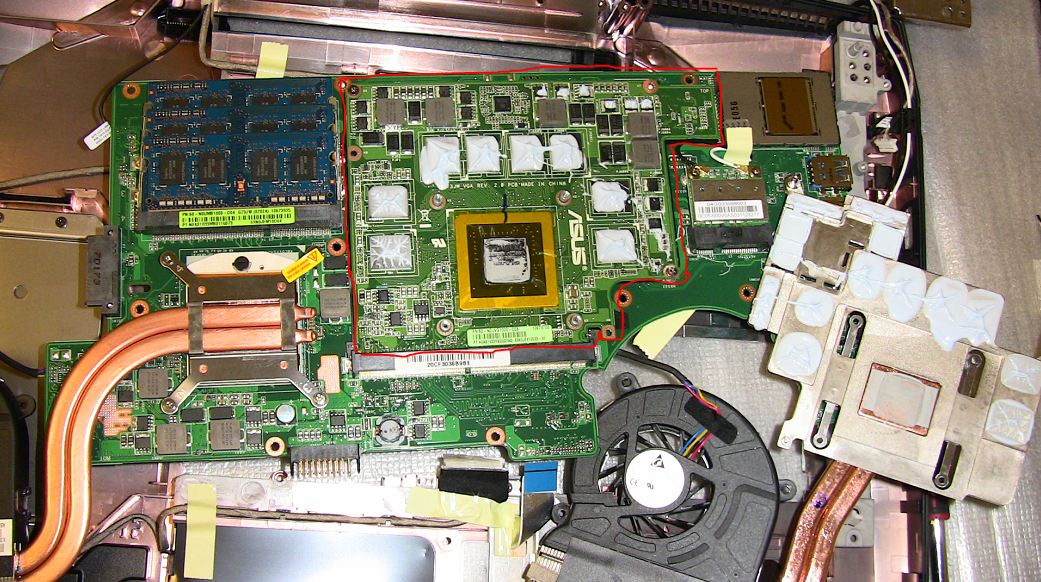
MXM still not standardize yet and most likely it never will. The picture attached showing Asus's GTX460M on G73JW with huge PCB:
Attached Files:
-
-
just curious of the RAID controller in the GT780DX R is native or software?
--->The Official MSI GT780/GT783 Owner's Lounge<---
Discussion in 'MSI Reviews & Owners' Lounges' started by -=$tR|k3r=-, Jun 9, 2011.