Problems? See this thread at archive.org.
Yep. My reseller told me to call MSI. As long as it gets replaced, whatever.
-
-
Xonar - another quick question for you. When you unlocked the GT780 BIOS, do you recall what the GUID of the configuration section was? Thanks -
-Dano- -
No, what is important about this and what do you mean 'configuration' section?
Is this what you are looking for? http://en.wikipedia.org/wiki/GUID_Partition_Table#Partition_type_GUIDs -
Just reaching 95C and your GPU is fried already? I thought this could run for a definite amount of time at 95C without any problem at all.
 Maybe a bad paste job?
-
I thought I'd take a crack at unlocking the 30E bios (most current) for the GT780 while I was waiting for the laptop to come in. I was looking through the uncompressed bios blocks and noticed they are labeled with GUIDs. I was wondering what the GUID of the block you modified was? Also, can you tell me what changes you made? Did you need to re-checksum the block after the changes? Thanks a million -
-Dano- -
I enabled XMP support, which is originally disabled by default. Never used/tried whatever you are doing, but by the end of this week I should have the newly released wave of BIOS unlocked.
Funny, I just ran furmark, walked away for two minutes only to come back to my computer restarting. No smoke, but I think this is one of nvidia's preventive measures. They aren't happy about furmark. -
Strange, i've done furmark tests with both my 560M and 5870 cards when overclocked (though not when overvolted too) and had no issues.
-
Wow, that sounds great! May I ask what tool you're using to unlock the bios?
-Dano- -
You have a 1 year global warranty.
You can have it repaired at any MSI service center in the world so there's no need to send it to the US during the first year of ownership. -
You might want to check to see if anything blocking the vent or remove the cooler see if it makes difference.
Your GPU was running at 59*C~63*C max with overcocked when you first got it, I don't think it will suddenly reach 91*C:
-
There a new driver update for the Bigfoot Networks Wireless cards BFN 1103 and BFN 1102.
I just posted the info on the Notebook Manufactures MSI front page.
MSI Laptop Forums - MSI Notebook Computer Discussions -
Anyone willing to share their experiences with BF3? so far im running on "medium" with 30-40 fps. This is a lot lower then I was expecting from this laptop.
Have the edition with 8gb ram, i7 2630 and 570m card. -
I have 3 videos from stock setting on high, OC and Ultra mode:
Battlefield 3 Ultra mode on MSI GT780DXR NV GTX570M Overclocked - YouTube
Battlefield 3 on MSI GT780DXR NV GTX570M w/Svet's VBIOS OC Tool - YouTube
Battlefield 3 on MSI GT780DXR NV GTX570M driver 285.62 - YouTube -
that looks great, can you share the exact (ingame)settings?
-
At ultra setting, vsync on, AAx2 I get 25-30 on fraps.
My rig has 570M at 700/975/1450. I don't see any obvious movement lag issues. -
DANG, that was FAST!
Ken already has the new GT780 with the 3GB 570M.
The NEW GT780DXR-446US!
I'll add this model to the lead post shortly.....
Enjoy!
-
I noticed that too, it came with the upgraded CPU as well i7-2670QM.
I wonder how the 3GB 570M compares to the 1.5GB 570M version. -
Ken,
He already admits he is using the notebook laying in his bed, and on a pillow:
In spite of his claims that this is not blocking airflow, I really don't see how this could be the case..... especially considering the various bottom vents. Furthermore, he states he 'pay's big attention', spending up to 15 minutes examining how it sits on the pillow. This gives me pause.....
1.) He is using the notebook on a pillow
2.) He continues to run the notebook with abnormally high temps
3.) He doesn't want to spend the time returning the notebook for diagnosis..... because he can't bare the inconvenience of being without a computer. If there really is a cooling problem, he somehow believes a bandaid approach of a cooling pad will resolve it. A cooling pad may be helpful to him, but it will NOT magically correct a cooling problem.
Sorry, but with this reasoning, it's difficult to see he is REALLY concerned with temp issues. If I were the reseller or with MSI, I'd be taking notes on this one!
-
Actually if he's using the laptop on a pillow, using a cooling pad would solve his cooling problem as this would give him a flat surface to work on therefore no blocked airflow assuming this is really the case.
-
I was thinking that myself after just ordering mine last week only to find out the 3gb card was implemented into the new model, but I found this:
GTX 460 2GB vs 1GB vs 768MB
and it kind of shows that there's not much of a gain just because there's more vram (1-2 frames really, not all that big of a deal)
The only real increase is if it's being used on a larger resolution than 1980x1080, or with lots of anitaliasing etc. At least that's my understanding anyway! -
Yeah, forgot to mention the CPU, but I already upgraded mine anyhow.
If my memory is correct, when Asus did this with the 560M, it really did no good whatsoever, and actually I believe there was a loss of a few FPS. The extra GDDR may be helpful to those running HDMI to a bigscreen though.
-
I believe he says he checks every 15 minutes, not 'for' 15 minutes!
1) I don't really believe he can use it on pillow while not blocking air vents either, unless he has some hard cardboard on his pillow.
2) That's true
3) I believe that a decent cooling pad will solve it as it should normally have air coming out sideways as well (At least my $8 USD cooling pad can do that) and since the laptop is 17 inch it shouldn't sink enough to cover all the air outlets up. This effectively solves the vent blocking issue. -
Yes, even a lap desk would be a better option, but neither of these solution will CORRECT an internal cooling problem. This is yet to be determined. Personally, I would have tested this on a flat surface (such as a desk) immediately.
Still, the reasoning and rational has me shaking my head......
This is what I am reading...... "Sometimes spend 15 minutes just to make sure the laptop is sitting on the pillow, while having all holes free to not prevent proper cooling." Also, again a cooling pad may be helpful, but will NOT resolve an internal issue.
-
Just ordered mine just NOW! I can't wait till I get it!!
-
Congratz Orpington2019, Welcome To The Party! I think most of us understand the "can't wait" part. You'll Like!
-
Thanks Striker! Without your help with this thread I might have ordered something else! Thanks for helping me make the right decision!!
-
LOL! Thanks Brother, but that decision was all yours. I am just happy to see you have some wisdom, and did your homework! Good Job!
-
Nice one, I'm sure you'll get yours long before I do mine
I'll only get mine when I return to Ireland for Christmas! -
I can run on Ultra (2x aa, no v-sync) with a tiny bit of studder (20fps - 30fps) when it gets intense on screen. I usually run on high (default high settings) and it's silky smooth (>30fps) with very little drop in visual detail.
I OC at 700,1400,1500. no turbo fan needed.
I have a stock gt780dxr-099us, i'm also using the newer drivers released by nvidia 285.62 -
I've finally fit the new GT780DXR-446US GTX570M 3GB into my budget. I wasn't going to get the 3GB vram, but when I plug this into my large flat panel, I figure I'll be wanting that extra bit of juice.
As I have this spec'd out, the only differences I have are in the processor and the wireless. I want to step up to 2760QM for that extra little bit of performance, and I am planning on getting the Bigfoot 1103 card as well for time's I'm at work and want to transfer large files.
I do have a couple of questions though. In re-reading this thread numerous times, I see a lot of posts about bios & vbios updates. What will updating these gain me in performance or stability over the stock bios?
Other than generic software (office, games, etc.), will there be any drivers that I should update upon arrival (touchpad issue patch, etc.)?
And finally, while I want to tweak my laptop to the best gameplay possible, I see a number of posts about Svet's vbios tuner, MSI Afterburner, etc. Can someone point me to a thread about how to safely tweak these settings and maybe what I should look for if I over tweak that lets me know I'm going to far. -
I just read about a video card that got fried while the turbo fan is running? Is this true? Is there a problem with the video card cooling system of the gt780 notebooks?
I'm leaning more on getting myself a gt780 than a clevo notebook but I'm not sure anymore. -
Setting aside some pretty extreme tweaking, I can't really see this happening. As for just running turbofan, I don't see how that would affect the card as it just boosts fan speed to 100%. Even if the fan broke, I think I'm right in assuming that the system would shut down as the temperature reached the unsafe upper limit (and probably prevent much, if any damage). However you should take into account that with any system, things can go wrong.
As far as I've seen the cooling system is rather good. I play games for a few hours on end and have not experienced any overheating. I even have some pretty high OC (747/1495/1600) with afterburner and the highest I recall without turbofan was around 86C. Honesty not bad for a notebook with hardware this hot. It's usually a bit lower, especially at stock clock settings and really cool when not doing intensive tasks. What I'm getting at is you should have little to worry about as far as cooling goes. -
There's a post here by Mr. Shadow that his video card fried when it reached 95C. Is this a freak accident?
What's the highest temp the video card in this laptop could withstand? I've read that 485M & 580M could withstand over 95C and it would only shutdown if it goes above 98C. -
What's the normal temperature of the video card for this notebook? I think 86C is still high. Do you have special thermal paste in it or it is the stock one from MSI?
-
OMG.... REALLY? One report of a bad card, and one report of high temps running a notebook on a pillow..... and all of the sudden there are inquiries about high temps, and asking if there are problem with the video card!
GAWDdddddddddddddddd!
Seriously, there are 414 pages to this thread right now...... try reading more than a couple post...... or better yet, try the search function or Google..... DANG! Your questions has been answered over, and over, and over, and over AGAIN!
GEEZzzzzzzzzzzzzzzzzzzz! -
Get the GT780DX or DXR.
Don't go on some fruit cakes word about video card being fried. He was probably sitting in the sauna room trying to hump is laptop.
This laptop is perfect especially for cooling. -
Lol. If you read it then, yes? You act as if you've never heard of a component failure before. Note to everyone: it was decapitated_chicken's VGA that fried. He has a MSI-1761, it's been stated a couple pages back.
If anything, this is an excellent situation to learn something valuable from. I would wait and see what happens once the user gets his card back from MSi. Prompt shipment, good support, extra $$ and most importantly a FIXED/NEW VGA, are all concerns for people with any company and customer support nightmares scare away potential customers in an instant. Let's see how MSi treats their customers in comparison to other OEMs. -
Okay okay settle down guys, I just want to be sure before I purchase one. So this is the first time someone reported this? It's better then.
Now which shop do you recommend I buy this laptop from? xotic pc? gentech pc? which one has better support? -
Yes. It does have very good cooling. Especially with the turbo cooling button if you really need it. I'm not "some fruitcake" and the ambient temperatures were about 70° ferenheit. That's hardly a sauna. What did happen though was I was running furmark overclocked at (720/1440/1700). It physically began to smoke after hitting 95° C. That is hot, yes, but that does not reflect the cooling ability of this laptop. Playing games (Crysis 2, Battlefield 3) it never went over 75° without turbo cooling but overclocked. I was stressing the hardware beyond normal gaming use, but even the guy I talked to at MSI said that was probably a bad card.
-
I suspect it was a bad card.
The MSI manufactured GTX 570M temps have been very comparable with their GTX 560M. Ken brutally tested the GT780R with FurMark for over 10 hours..... no issues, and temps were outstanding. There is no reason why the 570M could not realistically do the same.
Links to Ken's stress testing can be found in the #1 post of this thread.
-
I can't speak for the temperature as I haven't got the laptop yet, but I've read 90% of this thread and this is the first time I've seen an issue with the cooling for this laptop. Take note the GPU that was fried was overclocked really high, and I'm pretty sure if it's on stock settings or on the default TDE overclock set by MSI the GPU won't fry at all.
For a recommendation, I'll go with gentechpc based on my experience. I have nothing but good experience from them and the ordering process is smooth sailing all the way! You can talk to Ken his username here is Gentechpc, he's easy to talk too and he's active on this forum. He might be able to help you out with your questions and of course with your laptop needs. Good luck!
-
All of the resellers here are reputable, and have a good service & support history. You can find info on them and other GT780 related topics HERE.
-
Thanks for the explanation
-
From previous encounters and various comments from people on this page, I believe MSI has one of the best if not the best customer support in the laptop area
-
Thanks for this and for pointing out the stress test done, but it was for the 560M.
What I understand is that the more powerful the video card, the hotter it gets especially if they're in the same form factor. So that would mean 570M should run hotter. -
Thanks for the recommendation. I'm looking at GenTechPC website right now and comparing it to Xotic PC.
BTW how could I contact ken? -
Who here has played the old game U.F.O? Sometimes I feel exactly like the platypus...... Derrrrrrr, Derrrrrrrrr, Der, Derrrrrrr..........
-
You can click on the name "Gentech PC" and send private message I believe he checks it everyday if not every 2 hours haha. Sometimes he replies within 5 minutes to anything you ask, even non-computer related stuff!!!
-
The in game settings are in the videos except the one with Ultra mode.
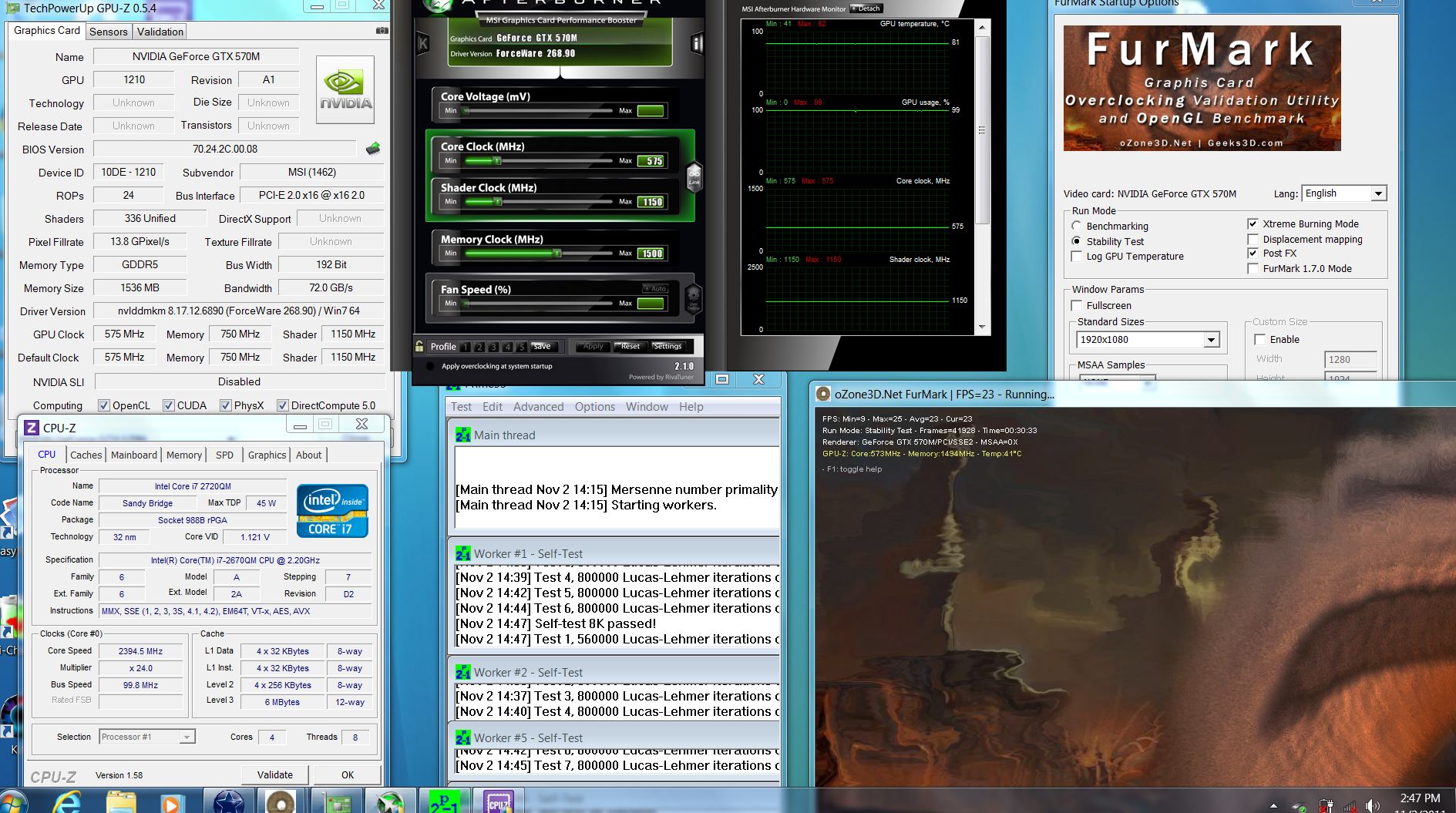
Just tested Prime + Furmark using 570 with GT780DXR-406US.
System setup:
- GTX570M 1.5GB GDDR5
- i7-2670QM
- 12GB DDR3 1333
- TED On
- Turbo Fan off
- Stock thermal paste MX-2
GPU at 82*C max, 41*C min.Attached Files:
-
-
This is another problem, if it really did smoke. The notebook should turn itself off when it hits its safe thermal max. This is usually is around 105C. If it didn't shut down automatically then you were still within a safe range. 95C is hot, based on this notebooks average high temps, but hardly dangerous to the components.
--->The Official MSI GT780/GT783 Owner's Lounge<---
Discussion in 'MSI Reviews & Owners' Lounges' started by -=$tR|k3r=-, Jun 9, 2011.