Problems? See this thread at archive.org.
I've never got more than 82°C on my own GT780DXR ... If you get more than 85°C, try to replace the thermal past.
-
yeah 95*C with smoke is really unheard before, the laptop will shut itself off before you can get the chance to see the smoke. I can unplug the fan or even remove the heatsink and run the game the laptop will just shut itself off instantly.
82*C with Furmark + Prime at the same time is extreme test and unrealistic for real world use. -
Still pretty happy I traded in my 17 inch MBP for this!!
-
I was overclocked. And the part of the card that fried was a chip on the corner of the GPU board. The corner closest to the power socket on the computer. I have a picture I can upload if I can get to a computer. My guess is that while the core reached only 95°, the component on the board that fried was above 95° but since there's no sensor there, I'll never know.
-
hi, anyone know of any place i can get a hdd bracket so i can fit a hdd into my second hdd slot?
hopefully in norway so the shipment costs isnt expensive
-
Anyone seen the GTA V trailer?
Looks like its based on the same engine, but optimized even more!
Will prolly run on high settings on the GT780s! -
Yup I saw it here Grand Theft Auto V - Trailer | Rockstar Games
Looks amazing! Now compare it to the very first GTA game Grand Theft Auto 1 Mission: Liberty City Chapter 1 mission #2 - YouTube
-
can anyone tell me what I should use as raid driver on my GT780? im stuck reinstalling windows because it needs these drivers and im not getting any wiser from MSI download page...
-
intel RST (Rapid Storage)
-
Thanks, tried it but when windows setup scans the dir for drivers it says no drivers found.
Ive unzipped it to a thumbdrive... -
What bios version do you have installed? There's two types of bios for the GT780, 1 with Raid support enabled and the other without Raid support. Just making sure you got the correct bios installed first.
-
Bios says raid enabled (other are IDE/AHCI).
have recrated the raid 1 partition now, read a topic on msi forums that showed this as a solution -
didnt work, have made a raid0 partition now to check if it makes any difference.
problem persist with both raid0 and raid1. I am using an original W7 64bit disk.
suggestions are welcome since my laptop is pretty much useless at the moment...
-
Wow! I just wanted to say what wonderful service I've received so far from GenTechPC. You know... when I'm dropping near $2500 for a laptop with upgrades, I just wanted to speak to someone on the phone to have my questions answered.
Ken was very helpful in answering my general questions, telling me how I can safely OC without frying my laptop, as well as information related to bios flashing, raid, and partitioning. It's just nice to know that I'm not a number on an order form. Thank you Ken for making my experience personal and easing my anxiety a bit.
Now I just have to wait for it to be shipped.... come on Brown Santa!
-
So my laptop is on it's way thanks to Ken, it'll be a while until I get to personally play with it, but hopefully it'll be a game filled Christmas!
I'll probably get a responsible member of the family to carefully take it out and make sure it's all in one piece... Then put it back in the box and stay the hell away from it until I get there
Days until I get my hands on my laptop (hopefully): 44... -
Howdy Everyone! First post here after lurking a week or so.
Ok, so I received my MSI GT780DX-215 in the mail today, woohoo! I likey
However after hunting around, the only evidence I can see of this "TruStudio Pro" is a sticker on the palm rest. Is this just hardware technology built into the audio component of the motherboard? Is it all automatic? Nothing the user can change/control? Or is there a software component I can't seem to find?
Also, I was playing around with the sound in the control panel and there is no option to set the sound system up as stereo (with sub), only stereo (no sub pictured), 5.1 and 7.1. If you set it to stereo, there is no way to test the sub- it doesn't even show up. I did try and set it to 5.1 and just turn off the rear and center speakers, but when it tries to test the sub, there is only silence.
Now I am not expecting a lot from a tiny little sub in a laptop, but I would expect to be able to test it out and at least hear something...and ideas?
Thanks
-
When you enable Stereo, bass are automaticaly played by the sub. No need for an option to test it.
Use 5.1 or 7.1 only if you connect corresponding speakers with jack. -
Bios version 30b, so far recreating partitions did not work. now disabled raid to install windows so I can flash bios.
its making me pull my hair out grrrrr.... -
About the screen:
did you guys experiment a lighter halo located close to the side of the screen?
When my screen is totally black (and ON off course ) for example during booting or when watching a dark movie, I can see that the right bottom of the screen close to the plastic is lighter than the rest of the screen. Sometime I can even see a weird lighter zone in the top third of the screen. This effect is hard to see and only observable when the screen is very dark and the room where my laptop is dark too. When there is color or something bright the contrast make it impossible to see it.
Does the same thing happen to you (black screen is equally black everywhere)? That's a bit weird because I just noticed it after a month of using my laptop, I can't tell if it's new or it was here from the beginning, but it is sure bothering me since I have noticed it as I keep focusing on it :/ -
Ok, guess I'll have to set it to stereo and put my ear to the sub, lol.
Any idea about the TruStudio questions?
Thanks
-
Ken Lee and Gentech is on a roll. Your video of the DXR playing BF3 is featured on MSI official facebook page. Nice
Facebook MSI Computer US -
Do you see a THX icon in the systray? If so, from here you can open the THX control panel interface, and have limited control over the software. Otherwise it can be launched from the start menu. When launched and activated (turned-on), yes, the software is automatic.
Creative's THX TruStudio Pro info
Creative's THX TruStudio Pro & MSI - Press Release
THX info
-
Before you setup the Raid array format all visible partitions and then delete all the partitions on both drives by going through the Windows 7 installation process on each drive as far as the add driver/disk options screen.
When finished there should be only 1 partition on each drive and the partition size should be the same on both drives.
Use the disk options in the Windows 7 Insallation setup to format and delete the partitions if they are not brand new drives.It's on the screen before the installation files extract and install.
After this has been done change the bios from AHCI to Raid and accept changes and exit bios.
Now you will need Windows 7 on a USB stick or DVD and the Intel RST driver/software on a 2nd USB stick.
The Intel RST you can download from station-drivers will be Zipped.Unzip and open the folder until you find a 64 bit folder .Put this folder on the USB stick.
Ok,now with your Windows 7 installation disk in the notebook bootup and choose to boot from the USB or DVD Windows 7 disk.
A screen will become available to access the Raid Setup.I believe you press CTRL + I .Here you will choose the type of Raid and the drives for the array.After you exit the Raid setup you will again get to the add driver screen of the Windows 7 installation.
The USB stick with the 64bit folder on it should be incerted and the driver installation should browse to the 64bit folder on the 2nd USB stick.
After the RST driver is installed continue with the Windows 7 installation.
The 1st time the installation reboots remove both USB sticks to prevent the installation from starting from the beginng after reboot.
When Windows 7 has finished installing install the Intel chipset installation software.
The RST 64bit zip file and Intel Chipset Installation Software can be downloaded from station-drivers.
WHQL RST v10.6.2.1001
intel drivers pour Raid/Sata/Ata/Ahci
WHQL Chipset Installation Software v9.2.3.1022
intel drivers pour chipsets
BTW,I used to have raid arrays all the time but these days I much prefer a SATA 3 SSD as my primary boot drive. -
Thanks for the heads up.
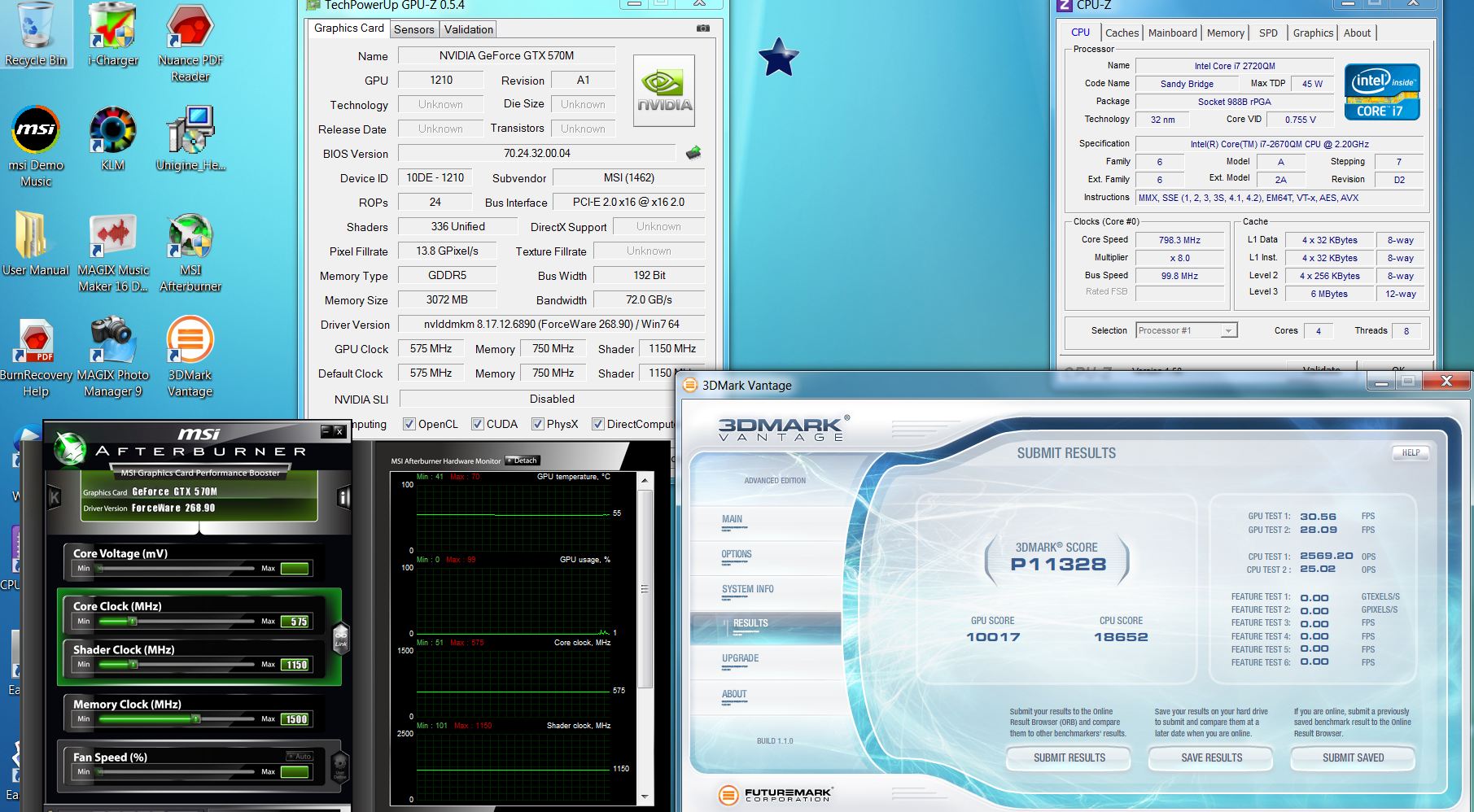
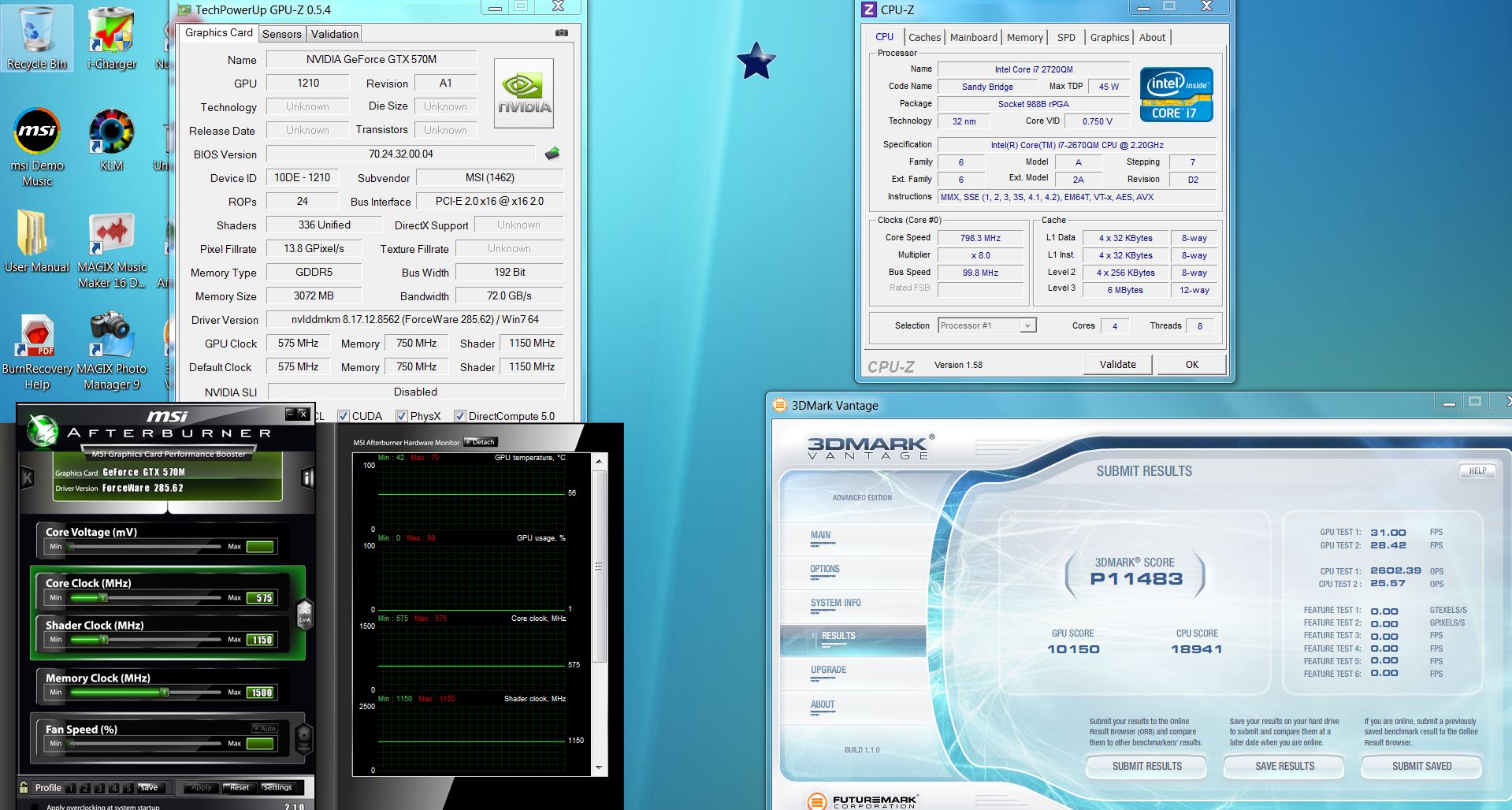
Just tested the GTX570M 3GB version with stock driver and 285.62.
system setup:
Gt780DXR-446US
- GTX570M 3GB GDDR5
- i7-2670QM
- 16GB DDR3 1333
- TED on
- Turbo fan offAttached Files:
-
-
is it necessary to do all that stuff? Sounds complicated @.@ i just Ctrl+I in the bios boot screen to get into the raid setup page to create or delete a raid config.
-
This might be a really stupid question and out off topic but can you upgrade the GPU to a Radeon 6990 or GTX 580?
-
Yes, it is possible.
Refer to this thread :
http://forum.notebookreview.com/msi/617863-msi-gt683dx-r-ms-16f2-amd-radeon-hd-6990m-succeed.html
dragon290513 upgraded his GPU from a GTX570m to a 6990m, there are many who are doing it now. =) -
I don't have a THX icon in the tray and nothing in the start menu or all programs shows up. I'll contact my reseller....I had them do a clean install. Perhaps they forgot to install that.
Thanks
-
Than You for the info, know I am interested in this laptop.
-
For other models of MSI such as my sister's EX628, you need to turn on Cinema Pro for the sub to work!
-
Deleting the array makes the array inaccessable but the info on the drive is still there.
It's possible but it's best to format/secure erase and then delete partitions so you don't have problems later with file corruption.
Even though you just delete partitions and raid arrays doesn't mean the files are gone.Most are probable recoverable with proper software.
The cleaner the drive you start with the better the chances that you will get a good OS installation.
Full drive formats are much better than quick formats.
A quick format is sort of like simply taking the list of residents off of the front door and declaring the building empty. A full format takes the extra step of actually emptying the apartments of all their contents. -
Quick question/advice needed about a huge yet tiny kink in my GT780R-012US!
Owner since August, all good and well, frequent user of the HDMI port. One day I sit down ready to see what Sisko and Dax are gonna get into this time, and the computer does not identify any HDMI connection
I believe the problem is a physical and not software based. I may have bent one of the metal contacts on both the pc port and the HDMI chord.
I ruled out the tv ofcourse. The HDMI cable I had been using, however, was busted and I couldn't establish a connection to the PC with a good HDMI chord, hence PC HDMI port busted, 1 chord busted.
Now the problem is that this is a fully functional and downright awesome computer, otherwise. Even though MSI turnaround is quick, I cannot afford to be without my rig for the ~2 weeks it would take to RMA.
I'm open to suggestions.
I have a 3 year extended warranty that will go poof if I take it to a repair guy (even if I gladly pay the repair cost). Tried to get an ahead-of-time exception from MSI but they wouldn't budge.
So cant RMA, can't repair, (unless it's possible to install a new HDMI port without breaking any seals) can't live without my stories. Thinktank activate! -
Download and install the following, and you'll have it working in no time:
THX_TruStudioPRO_MSI_Ref1_RC1.zip
THXSPKEQ_MSI_PCAPP_US_1_00_20.zip
GT780 downloads and other info can be found HERE!
-
Hmmm thats abit too much for me. My infomation while some of them are important, still isnt at that level of confidential. If i have lots of spare time maybe but for now im fine with the usual method. And here i thought i was abit OCD. (no offense intended)
-
Thanks a ton. I downloaded them both and the first one seemed to do the trick and installed the software. The second one started installing something and then just shut down....not sure if did anything at all.
-
Yeah, the second one does that....it's a quickie..... kinda leaves you unsatisfied, wondering what just happened..... doesn't it?
-
Thought I would join the thread as a new GT780DX-215US owner, i7 2630qm. 12gb 1600mhz ram (3 slots), blue ray and 2 x 750GB 7200rpm drivers. As standard the 215us does not have Raid. After looking into the system spec's all the GT780 range seems to be identical. So I flashed the bios for the 30e version from the MSI site to enable me to run Raid 0 and this has worked fine.
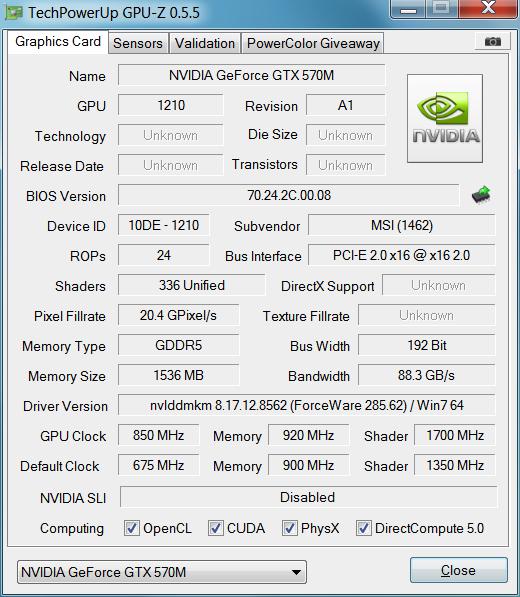
I have also been playing with the Overclock for the 570m and yet to test it on a benchmarking software but temps have been good whilst playing BF3 for a few good hours seen a max of 68c I attach a copy of my GPU-z you will note my default clocks are above the standard 570m as I have increased them to that of just over a desktop GTX460 card and I have also increased the voltage to .9v in the bios itself, the overclock above the new default settings was done using Nvidia inspector.
Want to increase the bandwith a little more so will up the memory some more and see if stable. Anyone got any tips or advice for modding the 570m I am still reading throught this thread as alot of pages to go through LOL but alot of informative information on here.
I am also looking into unlocking the bios to enable me to amend the Ram frequncy's as my ram is 1600mhz but I am sure they are only running 800mhz at present so not getting the full benefit.Attached Files:
-
-
800mhz = 1600 DDR
-
Holy crap! 850 MHz? That's by far the highest overclock I've seen around these threads. So you increased the voltage and base clocks with a custom vBIOS? Also, any artifact? Temps? Benchmarks?
-
I used custom vbios tool and I modified it to increase the base clocks and the voltage and the idle fan speed aswell, idle temps are 38c max temps have been 68c with the turbo boost fan on 100%.
The card has performed very well in BF3, Crysis 2 and Dirt 3 in UK temp's, the laptop is always on a desk or table top I have seen no more than 68c after a good 3-4 hr gaming session on BF3.
I will get some benchmarking done over the next couple of days, along with some screen dumps of temp's.
I have seen another 570m GPU clock @ 1000mhz and the shader clock was also set @ 2000Mhz although I have not seen his temps yet, I will try and find the link to it think the guy was from japan.
At present I am am happy with mine just want to increase the memory clock a bit, then it's benchmark time -
Cheers so my 3.0e bios must allow over the 1333Mhz then
-
Forgive me if this has already been asked. I'm currently re-reading the entire thread looking for various pieces of useful information to bookmark and review when my GT780DXR-446US GTX570M actually does come in, sometime next week as Ken has mentioned... (Hurry up man! I'm jonesing for a fix here
). However, after 2 days reading, I'm still only up to page 150.
I've purchased and asked my reseller, GenTechPC, to upgrade my machine to Windows 7 Professional 64. I not only wanted a genuine windows DVD, but also wanted some functionality for my business that was in Pro. When looking at the pricing on GenTech, versus the rest of the net, it looks like I'm buying a full retail, not an upgrade, version of 7 Pro (which I'd expect). Because of this, I'm actually buying 2 versions of windows... correct; the bundled version & the upgrade.
Anyway... my question is this; if GenTech repartitions, formats, and reinstalls the upgraded windows copy, will I lose the restore partition completely, or will I still be able to make a backup copy of that as well in case I sell the laptop at a later date? -
Would you mind just running furmark on the default settings and telling me what the average framerate is? I'm just curious what kinda performance boost your voltage increase is getting you and furmark can be used as a rudimentary sort of benchmark.
-
hi, i have tried to search on google for an answer on thsi but i havent found anyone
is it normal that when i change to batterypower, the gfx card is not changing to the intel gfx card.
should it go over to the onboard intel card? or isnt that a feature in the gt780dx? -
No optimus so it will be staying on the GTX all the time,
-
I will get hold of a copy of furmark and do that And do you mean the modified bios default setting's or the original laptop default setting's? sorry for sounding stupid
-
You can download it here. Thanks.
And I mean the overclocked and overvolted settings.
I actually own the barebone of the 780 and (well I actually fried my 570m and it's still being fixed or replaced by MSI) and was wondering how much performance boost I could expect from overvolting. I was (am) running at 720/1440/1750. I got at high as 775 MHz on the default voltage. But doing that was highly unstable so I never gamed over 730 MHz.
I'm also curious, you said that you upped the voltage to 0.9 v. Was that the "3D Vcore" value or the "Max Vcore" value? -
I will have a play tonight when i finish work, this is what I used to modify the GPU bios
http://forum-en.msi.com/index.php?topic=148273.0 -
I know you used Svet's tool. But which number did you change?
-
Is it possible to have the HDMI port replaced without breaking the warranty AND without RMAing?
--->The Official MSI GT780/GT783 Owner's Lounge<---
Discussion in 'MSI Reviews & Owners' Lounges' started by -=$tR|k3r=-, Jun 9, 2011.