Problems? See this thread at archive.org.
It definitely is. I couldn't be happier with it. And, the internal fan speeds have never even once kicked up to where they are audible since I started using it at 4:00 AM.
-
-
Have you changed your ThrottleStop settings at all since this video was uploaded in March?
Are you running the standard current version of Nvidia Inspector? I haven't used that program yet, but I'd like to see if I can undervolt my GPU to drop temps a little more. What is an average undervolt for stock clocks and memory?Last edited: Aug 3, 2017Huniken and Donald@Paladin44 like this. -
Hope you don't have to change MB
 And yeah, I hope you will continue follow good advices
hmscott, Rage Set and Donald@Paladin44 like this.
And yeah, I hope you will continue follow good advices
hmscott, Rage Set and Donald@Paladin44 like this. -
Dear guy!
I have contact to eurocom to request unlock BIOS, the support say :
and try again with MSI, MSI'support say:
Please, How to get unlock BIOS ? -
@Eurocom Support Any Idea why you don't offer the new unlocked bios?
-
Nope. My ThrottleStop settings are all the same as before. But, I don't use ThrottleStop all of the time any more. When I am benching I set the BIOS where I want it to be. When I am not benching I set the BIOS for 4.7GHz, and only launch ThrottleStop when I want to tinker with lower clock speeds (like 4.5GHz for a long gaming session that doesn't require very much CPU horsepower).hmscott and leftsenseless like this.
-
Is there a limiting factor using ThrottleStop? It seems for many BIOS options you can set values that apply for most frequencies without limiting daily usage functionality.
Sent from my SM-G935T using Tapatalk -
No, not really. ThrottleStop is an excellent program and very useful. I don't have any real limitations to using it.
Since I moved to 7700K I have experienced random times when launching ThrottleStop causes both my 16L13 and P870 to freeze or crash with a BSOD. It is often Watchdog Timer, but is sometimes PAGE_FAULT_IN_UNPAGED_AREA, or a message about attempting to read or write protected memory. I used to have it launch automatically with Windows, but had to stop doing that because of the random lockups and BSOD. I have mentioned this to @unclewebb, but I never heard back from him.
When that starts happening I have to rename the INI file, launch ThrottleStop, then delete the new INI file, rename the original and change a setting in one of the profiles, (doesn't matter which setting or profile) and save the change. After doing that it will no longer cause the random lockup or BSOD for a number or days or weeks, then it will mysteriously begin having the same issue. Since it happens on both systems, under Windows 7 and Windows 10, I'm guessing it is either an issue with 7700K CPUs or something changed in ThrottleStop.
I have tried changing things in the BIOS, like disabling XTU interface. I thought that resolved it, but the problem returned after a while with that switch disabled in the BIOS. So, I don't know that the deal is.Last edited: Aug 4, 2017Papusan, hmscott and leftsenseless like this. -
Is this with the Prema magic or stock BIOS? I never had that problem with the old BIOS, and I haven't tuned my system since I've had Prema in my book - it's hard to find the motivation when everything just works so well!
Sent from my SM-G935T using Tapatalk -
Both @Prema and Svet BIOS does it. I cannot say about the stock BIOS because I've not run the stock BIOS on the Clevo or the MSI more than a few days when they were brand new. I'm pretty sure it has nothing to do with the BIOS based on the behavior I am seeing. I think it may have something to do with errors in the programming language or something to do with my G.SKILL memory clocked at 3000 or higher, or maybe something specific to 7700K since I never experienced it with 6700K or older CPUs.Last edited: Aug 4, 2017Papusan, Spartan@HIDevolution and hmscott like this.
-
Thank you.
Sent from my SM-G935T using TapatalkMr. Fox likes this. -
But here's a question -- and I mean no disrespect -- but where are the benchmarking boundary lines to still be within the "same machine", for comparison?
For example, if I take my motherboard out of my laptop, immerse it in liquid nitrogen, then overclock to 7 GHz, am I really making a valid comparison against my peers with the same machine?
Again...no disrespect intended here, just a sincere question. What portion of hardware mods fall into "tuning" and what takes it beyond tuning into the realm of having rebuilt the machine? How much of benchmarking's implied (and somewhat informal) competition is limited only to "what can you do with nothing but changes to your config settings within the same hardware?"
Or am I making much ado about nothing, and all that really matters is raw performance irrespective of hardware platform?hmscott and Donald@Paladin44 like this. -
-
My EVOC baby just arrived at HID Evolution's labs yesterday, according to our friends at FedEx. Cue suspenseful music, and stock footage of a nerdy guy pacing the floor as he eagerly waits to get his hands on that juicy @Prema BIOS! I'm also very excited about the possibility I may be able to push my CPU clocks a bit higher once I have the modded bottom panel for better cooling. My lightmap bakes in Unity suck up every CPU cycle they can get.
-
Thanks for taking the time to reply. So is it a fair statement that you regard benchmarking as a matter of getting the most out of your system, any way you can, rather than a comparison against others?
(The context of my original question is that I'm relatively new to the OC/benchmarking world, and I bought my EVOC for work, so I'm trying to understand the community's traditions.)Huniken and Spartan@HIDevolution like this. -
Kind of like Drag Racing...same class of vehicle...but it is the sauce you put in it that separates winners from losers.Mr. Fox, Rage Set, syscrusher and 3 others like this.
-
I wouldn't say that. If they have the 16L, they are already winners regardless of the sauce...
Sent from my SM-G935T using TapatalkMr. Fox, syscrusher and Papusan like this. -
I buy my computers to play games and do work, not to run synthetic testing programs all day in order to get the biggest number to show off to strangers on the Internet.
Mr. Fox, Falkentyne and syscrusher like this. -
-
You make benching sound bad/shallow. Its a competition for many people; and there can be an art to it. like marathon running, you may not know any of the other runners, but still feels good to place high.
I don't bench much at all either, but I can appreciate what goes into it; and how it can be fun in the competitive spirit -
The [quasi-]competitive aspect of benchmarking isn't my thing, either, but I can appreciate the fact that others enjoy it. I also am keenly aware of the fact that all my deadly-serious work applications are running faster because of all the great tuning techniques that I have learned from the likes of @Phoenix and @Mr. Fox and others on this forum.
I'll also confess to a certain amount of competitiveness against myself. It doesn't matter to me whether my FireStrike score is better than someone else's, but I do get a charge out of beating my own previous record by using a new setting.
Spartan@HIDevolution, hmscott, Papusan and 5 others like this. -
This.
I only bench to make sure my system is performing as it should and to have a baseline and to look at numbers. I'm not doing it to show my little pink mars is bigger than someone else's. I want to see where I stand and what performance I get, not to make it some sort of contest. If I want a contest, I'll enter a chess tournament. -
A man after my own heart. It does my soul good to see others enjoying their wonderful addiction like me.
I primarily enjoy showing off to myself and if others like it they are more than welcome to join in the festive celebration of what a real computer runs like. I am not competing against others as much as I am producing multiple examples of performance greatness that casts pathetic notebook filth into the negative light it deserves to be cast into. If figure that if a few people are paying attention and my benchmark scores make them hate the wimpy trashbook they purchased and be regretful for it, maybe next time they will think a bit harder before spending their money on something the company that made it should be ashamed of selling them. In long run, maybe none of us will have to tolerate garbagebooks. Not likely, seeing we are encompassed by a massive crowd that doesn't know any better, but I am an optimist.
I also prefer gaming offline in single-player campaign mode.
That's right. Winning isn't everything, but losing always sucks.
If you don't do all three, then you're missing out on whatever you're not doing, or you bought the wrong tool that is unfit for the task of doing all three. Whatever the case might be, using any tool incorrectly will produce unimpressive results.Last edited: Aug 4, 2017Aroc, Papusan, Huniken and 1 other person like this. -
When I got my 16L (I was the first here with the 7700k/1080 version) in hand, I mostly OC'ed the crap out of it to showcase how powerful it was, even with the limited BIOS [my stock BIOS weren't as limited as the other owners and that caused somewhat of a stir]. I did purchase this beast for work but it was secondary to what I was doing - OC'ing. @Mr. Fox got his 16L, kicked my a$$ and everyone's.
I now use my beast mainly for work but I still have an OC session once a week. I may not post scores as much anymore in this thread, however, I am still working on beating my scores and trying to least match Mr. Fox's. OC'ing builds friendships and believe it or not, helps teach you a lot about computing in general if you're new to it. For some, OC'ing is about showing off and for others, it is about getting most out of your investment. -
Right on!! Some of my best friendships are built around the sport. It's wonderful. Fun, safe and more affordable than most hobbies. Whenever my wife complains that I spend too much on computers we look at how much fancy guns, hot rods and boats cost and then it's no longer such a bad deal after all.
We're just lucky that Brother @Johnksss@iBUYPOWER didn't get one or he'd mop the floor with both of our butts, LOL.
That is true. It takes good hardware that is capable of handling it, but it also takes time to learn (mostly trial and error) and acquire the knowledge. It's lots of fun seeing if you can squeeze a few more points out of your beast, and like many other games people play it can be very addictive. It seems lately the people that criticize the sport most are those that have machines that cannot produce impressive benchmark scores. But, I enjoy seeing anyone push their machine to its functional limits, even if it is wimpy a BGA turdbook. Enjoying what you have and doing something with it that others can't or don't know how is nothing to ever be ashamed of. If you get the highest benchmark score compared to other turdbooks with the same specs, you're still the winner in your class. Nothing wrong with that! Who doesn't like being a winner?Last edited: Aug 4, 2017hmscott, Papusan, Huniken and 1 other person like this. -
Hi, how was your stock original Bios less limited than the others? (I sent you a PM about a related question).
-
I know you are asking Brother @Rage Set but I can remember seeing 16L13 owners with a stock BIOS that could not overclock even a little bit using XTU or ThrottleStop. For some strange reason, some were completely clock-blocked and incapable of overclocking. I have no idea why. I even tried to help one of those guys using TeamViewer and some kind of weird product defect caused all of the applied settings to be completely ignored. @Rage Set can explain more about that. What I am mentioning may not be what he is referring to.Last edited: Aug 4, 2017
-
Like I wrote in the PM, my stock BIOS were different than what others had at the time. I could actually OC my 7700K when I got the machine, whereas everyone else were stuck at stock speeds. I believe since I literally got the first one with the 7700K/1080 (Eurocom used my machine in one of their F5 videos), someone at Eurocom forgot to lock it down, hahaha.
Yes. When I posted my scores, that caused one person in particular (a mini reseller) to accuse me of 'cheating' or not even owning the machine. Fun times. -
I never knew that the 16L13 had none overclock-able Bios since my stock Bios allowed me to OC the CPU, thanks for bringing this up.Mr. Fox likes this.
-
Got an email last night that my laptop is finally done with the screen replacement and other work being done and was shipped out. I cannot wait to have this back in my hands it's been way too long. Ordered an Everki Titan as I kind of needed a new bag anyway and it just came in yesterday. I'm ready to go.
Huniken, Mr. Fox, syscrusher and 1 other person like this. -
Those Everki bags are great. I bought a slightly smaller one (the Glide, iirc) because I needed to fit it under an airline seat. I've been very impressed with the quality of the Everki so far.
EDIT: I forgot to add, big props to the folks on this forum, who first alerted me to the existence of that brand. I had not heard of them before.Last edited: Aug 5, 2017 -
Anybody with experience with the 6700T or 7700T processors with this machine or in general since I've never used them? I'm trying to decide whether to get the 7700T or just get the K and just undervolt and underclock it when needed. Which setup would provide better battery life when doing light tasks (word procesing and spreadsheet stuff)
I also noticed in the Eurocom page that Intel HD graphics is listed with the T cpus. I asked the guys at Eurocom and the representative said that graphics automatically switches between integrated and dedicated gpu depending on the task and this only works with the T cpus. I'm not sure how this works and if power consumption is significantly lowered for better battery life.
Also, anyone know if it is possible to charge this thing with a 120W power bank ( http://www.goalzero.com/mobile/p/207/sherpa-100-power-pack) when idle or turned off? -
Given the i7-7700T is a 35W processor, I'd imagine it increases battery life by quite a bit (K series are 91W).
Optimus graphics switching is what he is talking about. K series chips have no iGPU, while the T chips do
@Mr. Fox or anyone else knowledgeable about iGPU stuff
Correct me if I am wrong, but if you get the 120Hz panel you will have no Optimus graphics switching. If you get a G-Sync panel you also have Optimus disabled. So Eurocom is wrong to say that Optimus works on T series CPU in Tornado F5, because it will be disabled anyway?
About the power bank. The MSI 16L uses a 4 pin power connector, id imagine it hard to find a compatible plug for a power bank
![[IMG]](images/storyImages/s-l225.jpg) Last edited: Aug 5, 2017
Last edited: Aug 5, 2017 -
The 6700K and 7700K both have iGFX (Intel HD Graphics) but it is purposefully disabled (thank God) on this machine and the better Clevos with desktop CPUs. Only the HEDT CPUs are missing iGFX... probably because the people that want HEDT CPUs don't want that stupid crap gumming up the works.
I am not aware of any Tornado F5/16L13 with Optimus working. Having the iGFX disabled is a great selling point of this machine and the better Clevos models with desktop CPUs. Integrated graphics has no place in a high performance notebook, unless it can be used like the Alienware M18x/M18xR2/18 where you had to choose iGFX or discrete graphics--one or the other--with a reboot in between. That was brilliant and elegantly executed. That's actually worth having, but hybrid switching sucks. I know we commonly call it Optimus, but that doesn't really exist any more. Micro$haft has their own flavor of it now and it's no better than Optimus or Enduro crap. (AMD's version of this filth was called Enduro and it was equally horrible, if not more so.)
I am assuming if it were possible to have the iGPU functional the 120Hz display and G-Stink would break it. Unless intel changed something IGFX only supports 60Hz and I am pretty sure that G-Stink cannot work if the display signal is routed through the Intel iGFX.
MSI and Clevo 4-pin connectors are exactly the same. You can swap out the AC adapters between those to brands on the models that use the 4-pin DIN connector.
Edit: I can vaguely remember hearing that Intel's IrisPRO iGPU filth supports 120Hz display, but don't quote me on that. I do not make a special point of remembering things that are irrelevant or unimportant to me. I could be wrong.Last edited: Aug 5, 2017Aroc, Papusan, ThatOldGuy and 1 other person like this. -
The connector is a standard 4-position female DIN (Deutsches Institut für Normung) type. I believe you could use something like this if you wanted to make your own: https://www.digikey.com/product-detail/en/cui-inc/MD-40J/CP-2140-ND/96924. The Digi-Key company, a very reputable and longstanding supplier, carries thousands of DIN connector variants, so if you decide to build something, visit their site and spend some time in their search engine to find just what you need.
![[IMG]](images/storyImages/MD-40J.jpg)
You will need to know the pinouts from the MSI power supply. Don't quote me on this, but I believe these power blocks just use two pins for positive and two pins for negative, with nothing special like serial I/O for intelligent power control or anything of that sort. -
Look on the label glued to the AC adapter and in most cases there is a small pin-out diagram on the MSI and Clevo units. I tried several connectors from Digi-Key or Mouser and none where the correct configuration. The pin spacing was correct, but the male/female parts where the exact opposite of what they needed to be to function. I cannot remember the name of the Clevo/MSI type, but I believe @t456 might know. It is nearly impossible to find the type we need for sale any place. I don't know if somebody licensed it and made it proprietary so we couldn't mess with our own stuff, or it is so unpopular that nobody makes it available.Papusan and Falkentyne like this.
-
They're made by Singatron, 2MJ-3002-*/2MJ-3432-* for the socket and 3MP-3432 for the plug. We had a discussion about them here: 4PIN power jack broken. The pins are indeed simply 2x voltage and 2x ground. Disadvantage with these is that it's a non-locking plug and if even a single one of the pins is momentarily disconnected then its partner pin will have to take up the full load and that can easily burn/melt it when the system is stressed. A normal 1xV + 1xGnd would not have that issue because with one pin gone there's no current at all, having the system hiccup and run on battery for an instant.
You could use that 120W bank for charging, it'd even do a full charge of the original battery and it shouldn't be any slower than when using the adapter (charge is limited to 1A per cell anyway). Can't run the system on 120W without throttling, but charging passively is fine. The plug needs soldering and, first of all, sourcing; that CUI won't fit and the Kycons have the wrong gender, as Mr. Fox pointed out. Easiest and cheapest (relatively) is buying the dual 330W adapter box (AC-100 or AC-200) and clipping off the female plug from that. Should be ~$100 when bought separately, so still a bit steep for a $3 item.Aroc, Papusan, Mr. Fox and 1 other person like this. -
HIDEvolution shows a standard 3 prong power cord on their 16L page.
http://www.hidevolution.com/evoc-16l-g-1080-custom-built-gaming-desktop-replacement-laptop.html
Do they use a different adapter with the standard female power plug, or is it incorrect? -
Thanks for the info. I've considered a homebuilt solar charger for my EVOC, and have filed this info in case I decide to proceed with that project. (It's a "someday" thing, not high priority right now, since I already have a marine battery and 120VAC inverter.)Donald@Paladin44, Huniken and Mr. Fox like this.
-
i have research about 120Hz FHD 15.6inh with Gsync and here is a result
AUO B156HTN05.2
it's working on
Schenker XMG P507 (Clevo P651HS-G)
and HIDevolution EVOC P750DM2-G
http://forum.notebookreview.com/thr...isplays-gorgeous.795452/page-26#post-10443318
https://www.notebookcheck.net/Schenker-XMG-P507-Clevo-P651HS-G-Notebook-Review.193074.0.html
anybody have any idea?Last edited: Aug 5, 2017Donald@Paladin44 and Mr. Fox like this. -
I knew I could count on Brother @t456 to refresh my memory. The man is a walking encyclopedia of tech knowledge.
If you're really ambitious you could replace the socket on the motherboard with the very common and easy to source big barrel type like Dell and HP have used for years.
Or, look around on eBay, Craigslist and yard sales and see if you can get a crappy old used Clevo AC adapter for less than an AC-100. The P750ZM that I purchased came with a wimpy old 230W (or 240W... whatever it was Clevo used) and I just opened it up, desoldered the cord, and threw the rest in the trash. I already had plenty of 330W AC adapters and that panty waist AC adapter was worthless to me anyhow.
I used the cord from that wee boy's AC adapter to mod my AC-100 adapter because the stubby pigtail Clevo uses on them is about as idiotic as anything I have ever seen... super inconvenient. The end result is perfect and it looks factory because I used the original strain relief boot from the AC adapter I robbed the cord from.
![[IMG]](images/storyImages/iV8tVhS.jpg) Donald@Paladin44, syscrusher, Papusan and 2 others like this.
Donald@Paladin44, syscrusher, Papusan and 2 others like this. -
you must be confused, they don't show it at all. They only have pictures of different power cords they offer (wall end). Laptop end is what everyone is talking about, See DC-In (4 pin)
![[IMG]](images/storyImages/m384_15_1.jpg) Donald@Paladin44, Chuzzz, Papusan and 1 other person like this.
Donald@Paladin44, Chuzzz, Papusan and 1 other person like this. -
Thanks for the info guys. Modifying the ac plug for my power needs is something I can do a project on in the future. Are T chips significantly more power efficient than the regular or K chips given the same light load like text editing or spreadsheets? Or are they just the same with different power limits? Are there any tests anywhere I can look up?
Also, can the cpu be undervolted using the regular or unlocked bios? I'm going to use linux and I don't think there are any tools in linux for undervolting these newer cpus.Donald@Paladin44 likes this. -
The power block (the external unit, not the laptop itself!) has a male IEC C14 (male) connector, which mates with an IEC C13 (female) cord.Donald@Paladin44, hmscott and Chuzzz like this.
-
Go for K chips. If you absolutely want lower power usage from the cpu. Clock down and undervolt. No difference in power usage between them when they run same clocks. Maybe even better with a K chips as it is better binned. You never know if you want or need better performance in the future.Last edited: Aug 5, 2017Donald@Paladin44, Aroc, hmscott and 4 others like this.
-
Sure was, I don't know why I was so fixated on the wall<>adapter rather than adapter<>laptop. Thanks.Donald@Paladin44, Mr. Fox and ThatOldGuy like this.
-
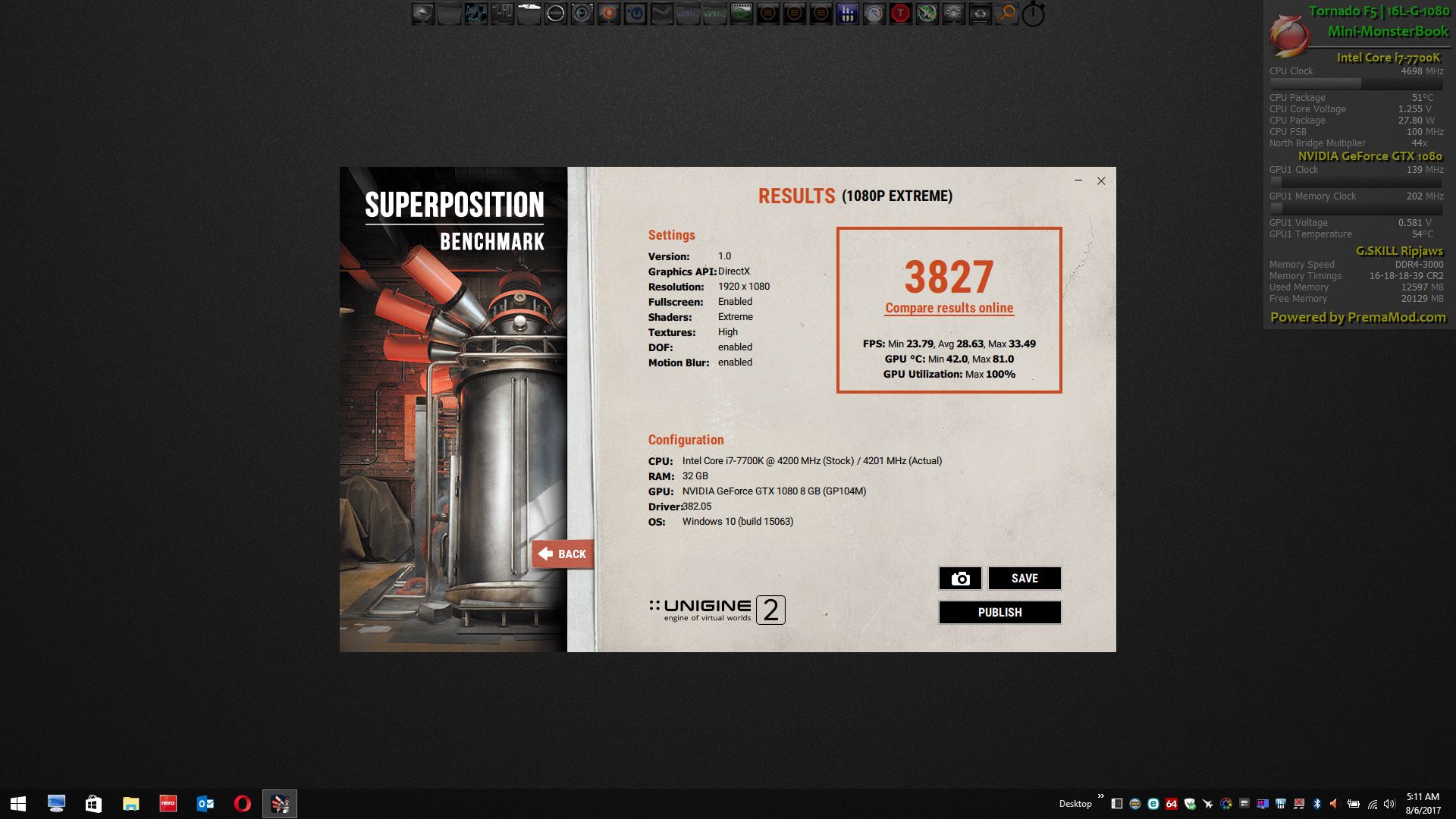
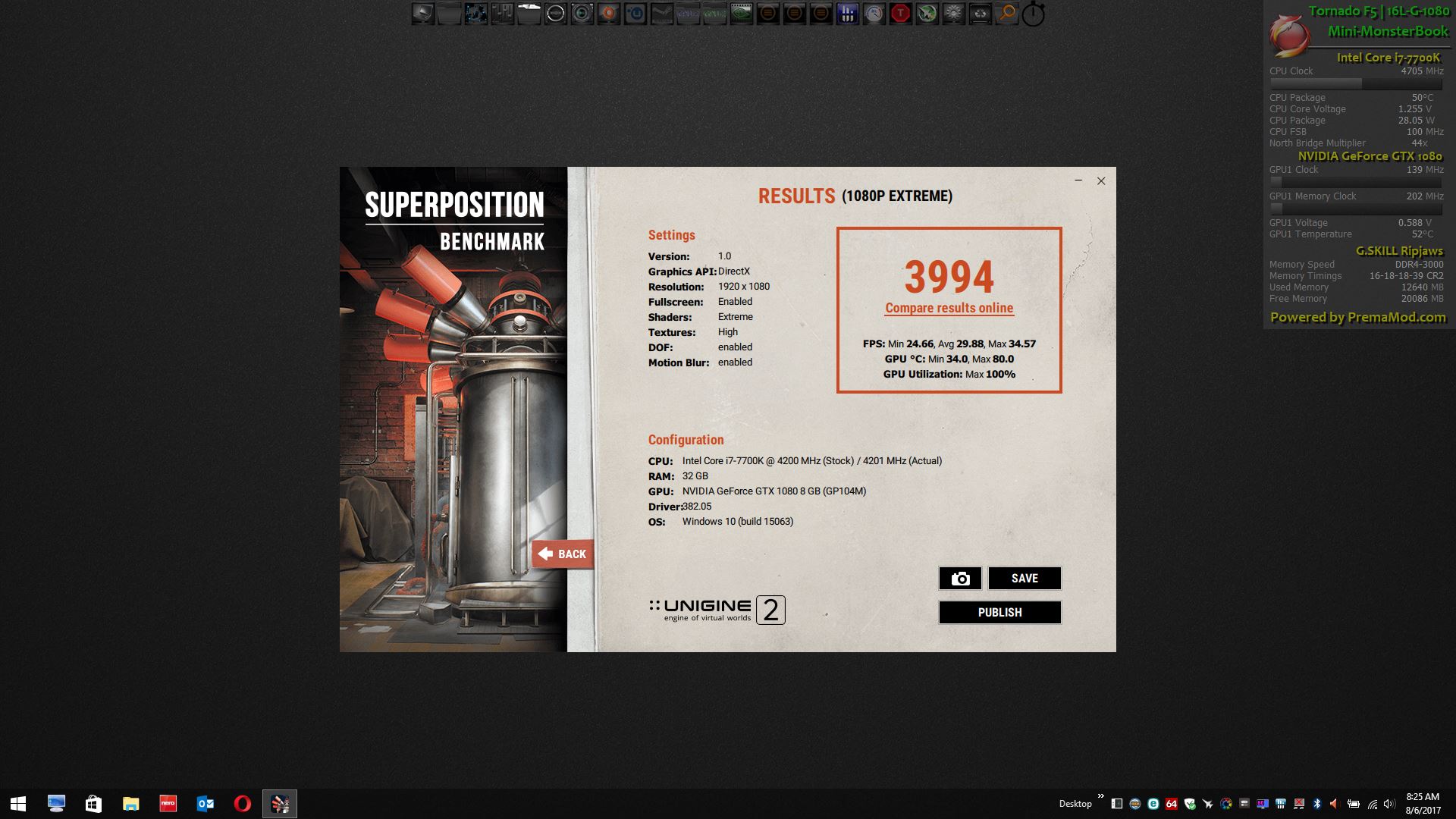
Foam dam deployed on the Tornado F5 / 16L-G-1080. Liquid metal contained on CPU and GPU. Now I can rough-house with it all I want to. Ran Unigine SuperPosition benchmark before and after. Temperatures are unchanged, so that verifies no contact interference. I used super glue to attach the foam to the Kapton tape same as I did the GPUs on the P870.
![[IMG]](images/storyImages/3PcqnCI.jpg)
@Donald@HIDevolution @thattechgirl_vivAttached Files:
Last edited: Aug 7, 2017syscrusher, Donald@Paladin44, Huniken and 3 others like this. -
-
How much did the temps drop using liquid metal vs paste?
Sent from my SM-G935T using TapatalkDonald@Paladin44 likes this.
*** MSI 16L13 (Eurocom Tornado F5)/EVOC 16L-G-1080 15.6" Owner's Lounge ***
Discussion in 'MSI Reviews & Owners' Lounges' started by Diversion, Oct 14, 2016.