 Problems? See this thread at archive.org.
1080ti notebook MXM - very interesting! Fairly certain it won't operate at the same clocks or at least will have a lower TDP, but the good news is that with reduced clocks it will operate in a more efficient place on the Mhz/voltage scale & therefore you end up with more performance per Watt. Hopefully it will still be a big jump over the GTX 1080. Maybe in some of the massive notebooks that have the 200W versions of the GTX 1080, maybe these ones would be able to run a GTX 1080ti at desktop TDP levels, although that would mean in the region of 280W as measured by Guru3d in their 1080ti review. GTX 1080ti has 40% more cores than a GTX 1080, but given that GTX 1080 is close to the limits of current notebook cooling & power consumption, then perhaps we'll only see say a 20% improvement in performance over the GTX 1080 in laptops.
-
-
I'm already pushing 250W from 1080 MXM. So, it could be more than 300W with a heavy overclock and vBIOS mod. Unless it is a gimped Q-Max turd thing trying to offset low TDP and low clocks with more shaders. Not sure that it would be all that awesome if that is what turns out to be. One thing we can count on from NVIDIA... if they can sell it to people willing to pay for it based on a name only, it does not have to be a good idea and it doesn't need to be a good product. If the Facebook yuppies think its good it will sell like hotcakes. The childlike acceptance of Q-Max filth reinforces this fact.
Q-Max, Max-Q, tomato, potato, don't touch my Tornado. (Yes, let's all say it wrong out of disrespect for the Green Goblin's wuss-boy garbage.)Last edited: Aug 12, 2017Donald@Paladin44, Huniken and Spartan@HIDevolution like this. -
Wow, 250W! Is that with vBIOS mods? I only ask, because it would be good news if that was with vBIOS mods, because then it could mean that it's not a crazy notion that some notebooks could adequately cool 250W of GPU power - in which case perhaps we'll see a laptop GTX 1080ti in the region of 250W - that would be good news, not massive gimping! (Most potent off the shelf laptop GTX 1080 is 200W as far as I know).Donald@Paladin44 and hmscott like this.
-
-
@Prema the God has spoken.
Donald@Paladin44, Papusan and hmscott like this. -
What? So who is getting the 1080ti detuned GPU?Donald@Paladin44 likes this.
-
-
The fabled laptop GTX 1080ti perhaps!
-
Yes, definitely a @Prema vBIOS. Check it out... ran this just for you, bro.
Too busy to try to beat my last best today, but soon...
http://www.3dmark.com/3dm11/12274145
![[IMG]](images/storyImages/LlocfVt.jpg) Donald@Paladin44, Huniken, Robbo99999 and 2 others like this.
Donald@Paladin44, Huniken, Robbo99999 and 2 others like this. -
And, here's the little "150W 1080" in my 15-inch 'El Cucuy' RPG-book.
And, my last best target with that little terror I will be striving to beat...
http://www.3dmark.com/3dm11/12251733
![[IMG]](images/storyImages/f3PDvwl.jpg) Donald@Paladin44, Huniken, Papusan and 1 other person like this.
Donald@Paladin44, Huniken, Papusan and 1 other person like this. -
I've got my machine back! It was "due" on Tuesday, but FedEx beat the target considerably. By very lucky coincidence, I was already near the FedEx office when they texted me an alert that my system was held for pickup. w00t!
A couple of weeks ago, @hmscott had asked about Linux. I took a couple of hours this afternoon and did an installation of Debian 9.1 (via netinstall media) on my spare SATA SSD. Here's what I've found so far:
- Ubuntu 16.04 runs fine from a thumb drive boot, but their default installer didn't have the flexibility to handle my desired (complex) Luks encryption plus LVM setup. They have a "guided" partition setting that will do LVM over crypto, but I've found that option uses the whole drive without leaving any LVM extents available. I like to start my logical volumes slow and grow them into spare extents as needed. Ergo, I went with Debian, whose installer is smarter.
- Debian's graphical installer works perfectly, with two caveats:
- The touchpad on this machine doesn't work during install (but does work afterward), so you have to use keyboard navigation during install.
- On my 4K screen, the GUI installer scales to what looks like 1920x1080 or something close to that, but it's perfectly readable.
- I didn't have time to examine the GPU driver in detail, but unlike my previous Linux installation attempts, Debian 9 "just worked" with the GTX 1080 in this machine, even at 4K. I didn't manually install an Nvidia "non-free" driver yet, but whatever open source default driver is in Debian 9 works just fine on this machine. I didn't specifically performance test, but playback of 1080p video was perfectly smooth, so it can't be too bad.
- I was able to change screen resolution easily from the standard screen settings widget in my xfce4 desktop.
- I did not test Bluetooth yet, but theoretically it is supported.
- Sound through speakers works perfectly, but Linux wasn't able to detect when I plugged in headphones. I didn't take time to troubleshoot just now.
- Wired Ethernet "just worked". Wifi also worked, but I had to enable Debian's non-free repositories in /etc/apt/sources.list, run apt-get update, and then manually install firmware-iwlwifi. Once that was done, networking was golden.
- Of course, there is no keyboard illumination control from Linux.
- I have Windows on my NVMe SSD and Linux on a SATA SSD. To choose which o.s. to boot, I don't use the "boot order" settings in Prema BIOS directly. Instead, on the same main tab but lower in the screen panel, there is a "UEFI boot priority" (or something like that) setting that chooses among available SSDs or HDDs, and whichever one is highest priority is the one that will appear as "Hard Disk" in the traditional boot order menu. (I elected to make Linux and Windows entirely unaware of each other, changing boot in the BIOS instead of a boot loader selection menu, for maximum isolation and safety.)
- I've not had time to search for a Linux-native way to control CPU clock and so forth. It may or may not be necessary to set this in the Prema BIOS.
Donald@Paladin44 and hmscott like this. -
Awesome info and details, thanks for that, please keep it up as you discover new features for Linux and Windows - I've set up something like that with either Linux or Windows as Host OS for VMware and mounted the other partition to run as a Guest, very handy for product testing and development.
There was some interest in GPU passthrough for Windows Guest for gaming, perhaps when you get the urge to set that up you can report back the setup and configuration, and how well it works for you.
Glad you lucked into getting your return early, that's cool Donald@Paladin44 and syscrusher like this.
 -
Now that my baby has the spiffy new Prema BIOS and bottom panel mod, I decided to re-run FireStrike and see how things compare.
My previous FireStrike score was 17133. Bit of an improvement! What appears to be the difference is that the GPU is running faster before it hits thermal throttle.
Donald@Paladin44, Huniken, Prema and 3 others like this. -
That's good, that's proof that if manufacturers can get there cooling systems right then there's nothing to stop a 250W GTX 1080ti being used in a laptop...here's to hoping!Donald@Paladin44, hmscott and Mr. Fox like this.
-
Please help!
I cannot monitor 1080 gtx's power usage in watt, neither on hwinfo64 (already try x86 and 64 version, latest 5.54.3200 and the beta 5.55) or gpu-z.
checked with nvidia drivers 378.78 and 384.94.
Any suggest?Donald@Paladin44 likes this. -
In HWinfo64, hit sensors only, and in bottom right corner is configure sensors. In there, go to layout tab, make sure YES is displayed for all GPU power monitorsDonald@Paladin44 and hmscott like this.
-
Is there anything I should be wary of before installing Windows 7 on this? I'm going to self harm if I have to deal with 10 any longer.
hmscott likes this. -
Hey thanks but it is not here
If you don't want to make your own iso copy with usb and chipset driver integrated, the only way is to install win 10 and then dual boot with win 7Donald@Paladin44, Chuzzz and ThatOldGuy like this. -
Strange, not reading RAM, SSD, Network card, or smart battery either. I suspect you have some monitoring turned off in bios somehow. There are very many options in the bios I am not familiar with. Maybe @Mr. Fox or @Prema can help? I'll take a poke around mine and see if I can come up with anything
For now, do a clean install of this driver: http://forum.notebookreview.com/thr...94-findings-fixes.807276/page-5#post-10575421Donald@Paladin44 and aaronne like this. -
Try delete Hwinfo64 ini.file and re-launch without changing settings.Donald@Paladin44 and aaronne like this.
-
Hey thanks! These HWinfo listed entries are hidden and disabled by me, but gpu's wattage is not present anywhere . (also in gpu-z is missing)
I always use dd in safemode for get rid off my drivers.
Now downloading driver and stuff from j95 post
Thanks to you too man!
going to try in a moment.
Edit:
cleaning .ini files doesn't works (as resetting from start page, or changing my driver, has no effect) I also have the fck ìg dimm thermal sensors but not gpu watt!
2nd Edit:
I'd try with these drivers(downloaded from nvidia), no luck for me
378.78 no no brightness ctrl
378.92 no no brightness ctrl, no watt
381.89 ok no watt
382.53 ok no watt, no nvcplui
384.94 ok no watt
385.12 ok no watt, desktop drv j95 mod
385.12 ok no watt, desktop drv
385.12 ok no watt, laptop drv
3rd Edit:
1080 gtx Vbios ver is 86.04.5b.00.47Last edited: Aug 13, 2017Donald@Paladin44, ThatOldGuy and Papusan like this. -
Yea I noticed pressing EC reset disconnects the battery. Do you press it for 30 secs? I always test by pressing the power button to be sure.
-
That's really smart to press the power button to be sure. I don't think you have to hold it for 30 seconds. If you disconnect the AC adapter with it running and press the EC reset switch it will shut off immediately, just like yanking the power cord to your TV set from the wall outlet. But, holding it for 30 seconds certainly doesn't hurt anything. We all need to slow down sometimes and take time to smell the roses.Last edited: Aug 13, 2017Donald@Paladin44 and Papusan like this.
-
Nope, no problems of any kind. Micro$lop would like you to believe you need Windows OS X for SKL and KBL, but that is a blatant lie. Windows 7 works stupendously on it. I have it on mine, dual booting with Windoze OS X Creators Abortion. You will have to use a Windows 7 ISO that has been modded to include USB 3.0 drivers or you may run into snags installing it. See the instructions posted here [Guide] Installing Windows 7 on an NVME SSD (from a USB 3.0 thumbdrive) - excellent guide by @bfishman
For Windows 7 updates, use the Simplix pack. Much faster and easier. Just does them all in one massive batch and leaves out all of the Windows 10 backdoor filth.
And, you're absolutely correct that Windows 10 sucks. I have lost all hope that it will ever be worth a darn, too. Micro$loth sucks at what they do now and stupid is very difficult to cure.
While some GeForce driver versions do goofy things with the power sensors disappearing, I think the vBIOS version has more to do with it. Some do not have the code for power monitoring sensors. I used to run into the same with different vBIOS version for 980M and 780M. There are no BIOS settings for this.
The best was to confirm this would be if someone else that has 1080 vBIOS version 86.04.5b.00.47 (sames as yours) if they have GPU power settings in HWiNFO64. If they do, then it is not the vBIOS. If they do not have the sensor readings, that will confirm it.Last edited: Aug 13, 2017 -
I've noticed one small oddity since installing the @Prema BIOS. Although I turned on the XTU interface option in BIOS, and I am able to control overclocking and voltage from XTU, the XTU data display no longer shows my CPU core utilization and temperatures. Is this a setting issue of something I need to change in BIOS? HWinfo64 *does* read out all the data as usual, so I know the sensors are working.
There are a lot of fascinating options in Prema BIOS, and I'm eager to understand them better. Could someone recommend an online documentation source where I can learn what these mean? Some of them are, at least partially, meaningful to me because of my hardware design background, but to be honest it's been 20+ years since I did circuit design. Things have changed just a bit since then.
Donald@Paladin44 likes this. -
Or I can back a few page ago and flash your signed vbios after backupping mine!
Thanks for suggestion Mr. Fox, in the meanwhile I made a post on hwinfo forum
edit:
tried to flash standard Prema vbios 86.04.2B.00.1B from Mr. Fox's post but still no gpu wattage on hwiinfo
2nd edit:
here the link to hwinfo forum with MArtin's talk about this.
https://www.hwinfo.com/forum/Thread-Hwinfo64-gpu-power-sensor-not-show
TL,dR!
Fact is: working on win10 because the same nvidia driver (382.53) miss some components (NVML and NVSMI) when installing on Windows 7
so I would gently ask to @j95 to investigate a bit on this
(on win10 is section152 and on win 7 is section177) if is a driver or os or "user" issue ^_^
3rd and final Edit!
got it working after ddu again and importing hwinfo64 5.55-3220 .reg and .ini, on 382.53 notebook driver and Mr. Fox/Prema's vbios on gpu, now I'll try later if changing driver result in showing wattage
Argh! The Prema's vbios pull 203 Watt from 1080 also on mine! going to reflash the stock one, maybe, just for chek them wattage limit.
..And yes, msi 1080 gtx vbios 86.04.5b.00.47 version is 150W limited instead of magic'sPremas one of 200W
..at the end the issue seems to be me ^_^ nor my software, thanks all for your effort and sorry for my englishLast edited: Aug 14, 2017Huniken, Papusan, Donald@Paladin44 and 1 other person like this. -
Yes, you can give that a shot. Let us know if it takes care of it.Donald@Paladin44 and aaronne like this.
-
My EVOC was delayed last week due to laser engraving and the last minute before it leaves HIDEVOLUTION they found out that they still forgot to swap out the 4K screen to the FHD 120Hz screen so that took extra time and then they shipped it by FedEx to be stuck in transit in Memphis, now it just departed after a 24 hours layover. Still I expect my machine to arrive in my hands by Monday next week. Right now I'm stuck on the go with my Android Wacom cintiq companion Hybrid 32GB and iPhone 6.....work is going to be a pain.
Papusan and Donald@Paladin44 like this. -
Before you dump Windows 10, reach out to @Phoenix and let him do his magic. When he is finished, all the cockroaches will be gone, and it will look like Windows 7. If that still doesn't satisfy you, then proceed with the dual boot.Spartan@HIDevolution, syscrusher, aaronne and 2 others like this.
-
I am thinking of buying the EVOC 16L-G-1080, but i have couple of questions.I am going to buy it from HIDevolution so they will upgrade and do all repasting stuff.
1- Is there any overheat issues with the gtx 1080 ??
2- is the GPU overclocked ?
3- what is the refresh rate of both 15.6" Full HD (1920x1080) IPS Antiglare Matte and the 4K as i want a 120hz ??
4- Do i get a MSI warranty too ?
5- Would i be able to upgrade this laptop later (e.g nvidia volta) ?
6- do u advice me with this laptop or is there a better one ? because i like the 15" but if it has a lot of disadvantage i wont get it. -
Does anybody know if this uses the same adapter tip as the MSI 16L13?
https://www.amazon.com/dp/B004G7IMP...W6JXV233DHGX6CB90&ie=UTF8&qid=1502701616&sr=1
View attachment 148510 View attachment 148511 -
Does anybody know if the MSI 16L13 uses the same power adapter tip as this (for Toshiba Qosmio)?
https://www.amazon.com/dp/B004G7IMP...W6JXV233DHGX6CB90&ie=UTF8&qid=1502701616&sr=1
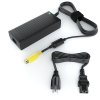

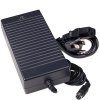
or maybe this one from Targus?
https://www.amazon.com/dp/B00336ZIW...W6JXV233DHGX6CB90&ie=UTF8&qid=1502701616&sr=3
-
I've hit a snag. Windows 7 is not compatible with UEFI, yet I get no display with either other option:
UEFI+CSM- Powers on, backlight on, but doesn't seem to boot (no display and shuts off instantly when I press the power button).
Legacy- Powers on, but no backlight or display. Unsure if it's booting at all.
I have the 4k GSYNC screen.
Any ideas?
I was actually using his bloatware-free version. If I can't get 7 to work then I'll eventually settle down from my tantrum and go back to it, I've just got a case of nostalgia for when right-click was for more than just pinning and unpinning crap. -
1/2- The 1080 can get hot. You're ordering it from the best reseller, so it's going to run cooler than it typically would. Plus you can get the bottom cover mod to improve the thermals. You can OC the gpu if you really want. As I've stated, temps aren't going to be the best as you have the full 1080 in the smallest laptop you can get it in. With the Prema BIOS you are actually capable of running the 1080 beyond what is standard for this book - 220+ watts vs 150.
3- The 1920×1080 is the only 120 Hz option. Great screen. I love mine.
4- I imagine there is a factory warranty, but I haven't really asked.
5- Nobody knows if Volta will be compatible, but many are doubting it.
6- This is the best 15" on the market. If you want more performance, you can get slightly more out of the 17" Clevo.
This is a fantastic machine that I would recommend any day. HID is the best. I can't imagine any regret for either of those choices.
Sent from my SM-G935T using TapatalkDonald@Paladin44, Robbo99999 and Papusan like this. -
if you don't wont to dual-boot starting from win10 installation, you must integrate usb3 and other stuff into windows7 (to iso prior to usb) and need to convert also your disk in GPT in both cases.
i' went to first route.
-
If i got the 17" would it run cooler, as i dont want to worry about the temp. ?
and what model u advice me as i can see those two: P870KM1 and P775DM3Donald@Paladin44 likes this. -
They tend to run cooler especially if you get a model that has a vapor chamber. The price begins to climb. I'd visit the Clevo owners thread to get the best answers beyond the 16L. I'm not steering you away from the 16L, you can't lose either way. You get a smaller machine if you need it with the 16L. If that doesn't matter, then go for the 17".
Sent from my SM-G935T using TapatalkDonald@Paladin44 likes this. -
Go for P870KM1. Nothing beats this machine. With or without Sli. Try to get the big sli heatsink if you go for single 1080.leftsenseless likes this.
-
How to do that because the only option i can see is the Vapor Chamber GPU & CPU Heat Sink Set .Donald@Paladin44 likes this.
-
Ask, pm or email @Donald@HIDevolution Maybe he can help you out if you go for HID. You need the whole HS setup.
-
+1 on this suggestion from me. I loathed Windows 10 until the day @Phoenix kindly helped me stomp on its annoyances with freely downloadable tools like OOShutUp and CCleaner.
One thing that is nice about Windows 10 is the availability of the user-mode Linux (UML) Ubuntu shell. Finally, Windows is halfway usable to sysadmins!Huniken, Spartan@HIDevolution and Donald@Paladin44 like this. -
Everyone will have a different idea of what constitutes "overheating". The GTX 1080 VBIOS from NVidia won't allow the chip to run above what the manufacturer thinks is a safe thermal limit. You can use something like MSI Afterburner to adjust the clock speed on the GPU, either pushing it up to run close to the limit for max performance, or pulling it back to trade performance for cooler temps. This machine also has a keyboard button to manually max out the cooling fans, and turning this on before intensive CPU or GPU loading makes a significant (about 10 degrees C, for me, but YMMV) difference in temperatures.
That's under your control, using a tool like MSI Afterburner. It's not OC by the manufacturer. This is the best way to do things, IMO.
I will let HID Evolution respond to that, as you're asking a specific product availability question per their catalog.
Again, I defer to HID Evolution. It would be improper for me to cite warranty terms on their behalf.
With any laptop, it is virtually impossible to predict future upgrade paths, because the semiconductor manufacturers are always changing and evolving their interconnection specs.
That's a very open-ended question. What is the best laptop for you is something that only you can decide, based on your own needs and preferences. This is a solidly-built, high-performance, well-supported machine whose chassis is made by a mainstream manufacturer, and whose options are skillfully customized by the boutique retailers represented on this forum. Obviously everyone in this owners' forum who bought one thinks it's a great computer, or we wouldn't have purchased it. But no single machine is the "best" in every way.
Here are some pros and cons, from my personal opinion. Bear in mind that I bought my EVOC for work, not for gaming, and so my needs are different from those of many others here:
- PRO: Extremely fast performance for a mobile computer. It won't beat an SLI desktop, but it is hard to find laptops that will outrun this beast.
- PRO: Solid mechanical build, decent (but not stellar) keyboard feel, numeric keypad present, and easy access to most components for upgrades and service.
- PRO: Multiple screen and mass storage options. Multiple internal NVMe SSD and SATA bays to add storage later.
- PRO: Onboard wired Ethernet (1 Gb/sec), Thunderbolt 3, and 3 USB ports. Line in/out, mic, and headphone audio jacks.
- PRO: Active and supportive user community with good technical prowess.
- PRO: Although any high-performance machine must exhaust a lot of heat somewhere in order to function, this unit blows the warm air from its rear vents, leaving the keyboard and wrist rest comfortably cool for the user.
- PRO: Direct button on the keyboard panel to max out the fans -- great for intense gaming or (in my case) CPU-intensive batch jobs, to keep the machine cool for longer life.
- PRO: From HID Evolution, this machine gets a Prema BIOS. That's a rare and powerful option that allows deep customization for technically-advanced owners. (If you are not a techie, the default settings should still work, so you don't have to play with it if you don't want to.)
- PRO: Socketed and unlocked CPU and GPU chips, allowing overclocking.
- CON: Not as thin and light as the "ultrabook" class of laptops. The power brick is the size of an actual brick.
- CON: In my personal opinion, the trackpad is mediocre compared to Apple's trackpad. Most people use a real mouse anyway.
- CON: All three USB ports are on the right side of the machine. I wish MSI had put at least one on the left. It's a minor annoyance, but still an annoyance.
- NEUTRAL: This is an enthusiast-class machine. Like a performance automobile, you can get a lot out of this machine, but you will get the best performance if you are willing to invest the time to custom-tune it. There are many experts (myself NOT among them) on this forum who are willing to be your mentor, but you must be a willing student.
-
The 17" P870KM1 will run cooler. The P775DM3 only slightly cooler.
If you do not need to be mobile I would recommend the P870KM1. If you do... P870KM1 is over 10.5 lbs and significantly larger than the 16L-G-!080 which weighs in at 6.6 lbs. No brainier to get the 16L if you need to be mobileUsmanKhan, Huniken, Donald@Paladin44 and 1 other person like this. -
You have now listed the only option people should opt for regarding useful laptops!! One for Max power and one for max portability! Thanks... +repUsmanKhan, Huniken, Donald@Paladin44 and 1 other person like this.
-
Sad, but true. Unless your intention is frequent travel expectations with very little performance requirement.
Sent from my SM-G935T using TapatalkUsmanKhan and Donald@Paladin44 like this. -
Yeah I know, it's sad.., Next best option is a cheap $149 TURD for portability. More info $150 bucks Don't throw your hard earned money down the drain!! Learn from bro @Mr. Fox A damn smart man!! I could say my mentor. But I'm sure we are on same level long time ago.UsmanKhan, Huniken, Donald@Paladin44 and 2 others like this.
-
Nice find
 !
!
And yes, the Qosmio's is fine, but the Targus adapter has the wrong gender. -
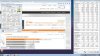
And whats the purpose of this psu here?
isn't enough neither for a stock clocks gpu alone..(maybe for 1070 equipped version?)
 Mr. Fox likes this.
 -
To take it apart and steal the cord for something more special. Pretty sweet that it has a 12 foot long cord. The correct 4-pin DIN connectors are impossible to find for sale and so are the bulk cords. But, you're right... 180W won't cut it for this beast. It might work for web browsing and email, but not much more than that. Buying that just for the cord would be expensive, but no more so than buying an AC-100/AC-200 just to steal the little stubby cord/connector from it, and a LOT BETTER since no splicing would be required. The pigtail on the AC-100/AC-200 is so short it's stupid.
Edit: looks like using a different vBIOS fixed the problem with no GPU power sensor? Is that correct?UsmanKhan, Huniken, Donald@Paladin44 and 1 other person like this.
*** MSI 16L13 (Eurocom Tornado F5)/EVOC 16L-G-1080 15.6" Owner's Lounge ***
Discussion in 'MSI Reviews & Owners' Lounges' started by Diversion, Oct 14, 2016.


