Problems? See this thread at archive.org.
well then thats all we needed to know, if anyone was concerned.
-
-
I think that it would be kind of silly to connect an eGPU to any notebook with an internal 1080. It would be a performance downgrade due to the lack of bandwidth for TB3 versus a direct PCIe connection. @bloodhawk had done quite a bit of eGPU tinkering and if I remember correctly, he wasn't particularly impressed with the performance. I will let him clarify that for us.
To me, an eGPU only makes good sense for a notebook that one has an abnormal sentimental attachment to that isn't able to perform up to snuff with a built-in GPU and cannot be upgraded to make up for its performance deficits. The eGPU would be an overly expensive compromise that lets a person hang onto something that would actually be better off being replaced by something offering more performance. An eGPU is a ball and chain geek toy that tethers a weak notebook to a desk and justifies mediocre performance without the capability of delivering true desktop performance.Last edited: Sep 11, 2017Aroc, UsmanKhan, syscrusher and 4 others like this. -
we've had these risers for laptops for the mpcie slots, that you could use to try out GPU solutions in the past, and basically by the time we got to the 980Ti's it wouldn't scale performance very well. The bandwidth was taken up. Thats because it was like 2.0 at x4/x8 versus like 3.0 at x8/x16 which would be much faster and have less latency and more bandwidth to spare.Mr. Fox likes this.
-
I really don't have experience with thunderbolt eGPUs but how about using it for just the added CUDA and OpenCL computing boost? I'm using Agisoft Photoscan (photogrammetry and 3d modelling) and using multiple gpus in desktops (even without sli) speed up the process significantly. I'm planning on getting the f5 tornado for this purpose and I'm wondering if it is possible to plug in a thunderbolt egpu and use both the internal gpu plus the thunderbolt gpu for processing. I know with newer optimus laptops you can use both the discrete Nvidia and the Intel HD gpus at the same time for processing and it does speed up the process. I'm just wondering if this was possible with the tornado connected to an egpu. Anybody with experience or willing to try this out?syscrusher and Mr. Fox like this.
-
I would have to say, yes, it should work. I have not personally done this, but it connects a GPU as if it was a normal connection for the GPU once it's installed and running. Would be no different.Mr. Fox likes this.
-
Yeah any TB3 based eGPU is pointless on a notebook with a 1070 or above. There is too much latency IMO and performance loss just stacks up, specially if the user wants to route to the internal display.Last edited: Sep 11, 2017
-
So I can definitely confirm that the external DP port can power a 1080/144hz monitor and utilize gysnc like others have posted before. Been hauling an ASUS monitor with me when I travel for work since I got used to 144hz at home. One thing I due notice is I get random drops to 0% GPU usage when utilizing an external monitor, going to reinstall drivers and see if that helps. I also get power limited all the time now since the GPU is trying to push 144 fps instead of 60 fps and I see my core voltage bounce between 800 mV and 900 mV depending how hard the GPU is being used. Really with there was a way to edit the bios to increase the 1070 power limit higher than 120W. I don't have the tools to hardware mod it and I would probably break it anyway. Kind of wish I snagged the 1080 now but oh well.
-
I could also see an eGPU being useful if you were doing CUDA programming in C++, or Bitcoin mining (etc.) -- in other words, using the eGPU as a compute resource and not a graphics resource.
EDIT: And then I read the post by @Aswang making the same point. Apologies for being redundant.
-
Lugging a 144hz monitor around for work is dedication man. You carry that in luggage or jjust with you to hotels? Which one?
Also Eurocom is supposed to be releasing standard MXM 3.0 1060, 1070 and 1080 cards around November. It has been said to be fully compatible with the F5, so you could sell your 1070 and buy a 1080 then. -
+ Rep for confirming that my friend, that's good information for many people.Papusan, b-mac, hmscott and 1 other person like this.
-
There was some guy linking some PC optimization stuff here, and I think the post or user got removed (nothing to do with me), I see the update in my email funny enough, but please people, you do not need that stuff.
If you want to optimize your F5 Tornado, please post your questions and what not here, we have like a bazillion pro users willing to share tips and tricks around the clock in this thread.
Like seriously this is a great thread, and so many great users here have shared thier experience from whichever seller they had, to all the tips and discoveries and upgrades and aftermarket upgrades etc.. list goes on... but don't share some bloatware/spyware, lol.Last edited: Sep 12, 2017 -
Did anyone see my question on page 803? @Eurocom Support @Donald@HIDevolution
Thanks... -
Tried it as a compute resource. The performance loss is similar. At least over TB3.
Using something like the AGA or maybe the m.2 implementations is still a much better choice, and makes it border line worth it. (for users with a 1070 or lower)Papusan and syscrusher like this. -
Knowing Eurocom, they are going to be ridiculously priced.hmscott likes this.
-
Interesting. So the inter-node communication bottlenecks more classes of computation than I would have expected. I would presume this would somewhat depend on whether the onboard and offboard GPUs are treated as a single compute fabric, or if they are given two related but loosely-coupled problems by the supervisory code. For example, in a purely hypothetical F5-based robot, you might have the onboard GPU solving computer vision and object recognition, and the offboard GPU running a neural network for higher level AI.
All that, I'm guessing, is beyond what has been tried with an eGPU, because the people working on those levels of problems are probably just using dedicated computers for each rather than two GPUs in one computer.Donald@Paladin44 and hmscott like this. -
Maybe linking to it would help @Donald@HIDevolution and @Eurocom Support find it.
As the TF5 has only one visible DisplayPort, it would be a mystery if there are two connected to the TB3 port. You might have to try it to find out.
Why not connect this adapter you were looking at to USB-C with one DP out to one monitor and use the on-board mini-DP for the other monitor? You could also try that adapter with both DisplayPort outlets and if only one works, then use the on-board mini-DP for the second monitor.Last edited: Sep 12, 2017 -
Yeah its the signal conversion over head. TB3 to PCI to PCH/CPU.
For FP32 based computations its somewhat bearable for certain uses, but for FP64, its painful.hmscott and syscrusher like this. -
whats your question, maybe I can help
-
FP64 vs. FP32 is a big issue in open-world game design, too. The older GPUs don't support FP64, but the problem is that the number of significant digits available in FP32 causes severe animation errors in scenes larger than a few kilometers square. In gamedev one has to do all sorts of gymnastics like relocating the scene's origin point to follow the player from sector to sector. It will be nice when -- a few years from now, sadly -- all GPUs have FP64 support.
-
Exactly.
I use FP64 extensively for Cloth simulations and by chance if i drop to FP32, its a interpenetration / cloth collapsing on it self type of hell.
Relocating object to the origin and then running full/partial sim there, and then moving it back to the original animation position is something i do on a daily basis. The whole webbing system used to generate webs in Spiderman Homecoming, is based on that concept.
Having access to almost every type of attribute / data in Houdini, makes life so much easier though. Specially when dealing with Transform and rotational matrices
Last edited: Sep 12, 2017 -
Haha I sometimes have a 4 hour drive and overnight stay for work. I just leave the monitor in the box and pack/unpack as I go. I don't fly with it. I like to game when I'm on the road and I have been spoiled by 144hz at home.
Yea it's a small community of owners so hopefully getting the info out helps someone. -
You and I should connect off-forum to talk gamedev tools.
UsmanKhan, Donald@Paladin44 and bloodhawk like this.
-
For a second monitor when traveling, I have a GeChic portable LCD screen, 1080p resolution and HDMI connector. It powers off a USB connector (which it uses only for power, not data), so there is no wall wart to lug around. The LCD cover flips over to become an easel stand. Nice unit.Donald@Paladin44 and hmscott like this.
-
For sure sharing our experiences does. I can tell you as a seller, the more people shared the more interest in the laptop there was and the more people purchased, on the grounds of the clarity they saw here and what they could do with the laptop.
-
I have that pluggable adapter and it doesn't work with the tornado F5. There is only one native DP on the thunderbolt port. It works great with the Dell XPS though.
I connect my F5 with a thunderbolt dock, HDMI out and displayport MST hub for 4 external monitors. The thunderbolt dock powers a 1440p 120hz monitor, the HDMI a 4k monitor and the MST hub has a pair of 1080p displays.Last edited: Sep 13, 2017Mr. Fox, UsmanKhan and Donald@Paladin44 like this. -
-
A small update.
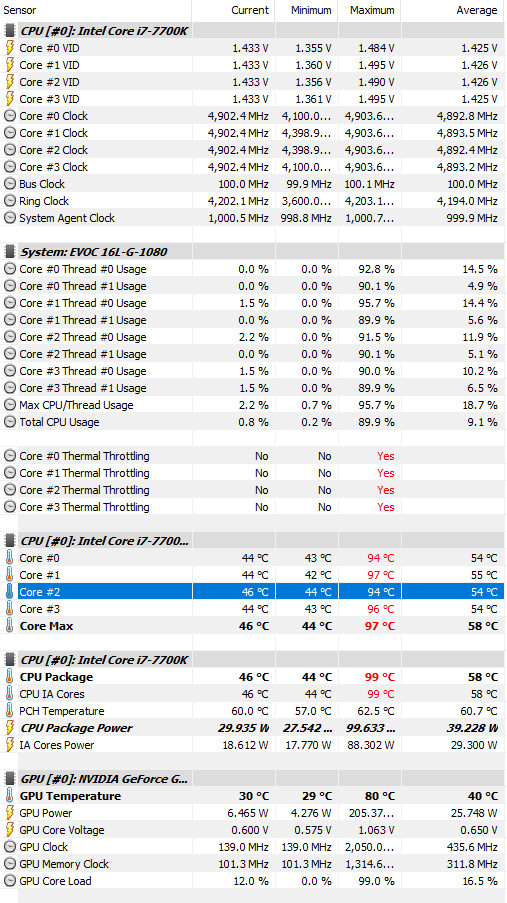
After observing for a while the behaviour in my unit, random crashes occurring ONLY when the GPU is under the effect of an undervolt, CPU OC got nothing to do with it.
The Prema 200w Bios makes the gpu ask for MOAR POWAH!! and it HATES to be undervolted.....it WILL ruin your day if you don't feed it, give the monster the normal dosage, don't lower it for temps, in my case at least.
I got a cheap cooling pad for now until later on I could afford one of those high end cooling pads and external suction fans to test with.
Back to OC CPU now.Mr. Fox, Papusan, Donald@Paladin44 and 1 other person like this. -
What is the default BIOS CPU voltage on the stock BIOS, and on the Prema BIOS? Prema likely dropped the default voltage down already to "fix" the overvolt of the stock BIOS.Last edited: Sep 13, 2017Donald@Paladin44 likes this.
-
I can't remember what the stock voltage was set to!
But HEY look at THIS!
http://www.3dmark.com/fs/13612462
19044!! Fire Strike with 4.9GHz and a toasty 1290Mv static, no cooling pad as I'm in the office and got a bit excited, I feel if you guys can guide me to OC my CPU to 5.0Ghz and Reach 20K in FS I will be fulfilled.
@Mr. Fox @Rage Set
Attached Files:
aaronne, syscrusher, Rage Set and 3 others like this. -
-
First fix your voltage for your 4.9GHz overclock.
Down a notch with voltage(see if you can go with 1240/1250). As you can see on your Physics score, yoo experience throttling now due overheating. 4.9GHz is more like 15800 in FireStrike physics(Your FS physics score is more like 4,7GHz).temp00876, Falkentyne, syscrusher and 7 others like this. -
What my F5 becomes when I'm tired and not paying enough attention at midnight
Falkentyne, syscrusher, Mr. Fox and 3 others like this.
-
OK, I will give it a try and report back on it in a few hours. Will try it with the cooling pad.hmscott likes this.
-
For the GPU leave the voltage curve alone. That feature is garbage and makes my GPUs in the Clevo and 16L13 run like crap. Undervolting a Pascal GPU has never been a good idea if you like stability and performance. Pascal voltage is already on the edge of being too low to work correctly, and they start acting spastic when you lower the voltage curve. I really hate what NVIDIA has done to Pascal. Powerful, yes... only because of higher core and memory clocks. Unless you want to run everything stock like a sissy boy, Pascal is a screwed up product in terms of functionality and cancer firmware. It seems it was designed primarily for gamer noob's that never overclock. Even though they are less powerful, due to lower clock speeds, Maxwell and Kepler were better products in many respects.
You need to overclock the GPU and keep it as cool as possible to break 20k. Otherwise, it will throttle to near stock clocks long before it actually gets hot enough that it needs to throttle to avoid overheating.Jon Webb, Robbo99999, Talon and 2 others like this. -
Mostly positive it is a case per case basis. I run several afterburner profiles. Not doing anything demanding, and playing older AAA and indie games right now. So I have undervolted to 0.800v @ 1733MHz and sitting comfortable and quiet @ 66C after hours of Dragon Age Inquisition maxed out.
@Papusan @Mr. Fox It is fine to change voltage curve, no problems here. Epic facepalm for those who bought into 1080 Max-Quids. @ 0.800v @ 1733MHz I am sittng well below 40 DB and score 1000 more Time Spy GPU (MAx-Q ~5600 notebookcheck). Poeple simply didn't realize they could play with the the voltage curve themselves, and bought Ngredia's lies.
raz8020, Huniken, Donald@Paladin44 and 2 others like this. -
If you are striving for overclocking stability, messing with the voltage curve causes me nothing but grief in terms of stability. Lowering voltage to run stock might be OK, but I haven't needed to do that.
Are you only seeing a maximum of 1733 after undervolting? My GPU runs at 1850 with boost clocks.
Here is the same run on mine. Stock CPU and GPU clocks, no U3 cooler, just sitting on a flat surface with max fans.
Last edited: Sep 13, 2017Rage Set, Donald@Paladin44 and ThatOldGuy like this. -
I think he running Max-Qrippled default voltage and clocks And same time score higher than Ngreedia/OEMs overpriced Scam
Donald@Paladin44 and ThatOldGuy like this.
-
Yes, I undervolted as far as I can go and Underclocked (not overclocked). No longer a curve, but a strait line 1733MHz was sweet spot for 0.800v and stability.
Original purpose was to prove to someone that Max-Q was pointless, as you can do similar thing with normal GTX 1080 (underclock and undervolt). I decided to keep the profile for general use (where games use 100% GPU, but don't need 1000% power to get over 120FPS). Temps stay really low, and fans stay quiet.
Best part is I still get better firestrike and Time Spy scores than Max-Trash, and run cooler
Like you said, undervolting and Overclocking does nothing within my testing, temps remain the same for gaming purposes. However, for benchmarking, I found small Undervolt + Overclock helps take longer before throttling for slight increase in score... but this is pointless too as you get better score with stock voltage + higher overclock. -
As expected
Remember Pascal performing better the lower temp you can go. AC bench next
syscrusher, Donald@Paladin44, Huniken and 1 other person like this. -
Exactly, and I can overclock +200/200 when I'd like, through t on a laptop cooler; and blow their BGA laptops out of the water with desktops scores.
All simple with a click of a button in MSI Afterburner (or any other OC software that saves profiles)Mr. Fox, Robbo99999, Donald@Paladin44 and 1 other person like this. -
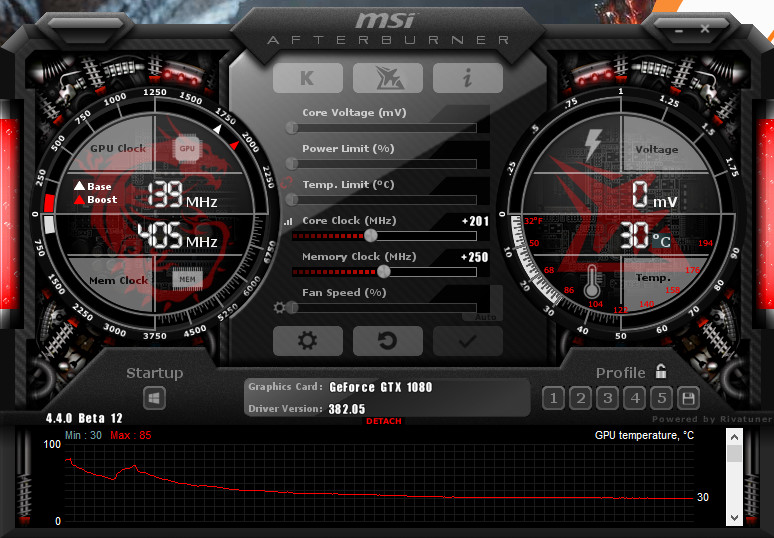
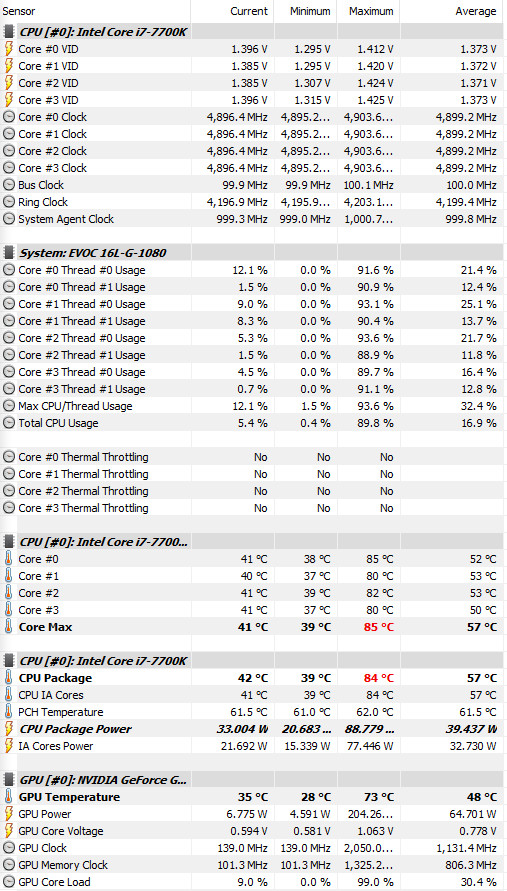
Some good progress here with undervolt to CPU @1250Mv static 4.9GHz (I wonder why previously it didn't accept it to run, will try 5.0GHz now), Same as previous GPU clocks +201 Core but increased MEM to +300.
New self best score of 19115. No undervolt to GPU. Using a standard air pad cooler plus in an A/C room ambient of around 22c. Max fans.
http://www.3dmark.com/fs/13615444
Attached Files:
hmscott, syscrusher, Mr. Fox and 2 others like this. -
-
Time Spy: http://www.3dmark.com/spy/2379347
SCORE 7570
CPU: 86c GPU: 85c max.
Mr. Fox, Rage Set and Donald@Paladin44 like this. -
Remember you can see hardware's behavior in FireStrike's own monitoring. Temp, clocks and fps Physics is still too low for 4.9GHz. Try without Hwinfo64 running in the background for maxed scores.
Huniken, Rage Set and Donald@Paladin44 like this.
-
Yep. Pascal to me reminds me of a highly tuned import car vs the big block V8. Maxwell was a transitional period and it still responded well to voltage changes. On my desktop 1080 Ti I don't even bother messing with the voltage slider because it makes little to no difference and can actually create instability. I drag the power slider to the max and found the highest stable clock bin and called it a day.UsmanKhan, Huniken, Mr. Fox and 1 other person like this.
-
Exactly how I do it, too.
Nice analogy on the tuned import versus big block V8. Another good analogy would be a fighter wound up like an 8-day clock on performance enhancing drugs versus one that is an insanely muscular and powerful beast without any chemical assistance. The one on drugs is dangerous and unpredictable, but the other one is deadly and if he can lay his hands on you, he will tear your arms off and beat you to death with them.Last edited: Sep 13, 2017UsmanKhan and syscrusher like this. -
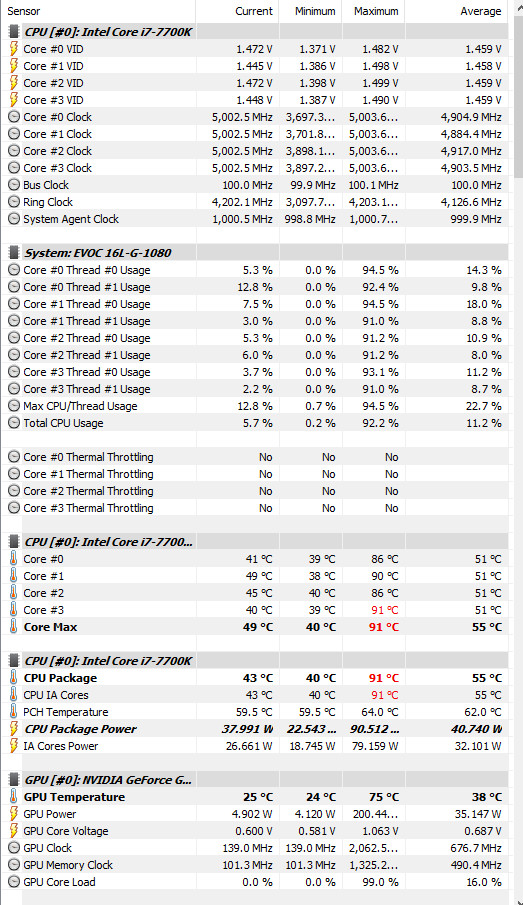
ok will try it. Another thing, I can have 5.0GHz running on 1320Mv stable but it's really not working out for me, the score is LOWER in FS.....what's going on? Seems I can't have average of 5.0Ghz, I get like 4.9Ghz average and the scores suck big time...
FS 18386
http://www.3dmark.com/fs/13615943
Check attached HWinfo screenshot.
Does that mean my CPU unit is capped? Do I need a binned CPU now?Attached Files:
Papusan, UsmanKhan and Donald@Paladin44 like this. -
-
Back to 4.9Ghz 1250Mv, new FS score and better!
http://www.3dmark.com/fs/13616112
19163 Fire Strike.
EDIT: New better Score
http://www.3dmark.com/fs/13616166
19305 Fire Strike.Last edited: Sep 13, 2017Papusan, Mr. Fox and Donald@Paladin44 like this. -
Another one, I have exhausted my knowledge up to this point, how did some of you guys reach 20K in FS? @Mr. Fox @Rage Set @Papusan
http://www.3dmark.com/fs/13616452
I would really appreciate any further input and tips.
This is 4.9GHz 1250Mv on CPU.
+201 Core and +900 MEM stock voltage for GPU. Running from control panel maximum performance. Laptop running in Maximum performance. -
thats speculation if you do not know, just pointing it out, before anyone take sit as fact and if it turns out is not true, confuses them and makes them waste thier time...
So is there anyway you can find out 100% ? -
lol, ah mistype, sorry was genuinely not sure what you meant hahaalaskajoel likes this.
-
My tips would be do not game with the clocks like that unless you have headsets to wear, lol
The extra clock on the CPU could cause extra heat in the long run, and be an issue for who knows what reason in the future, I recommend a stable low heat/undervolted 4.5Ghz always - for everyday use. It's good enough and easy to achieve and you can paste and be done with it for like 6 months to a year without having to revisit it for maintenance.
Your 1080 though probably still has room to grow if your just chasing numbers, but otherwise looks great !Huniken likes this.
*** MSI 16L13 (Eurocom Tornado F5)/EVOC 16L-G-1080 15.6" Owner's Lounge ***
Discussion in 'MSI Reviews & Owners' Lounges' started by Diversion, Oct 14, 2016.