Problems? See this thread at archive.org.
That is a really fantastic score. From where you are now you might be able to break 20K without changing any settings if you can just get the thing colder, which will help the GPU not lose core clock speeds due to the Green Goblin's retarded premature throttling nonsense.
Run HWiNFO64 maximized so you can see the sensors for the CPU cores. Run Fire Strike in Window Mode (Custom Settings) and select only the Physics test. Run that and watch the CPU clock speeds to make sure they are not dropping.
-
-
Done some fiddling with overclocking after seing @Huniken 's scores. I can't seem to get more than +210 stable on my GPU, but CPU clocks nicely
Am I supposed to touch the Cache Ratio (Ring clock)?
Attached Files:
-
-
First of all, welcome to F5 19K club. There are not many F5 owners in this group. The 20K group is a different ballgame altogether. It is not easy to achieve.
Ambient temps play a large role and there is very little you can do unless you use a portable AC machine to pump cold air into your unit. What kind of fans do you have on your cooling pad? @Mr. Fox has Vadars attached to his and I have powerful (and loud) server fans on mine.
What's the timings on your memory?
Here's a comparison - Yours, mine with PremaMOD, mine with "normal unlocked bios".
https://www.3dmark.com/compare/fs/13616452/fs/13113943/fs/11873926# -
Hey does anyone on here know of there being an interest in a extremely rarely used one of these little beasts? I bought it in April and have use it for work and a bit of gaming. Have not done any overclocking or anything like that.
It is ready to be shipped back to HIDEvolution to get the custom Prema BIOS on it. The specs are below.
Display
15.6" Full HD (1920x1080) IPS Antiglare Matte Type Display - with nVIDIA® G-SYNC™
Yes, display professionally calibrated w/ profile saved to USB drive.
Yes, quality check and give me a panel with minimal backlight bleed.
Graphics Card
NVIDIA GeForce GTX 1080 w/ 8GB GDDR5 X w/ G-Sync
Processor
HIDevolution Delidded - Unlocked, Under Volted and Overclocked 7th Generation Intel Core i7-7700K Quad Core Processor, 4.2 GHz (HIDevolution Overclocked to 4.7GHz) - GUARANTEED Performance (Coollaboratory Liquid Ultra includ
Ram
32GB (2 x 16GB) Dual Channel DDR4/2400MHz - Installed on keyboard side so could easily upgrade to more from bottom panel removal
Hard Drive
1TB M.2 SATA
CMOS battery extension modification for easy reset
Wireless
Intel® Wireless-AC 8265 802.11 ac/a/b/g/n 2x2 NGFF w/ Bluetooth 4.2
Operating System
Windows 10 64bit
OS Reinstallation + Drivers USB Flash Drive
No Logo on LCD Cover and Bezel
1 Year HIDevolution Limited U.S. Warranty + LIFETIME HIDevolution Technical Support
@Mr. Fox @Phoenix @woodzstack @Donald@HIDevolution -
List it for sale here - http://forum.notebookreview.com/forums/notebooks-and-desktops-for-sale.1071/syscrusher, Papusan, Mr. Fox and 1 other person like this.
-
There's a part of the forum for posting trades and "WTS" threads... I would recommend going there.
Though you need 100 posts and 3 months of time on NBR or is it 1 year ? I forget. As a reseller I am not allowed to sell there explicitly the way I used to.
If you want me to keep an eye out for a potential client for you, I will let people know you have one for sale. -
That would be great! Thanks!
Sent from my iPhone using Tapatalkhmscott likes this. -
Perfect thanks!
Sent from my iPhone using Tapatalkhmscott likes this. -
He doesn't meet the post count reqirement
@Bearded Hedgehog I recommend getting in an argument with an obstinate forum member. The Intel vs. AMD threads are usually game . Just take the controversial opinion
raz8020, syscrusher, Huniken and 2 others like this.
. Just take the controversial opinion
raz8020, syscrusher, Huniken and 2 others like this. -
Haha thanks.
Yea Intel vs AMD is a pretty hot one right now! Lol
Sent from my iPhone using TapatalkDonald@Paladin44, ThatOldGuy and hmscott like this. -
Geez, using WMD's to try to slow down the growth of AMD, pathetic
@Bearded Hedgehog - there are plenty of positive ways to get your post count up, a zillion threads already created, and if none of those cover your favorite subjects, please create some new ones.
You've only got 52 posts left, you outta be able to get that done before breakfast tomorrow
Last edited: Sep 13, 2017Papusan, Donald@Paladin44 and ThatOldGuy like this. -
How much do you want for it?
-
Well I initially thought $3k but I would actually love to hear you're or anyone's thoughts on it?
Sent from my iPhone using Tapatalk -
Could you please try a bench with lower 4.8GHz and reduced core voltage? 4.8GHz fully working should give up to 15500 in physics. I wanna see what's hamper your physics score. And could you post screenies of finished Firestrike bench with moitoring- details as the pict (both for 4.8-4.9 and 5.0GHz).
syscrusher, hmscott and Rage Set like this. -
@Huniken
This is a Firestrike without any manual GPU OC, only my CPU at 5.0Ghz. The F5 is on my cooler pad, max fans on the pad and in the laptop.
https://www.3dmark.com/fs/13619624 - 19,044
EDIT: This is with a GPU OC and the CPU at 5.0. I still have a lot of room for improvement.
https://www.3dmark.com/3dm/22140419 - 20,104Last edited: Sep 14, 2017syscrusher, Huniken, UsmanKhan and 3 others like this. -
Will do as soon as I'm free again, I'm also curious as to why it is lower than usual.Donald@Paladin44 likes this.
-
There is one thing left to try, I didn't remove the bottom panel while benching, today I will remove it and put the laptop on the air pad cooler in a very cold A/Ced room, let me try to squeez that green lemon!Papusan and Donald@Paladin44 like this.
-
Thank you. Your scores are impressive too, 20K and above is really is something!
I'm using a run of the mill air pad cooler, I don't have a U3. The fans are stock ~1500RPM *2 fans.
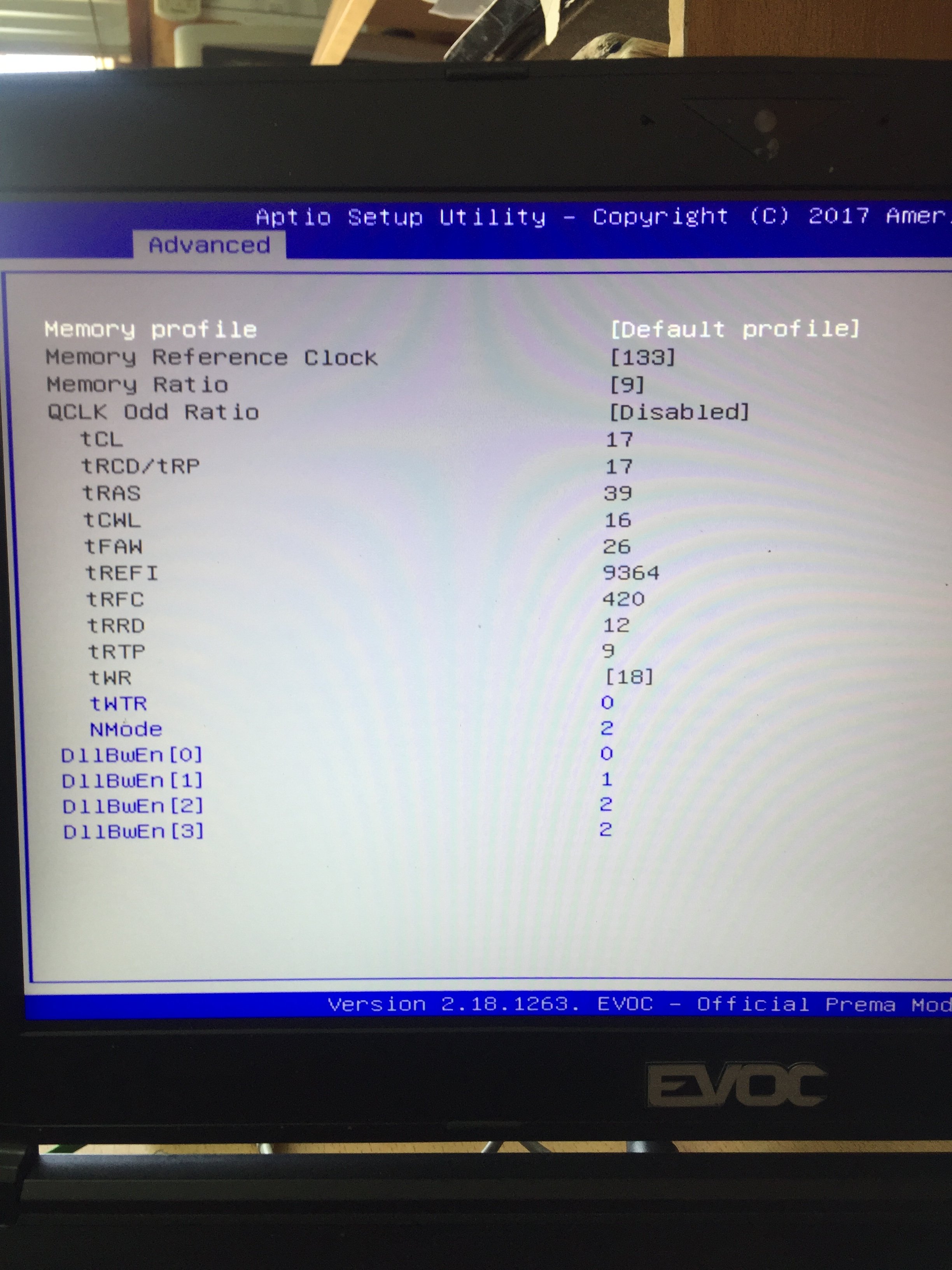
Memory is 17-17-17-39 2400Mhz DDR4 64GB.
There is a problem with Physics score, I need to find out what is the problem there.Papusan and Donald@Paladin44 like this. -
One thing I love about this machine is that it performs well even if you aren't pushing it to the cutting edge. I'm getting FS scores around 18.3K to 18.5K with my normal "work mode" settings (4.8 GHz CPU @ 1.170V; +140 MHz GPU core; +320 MHz VRAM). I don't even own an external cooler, though I do have the custom bottom panel. I'm probably going to drop my CPU back to 4.7 GHz, though. It's been stable for several days of heavy use at 4.8 GHz, but on some single-core workloads I've seen the core temp as high as 95C, and I'm not comfortable with that for the long haul. Dropping from 4.8 to 4.7 is a 2.1% performance drop, a small price to pay for about 5C lower temps under load in my work machine. I don't see that high temp under most of my real-world conditions, just briefly in one very specific situation, but it's just not worth the risk. I wanted to see if 4.8 GHz was stable for a while, and it is. Point proven, now going back to safety.
When I sent my unit back to HID for the Prema flash, I had to use my Macbook Pro for two weeks. It feels so slooooowwwww now that I'm spoiled by the 16L-G-1080!hmscott, Rage Set, Donald@Paladin44 and 2 others like this. -
I never had to fiddle with any RAM timings in my entire life, this will be a first time for me.Rage Set, Donald@Paladin44 and UsmanKhan like this.
-
It might be throttling under load. You may need to tweak the PL1/PL2 higher or give it more power on the VR Domain menus in the BIOS. Run in a Window and watch the core clocks in HWiNFO64 to make sure the clock speeds are not dropping during the physics and combined tests. Or, use RTSS and configure HWiNFO64 to output the values to your screen in real time. Either way, you need to be able to observe the behavior during the benchmark. You could also connect an external monitor and have HWiNFO64 sensor table open for viewing on the screen that is not running the benchmark.UsmanKhan, Rage Set, Donald@Paladin44 and 1 other person like this.
-
I have a FHD external monitor, will use it.Donald@Paladin44 likes this.
-
Those fans will do fine if you have great ambient temps. However, if you can afford some Vardars or even cheaper fans that are high static pressured, that will make a world of difference.
Memory OC'ing can be very intimidating but it's another way to boost the performance of your computing for free. The first thing I always do is try to increase the speed of my RAM. Test it. If it passes several hours of Memtest, I then go to timings. @UsmanKhan is giving you sound advice. Try it bro.Last edited: Sep 14, 2017 -
I just did a bunch of RAM swapping to accommodate the P870DM-G project. I had 16GB of Kingston HyperX Impact 2400 and it is rock solid stable at 2800. All it did was change the memory clock and ratio from stock to 100*14 and it hasn't missed a beat. I left all of the timings for 2400 alone, so it is running 2800 @ CL14-14-14-35 1T and stock voltage.
Last edited: Sep 14, 2017 -
Very nice timings there bro. Lol, I wish all RAM gave an extra 400Mhz.UsmanKhan and Donald@Paladin44 like this.
-
I'm having a similar issue with my 16L that I had with my P670RS. I have the machine connected to an external monitor. I only run off the external display and keep the laptop screen off. If I put the computer to sleep, upon waking it up, both the built-in and external screens will power on. The former displays nothing while the latter shows the login screen as it should. I want the laptop's screen to stay off when the system wakes up. On the P670, I could run the system in MSHybrid/Optimus mode, which would work fine, but that's obviously not an option on this computer. I've tried a few different NVIDIA drivers, all with the same result. Is there perhaps a BIOS setting I can adjust? Something with the power management?
Donald@Paladin44 likes this. -
@Mr. Fox
I coming for you brother! 20,321 on Firestrike.
https://www.3dmark.com/compare/fs/12707929/fs/13627085temp00876, Huniken, syscrusher and 5 others like this. -
those are great numbers!, unfortunately one of my HyperX stick won't post above 2700mhz. tho the other one works great with 2800mhz no other setting change(there's one setting i have to make it 18 to do any kind of ram OC else it wont boot) . HyperX seems great with good timings thn most competitors in laptop market.
i dont have any such issue, laptop screen remains off after sleep. all my nvidia/power settings are stock pre-creators update windows 10. nvidia driver version 385.41.Last edited: Sep 15, 2017Huniken, Donald@Paladin44 and Rage Set like this. -
How are you connected to your external monitor? HDMI? DisplayPort?Donald@Paladin44 and UsmanKhan like this.
-
I figured as much. I tested this morning using the HDMI port on my monitor, and it behaves as it should. The problem only occurs when the computer is connected via DisplayPort, which unfortunately is the only way to get G-Sync. I have a couple other troubleshooting ideas, but I won't get around to testing until tonight.Donald@Paladin44 and UsmanKhan like this.
-
The HDMI port working must have been a one-time fluke because it acted up again tonight. I tried different cables, refresh rates, nothing. Then I tried connecting the system to my living room TV, and it worked perfectly. After doing some more thinking, it finally dawned on me. I had recorded a video of the issue when I had my Clevo P670RS and uploaded it privately to my Youtube channel. I reviewed said video, and discovered a common denominator: the monitor itself, a Dell S2716DG. Since recording that video, I had traded it for a 4K display but then went back to the Dell (same model, but a different panel) right before the 16L13 arrived. Since there was no problem with the computer connected to the TV, I have to assume that getting a new monitor would provide a similar result. Thing is, I really like the S2716 otherwise. It's a TN panel with 1 ms response, and when properly calibrated it's darn close to IPS quality. I can work around the issue by hibernating the system, rather than putting it to sleep (I don't give a flying rat's behind about "muh SSD write cycles"), and if I do put it to sleep, I can use Win 10's "Project" sidebar gadget to switch display modes back and forth so the internal display shuts off.
UsmanKhan and Donald@Paladin44 like this. -
Great News! P5000 and P3000 are now supported in Tornado F5 series. Check benchmarks under Tornado F5W benchmarks links on our website.
-
What should I change in the BIOS RAM timings window to have a slight overclock on those sticks? I never done it before now, I just tried from 17-17-17-39 to 15-15-37 but they just reset.
Attached Files:
hmscott and Donald@Paladin44 like this. -
-
Start with increase Ram speed.. Change Default profile to Custom. Then put memory Ratio to 10(aka you will get 2660MHz instead of default 2400MHz). Save changes and reset. See if the custom settings will boot.
Run AIDA64 memory benchmark (Click tools and yoo find it) before and after changes. Then compare the results.Last edited: Sep 16, 2017FrozenLord, syscrusher, hmscott and 4 others like this. -
enabling in bios"qclk odd" to see all straps, result in my ram to run at 3100mhz instead of 3000 designed for.
(15x100 is set on bios with all standard timings so I don't get where this number come from)
I'm trying to overclock in this way too, not by timings/latencies but starting by speed but until I get how the multiplier works I'll think I will see many soft-reboot..
Edit:
another un-related question, is the first jack (in front of an open laptop) supposed tu audio out to normal earphones?
Because mine mute the speakers but doesnt emit soundsLast edited: Sep 16, 2017Donald@Paladin44 likes this. -
Yes, green one in front is the headphone jack, the pink one 2nd from the front is the mic jack.aaronne, syscrusher and hmscott like this.
-
Holy crap -- I just logged onto the NBR forum intending to post this exact problem with my own machine! I was afraid I had damaged the hardware last time I had the bottom panel off, but if you can replicate the problem that probably means we both have a driver issue.
This jack was working for me when I first got the machine. I think a driver update must have broken it, since we have the same issue. I first noticed it about 2 days ago -- you?
Crazy coincidence -- I literally came to NBR just now to post the issue, and the very latest post was yours. -
Ok thank you for reply, so my front jack isn't working at all, neither on win7/win10.
Yes man but I bought this laptop on July so I still exploring it, just noticed yesterday, I'm using the SoundBlasterCinema3 software and the realtek driver on win7;
besides, win10 has standard windows audio driver installed, and it doesn't mute speakers, the earphone as in win7 doesn't emit sounds.
Will try later with driver uninstall etc. -
Check the Windows update history to see if a driver was installed or an update that fixed an audio issue. I would check but mine is out for repair.
aaronne likes this. -
I only install security updates and the .netFramework's one.
Just checked to be sure but I can confirm there are not driver installed trough windows update. -
Also I know a lot of people swear by this software: http://www.tomshardware.com/news/avast-unknowingly-bundled-malware-ccleaner,35477.html#xtor=RSS-181
-
yeah sure, checked in morning here
http://forum.notebookreview.com/thr...illion-downloads-2-3-million-infected.809062/ -
dear guy!
Is IntelHD graphics can enable when remove MXM graphics card ? -
-
No, there is no way to enable Intel's graphics in this laptop. Even with the removal of the dGPU, you won't have the option.saturnotaku and UsmanKhan like this.
-
Clevo sells LGA laptops with Intel gpu if you want just desktop CPU power. I can't remember the models; @sicily428 probably knowsDuongTHVN likes this.
-
these are LGA+mxm clevo laptops
-Clevo p750dm2 15" gtx1060 mxm
-Clevo p750dm2 15" gtx1070 mxm
-Clevo p775dm3 17" gtx1060 mxm
-Clevo p775dm3 17" gtx1070 mxm
-Clevo p775dm3 17" gtx1080 mxm
-Clevo p870km 17" gtx1070 sli mxm
-Clevo p870km1 17" gtx1080 sli mxm
-Clevo p870dm2 17" gtx1070 sli mxm
-Clevo p870dm3 17" gtx1080 sli mxm
no mxm card
-Clevo n350dw 15" igpu
-Clevo n650du 15" igpu
-Clevo w650kj1 15" gtx1050
-Clevo w650kk1 15" gtx1050ti
-Clevo n950kp6 15" gtx1060
I think you can't boot LGA clevos without dgpuDuongTHVN and ThatOldGuy like this. -
I caught a lucky break. I hadn't updated in a while, and by chance updated just a few hours after they put 5.34 (the fixed version) online. So I never had 5.33. Whew!
*** MSI 16L13 (Eurocom Tornado F5)/EVOC 16L-G-1080 15.6" Owner's Lounge ***
Discussion in 'MSI Reviews & Owners' Lounges' started by Diversion, Oct 14, 2016.