 Problems? See this thread at archive.org.
So I found a few different sites with different pricing, one I know said used but the others seem to advertise it as new.
https://www.impactcomputers.com/466954-001.html for 190$
http://www.adapter.cc/products/Hp-466954%2d001_p1281.html for $70 but sounds like it is used but for that price I may just go with it.
https://www.cheap-chargers.com/ac-adapter-20v-17.5a-350w-for-hp-compatible-with-adp-350ab-b.html they want over $300 here
http://1007460.kancart.com/item_detail/30225#!detail $102 but not sure if new or used
http://www.shopping-adapter.co.uk/hp-adaptor/adp-350ab-b,adaptor,28189.htm this is a UK website which comes out to about $150 for a new one and it looks like they ship worldwide. Depending on shipping this may be the best for a new one.
While trying to track these down it looks like 2 models of the PSU had issues and we're recalled and came out with a new revision so I'm a little worried some of these may be one of the older revisions.
Either way I found where to order them from....now my only issue or concern is the soldering as I am awful at it and do not know how comfortable I would be opening one of these up and changing the wire on it.
Definitely going to keep looking into this though especially as I'd need a second one to leave at home anyway and I'd rather have one of these for on the go than 2 330w ones. Gonna see if I know anyone who is comfortable doing this kind of stuff unless there's someone on here I could pay for their services.
-
Before going all out on this project... Check the dimensions.
Not only does the HP adapter have almost 20% more volume. It isn't really much slimmer (0.5 cm slimmer). It is about 3 cm shorter and 6.5 cm wider
in mm
HP 350W
W (X)/ H(Y)/ L(Z) 165 / 38 / 165
Volume = 1034550 mm^3
MSI 330W
W (X)/ H(Y)/ L(Z) 99 / 43 / 197
Volume = 838629 mm^3
It just looks sleek and slim in photos because of the proportions/ optical illusion
Last edited: Sep 21, 2017Huniken likes this. -
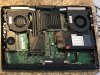
I think I have just proven that this is not a software or device driver problem. I booted into Debian Linux and ran a CPU stress test for 60 seconds to warm things up a little. The fan is oscillating between about 2500 RPM and 200 RPM every few seconds, same as in Windows. It's definitely the fan that is on the right side of the machine as viewed from the user position.
I'm going to take the bottom panel off and check for loose cables, but if anyone has particular suggestions I'd welcome the advice.hmscott likes this. -
What if the fan profiles is developed this way to cool the other hardware(components)on MB? More than just the cpu can be hot.
Edit. Seems both fans are same shape/size... Switch cpu with gpu fan and test.
 Last edited: Sep 22, 2017
 -
That's a great idea, but the fans are mirror images of one another because of the way they mount.
What I have done so far:
- Reseated the fan cables on both sides. Incidentally, if you don't get the cable quite right, the system will not boot. That was scary, as I thought I had broken something mechanically!
- Disconnected the battery (also with the AC adapter disconnected) and waited about 60 seconds for the EC to reset fully.
I haven't run long enough yet to see if this fixed the problem or not. I really don't think I had a fan cable problem, but I suspect the EC reset may help. We'll see. -
Good point, although the up/down oscillation of fan speed is definitely not a good thing, if a component temp is causing that. It's definitely new behavior, one way or the other, and that itself is concerning to me.Papusan likes this.
-
Switch the fans as in my edit. Have this fan behavior been there the whole time or after firmware update or started recently?
-
The fans are mirror-reversed, and it is a new problem from about a week ago. (See my previous post just before the one you quoted.)Papusan likes this.
-
Well, the problem is back, after all the resets. I also note that there is a very faint sound coming from that area also, similar to the sound of head seek movement in a HDD -- except that both drives in my system are SSD. I wonder if I might have a bad fan bearing?Last edited: Sep 22, 2017
-
Have seen a numbers of failed fans in Msi Gt73 series. Often a clicking sound. I mean MSI Is aware of the problem. As they send out new fans without much questions. Not saying this is your problem. Just a heads up.
-
I hope you nail down this problem, I'm now starting to worry that I don't have even one spare fan with me, I guess I will go ask Hidevolution for the cost of one fan or two as in a set....
@Donald@HIDevolutionDonald@Paladin44 and Papusan like this. -
Don't tag Donald on matters of tech support. He's sales, not service.Donald@Paladin44 likes this.
-
All true, but "I want to buy some spare parts" sounds at least a little like sales. That being said, when I needed to order some spare screws, Donald referred me to
@Zoltan@HIDevolution. I also have a ticket open with him (Zoltan) about my fan issue.
hmscott and Donald@Paladin44 like this.
-
I had seen this spreadsheet posted when he mentioned this adapter https://docs.google.com/spreadsheet...PLW7hpzzVXWNbYD2dt9APuU8c/edit#gid=1255067629 and I was under the impression that the "Delta 330W" is the one that the MSI uses, and it seemed the voodoo had quite a bit smaller volume, am I incorrect about something?Donald@Paladin44 likes this.
-
These measurements are completely wrong:
Delta ADP-330AB-D (Dell DA330PM111)
(W) 262 (L) 163 (H) 53
These do not make sense if you look at the spreadsheet... 262 Wide is almost 1 foot, and 163 deep is about 6.5 inches. I think Depth (length) and Width are flipped for the whole chart too.
Where did you get them? Maybe shipping box dimensions? I did not look them up when I gave:
(W) 99 (L) 197 (H) 43
That is as measured by me -
Yes, it is better to open a ticket in your account at HIDevolution.com, with Zoltan S - Tech Support, for this kind of issue. This is a much better way to handle individual requests than to tag @Zoltan@HIDevolution, or even me, here on the forum. The forum is for issues concerning all, not individual issues. Individual issues should be handled directly with HIDevolution.com.Huniken, saturnotaku, Papusan and 2 others like this.
-
According to this Amazon listing the Delta ADP-330AB/DA330PM111 measures '8.8 x 6.1 x 3 inches', but if you've measured it directly then that can't be correct. So yes, not much sense in switching to the Voodoo then, apart from being a bit thinner. A dual psu+splitter is still an option; two Razer 165Ws stacked are 1/4th the size of the Delta, not counting the splitter though, so that would take a bit of space as well. No way around soldering then, but a lot of repair shop can do a good job on that for a small fee.Donald@Paladin44 and ThatOldGuy like this.
-
As I said, the spreadsheet was posted by someone back on page 820 who mentioned this adapter as a possible option of a smaller replacement PSU for it. I do not know who made it or where the specs came from I was going off the information that was linked.Donald@Paladin44 and ThatOldGuy like this.
-
Amazon tends to be a crapshoot with dimensions. They told me Desktop GTX 1070 was going to be 14" long and 8" wide (I had to lookup real dimensions on EVGA to make sure it would fit)
On amazon you have to use proportions if you know you can't trust dimensions.
Example: Just knowing the size of your standard 3 prog plug, and looking at a ruler, you can tell that this will not be 3" thick
![[IMG]](images/storyImages/61QcJ2%2Bu-3L._SL1500_.jpg) Huniken, Donald@Paladin44 and t456 like this.
Huniken, Donald@Paladin44 and t456 like this. -
The spreadsheet is half mine and half contributions from other users. Apparently the Delta ADP's information came from Amazon and wasn't accurate. Best is measuring directly, of course, but if that's not possible then 'online sources' will have to do.
The Razer and Aorus systems use some of the most compact adapters available, but these will also run a fair bit hotter as a consequence. Long term, peak-level runs may limit their maximum output or cause high voltage ripple, so a 2x180W or 2x200W setup may be a wiser option.Donald@Paladin44 likes this. -
Going back to this topic, I grabbed the 180W version of the TB16 for $110 on fleBay. The main reason to get the 240W version is for the extra power it can provide to a compatible notebook, but this capability is not needed for the 16L13. And if for some reason it doesn't work, I should be able to resell it for close to what I paid.ThatOldGuy and Donald@Paladin44 like this.
-
why do you need a small PSu for this laptop ? What happened to the stock PSU you got or if you purchased the 330W one or larger - is it just to have a travel PSU ?
-
He is talking about PSU for a thunderbolt dock (Dell TB16) which can use either 240W or 180W (bundled with the dock). Saying it probably doesn't matter which one he gets (as 16L13 doesn't have thunderbolt charging), so he went with cheaper smaller one.Last edited: Sep 22, 2017syscrusher, saturnotaku and Donald@Paladin44 like this.
-
That's exactly what I meant. It would be nice if this machine did Thunderbolt charging as a way to supplement the regular power supply for overclocking and such, but not a big deal. I'm mainly interested in single-cable connectivity for USB devices and, more importantly, my external monitor. I appreciate the Dell dock having a mini-DisplayPort connection so I can continue to use the high-quality cable I have at present. The test will be if G-Sync and high refresh rates work as they do on the built-in mini-DP connector.Donald@Paladin44 and Huniken like this.
-
Ahh thank you, I only read backwards from last thread page ..was not sure what was being said. Haven't personally jumped onboard thunderbolt use yet myself.syscrusher likes this.
-
I'm interested to know, I have a 144Hz G-Sync Asus swift monitor that I want to test it with the mini display port, finding the cable in for mini display port to standard display port is hard from where I live, I hate that most accessories I want to buy must be sourced online.
-
should work fine, with the right adapter, however depending on the adapter it might not do 4K... you might need some powered adapter unsure.
The refresh is high thus the bandwidth is high, like 144hz 1080p should be fine with a straight cable adapter. But higher resolution will call for full eDP 1.3 or later -
Hello syscrusher,
I have read about your problem a while ago but due to my exams I was not able to reply.
I had the exact same problem a while ago. This lasted for 4-6 months and then the problematic fan just stopped working. I contacted the local MSI support (since the laptop's fans are part of the barebones and as a result covered by MSI warranty) and they "repaired" my laptop. (they just changed this one fan xD).
Of course there is no way in the world to know that you have the same kind of issue, and I hope you do not, but I felt obliged to inform you.
Best regards,syscrusher, leftsenseless, Robbo99999 and 2 others like this. -
The Asus swift is QHD, so it still draws a question mark over my head.
-
A single DisplayPort 1.2 cable can drive a 1440p monitor up to 165Hz, provides said cable is of good quality. I expect the dock will be able to do this as well. My main concern is whether G-Sync will function.
Sent from my iPhone using TapatalkHuniken likes this. -
Yes but am I concerned if the TB3 port is wired correctly to the GPU to allow its full suite of features as it does with the mini-DisplayPort.
Sent from my iPhone using TapatalkHuniken likes this. -
All- Thinking about picking up the 16L-1080 but had a few questions:
1: I have four 1440p monitors, one of which is 144hz. How can I drive these from the laptop? Do I need a adapter? On my current desktop, I have 3 plugged into the mini displayport out and one into hdmi out. Im assuming I can use the thunderbolt port but just wanted to make sure
2: Is there any substantial differences between ordering from eurocom or hidevolution? Looks like the same laptop minus some small differences ( HID lets u remove branding and has a better ventilated bottom - Unsure if either offers better warranty/support/etc..)
3: How is the performance of the 1080 compared to a reference desktop 1080? What % slower is it?
4: I intend to leave this thing running 24/7 (going to be a desktop replacement for me) - Any drawbacks to doing this? Going to get a laptop cooler for it but just wanted to make sure it could live up to 24/7 usage/heat. 99% of the time, the CPU/gfx will basically be idle.UsmanKhan likes this. -
Probably around 20% slower. Reduced GPU clocks, and TDP restrictions. Most MXM 1080's have a TDP between 180-200W (I think some old vbioses of the alienwares were capped at 150W). It's possible to remove that performance gap with a hardware vbios mod with a spi programmer (and the Pascal Bios editor), but the thermals are going to go through the roof without a VERY good heatsink system and a proper repaste. And most systems that don't have a prema magic bios mod available to remove restrictive power and AC limits are not going to be happy about exceeding 330W of AC power without something being throttled hard.
UsmanKhan and Donald@Paladin44 like this. -
You can connect your 144Hz monitor to the mini-DisplayPort output, then one to HDMI. You would need a Thunderbolt 3 dock to connect the other two. Something like the Dell TB16 with 180W AC adapter (available on eBay for $100-$120) should do what you need. TB3 would have enough bandwidth for two 1440p monitors, as long as they're both 60-75Hz, and the Dell dock has outputs for VGA, HDMI, mini-DP, and full-size DP.
It is the same system. HID includes the comprehensive Prema BIOS and de-lidded CPUs. Eurcom charges extra for the former and doesn't offer the latter. When dealing with a small system and a desktop-class CPU, proper cooling is essential, and with the modded CPUs and bottom chassis cover, HIDEvolution is the better value. Eurocom offers more discounts if you're a student, and I would go with them if I lived in Canada. Otherwise, HID all the way.
See the response above.
Are you going to be pushing the CPU at all or just leaving the system idle on your desktop when it's not in use?Donald@Paladin44 likes this. -
im running my tornado f5 24/7, tho my specs are a bit weaker thn what u want i have no issues at all. i have to run unity engine most of the time so my cpu/gpu usage is pretty high most of the time. its been almost 9 months now and its performing well and hopefully will continue like this!.hmscott likes this.
-
It is much appreciated! Although I have opened a ticket with HID Evolution in the official way (using their web site), I also posted here in hopes someone else might have insight to share, as you do. More information is generally a Good Thing.
Zoltan from HID Evolution recommended I do an EC reset via the bottom-panel button. I had previously reset things by disconnecting the battery, but I have just now done the procedure Zoltan recommended. It's too soon to know if this will fix the problem or not.hmscott likes this. -
I am a computer engineer who also does 3D content creation. I am using my 16L-G-1080 from HID Evolution as my daily driver for work, and I don't even own a desktop (I have a tower connected to a large screen TV for gaming, but not relevant to your question). So this is a true DTR situation for me. I leave my machine on 7x24 most of the time, although if I have been mobile on a particular day I may leave it suspended and in my backpack overnight.
With CPU and GPU idle, my temps hover around 40C for both devices, well within safe limits for long-term use. -
After the reset, the CPU fan isn't working at all. I've updated my HID Evolution ticket, so we'll see what happens next.
-
If you wish to respond to more than one person, please use the "+Quote" button instead of creating separate posts.hmscott likes this.
-
@syscrusher MSI let me install my own fan for free... Just ask...
-
I'm sorry. I had already done the first post before I realized I needed to do the second. I will heed your request in future.
-
@Mr. Fox I did that firesttrike windowed Physics test, indeed the CPU doesn't hold the clocks! It fluctuates from 3.7 to 4.2 or 4.5 only, it barely holds 5.0 on one core...this with a 1325Mv static.....no wonder my FS scores were very bad....
-
-
Is 3dMark?
It Doesnt hold clocks during all graphics and physics tests, or only in one of them?
First try 3dMark11 or other stress test/software to see if it hold clock, if yes, is normal that in all 3dMark's tests the clock fluctuates (but during physics or a real stressing game the clocks remain full speed). In this (negative for someone) case you must disable C states in bios or in Windows Power Management (exposing the hidden settings and seaching for "CPU inactivity Disable" or something similar, because mine is in italian), but my score doesnt change at all from runs a one with Cstates and one in full clock
Last edited: Sep 24, 2017 -
yes it is 3D Mark.
it doesn't hold clocks even for chrome.........will try 4.9, 4.8 and 4.7.
Currently on 4.5 and it holds it very well with 1100Mv.
I think C states is disabled because I used @Mr. Fox OC PDF for the F5/EVOC. I will disable the one in power management. That should "unpark" the cores....Donald@Paladin44 likes this. -
Yes, unpark the cores. That will not fix the throttling, but it is still something worth doing.Donald@Paladin44, Papusan and Huniken like this.
-
Start to see if you find voltage settings for 4.8GHz that work well. I mean 4.8GHz should function without any sorts of throttling in F5/EVOC.Huniken, Donald@Paladin44 and Mr. Fox like this.
-
Run throttlestop 8.48 at 4.8 ghz and post the limit reasons box screenshot. If there's no throtting, do the same at 4.9 ghz and post the limit reasons box.
Huniken and Donald@Paladin44 like this. -
Looking into finally putting a 16GB stick in my laptop and replacing the 8GB I have. There does not seem to be too big of a selection of DDR4 laptop memory, is there any recommendations on one vs the other or does it not matter too much? I see the Ripjaws on sale for 120 on newegg for the next couple days.
*** MSI 16L13 (Eurocom Tornado F5)/EVOC 16L-G-1080 15.6" Owner's Lounge ***
Discussion in 'MSI Reviews & Owners' Lounges' started by Diversion, Oct 14, 2016.


