Problems? See this thread at archive.org.
Seems like people do like this one. I have not read all of the thread, but how noisy is it normally?
-
the laptop? or people in the thread?
The people are loud ; we don't like that BGA has become the normal.
The laptop, compared to the AW 13 R3 I had, the MSI 16L13 is quieter, both at full blast, and under average load. Under light (web,office) load it is very quiet. If you plan on overclocking it to the max, it is going to be a loud laptop.Mr. Fox, aaronne, Vasudev and 1 other person like this. -
Me has me one of them me Clevo me p775 DM3-G and it is not a silent laptop... This is why me asks
I like loud people who dislike BGA. I am here as well!
Never BGA
Mr. Fox, Vasudev and ThatOldGuy like this. -
The 16L13 is quieter than my GT73VR was. Of course, that could be the result of the fans not spinning up as fast as they can, which would explain the overheated I've seen.
-
30-40 dB + usually. Quite loud stock when in use gaming.
-
CPU with Collaboratory Ultra.
GPU with IC DIAMOND 7.
I had to open them for delid CPU and repaste CPU and GPU.
Do you see any anomaly by the pictures for me to have that high temps?
CPU 96°C in 20 min The Witcher 3.
GPU 90°C also in 20 min.
-
For starters, you applied too little LM on CPU, delid the CPU and apply LM in small amount (a small pea/dot), then on the heatspreader use IC diamond or TGK or Phobya. On GPU you applied more paste than needed, start with bigger dot in the middle and spread it in one stroke. Also, replace the thermal pads with Aftermarket ones like Arctic or any other chinese branded ones, judging by the thickness it should be 1mm. Follow/Watch @Mr. Fox F5 tornado teardown and repaste video for more clarity.Mr. Fox likes this.
-
This is Eurocom job. I'll try to make it better with Delid and KRYONAUT.
I guess they are not that good.Vasudev likes this. -
You're joking, right!? You paid extra $ for their paste job, correct?hmscott likes this.
-
Yes extra was paid. IC DIAMOND for GPU (they put too much) and COLLABORATORY ULTRA for CPU. No delid.
Not a joke and such a headache. -
-
Use Conductonaut only for the CPU, not Liquid Ultra. Paint a thin layer on both surfaces so they come together wet. If the CPU is not delidded you are wasting time and money on a futile endeavor. Temps will never be good for the CPU until delid. Use only Phobya NanoGrease Extreme or Kryonaut for the GPU.
-
-
If you can... Run and buy before stock is out http://www.performance-pcs.com/bitspower-cpu-integrated-heat-spreader-silver-shining.html (Coffee is out and older Bitspower IHS for Skylake will be difficult to obtain). Intended for both Kaby/Skylake.
Then take your time and LAPPING your Bitspower IHSLast edited: Oct 11, 2017 -
Do not use Kryonaut for CPU if you want the best possible results. Conductonaut is best for CPU. Something changed with the composition of CLU. It used to be the best liquid metal, but no longer is. However, CLU is still better than non-liquid metal paste for the CPU. Temps will be higher on the CPU if you do not use liquid metal.
There is one exception to this rule. If the heat sink contact with the CPU is not good, liquid metal will produce poor results. If the contact is poor, IC Diamond or Phobya NanoGrease Extreme are the only good options. They are the only thermal pastes that are thick enough to use with sloppy fitting heat sinks. Kryonaut, Gelid GC Extreme and other thermal pastes will not work effectively with sloppy fitting heat sink because they are too thin and creamy to use as a gap filler. -
To my country with slow shipping is about 30$ of total, do you think it's worth it?Last edited: Oct 11, 2017Papusan likes this. -
I do, definitely think it is worth it. I believe @Papusan will agree.
Even the stock IHS can be lapped to improve heat sink contact. Both are concave on top and the laptop CPU heat sinks are flat (or worse if they are bent or fatigue and become convex). Contact will be improved by lapping to make the IHS flat on top with either stock or Bitspower IHS. The 7700K that I have in the 16L13 has a lapped stock IHS. I will replace it with the Bitspower IHS and lap it in the near future.
The advantage of the Bitspower IHS is two-fold:
- The Skylake version Bitspower IHS is taller, thicker and heavier. The increased height increases contact pressure with the heat sink by placing more tension on the springs. It also reduces the likelihood of the c-clips on the screws interfering with contact using the stock IHS. (Note: Do not buy the Kaby Lake Bitspower IHS. It is same height as stock and provides no benefit in terms of improving contact pressure.)
- The Bitspower IHS has a nice wide lip around the perimeter. This is ideal for applying Kapton tape to prevent leakage of liquid metal into the CPU socket. The stock IHS has a narrow lip and on two sides there is a protrusion with no lip at all, which creates a small area where there is no place to stick the Kapton tape. The two areas with the protrusion create a space where you cannot effectively seal it off with Kapton tape.
Last edited: Oct 11, 2017 - The Skylake version Bitspower IHS is taller, thicker and heavier. The increased height increases contact pressure with the heat sink by placing more tension on the springs. It also reduces the likelihood of the c-clips on the screws interfering with contact using the stock IHS. (Note: Do not buy the Kaby Lake Bitspower IHS. It is same height as stock and provides no benefit in terms of improving contact pressure.)
-
It’s a reason I posted the link. Run and buy before it’s too late!!
THIS!! -
Hey PApusan! I cant rep you anymore at moment but ++Rep !!
Got it!
Order processed! now I must wait 2 week or more to try -
In this order:
- Thermal Grizzly Conductonaut
- Coollaboratory Liquid Metal
- Phobya Liquid Metal
- Coollaboratory Liquid Pro
- Phobya NanoGrease Extreme
- Thermal Grizzly Kryonaut
- Coolermaster MasterGel Maker Nano
- IC Diamond
- Gelid GC Extreme
- Wasting time and money on something else pretty much worthless
Agreed. And, Conductonaut is less watery and less likely to drip/run than CLU. Phobya Liquid Metal and Coollaboratory Liquid Pro are the most watery/runny. They are effective, but I think using them poses a greater risk because they lack viscosity.Last edited: Oct 11, 2017FrozenLord, syscrusher, Vasudev and 1 other person like this. -
So I plan on going through and building a new desktop to have in addition to my beast of a laptop, when I get my 8700k whenever that might be, I am finally going to try delidding my CPU myself since I do not have HID to do it for me, and potentially maybe even do my laptop 7700k myself as well. Just looking for any advice on how to do this. Should one use a razor blade/scalpel to do it, or am I better off buying one of those 3d printed delidding tools people have made to help with it? I plan to use conductonaut during the delid between the heat sink and cpu die, what about the best thermal paste to use between the CPU and actual heatsink once the lit is back on? Looking for advice for both my laptop as well as the desktop. I don't know/think I want to be using any sort of liquid paste for that portion, correct?
-
From my older post statement from Silicon Lottery.
-
Use this: https://rockitcool.myshopify.com/
As noted in previous posts... for best results, apply Conductonaut to both sides of the IHS and replace the stock IHS with a Bitspower Skylake IHS and lap it to make it flat. If you are too scared to apply Conductonaut on top of the IHS, then use Phobya NanoGrease Extreme or Kryonaut.hmscott, steberg, Papusan and 1 other person like this. -
Purchase a delid tool by der8uer or kingpin and delid smartly. Follow @Mr. Fox advice since he has the experience of delidding a CPU and performance mods as well.
Its best to be safe than sorry, use free insurance when using LM like a Kapton tape or 3m super 33+ around the CPU die. -
Yeah I feel you, I get laptops like this from EUROCOM all the time, I stopped telling them when it was bad and moved on to congratulating them when it was done good!
I soo know how you feel.
I have customers that purchase off EUROCOM and have it send to me for 3rd party repasting all the time.
However, seeing your temps, also suggests to me , because I can see the GPU temps in the 90C as well range, that something else has got to be going on too. The paste shown for the GPU shouldn't have hit 90C, while thats very high, it didn't look like the paste job for that with the ICD7 was bad. The CPU it looked dried out, which happens usually only when it's been on there for a while or not applied properly or been exposed to air for awhile.
anyways NOV 15th.. coffeelake EUROCOM SYSTEMS!! -
The good thing is they are trying harder and doing things like delid and liquid metal that were not part of the services offered before. That is really awesome progress and worthy of commendation. Maybe more robust testing prior to shipping with a fixed maximum acceptable temperature for CPU and GPU under sustained 100% core load would be a good idea. That will increase the cost because of the extra labor associated with the build process. Can't expect anyone to do the extra work for free.
There can be other factors that affect cooling and automatically blaming it on a bad paste job might not be accurate in every case. Heat sinks can be defective and minor variances in fit can have a dramatic effect on temps. For laptops in general there is a lot of opportunity for sloppy manufacturing to bugger things up, even among the best of the best (where this model definitely ranks). Nobody builds anything for gamers and enthusiasts that is done with great precision. Doing that increases costs, and most gamers are worried more about costs than quality. They have to price things that appeal to the demographic, so there are going to be compromises that nobody likes (even the cheapskates) so that more people are capable and willing to buy.
Edit: I know you already know these things. Only adding to your comments for the benefit of others.syscrusher, Vasudev and Papusan like this. -
For me it looks like @menko’s Gpu Hs is convex and need lapping. Worth a try.
-
So disappointed...
I delid with CLU as it was done already.
Repaste with KRYONAUT properly and the temps are the same:
90°C GPU in just 10 min in The Witcher 3.
98°C CPU in PRIME95 and 96°C in The Witcher 3.
So much work for this... I wonder what I did wrong. All looks great and the delid was done properly from an expert. I personally repaste it.Vasudev likes this. -
Will the Skylake IHS work on a 8700k Coffee Lake CPU or will a new one need to be released?
-
Use a soft creamy thermal paste, cream or toothpaste for checking the heatsink fit on IHS. Same for GPU die.
Edit. Don’t forget checking thermal pads. Could be they should be thinner. Too thick and the heatsink won’t sit even on IHS/die.
No, the Coffee die is bigger.Last edited: Oct 11, 2017 -
I'm thinking of returning the laptop. Im worried to be playing at this temps.
Mr Fox,
1) what are the average temps of CPU and GPU for this laptop without the modded back with holes?
Will be good to know how much I'm getting comparing to the other owners.
.
2) Is it safe to be playing with 90°C of more in GPU and 95°C in CPU?
Thanks a lot -
Well...
- This is a loaded question. Too many variables. Ambient temps, whether you have the fans running full blast, whether you are using the notebook on a cooler, flat on a desk, in your lap. The next question is easier to answer.
- Safe... yes. Good for performance... nope. CPU and GPU will both suffer from thermal throttling and performance will suffer because of it.
Have you already tried undervolting the CPU? Even with a delid, perfect paste job, and lapping the CPU you will need to think about doing the mod open up the bottom cover to allow the fans to work correctly because the stock bottom cover chokes it and reduces fan effectiveness.
Also, bear in mind that each change adds up to a big difference in the aggregate. Delid with liquid metal will knock anywhere from 10-20°C off the CPU temps. Opening the bottom cover above the fans where it can breathe will knock another 3-5°C off the temps. Using it on a good cooler or elevating it so there are no restrictions to air intake, figure another 3-5°C... before you know it, you're overclocking at 4.7GHz (instead of stock 4.2GHz) at 10-15°C less than when you first got it and everything was stock. And, if you do not overclock, it's running cooler than you might have thought possible.
The one fault that the 16L13 has, which happens to be one of the reasons many people want it, is the fact that it is a 15-inch form factor. There is no room in the chassis for larger radiators, more heat pipes, etc. The smaller and thinner a notebook is, the less likely it is to have an effective thermal management system. It's like trying to put 10 pounds of sand in a 5 pound sack. There are some huge laptops that totally suck at cooling as well, but those are without a legitimate excuse... they're just made like garbage. I'd say the 16L13 can claim that excuse because it is small and space is limited. It is an excellent product overall.Last edited: Oct 11, 2017syscrusher, Huniken, Robbo99999 and 4 others like this. -
@Mr. Fox I would give you a +Rep for your response above, but I have to spread the love around before I can. Informative as always, sir. Thanks.
syscrusher, Papusan and Mr. Fox like this. -
Thank you very much for the help. Well needed. Tomorrow I'll decide about returning.
1) Ambient temps is 23°C. Running in my desk table. I tried at full fan and lowered 1°C the temps only. So 89°C GPU and 95°C CPU. This goes into what you consider normal? Specially the GPU as I left the game just 10min and had to stop it as the GPU kept getting hotter.
2) I also delided the CPU and there is no changes in the temps at all. Used CLU. Someone reliable did it for me.
The lapping I did it myself and took me quite some time to polish to the max. But no changes either.
3) About undervolt I have no idea how to do it. I don't have the unlocked BIOS so I'm a bit lost here. How can I do it? Any value somewhere to put?
4) For last I can leave the bottom cover completely open to see. I guess will be similar than making the holes before I decide to return it.
I have done so much to the laptop and I'm stuck as in the beggining. I payed a lot for something that will throttle...not the best.Mr. Fox likes this. -
Can you please take a picture of HWinfo window with your CPU at full load please? I need cpu vcore and temps, especially CPU vcore. Thank you!menko likes this. -
Is this what you need?
Someone told me to put in power options, advanced, the max processor state from 100% to 95%. It does reduce the temps of CPU by 7-8°C. Benchmark also dropped.
The screenshot I post is with 100% full load with PRIME95 running.
The GPU i can't find a was to cool it. 90°C+ is too much.
Do you see anything strange?
Thank you -
Please show HWinfo "Sensors only" screenshots.
That page doesn't clearly show what the current active CPU speed actually is. It could be anywhere from 4200 mhz to 4500 mhz in that screenshot. It isn't clear.
When you run hwinfo next time, just press "sensors only".
If it's showing up as 1.18v for 4.2 ghz, that's way too high voltage. Even 4.5 ghz shouldn't be using much more than 1.1vmenko likes this. -
Here it is. Please let me know what to do and if you see something in the GPU which is worst temps than CPU. Thank you
-
Learn how to undevolt with Throttlestop.
Why use P95 ? You don't have a desktop. Rather Download and istall AIDA64 v5.99 for your stress testing.
How to use AIDA64...
1. Fire up Aida64 + Hwinfo64. In Aida64 Click Tools. Then click System Stability Test.
2. . Click the boxes.
3. Click the start button and let the show begin
For more heat put up Aida64 like this setup!!
Run HWINFO in the background as the pict in the spoiler.
Last edited: Apr 5, 2019 -
-
-
This is what I got (part1):
. -
Part 2:
It looks like the CPU might have some tweaks to reduce the temps.
Is there anything I can do to lower the temps of the GPU? 90°C+ for gaming is too much.
Thank you
Vasudev likes this. -
Can you run Heaven benchmarks a couple of times? Can't see your GPU temp.
Fix. Re-paste and double check thermal pads on graphics. Maybe the pads are too thick and the heatsink don't fit well on gpu die due this.
Edit. Make sure that the thermal pads are not too squeezed. They should touch components, not be squeezed.
Last edited: Oct 12, 2017Vasudev likes this. -
@menko
also the cpu's vcore is shooting too much voltage, I saw a 1,30v when other people say you to start downvolting by -100mv, so it must be 1,1v / 1,2v.
If you don't have an unlocked bios, check it with throttleStop or intel Xtuhmscott, Vasudev, Robbo99999 and 3 others like this. -
I doubt it would function correctly and may not even post if set to 1.000V. You could probably get away with 1.050-1.065V. Stock/default is like 1.250V.Vasudev, Papusan and Falkentyne like this.
-
Before I go to bed, maybe these temps will give you hope that things can be much better if you take the proper steps.
Heaven Benchark, Maxed Settings (see screen shot) 2 Passes...
Settings Applied:
- CPU: 4.7GHz, Static Voltage: 1.160V
- Memory: OC from 2400 to 2800
- GPU: modest OC +100MHz Core, +350MHz Memory
- Maximum Fan Speed
- CPU Delid, Stock IHS lapped
- C-Clips removed from CPU spring screws
- GPU pads reduced from 1.0mm to 0.5mm (cheap/soft/sticky eBay Chinese generic pads)
- Conductonaut on everything (foam dams and Kapton tape on CPU and GPU)
- Stacked flat washers (2 high) between GPU plate and CPU heat sink to keep them separated
- Bottom Cover Mod
- U3 Cooler (modded with 3x120mm Rosewill Fans)
![[IMG]](images/storyImages/heaven_2017_10_12_00_35_09_856.jpg)
![[IMG]](images/storyImages/Heaven_Temps.jpg)
![[IMG]](images/storyImages/image.jpg)
![[IMG]](images/storyImages/CB2.jpg)
![[IMG]](images/storyImages/XTU.jpg) Last edited: Oct 12, 2017FrozenLord, Papusan, menko and 2 others like this.
Last edited: Oct 12, 2017FrozenLord, Papusan, menko and 2 others like this. -
And, here is 5 minutes of AIDA64 maxing out the CPU and GPU... CPU set to 4.5GHz, 1.075V (Static)
-
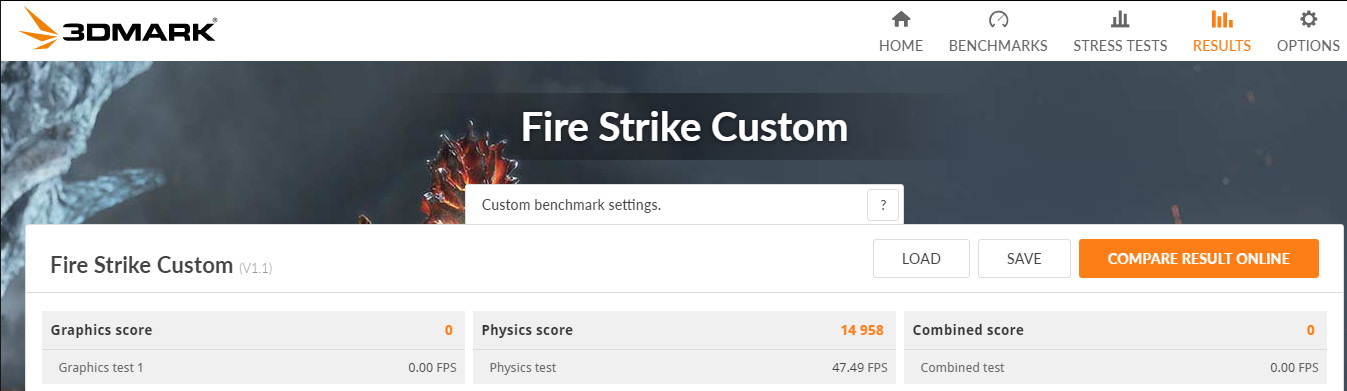
Check attached score, 4.8Ghz with static 1260Mv.
No throtteling so far on 4.8, need to test now on 4.9Ghz.Attached Files:
-
*** MSI 16L13 (Eurocom Tornado F5)/EVOC 16L-G-1080 15.6" Owner's Lounge ***
Discussion in 'MSI Reviews & Owners' Lounges' started by Diversion, Oct 14, 2016.