Problems? See this thread at archive.org.
Yes, for privacy, performance and softwares thing I need W7x64.
Dual Booting on all my laptop Win10 LTSB N 1607 from August 2016. So no news here.
Thanks Papusan, for driver install I already have the DVD shipped with laptop. I've no issues at moment.
The point of my post above is:
"All drivers for Tornado F5 (for all OSes version, Win7,8,10) are not available on EUROCOM site from about 3 weeks"
"QC sucks!"
Changing a bit way..
I uploaded a little (24min, 3,6GB, 8hrs upload with no fibre)video of PUBG running on my Tornado F5. I'm scarce, only 17th with 2kills for this run.
All graphics settings on "High" but Distance view on "Ultra", 1920x1080, driver desktop 388.10,
Ambient 21°c (70F)
6700k@4,3Ghz 71°c (160F)
Fan not maxed out (2 step low in MSI sw)
Gtx 1080@0,875v 74°c (165F)
-
I know for a fact they are busy with a very large order, for a very big client. Not my place to say the specifics what their business or client is, so I can't really say more.
I will try and remind them about the drivers thingy, if I can speak to them monday. I would have to guess they semi forgot about it or put it off as they got busy with something. Who knows. Just speculation why, is all.
Eitherway, as for recent drivers, really NVidia download page for them is still your best bet.aaronne likes this. -
HEy help!!
I got some issue from time I swapped out IC7 to Phobya Nanogrease extreme ...
Temps are worst then before and I dont get how to apply it correctly because seems my heatsink pump it out (screws no tightened at all).
Please suggestion are needed because my cat spill hairs everywhere and is the third time in a week that I open my tornado F5
Edit:
Got a bit of residual IC7, applied it and dropped temp about 5/7°c, now maxing at 71°c with 150W bios on 21°c ambient temp and max fan from software (not button)Last edited: Oct 28, 2017 -
I'm facing a strange temp spike on CPU, it's hitting 88-91c even on 4.4 with 1060Mv. VR core settings are disabled, no throttling at all either, but just why it is now spiking up?
-
Maybe the paste job dried out?
-
Enable VR and set IA Core Domain AC/DC Loadline to 1 instead of auto?
-
You have to make sure you clean the surfaces between applying thermal pastes otherwise it will act as an insulator between the various pastes itself.
Your also not making a perfect contact, as you can see in the heatsink it's unbalanced on side corner Possibly from not being screwed in evenly if I had to guess.
Also, if it makes perfect contact, you might have used too much paste, maybe try using 25% less if you can, but make it spread out evenly using a credit card edge. -
no boot
-
So it only works at auto?
What override voltages did you try?
Maybe ask @Eurocom Support , looks like a bios bug of some sort. It works fine on the Clevo systems and the MSI GT73.
On the desktop boards this value should be set to 1 (or .01), whatever is lowest, when using manual voltages, then the main setting "Loadline Calibration" can be used (if available). -
It's new, and also my bad, I meant to say that the Idle temps are around 70s for CPU while using chrome, not my favorite but highest it goes is 80c, can't complain. @4.5GHz.
-
This should not be happening.
I use chrome all the time on a BGA turdbook at 4.5 ghz. Never see temps anywhere close to this. Even when I had Kryonaut on it (using LM now). -
-
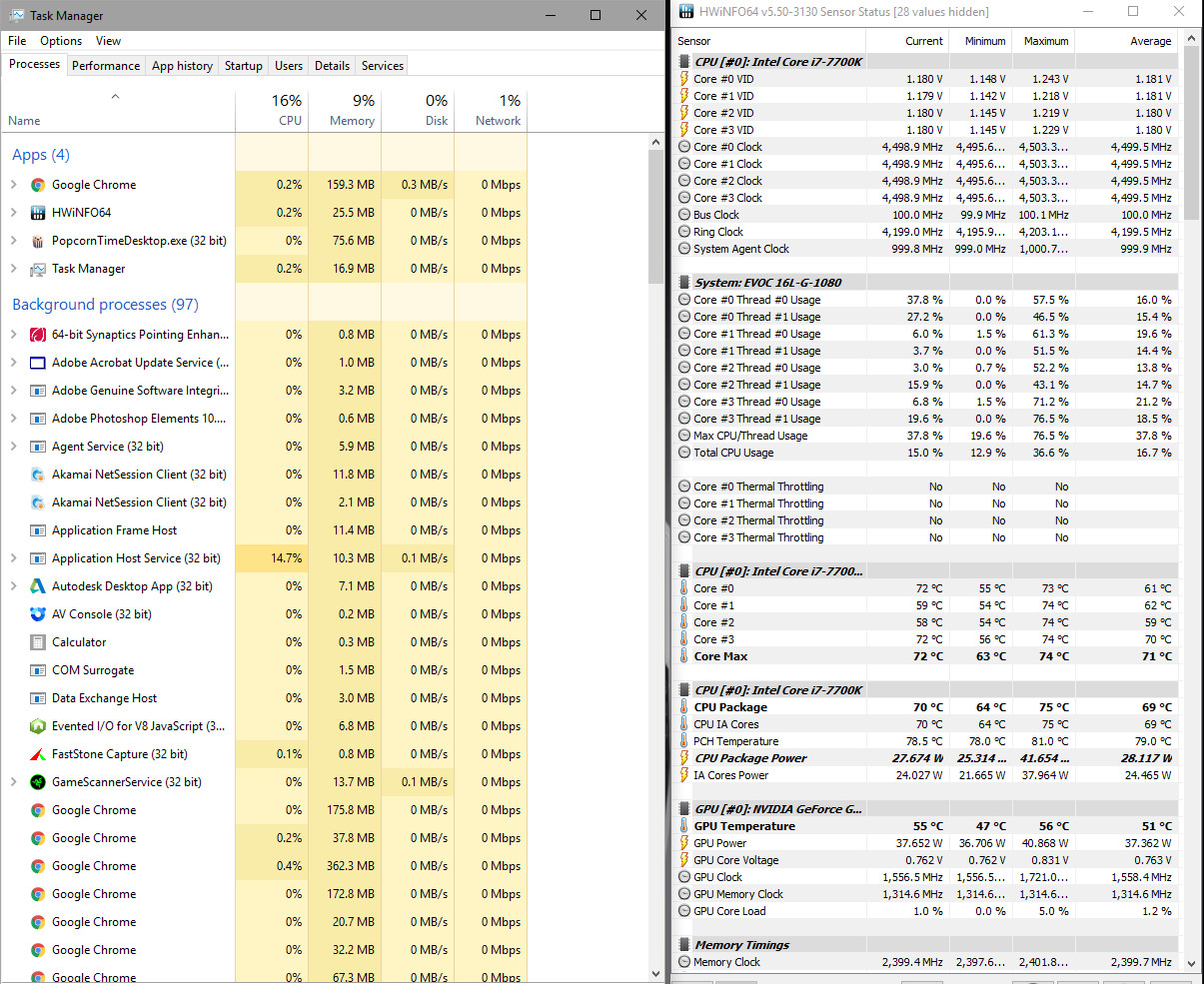
Here it is.
Attached Files:
Georgel likes this. -
-
It seems application host service (32 bit) is what tax your system. Not Chrome. Search on the web for solutions.
Edit. If you have O&O Shutup 10. Try put it to default settings. Restart see how it goes. Then put back your preferred settings. Have seen similar behaviour before. Worth a try.Last edited: Oct 29, 2017 -
It also looks like you have max CPU state on in power management. Why do you want to idle/ do light stuff at 4.5 ghz?
I have it idle at 800 mhz. Using chrome it goes to like 2.6 ghz average. Idle temps stay at 38 C. Typing this now in chrome I'm at 40 C.
However you might want to repaste anyway. @4.5 ghz stress tested my unit doesn't pass 72 C
Georgel likes this. -
Rather put it this way... No need for use of crippled power settings intended for BGA Junk if everything works as it should.
Use of <BGA CPU states> is one of the first choices Jokebook owners will throw out when they see others with same Trash run into overheating problems!!Last edited: Oct 29, 2017woodzstack, Huniken and Georgel like this. -
I don't get it.
If everything is working as it should, clocks shoot up to 4.5 (or whatever max is set for you) when you go in game, start encoding video, or watch 4K content. I have never had a problem with this on my old BGA or my 16L13. It has the benefit of the system running cool and almost completely silent for web and office content.
If you want to benchmark; it takes all of 30 seconds to change your power settings, if it is a indeed a problem for this... -
As I stated in my previous post... No need for other power plan than max performance if everything works as intended, you run stock clocks or even with slightly overclock. You will still have almost silent laptop in web or office work. I have 4 power profiles with TS... 4.7GHz is lowest but all 4 is put up as max performance. @Huniken ‘s problem is tasks which is stucks in startup. Windoze doesn’t always play nice all time. Not first time you see similar on the web.syscrusher, Huniken, ThatOldGuy and 1 other person like this.
-
I had a similoar issue like the one above before I started taking out windows components.
As of for now, my win is custom made, so it doesn't do that anymore.
@Papusan , I think some users might want less power consumption. I don't really care about that, but my system seems to stay cooler if it can go lower while in idle.hmscott and ThatOldGuy like this. -
-
I never thought of running balanced, always max performance.
-
I did some testing of PCMark on my 6700K with regards to various Windows power plan settings, and with & without C-states enabled to see if I could find a low idle power consumption without any compromises in performance. I found that High Performance Power Plan but with C-states enabled was the best combination of low idle power consumption, and there was no loss of performance in PCMark in comparison to having the CPU at full wack all the time. Here's the thread where I showed my testing: http://forum.notebookreview.com/thr...eatures-vs-performance-responsiveness.803030/
So, my CPU doesn't downclock & doesn't go to lower Mhz, but instead it just enters C-states when idle. Right now browsing the web my CPU is averaging 15W power consumption, but you'd have lower power consumption than me probably because I'm at 4.7Ghz @1.4V. I recommend using High Performance Power Plan with Speed Shift disabled and any kind of frequency downclocking disabled, and instead just make sure you have C-states enabled instead.Last edited: Oct 29, 2017ThatOldGuy likes this. -
Disabling C-States can help with stability if you max out your clocks. We talk about notebooks. Not desktops with better cooling and MB. But we are agree on High Performance Power Plan
Last edited: Oct 29, 2017ThatOldGuy likes this.
-
Ok, but if you're not right on the edge of your stability for your CPU overclock then I guess you could run with C-states enabled for lower idle power consumption while retaining the performance of a mild to strong overclock. I'm assuming that F5 Tornado BIOS allows for switching between C-states enabled & disabled?Papusan likes this.
-
I don’t know if stock bios handle it. Others who have the F5 can give you a answer on this. But enabed C-states and balanced power saving is the preferred Cpu settings in the BGA camp. Interpret this as you please
-
Is this comparison with the fans not going very fast, like a custom fan table ? Or perhaps give us an example of how fast they are moving, because that seems like pretty high temps, which is very possible on this laptop - by default it is hot, and essentially what many of us do is a few tricks to get the CPU temps lower, undervolting, repasting if not delidding, and modifying the bottom panel for better air intakes etc..
-
-
Yeah I've seen thi8s behavior especially on the F5, I do not know why half the time, but its like windows REALLY wants to spy on someone using these. Setting all the recommended on 0&0 each update basically prevents it. I usually manually set many of the same things for my customers, but your solution for an all in 1 is good, and easy to apply after each windows updates.
Its such a ripoff the way they "reset" all your privacy settings. FB has been known to do this for years too.hmscott likes this. -
wait, what?
how does FB have privacy settings? -
Does anyone know if anyone sells a skin wrap for the F5 Tornado? I see plenty for the GT62 VR but those have the MSI logo on the outer shell. The interior between the two is identical, right?
-
My bad for bringing it up, facebook is no the topic in this thread. However - facebook shares your information, and anytime they want to share it when you've essentially made it private they do an update or change something and things can go back to default - without you knowing, and by using facebook, and not re-agreeing, they basically essentially have your consent anyways, just because you logged in again since they changed settings, even if it means they can only share the information as it is that moment between logging in and changing the settings to private again. Was an issue that came up several times over the years that upset many. It's like bureaucratic non-sense to get around the fact they can share your info anytime to anyone.
Anyways moving back to F5... and windows the way it works on this laptop, do not know why but when I do the same full install on many other laptops, Chrome doesn't go nuts and grab all resources, but it sure does on the F5, I wonder if it is because it has no hardware vendor publicly attached to it in someway or something... but its something I have actually noticed, and couldn't quite figure out. However - it's true, making sure all telemetry and sharing, does get rid of it. Call it cautious, or paranoid but it pays to block all that stuff, your system is more responsive as a result.
I am all about performance ~! -
Basically yes. I can recommend some other peoples services if you need dipping or wrapping, some of these other vendors here active in this thread have that sort of service and they do a great job. Always thought of tackling it myself, but I do not yet have the know how. Maybe in the future.
For years wanted to do this to my Alienwares
-
@woodzstack
Is that possibly related to there being no "power limit" override possible in the Bios, (Bios power limit overrides are ignored) due to there being no "hardware ID" preset in the EC? (the value set in register E3 by the Bios (32=GTX 1070, 33=GTX 1080. Different value for prema Bios, unlocked system power draw but still 91W TDP). acts like an unsupported CPU is being used, enforcing a PECI enforced power limit of CPU TDP reported in the MSR/SKU. Meaning, unless you do a negative imon offset (-31999 maximum), the 7700K is hard capped at 91W TDP regardless of the Bios power limits (you can go lower but not higher than 91W).
If I'm correct, the TDP is either capped at 91W, or the maximum NON TURBO multiplier for the SKU, whatever is lowest (meaning it won't ever go below the max non turbo multiplier).Huniken likes this. -
People need to do their Due dilligence!! Trash everywhere. Both from FB and
![[IMG]](images/storyImages/BZm5fNo.gif) M$ Morons HQ. Regarding FaceBook!!
"Facebook seems to be constantly changing the way it implements users' privacy settings. Who knows, they may change the settings twice before you even finish reading this article." And people want this?
M$ Morons HQ. Regarding FaceBook!!
"Facebook seems to be constantly changing the way it implements users' privacy settings. Who knows, they may change the settings twice before you even finish reading this article." And people want this?
Windows 10 - Bloatware Free Edition
Windows 10 Tweaks and Fixes (Index post #1)
NBR Windows 10 Clean Installation Guide
O&O ShutUp10 - Do not use Windows 10 without it!
-
-
So can you still overclock without Prema BIOs that doesn't seem immediately clear.
-
There are other unlocked bioses for the F5
-
For the benefit of the folks in this thread & if their BIOS allows it: ditch the Balanced Power Savings Profile as well as ditch the Speed Shift/EIST frequency downclocking, but instead apply High Performance Profile & enable C-states: best of both worlds, low idle power consumption & still a responsive system.hmscott likes this.
-
Can you post screenshots or directions of exactly what settings to adjust within the BIOS and/or Windows to enable C-states?
-
Click on Battery Icon on Taskbar in windows & change to High Performance profile. In BIOS, every BIOS is different (I'm on a desktop - MSI motherboard). Just go to C-states option in BIOS and make sure it's enabled. I don't have Tornado F5, apologies if any confusion caused by this. However, Tornado F5 very desktop orientated, so figured would be some comparable settings in BIOS. Disable EIST in BIOS (that's the downclocking of CPU), although windows High Performance Profile may override that anyway & prevent downclocking, not sure.
EDIT: Use a free program called HWInfo (the sensors option), to check that CPU is not downclocking & that C-states are being entered - both & more information is displayed by HWInfo Sensors.Last edited: Oct 30, 2017hmscott, saturnotaku and Vasudev like this. -
Now I'm intrigued to enable C-states and observe the temps again.
Also what in windows could be causing this?
Stock, no max fans, max fans will make it go max 74c but average in the 60s. I already have all the mods from HIDevolution, this is something in the background that I'm suspecting is the culprit here. -
So here I did it, little 4C difference but clocks hold at 4.5Ghz. Max Fans. Top 70c. Both fans are working and blowing hard. They are on an air pad at full.
hmscott and Robbo99999 like this. -
Cool that you enabled C-states. Surprised to see your average CPU package consumption was 24W, what were you doing during the measurment period? I've had HWInfo Sensors open for the past 2 hrs and my average CPU Package power is only 14W. I'm also surprised that I can't see the C-state Residency information in HWInfo which tells you how long each core has spent in C-states - perhaps you hid some of the Sensors, maybe unhide everything, to be sure it's actually entering C-states. As a note, I haven't been following your issues closely, so can't say C-states is that cure, but I do vaguely remember you having temperature spikes at idle - well your PC is doing something for whatever reason. EDIT: yes, you're at average 15% CPU usage, that's quite high, you must have been doing something, or your PC is idling with high CPU usage for some reason.
EDIT #2: Windows 10 will always do some kind of stuff in the background, but if you leave your PC idle for a while it should do everything during that period, perhaps if you never leave it idle is has background tasks to catch up on. I tend to leave mine on for most of the day, yet I don't use it all the time - praps not very good for the planet, but to be honest it's saving on a little heating now in the Autumn! (My desktop is idling at only 40W though according to my Killawatt meter at the electrical socket, that's only the tower though, not the monitor included).
EDIT#3: Read up on your issue in this thread. High CPU usage during browsing is almost always due to excessive adds on various web pages. In fact, it got so bad on notebookreview here that I enabled Adblock. Guru3D also sometimes has adds that can easily constantly consume 15% or so CPU resources. You could try an Adblocker to see if that cuts down your CPU usage. I don't like using an Adblocker, but on some sites you kinda have to. I should probably disable it for a while here on notebookreview forums to see if it's gotten any better. Haha, yeah, just disabled Adblock here, and CPU usage instantly shot up from close to zero back up to at least 10% usage with just one tab open!Last edited: Oct 30, 2017Huniken, hmscott, Vasudev and 1 other person like this. -
Try going into your forum profile here and enable the "vB 3.X - Fluid" theme to see if that cuts down on bandwidth-choking ads.hmscott likes this.
-
Man that was ugly, can't use that! Thanks for the tip though.
-
-
1.) Try what I suggested in post #8714
2.) Try as suggested "vB 3.X - Fluid" theme. I use it( @Robbo99999 I like this theme. We all can't like the same lady as you know). As well use Adblocker.
3.) Download Process Explorer. Look after what is stealing processes. Then Search the web for soultions. The web is full of people who have stuck Windows task running and swim in problems. Sometimes is a re'install the only solutions.
4.) Download Autoruns.exe Test it out, if you not already use it.
5.) Disable Automatic Maintenance in Windows 10. Test without this trash fireing up. I disable it with tasks. If I want it running, I just enable it and then force Maintenance. Then disable the task again. No need for this trash running several times, days/week. M$ Morons want to see what's in your computer . Even less needed the whole time if you prefer prevent what Windoze will determine what you should download. Windoze X is a BIG SPYBOX!!
6.) Reinstall Windoze if you still struggle with tasks running in the background, eating process cycles for no reason.
High Cpu usage aint normal with just web browsing or idle in normal tasks. Of course some web pages is screw up. But this Smells <Windoze is screwed up>. -
My Windows is not screwed up and it's vanilla Windows 10, I don't have high CPU usage problems, doesn't have to be a Windows 10 issue. You're right that he should use Task Manager or Process Explorer to investigate what's eating CPU cycles though.hmscott likes this.
-
I didn't say YOUR Windoze is screwed up. Or did I ?
Edit. Of topic. But Facebook was mentioned a few post back... Here we go
How to delete or disable your Facebook account
"Need some time away from Facebook? Sick of its privacy issues? You can deactivate—or outright delete—your account if you know where to look." Last edited: Oct 30, 2017
 -
Edit: I downloaded the explorer, It's 3AM, will get back to this when I'm fresh, Gud Night!
*** MSI 16L13 (Eurocom Tornado F5)/EVOC 16L-G-1080 15.6" Owner's Lounge ***
Discussion in 'MSI Reviews & Owners' Lounges' started by Diversion, Oct 14, 2016.