Problems? See this thread at archive.org.
I have been wondering this myself cuz i want to purchase the EVOC version of the f5 when it becomes available next year with the coffee lake cpu and hopefully the new nvidia volta gpus. I looked at the dbrand sight and didnt see aby for this particular model. But somebodys gotta make one. Otherwisr i was gonna try to make one myself. But i feel like itll be really hard to do it precisely so it looks good. Id really like to have a carbon fiber skin when i get mine.
-
Guys, if you are using the unlocked Bios and MANUAL voltages, can you please go into Intel I/A core and set AC/DC loadline to 1 (lowest value) instead of 0, and then readjust your voltages after testing heat and power draw?
Apparently "Auto" is 2.10 mohms (Intel reference?), designed for adaptive vcore, but this causes manual voltages to be set MUCH higher than expected. One user measured 1.35v being measured as 1.5v.
Auto being 2.10 seems to relate to this reddit post quote I found also: (Besides Raja@asus saying Intel ref is 2.10):
https://www.reddit.com/r/overclocking/comments/5tz379/unable_to_reach_stable_oc_with_i7_7700k/Last edited: Oct 30, 2017aaronne likes this. -
I'll let you know when I order one. I was going to do a generic laptop skin on top.
-
So this is about your request, start point, cpu vcore override set at 1175 (results in 1,184v in full load) ia core domain AC/DC set to 0 (auto)
![[IMG]](images/storyImages/NMJeZz6h.jpg)
![[IMG]](images/storyImages/58y4T0u.jpg)
aswrote before
1,184v in full load ia core domain AC/DC set to 0 (auto)
Then I set on ia core domain AC/DC 1/1...
![[IMG]](images/storyImages/Pn8oT9Ah.jpg)
^_^
So lowered cpu multi to 42x...another bsod, another notch down at 41x and booting is ok this time, so time to test vcore!
Argh!..
1,100v so explained why bsoded before, also VDROP is way lower and precise then before,
(1.100/1.130 instead of 1.068/1.242)
but I don t get where do you want to go or expose with this settings, because on idle is 5/6Watts more then the adaptive(gay) mode
![[IMG]](images/storyImages/oeHW3JK.jpg) Last edited: Oct 31, 2017
Last edited: Oct 31, 2017 -
I wanted to give Rep on this post, I think I don't have O&O ShutUp 10, brother @Phoenix helped me the time I got my machine to set up windows 10 without Cortana and other stuff to make it look like the classic lovely windows 7 style for my own preference.
I'm taking a look at:
Windows 10 Tweaks and Fixes (Index post #1)
O&O ShutUp10 - Do not use Windows 10 without it!
^This post also I can't give Rep but +RESPECT for trying to help out a brother.
In your post #8714 you suggest trying to find out the process that takes CPU usage high, I have Akamai Net Session running twice, dunno why but this App is used by 3 vendors which I run in my system for work and for gaming: Adobe, Autodesk and Ubisoft.
2) Brother @Phoenix already helped me set up my Chrome with Adblocker, I imagine he did everything and beyond, really his touch lasts to this moment when he hooked me up with FastStone Capture to be able to quickly post HWinfo screenshots and FS screenshots, can't thank enough this illusive guy!
3) & 4) downloaded and about to use them.
5) This will do once I'm done reading, time sink here.
6) Not feeling like to Reinstall the whole OS......I mean maybe because I live in a hot country it gets that hot even if I was in an A/C cooled room that isn't cooled efficiently (I'm in the middle east, ask brother @Phoenix how hot and humid it gets here )
)
-
Idle using 74%? Is that supposed to be like that?
-
Ha, that's ok, System Idle is just showing you the percentage of time that the CPU is idle, ie not doing anything. It's the other items you wanna keep an eye on. It's PSANhost & Chrome using your CPU in that screenshot.Huniken, hmscott, Vasudev and 1 other person like this.
-
Could you deactivate your antivirus software and then see what happens?
Edit.. http://support.pandasecurity.com/forum/viewtopic.php?f=83&t=6365
You find more about PSANhost on the web.Last edited: Oct 31, 2017Huniken, Vasudev and Robbo99999 like this. -
Papusan said it right, it might be AV related or maybe FCU borked the AV functionality.
@Huniken :
I haven't installed FCU, is it possible to post a screenie of WD exploit protection feature.
DEP causes apps to crash. Use application opt-in feature in WD exploit and everything should work correctly. Even ASLR or SEHOP can be App opted in.Papusan likes this. -
@aaronne Do you see why auto (0) is bad?
at auto, it will add voltage randomly. Your vcore is going from 1.081 to 1.245. Do you see that? You are also using an offset (negative). That is why.
With AC/DC of 1, your voltage is now 1.081. This is of course too low.
Change it to 1175, change the offset to 0. then try again. It should work.
Then in the voltage test, you will not see crazy voltage range of 1.081-1.24 anymore. But you need to raise the manual voltage and set offset to 0.
The auto setting (AC/DC=0) is for adaptive vcore only. -
I think I'm liking the new setting, going to stick with AC/DC=1aaronne likes this. -
Did you tune your AV to Exclude disks or folders that don't need rescanning daily? That reduces the system load a lot. Rely on new download, and installer activity to catch the infections before they happen.
I exclude all the drives other than C where I download, and exclude folders that don't change after install on the C drive.
Make sure you have all the heuristics enabled and any activity based detection, like USB storage insertion - although I'd Exclude the external disks/folders that have already passed inspection.
No matter the AV, if you don't exclude already scanned disks / folders you will have a period each day that will have high IO / CPU usage.
saturnotaku, Vasudev and Huniken like this. -
FCU-> Fall creators update
WD-> Win Defender
ASLR-> Address space layout randomization
SEHOP-> Structured Exception Handling Overwrite Protection
I will suggest a pure signature-less Anti-executable called AppGuard. Virtually zero CPU usage.
Bitdefender AV, MBAM Free, ZAM free combo really keeps viruses off ur PC with 5-20% CPU usage.Skylake_, Huniken, temp00876 and 1 other person like this. -
I will go with ESET, what is MBAM?
-
-
MalwareBytes AntiMalware 2.x . V3.x has more RAM usage and CPU usage.
-
Now I have to wait for the next paycheck to purchase both. Thank you.
-
Complete line of Quadro Pxxxx (P5000, P4000 and P3000) series is now supported in Tornado F5 series, so you can turn your Tornado F5 into high performance Quadro Mobile Workstation. All of Quadro cards support 3D Stereo with 120Hz LCD panel.
syscrusher, Vasudev and Huniken like this. -
@Eurocom Support when will the tornado f7 be available?? and have you heard anything about when volta gpus will be available in your lineup as well??
-
Use MBAM free version its a second opinion scanner along with AV. ZAM free will do it too. Don't run multiple real time protection modules from multiple AVs tools.
If you're interested grab a giveaway key for ZAM premium at malwaretips.comhmscott, Robbo99999 and Huniken like this. -
Thanks but I want ESET and will grab MBAM.
-
I'm also wondering, @Eurocom Support will the new motherboard for the F5 Z390 feature improved overclocking design for the CPU and GPU?
-
I may be putting up my Tornado F5 for sale. I have only been using it for work and it is way overkill for my needs. Stay tuned if you are interested.
Keith, steberg, Kevin@GenTechPC and 1 other person like this. -
Since I did that, now it crahsed multiple times while browsing or gaming....I went back to disable it and disable C-states, reverting to the old voltage it doesn't work anymore! However what I used for 4.5GHz only works with 4.2Ghz now, it is 1090Mv.
Here is the who crashed:
Crash Dump Analysis
Crash dump directory: C:\WINDOWS\Minidump
Crash dumps are enabled on your computer.
On Fri 03-Nov-17 23:56:12 your computer crashed
crash dump file: C:\WINDOWS\Minidump\110317-6828-01.dmp
This was probably caused by the following module: ntoskrnl.exe (nt+0x111943)
Bugcheck code: 0x1000007E (0xFFFFFFFFC0000005, 0xFFFFF800F191C943, 0xFFFFCD01F332D378, 0xFFFFCD01F332CBC0)
Error: SYSTEM_THREAD_EXCEPTION_NOT_HANDLED_M
file path: C:\WINDOWS\system32\ntoskrnl.exe
product: Microsoft® Windows® Operating System
company: Microsoft Corporation
description: NT Kernel & System
Bug check description: This indicates that a system thread generated an exception which the error handler did not catch.
This appears to be a typical software driver bug and is not likely to be caused by a hardware problem.
The crash took place in the Windows kernel. Possibly this problem is caused by another driver that cannot be identified at this time.
On Fri 03-Nov-17 23:56:12 your computer crashed
crash dump file: C:\WINDOWS\memory.dmp
This was probably caused by the following module: wdf01000.sys (Wdf01000+0x2C22E)
Bugcheck code: 0x7E (0xFFFFFFFFC0000005, 0xFFFFF800F191C943, 0xFFFFCD01F332D378, 0xFFFFCD01F332CBC0)
Error: SYSTEM_THREAD_EXCEPTION_NOT_HANDLED
file path: C:\WINDOWS\system32\drivers\wdf01000.sys
product: Microsoft® Windows® Operating System
company: Microsoft Corporation
description: Kernel Mode Driver Framework Runtime
Bug check description: This bug check indicates that a system thread generated an exception that the error handler did not catch.
The crash took place in a standard Microsoft module. Your system configuration may be incorrect. Possibly this problem is caused by another driver on your system that cannot be identified at this time.
On Fri 03-Nov-17 22:19:09 your computer crashed
crash dump file: C:\WINDOWS\Minidump\110317-8140-01.dmp
This was probably caused by the following module: ntoskrnl.exe (nt+0x16C580)
Bugcheck code: 0x3B (0xC0000005, 0xFFFFF8026A719746, 0xFFFF8C004C13D880, 0x0)
Error: SYSTEM_SERVICE_EXCEPTION
file path: C:\WINDOWS\system32\ntoskrnl.exe
product: Microsoft® Windows® Operating System
company: Microsoft Corporation
description: NT Kernel & System
Bug check description: This indicates that an exception happened while executing a routine that transitions from non-privileged code to privileged code.
This appears to be a typical software driver bug and is not likely to be caused by a hardware problem.
The crash took place in the Windows kernel. Possibly this problem is caused by another driver that cannot be identified at this time.
On Fri 03-Nov-17 15:40:24 your computer crashed
crash dump file: C:\WINDOWS\Minidump\110317-8843-01.dmp
This was probably caused by the following module: Unknown ()
Bugcheck code: 0x0 (0x0, 0x0, 0x0, 0x0)
Error: CUSTOM_ERROR
A third party driver was identified as the probable root cause of this system error.
Google query: CUSTOM_ERROR
On Fri 03-Nov-17 15:24:09 your computer crashed
crash dump file: C:\WINDOWS\Minidump\110317-16125-01.dmp
This was probably caused by the following module: ntoskrnl.exe (nt+0x16C580)
Bugcheck code: 0x3D (0xFFFFD38064D398D8, 0xFFFFD38064D39120, 0x0, 0x0)
Error: INTERRUPT_EXCEPTION_NOT_HANDLED
file path: C:\WINDOWS\system32\ntoskrnl.exe
product: Microsoft® Windows® Operating System
company: Microsoft Corporation
description: NT Kernel & System
Bug check description: This bug check appears very infrequently.
The crash took place in the Windows kernel. Possibly this problem is caused by another driver that cannot be identified at this time.
Conclusion
33 crash dumps have been found and analyzed. Only 5 are included in this report. A third party driver has been identified to be causing system crashes on your computer. It is strongly suggested that you check for updates for these drivers on their company websites. Click on the links below to search with Google for updates for these drivers:
syntp.sys (Synaptics Touchpad Win64 Driver, Synaptics Incorporated)
If no updates for these drivers are available, try searching with Google on the names of these drivers in combination with the errors that have been reported for these drivers. Include the brand and model name of your computer as well in the query. This often yields interesting results from discussions on the web by users who have been experiencing similar problems.
=====================================
Synaptics Touchpad Win64 Driver, REALLY NOW?!! This driver is causing stability issues in my laptop.....I mean what it have to do with the CPU it self?!!Vasudev, ThatOldGuy and hmscott like this. -
Clean up NVRAM. Aka Reset. Fire up and put up your preferred bios settings again. Hardware, Os and drivers work with each other.
-
Build quality is excellent. I'm using this machine as my daily driver for work since April.
My only complaint is that MSI apparently got a bad batch of CPU and GPU fans, and I have had to replace both in my unit (one at a time). It is to this machine's credit, though, that I was still able to operate (albeit at reduced performance) even with the failing fans.
HID Evolution has stood behind the warranty well, modulo MSI itself having parts on backorder. For both fans, they advance-shipped me the part under warranty, so I didn't have to ship my machine back to them for a week. It's great to have a machine I can repair myself when things go wrong, or upgrade myself when I want to expand.Robbo99999, steberg, Vasudev and 2 others like this. -
Get the color calibration option from HID Evolution, which also provides the ICC file on a thumb drive in case you need to reinstall Windows. It does make a big difference. Alternatively, buy a colorimeter such as the X-Rite ColorMunki (or equivalent) and calibrate it yourself. Either way, you do need to calibrate this screen if you care about color accuracy.
-
That sucks, my GPU fan failed, still waiting for them to ship me one.
-
I got mine today. It is the same Aavid part number as the old one, but it has a different outward appearance. This suggests to me that Aavid might have changed some design elements, perhaps in response to reliability issues. That's good news if they did.
In any case, MSI does apparently have some parts inventory now (they were back-ordered on these), and my machine is now back in full operation. -
Agreed. I have different profiles for battery vs. wall power, but the only difference is that I dim the screen slightly and have it be more aggressive about screen blanking when idle.
My CPU clocks are managed based on load, not power profile. Right now I'm working in Unity game engine (just editing code, not running a lightmap bake or graphics test), and my machine is so quiet that I literally can't hear it over my wife's TV show. When I ramp up load, the fans spin up, as they should.
Silent Option is really helpful here. I have it running the fans slowly under very low load, but I actually ramp them up more aggressively than stock profiles as load increases. The reason I do this is that my Unity work tends to be very 'bursty" for load, ramping from "very light" to "maxed out" in a second or two as I start a lightmap bake, project build, or graphics test. I have the fans hit hard during that load peak so the temp doesn't climb while waiting for the fans to catch up.hmscott likes this. -
Can you talk more aobut your profile setups since I use Unity as well and noise is a premium when I use it at work.
-
How about "a picture's worth a thousand words"?

These are my current Silent Option settings, in Advanced Mode.
If I'm doing something really intense, like a lightmap bake that runs more than a few minutes, I'll typically max the fans from the keyboard button and damn the noise.
The fan settings shown above work well for me under Unity's bursty load patterns (a few seconds of 100% CPU usage as I import assets or recompile my C# code, for example, a couple of minutes when I do a project build or mumbledy-mumble too damned many minutes when I do a WebGL project build).
When testing my Unity projects in play mode, I rarely need to manually max the fans, as the Silent Option profiles above do a decent job of keeping my temps reasonably cool (70C to 80C is acceptable to me for short duration).
My power plan is a modified version of "High Performance", surprisingly to turn down the screen brightness a little. The maxed-out setting for AC power mode was actually painful to my eyes, so I'm doing this for comfort and not especially for power savings.
Both my CPU and GPU fans tend to idle at about 1700 to 1800 rpm when I am lightly loading the system, and the noise is barely perceptible.Skylake_, Vasudev, saturnotaku and 1 other person like this. -
Hi guys, I need your help.
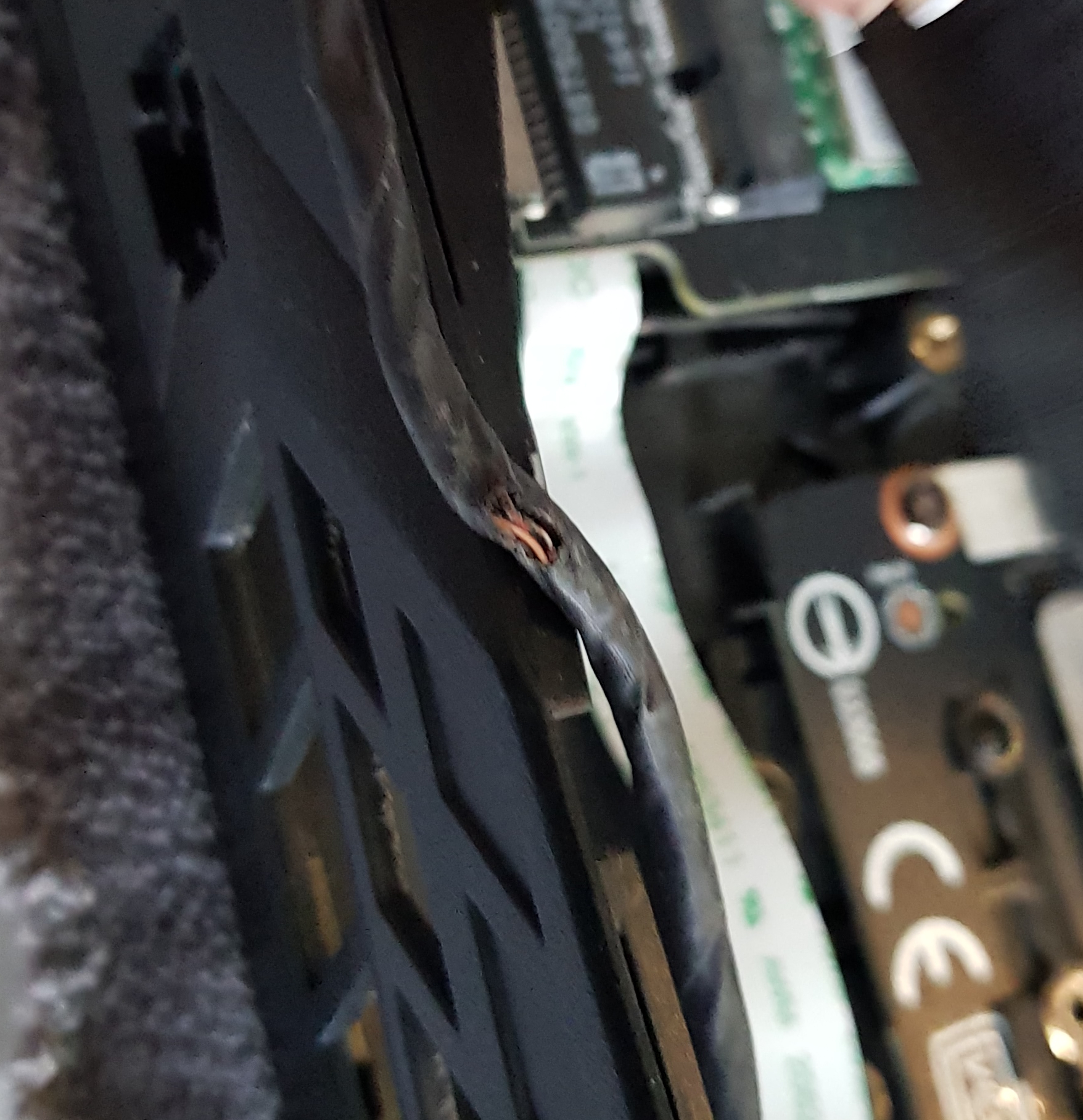
Is this the monitor cable that connects to the motherboard?
Yesterday after repasting the CPU the screen of the notebook didn't turn on. So I disassembled it again and found this cable (picture) underneath the radiator, a little bit out of place and with its outter protection cut. The thin cables inside it seems ok... but I really don't know what's going on.
Please any thoughts?
ThanksAttached Files:
-
-
Ouch, that doesn't look good. It might have gotten jammed between the base and the bottom cover after the repaste.
Looks a bit like the lcd cable, yes, but there should be 20 to 40 wires inside. Just make a photo of its motherboard end; the connector is a dead giveaway.Papusan likes this. -
Yes, it was the EDP cable. Fortunatelly I managed to fix it. The CPU radiator cut it because it was out of place and the red and black cables were also cut. Fixed them and now it is working great again... Thank you!!!
-
Thanks @syscrusher What are you working on in Unity?
More on topic, can you order a laptop without a CPU from Eurocom?hmscott likes this. -
@woodzstack is probably your best bet for a bare-bones system.hmscott likes this.
-
I would love to order from Woodstackz but the 20% discount is hard to pass up since this will be a tight budget but definitely know where to go for any upgrades/accessories.hmscott likes this.
-
I'm about to release a Unity developer tool on the Asset Store, my very first *commercial* project in Unity. To keep from drawing the forum off-topic, please PM me if you want to know more.
hmscott and leftsenseless like this.
-
I think that the fans of my Eurocom are working properly, but lightly rattling since the first day I owned this PC. Did you notice any difference about sound/fan noise from the old to the new fan?
-
Hey guys this is my first post here although I have lurked this thread for months, and you guys helped persuade me to purchase this laptop from Eurocom. I need some advice.
I have had this laptop for about 7 months now with no issues, but then last week my GPU fan started "wavering" up and down continuously even when at low temps. When forced to max fan speed using the button it goes up and stays there with no issues. After a couple days it won't start at all until i push the max fan button, once started it wavers. Now this week it won't start at all until I push the max fan button and blow some air in the vent in order to force it to spin.
I am not an expert but I have opened and fixed some minor hardware related issues with laptops and PCs, replacing laptop screens, opening and cleaning fan dust buildups etc. So the first thing I did was to open up the laptop, then dust and re-oil the GPU fan, but this had not effect. It spins fine when spun manually with my hands but doesn't start until blown while having the max fan button on. A couple days ago my CPU fan started making low airplane-like whining noises when at high rpms or when slowing down from max rpm, so I re-oiled that too but this had no effect (it still spins fine with no wavering just the weird noise). I did some research today and noticed that some people who have this fan (PABD19735BM N322) on MSI laptops had this issue, with a couple having this issue right after upgrading to the new Windows 10 Creators Update. I recently updated last week right before this started happening, but this surely isn't a software issue? I tried rolling back the update but the issue persists. So I came here to see if anyone has fan issues and it looks like there are some.
The laptop is still under warranty but since I have opened it and opened the seal on the fan in order to re-oil I don't know if it will still be accepted. I would prefer to replace it on my own since I need the laptop for my job and have no other computer. So my questions are, was my warranty voided since I opened the laptop and fans? Does anyone have experience with Eurocom sending parts for individuals to replace themselves or must the laptop be sent to them? Is this a hardware or software issue? Is this a reliability issue with this specific fan?
Any advice will be welcome. Sorry for the long post. -
Search a youtube video on how to fix the fans. You have to open it up, remove the spindle, and clean it that way. You can't clean it the way you did.
They are called "Laptop brushless fans". Search it. -
In terms of opening the fans to clean, I got as far as this (different fan shown): https://www.dhresource.com/albu_349005240_00-1.0x0/wholesale-new-laptop-cooling-fan-toshiba.jpg
So I should go further? I didn't see any other screws to remove. I guess I'll check youtube, but most videos of bad fans on youtube I have see are for fans doesn't spin freely, mine does, just doesn't start on its own, and then it wavers when started. It spins fine at max rpm, and spins fine when u blow air on it, or by hand. It also wasn't that dirty before the cleaning, just minor dust particles.Last edited: Nov 7, 2017 -
My GPU fan died recently. I did notice it was a little louder than usual before hand.
These fans seem bad quality as I've seen too many people had them failing on them. I'm still waiting for a replacement from HiDevolution, laptop is pretty much useless in the meantime.
I highly doubt it's win 10 update related, the failing parts have been happening since before the Creator's Update. I shouldn't have to clean it or take it apart and repair it. It's 6 months old.
This is the second spate of downtime for this unit. I suspect if the trend continues I'll be replacing the CPU fan at some point as well.Robbo99999 likes this. -
You have to remove the other three bolts or whatever they are called. I can't help with that. sorry.
-
@Falkentyne
I just opened it opened it up again. Found a youtube vid:
The fan blades doesn't pull out as it does in this video. I dont know if it can be removed this way, i feel if i apply anymore force it will break. It also spins alot more freely than the fan in that vid. Just minor air blown and it spins.
@hfm
If this is a reliability issue with the fan then thats pretty bad because replacing will mean getting the same unreliable fan. Unless other models are compatible?syscrusher likes this.
*** MSI 16L13 (Eurocom Tornado F5)/EVOC 16L-G-1080 15.6" Owner's Lounge ***
Discussion in 'MSI Reviews & Owners' Lounges' started by Diversion, Oct 14, 2016.