Problems? See this thread at archive.org.
Don't those Delta fans require some modification to the mounting point(s) and/or heatsinks?
-
-
If it's a repeating humming noise it's probably the hdd. You can feel it near the palm rest where it's located. If it's more like a high pitched whinning sound it's probably one of the fans or both. I'll post links to where I got the Delta ones soon.
Yup some mods needed to be done. I went with modding the fan casing and leaving the notebook's chassis as is for a nice and clean fit. Will post pics this weekend raz8020, hmscott, Donald@Paladin44 and 1 other person like this.
 -
What do you think of the fan noise and temps compared to the stock fans from MSI?
-
I would say I prefer it over the stock fans. The stock fans have a more high pitched whirling noise when running at high RPM. These Delta fans do make noise ofcourse (all blower style fans do on varying degrees) but it's a more tolerable wooshing of wind rather than motor noise. Temps there's not a noticeable difference. Maybe 1-2 max °C higher at worst. But that's beacause the Delta fan is thicker than the stock fan and the heatsink's fins aren't thick enough to cover the entire fan's exhaust area. I'm using some electrical tape to cover the height difference. I ordered a copper tape to use and cover the "exposed area". That should compensate for the small difference and bring in somewhat better cooling efficiency. Pics to come later in the day.saturnotaku likes this.
-
Would be good if suppliers of the F5 could replace the failing fans with different models that are more reliable & that don't require a bit of a 'bodge' job to fit into the space. Seems like the stock fans are really unreliable, so would be good to have that inadequacy addressed.
-
What MSI have to say about on failing fan
Sent from my iPhone using Tapatalk ProHuniken and Robbo99999 like this. -
I highly doubt they will say anything, but it's extremely clear these fans need to be replaced by a new vendor.saturnotaku and Huniken like this.
-
Ok guys here's my fan mod for you.
Initially I placed the delta fans on their respective slots to have a taste of how they would fit and how did they sound.
![[IMG]](images/storyImages/sZ8wAMO.jpg)
Working good so far. There was a slight vibration as the fans weren't properly attached and damped. They were loose in there space. Here I took a couple screens showing idle and full blast fan speeds.
![[IMG]](images/storyImages/fmS3ydu.jpg)
![[IMG]](images/storyImages/5odyJN5.jpg)
For those of you who would want a least invasive procedure to the notebook's chassis you need to make a hole in the fan's case like this. That should make sure to be able to remount the original fans without problem.
Better risk damaging a 15$ fan than a $$$ motherboard
![[IMG]](images/storyImages/Mz3GU6P.jpg)
As you go on you'll notice the height of the delta fans is higher. In this case a bit of foam strips cut to precision come of great help. Just place a strip of double-sided tape onver one of the heatpipes and install the foam over it. Use a heat resistant tape cause the pipes get really hot in that area
![[IMG]](images/storyImages/uYbwO43.jpg)
![[IMG]](images/storyImages/exLU2M0.jpg)
I've placed some 3M double sided foam tape in specific parts of the fans to dumpen vibrations and keep the fans from moving/falling off their place. Small pieces should do better as the smaller the contact surface the better the damping. You'll need at least 3 pieces to have a stable base. I've labeled the fans cause their tape placement and custom "mounting hole" positions differs a little bit. The CPU fan needs a slightly deeper hole and there's the fan/keyboard light/power button pcb to keep in mind.
![[IMG]](images/storyImages/WZlGTFK.jpg)
![[IMG]](images/storyImages/Ljzogbn.jpg)
What it looks like once finished
![[IMG]](images/storyImages/N25B3cF.jpg)
Oh and one last thing, you need to remove a small "cross" on the lower panel for it to fit better. Remember these fans are thicker than the orginal Aavid ones.
![[IMG]](images/storyImages/XRsxEIY.jpg)
This screenshot was after running Starcraft 2 on Ultra settings. Fans were in auto speed. It would seem they're slightly air starved as the temps were lower without the bottom panel. Doing the bottom panel mod I'm sure would maximize their potential.
![[IMG]](images/storyImages/ojExsyT.png)
PS: I copper foil taped the fans to give them a more "premium" look vs their standard grey industrial feel.
raz8020, alaskajoel, Robbo99999 and 4 others like this. -
Very nice...if you ever plan to use the warranty, this is probably a better solution than my approach of ripping out the fan mounts.
A warning about the bottom cover mod: I've tried this mod with these fans and while it does greatly improve temperatures to CPU and GPU, it comes at the cost of zero air moving in other parts of the case which in my machine meant higher PCH and NVME temperatures. I went back to the unmodded bottom panel because my PC was shutting down due to high PCH temps during some of my normal work tasks.
Good to see someone else try this!felix3650 likes this. -
yeah would like to know too
-
Maybe smaller air vents, so it pulls from all over ?
-
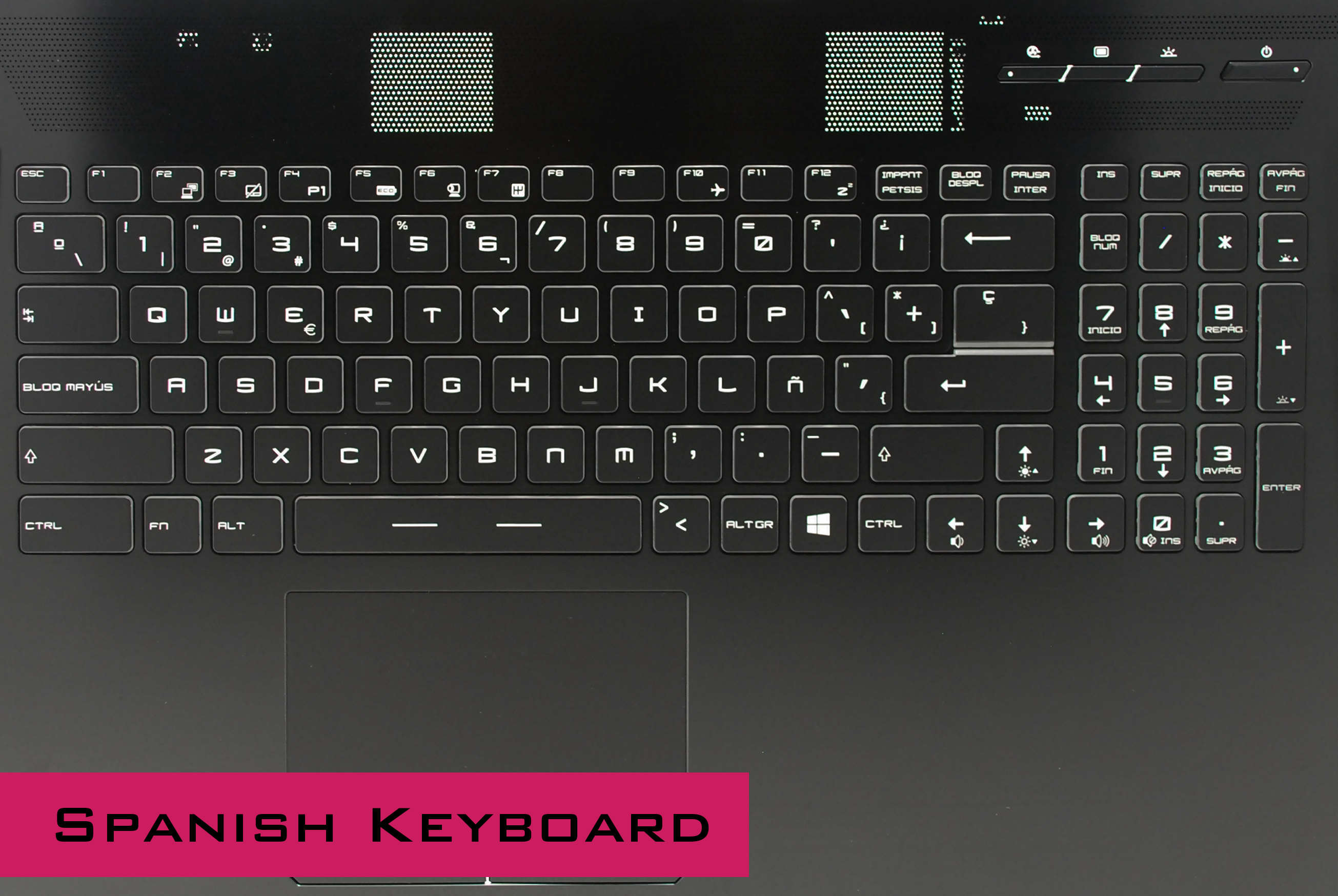
UK English keyboards are available now for Tornado F5 series. We have also Spanish, Russian, German, Italian and French in stock.
-
Where can I find the prices? Also display bazel is available? I have a small dent on it due to the lcd upgrade((
-
Please check with our Sales Team [email protected] for front cover. We have all spare parts in stock.
-
I believe I have some in stock as well. If your interested, just PM me, as usual. Cheers.
-
I just got my laptop back from """repairs""" and these four screws are missing (photo isn't mine, obviously). I'm sure I know the answer but can someone please confirm that there's no good reason for them not to be there any more...
Also one of the bottom cover screws is missing so that's nice.
![[IMG]](images/storyImages/33_359.jpg)
-
There is good reason; and re-sellers should remove them. They bind the 2 heat-sinks together; which research shows as a bad idea fro combined loads. Hidevolution and I think @woodzstack remove them from systems they sell. I think @Mr. Fox did research on this when system was being tested.
As for that bottom screw; that's just a "screw up" *nudge* *nudge*
Chuzzz, Mr. Fox, t456 and 1 other person like this. -
That is correct. Temps are better when the CPU and GPU are not puking on one another. This applies to other models as well. Unified heat sinks are retarded. At least the 16L-G-1080 / Tornado F5 owners can simply take the screws out and leave air space between them to stop the madness. Owners of other models where the unified heat sink is soldered together are not even lucky enough to have been screwed (pun intended).Huniken, matyee, ThatOldGuy and 2 others like this.
-
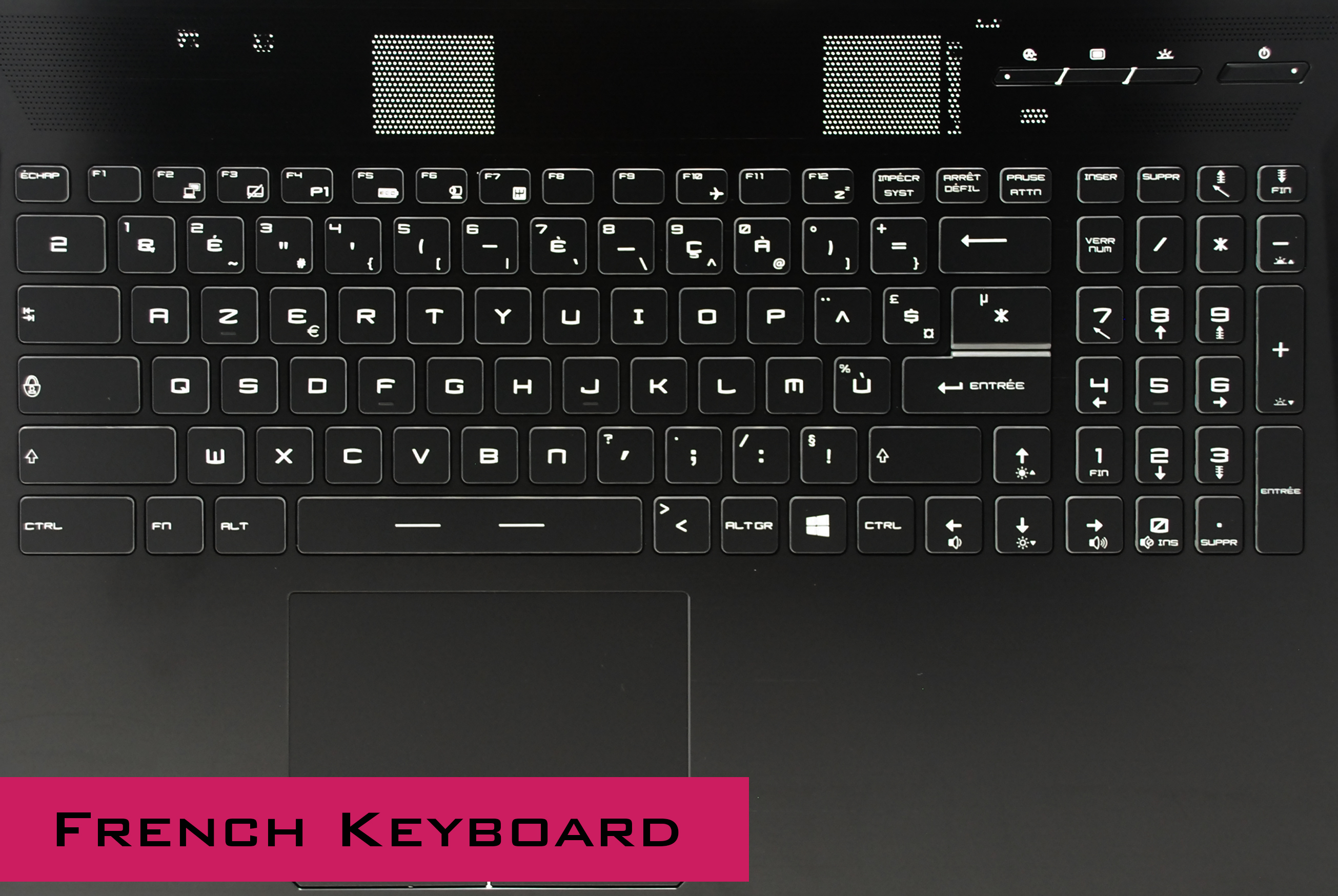
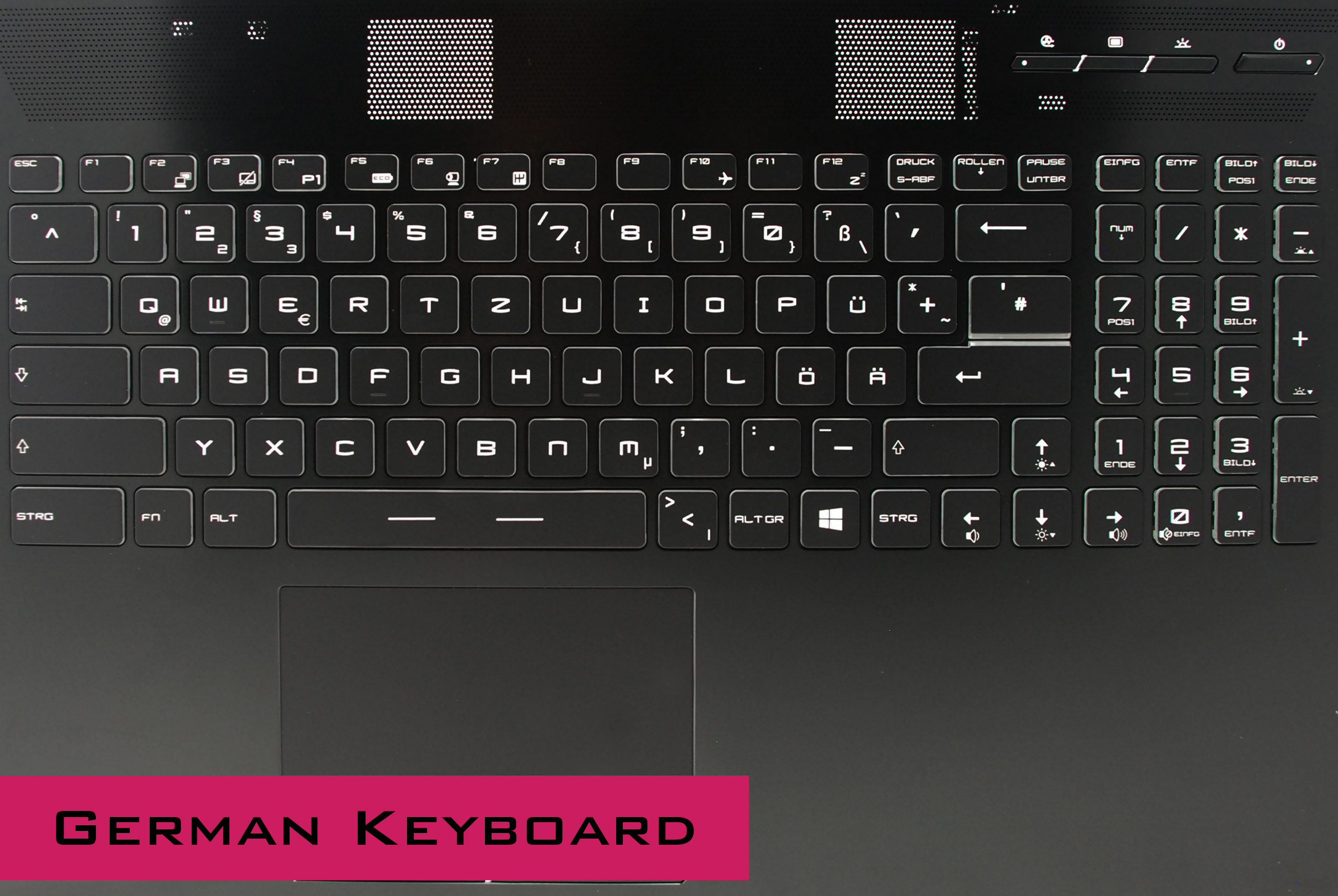
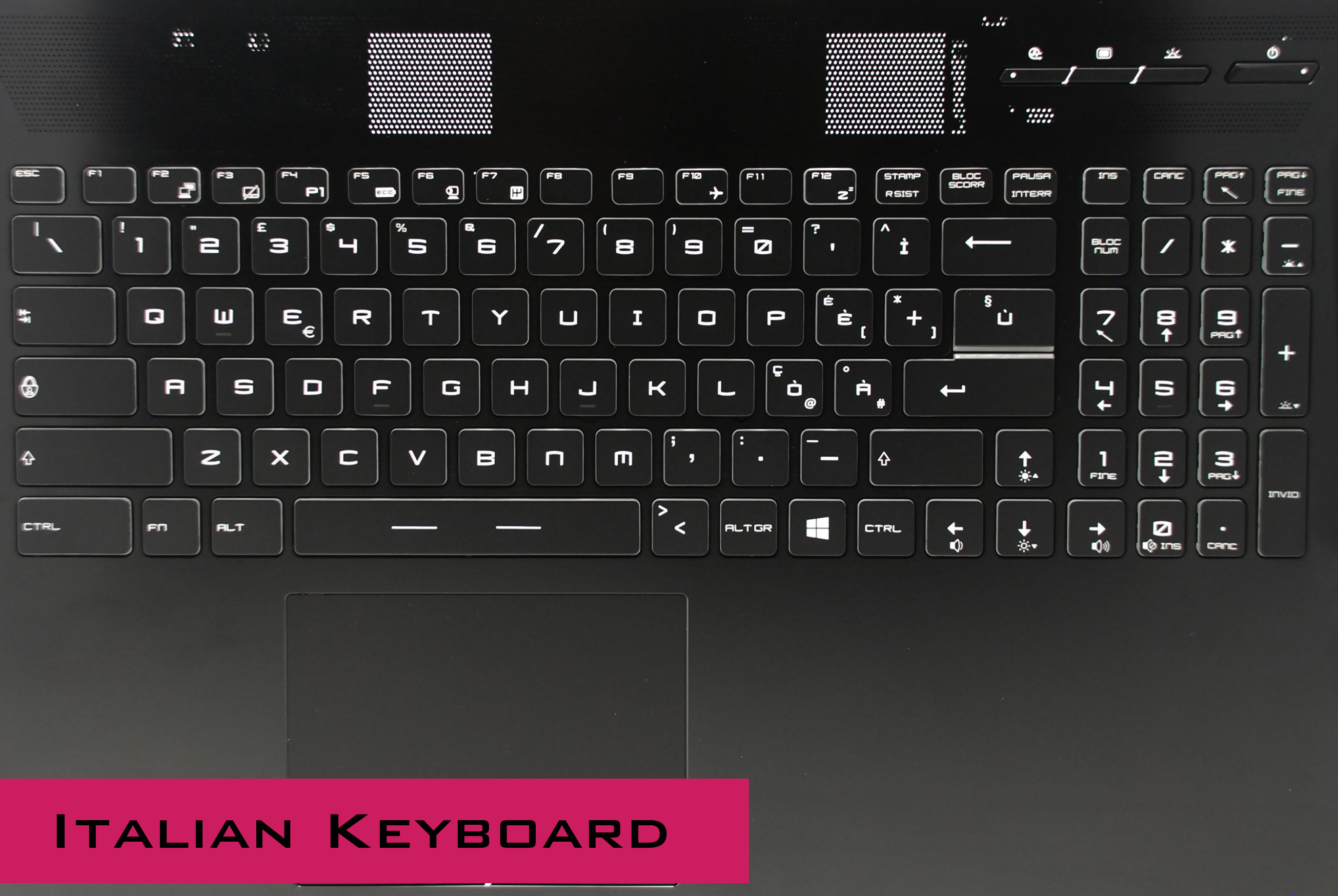
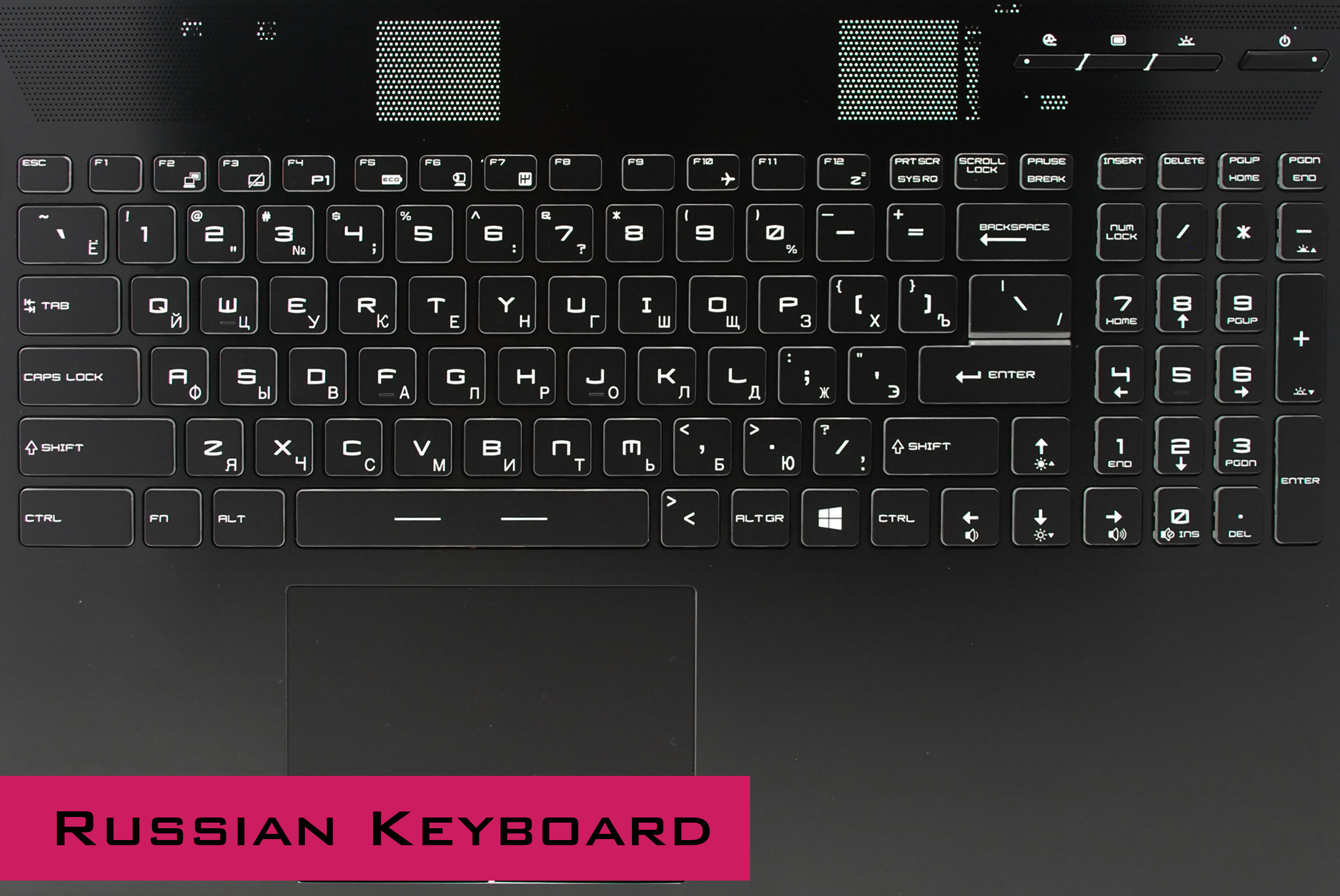
Here are some pics of all of Tornado F5 keyboards.
Here is complete listing:
US English
UK English
French
German
Italian
Spanish
Russian
We have all of them in stock.Attached Files:
-
-
Can I do the same with my clevo p775dm3? Gpu heats up the cpu pretty much, even with intel burn test I do not reach 70C, but under "heavy" gaming, it goes up +10C...Mr. Fox likes this.
-
No, unless I am mistaken the GPU and CPU heat sink are a one-piece soldered mess like the previous generations of P7 machines. I think maybe the P775TM corrected that issue and separated them into discrete heat sinks. If those heat sinks fit the P775DM3 chassis, maybe that would be an option. You would need to see if @Prema or @Donald@HIDevolution or @Eurocom Support or @Meaker@Sager can answer that question since I am not familiar with the product.
-
Unfortunately we do not have a P775DM3 chassis with which we could test this.saturnotaku, Mr. Fox and Spartan@HIDevolution like this.
-
If you pull out the stubs here, they are simply glued on :
This is what prevents you from using a 1080 :
![[IMG]](images/storyImages/5drcfjE.jpg)
Next what you need is this piece :
![[IMG]](images/storyImages/ELCtJhh.png)
This piece is what holds down the 1080 GPU.
Now you can simply use some electrical tape and washers to level it down with a tiny bolt and your good to go.
Thought I would share, because so many of you are buying new motherboards for just using a 1080, when technically this is all you need.
You will need the heatsink too , obviously:
![[IMG]](images/storyImages/26Ab09e.png)
-
That heatsink construction made me feel, its made to melt away any game you throw at your Clevo DTR.
Does this have a Vapor Chamber?woodzstack likes this. -
lol, vapour chamber, these are traditional vacuum copper heatpipes as usual here, they have worked for many years just fine.Vasudev likes this.
-
That is not a Clevo heat sink. What @woodzstack is showing in the photos is a Tornado F5/16L-G-1080 heat sink and MSI 1080 GPU bracket.raz8020, Vasudev and woodzstack like this.
-
yup, that's exactly what I am showing. Essentially you are charged hundreds more, for this work. I just thought to highlight the differences.
-
no idea from other sellers.
If you want from me, just send me a PM, but otherwise I'm to respect other sellers in this thread and like threads and not negotiate business in the thread itself.Vasudev likes this. -
I would be interested very much! As i see for 775tm1 the heatsinks are separate for the gpu and cpu. I would love to test it...raz8020 and woodzstack like this.
-
I have a clients P775TM1 with me right now, damn the thing is great. Had to shim the pascal GPU though, can you believe it ?
Whats with these companies these days, nothing they seem to make fits properly. -
Pm sent
Your yesterday offer accepted only thing what else can i put in maybe 108
lol
Vasudev likes this. -
See, I took these off :
![[IMG]](images/storyImages/E1OpPPO.png)
normally they create a stand, and thats where the 1060/1070 rest on and the little bolt screws into.
this plate :
if you look here the two inner circles are where a bolt screws into those pegs - BUT - if they are on the normal side of the motherboard they raise the plate too high - so the modification EUROCOM paid MSI to do, was to imbed the bolt circle holder things into the motherboard, essentially just making them shorter.
You can have this done by moving the circle peg things to the otherside of the motherboard.
Then you take a screw and bolt the plate down onto the motherboard.
see here I put a screw to show :
![[IMG]](images/storyImages/e5QEhwV.png)
now to show the otherside :
![[IMG]](images/storyImages/mSvKw1R.png)
when the cirlce bolt holder thingy is moved to the bottom side of the motherboard, you simply use a longer bolt and it should bolt right in, see here :
![[IMG]](images/storyImages/pNy5PXG.png)
-
essentially this should allow you to mod your motherboard to hold a 1080. just need that plate. Or make one or something.
You should be able to do this to the MS16L11 as well, and make it like a F5 or so.
thats another MSI whitebook, probably easier to get from MSI directly, but different CPU and it came with 980M I think. but everything is in right place.Papusan likes this. -
Is there a place to update bios to go from 6700 to 7700k?
woodzstack likes this. -
get the updated bios from someone here, theres sure to be people with the updated bios around, you just need the skylake to kabylake bios.
you could ask SVET for a copy of the bios, and help installing it. Maybe Prema too. -
![[IMG]](images/storyImages/7U1GeXR.png)
doing a panel mod myself, here's the underneath, you can see the epoxy
![[IMG]](images/storyImages/cAd86Lk.png)
it's not finished of course, this is before any real touch ups.
What you guys think ?> -
didn't take too long, but I would do things completely differently next time.
guess you learn some lose some along the way.
![[IMG]](images/storyImages/TLYNXnT.png)
-
@JD$
What do you think? -
I just got my bios updated to Svet .. for some reason it’s not finding my nvme any more. Any ideas on what setting need to be changed
-
Is your operating system just not finding it or is it not showing up in BIOS either? Do you boot in pure UEFI? Otherwise you might have to set Storage to UEFI in CSM configuration.
-
I see it in the bios just not showing up when I try to reinstall
Windows or even boot to the os in it -
the very same happened with me... in bios info page I see, but I cannot boot from it or select in win10 install as drive... the only thing I could do to set to intel rst, but win10 could not boot in... finally gave up and put a m2 sata in the drive...
-
when I have used the 2,5 ssd as win10 drive, I could see the m2 drive in win10, I could also use it, but not for win as a primary boot drive... wierd.
-
Well crap
-
but if bios sees and win10 also, can it be the bios?
-
-
what have you set? could you give an exact step by step tutorial? thx in advance!
Cerreta28 likes this.
*** MSI 16L13 (Eurocom Tornado F5)/EVOC 16L-G-1080 15.6" Owner's Lounge ***
Discussion in 'MSI Reviews & Owners' Lounges' started by Diversion, Oct 14, 2016.