The Notebook Review forums were hosted by TechTarget, who shut down them down on January 31, 2022. This static read-only archive was pulled by NBR forum users between January 20 and January 31, 2022, in an effort to make sure that the valuable technical information that had been posted on the forums is preserved. For current discussions, many NBR forum users moved over to NotebookTalk.net after the shutdown.
Problems? See this thread at archive.org.
← Previous pageNext page →

    *** MSI 16L13 (Eurocom Tornado F5)/EVOC 16L-G-1080 15.6" Owner's Lounge ***

    Discussion in 'MSI Reviews & Owners' Lounges' started by Diversion, Oct 14, 2016.

  1. woodzstack

    woodzstack Alezka Computers , Official Clevo reseller.

    Reputations:
    1,201
    Messages:
    3,495
    Likes Received:
    2,593
    Trophy Points:
    231
    there was step by step in the link.
     
    Cerreta28 likes this.
  2. woodzstack

    woodzstack Alezka Computers , Official Clevo reseller.

    Reputations:
    1,201
    Messages:
    3,495
    Likes Received:
    2,593
    Trophy Points:
    231
    just quoting this.
     
    Cerreta28 likes this.
  3. Papusan

    Papusan Jokebook's Sucks! Dont waste your $$$ on Filthy

    Reputations:
    42,712
    Messages:
    29,847
    Likes Received:
    59,652
    Trophy Points:
    931
    You're welcome :)
     
  4. Cerreta28

    Cerreta28 Notebook Evangelist

    Reputations:
    74
    Messages:
    635
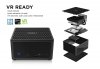
    Likes Received:
    311
    Trophy Points:
    76
    Your the best
     
    Vasudev, Papusan and Donald@Paladin44 like this.
  5. woodzstack

    woodzstack Alezka Computers , Official Clevo reseller.

    Reputations:
    1,201
    Messages:
    3,495
    Likes Received:
    2,593
    Trophy Points:
    231
    Papusan FTW
     
    Vasudev and Papusan like this.
  6. matyee

    matyee Notebook Deity

    Reputations:
    254
    Messages:
    861
    Likes Received:
    430
    Trophy Points:
    76
    Hi,
    Anyone knows, that AUO B156HTN05.1 15.6" FHD TN 120Hz model compatible for the F5? I know that 5.2 is compatible, however I have not found anything about 5.1. Btw, what is the difference?
    any help is appreciated,
    cheers
     
  7. Cerreta28

    Cerreta28 Notebook Evangelist

    Reputations:
    74
    Messages:
    635
    Likes Received:
    311
    Trophy Points:
    76
    Just put a 7700k in my system and not the screen stays black but if I put the 6700 in it’s fine any reason for this . I have svet bios
     
  8. woodzstack

    woodzstack Alezka Computers , Official Clevo reseller.

    Reputations:
    1,201
    Messages:
    3,495
    Likes Received:
    2,593
    Trophy Points:
    231
    did he UNLOCK your bios or did he give you an updated bios for your system, what did you ask SVET to do for you?

    Because you need the latest bios to use Kabylake, but if you go to SVET for unlocking, don't just unlock the old bios from 2016 lol.
     
    DreDre likes this.
  9. Cerreta28

    Cerreta28 Notebook Evangelist

    Reputations:
    74
    Messages:
    635
    Likes Received:
    311
    Trophy Points:
    76
    I told him I wanted to use my 7700k
     
    Vasudev likes this.
  10. woodzstack

    woodzstack Alezka Computers , Official Clevo reseller.

    Reputations:
    1,201
    Messages:
    3,495
    Likes Received:
    2,593
    Trophy Points:
    231
    ah, well sounds like you got the wrong bios IMO. let him know, maybe was simple mistake.
     
    Vasudev likes this.
  11. woodzstack

    woodzstack Alezka Computers , Official Clevo reseller.

    Reputations:
    1,201
    Messages:
    3,495
    Likes Received:
    2,593
    Trophy Points:
    231
    what version does the bios say or whats the name of the files he sent you ?
     
  12. Huniken

    Huniken Notebook Evangelist

    Reputations:
    332
    Messages:
    582
    Likes Received:
    610
    Trophy Points:
    106
    I'm just curious, how does SVET BIOS UI looks like in comparison to the one provided by @Prema ?

    I heard SVET BIOS have extra menus that could be dangerous to the user who doesn't know what they are doing, so I'm now curious to see how it looks like....never seen SVET bios before but his reputation is very good, no denying that at all.
     
    Vasudev likes this.
  13. Vasudev

    Vasudev Notebook Nobel Laureate

    Reputations:
    12,045
    Messages:
    11,278
    Likes Received:
    8,815
    Trophy Points:
    931
    Most likely similar to Stock Aptio V BIOS screen and I hope we get BIOS screen with decent like LGA Mobos like Asus, Asrock etc..
     
  14. matyee

    matyee Notebook Deity

    Reputations:
    254
    Messages:
    861
    Likes Received:
    430
    Trophy Points:
    76
    Anyone idea?

    AUO B156HTN0 5.1 vs B156HTN0 5.2?
     
  15. Cerreta28

    Cerreta28 Notebook Evangelist

    Reputations:
    74
    Messages:
    635
    Likes Received:
    311
    Trophy Points:
    76
    Ok got the 7700k up and running .. for some reason it throttles down a lot so I’m sure I need to change some power settings . Also does any one have a gtx 1070 v bios that will let it go over 115w
     
  16. Falkentyne

    Falkentyne Notebook Prophet

    Reputations:
    8,396
    Messages:
    5,992
    Likes Received:
    8,633
    Trophy Points:
    681
    You need to hard TDP mod it with a SPI programmer. A lot of us have vbioses with 150W (some as high as 195W TDP) but you can't flash it with NVflash.

    You can mod the Bios without the programmer, but you can't FLASH it with NVflash, because modding the Bios breaks the HULK Certification instantly, which NVflash sees because green goblin is OP.
    Hardware programmers don't care about no certifications and will forcibly flash it.

    http://forum.notebookreview.com/threads/mobile-pascal-tdp-tweaker-update-and-feedback-thread.806161/
     
    raz8020 and Vasudev like this.
  17. Cerreta28

    Cerreta28 Notebook Evangelist

    Reputations:
    74
    Messages:
    635
    Likes Received:
    311
    Trophy Points:
    76
    I flashed a Asus bios on it and tdp went up just not a ton can any one share their 150W bios
     
  18. Falkentyne

    Falkentyne Notebook Prophet

    Reputations:
    8,396
    Messages:
    5,992
    Likes Received:
    8,633
    Trophy Points:
    681
    Your Asus Bios was certified by Nvidia. That's the problem.
    Self modded Bioses are NOT certified. Thus NVflash wont flash them.
    See? here's my 195W TDP bios right here.

    Try to flash it. Watch.
     

    Attached Files:

  19. Falkentyne

    Falkentyne Notebook Prophet

    Reputations:
    8,396
    Messages:
    5,992
    Likes Received:
    8,633
    Trophy Points:
    681
    Here's another MSI 1070 vbios, newer than .3a, dont know the difference because I'm not taking out my SPI programmer to try it. Repasting liquid metal is too much work.
     

    Attached Files:

    Vasudev likes this.
  20. Cerreta28

    Cerreta28 Notebook Evangelist

    Reputations:
    74
    Messages:
    635
    Likes Received:
    311
    Trophy Points:
    76
    OK I get what you’re saying so that bios that you just posted won’t let me flash
     
    Vasudev likes this.
  21. Falkentyne

    Falkentyne Notebook Prophet

    Reputations:
    8,396
    Messages:
    5,992
    Likes Received:
    8,633
    Trophy Points:
    681
    Right. But if you had a Skypro hardware programmer, a Pomona 5250 IC clip, some male to female jumper cables to hook up the pomona clip to the 1.8v adapter easily ( https://www.amazon.com/gp/product/B01LZF1ZSZ/ref=ox_sc_sfl_title_5?ie=UTF8&psc=1&smid=A3KL3JVC9E1BY6 ) and a 1.8v adapter (REQUIRED), you could force flash it manually. No soldering. Just hook up pin 1 (top left) to pin 8 (top right) on the IC clip (matching the pin layout on the 1.8v adapter), find the pin 1 "small circle indention" on the main bios chip, line up pin 1 on the clip to that, then press "Detect" on your skypro software, then press "Auto" (do not auto unless you detect) then off you go.
     
    t456, raz8020 and Vasudev like this.
  22. Cerreta28

    Cerreta28 Notebook Evangelist

    Reputations:
    74
    Messages:
    635
    Likes Received:
    311
    Trophy Points:
    76
    Shoot so I just need to find someone that has 150 W the bios from a factory card
     
  23. Cerreta28

    Cerreta28 Notebook Evangelist

    Reputations:
    74
    Messages:
    635
    Likes Received:
    311
    Trophy Points:
    76
    I got the 7700k to work the issue I’m having now is the cpu is ramping up to the 4.5ghz and throttles to 2.5ghz
     
  24. Falkentyne

    Falkentyne Notebook Prophet

    Reputations:
    8,396
    Messages:
    5,992
    Likes Received:
    8,633
    Trophy Points:
    681
    You need to change "CPU Current Limit" (ICCMAX) in your Bios, to 200 amps. If the help on the right says the value is divided by 4 then converted to amps, then that would be a value of 800.
    Not sure where you put that value at. If you look in Mr Fox's 16L13 video on youtube, he passes by it.

    You will STILL have a 91W TDP limit after doing this, however, even though you can change power limits in the unlocked Bios, these power limit values will be ignored.

    if your bios is not unlocked, you could use Intel XTU, but I would avoid that, TBH. you should have access to advanced Bios options. Then just find power and performance ->Core IA Domain, and the option will be there.
     
  25. Cerreta28

    Cerreta28 Notebook Evangelist

    Reputations:
    74
    Messages:
    635
    Likes Received:
    311
    Trophy Points:
    76
    Ok I’ll take a look at this So I’m looking for iccmax ?
     
    Falkentyne likes this.
  26. Falkentyne

    Falkentyne Notebook Prophet

    Reputations:
    8,396
    Messages:
    5,992
    Likes Received:
    8,633
    Trophy Points:
    681
    Yes, but in the Bios it's usually called VR Current Limit !
     
    raz8020 and Spartan@HIDevolution like this.
  27. Cerreta28

    Cerreta28 Notebook Evangelist

    Reputations:
    74
    Messages:
    635
    Likes Received:
    311
    Trophy Points:
    76
    [​IMG]
    Shows zero
     
    Vasudev and Donald@Paladin44 like this.
  28. Falkentyne

    Falkentyne Notebook Prophet

    Reputations:
    8,396
    Messages:
    5,992
    Likes Received:
    8,633
    Trophy Points:
    681
    0 means auto which is 70 amps.
    Set it to 800 (200 amps).
    Check the divider on the right.
     
  29. Cerreta28

    Cerreta28 Notebook Evangelist

    Reputations:
    74
    Messages:
    635
    Likes Received:
    311
    Trophy Points:
    76
    Do I change both current and voltage limit
     
    Vasudev and Donald@Paladin44 like this.
  30. Falkentyne

    Falkentyne Notebook Prophet

    Reputations:
    8,396
    Messages:
    5,992
    Likes Received:
    8,633
    Trophy Points:
    681
    voltage limit means nothing. Auto is infinite for that. Just current.
     
    raz8020, Vasudev and Donald@Paladin44 like this.
  31. Cerreta28

    Cerreta28 Notebook Evangelist

    Reputations:
    74
    Messages:
    635
    Likes Received:
    311
    Trophy Points:
    76
     
  32. Falkentyne

    Falkentyne Notebook Prophet

    Reputations:
    8,396
    Messages:
    5,992
    Likes Received:
    8,633
    Trophy Points:
    681
    I don't know what the problem is then. Download Throttlestop and check Limit Reasons for what flashes in red. Should tell you.
     
    raz8020 and Donald@Paladin44 like this.
  33. Cerreta28

    Cerreta28 Notebook Evangelist

    Reputations:
    74
    Messages:
    635
    Likes Received:
    311
    Trophy Points:
    76
    Under throttle stop it’s showing EDP Other and PL2
     
    Donald@Paladin44 likes this.
  34. Falkentyne

    Falkentyne Notebook Prophet

    Reputations:
    8,396
    Messages:
    5,992
    Likes Received:
    8,633
    Trophy Points:
    681
    Don't PM me and spam my inbox to say the same things you are saying here. I dont own this laptop.
    I muted the PM.

    You can try changing IMON OFFSET to -31999 (negative) in the CPU VR area, and then go to overclocking performance menu and change IMON SCALING SUPPORT to enabled.
    That's the most i can do for you.
     
    Donald@Paladin44 likes this.
  35. Cerreta28

    Cerreta28 Notebook Evangelist

    Reputations:
    74
    Messages:
    635
    Likes Received:
    311
    Trophy Points:
    76
    You told me to post it here .. but ya no pro I sent a message saying sorry
     
    Donald@Paladin44 likes this.
  36. woodzstack

    woodzstack Alezka Computers , Official Clevo reseller.

    Reputations:
    1,201
    Messages:
    3,495
    Likes Received:
    2,593
    Trophy Points:
    231
    Thats great information.
     
  37. Cerreta28

    Cerreta28 Notebook Evangelist

    Reputations:
    74
    Messages:
    635
    Likes Received:
    311
    Trophy Points:
    76
    It’s def great advice just didn’t work
     
    Last edited: Feb 8, 2018
  38. woodzstack

    woodzstack Alezka Computers , Official Clevo reseller.

    Reputations:
    1,201
    Messages:
    3,495
    Likes Received:
    2,593
    Trophy Points:
    231
    oh damn :s
     
  39. Cerreta28

    Cerreta28 Notebook Evangelist

    Reputations:
    74
    Messages:
    635
    Likes Received:
    311
    Trophy Points:
    76
    Yeah I’m not sure what to do wonder if it could be the laptop

    When I’m in xtu it’s not going past 50w
     
  40. matyee

    matyee Notebook Deity

    Reputations:
    254
    Messages:
    861
    Likes Received:
    430
    Trophy Points:
    76
    Is anybody knows, that eurocom is willing to provide updated bios (mainly to change the screen to 120hz)? Of course I have the proof of purchase. cheers
     
  41. yotano21

    yotano21 Notebook Evangelist

    Reputations:
    67
    Messages:
    570
    Likes Received:
    332
    Trophy Points:
    76
  42. yotano21

    yotano21 Notebook Evangelist

    Reputations:
    67
    Messages:
    570
    Likes Received:
    332
    Trophy Points:
    76
    I guess this 1080 model did not work on the F5. I guess I'll sell it.
     
  43. NIGHTMARE

    NIGHTMARE Notebook Evangelist

    Reputations:
    147
    Messages:
    487
    Likes Received:
    115
    Trophy Points:
    56
    You can check with @Eurocom


    Sent from my iPhone using Tapatalk Pro
     
  44. matyee

    matyee Notebook Deity

    Reputations:
    254
    Messages:
    861
    Likes Received:
    430
    Trophy Points:
    76
    Wow! Good mini desktop concept, with a tweaked 7700k could be a good gaming machine under the tv :)
     
    Vasudev likes this.
  45. yotano21

    yotano21 Notebook Evangelist

    Reputations:
    67
    Messages:
    570
    Likes Received:
    332
    Trophy Points:
    76
    From what I have read on the review, the 7700k can not be overclocked and its very hard to take it apart.
     
  46. felix3650

    felix3650 Notebook Evangelist

    Reputations:
    832
    Messages:
    631
    Likes Received:
    224
    Trophy Points:
    56
    From this pic it seems to be using a closed loop liquid solution. Kinda hard to find a compatible heatsink for such a customized GPU PCB. Plus Zotac probably is using a custom VBIOS incompatible with the F5 or any other notebook (I'm guessing here).
    71tD0Oa+DZL._SL1500_.jpg

    I would have sold it and build a kick*ss mini-ITX desktop with the money :)
     
    matyee likes this.
  47. Skylake_

    Skylake_ Notebook Consultant

    Reputations:
    60
    Messages:
    195
    Likes Received:
    133
    Trophy Points:
    56
    Hi, usually the last number means a different screw holes layout, but the LCD panel is still the same (B156HTN).
    For instance, the panel that I was looking for (B156ZAN02.3) is the same of the 02.1 version, but holes have a different layout.

    I didn't understand if this SVET Bios is the same that you are talking about at the moment, and if it's capable to solve issues with Eurocom F5 and the fantastic 4K panel B156ZAN02.3 which - according to the two owners @cavell219 and @skyFox90 - works only with Nvidia 378.88 driver.
    Unfortunately, I need newer drivers because some of the games I play at require at least 388.59 (e.g. Star Wars Battlefront II).

    My machine hasn't unlocked BIOS and stock BIOS on the Nvidia GeForce 1080.

    Thank you in advance.
     
    skyFox90 likes this.
  48. matyee

    matyee Notebook Deity

    Reputations:
    254
    Messages:
    861
    Likes Received:
    430
    Trophy Points:
    76
    First of all thank you! It means that the 5.1 is not good for the F5? 5.2 screw holes are on the perfect spot, anything different, might not be good :(
     
  49. Skylake_

    Skylake_ Notebook Consultant

    Reputations:
    60
    Messages:
    195
    Likes Received:
    133
    Trophy Points:
    56
    If you are sure that the 5.2 version has screw holes on the perfect spot, then focus on that version :)
     
  50. matyee

    matyee Notebook Deity

    Reputations:
    254
    Messages:
    861
    Likes Received:
    430
    Trophy Points:
    76
    I am sure, I have already upgraded one machine. The seller has only 5.1 atm. I ask pictures to compary, however thanks for the hint! Good advise prior purchase :)
     
← Previous pageNext page →