Problems? See this thread at archive.org.
My new desktop which is still a work in progress. My tubing finally arrived earlier this week, so hopefully this weekend or next week I can finally do my tubing runs and finalize the build and start using the machine. Has been a work in progress since the 8700k was announced and then prices shot up for everything and GPU prices held me back for a little until I could afford a 1080ti but finally, everything is together and ready to be finished. Very excited.
-
Awesome, looking forward to the photos once built!
-
"Count to four. Inhale. Count to four. Exhale" B.J. Blazkovich
I have started to prepare the bottom mod
- preparation, measuring, tape 30mins max
- drill 54mm holes (black and decker is a piece of **** btw) 10mins
- refine the surface after drilling 10mins
- superglue + tape the fan filter 1 hour (it was pretty slow due to the taping)
(+) cpu 6-8C cooler,
(+) gpu 10C cooler (it could be smaller after heavier gaming, it was roughly 30min test).
(-) I can also feel the hdd and the ssd got warmer, so far I have not felt that the top cover warm. So I assume the temps of them increased.
All in all I am happy, it has significant effect on the cpu and gpu temps.
Please find some picture of the process. Thx for the great tutorials.
![[IMG]](images/storyImages/Photo%202018.%2004.%2007.%2012%2056%20.jpg)
![[IMG]](images/storyImages/Photo%202018.%2004.%2007.%2012%2057%2009.jpg)
![[IMG]](images/storyImages/Photo%202018.%2004.%2007.%2016%2050%2016.jpg)
![[IMG]](images/storyImages/Photo%202018.%2004.%2007.%2016%2050%2028.jpg)
![[IMG]](images/storyImages/Photo%202018.%2004.%2007.%2016%2050%2032.jpg)
![[IMG]](images/storyImages/Photo%202018.%2004.%2007.%2023%2033%2033.jpg)
![[IMG]](images/storyImages/Photo%202018.%2004.%2007.%2023%2033%2052.jpg)
![[IMG]](images/storyImages/Photo%202018.%2004.%2008.%200%2005%2028.jpg)
![[IMG]](images/storyImages/Photo%202018.%2004.%2008.%200%2006%2056.jpg)
![[IMG]](images/storyImages/bottommod.png) Last edited: Apr 7, 2018
Last edited: Apr 7, 2018 -
You lack only a mod U3 cooler if you not already have it +rep. Great work.
raz8020, Donald@Paladin44 and Vistar Shook like this.
-
Yeah, I used to have one (not modded), but I do not like to use additional cooling pads. Lifts up the laptop what I do not really like, so I would like to max out the laptop with any additional coolers/pads.
-
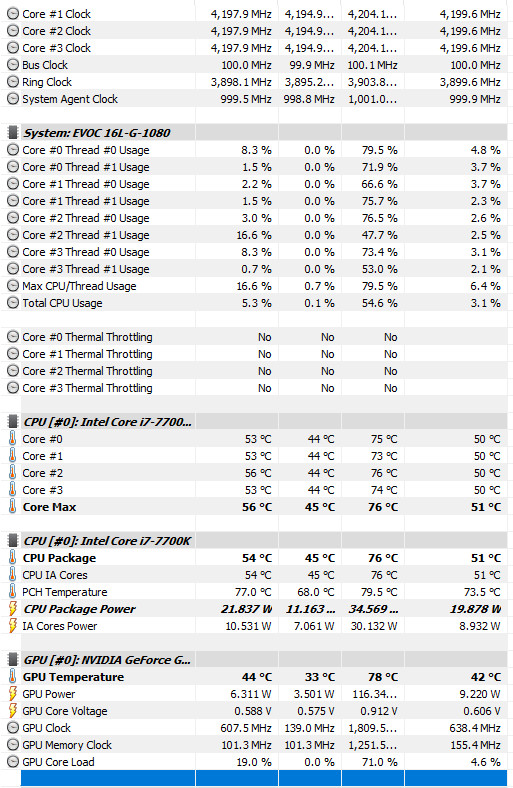
I have increased the clocks to 4,6ghz, after some playing it tops around 80C. Without bottom mod it spiked to 84C on 4,5Ghz. However the difference is less than I have though, around 4-5C. On gpu side it is more visible, I would say 6-8C.
Huniken and Kevin@GenTechPC like this. -
@Huniken @cavell219 Didn't you guys swap from a 4K panel to the 120hz? Trying to find out where to get a 30 pin EDP cable that will work and if anything else is required to "downgrade" from the 4K panel to the 120hz screen. Is the cable itself an easy swap?
-
Hi guys
I'm looking to sell my Tornado F5 with the below specs and still has under a year of warranty to go. It's in great condition and I use external keyboard mostly so keyboard relatively untouched and everything stock. My question is, what would be a competitive price to sell it at?
Choose your LCD Display
15.6-inch (39.6cm); FHD 1920x1080; 60Hz; Matte; IPS; 700:1; NTSC 72%; LG LP156WF6-SPB1
G-Sync Technology
with NVIDIA G-SYNC™
VGA / GPU Graphics Options
8GB GDDR5; NVIDIA GeForce GTX 1070 (desktop); 2048 CUDA; N17E-G2; MXM 3.0
GPU Heatsink - Thermal Paste
IC Diamond 7 Carat Thermal Compound for Maximum Performance
Processor / CPU
4GHz (up to 4.2GHz) Intel Core i7-6700K; 4C/8T; 8MB L3; Skylake-S; 14nm; LGA1151; 91W
CPU Heatsink - Thermal Paste
IC Diamond 7 Carat Thermal Compound for Maximum Performance
Memory (RAM) Configuration - Fully Upgradeable
16GB; 2x 8GB; DDR4; 2400Hz; CL14; 260-pin;1.2V; Kingston HyperX Impact; 1 SODIMM
Operating System(s)
Microsoft Windows 10 Home; 64-bit; OEM; with DVD and USB key
Choose Your Keyboard (Language)
Backlit; English; USA/Canada; QWERTY
Internal M.2 (2280) SSD Storage; 22mmx80mm
512GB; M.2 MICRON M600; SSD; SATA3; R/W: 560/510 MB/s
1st Hard Drive. Choose Regular HDD, SSD or Hybrid SHDD:
1TB (1000GB); 7200rpm; SATA3 (6Gb/s); 32MB cache; Hitachi Travelstar 7K1000; 9.5mm
Internal Card Reader
6-in-1 Card Reader; MMC/RSMMC/SD/MiniSD/SDHC/SDXC; UHS-II interface
Wireless LAN
2-in-1: 802.11a/b/g/n/ac WLAN+Bluetooth 4.2; Intel Wireless-AC 8260; M.2 2230; up to 867Mbps; 2.4GHz/5GHz
Built-in Web Camera
2.0 Megapixels; Webcam; Built-in
HDMI Port(s)
HDMI 2.0 Output Port
Thunderbolt Port
1x Thunderbolt 3 (via USB 3.1 type C)
Standard Battery (internal)
8-cells Smart Li-lon Battery
Standard AC Adapter
230W; 100V-250V; Auto-Switching (Worldwide); Slimline
Standard Power Cord - included
UK
Choose Your Warranty Plan
2 Years Return to Factory Depot with 2 Years of Tech Support -
Guys,
I have just realized the 144hz screens are available for 15,6 and for 17,3 laptops? Is it an option for MSI16Lx?
I am so excited, could be great for gaming!! -
Howdy.
I didn't do it myself as I sent the whole laptop back to HIDevolution to upgrade to the @Prema BIOS. HIDevolution swapped it for me after paying the full price for a new 120Hz panel plus cable. I rather have high refresh rate and FHD than 4K just for eyecandy. -
For anyone with 120Hz panel I think it is enough so no need to swap to 144hz unless G-sync is available plus is the 144Hz also 4K?
-
8700k @ 5.0 Ghz on z170m moBo
![[IMG]](images/storyImages/hsiKfrq.jpg)
https://community.hwbot.org/topic/175489-asrock-z170-mocf-lives-on-coffee-lake-mods/?page=2
Next month (with hope all funds and pieces arrive at goal) with brave help of various forum members I will try to put a 8700K on our beloved TornadoF5 (after a bios backup/reprogramming) and I'll report here the results.
Just want to ask @Prema if is possible to downgrade the infamous IME from 11.8.5 to a lower and insecure but "more open"version (upgraded thankfully by your tool)
Best regards to all!Papusan, raz8020, Robbo99999 and 1 other person like this. -
Eurocom BIOS/ME versions for this model are locked for rewrites like ME downgrade.
PremaMod BIOS/ME versions are open.Last edited: Apr 10, 2018Papusan, Vistar Shook, raz8020 and 1 other person like this. -
Thanks for reply but sorry for my ignorance, it appear to be writable to me..
Or could I try with a programmer like ch341 as last resort?
Thanks again -
You can do updates but the descriptor is locked, so no simple downgrades.
With a programmer of course that is no problem.
On a side note: That versions EC throttle makes an upgrade to 8700K a bit useless...
Edit:
The light side of the force: https://valid.x86.fr/m9kcyv
Last edited: Apr 10, 2018Papusan, raz8020, Huniken and 1 other person like this. -
Will it be possible to have the 8700K in the 16L13?
-
Sure, but it'll throttle more than a 7700K due to higher power pull unless the EC is modded as well to accommodate it.
So RL results won't justify the investment. -
So...maybe just wait for a new MOBO then....damn it
-
Can someone please post the 16L13 EC binary file so I can see if the MSI cancer throttling flags are in it, please?
-
tricking the IA VR part on bios result in lower wattage readout, total we have [91W stock+ 31999 (+16W) + 50 slope (50W)] 157W of sustained load!!I think is Enough to run a 8700K at stock rated speed of 4,3Ghz on all core and 4,7on single (and also enough to prove to the meltdown the inadequate cooling of TornadoF5)Huniken and Vistar Shook like this.
-
In our tests (with throttle removed) the maximum this system could handle under full load (GPU/CPU combined) was 5Ghz on all cores of a 7700K. It shut down during full load benches at 5.1/5.2Ghz...
Last edited: Apr 10, 2018Papusan, Huniken, Vistar Shook and 1 other person like this. -
@Prema
that's because the current trip was still enabled.
Do you remember what we talked about before?
CPU_CrtT = 1.CPU_ThtlT = 1.CPU_ThtlT = 0.SYS_CrtT = 1.SYS_ThtlT = 1.SYS_ThtlT = 0
CPU_CrtT = CPU Current Trip
And SYS_CrtT=SYSTEM CURRENT TRIP.
Both of these have to be set to 0, then the laptop can draw up to where the VRM's will explode. (this is unsafe but if MSI didnt use Alienware type VRM's it should be able to handle it).
Why is this code in strings to begin with?
Because MSI HAS THE UNLOCKED EC IN TAIWAN. they admitted it.
They use it to test unlimited power draw.
So they have to have the strings to set to 0 so they can draw unlimited power.
So how do you draw unlimited power? Set the trips and current to 0, redo the checksums, recompile and conquer the world!
but HEX EDITING THIS=INSTANT BRICK!
The EC has to be decompiled in Linux, and who here is capable of this?
The problem is, there are CHECKSUMS. Multiple checksums and no one knows how the checksums work.
The file checksum will prevent flashing (unless a programmer is used).
But the internal checksums will cause a brick if a check is done and the part of the code fails.
E.g. on Lenovo, the EC calculates 4 parts of the EC with the DECRYPTED IMAGE, 32 bit sections of the code
If any of them fail, the laptop bricks on POST. (besides the flasher setting a brick flag if another 32 bit (or 16 bit?) checksum fails on POST
But the only people capable of bypassing checksums are you and SVET.
But SVET Said while such a thing is possible, without him having the hardware, it will result in MULTIPLE BRICKS until the checksums are passed successfully (multiple builds).
BTW @Papusan @aaronne
Found out why the stock EC has battery boost (NOS).
EmSD=1.EmSD=0.AC_Out.AC_In.SusOn=H.Batt_Out.Batt_In.BATT_OFF.BattThrottleST = 1.BattThrottleST = 0.BattCurrThlFlag = 1.BattCurrThlFlag = 0.BattCurrentCrtFlag = 1
Looks like MSI is using the same crappy code they use in their BGAbooks.
I attached @aaronne 's stock EC here. I extracted the EC from the main Bios backup he made, with HxD. (This is the same way I got EC 17A1EMS1.109 for the MSI GT73VR jokebook, an EC they never released publicly. Too bad it's still freaking locked down).Attached Files:
Huniken, aaronne and Vistar Shook like this. -
-
Guys, if I'm wrong about the function of those strings, PLEASE tell me. But as a chess player I think I did my homework.
@Prema
You have to know.
Those strings are the flags, right?Vistar Shook and Huniken like this. -
I'm sure you could pioneer this with @Mr. Fox again like you did with the 7700K, please consider it, It would mean a bit more processing power in this laptop, more cores to begin with, 12 threads instead of 8, I'd want that even at stock speeds of the 8700K anyday. More and more games use more threads, I'm using Star Citizen as an example of how it will use feature hardware.
If I can put a 8700K in my laptop 16L13-G-1080 with stock speeds/boost on all cores I would do it. -
I have to go, but does anyone here know where the EC chip is located?
A few of you have programmers here.
I KNOW in the GT75VR, MSI moved the EC chip to be right next to the GPU fan, easily accessible to a SPI programmer and Pomona clip. But in the GT73VR it's freaking BEHIND THE MOTHERBOARD.
Someone with too much time on their hands should at least **TRY** hex editing the 1 to a 0 in those strings (which I posted) which are in that EC I attached to my above post, force flashing it with a SPI programmer, and seeing if the laptop posts (make sure you flash the EC and not the bios chip. you can do a READ AND BACKUP on the EC to see if you get the 128k flash data or not), and if not, just reflash the backup EC.
Am I crazy? of course I am. But like brother Phoenix I'm still going to speak my mind.
If i weren't crazy I never would have bypassed the 230W AC power limit on the Gt73VR jokebook.
*EDIT* since I don't think anyone realized it, I posted the MSI 16L13 BACKUP EC in an above post, I extracted it from aaronne's bios (since MSI embeds the EC in the bios on all of their books).Vistar Shook likes this. -
CPU_CrtT = CPU Current
TripThrottle
Instant hard resetting a systems would be a bad idea...no one in his right mind would make that a default system behavior as it would cause more harm than actually protecting the system.
During a regulated EC shutdown e.g. thermal the system would initialize a controlled shutdown and not a sudden crash as we have seen here.
Not sure if the ENE has it's own SOIC on the MSI board.
On LGA Clevo's the EC is hosted within the 133PIN ITE controller itself...
The file you extracted from the BIOS is a generic dummy and does not have to represent the EC version actually used by the system.Last edited: Apr 10, 2018hmscott, Huniken, Papusan and 1 other person like this. -
This alone is reason to not trust MSI for any of your notebook needs. When they cripple stuff on purpose and know what the solution is, but release it that way anyhow; then, you know you are dealing with evil scumbags.
This raises the question, "Who can we trust?" All of them are messed up in one way or another. It all boils down to identifying the lesser among evils and picking your own poison at this point.Last edited: Apr 10, 2018Huniken, Vistar Shook and Papusan like this. -
@Mr. Fox Well we can trust someone with a programmer.
All we need is for someone to identify the EC chip. Then dump it. if it's 128k, then hex edit the string from 1 to 0, then force flash it with the programmer. If it bricks, then flash the backup. If it works, and does NOT automatically brick on POST, we have a new mod. This would also mean that the GT jokebooks would also be safe to flash in this way.
THEN if that is confirmed, we need to determine if ECflashwin can flash it without signaling the EC to brick.
if I had a GT75VR, I would have done this for you guys since MSI actually moved the flash chips to an accessible position.
But on the GT73VR, the EC chip (if it is the EC) is BEHIND the motherboard, making a full disassembly required. And with the metal bar in my spine, combined with my OCD on getting 1-2C core temp differences in prime95 with liquid metal, I would probably hospitalize myself trying.
I do NOT know where the EC chip is on the 16L13. But a 128k read from a HW programmer can verify that's the EC (an 8192K or 6144k read means it's the bios).
So is anyone here brave enough to try?Mr. Fox and Vistar Shook like this. -
Prema, that is EXACTLY WHAT HAPPENS!!!!!!!!!!
if I run prime95, small FFT at 4.7 ghz at 1.275v, with AVX enabled or FMA3 enabled, as soon as I press start, the laptop INSTANTLY SHUTS OFF AND COMES BACK ON IN HALF A SECOND! Yes it's unsafe. But did you expect anything else from MSI?
Really now, brother?
If I knew how to make videos, I'd show it. You'd see it.
it's the exact same shutoff that you and brother @Mr. Fox had at 5.1 ghz when you loaded the CPU and GPU.
But if I disable AVX/FMA3, prime95 runs forever.
If CPU_CrtT means Throttle trip, then what does CPU_ThtlT mean?
It HAS to mean throttle.
There can't be a duplicate register like that.
Look at the strings again.
CPU_CrtT = 1.CPU_ThtlT = 1.CPU_ThtlT = 0.SYS_CrtT = 1.SYS_ThtlT = 1.SYS_ThtlT = 0
if CrtT means throttle trip, then what does ThltT mean?
As I said, someone has to give me a leap of faith for once.
@Prema, look at this, brother. Just trust brother Falkentyne. Just once. It's all I ask. Please.
Do you see what EC version that is?
17A1EMS1.109.
This EC was not released by MSI. I got it by taking HxD to the main Bios and extracting it and flashing. You can also use UEFItool as well (if you knew the field to extract).
Here is a link to it right here. THIS EC IS SAFE TO FLASH FOR ANYONE WITH GT73VR SKYLAKE OR KABYLAKE 7820HK. This is NOT for the 16L1. The 16L1 EC (the stock one) was posted above.
Do you see the EC register "D7"? It has a 00 in it.
Program a 01 or an 81 into it, and the laptop instantly shuts off and turns on again in half a second.
This register triggers the trip circuit.
Now I'm saying, someone with a SPI programmer and with better health than me should be the "man" and try hex editing the string from a 1 to a 0.
Then there are 2 things that have to be tested:
1) whether a SPI force flash of the EC will work without bricking (if the MSI flasher sees a bad checksum and signals the EC to brick itself, this will circumvent that).
2) If the HW flash with a SPI programmer DOES NOT BRICK THE EC, this means that these strings are 'protected' from the boot checksum validation. If the laptop works, then we need to see if ECwinflash will flash the same edited file or if the laptop bricks. If it DOES brick then that means someone needs to find the checksum algorithm, disassemble the EC and redo the checksums in Linux.
If it does not brick, then we have a simple and safe mod.
If #1 bricks, flash the backup you made. (if you could not find or read the 128K EC chip with the programmer, then abort).
Yes this is caveman hacking here. But is this any different than using NOP commands to bypass a "machine language JMP" as basic cracking (e.g., a hardware check fails, execute jump to failure condition, if NOP occurs, we do the success condition).Attached Files:
raz8020, Huniken, Vistar Shook and 2 others like this. -
-
friggin bios guru's ... lolraz8020, Huniken, Vistar Shook and 1 other person like this.
-
It's kind of sad that there is such a dire need for them. Would be so much nicer if manufacturers did not push broken crap to market. It's a shame that enthusiasts that own expensive notebooks have to jump through so many hoops with firmware to try to end up with a properly functioning product. They all deserve the same level of quality, performance and functionality that owners of desktop enthusiast motherboards enjoy, and it's really inexcusable that is not the case. The crippling firmware crap is for the birds.
Thank God we have @Prema.Last edited: Apr 11, 2018raz8020, Falkentyne, Huniken and 3 others like this. -
Well people in this community sure know how to come together and resolve issues thats other communities would think is over the top.
Like how many people with a Toshiba Satellite or something similar really buy the laptop expecting anything from the bios ?
lo and behold, I bet people here in these forums could and would do something about it, if there was the desire/need etc... if not already.raz8020, Huniken, Vistar Shook and 2 others like this. -
Let's look at how this beast came out initially:
Robbo99999, Papusan, Falkentyne and 2 others like this. -
Wildly successful product, to say the least. And for good reason: an amazing system with BGA filth taken out of the picture.
 The world's most powerful 15-inch baby beast! Still true today.
Huniken, Robbo99999, Papusan and 1 other person like this.
The world's most powerful 15-inch baby beast! Still true today.
Huniken, Robbo99999, Papusan and 1 other person like this. -
-
-
Okay, so what's the best advice to try and manage GPU temps without affecting performance too much? I am sick of seeing my GPU reporting at 90c when I am gaming. Everything runs fine, I do not have performance issues but I am not 100% comfortable with the GPU running at that temp for extended periods of gaming. I don't know how much longer this will be my primary computer for and get 4+ hour gaming sessions on it after work like it currently is every day, but I'd like to try and manage this a little better without losing too much power.
Would repasting it be my best bet and place to start? And repasting this also means repasting my CPU as well, correct?
What settings can I adjust in game that may affect GPU temp the most? I am currently using a 1440P external monitor so I don't know if the high resolution affects temps at all or what. I did notice I had fortnite set on the highest settings and I recently turned everything down except for view distance, resolution, and texture quality. My temp ended up going from 90 degrees down to about 60-65. It seemed like anti aliasing had one of the biggest effects on the temps. Aside from setting everything to low, is my best bet a repaste or try and undervolt?Falkentyne likes this. -
I have also tried my little baby on a 1440p monitor, it gave a hard time for my gpu, which was working on 100%... I think it sweats the gpu pretty much... Try to cap the FPS, it give a relief to the gpu... check if it helps...
-
Yeah turning the AA down and capping FPS helped a lot in Fortnite as I noticed it was running at like 300 fps. Sadly games like PUBG will still run at 90 constantly and that's not even quite running at 100 fps smoothly so there's not much I can limit there = \.
-
Did you try undervolting the 1080 yet?
-
-
Unless it actually needs new thermal paste, that's probably not going to help much. I would recommend undervolting for long gaming sessions. If you haven't already, try separating the GPU heat sink from the CPU heat sink. That can also help some. Use the MSI Afterburner voltage curve tool and lock the voltage like around 0.950V for stock clocks and that should help quite a bit. If you're not sure how to do that, feel free to ask and one of us can explain that. (It's not that intuitive and there are not any instructions on how that I have seen, so don't hesitate to ask.)Robbo99999, raz8020, Huniken and 3 others like this.
-
Yes, using the VF curve editor in Afterburner, you can either lock the curve on a specific point using Ctr+L, or you can flatten out the curve to the right of that point. Both methods will effectively prevent the card from using higher voltage points and boosting past the frequency you set.
If you use the lock method, keep in mind that the card will be locked at that frequency and voltage outside of 3D apps. So if you want your card to downclock/downvolt at idle, I recommend saving your curve with the locked point to Profile 2, and saving the stock dynamic curve to Profile 1. Then in the Profiles tab of Afterburner settings, set your 2D profile to Profile 1, and your 3D profile to Profile 2.
The above is just for locking the curve though. In order to actually undervolt, you need to first apply an offset overclock to the core, for example +150MHz, or hold Shift while dragging the curve up. This increases the frequency at each voltage point, after which you lock at a point lower down the curve, so that your stock frequency is reached at a lower voltage, which is effectively undervolting.
What you don't want to do is drastically change the slope of the curve, for example dragging a lower voltage point up to a much higher frequency, because these sudden spikes/jumps in the curve will reduce performance if the GPU drops down to a much lower clock at a lower voltage point if it hits a power or temp limit.
I recommend doing the curve editing while a GPU stress test is running in the background and the card has reached a steady state temperature because Pasal's temperature compensation effect will automatically shift the curve down a few notches as the card heats up, which messes things up if you edit the curve when the card is cold. I prefer Heaven paused on a scene (space bar) so you can monitor the FPS in real-time. If you've undervolted too low for a given frequency, Pascal has a tendency to reduce performance rather than crash.raz8020, Huniken, Vistar Shook and 1 other person like this. -
When I had mine after a repaste with Gelid Xtreme I would hover around 86 degrees for most games and extreme games would bring it to 88C with about 73 degrees ambient temps. This was with a daily 4.5oc I used for gaming on the CPU and a fairly hefty OC on the GPU; Unfortunately, it is the nature of the beast with the 1080gtx. Did you look at investing in a U3 cooling pad?Huniken likes this.
-
My GPU Curve at 0.900V played Fortnite 120fps with low settings FHD.
Edit: Cheers for a 2 year effort to bring this little beast to manhood!Attached Files:
-
-
I sure hope that it is possible to reverse engineering and flash EC with microcodes for Coffee lake, would be interesting to see it on my 16l-g-1080
Huniken likes this. -
For anyone that has done the 4k to 120hz panel swap, can you please tell me what EDP cable is required (link would be helpful). Assuming the laptop model it comes from really doesn't matter as long as it is 30 pin?
*** MSI 16L13 (Eurocom Tornado F5)/EVOC 16L-G-1080 15.6" Owner's Lounge ***
Discussion in 'MSI Reviews & Owners' Lounges' started by Diversion, Oct 14, 2016.