 Problems? See this thread at archive.org.
Seems odd... I have also been suffering thermal issues, and it turned out it was the bad delid+clu. The temps of yours seems high but not that much, similar to mine...
-
Still early to tell, but my temps seem to be much improved with the work I did last night. Will post a follow up with what I ended up doing if things pan out for those suffering the same issue on CPU/GPU temps.
-
Hi Guys,
Somebody posted pictures and some additional info how the 1070gtx can be upgraded to 1080gtx... some MB pegs need to be removed and some additional "holder" is needed for the 1080gtx. Furthermore where can I find heatsink for 1080? The cpu heatsink is needed to be switched? or the vga heatsink is enough? I might get a 1080, would be wonderful upgrade to my little beats
-
Heatsink for 1080 is completely different from 1070. Different VRM sink may be needed too. At least this is how the GT73VR and GT75VR are like. The layout of the GPU VRMs/RAM and GPU position is different on 1080 vs 1070. See if you can tag or ask Mr. Fox if he has pictures or old links to his old 1080, then you can compare yours and his.
I know he had a disassembly video of the 16L13 on youtube. -
Thx, after some search I have found woodzstack's post about it! The upgrade requires: some skill to remove the pegs, new holder for the 1080, and of course new heatsink (I assume it comes together with the cpu, however the cpu part seems the same). Cheers
-
If you purchased Bitspower I think it was better than which you purchase from ebay.
Sent from my iPhone using Tapatalk Pro -
Hi guys I'm trying to reset my Eurocom Tornado F5 and wipe it to factory settings to be sold but stuck on 26%, anything I can do?
Edit
Yay left it over night and it's at the region select screen, fingers crossed that's all wiped
![[IMG]](images/storyImages/KUWzGhu.jpg) Last edited: May 8, 2018
Last edited: May 8, 2018 -
@Donald@HIDevolution do you know what size shim you guys use for cpu hestsink on models where it isn't making good contact?
-
Shim? No.
-
See if you can get the 4.4mm thick lid http://www.performance-pcs.com/bitspower-cpu-integrated-heat-spreader-silver-shining.html#Features
-
Might give it a shot, next time I open her back up. I went ahead and ordered some 30mm x 0.5 and 1.0 shims to start there. I saw a thread over at HardOCP I believe where someone tested the heater spreader you linked in conjunction with the one I have and the stock intel one and this one performed the worst because it just retained the heat.
-
-
Has anyone noticed that this latest Windows 10 update seems to have broken the CPU downclocking at idle?
I double checked my BIOS (Prema) and I have speedstep enabled, cstates, etc..etc.. Also using balanced plan in Windows 10, 5% minimum processor state. Seems like something broke speedstep/cstates.
Anyone have any clue what I should look at or anyone else also seeing this? Seemed to happen out of nowhere, the only thing that I've done is installed a few windows updates today ( https://support.microsoft.com/en-us/help/4103721/windows-10-update-kb4103721) I already had the Spring Creator's Update installed and it was fine before today. CPU is definitely pegged at 4.4Ghz constantly even at 0% usage. The fan constantly ramping up and down is super annoying. :/ -
Hi Guys,
Is there anyone who would swap 1080 to 1070 to deleverage and have some additional cash? I would send my card plus heatsink in advance for testing etc plus cash so no interim period could be using the laptop.
Let me know if someone is interested in swapping...
Thx!Last edited: May 10, 2018 -
You might have a chance at GTX 1080 if the next Turin XX80 series is compatible with the 16L13. Many would be selling theirs as they replace it with the newer GPUs.
-
Assuming the next-generation GPU is compatible, which I'm betting it won't be.
-
I wouldn't be so quick to assume it won't work honestly. I think we will see at least some level of compatibility, at least I hope @EUROCOM Europe helps maintain the "upgradability" and "love your laptop" type of product marketing. Did @Eurocom Support delete their account or change their name?Huniken likes this.
-
I would be more optimistic if 10XX series compatibility were stronger among laptops that had previous-generation GPUs. As such, I'm taking an "expect the worst, hope for the best" approach, that way if the new processors do in fact work, it will be a pleasant surprise.
-
I am fully patched and on balanced mine downclocks to 4.2ghz and ramps back up to 4.5 or 4.6 depending on what profile I am using. If you want my bios settings let me know, I have the Eurocom unlocked one.
-
It should be going much lower than that when it's idling.
-
Well I want to ask.
I bought a new TV for a really good price, the Samsung MU7350 49" 4K HDR.
I played with HDR on my PS4, but the windows 10 HDR button is greyed out....I updated drivers restarted the laptop but no nice.
The DXDIAG says that HDR is supported but in the display area it is still greyed out, can't enable HDR to play PC games in HDR.
Is there anyone here who is able to play with HDR on their TV sets?
@Phoenix @Mr. Fox @Papusan @hfm -
Found it!!
-
OMG the fans on this thing are ATROCIOUS. After replacing the GPU fan dying only 6 months after I bought it, the CPU fan just died.. Made it about 1 year. Insult to injury at this point since it appears like the 1803 windows 10 update broke speedstep. So now the CPU is sitting here throttling to 3.2GHz with no fan trying to stay under 95C, when it probably should be running at 1.2GHz or less when seeing very little usage. Ugh...
-
Use Speed Shift - EPP with Papusan inspired small footprint ThrottleStop edition
 Last edited: May 12, 2018
 -
That worked! Thanks (Can't rep you again yet but I'll throw some at you when I can).
Oddly SpeedStep was already enabled, apparently not working. CPU is down to 77C now, I can live with that until I can change the fan. Again... I guess no time like the present to install those alternate fans I bought and never tried out due to @alaskajoel thread here http://forum.notebookreview.com/threads/msi-16l13-eurocom-tornado-f5-fan-modifications.810712/ -
Great And no problem. Not fun with BGA temps (+-95 °C)
Msi really need to fix new fans for the refresh.
-
For sure.. MSI should dump their current vendor and take a serious look at those fans used in the G750 that @alaskajoel sourced. Much quieter notebook is always a good thing. if @Donald@HIDevolution, @Ted@HIDevolution or @Eurocom Support have any sway over MSI they need to IMPLORE them to stop using these garbage fans in such a top shelf notebook.
-
anyone could post a pic of the 1080 card compatible for F5? is it this? thx
![[IMG]](images/storyImages/s-l1600.jpg)
-
ood for me it didn't update, well at least I have the peace of mind.
-
Anyone could give me a quick confirmation? THX!
-
Yes it is. Gpu is closer to cpu side
HTC One cihazımdan Tapatalk kullanılarak gönderildi -
thx a lot! I wanted to be 100% sure, not to buy an incompatible card
-
You can check that with youtube videos of @Mr. Fox . He was using F5 with GTX 1080 before he sold it.
-
@matyee there you go !
-
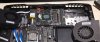
Thx, seems similar, I cannot see that small corner edge, however the gpu, rams are on the same place
-
Believe me, MSI already heard you...they now make their own fans which are far superior to the ones they used to buy. All of the current models have them.Huniken, saturnotaku, raz8020 and 3 others like this.
-
No problem m8. There is your small edge of 1080.
-
Oh. That's good news. Are these new fans available for the 16L-G-1080 for purchase?
-
That is something about which I am not aware.
-
Guys,
Has anyone got this metal holder for 1080 card? I can manage to buy a 1080 (replace the 1070) however I need a heatsink for the 1080 and this metal holder? I would appreciate if somebody could help. Of course I buy it Or any other mod, solution is good to fix the 1080 safely to the motherboard.
thx a lot!
![[IMG]](images/storyImages/ELCtJhh.png) Last edited: May 13, 2018
Last edited: May 13, 2018 -
If you could find that out I would (and I'm sure many others) greatly appreciate it. I would prefer buying something from the manufacturer that is supposed to be better than buying third party fans which may need modification to use, or buying the same fans again that everyone has issues with after a year.
-
Unfortunately, so far as we know, MSI did not develop their new fans for this model.
-
Can you guys help me where I can buy heatsink for 1080? I would replace the 1070, I have already have the card, but I still need heatsink. Any contact would be appreciated to any official resell, preferably in EU. THX!!!
-
I purchased both heatsinks (cpu and gpu) from HID Evolution (Zoltan). It took like 5 weeks to get from MSI to HID, and then a few more days to arrive here in Brazil.
-
I am Zoltan as well, Hungarian name
If anyone has a spare heatsink for 1080 pls msg me! THXLast edited: May 15, 2018 -
How do you download the drivers for the built in camera?
-
Check Eurocom, they have stock drivers to download for the F5.
-
Hi guys
I get a new RAM, so i need to disasamble the machine
The thing here is, I need to repaste the thermal compound…
And I cant decide betweet conductive or not conductive thermals, conductive is the best but can damage if doesn’t apply correctly, and I have read than its dries on a few months and can not be applicated on aluminium
Whats is your experience whit thermals compounds?
how often you repaste the thermal compound?
can you link me any video to disasamble the laptop?Donald@Paladin44 and Huniken like this. -
Guys,
If you remember I was complaining how bad my temps were, then I had another 7700k and turned out that the delid+CLU was pretty bad. My temporary cpu worked flawlessly 4,6Ghz@1,255V temps max at 82C. I have received back the superglued, terribled delided cpu. MY friend has fixed, and last night I replaced it. As it runs 4,6Ghz@1,214V I expected a little better temps. And voila! I have tried the 4,7Ghz, works well, but the chip needs 1,275V which heats it up to 83-85C, so by the end of the day for me it is not worth +10C for 100mhz.
However I am pretty ok with 4,6Ghz and the temp.
I have waiting to receive my 1080gtx, now all I need is heatsink, and I will start the 1070 upgrade to 1080. I will share the process if anyone interested... (however I have no idea where I can get heatsink from...)
![[IMG]](images/storyImages/7700k_old_relid.png)
*** MSI 16L13 (Eurocom Tornado F5)/EVOC 16L-G-1080 15.6" Owner's Lounge ***
Discussion in 'MSI Reviews & Owners' Lounges' started by Diversion, Oct 14, 2016.


