Problems? See this thread at archive.org.
Today @Mr. Fox posted a nice GPU tweaking video:
-
-
Believe it or not, that is pretty much average voltage requirement for 4.7GHz on 7700K and 8700K. So, your chip is not a bad one, just not better than normal. And, it is still a major improvement over previous generation CPUs. If you use ThrottleStop and lower the cache voltage to like 1.100V to 1.150V the temps may improve. By default the core and cache voltage are the same, but you can make cache voltage lower than core voltage using ThrottleStop.
You can probably order the 1080 heat sink through @Donald@HIDevolution or Eurocom.Huniken, Donald@Paladin44 and raz8020 like this. -
@Mr. Fox I am getting around 79 degree temps @ 4.5ghz with a hefty undervolt so I am going to attempt a .05mm and a 1.0mm shim today to see if that helps. Between the IHS and the shim do you recommend conductonaut or should I go for more traditional paste that is thicker? I was not seeing any differences in temp with the IHS and CPU cooler having conductonaut vs. phobya nanogrease or grizzly kryonaut.
Mr. Fox likes this. -
I would try it both ways, with and without liquid metal. If the temps are the same, then use the normal thermal paste instead of liquid metal. I think what is happening is the 16L13 heat sink gets saturated to the point that it doesn't matter what paste you use. If it gets saturated and cannot shed the heat any faster than it does, then nothing but more pipes, larger radiator and stronger fans will improve the temperatures. Similar to how you can only pump so much water through a garden hose per second, minute or hour. I doesn't matter how strong the pump pushing the water is, the capacity of the garden hose is limited. Getting a stronger pump won't increase the limited capacity of the garden hose.
Here is an example. Added two more heat pipes, but essentially no benefit with the same fan and radiator. It takes a couple of minutes longer to saturate the heat sink with the extra pipes, but it still reaches the same temperature because the fan and radiator cannot work any harder than they already work. They are maxed out. http://forum.notebookreview.com/thr...gtx-1080-upgrade.814711/page-43#post-10731555 But, it was worth a shot. Had the heat pipes been the bottle neck between the CPU and radiator, then it would have helped.Last edited: May 20, 2018 -
Can anyone send me his bios settings that work stable for 4.5ghz ? ( any settings that effect stabilization for cpu like vcore settings or etc. )
In my opinion my 7700K is not a good one if my settings are okay because Im using this right now @4.4ghz with 1,199V. Actually I made vcore override 1150 mV but system increases it to 1.199V at load. These voltages are stable but when I see other people reach 4.6ghz at 1.21-1.22V , must be something wrong except bad silicon lottery.
Also when I change it to 1140mV, getting crashed.Last edited: May 20, 2018 -
Vcore override: 1200mv
CPU VR Settings->Core I/A Domain->IA AC DC loadline= 1, 1
VR Current Limit 1000 or 250 *AMPS* (check the divider in bios, if its 1/4, then 1000).
PECI: off
RSR: off
Watchdog: off
Overclocking Performance Menu (or wherever "Uncore" offset is: look for Uncore, try giving a +30mv offset. Won't change temps. MAY increase stability. May not.
DO NOT attempt to run cache at exact core speed (cache speed cap of 3 lower than core can be "overriden" by setting min and max cache to the exact same value)Huniken, Talon and CuttingEdge_ like this. -
Interestingly this is no longer available at HIDevolution. @Donald@HIDevolution , is that just an out of stock situation or are you no longer selling it?
-
Sold out. There isn't a lot of interest in an Intel 7th Generation "Kaby Lake" at this point, and the MSI GT63 Series and EVOC High Performance Systems P750TM1 take its place nicely.hfm likes this.
-
3 years old Clevo BGA-KILLER with Coffee lake.
[email protected] all 6 cores - Cinebench R15 - 1579cb maxed out 51C.
![[IMG]](images/storyImages/MNWvB7l.png)
49x on all 6 cores.
![[IMG]](images/storyImages/2022854.jpg)
http://hwbot.org/submission/3862256_papusan_cinebench___r15_core_i7_8700k_1619_cb?recalculate=trueLast edited: May 26, 2018 -
The 16L13 can barely handle a 7700K. Even if 8700K support were added, it wouldn't be worth running.
-
I think it is unlikely this will be supported for Prema Partner Shops for numerous reasons.
Unfortunately, this is true even if the above were true. It would be an overheating mess that could never function correctly. The heat sink and fan is far to weak to accommodate this.saturnotaku, Papusan, raz8020 and 1 other person like this. -
So I’m doomed with the 16L13 to only use the 7700K? I guess I can just wait at this point for another 15” beast. HIDevolution removed the 16L13 from their web store, I wonder if there will ever be another beast 15”.....guess Clevo 17” is next.Mr. Fox likes this.
-
I noticed HID took it down as well. Here's to hoping the 17" model is a beast and doesn't have the short-comings of the F5. If price is reasonable I will be upgrading, but only if we get them with the new Nvidia cards.
Mr. Fox likes this. -
You can be proud to know you have the only MSI laptop made in many years that has a CPU which is actually worth a damn, and the most potent 15-inch baby beast ever made with a quad core desktop CPU. So, it's not really doomed as much as stuck. I can think of far worse problems to have and your EVOC 16L-G-1080 is still a kick ass laptop.
But, 8700K could work if you custom made a better heat sink with twice the TDP capacity and found a fan to replace the original with twice the CFM and static pressure. That being said, building a desktop or switching to something like a P870TM1 makes a lot more sense. I would not recommend buying another 15 inch system. I've had two in recent years (16L13 and P750ZM) and that's just too small. I mean, it's really cute, convenient and all that, but smaller computers just carry far too many limitations and impediments. And, I just love the bigger and heavier 17-inch systems so much better. I also will never consider going SFF for desktop for the same reason. Cute is cute, but limitations that coincide with smallness always suck. Once things start to suck, cute loses it shine and doesn't count for anything.Last edited: May 27, 2018Ashtrix, Huniken, raz8020 and 1 other person like this. -
I mean a stock clocked 8700K could work ok without much work on HS if it was possible to obtain a bios mod. Maybe with 44 for all 6 cores as well. Aka near 50% more performance than stock clocked 7700K. Or +33% more performance than a nice oc'd 7700K.
Stock 8700K with undervolt.
![[IMG]](images/storyImages/fle3Qln.png) Ashtrix, Mr. Fox, Huniken and 1 other person like this.
Ashtrix, Mr. Fox, Huniken and 1 other person like this. -
Yeah, I also think that, the original HS might be enough for 8700 non k. This means you'll trade higher clocks for a plus in multicore performance, which would be worth for those that are using the laptop for productivity.
panamaniacs2011 and Huniken like this. -
Hi,
I really want to know the differences between the ms16l13 and the ms 16l3.
I know for sure that the 16l3 have the same audio connector from the msi gt62vr but I dont understand to what extent this laptop is different from the "older" one.
And without being too much off topic. How it can be compared to the gt62vr and by extension does this whitebook alter the comparaison between the bulky 15' clevo and the msi?
Thanks you for your attention -
Interesting but I have the total opposite feeling. A desktop cannot be replaced by a laptop, even though I love my little machines
 Nowdays you can sit in front of a 27/34C 144hz/165hz screen with an almost silent desktop. Currently you cannot have that from a laptop. However when I need to move I prefer the F5. Less than 3kg, relatively easy to carry, and the size is pretty compact, fits in almost all backpacks. I tried to skip the desktop to 17' clevo, it was a luck to be honest, that I have purchased the F5. Currently I would like to go back to a desktop, sell the 17 and keep the F5. Home desktop, on the move F5
-
Exactly what I am doing, my friend. Now if only the damn 144hz 4k monitors weren't $2k..Huniken likes this.
-
I guess I'm going to build a new desktop system as I gave away my desktop to my friend. As long as the EVOC still holds enough power to game on the go then I'm gold.
-
I sort of agree with that, but the Clevo P870DM3/KM1/TM1 is the exception that breaks the rules. It is as good as an air cooled desktop with the same specs. It has no match and at this time the P870XX is the only laptop that I give a rat's ass about. I view literally everything else as being a piece of trash now due to ridiculous limitations. But, big picture, I do agree and I have mostly abandoned laptops since I no longer need one for frequent overnight travel. When I needed a wicked beast laptop for many years it was only because I was traveling 70% or more and very seldom home except on weekends. Even the P870XX, in all of its wicked glory, it not really a desktop replacement unless you are talking about an ordinary gamer-boy desktop built on a budget. In that case the P870XX is better than that kind of sissy-girl desktop... it rips those a new fanny.
I love my 1440p 165Hz Predator monitor. It's awesome. But, I doubt I will ever care much about 4K. It seems like a pretty pointless waste of money to me, and on a display under 27 inches, I think 4K sucks. It kills framerate in games and doesn't really look any better. I only enjoy 100% scaling and you need to have at least 27 inch display for 100% scaling or 4K is kind of miserable for reading text, Office productivity apps and web browsing. If you jack the scaling up above 100% the loss in screen real estate makes it pointless for me. I think 2560*1440 is excellent and ideal for 17-inch or larger computer display panels. That's just my own opinion though.Last edited: May 27, 2018 -
There you go. That's the best way to look at it. Don't expect it to be a desktop replacement and it's great. It destroys everything else in its class, and that has to count for something. If I were not such an overclocking nut, I would still have mine. I expected way too much from such a small little monsterbook. That's my bad, not the laptop's fault. I won't make that mistake again, but I miss the little champ. It changed the paradigm of guaranteed mediocrity for 15 inch notebooks.
-
got an eurocom tornado f5 and im loving it , had to underclock to 3,4GHZ and undervolt (-.10 offset) to get decent temps on the cpu , i get maximum of 80C on cpu and 73 on gpu , im getting some freezing once in a while i wonder if its because im using a mechanical hard drive or im exeeding the 91W CPU TDP . im using unlocked bios btw. very happy to have this notebook
Mr. Fox, Huniken, Papusan and 1 other person like this. -
This is your temps from brand new out of box F5? Something's not right.Papusan likes this.
-
You won’t exeeding the 91W CPU TDP with your 3.4GHz clock speed. Could be much but test with less undervolt, disable mechanical hard drive, other drivers and clean installed OS. And 80C on this clocks means something is wrong.Last edited: May 28, 2018Huniken likes this.
-
well thats my temps with cpu underclock and undervolt , at stock settings i get 99 max temps on cpu . i dont have problems with the gpu so far since im getting max of 73 which in my opinion is excellent for a 15 inch laptop .
btw im using a mechanical hdd because i ran out of money putting this monster together , that said i did a clean windows 10 installation , which means i wiped the hard drive , also which drivers ? atm i dont have any other hard drive to test
regarding cpu temps i reapplied paste and when i tool the hs i could see the thermal paste was evenly spread on both cpu and heatsink ,i dunno what else to do , also keep in mind i dont have AC and my country is hot so going from 100 to 80 is not that bad , btw what is the normal avg temps for 3,4 ghz?Huniken likes this. -
Have you seen the Win 10 clean install guide in the forum? Take a look also on Win 10 tweak guide.
You find it in the Windows forum.
I’m not sure if you have or tested latest drivers/software from your reseller. Check it out or maybe others with same setup can shime in and post what drivers they use.
What thermal paste used? Could still be a bad paste application. What inside home temp?
None run 91w Cpu 3.4GHz. But with 3.4GHz the Cpu temp would be much lower than what you can see. Shouldn’t be needed even with higher inside home temp. See if you can find @Mr. Fox review of Msi Barbones in the forum. You can do several tweaks to lower temp. You find it as well in this thread.
Edit. http://forum.notebookreview.com/threads/eurocom-tornado-f5-mini-monsterbook-review-thread.800796/Last edited: May 28, 2018panamaniacs2011 likes this. -
First take a look at this PDF by @Mr. Fox
1-Apply all the settings from the PDF in your BIOS
2-In the CORE VR Go to load line and set DC=1 and AC=1
3-Set all core clocks in CPU OC to 42
4-In Override static volt set it to 1100Mv with ZERO offset.
Save settings to BIOS then restart, check your temps while running Cinebench 15.
Here are my temps:
Attached Files:
Donald@Paladin44, Papusan, panamaniacs2011 and 2 others like this. -
-
After some testing (different cpu, delid) i can say that any 91w tdp cpu on stock voltage cannot be more than 70-75c with delid of course. My pretty average cpu runs under 80c on 4,[email protected]... sthing can be finetunes as i see... delid, voltage, bios, bottom mod etc
-
Could one of you fine peoples point me in the direction I would need to look to find the 40-pin to 30-pin cable for this thing in order to use a panel with a 30-pin eDP connector?
-
tanks for the tips ill try that and post my results
-
Would a non-K Core i7 8700 be feasible in this machine? It's only 65W TDP.
-
I would think so from that 65W TDP perspective, not bad! (Don't know if compatible or not, I haven't been following this thread recently, but TDP wise I think it's a good idea.)
-
If the 16L13 is the same chipset as the P870DM/KM, I don't see why it wouldn't work with a simple BIOS update. This is an upgrade I would consider as I care more about core/thread count than I do sheer clock speed. Similar to lower operating temperatures would be a bonus. @Prema - any thoughts/insights as to whether or not this would be possible?Robbo99999 likes this.
-
You would not have to worry about TDP much without overclocking. An 8700K running stock doesn't really take any more TDP than an 8700 in practical application. There really would not be much difference between 8700 and 8700K, other than the 8700 has capabilities crippled, unlike the 8700K. Even with an overclock, I rarely ever see the 8700K (or 6700K or 7700K) pulling more than 50-70W playing most games. In some cases they are more like 35-45W while playing games, even when overclocked. The idea of downgrading the CPU to a crippled version doesn't sound very appealing to me, just because I do not like having the forced limitations of a locked CPU. With the 8700K you can choose what clock speed to run it at and control the power utilization.
What the OEMs/ODMs really need to focus on is building notebooks with superior cooling systems that exceed what is required instead of trying to be half-assed and lazy by only squeaking by on the skin of their teeth with marginally adequate cooling.
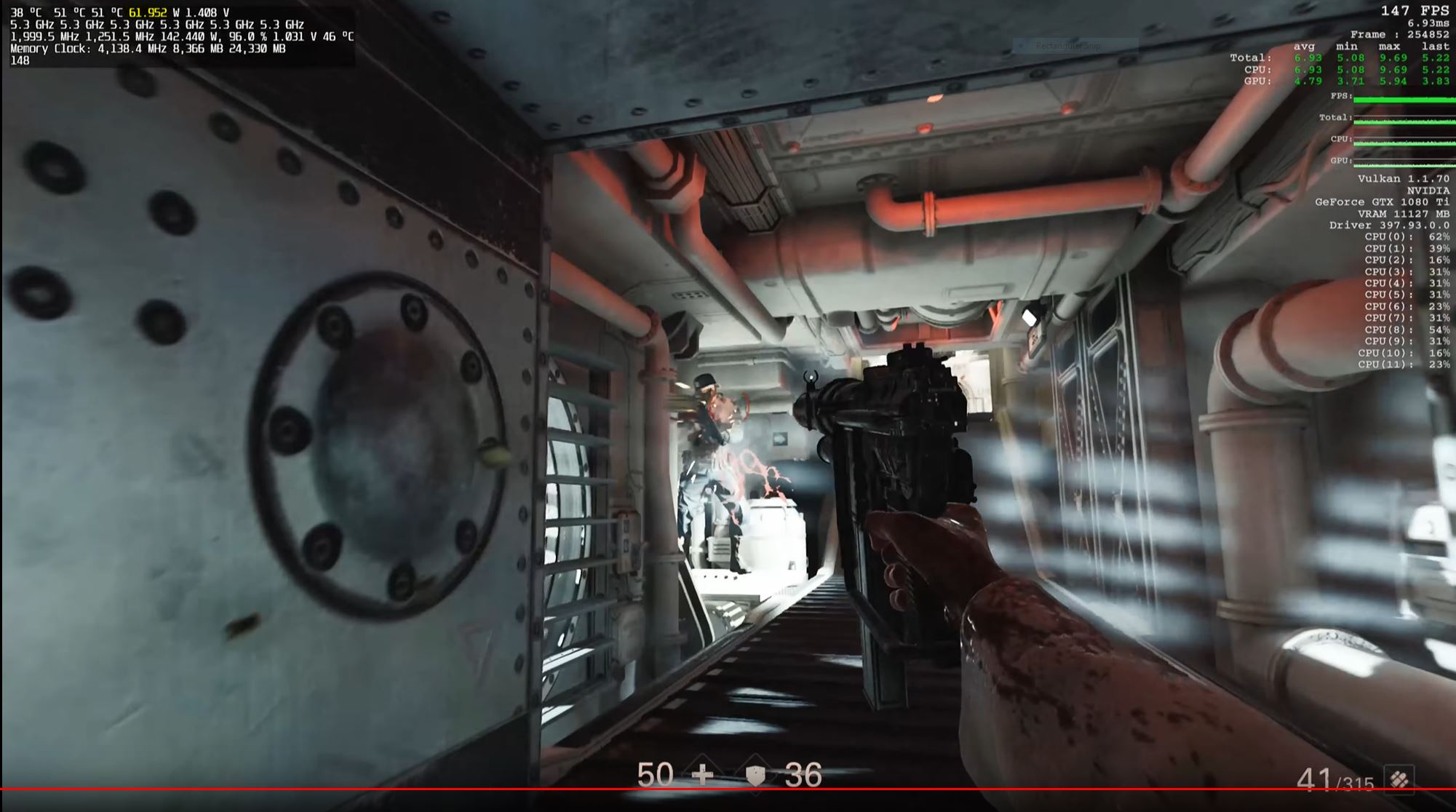
As an example, look at this sample of Wolfenstein II: The New Colossus running the 8700K at 5.3GHz. Yes, there are some random peaks at +100W, but most of the time less than 50W, hardly ever reaching stock TDP even at 5.3GHz.
Attached Files:
Last edited: May 29, 2018Huniken and Robbo99999 like this. -
-
I told all of you guys already multiple times, but either people either ignore me or forget.
TDP issues (bypassing EC TDP and CPU TDP restrictions) can be bypassed by setting IMON SLOPE lower than 1.0x (100), and IMON OFFSET to -31999 (negative).
This works on BGA, HQ and other processors. This forces the CPU to report lower power consumption than it's actually using. It's similar to the VCCIN haswell trick, except you aren't changing VCCIN anymore.
This should also work for 8700 and other non K locked processors.
If none of you believe anything I'm saying, try it yourself on your existing fully unlocked processors.
Set your CPU power limit 1 to 45W. Set PL2 to 62W. This is default for HQ 45W processors. Why? Because I said so (because it's easy to test low existing values).
Then go to CPU VR Settings ->Core IA domain
Set IMON SLOPE to 50 (i could not see values lower than 50 doing anything in my tests). In my earlier posts here, I did not ever mention IMON SLOPE. I only found out how to use this setting because @Vistar Shook did it first.
Set IMON OFFSET to (NEGATIVE) -31999.
Then run a prime95 small FFT test with AVX disabled in local.txt (CPUSupportsAVX=0).
And notice the power consumption (watts). -
That's true, but if you want to leave at stock then i7-8700 (non K version) is more frugal & lower temperature running than the 95 TDP K version. Can you undervolt the i7-8700 (non K version) though? Because if you're wanting to be frugal & wanting to keep temps as low as possible that is what you would do - and I guess if you wanted to save some moolah you could get the non K version & underclock for optimal temps & power consumption?Mr. Fox likes this.
-
I'm not sure. You might be able to. I have ever had a reason to care or check into it. It just seems like a shame to spend money on something permanently limited when you can impose the limits on the K version when necessary, and uncork it when it's not. But, if you're the kind of person that never overclocks and always runs their stuff below specs it probably doesn't matter much. It might be harder to sell later on unless the potential buyer had the same modest expectations as the seller. I always look at everything based on my own perspective simply because nothing else matters (to me). Mediocre laptop stuff is almost always readily available, with lots of options to choose from if a person isn't too picky.Papusan likes this.
-
-
I mean I'd choose 8700K for desktop, but for 15" laptop without cooling modifications of any sort then 8700 non-K is a pretty sensible option I think, 6 cores is 6 cores and when they're hyperthreaded then you're pretty much good to go (regardless of the extra Mhz)!
-
Well I don’t like the none K version, it’s like switching from a Turbocharged car to a normal aspirated one, losing all that power & awesome performance.Papusan likes this.
-
Unfortunately, the system would require more than just a BIOS update to support Coffee Lake, so unless you want to undertake physical modification, the 7700K will be the end of the line for the 16L13.
-
With the locked CPU, you'll hit the chip's power limit before cooling limit. 65W is probably not enough for the 8700 non-K to keep its 4.3GHz all-core turbo in longer and/or more strenuous workloads, even with an undervolt. And definitely not in loads using AVX.
If you have an unlocked BIOS, lowering IMON Slope per @Falkentyne's suggestion to falsely report low package power can circumvent TDP throttling.
Most games I play regularly sit at 70-95W on the CPU. This is with a modest 4.7GHz overclock at manual 1.175V on the i5-8600K.
![[IMG]](images/storyImages/xSxL2sk.jpg)
![[IMG]](images/storyImages/oN1cpZq.jpg)
![[IMG]](images/storyImages/ze5JKFC.jpg)
![[IMG]](images/storyImages/dMdETdQ.jpg)
![[IMG]](images/storyImages/z7nSNez.jpg)
Maybe your games are less CPU-intensive or you're playing at lower frame rates. Your frigid temps, which we can't achieve in laptops, are also helping the power consumption a great deal. -
You might want to read the post immediately above yours.Mr. Fox likes this.
-
Oh sorry, didn't refresh the page.
Aside from BIOS support, the "physical modification" involves taping the gold contacts on the underside of the CPU in a specific manner from what I've heard, which doesn't seem too terribly difficult. -
The examples I showed with Cinebench (quoted below) are the P870DM-G, not my desktop. The video clip I referenced was the desktop. The point I was making was that the 16L13 might not do terribly bad with an 8700K running stock clocks. It would most assuredly be a thermal mess with overclocking. Even my P870DM-G is a thermal mess when overclocked. @Papusan is having excellent results with his, but he has an excellent chip sample that can run 5.0GHz with the same voltage the the 8700K in my laptop needs for 4.5GHz, LOL.
Last edited: May 30, 2018 -
I know, I was talking about your watercooled desktop CPU running at a cool 36C at 5.3GHz in Wolfenstein II.
Even well-cooled laptops are running 40-50C higher under load at lower clock speeds to boot, and as you know temperature has a major effect on power consumption.Mr. Fox likes this. -
This is definitely a case where paying extra for a nicely binned 5.2GHz or higher Silicon Lottery CPU might reap huge rewards for a laptop. It's absolutely ludicrous how much cooler @Papusan's laptop runs compared to the one in my P870DM-G. And, mine is a totally average/normal 8700K... which is kind of sad when you stop and think about it. The one in my laptop probably would not be worth a darn in a 16L13, but an extraordinary sample like Papusan's might work pretty decent.
After seeing how much cooler his system runs with an excellent CPU, I am less inclined to want to throw jagged rocks and broken bottles at Clevo for having crappy cooling systems and thinking more along the lines of Intel selling random defective garbage samples of 8700K. Probably explains the hideous BGA laptop temperatures as well, since the BGA CPUs are notorious for being super-crappy samples. Being stuck with one of those turds forever (short of a mobo replacement) is a pretty devastating curse to have to live with.Last edited: May 30, 2018Huniken, raz8020, Papusan and 1 other person like this.
*** MSI 16L13 (Eurocom Tornado F5)/EVOC 16L-G-1080 15.6" Owner's Lounge ***
Discussion in 'MSI Reviews & Owners' Lounges' started by Diversion, Oct 14, 2016.