Problems? See this thread at archive.org.
Ugh it’s such a good machine but if only quality check was doing their job. Good luck man, hopefully you get yours!
If word given to recommend a shop for BGA laptops or LGA laptops it is the legendary HIDevolution. Those guys make sure you get mint working machine troubles free 99.9% of the time. Since I bought my EVOC in 2017 it is a solid ride so far, no problem cannot be overcome.
Shoutout to: @Mr. Fox @Phoenix @Falkentyne @Prema @Talon @Papusan @dsanke @Nourival Pedroso @Donald@HIDevolution @Zoltan@HIDevolution @Ted@HIDevolution @thattechgirl_viv @matyee & everyone else in this community thank you for all the contributions in this thread & other topics, this community is really blessed indeed.
-
How do you know there is a short in the circuit board? Did you test another board and find it working? It could be the BIOS mod causing the display to not light up with the 8700K. That happens on Clevo systems all the time with hardware mods. @Prema has to tweak the code to keep things like display panels and audio working whenever "unofficial" CPUs and GPUs are involved. This is one of the hazards of upgrading laptops to use components that were never intended for use on a given model. There are many firmware dependencies that desktop owners don't have to put up with.Papusan likes this.
-
The display never worked even with the original bios and 6700k. The 3.3v rail for the lcd was reading 0.1v which means the display wasn't getting power at all. Something was stopping the voltage from going through and I wasn't ready to find out either as my university starts in a week and I need a motherboard as quick as possible.Mr. Fox likes this.
-
Ah, OK. If you posted that before I did not see it. Sorry about that. Other than getting one from China, HIDevolution or Eurocom, not sure where you are going to find a replacement mobo.
Have you ruled out the eDP cable? Maybe it is bad? It is connected right below the WiFi module if my memory serves me correctly. Did you find the 0.1V reading at the motherboard socket or the LCD end of the cable?DaMafiaGamer likes this. -
Unfortunately it was at the end of the motherboard connector.Mr. Fox likes this.
-
Going to be honest I have never had motherboard issues with clevo even after accidently knocking off a few capacitors on my p770dm motherboard. As well as one resistor!
The laptop worked fine and still works to this day, clevo has quality where as the eurocom tornado f5 does not, the fans fail overtime.
I have not seen a better laptop than the clevo P870dm-g with bios mods it's an absolute beast. -
Well I bought the Big Asus GPU fans and also I bought the other stuff for the water cooling project. Lining up also a binned 5.1 8700K CPU via HIDevolution. I'm going all out on this little mini beast! If **** hits the fan, might have to return to 7700K on the EVOC then use 8700K in a desktop build.
Mr. Fox, DaMafiaGamer and hmscott like this. -
I've read about the fan issues on this beast and it's disappointing but meh it's a fan. At least it's not faulty GPUs or motherboards. Honestly yours is the first issue I've heard of. I've been hitting mine hard since I got it in Sep 2016 and I have yet to have a single failure. My fans are going strong as well. I have done the 8700K mod without issue, and my 1070 is now running 150/171w power limit mod. This laptop is my ultimate 15.6" beast minus a few EC cancer issues that can luckily be fixed with a few band-aid work arounds.raz8020, aaronne, Huniken and 1 other person like this.
-
I have to agree with you that the P870 product line is the best high performance laptops I have ever owned. Hands-down the best. Not perfect by any means, but without match. I absolutely will not buy anything else... period. Everything else in the high performance notebook space is defective trash that I refuse to waste my money on.
That said, I still think the 16L13 is a great product within the functional limitations of its minuscule form factor. It is well made and I see no major issues with it. It's too small to have good cooling and I think people that buy it just have to come to grips with that. It is unavoidable and I think MSI did the best they could within the confines of a 15-inch form factor except for the weak fans.
And, yes... the fans are too weak. They should be much stronger. Louder would likely be a byproduct, but it would be a small sacrifice to have the louder fans with a cooler laptop. Not a big deal to me. I like cars and motorcycles to be fast and loud, too. The 16L13 with max fans is disturbingly quiet to me and I never liked that part of it because the temps reflected that. No doubt, a ton of people would piss and moan about the louder fans, which goes to show you can't please everyone, LOL. I loved mine in spite of the thermal challenges that went along with being too small. It's an amazingly powerful little beast.
I think you have a one-off thing with the display.Last edited: Aug 18, 2018Ashtrix, raz8020, FrozenLord and 3 others like this. -
I'm quite sure it's possible make stronger and better fans with equal or barely more noise than the current one. It's about the $$$.Ashtrix, raz8020, FrozenLord and 4 others like this.
-
And why I ended up with a 15.6" P751DM2-G is mostly because of the schematics... Since I did not found schematics for MSI these seem to be very hard to repair/debug.
Panel 3.3VS is somehow linked with the HDMI port on Clevo machines, and since you have HDMI detection and signal this voltage should be present on the MB.
This you measured on 5-6 pins? Should be 3.3V, and from here is the EDID is powered.
What voltage do you have on 1-4 pins? There should be ~5V.
Since this is MSI, I am not sure how they do these voltages, maybe there are separate ICs which form these voltages. Images of the motherboard would help.
Have you checked if you have signal from your miniDP ports?DaMafiaGamer likes this. -
I have already sent the motherboard back to the seller. I should have check the mdp port. Your right that could have been shorting the edp connector! As they have the same signal lines.
I didn't even think of that lol. Oh well, I found a motherboard and the seller is willing to give me the motherboard for $500 which is an absolute rip off but I can't do much as I need a laptop asap.
It's strange isn't it, with my multimeter I was getting 0.1v on the 3v line on the edp connector but hdmi worked. What's REALLY STRANGE is that after a few minutes the computer manually detected another monitor in Windows 10, the internal lcd I'm guessing. But, the resolution was all messed up for it displaying 800x600 or something like that. Still the lcd never lit up and never showed any signs of life.Last edited: Aug 20, 2018 -
There is a full tear down of the mother board done by @Mr. Fox
-
I mean very detailed pictures where I can see the marking of every IC chip. This way I am repairing motherboard, separate IC documentation plus lots of measurements.
-
There are a lot of photos in this thread showing the mother board, I’m on phone or else I would try to search some for you.
-
I remember there are also pictures in @Mr.Fox posts, can't find them right now. Sadly @DaMafiaGamer already sent the MB back.DaMafiaGamer likes this.
-
I wish I hadn't as new motherboards for this laptop cost a lot of money, I thought the taobao seller would sell the motherboard for the original price of £150 but now I'm looking at alternatives which cost way more.
-
By the way, I also changed my mind to buy anything from there. It's too risky so I think i will stick with the ebay alternative..
P.S. anyone tried m2 ssd heatsink with a cooler on it? Like this one, I wonder how it performs in a laptop..
![[IMG]](images/storyImages/41Q2NK4iJdL.jpg) hmscott likes this.
hmscott likes this. -
Now if you put a thing metal layer on top of SSD, put cold side of Paltier pad on it then the hot side put on it this cooler....profit!
-
Kind of nice idea, but all this has to be at most 8-10 mm high, or using thin heatpipes or thin copper vapor chambers with cooling ribs.
One problem with Peltier pads would be that it tends to sweat (correct me if I am not right). -
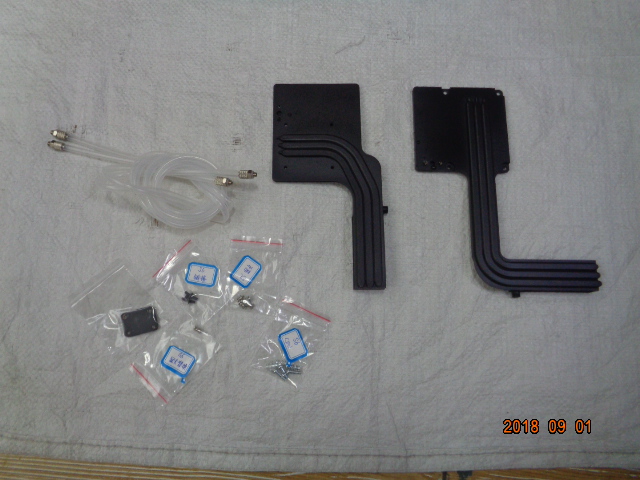
If someone can speak/read chinese, I really would do like to buy one of these kit, the seller claim was full copper and the price is ok. (about 150$ w/o shipping).
Is a combined air/water cooling, it needs pump radiator etc. for performing at best but I really like its clean design and its full copper, also the surface is greater than standard heatsink (hoping for a better thermals for my little monster not yet delidded)
If someone will to buy please let me know! ^_^
edit:
link to taobao
https://item.taobao.com/item.htm?id=572473815273Last edited: Aug 23, 2018raz8020, FrozenLord, deathwingbg and 2 others like this. -
Are these heasinks performing OK only on air cooling? only 2 and 2 heatpipes on CPU and GPU seems to be kind of weak for air cooling, and the massive copper will have thermal inertia..
-
- I don't know.
- maybe
- no, copper vs alu, (excluding the more covered area of this case), will always has more mass at same size of aluminium, and its w/K will always be better at same condition/size.
Have a good read https://www.techpowerup.com/forums/threads/copper-vs-aluminum-thermal-conductivity-radiation.83361/
So the only possible issues can be the less heatpipes (but thicker) -
I've seen some gtx 1070s work on just one big heatpipe. So the cooling might be adequate.
I was looking at the same thing for my clevo P870dm-g. I might buy that watercooling heatsink and this one too. -
Quick, give me his contact information as I’m loaded now to buy even that!!
-
I ordered these parts from Ali express:
https://m.aliexpress.com/item/32776...ZVf&aff_short_key=UneMJZVf&aff_platform=msite
Water pump/rad/res box:
https://m.aliexpress.com/item/32364...ZVf&aff_short_key=UneMJZVf&aff_platform=msite
Asus GPU Large Fans:
https://m.aliexpress.com/item/32317...ZVf&aff_short_key=UneMJZVf&aff_platform=msite
Blocks for GPU+CPU:
https://m.aliexpress.com/item/32687...ZVf&aff_short_key=UneMJZVf&aff_platform=msite
But seeing that combo heatsink is already there I can imagine how much headache I can skip..... -
1 - I didn't said anything about alu, just about the thermal inertia which metals (copper) have. The more metal -> more inertia -> heats up slower, more heat absorption but cools much slower especially when air cooled.
My idea was to make it much lighter at the same surface, it will have less thermal inertia, ideally vapor bridged chambers (heatpipes between them, allowing water circulation if watercooling) + more heat pipes, 4 and 4 on CPU and GPU.
2 - Agreed, but 4 heapipes maybe would fit.
Sorry, complicated solution, but at least a more efficient one... -
I don't see any sealing (o-rings/gaskets) between the pieces. I would try (tiny amounts of) liquid gasket around the edge when screwing down, and leak test a lot... remember there will be water inside the heatsinks heating up to 80+C and pressure will increase wanting to force liquid out of incredibly tiny spaces.
Those hybrid heatsinks have been around for various Clevo models for a few months. I heard a story of a P775 being killed by a leak from one, and Prema reckons theyre a shoddy knockoff of some upcoming Clevo part. I would look into sales data to see how widely they have been sold. Awesome idea though, but boy all that copper would be quite a lot of weight and could cause issues depending on how they're mounted. (the weight being only supported by screws into CPU and GPU socket mounts, I would support it against the bottom case with rubber stoppers)
I got one of those 40mm blocks recently. The nipples were simply pressed into the block, I had to solder them in (which given how long it took to properly heat up the block, was a pain) to be completely watertight
Cheap pumps and fans are usually very noisy. Unfortunately the only way to tell if what you get is cheap, is for it to arrive and you fire it up. -
oh For Godsake, just don't use mineral water ^_^ use bidistilled one and you're ok, spilled many times on MoBo with no dead oneraz8020 likes this.
-
This! I wouldn't touch it. God knows how the average quality is.
-
Distilled water wouldn't do damage to the mobo, there have been times where I have put ice on top of laptop heatsinks just so I can complete a benchmark. Sure water gets everywhere but the laptop works and I get insane scores lol. I'm willing to take the risk I guess.
-
Put it this way... Distilled water gradually picks up electrolytes from various sources (eg bad milled heatsink - aka cheapo chineese work), so it starts conducting electricity pretty soon after distillation. Good luck, sir.
-
It will work out I'm sure, I will defo leak test the thing though. Worst case scenario my motherboard fries and I get it replaced. I spent to much money on this laptop to throw it away now.
-
I shall do the same thing, connect it to the water loop system and test it for over 24 hours. If it leaks I will have it sealed with better welding.bennyg and DaMafiaGamer like this.
-
Sigh.. Why not just build a desktop if you want to watercool something :{
hmscott likes this. -
-
I already have a desktop water cooled. I just need to see my laptop water cooled, in my entire life I never had a water cooled laptop. Also yeah. I travel a lot, I can't pack a behemoth like a desktop full tower E-ATX MOBO inside it.
This mini monster gets the job done, the water cooling is going to give it that extra edge when I need it. -
Same I have a custom waterloop fitted for my future desktop system, sold my old ryzen 1700 setup as I wanted to upgrade my p870dmg. Got 2 240mm radiators along with some thick water tubes which used to keep my 3930k at 5ghz between 40 to 45c on max load. Bare in mind that thing was consuming around 300 to 400w depending on load. That shows you that the ryzen was a piece of cake to cool lol, literally idle and load temps had a difference of 5c! I already have a beast watercooling setup that is dead silent (originally made for mining until the crypto currency market crashed).
Just like @Huniken I want to see what it would be like with a water cooled laptop.
I've had my fair share of desktop systems in the past, when the rtx 2080 ti comes out I'm getting one along with a 9900k to go with my Asus maximus x hero motherboard.
Ill be waiting for the next gen mxm cards too.Huniken likes this. -
I've been reading the thread (massive amount of posts X_x) and some users stated the current fans are pretty quiet.
Does anyone have a custom fan curve they can share? -
You should adjust the fan curve to your liking/preference. It is very simple.
The ADDA fans are pretty quiet. I mine with the laptop and sleep in the same room (I really hate noises when i sleep and i wake up really easy from sounds). This sound is ... even pleasant to the ear.
GPU temp 66C ... GPU 115W+ power draw at the wall 150W+
GPU fan runs at about 3500 RPM with open case and notebook pad with 2x14sm fans. If i close the lid the temperature goes to 75C and the fans go to above 4000 RPM and become bothering noisy.
WARNING: Just be extremely careful when you modify the wiring on the ADDA fans!!!
I might have killed my EC while adjusting the wires on my ADDA fan, since EC is responsible for the fan control.
http://forum.notebookreview.com/threads/msi-16l13-eurocom-tornado-f5-fan-modifications.810712/
As per this guide i cut the wires ... however i used the original AAVID plug* for the fan and at first i reversed the cable colors... The fan did not start.
Then i realized that the colors should match. E.g Black to black, Blue to Blue, Yellow to Yellow, Red to Red.
You should only reverse the colors if you use the ADDA 4 pin plug which is reversed.
Then i matched the colors and the fan started. However after another restart or two my laptop was completely dead (no light went on even after the PSU was plugged in). Same thing happened few months ago again when i was tinkering with the other ADDA fan, trying to figure out why it was not working. Back then the laptop started after the 50th try ...
This time the laptop started after $120+ in repairs and 2 weeks + without laptop. I got my EC chip replaced twice, reprogrammed with the EC bios & another power responsible chip replaced.
*The ADDA fans that i bought were 5 pin version instead of 4 that is why i had to use the 4 pin plugs of the original AAVID. -
Holy moly good to know! I’m going to pick up those fans tomorrow morning. I hope they are the 4 pin version of the ADDA fan so I can just reverse the cables & be good to go. Stock fans going to die soon for GPU & CPU side is already gone.
-
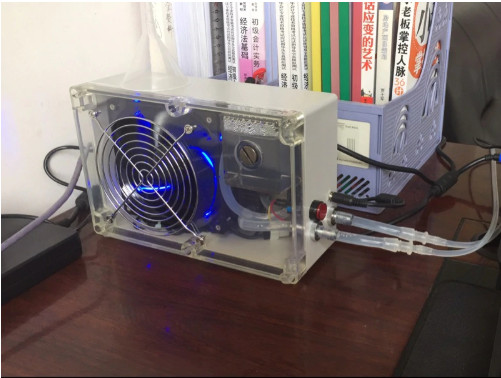
A little Sneak Peak of what's coming to papa! hey @aaronne

EDIT: Oh I forgot to add, HIDEVOLUTION shipped my 5.1GHz binned 8700K CPU to me today, should be here in a couple days. Thanks @Ted@HIDevolution for all the support much appreciated.Attached Files:
aaronne, deathwingbg, FrozenLord and 3 others like this. -
-
cannot wait!!!
-
The connection for it to be a continuous loop is just making me scratch my head, it's not visible in the photos but still that is a better HS than the stock one.
I hope it works as intended and not be a poor engineering design. I'm going to need to wait for the water pump kit to arrive.Attached Files:
-
-
I guess it could be cooler w/o water... stimes with my wartered riged I have realized, that the watercooling heatpipe even without water was better
-
Well nothing beats a good air conditioned room...Set A/C to 18!!
-
Really cool!
Where did you get it from?
But looks like this gpu heatsink is for the F5/Evoc equipped with gtx 1070, isn't it? -
Not sure really, I saw a comment that it works with 10 series better, seller didn’t confirm neither deny it. I’m going to test it either way.
This is from China Taobao seller.
Thanks to @aaronneaaronne and Nourival Pedroso like this. -
Well I installed the Asus fan, it works but Temps are the same, 89 to 90 in BF4, still it should outlive the crappy AAVID fans.
hmscott and Nourival Pedroso like this. -
I didn't really see a temp decrease from it either. It actually seemed a slight bit louder than the stock fan was for the same temps. I would imagine it is more reliable though. I did buy two more fans that are the exact same housing and mounting as the stock ones but are a slightly different model. Haven't tried them, but I'm selling it now so the next owner can do that.
Huniken likes this.
*** MSI 16L13 (Eurocom Tornado F5)/EVOC 16L-G-1080 15.6" Owner's Lounge ***
Discussion in 'MSI Reviews & Owners' Lounges' started by Diversion, Oct 14, 2016.