Problems? See this thread at archive.org.
That's why I'm going to wait. Hopefully by the time we know, decent new or used ones could be had for less than $350.
-
-
Once I get confirmation the bios for the f5 supports the i9, I will definitely post benchmarks, thermals, etc. For me if I can upgrade to the i9 there is not much more I could ask from this model laptop, short of supporting the rtx gpus which I highly doubt will be possible.Huniken likes this.
-
Is it possible to upgrade the WiFi card in this thing without having to remove the CPU heatsink?
-
guys, anyone who is considering to sell his MSI16L1X?
 any model can be good with at least 1070
-
I think no, you must disassemble the heatsink.
Are you regretting your sold one? ^_^saturnotaku likes this. -
Guys just for research purposes, how much difference of performance drop can I see if I switched from GTX 1080 to GTX 1070?
Can someone post photos of their GTX 1070 without heatsink on top? I want to see if it is compatible with my Chinese heatsink.
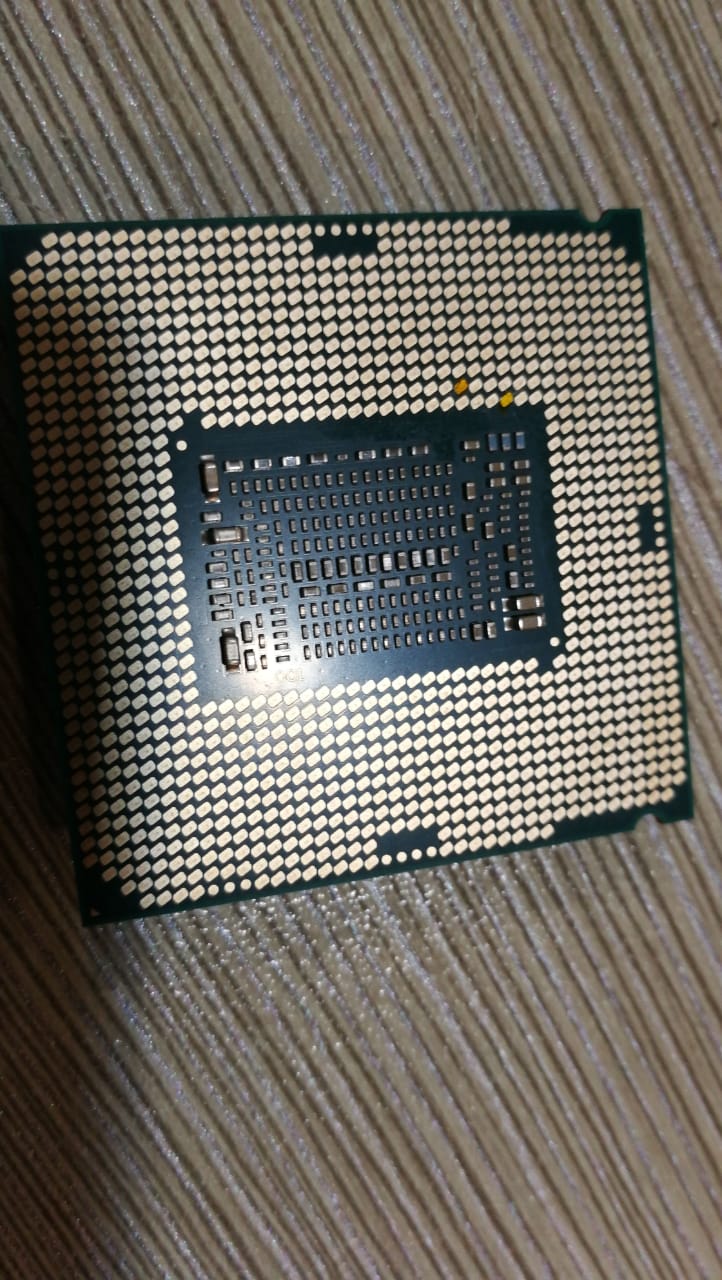
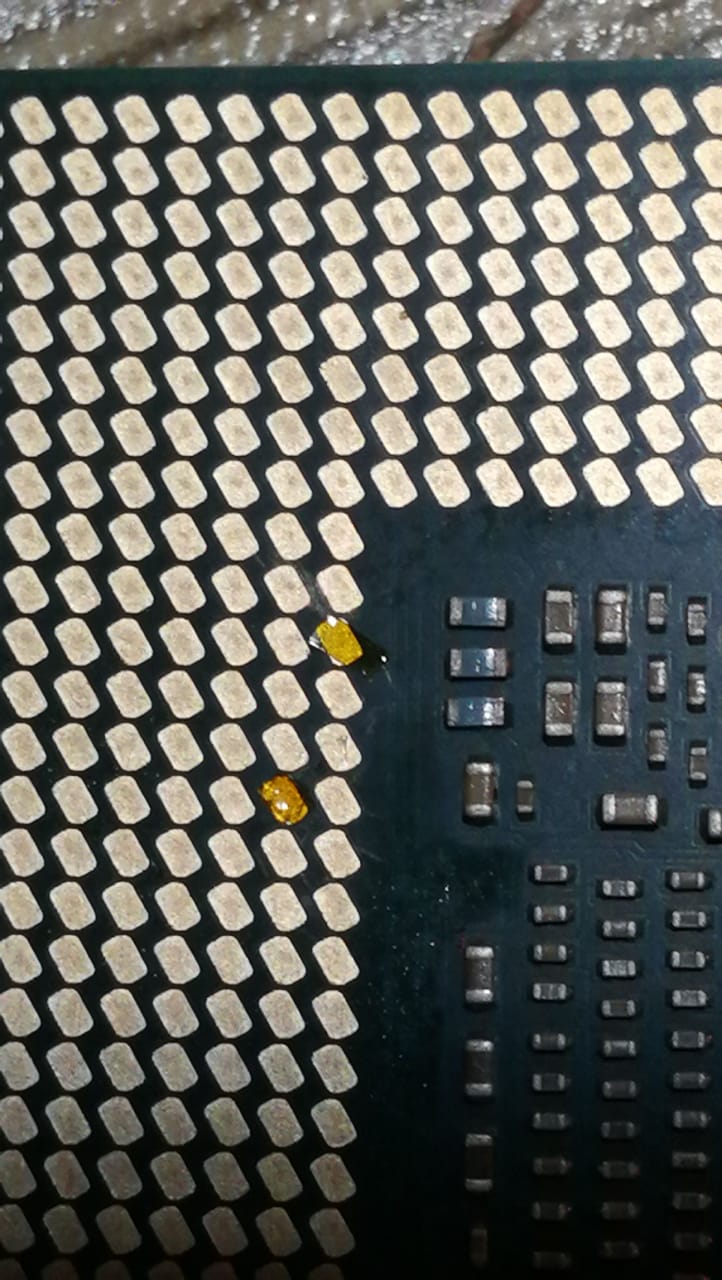
Update of 8700K, tapes are in place.Attached Files:
-
-
Mobile performance is similar to their desktop counterparts. Just watch a few videos comparing them. I recommend Digital Foundry's YT channel.
-
9900k benchmarks out today, looks fairly good for nearly everything minus gaming. Not that it is bad, but not much of an advantage over a 9700k or even an 8700k. Heat on nearly every review I've read today, including a video over @ overclock states they run insanely hot when overclocked and most watercooling cannot handle 5ghz sustained under load.
Having my doubts how this proc will work in the F5 now.Aroc, Huniken, ajc9988 and 1 other person like this. -
@ajc9988 posted this interesting video of der8auer, the silicon die is thicker, so taking apart more watts consumed by these cpus, we already have the answer..
Delid again and sand it a bit
-
Yup saw same video and quite honestly it isn't worth the hassle, at least to me to do all that. Maybe stock clocks the 9900k and f5 will be happy together, but a 9700k oc'd is probably as-fast or faster with less heat for gaming.
Between the rtx ti having bad power limitations and now heat for the new i9, I am disappointed this round of upgrades considering their cost of entry.
As mentioned, I will test everything once a new bios lands for the f5 as my i9 should ship today or tomorrow. -
I am not regretting, just I am selling my clevos and the best budget option to build an MSI again I miss its mobility
Aroc, Kevin@GenTechPC and hmscott like this.
-
Can you actually delid the 9900K? Isn't the IHS soldered?hmscott likes this.
-
Yes, you can still delid, as can be seen in this video by der8auer, ( @aaronne posted it one page before this one):
In the video, der8auer shows the delidding and goes into some detail of the effects.
He makes the point that not only did Intel somehow achieve bad thermal connection via their solider - shown by replacing the solder yet again with Conductonaut - but they have also increased the die's thickness, which seems to hinder thermal transfer - which is shown by sanding the die down to 3/4 of its original size.
The temperature decrease at this point - Conductonaut and sanded down - was about 13°C, which can be seen starting at 11:06 in the video.
IMHO, Intel needed to counter AMD's offerings and pushed out a CPU family that has thermal issues and does not use the full potential of soldered IHSs. -
It seems like running even stock 9900K won't be possible on F5 due to power and thermal throttling. Maybe 9900 non-K is way to go, as it probably will be simply less expensive, yet, I guess, it should get 1700-1800 cb r15 being crippled to let's say 100W? Will modded bios work with locked/non-K CPUs?
hmscott likes this. -
You won't find 9900 non-K chips Power concumption
https://www.techspot.com/review/1730-intel-core-i9-9900k-core-i7-9700k/page3.html
-
I have no idea how can be the 9th gen cpus cooled down... On stock clocks with liquid cooling it hits 80-90C... (AIO 240 or 360)....
-
Just an add-on related to 8700K 4,7Ghz allcore-overclock,
this option seems to be enabled as default but must be set (both) to "disabled" (if enabled they trigger "EDP Other" in yellow on TS and RingICCMax PL4 etc. under HWiNFO, with no performance loss apparently but I don't like get triggered by flashing limit ^_^ )
#Advanced# <CPU VR Settings>
<Core/IA VR Settings>
PS3 Enabled [Disabled]
PS4 Enabled [Disabled] -
Sorry to hijack thread, but if possible I would like to know how good are these phase,
(pic shot from msi16l1) appear to be 12+4 or 6+2 doubled, but my ignorance is strong, sorry
![[IMG]](images/storyImages/vbiq6W8h.jpg)
https://s8.postimg.cc/mhaifrlk5/m399_7.jpg
maybe considering also this his 6-core real counterpart big brother-aka- MSI WT75?
(obviously for knowledge and for considering a future upgrade)
So here we have the MSI WT75's motherboard suitable for i7 8700 TDP 65W or Intel Xeon E-2176G TDP 80W and appear to be a 8+2 or a doubled 4+1 phase boardLast edited: Oct 23, 2018 -
Still waiting on my chip to show up from Amazon, huge disappointment I "pre-ordered" it and still don't have it. I plan on undervolting the chip to see if I can get temps stable in the F5, but not holding my breath given how bad temps are under water in a desktop config.
hmscott likes this. -
@Johnksss is the first I've seen post 9900k in laptop results, here's one of his first posts with settings vs temps with a Clevo P870TM1:
http://forum.notebookreview.com/thr...e-lake-cpus-z390.811225/page-88#post-10814155
He has a few other posts before / after, but we haven't heard from him for a little while, hopefully he comes back with some tuned for maximum performance / cooling tweaks / results soon. -
Amazon delays reported into December, depending on where you are on the waiting list.
http://forum.notebookreview.com/thr...e-lake-cpus-z390.811225/page-86#post-10813637
Even Silicon Lottery is delayed:
http://forum.notebookreview.com/thr...e-lake-cpus-z390.811225/page-99#post-10815200 -
Ugh why do I feel the urge to rip apart the F5 and try my 9900K in it lol. Do we have confirmation from @dsanke the microcodes exist in the BIOS I have to support 9th gen? What about the tape mod? I have no information about if this is still required, or possibly needs to be modified for 9th gen. I have a very very good 9900K and it would seem ideal for testing in the F5. Obviously 5Ghz is out of the question, stock clocks are also probably a serious no go from my own testing. Now that I think of it, I haven't really tested power draw at lower clocks to see what I could get away with. I am guessing 4.3Ghz all cores but that is just a rough guess.
mat89, DaMafiaGamer, jaybee83 and 2 others like this. -
afaik the tape mod is still applicable on 9th gen cpus with the identical pins being covered up.
Sent from my Xiaomi Mi Max 2 (Oxygen) using TapatalkTalon likes this. -
According to Damafiagamer, Dsanke's bios is not working, and he did not get CPU enough time to test also mine bios (slightly different)
so at present, no i9 9900K in TonadoF5 / MSI 16l1
Huniken, DaMafiaGamer and Talon like this. -
9900K......I'm disappointed at intel providing such a lousy product when it comes to temperature management. That chip even delided it gets hot with a AIO on top, it sucks we can't use it in the Tornado F5 because of these thermal issues let alone BIOS support for it.
I hope there will be new mobo for the 10th gen cpu that lets us swap the mobo in our F5 chassis. -
I wish that could be true but I think if 10nm is coming Intel will change their chipset layout. Hence changing the future laptop motherboard layout. Amd will beat them to it though with 7nm lol as Intel won't be releasing 10nm chips for a while. There is a bga i3 that is out atm though...
-
That BGA i3 is 10nm, but the iGPU is disabled because it won't work on 10nm... sad really.
A Look at Intel’s 10nm Std Cell as TechInsights Reports on the i3-8121U, finds Ruthenium
David SchorCircuit Design, Process Technologies, June 15, 2018
https://fuse.wikichip.org/news/1371...ghts-reports-on-the-i3-8121u-finds-ruthenium/
"Early last month, Intel quietly launched a somewhat odd 10 nm part. This processor was shipped in limited quantities in a Lenovo IdeaPads 330.
The chip is based on the Cannon Lake micro-architecture but comes with a disabled GPU.
Lenovo fixed this by dropping an AMD Radeon RX 540 in there.
Lucky for us, TechInsights has managed to get their hands on that laptop and have done an analysis of the chip..."
AMD has already rolled out their new scalable architecture, and again with Zen 2.0, while Intel keeps the hits coming on 14nm Skylake re-treads.
I think Intel has new architectures waiting to roll out on 10nm, but with all of the delays, it's anyone's guess whether Intel will fab them or an external 3rd party fab will put them out on 14nm++, or 7nm, or if Intel will get some form of next generation process running under the name of "10nm", and what form will that take?
Given the thermal barrier Intel has been pushing with the 6 core and now the 8 core CPU's, LGA and BGA, it looks more and more like Intel is stuck until 10nm or another process solution is implemented, new architecture or not.Last edited: Nov 3, 2018DaMafiaGamer likes this. -
What is Intel actually doing. Can't even get just ONE processor working on the 10nm process and amd is speeding ahead with 7nm in recent claims of a leaked ryzen cpu. It crashes a lot but at least it works.hmscott likes this.
-
Guess my new desktop rig is going to be a 7nm AMD unit.DaMafiaGamer and hmscott like this.
-
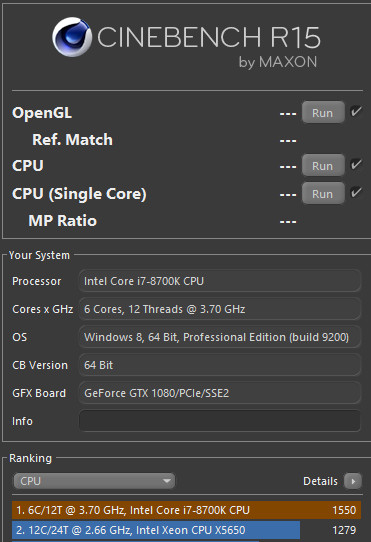
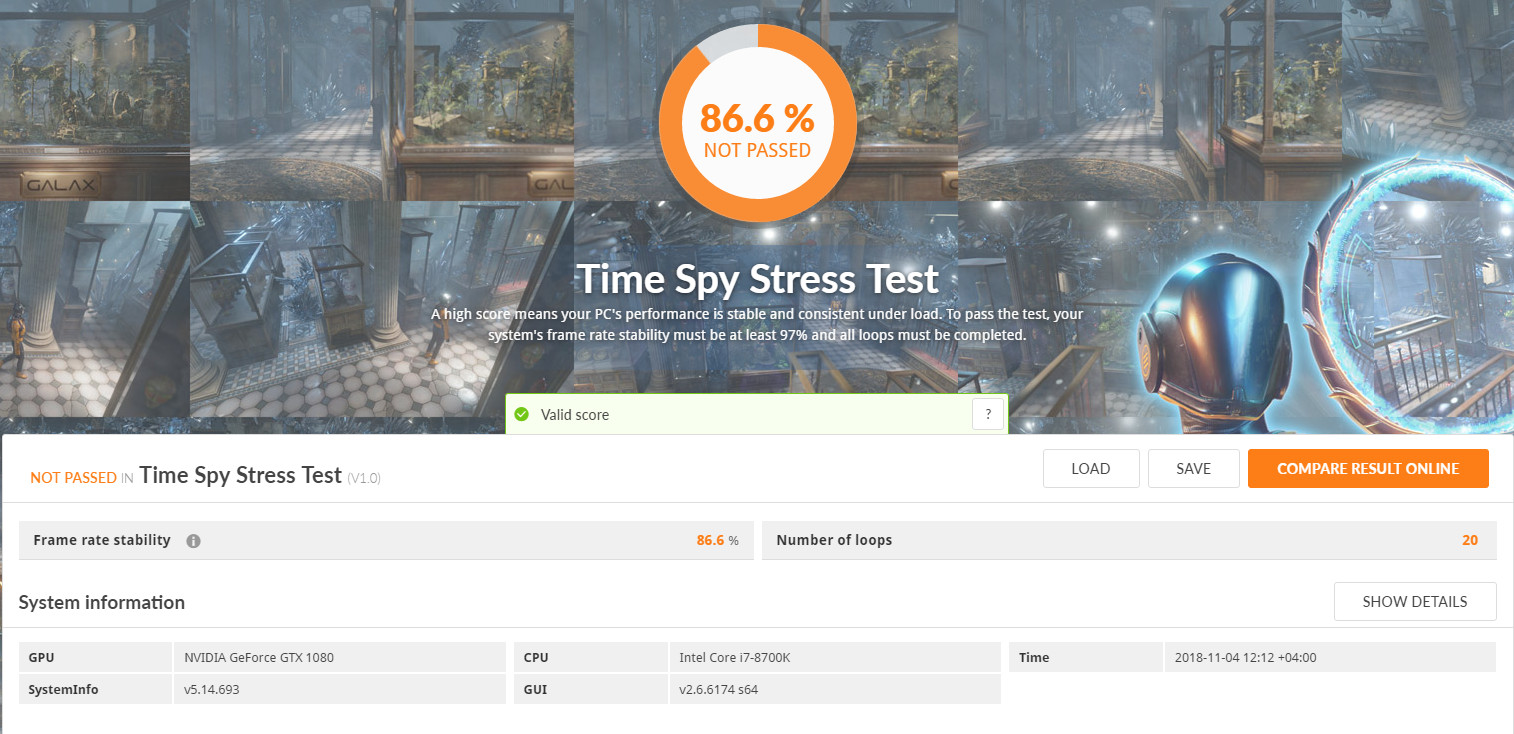
So I started playing with my 8700K and to see how it fares.
8700K scored 1550 in CB15, max temp around 83c. 4.7GHz.
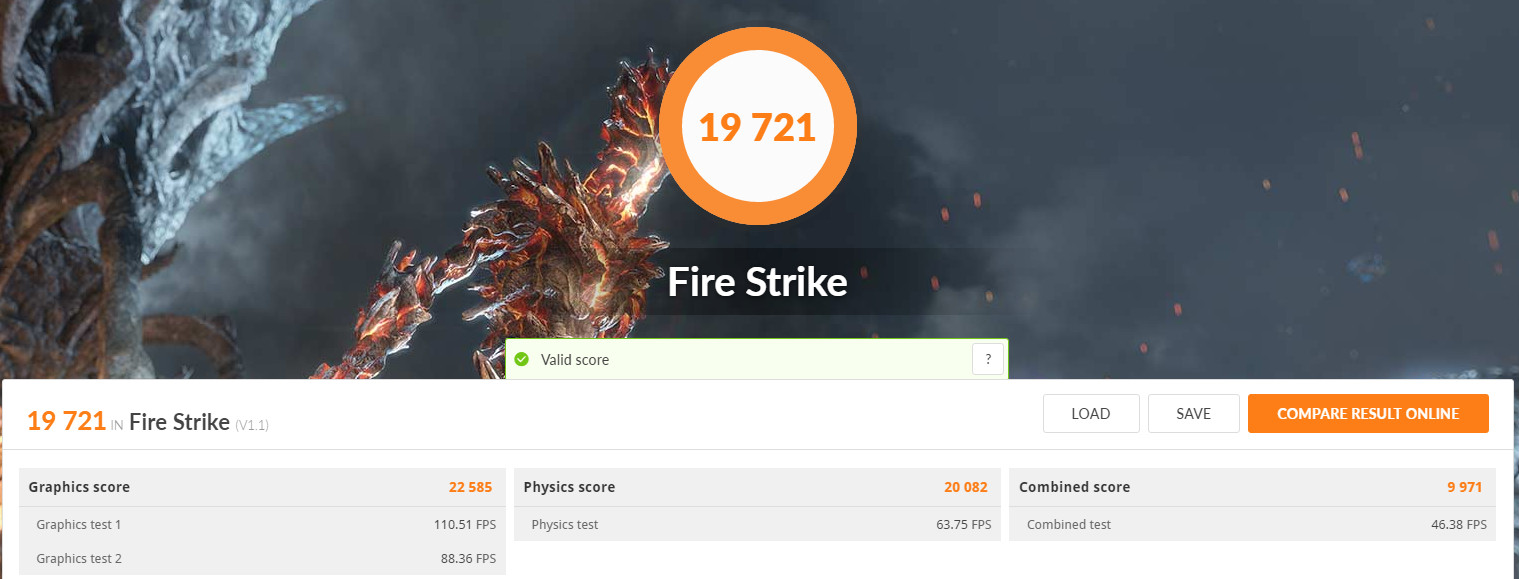
FS Scored 19721 @4.7GHz CPU, GPU +166 Core, +500 MEM.
Stress Test Valid for 20 runs Spy time....only FPS wasn't that stable but it's ok I can live with it since I OC the GPU, I need some Kryonaut on it soon.Attached Files:
aaronne, hmscott and Robbo99999 like this. -
-
^Was this answered in anyway?
-
I'm presuming the GPU started out cold and at a high frequency, then got very hot & the GPU boost lowered, but that is a big difference! Huniken would have to confirm though, if he was monitoring what his CPU & GPU were doing, CPU shouldn't get hot & throttle though (not in that test), but maybe there's some power limitations going on as well (power limitations associated with max watts consumption of whole system). Just some thoughts.Huniken likes this.
-
Hey guys, my friends Tornando F5 internal display stopped working. External works though.
I remember this happening last year as well but forgot what I did to fix it. I think it has to do with brightness?
Thanks -
The FPS was not consistent more than 97%.
Yeah this^
It was cold from previous FS run, it was also OC to +166 core and +500 MEM. So yeah boost clocks lowered so is FPS, I need Kryonaut on GPU side and test again but for me so far things look good!
CPU wasn't hot either, around 75c for all the stress test, I'm impressed! GPU still hits 90c-88c.Papusan and Robbo99999 like this. -
I thought it was a BIOS issue or drivers.....
-
Check with mobile phone or any torch that it is backlight issue or the lcd does not switch onFalkentyne likes this.
-
LCD is on, you can see it in sunlight. I think his drivers may have auto updated. I believe to fix this I had to revert to older drivers but I don't remember which ones.
I also believe a BIOS update was issued for this problem awhile back so I've tried to contact Eurocom to see if they'll provide a newer bios but we'll see how that goes.
Huniken likes this. -
It is clearly bios. My proposal is to conact svet, invest in some donation and have a proper unlocked bios prepared
-
BIOS support max 12thread now because of the other restriction in BIOS ( not in CpuMpPei this time ) so for 9900K you need turn off HT before you install CPU or just install 9700K . I am trying to make it support 9900K and 16thread.
-
As usual Eurocom wants me to downgrade the drivers instead of provide a proper updated BIOS that fixes this issue. Can't even play newer games like this...
Is Svet's BIOS flashable without a programmer? -
Svet will give you instructions.
-
Is he available on these forums? I think I remember messaging him awhile back on MSI forums.
-
Msi forum
-
Got my i9 today, debating if I even want to mess with the f5 after seeing Talon's results and just go straight to my desktop build.
Side note - I've had 3 rtx 2080tis and I sure as heck hope the mobole varient is more reliable.FrozenLord, DaMafiaGamer, Huniken and 3 others like this. -
9900K probably better suited to desktop rather than laptop. You've had x2 2080ti's fail then?
-
1 fail (FTE), 1 Gigabyte Gaming OC that overclocked and boosted poorly, on my 3rd card an Asus Strix Gaming and it is much better temp wise and boost clocks.
For me when you pay $1300 for a graphics card, you want max overclocking capability.Talon, Robbo99999, hmscott and 2 others like this. -
I heard about the failure rate of rtx 2080 ti's and instantly went for a gtx 1080 ti. I can get 300mhz overclock on both core and memory putting my card a bit closer to the rtx 2080 ti.
I've done shunt mods to my card and increased core voltage though. I got lucky with the crappy micron ram.Talon, Huniken, Robbo99999 and 1 other person like this. -
So I’m playing Star Citizen version 3.3.5 with all the improvements in it, getting high fps count from 55 to 121 frames.
The thing is, my GPU temperature even with undervolted setting at 0.920v it manages to be hot at 91c and pulling 148watts. I’m really in need to buy Krayonaut and work on that custom Chinese heatsink for water Cooling.
8700K with 4.7GHz still also reach 90c...guess I need to drop the clocks a little to 4.5 and see how it goes. If it reaches max while gaming 85c then I’m good.Papusan and DaMafiaGamer like this.
*** MSI 16L13 (Eurocom Tornado F5)/EVOC 16L-G-1080 15.6" Owner's Lounge ***
Discussion in 'MSI Reviews & Owners' Lounges' started by Diversion, Oct 14, 2016.