Problems? See this thread at archive.org.
When I tested my 8700k in the tornado f5 it reached 90c pretty quickly which is why I opted to put in a 8600k instead. Runs about 5 to 10c cooler even on overclock. Thing is there is virtually no difference between both cpus in gaming which shows that hyperthreading isn't utilized that well. P870dm-g and tornado f5 get nearly the same fps in every game I tried.
Also my gtx 1070 runs at a tdp of 170w with 250mhz overclock on both core and mem. No issues with heat whatsoever max temp is around 82c. You should repaste.
-
-
Hyperthreading is currently very important for 4 core CPUs to allow for good gaming experience, but if you're 6 or 8 core CPU then you don't need hyperthreading in current games. (This is true for recently released BF V too)Huniken and DaMafiaGamer like this.
-
But my 7700K crapped its pants running Shadow of the tomb raider until I went 8700K, it pulled impressive results so for my 6 cores 12 threads will take me a long way.
As for heat....I'm working on that water cooling chinese heatsink, just need time and some cash to buy materials it should be easy to do, an adapter of sorts for the GPU side and shime on CPU side for leveling both HS.
-
Will water cool this beast, I only travel twice a month with it so I can keep it stationary for a long time. Water cooling is next on the list.
-
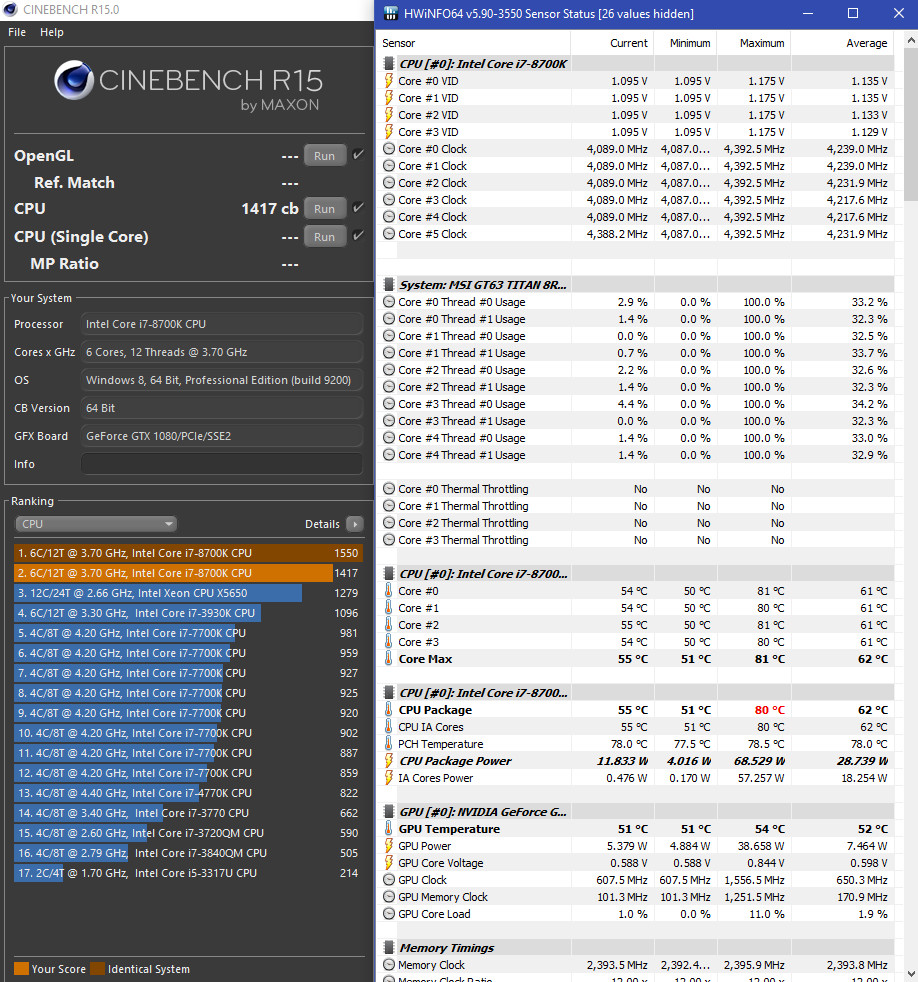
Run the processor at 4.4Ghz, -5mv adaptive as brother @aaronne advised.
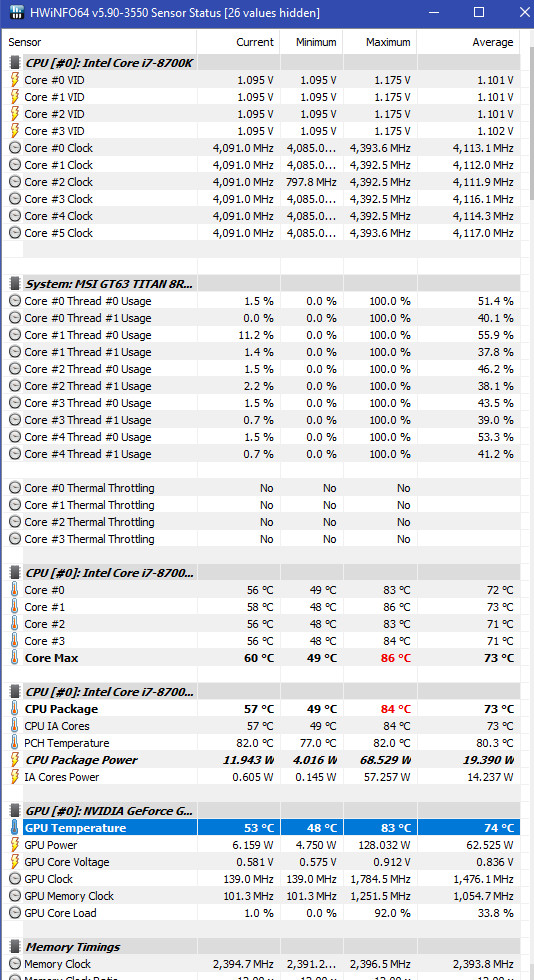
Star Citizen runs perfectly fine with CPU reaching max of 86c, GPU with 0.912v reach max of 83c.Attached Files:
-
-
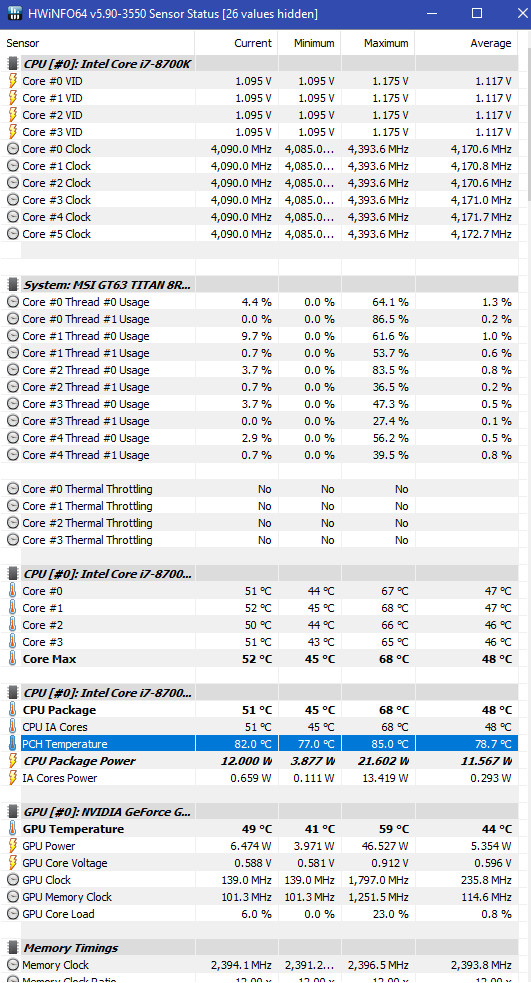
Guys, I noticed PCH temps reach 85c while gaming.
Is there anyway to help reduce those temps? -
http://forum.notebookreview.com/thr...6-owners-lounge.797128/page-722#post-10570737
 But 85C ain't critical.
Huniken, Robbo99999, Arrrrbol and 1 other person like this.
But 85C ain't critical.
Huniken, Robbo99999, Arrrrbol and 1 other person like this. -
Now I understand why that side of the laptop gets insanely hot, always thought it was the ram. Thanks for the link! I'll be sure to do that heatsink mod.
Pch has a cut off point of 120c to 130c it can handle some heat!Huniken likes this. -
Remember 5 watt from the PCH chips (the hearth in the hub) ain't much but if the cooling around the components isn't good enough even low wattage will push heat. Just look at NVMe drives... They don't use a lot watt but can run hot as Hell in some notebook chassis.DaMafiaGamer and Spartan@HIDevolution like this.
-
Theory is not the same as practice, bruh. Massive throttling and stability problems with a lot lower temp than you talk about ain't nice. You will run into a lot problem with a much lower temp than this.Huniken likes this.
-
No it can't.
This is dangerous advice to tell people.
There were TWO users in the MSI forums with some GS model laptop, who had the PCH *EXPLODE* from overheating. They took pictures of it. The entire topside was ripped off and burnt... -
It seems you are right, pch cut of for normal laptops can range from 80-100c. My Asus first gen i7 laptop was an expection as it could reach 115c with little to no gaming and be fine, it probably had a bad sensor though.
-
if it ever reaches 90, I'm prying open this machine to stick that copper heatsink onto it.
-
You should do it anyway, I wouldn't want to take the chance after what @Falkentyne has said. It's better to be safe than end up with a paperweight.
I'm disassembling my f5 as we speak to do this.Falkentyne and mat89 like this. -
I'm not too worried. Will do it when I feel like it.
Attached Files:
-
-
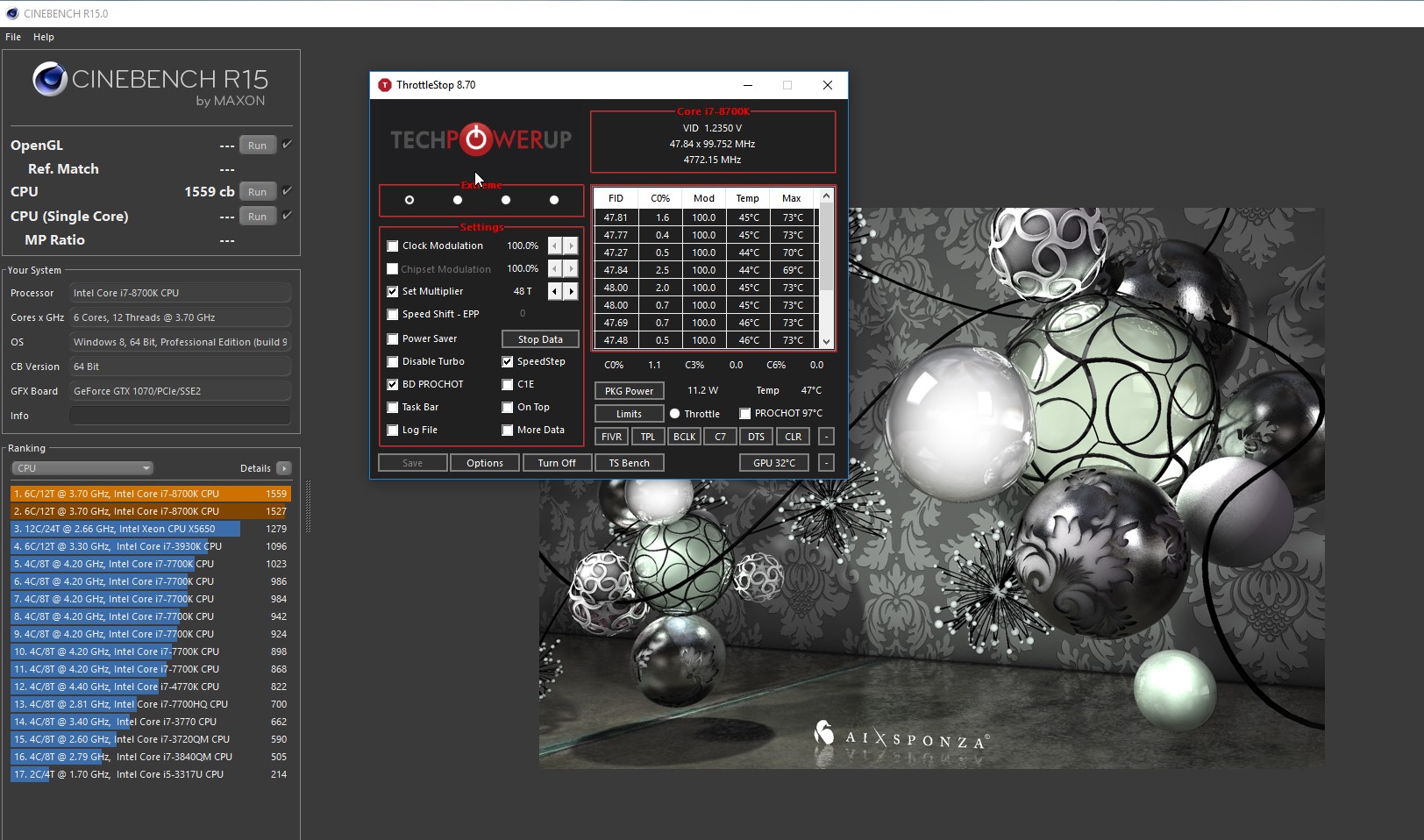
I can't go past 4.6 Ghz unfortunately (1494 cb). What is happening is weird, however.
When I'm trying 4.7Ghz I'm kind of stable at 1.15V, temp are totally fine, max 85*C on auto fans. PCH stays ~55*C.
The problem is that after ~10s of running Cinebench or any type of high load CPU downlocks to 4.1-4.2Ghz, TS shows red PL1. Power draw reported by TS is ~102W at start and ~94W after throttling begins.
I've tried setting Turbo Short/Long Time Power Max to 200, without success, it seems like it doesn't affect behaviour at all.
Do you know what can be the reason why this is happening? Maybe I missed some important setting in BIOS? -
Set IMON slope to 50 and IMON Offset to -31999 in the Core/IA settings.Huniken, Robbo99999 and mat89 like this.
-
That was it, thanks
Ended with 4.8Ghz at 1.22V giving 1559cb and ~75*C on max fans, which is fine.
At 4.9Ghz CPU thermals are still okay on max fans, but system shuts down immediately under heavy load, so something else may be overheating. Maybe VRM? I'll look for heatsink and then try to find voltage.Attached Files:
Huniken and Robbo99999 like this. -
-
Your laptop has a critical flaw, the same flaw that the WT75 has (and most likely, with MSI's incompetence, the upcoming MSI F7, which will be the 6 core LGA consumer chip version with Geforce GTX or RTX laptop based on the WT75). That is, the power limit overrides that are shown in the Bios don't do anything.
You can enter a power limit of 200W or 300W or 500W, but it gets ignored, and the Embedded Controller overrides it, and enforces a "base" power limit from your CPU's TDP rating (95W I assume). This is due to a bug with the LGA CPU not having a valid EC RAM ID, as these laptops were designed for BGA SKU's, not LGA. If a system ID that is programmed into EC RAM register E3 (you can view this in RW Everything, if you download RWE, click embedded controller, then go to register "E3"), which is set by the Bios, is not detected as a pre-programmed CPU type, the EC will overrule the Bios power limits and enforce the base TDP only.
I found this out by messing around with my GT73VR. For Kaby Lake (7820HK), the power ID for GTX 1070 is 90, and for GTX 1080 is 91. If you go to EC RAM Register E3 and program something like a 70 in there this power ID is unrecognized, which will cause the EC to force base TDP limits and ignore any overrides.
Fortunately, IMON SLOPE and IMON OFFSET cause the CPU to report either more (Slope > 100 or offset > positive zero) power usage, or less power usage than normal (Slope < 100 and negative imon offset). Note that going past 31999 resets it to 0, so 32000 is actually 0, and 63999 is the same as 31999. Spaghetti code. -
I just upgraded my 1080p/60 IPS panel to 1080p/120. Installation wasn't too bad, save for my snapping a few of the tiny plastic retention clips because of some adhesive that was applied between the bezel and old screen. After some tweaking, it looks pretty close to the outgoing display. Definitely worth the $72 including shipping and 15 minutes it took to get it hooked up.
Huniken and Robbo99999 like this. -
I've been getting really high temps and some crashing recently when gaming or using my laptop remotely (Path of Exile, Anydesk). Any recommendations/walkthroughs on what I can do? [I saw this suggestion but I'm not knowledgeable enough to pull that off without some more explanation or shopping list]
Also, is there a shortcut/command for the turbo fan button? It'll be helpful for after restarting remotely.
![[IMG]](images/storyImages/PoE_Temps.png)
-
You need to re-paste your Cpu with either Liquid metal or a good thermal paste as etc Phobya NanoGrease Extreme (what you go for depends on your tech skills). Look on the youtube videos in the thread http://forum.notebookreview.com/threads/eurocom-tornado-f5-mini-monsterbook-review-thread.800796/mat89, DaMafiaGamer, ELiusive and 1 other person like this.
-
Thanks for the reply. I'll have to see what options are available in my local shops and hopefully try it out this weekend.
I got the "Coollaboratory Liquid Ultra 100% Metal Thermal Interface + IC Diamond on CPU, IC Diamond on GPU" option from HIDevolution when I bought my machine about a year ago. Is re-pasting something I should expect to do every year as part of regular maintenance?DaMafiaGamer likes this. -
Yes definitely, liquid metal paste dries up and should be repasted every 3 to 6 months.
-
Nope! This is BS! @Mr. Fox @Donald@HIDevolution @Falkentyne
Huniken and Robbo99999 like this.
-
How is it bs then, this happens to my cpu die very occasionally. If you keep it at high temps eventually the liquid metal will solidify. It has happened to me in the past on my tornado f5.hmscott likes this.
-
Then you have done something wrong or the heatsink fits ain't good enough.Huniken and DaMafiaGamer like this.
-
Not only on my tornado f5, also on my p870dmg too. As well as my desktop 2700x cpu die.
I still get good temps, it's just that I have to repaste thats all.hmscott likes this. -
This is two years old Conductonaut http://hwbot.org/submission/3990242_papusan_cinebench___r15_core_i7_920xm_507_cb
If you add Liquid metal a second time or do it properly first time (Liquid metal needs to suck into the copper) the results will be best.
desktop 2700x cpu die?
DaMafiaGamer likes this. -
I may have some CPU and GPU lapping to do then
Desktop info in my sig: Ryzen 7 2700x lolLast edited: Nov 28, 2018 -
-
Not needed to repaste the liquid metal on my delidded 6700K yet, it's been over 1.5yrs now, temperatures are still the same I think. I think liquid metal is stable for 2yrs+ from what I have seen in testing on the internet.Papusan likes this.
-
I've had LM on previous systems for 3-4 years with no change in temps.
Robbo99999, t456 and Papusan like this. -
How are these benchmarks for a gtx 1070, (I'm selling this laptop on the NBR marketplace soon):
![[IMG]](images/storyImages/7FomNxF.png)
![[IMG]](images/storyImages/SvfG7A2.png)
The CPU benchmark is low due to single channel 16GB RAM -
Topic seems to be dead but mby someone have information that im looking for.
So basically i own MSI MS 16L3 (Z270 refresh) and approached few problems with configuration of this thing:
1. Can't find working Chipset drivers (eurocom for MS 16l13 not working well).
2. Can't get to work Sound blaster Cinema 3 software (keep getting information "There is not supported audio device available")
3. Is there any way to get running steel series app with build in keyboard?
4. Notebook seems to ignore ThrottleStop completely - setting anything does not affect processor (i7 7700k). Idk if it's something from BIOS or it is affected by chipset software
5. Is it possible to use TrueColor software on this?
It is really weird that MSI acknowledge this product and warranty but do not provide any drivers or whatsoever.
And also FANs. I know that sooner or later they will probably stop working. Other problem with em is that they sounds weird out of the box. By weird i mean at 1000RPM they're start making kind like really small and quiet tractor sound. It's like i can hear them turning. I own Clevo and i know how loud fans can get - clevo fans are loud but they do not make that fault like sound. Although at full fans it is not case - most of time u use laptop at low usage so in long term it might be problem. I wonder is it just how they are or is it something wrong with this particular fans?
Thanks for any response
EDIT. Nvm this fan thing - seems like MSI just put this piece of crap fans in their super expensive laptops.Last edited: Dec 7, 2018 -
Check this out:
https://ufile.io/8clq4
1. For me Intel 200 series drivers worked just ok
2. There are some troubles with that. I've found that 2.81 of Realtek drivers makes SBC3 install possible I included both installers in file..
3. I used KLM instead
4. It should work by default, maybe you have some other software installed that fights with TS?
5. Yes, check my driver pack
Stock fans are annoyingly loud, inefficient crap and they break a lot (however Z270 edition comes with a better version I think). ADDA fans uses by Asus worked so much better for me. Better thermals, better noise. Great mod. -
Thank you very much will try em and let you know.
PS. Dzieki
-
Hi,
Could you share your hackintosh mod for he MSI16L1x? it is possible to have your iso? thx a lot! -
@Jan Prochnica thank you again. Everything working great - besides true color - keeps getting error that it's only for true MSI machines. Mby im doing something wrong?
-
Ok, I looked into TrueColor installer and problem is that it uses WMIC command to check manufacturer. ($_54_.cmd file in $TEMP).
The only way I know to fool WMIC is to change manufacturer name in Bios. It's not super easy to do, but doable. You can follow instructions given by @DaMafiaGamer in this thread for USB method, but instead of using new Bios you can modify your version after getting a copy.
I recommend playing with UEFITool to modify Bios (you can also set boot splash screen ) Of course you can also just get dsanke Bios and enjoy unlocked version with no problems and extra 8-gen support for future.
It was pretty much straightforward hackintosh installation, nothing tricky, really. I can't share image bacause I use the system at my work. I can share Clover settings and kexts however if you like. -
I would appreciate if you can link me any page with helps me with the process, also apprecitate the kexts and settings
thx in advance! -
Here are my WT75 notes:
https://gist.github.com/fleaplus/dcf45788f172ab77c1fa148b4ad82c6b -
Does anyone know if you populate both NVME drive slots if it reduces the speed of the GPU to x8? Or does it run the pair of ssds at x2?
-
You could find out by using GPUz. Open GPUz and then on the 'front page' click on the question mark symbol that is to the right of the Bus Interface window - this launches the PCI Express Render Test. You then view what speed your GPU is connected at in the Bus Interface Window. So that will give you your answers you're looking for.
-
Ok, so looks like my CPU fan wasn't spinning:
![[IMG]](images/storyImages/unknown.png)
I replaced the old CPU with this... aaaaand, still not spinning. How should I go about trying to troubleshoot? -
Yeah the only thing is I don't have the other NVME drive, I wanted to make sure before I purchased. However, I'm pretty sure it has enough PCIE lanes for 2 nvmes and a 16x gpu. So I will probably upgrade in the future.
On to another topic, has anyone modded the casing and put some more fans inside the laptop? I'm getting some high temps even after a repaste. Might to add more fans -
@Talon pls ping me, I would like to get back to the MSI16L1x business
-
anyone has a MSI16L1x for sale? with 1070 or 1080 prefered, everything else is not relevant
-
Mine will be up for sale very soon, it feels like I'm not really using it to its full potential. Therefore I'm buying a light notebook or ultrabook for uni.
New original avvid fans have been fitted and the gtx 1070 is tdp modded to 170w. It gets to gtx 1080 levels of performance and higher easily.Robbo99999 likes this.
*** MSI 16L13 (Eurocom Tornado F5)/EVOC 16L-G-1080 15.6" Owner's Lounge ***
Discussion in 'MSI Reviews & Owners' Lounges' started by Diversion, Oct 14, 2016.





![[IMG]](images/storyImages/2018-11-22-19-37-42-HWi-NFO64-v5-82-3410-Sensor-Status-4-values-hidden.png)