 Problems? See this thread at archive.org.
Guys, could send me some temps for 8700k? Core clock / voltage / temp? I am considering to upgrade to 8700k. Thx
-
My 8700K daily use:
- 4.4 Ghz on all cores
- Undervolt -20mV with IA AC Loadline 20
- Reported voltage 1.11V at full load
- Stable temp under heavy prolonged load: 75 (auto fans)
- Delid + Kryonaut -
Thank you very much! Anyone with other experiences? My aim is exactly the same, 4,4-4,5Ghz in mid70, under 80 under full stress. (delid+bottom mod). THX!Last edited: Feb 2, 2019
-
http://forum.notebookreview.com/threads/clevo-2019.826781/page-31#post-10857163
here you can see the card msi 2080 dell 2080 clevo 2080 -
guys, the modded bios supports 9700k as well? thx
-
Not sure if it does. I haven't seen @dsanke around here in a bit to get confirmation. He did say earlier that the BIOS does contain the microcodes for the 9th gen CPUs, but nothing above 12 threads is supported yet. I think the 9700K could work but not tested by anyone here yet.
-
Thx however I have been reading a lot regarding tempretures, and a delided 8700k seems a better option temp wise. Performance wise also close call, so I will stick to the 8700kTalon likes this.
-
yes , the same pin work as 8700k . you can also use 9900k without ht ( turn it off via another cpu before install it )
-
Will be possible to use in future the HT?
Someone can confirm that the 144hz screen is working on this laptop? or 4k display that working with recent NVidia drivers? -
The bios is limited in maximum number of threads it can support.
Fixing this requires a complicated mod. Win-raid may help with this. You can also ask SVET over on MSI forums. I would talk to SVET first.dsanke, Talon, ryzeki and 1 other person like this. -
Thanks Falkentyne, I gonna ask to him in these days, regarding the cooling system I think we can handle it right?
-
AUO71ED (B156HAN07.1) is working 144hz ips, with the 4 lanes 40 pins edp cable and the dsanke biosTalon likes this.
-
Hello guys. I modded now both fans in my laptop and replaced them with Asus fans which goes up to 4800RPM.
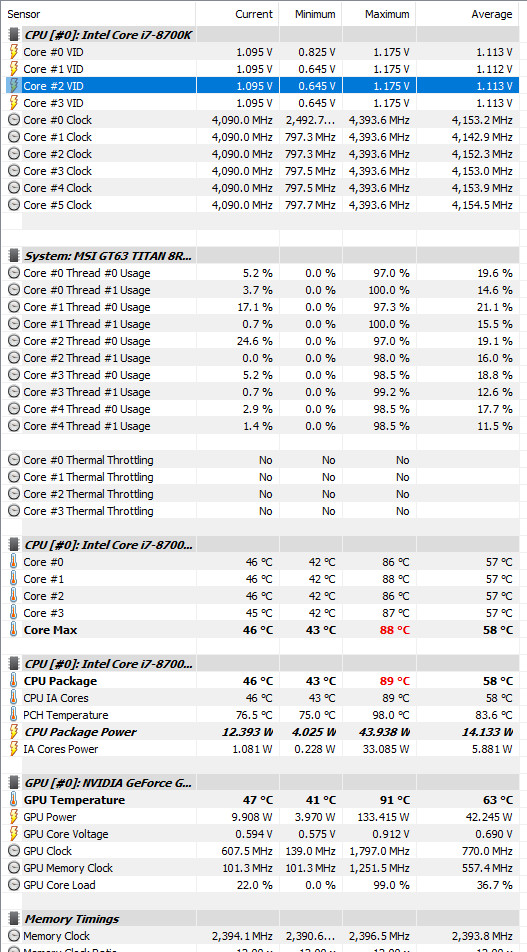
The Issue now is that my PCH is getting scorching hot, 98c.........that's really bad. I played last night Assassin's Creed Odyssey on FHD, Ultra graphics settings. Anyone got that link to @Mr. Fox post about the PCH cooling mod?Attached Files:
hmscott likes this. -
-
Not too hard to do it, you need to take out the MB and put a copper heatsink on it... it will help
-
-
and how you keep the copper in his place?
-
Question:
Is it safe to use this type of smaller power supply without any high load in mind if I constrain CPU and GPU accordingly? Let's say I can keep CPU at 35W and GPU at 60W max.
https://www.ebay.com/itm/EDAC-Power...n-AC-Power-Adapter-EA11003F-195-/183660029789
It's still 19.5V, but only 6.15A.Talon likes this. -
thank you.
-
yeah I need to go dig through the rubble of items I have!
-
Arctic Silver™ Thermal Adhesive/Arctic Silver® Silver Thermal Epoxies. Some use super glue on each corner of the copper block (glued against the tape used below on pcb) as pict below.
Have you found out why you got the change? Always better find the culprit first. Before you do changes.
You're welcome!Huniken, Falkentyne, Erick182 and 1 other person like this. -
Some new 4k screen? I want to check if mine will work with new dsanke bios and new the new driver nvidia.. i still have the one from february 2017!
-
You can but you shouldn't play any games on it because it can trigger overload shut off which will cause the system to turn off abruptly.
-
No display improvement using dsanke bios with B156HAN07.0, unfortunately. Still no brightness control, and stuck on NVIDIA driver 378.92 (black screen on anything later).
skyFox90 likes this. -
Still no one know how to fix that problem.. i am in the same situation with my 4k display..
-
Interesting as I have dsanke bios and I have replace the screen to chimei 120hz, which works with no issue (knock on wood)
-
I've found following IBM adapter
https://www.ebay.com/p/IBM-Lenovo-A...-Place-Kiosk-4838-POS-System-Tested/704838736
Everything looks promising, plug shape is the same, voltage almost the same, power output sufficient for low load in travel, however, plug pins have different signs, they're like 90* rotated:
IBM adapter:
Do you think is it possible to safely re-wire plug? can it work, or might there be some more hidden , dangerous differences that can cause damage?Attached Files:
Kevin@GenTechPC and ryzeki like this. -
-
No, voltage and ground is all.
You can't re-wire the plug itself since it's molded, but you can re-arrange and re-solder the wires in the cable to accomplish the same result. Just make sure to use a multimeter; not only for verification it is working (and check for inadvertent shorts), but also to identify the polarity of the individual wires. They're usually black plus white or blue and you could gamble on that, but I'd want to make dead certain before hooking it up ...
There's two options;
- Splice all three or four wires inside the cable and measure each's voltage while the adapter is plugged in. Have to be a it careful here and make sure none of them are close to one another.
- Open the two adapter halves and measure the cables by setting the multimeter to resistance, one pen at the exposed wire and the other at the wire end where it's soldered to the adapter's pcb. This way you don't have to measure a 'hot' adapter. The brick will open quite easily by wedging a broad screwdriver or a big, fat kitchen knife in-between the two sections. Re-assemble with black duct tape or a bit of glue.
Dannemand, Falkentyne, Kevin@GenTechPC and 4 others like this. -
I tried to speak with Svet but no answer after 3 days, someone know if he release a new version of his bios?hmscott likes this.
-
Sometimes he "disappears" doing personal stuff, he might be sick or on vacation, then he comes back, you need to be patient. Look for new postings from him, sometimes that helps - but may only indicate he is back and responding to posts and email and may still take some time to get to your request. Be nice and understanding in posts and email, it goes a long way to getting a response.
-
Well I know I'm not the only one to experience such a problem when replacing ****ty stock fans with ASUS ones, the PCH doesn't get enough air movement because of the bottom hole mods, so I need to add that copper block to it.hmscott likes this.
-
Yeah, temp can increase a bit with the bottom mod. But why not buy the original fans again? Use the Asus fans you use now as spare parts.
-
Well......I like to save on money...besides I still have that Chinese water heat sink to fiddle with, I need to make an adjustment plate to go on GPU and Heatsink to benefit from the water cooling method, same on CPU side to adjust a little but on height difference if needed, at the end I might need to elevate the back-cover with a plastic riser printed via a PLA 3D printer. I'm sure it is possible but the time is a bit tight as well money flow isn't so good recently.Papusan likes this.
-
Just an update, my 4k display eith dsanke bios not working, so you was a lucky guy eheh
-
maybe the issue with the 40pin 4k display? Talon's 120hz works as well, right?
-
I don’t know about Talon 120 hz, my priority is 4k because i work with graphic software.. however guys, if someone know how to fix that problem or some other 4k display just let me know!

-
@ skyFox90
work very good dsanke biosAttached Files:
-
-
Ye i know that the samsung 4k display is working.. BUT if you compare with the 4k Panel AUO-B156ZAN02.3 is another world.. this working only with nvidia drivers 388.77 (february 2018) very super quality display..
-
Papusan I feel like an Idiot.
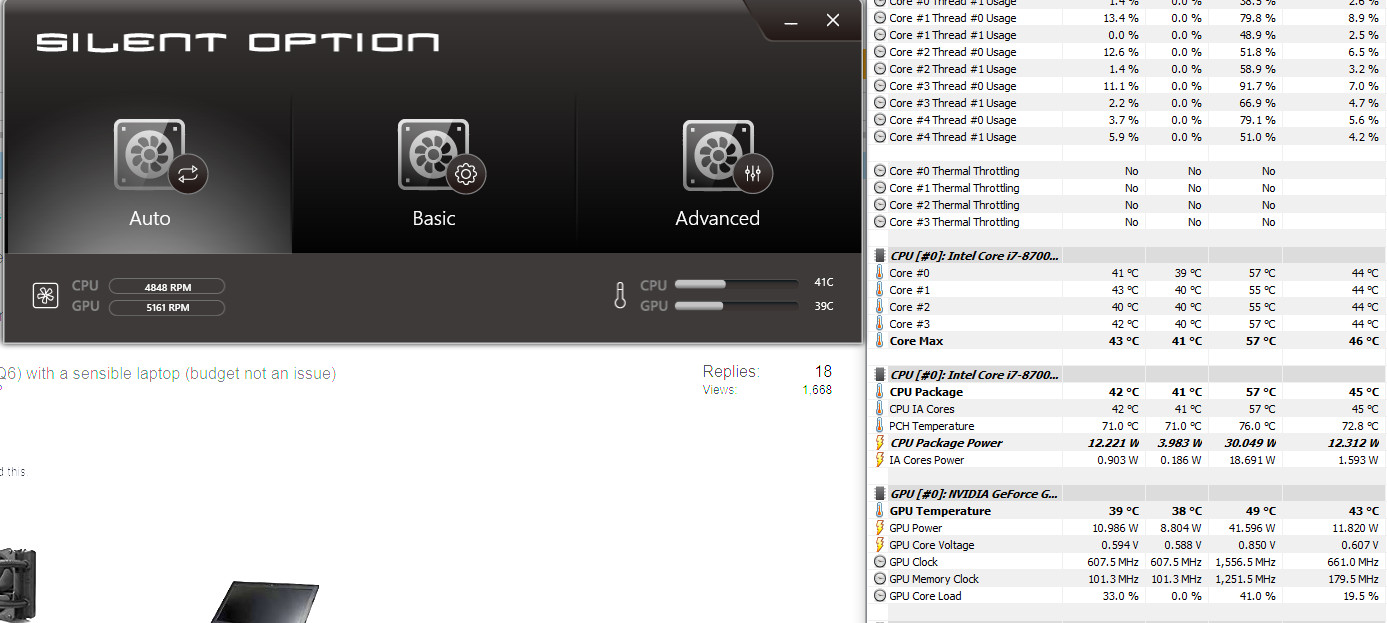
I never played using max fans!!! I forgot about the powerful option to cool the laptop. Just for a quick pain free mod, I used silver tape on the bottom holes leaving a ting gap for air intake, cranked the fans to max and voila!
Now I will test it while gaming Assassin's Creed Odyssey again and report back any findings.Attached Files:
-
-
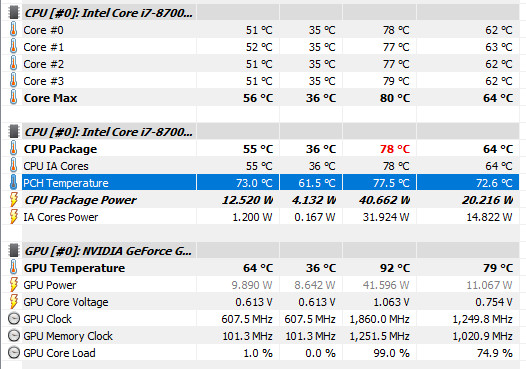
Update, so underload the PCH with max fans only hit 77c. That's a HUGE difference. Disregard the GPU temp, after drivers update I forgot to Re-Apply the voltage limit.
Attached Files:
-
-
Guys,
Could you help me what options I need to set in bios for good overclock? I have dsanke bios, and with alt cntrl shift f2 I can open the hidden menus in bios In my desktop my cpu runs 4,7Ghz @1,1V (1,083v), in the F5, even with 1,15V it crashes. In desktop I used LLC7, I have no idea if there is any options in bois what I use inappropriate way. Thx
Huniken likes this. -
LLC7? Must be an Asus Maximus XI then?
MSI boards don't have loadline calibration. It's built in and hardwired and without a DMM it's impossible to know what the default vdroop is.
Change IA AC loadline to 210 and IA DC loadline to 210 and see if your 1.15v is stable.Huniken likes this. -
Guys,
Could you help me what options I need to set in bios for good overclock? I have dsanke bios, and with alt cntrl shift f2 I can open the hidden menus in bios In my desktop my cpu runs 4,7Ghz @1,1V (1,083v), in the F5, even with 1,15V it crashes. In desktop I used LLC7, I have no idea if there is any options in bois what I use inappropriate wy
It is an asus strix z370- not maximus, but your guess was almost perfect If I sett IA AC loadlne 210, it means that it will give +0,21V extra on the top of the default settings?
-
@ matyee
16L11 vcore-1.170v
AC Loadline 1
DC Loadline 1
Vcore = 1,185v
VCore CINEBENCH -1,175v: VCore linX 64 - 1,185vLast edited: Feb 15, 2019 -
Attached Files:
-
-
Your are a genius again I have got a silicon lottery 8600k. In desktop it works a lot better, however it is pretty OK in the F5 as well
Just for fun:
![[IMG]](images/storyImages/5ghz%208600k%202.png)
Daily:
![[IMG]](images/storyImages/4,7.png)
Slow motion:
![[IMG]](images/storyImages/4,5ghzz%208600k.png)
4,8Ghz looks promising:
![[IMG]](images/storyImages/42968_4_8ghzz_8600k.png)
After 30 mins COD BO4:
![[IMG]](images/storyImages/42968_4_7_cod4.png)
-
Exactly
I've seen in the past "ideal" add-on super think PCH coolers with little thin fans, but I don't have a source right now, I just know I've seen such in the past, it might be a good idea to see if you can find something like that to add air-flow to that area of the MB which is "starved" for air-flow due to the short-circuiting of air flow over the motherboard that the "holes in front of the heat exchanger" create.
Something like this, but without the bolt's, a stick on version - or maybe DIY using AS5 ceramique or equivalent.
https://www.newegg.com/Product/Product.aspx?Item=N82E16835708006
https://www.newegg.com/Product/Product.aspx?Item=9SIAEAP6Y68194
The total height is only 13.5mm. It is great for situations where space is limited.
Last edited: Feb 15, 2019Huniken likes this. -
Thanks but I only need to cool the PCH when I play games, running the fans at max solved the whole issue!
Attached Files:
-
-
If you make a lot of noise fans can simply replace the bearings on the 693zz sold on Ebay Aliexpress (2 bearings for 1 fan)
-
Why is your gpu temp is 92C?
-
The Asus fans at max 5100RPM are rather....pleasant!
I didn't use undervolt. Also I need repaste anyways, with undervolt still getting to 90 or 91.
*** MSI 16L13 (Eurocom Tornado F5)/EVOC 16L-G-1080 15.6" Owner's Lounge ***
Discussion in 'MSI Reviews & Owners' Lounges' started by Diversion, Oct 14, 2016.




-preview.png)
-preview.png)