Problems? See this thread at archive.org.
You have the btn panel with is smooth and fast however has fade colors. The 144hz panel is IPS has much better colors with good response time BUT you need new cable as well. The chimei 120hz has also good colors and it is very fast with 120hz. I have that atm, I am fine with it.
-
Hello! Tell me, which manufacturer of NVIDIA Quadro P5000 graphics card is suitable for a Eurocom Tornado F5 laptop (MS 16L1) Dell, HP, Fujitsu, Lenovo? What version of video BIOS on the video card will work with this laptop? any?
Last edited: Apr 15, 2019 -
Hi all, been an owner of one of these since back in August 2017 which I bought off woodzstack back then. It's been a great laptop and still very happy with it, but I have an issue which is driving me crazy at the moment. I have one fan (on the left hand side) randomly spinning up every 5-10 seconds. I did a quick search in this thread and I can see people have been complaining about the fans failing, is there a recommended easy replacement that is "easy" and quick to fit? This noise is driving me crazy and would stop me being able to use the device at work. I wouldn't mind if it was always on, it's the random spinning up which is annoying me. I checked GPUz, CrystalDiskInfo and Task Manager etc, and there's no spike in temperature, CPU activity etc when this random fan spinning happens. One of my SSDs is at 50 degrees but this has been the case since I bought the laptop and the drive is still good. It happens even when the device is idle. It doesn't happen immediately after rebooting, but happens about 10-15 minutes of operation. Thank you for your help. I'm going to have a look in the BIOS see if I can run it at at a constant speed all the time rather than this annoying spin up spin down.
-
I guess it is failing. This is an amazing laptop with one small flaw, which is the fan. Buy a new one it is a small investment, and hopefully it goes away. Otherwise install a new windows on a temporary drive and see if it remains... I have had 3 of this laptop, which out of 2 had fan issues. On the other hand it is a pretty stable and durable machine, still better than melting bga chips

-
The fan motherboard is died. That is why any manipulations will not give any result. I have 4 such dead fans, over time they will completely cease to work. Perhaps a new fan will solve the problem, but this is not 100%. 2 of my 3 new fans Aavid Thermalloy also stopped working, or did not work already with the purchase. Perhaps, besides the fan, the EC controller could suffer. Or maybe there is a problem with the firmware EC.
Masters from the service center told me that when 1 of 2 fans is working, in this case the EC controller chip heats up. Therefore, you cannot operate a laptop with 1 fan running. -
To tell you the truth, those AAVID fans are crap, they are designed to die after almost one year of use. I replaced them with the ASUS fans, you need to remove 1 screw tab on both sides of the laptop fan housing section which leaves you with 2 intact screw tabs/holes on each side of the fan housing section inside the laptop, once you remove that one screw tab/hole you can install asus fans and secure them using tape, put on the back cover and screw it, job done. But the most important task before installing ASUS fans is that you need to rewire them before the plug, else you will burn the fans. Search this thread for a full guide it is somewhere in here.
-
@mo2k or just buy new fan and try it out. If you're looking for easiest and fastest way to fix it.
-
I recently realized that BIOS does show the AC and DC Loadline settings for the GT-partition of my CPU as well.
This, to me, seemed quite strange because my CPU (6700K) should not be using its integrated GPU, but it seemingly is powered nonetheless.
When I changed both Loadline settings for GT to 1 (was 0), my maximum CPU Package Power (according to HWInfo64) decreased from about 73W to about 65W (checked after a few hours of Far Cry 5).
Has anyone experienced similar decreases?
UPDATE: feel free to ignore those values. (GT Loadline AC / DC)
I have no idea why, but my CPU is still randomly reporting spikes in power use and the GT Loadlines are still set to 1, but don't seem to change the situation at all.
On top of that, my CPU seemed to misbehave when mildly overclocked - it would reduce core clock under load without any clear indication as to why.
After some research (and having a thorough look at HWInfo64) I saw the RSR-flag being turned on.
Seemingly, this feature should prevent the CPU from being damaged, at least that's the way it is marketed.
However, it does seem to misread the values when overclocking and should therefore be disabled in BIOS.
(I was previously not able to find any clear indication what it is and did not disable it, in spite of the OC Guide listing this as a recommended "disable")Last edited: May 30, 2019Huniken likes this. -
So, since there is no way for me to see an RTX 2080Ti or GTX 1080Ti in our laptop, any one tried those external GPU boxes with the backside USB-C port? Do they work?
-
Does that USB-C port in the 16l13 supports Thunderbolt 3?
@Zoltan@HIDevolution @Mr. Fox -
dont do it, there is a performance drop with TB between 15-20% on external monitor, internal is up to 30%.
You better use the M.2 slot with this instead:
https://www.aliexpress.com/af/R43SG.html
The performance drop with this is around the 10%
Or dont do it at all, just use the 1080 its capable enough to do whatever you need, maybe not in 4k unless you reduce the resolution of 4K by 10-15% which should not be tragically noticeably. -
Thanks for the advise, I'm well aware of performance drops but maybe in the future I actually will still need that external GPU, no upgrades so far to replace the GTX 1080 in our laptop in the market. So I'm just considering a RTX 2080Ti in external GPU box to run connected to my 4K HDR samsung TV, I saw the adapter in your link with Linus, I don't like it as it is messy and have to remove one M.2 drive which I use actually so it leaves me with TB, I just want to confirm if the one in the F5 Tornado actually is Thunderbolt III.
-
yeah it should be TB3 but dont know if its the 32 or 40 Gbps for video output
but you should be good to goHuniken likes this. -
I'll buy one of the eGPU boxes and plug into it a test GPU to see how it work with my laptop, if all is dandy then will look into buying an RTX 2080Ti.
-
for those who know,do I need a specific bios/vbios if I get barebone of 16L13/16l3 with stock bios,to support the Quadro P4000 or the stock ones doesn't have any problem recognizing and work it? and anyone know if M3000m (maxwell) or firepro cards will work with this unit on-the-go or not.
thanks in advance -
Where did you buy your laptop from?
If it is from Eurocom, contact them. If you bought from HIDevolution then maybe @Ted@HIDevolution or @Zoltan@HIDevolution could help you out.Kevin@GenTechPC likes this. -
none.from china as it's much cheaper and closer to us to import with no tax
-
Then you have one last option, contact SVET in the MSI forums, with a little donation he could help you out with his custom BIOS for the laptop.
-
M600M works 100%.(the vbios has to support uefi though)
-
I ran an Akitio Node with a Tornado F5 back in early 2017. It worked fine with a Founders Edition GTX 1070, other than the fact that the performance was about 20% less than the internal card (the best Firestrike Graphics score I could get was around 14,000). The big issue with it though is that the TB3 PCIe lanes are off of the PCH, so they are limited by the DMI bus which is also used for the SSD's, USB, Ethernet, etc. I much prefer Alienware's design where the processor PCIe lanes are split three ways - 8x for the dedicated GPU, 4x for TB3, and 4x for the AGA. This arrangement leaves DMI bandwidth available for accessory components so things like a fast M.2 SSD does not interfere with eGPU traffic.alaskajoel, Huniken, Aroc and 1 other person like this.
-
Well I'm running all drive slots with SSDs, will this prevent the eGPU from working or it will work with less performance only? Seeing an RTX 2080Ti is a huge jump from laptop GTX 1080 makes me want to get it, in the end I can always buy a desktop but that's extra money than buying the GPU and eGPU case.
-
I bought the Razer Core X and put a 2080ti in it no problem hooked up to our laptop. Performance hit is what they said, but even running it through the laptop LCD I still was pulling better benchmarks than the 1080 and obviously it ran a lot cooler. Ultimately the performance did not outweigh having to unhook it and buggy issues like it randomly not picking up coming out of hibernation so I boxed the egpu up and put the 2080ti back in my desktop.
I am hopeful the next wave of Nvidia cards will work with my epgu, I think it will be worth the hassle then not having to upgrade another year.hmscott, Huniken and FrozenLord like this. -
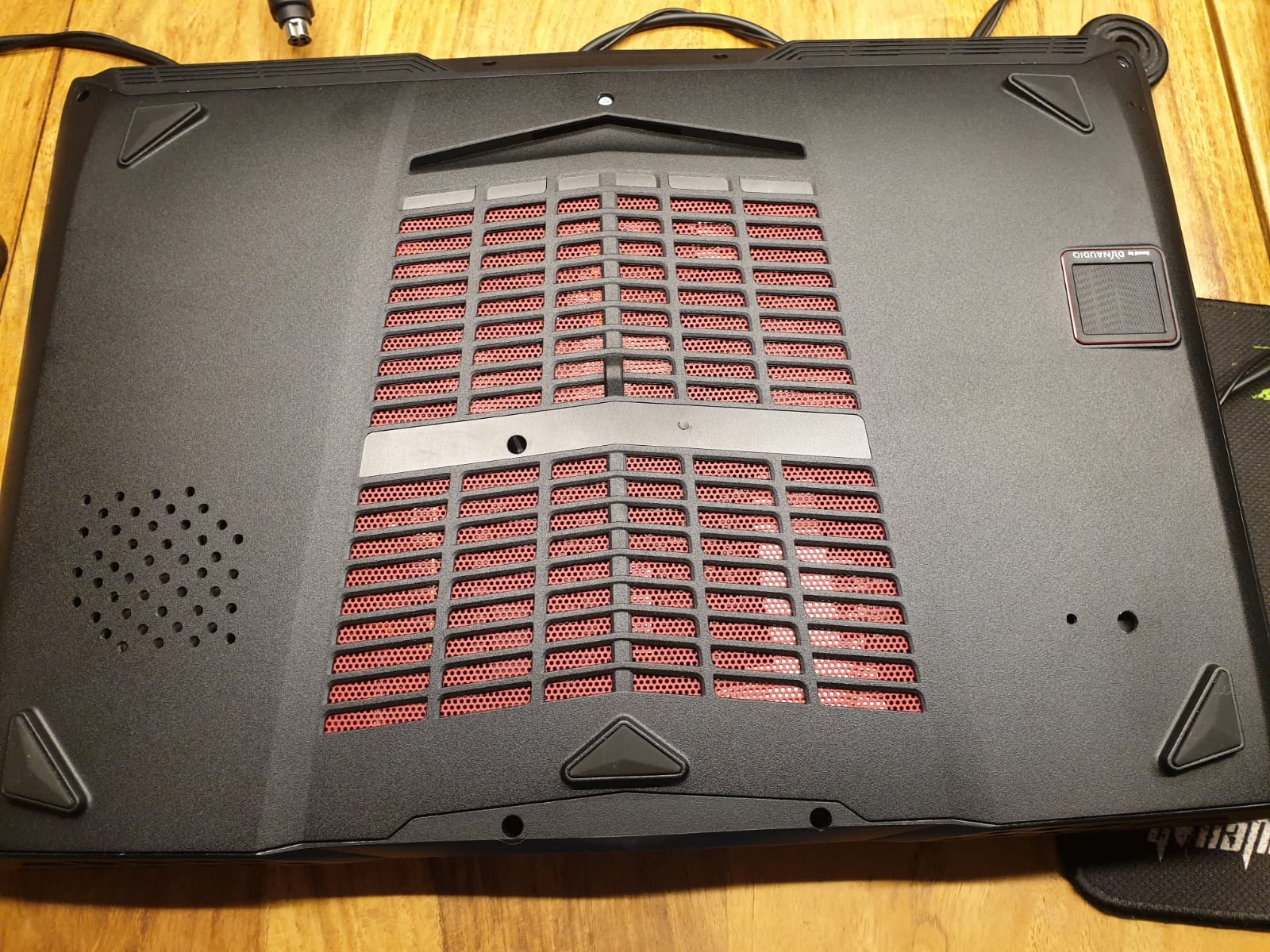
I might have a solution for anybody wondering whether they should cut holes into the bottom panel, but are hesitant due to the resulting look: drill holes
For the right side (CPU), I have gone with 2 drilled holes (on the right side in the picture).
Feel free to ignore the large drill hole as that is directly above the fan's case and will barely provide any benefit - that was me being stupid and not making sure where to drill in the first place.
Using only a few holes on the CPU's side ensures that the PCH will get enough cooling when under load, and I have just realized that there actually is a gap in the front of my laptop right next to the PCH to let in air...
For the left side (GPU), after drilling without any precise idea where to drill, I have decided on using a cross pattern.
It's really simple to do if you have any kind of paper with pre-printed lines.
I chose a 3mm drill and used a paper with 5mm sized squares, drilling down into every other crossing of the lines.
Now I am looking into upgrading the display and would like to benefit from your experience and wisdom
My F5 is equipped with the basic 4k display, according to MonInfo it's the SDC434B 156FL02-101 manufactured in 2014.
The biggest gripe I have with the display is the lack of colors and contrast.
After some research, I have come across AUO's B156ZAN03.2 on Panelook and am under the impression that this displays connector and dimensions should fit the F5.
However, I have read that some people have had problems when using a different display, but I am not sure why that is.
Do you have any idea, whether I can use the B156ZAN03.2 with the F5 without problems?
Thank you very much in advance.Attached Files:
-
-
I didn't have any problems swapping my old 16L13's 1080p/60 IPS display for a 1080p/120 Hz model. I would think as long as the cable works, the panel should.
FrozenLord likes this. -
Thanks, now I can buy a 2080Ti then hook it up to my 4K curved 49" TV to play games.
-
Guys,
I have bought on ebay for a very reasonable price a AUO B156HAN07.0 screen. With a good expert I have it replaced, it seemed good until windows log in, that the screen went black....
I have read back, and I saw some posts that 7.1 works flawlessly, 7.0 sucks big time. Same as with the BTN 5.1 (not good) 5.2 (good) panels.
Is there any new bios which fixes it? I would not like to go back to TN after this amazing IPS, however spending 100USD again for a new screen would put the whole effort out of reason
Thx, -
Hey guys,
I have finally received my new screen: AUO's B156ZAN03.2
And it is working flawlessly with the Tornado F5 (unmodded BIOS, came with the 4k panel).
However, should you wish to upgrade / change the display, please take care of the mounting method.
Even though the panel's active dimensions and connector are correct, I managed to buy a naked screen without the flaps / wings that the F5 uses for mounting and fixing the panel inside the chassis.
Apparently, those mounting methods differ and I have yet to find the correct nomenclature to google for it.
(After contacting the seller, it seems to be a different type of screen, having smaller bezels and therefore is supposedly mounted differently - it can however be used inside the F5 using double-sided tape)
And just in case the F5 does not boot after changing the display, feel free to unplug and replug the display.
I stopped early the first time and the laptop behaved strangely, not POSTing and not showing anything on the screen.
Unplugging and replugging the connector, pushing it in a little harder this time around, solved the problem for me.
Last but not least: do you guys know of any European shop that sells the B156ZAN03.2?
I have got mine from eBay and had to go through customs and wait for quite some time.Last edited: Jun 30, 2019 -
Guys,
Our MSI16L1x has gsync, gpu also, however we change to other gsync panel we loose it. Anyone tried to shoot new clevo vbios into the gpu? From electrical point of view I have learned both gsync and nongsync cards are the same. What do you think? B156Han07.0 gpu is verified by clevo vbios. Or MB bios is also needed to have gsync?
thx -
Hello. Does anyone have this power button board with a cable from MS16L1 ? Maybe from disassembly ? I can't find it anywhere...
![[IMG]](images/storyImages/rMLb1ih.png)
-
Guys,
Could you help me where I can find parts?
- I have a F5 with 1070
- I bought a gt73 titan with 1080
I would like to swap the gpus, Once I have managed to put the gt73 1080 in the F5 so I know if it feasible. Backwards (f5's 1070 to gt73) I do not know.
Question: Where I can find heatsink, for F5 I know I need one new, I assume for the gt73 I would need also a new one for the 1070.
Thank you! -
For g-sync to work there must be meet few requirements:
Correct G-sync vBIOS for GPU
Bios with support for used screen
Screen supported by BIOS.
So probably in your case - BIOS does not support this screen coz probably it wasn't option at first place when it came out. To correct it u might try go ask someone (ex svet) if he have BIOS with ur screen white listed. He might help you for little donate
Are you sure that u need different heatsink to fit GTX 1080? Afaik they look same. -
Thx i will ask svet, but he cannot do it i think (asked before)
Yes new heatsink needed as the layouts are different. Once i made this i know for sure... however i need heatsinks.
What i do not know if msi gt73 requires new one however i guess yes... -
Thx a lot!
Any hint for the gt73 1070? Thx -
I was trying to reach steady 5ghz with my i7 7700k. But unfortunately no luck so far. So i decided to try something with static voltage. Apparently it is only reason why it keeps crashing. I cant measure exact VID for this clocks with adaptive.
BUT - somehow when im setting it up in throttlestop - it doesn't affect VID at all. It's still same and keeps changing as if it was adaptive.
Any idea what could be a problem in this case? I heard that MSI somehow could screw us up on this. Other possibility is that im doing something wrong/missing some setup to make it work.
Here are mine settings. -
Ok. With help of TS author i managed to set static voltage. I had to change option in BIOS.
Now thermals are problem. With 5ghz on minimal voltage to handle it (around 1.3250V) it hit's 90C in few secs and than it reach 97C which is point when down-clocking is starting.
Do you guys know any thermal tricks in this laptop? Besides liquid metal and holes in bottom panel. -
You need very good chip to manage 5ghz
-
Yep. And proper cooling. I think VID is not to high for this kind of freq so it's matter cooling tweaking in order to sustain cloak on full load.
-
hi guys
can someone give me the driver for the web cam
i can't find him on the eurocom page
thanks -
Hi Everyone. So my GPU fan just died and I'm trying to find a replacement. Sadly I can't find any good results when I search for "MSI 16L13 fan" on google. I only found this one.
https://www.ebay.com/itm/New-MSI-GT...716951?hash=item3d82b220d7:g:vGwAAOSwYelbkPhP
Do you think that might work ?
Thanks ! -
It should work. Thats the same set of fans i purchased to replace the faulty ones on my unit.
Sent from my SM-N950F using Tapatalk -
Thanks !
-
You might want to look into getting the PABD19735BM- N395.
This seems to be a newer / more powerful version of the fan that is compatible to the stock fan (PABD19735BM-N322) from a pinout and design perspective.
And as an update, it seems that there are different opinions on this matter:
I would like to try and clarify, based on my experience with the PABD19735BM- N395.
In Germany, you can get this fan for about 30 € via eBay, Asian sellers might offer it at a lower price.
This fan is identical in dimensions as well as pinout when compared to the stock PABD19735BM- N322, it can be used in the F5 without any modification.
RPM-wise, I am not so sure.
I am struggling to find a datasheet and have got two fans of the N395-variant at hand, with one spinning (max fan button, rpm read via Silent Option) up to 3,750 rpm while the other spins up to 5,000 rpm.
The latter is a nice improvement over the N322 that I am currently using for my CPU side, that reports a maximum of about 4,200 rpm.
My fan curve (I have updated the EC to "T5_EC113", modding the EC firmware with Svet's bios tool to have custom fan curve) functions nicely and the N395 as well as the N322 ramp up their rpm just fine.
When sending the laptop to sleep, both fans run for a few more seconds and then stop - so even in standby, there is no fan spin.
I would therefore like to give the N395-variant a clear recommendation.
(But beware of "faulty" or low rpm versions, as they seem to exist / be defective.)Last edited: Aug 6, 2019hmscott likes this. -
just wondering since N395 seems to be compatible, will the N408 variant work as well?
-
Hi All,
I have also upgraded my F5 to AUOHAN07.0 144hz IPS screen, but I had also black screen issue. I bought a AUOHAN 07.1 panel and seems all work well, I have already upgraded to the newest nvidia driver with no issue. -
Another f5 (sorta) owner, just a late arrival, boy she hot even with kryonaut but the gpu does alright for stock power limit. -
The cpu is 7600k? Delided? For the gpu I think 1,05V is too much, with afterburner you should set a curve 0.9V - your 1070 could do 1850-1900mhz. Also propose to disconnect the gpu heatpipe from the cpu as it heats it up. What is the paste? Is it well spread and the heatsink well connected? These are my initial toughts about it... also the cpu voltage could be underclocked, my 8700k@4,5Ghz required 1,19V (and it is an average chip).
-
No delid, this is with the thermal pad and halfway through I add a -100mv and it brings the CPU down to manageable, and yeah the gpu heatpipe over cpu is still connected, should I just insulate it with something or just remove the thermal pad between them?
-
First of all delid the cpu and put tgc between the ihs and the chip. It could give you significant improvement. There are 4 screws which connect the two heatsinks, if you remove them the gpu will not give extra heat to the cpu. Use kyronaut to repaste your cpu.
-
![[IMG]](images/storyImages/unknown.png)
just flashed the coffee lake bios and undervolted my cpu properly now, runs alright in games so its fine till I get my 9400f/9600k/9700k or whatever
*** MSI 16L13 (Eurocom Tornado F5)/EVOC 16L-G-1080 15.6" Owner's Lounge ***
Discussion in 'MSI Reviews & Owners' Lounges' started by Diversion, Oct 14, 2016.