Problems? See this thread at archive.org.
Do you use XMP profile in BIOS? If setting correct XMP profile wont help - you should write to SVET and ask him about this ram. It's possible that first BIOS might not support this kind of speeds.
-
Hi everyone.
I have a few questions
I'm using Eurocom F5 with gtx970m. Now i want to upgrade to gtx 1060 or 1070 but don't know Buy what kind of it and where.
Can you show me what kind of it and where to buy it.
And i using CPU i7 6700, Can i upgrade to i7 8th and how to setup?
If who selling used graphic for Eurocom F5, can you sell for me?
And i saw in thread everyone upgrade to 144hz screen, so can i buy what kind to upgrade my laptop?
Thanks everyone. -
Hey there,
today I'd like to offer you instructions for a ghetto mod for our laptop
Short backstory:
My F5 (1080GTX, 6700K) has been struggling with high-ish GPU temperatures for some time.
After decent tweaking, I only ever managed to get it to cool down somwhere between 110W and 120W (going by HWInfo64) of GPU power.
Anytime I would average higher than 120W, it would steadily heat up to the dreaded 90°C and throttle.
To remedy this, I tried:
> undervolting the GPU (I am currently at 862.5mV and ~ 1.72 GHz in Afterburner)
> repaste several times (I did try with IC Diamond 7, Phobya HeGrease Extreme, Thermal Grizzly Kryonaut)
> limit my frames to 60 FPS (via Rivatuner Statistics Server)
> drill fan holes in my bottom cover (I have posted an image about that in this thread)
> replace the GPU's thermal pads (I did try Arctic Cooling's normal pads at first and K5 Pro afterwards, the second being a liquid thermal pad which basically guarantees that it is not too thick and thereby pushing up the heatsink)
> slightly raising my laptop from the surface it is standing on (I am using small decouplers meant for speakers - they are made from black rubber and lift the laptop by about 1.5cm)
> distancing the GPU heatsink's arm from the CPU heatsink (which did not really affect temperatures at all)
> adding a 1.5mm thermal pad between the GPU heatsink's arm and the CPU heatsink (which did help a little bit)
> modded EC firmware to change the fan curve and go up to MSI's maximum of 150% of the fan's RPM
All those ideas did help somewhat, but only ever brought me to where I am not able to average higher than about 120W.
Or put differently: the stock VBIOS (as well as the optimized one that has been posted in the beginning of this thread) allow for 150W of power, which results in me missing out on 30W of GPU
And just to add it: I do know about laptop coolers (which I don't want to rely on for portability reasons) as well as liquid metal (which seems too risky to me)
After some deliberation about how to improve the cooling, I realized that the GPU's heatsink might not make perfect contact.
When I repasted afterwards, I made sure to check the remaining thermal paste.
And while the layer on the GPU was not too thick, the paste had dried at the edges, suggesting a skewed fit.
Considering that I had not achieved better results with the repastes, I concluded that it might be the heatsink (or its fixing) that is the problem.
I did give bending the arms a few seconds of thought, but one of them is directly hitting the heatpipe behind it, which practically prevents it from bending.
The solution I came up with is to add a blank copper plate on top of the heatsink, which gets screwed to the GPU, and using a thermal pad of 1.0mm thickness to use as buffer.
By drilling holes in the copper plate, one is able to replace the flimsy heatsink arms with a sturdy plate that is pushing down on the heatsink, thereby increasing the pressure on the GPU.
I did use a copper plate of 1.0mm thickness that was cut to a size of 90mm by 70mm.
The heatsink's screws seem to be positioned as a square of 45mm edge length (at least that is what I used for drilling).
Copper can be easily drilled through - I have used a cheap cordless screwdriver (or electric drill, not sure about the translation) with a drill of 2.1mm diameter meant for metal.
The GPU's threading is M2 and my setup did go nicely with screws of about 14.5mm in length (I was not sure when ordering and had to shorten them manually) and countersunk heads.
However, it will be a little bit tricky to thread the screws through the heatsink's arms and into the GPU heatsink's threading.
Unfortunately, I can't offer any specific advice on screwing down the plate as I have no idea how to do it correctly.
When I screwed it down, I basically went with my gut feeling, paying special attention to the resistance of the screws turning and stopped once I deemed the resistance high enough.
This way, I tried to balance the four screws to have about the same resistance.
Should you think about doing this mod, please be aware that the combination of 1mm of thermal pad plus the 1mm of copper plate plus the protruding screw head is already touching the bottom cover.
While I am still able to close it perfectly, I am not sure whether the same would be true for 1.5mm or even 2.0mm of copper.
For completeness sake, this is what my poor F5 looks like now:
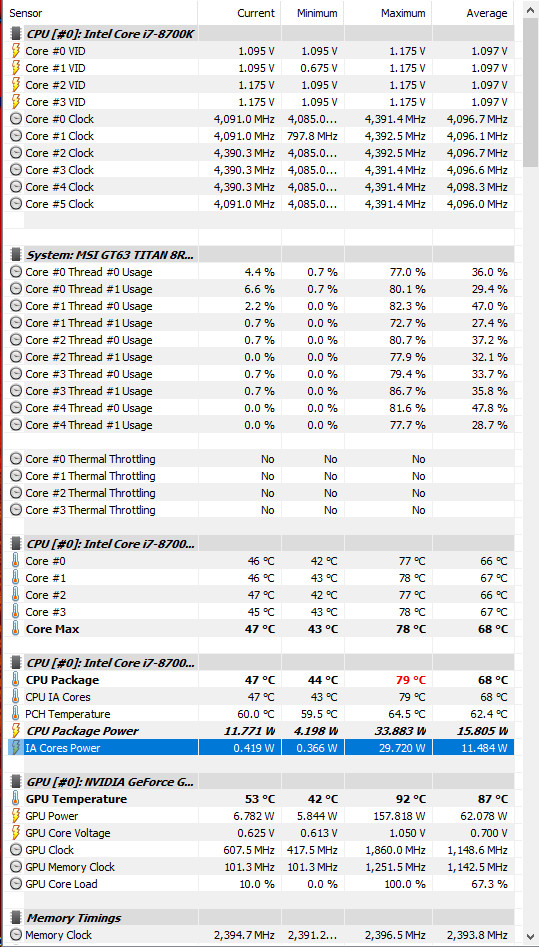
Overall, after installing this mod I have not seen temperatures climb above 78°C yet.
Running the Firestrike Stress Test (without FPS limit) results in this:

Word of warning: I have installed the copper plate in my laptop 2 days ago and have used it for gaming and benchmarking for several hours since then.
While it did not show any adverse signs yet, there is of course no guarantee that it will continue working flawlessly.
Should it break down any time soon, I will of course add the information to this post - until then, feel free to assume that I am still sporting this mod and am still happy with it
Status as of 23rd of February 2020: still going strong, temperatures basically unchanged (I got greedy and switched to 1.809 GHz @ 0.85V, my max temp is still 79°C)
Status as of 23rd of March 2020: still unchanged, i.e. no problems and same temp
Last edited: Mar 23, 2020Huniken, Papusan, Rahego and 1 other person like this. -
@ FrozenLord
can make a plate more to cover the heat pipes CPU ? -
@FrozenLord rly interesting stuff. Thank you for sharing.
So what u basically did was putting more pressure - which means better fit. Can u post pics with some benchmarks + hwinfo? On ur screen i cant see W and usage.
PS. amazing is that this mod can be used on most of the laptops and its rly cheap. I will try it on my P870Huniken likes this. -
Yes, I would guess so.
However, as I did not cut the copper sheets myself but ordered them online, I wanted to play it safe and go with a size for which I am confident that it would work.
Looking at how I placed the copper sheet, I would assume that you could make it stretch further in all directions.
Stretching towards the back of the laptop is of course going to be the first one to hit a limit, as the heatpipes on my device (don't know whether that's normal or slightly bent) are moving closer to the bottom lid at that point.
It's a similar story with the CPU heatpipes as they are not necessarily level with the GPU's heatsink.
Therefore, I would advise to check your device regarding how level the different areas are and checking where you would be able to make contact with a perfectly flat copper plate.
You're very welcome.
I am not 100% sure where the gain is coming from exactly.
It might be that the pressure on the GPU was just not enough to get a decent fit.
However, going by the picture, I would also assume that the pressure should have been fine but that the heatsink is skewed.
If you look at the top left and right corner, the thermal paste seems to have dried.

And yes, I am not saving on thermal paste, as I really don't enjoy taking apart the heatsink and don't want to risk using too little.
I tend to use way to much, knowing that excess amounts will just be pushed out of the way (and will pile up next to the GPU).
The white stuff all around is K5 Pro, which when exposed to heat over some time changes from the semi-liquid goo to a kind of rubbery texture.
Additionally, the mod does add copper (weight and surface) to the cooling system which might help a little bit as well.
And the mod does offer a kind of link between the heatpipes and might result in them being used more efficiently.
Maybe one of those heatpipes is not making (good) contact with the heatsink and therefore not transferring heat away in the intended way.
And just for completeness sake, these are my EC settings:

Going into the measurement side, I did go through the Fire Strike Ultra Stress Test - and failed, with 92.8%.

While I am not sure why it failed, it does not seem to be GPU related as the GPU was fully loaded during the whole test.
And just to recheck, I did the Fire Strike (non-ultra) Stress Test again - it passed with 98.4%.

I have attached the HWInfo64 monitoring logs for both runs as zipped CSV files, both of which are unchanged besides having the serial numbers removed.Attached Files:
Last edited: Jan 17, 2020Semmy likes this. -
-
On these laptops, the GPU heat sink is mounted without springs as on a CPU. Therefore, it can be slightly bent up. That will give him more downforce. I did the same on my msi gt62, the heat sink contact of the GPU is pretty good.
In addition, you do not need so much thermal paste. Just a little will be enough. Here is my fingerprint on gtx 1060, this is quite enough
![[IMG]](images/storyImages/QRXo5an.png)
![[IMG]](images/storyImages/5WTiRb5.png) Last edited: Jan 17, 2020
Last edited: Jan 17, 2020 -
I beg to differ.
At first, I did try to bend the arms.
However, the arm on the top right in the picture is directly below the heatpipe and - while trying to bend it - will collide with it.
For that reason, I did not try to go further into this, as the top arms of my GPU's heatsink were already showing too little pressure / the bottom arms were pressing too hard.
That problem has (so far) been solved by the 4 screws and a copper plate.
Regarding the amount of thermal paste on the GPU, I do agree, as mentioned above ;-) -
Then you need to align these legs as much as possible. And try to bend two legs diagonally. And the other 2 leave on the same level
![[IMG]](images/storyImages/8RjPyTq.png)
-
You could also try putting paper clips under the arms to increase pressure. That's what some of us have done on the Clevo P7 series.
Papusan likes this. -
I have done the copper plate mod in order to stop fiddling with the arms.
I am aware of this thread / mod: http://forum.notebookreview.com/thr...ctive-cooling-mod-for-p775dm2-p775dm3.803626/
Initially, I wanted to do the paperclip mod, as it seems really simple and effective.
Going by the pictures, my understanding is that you distance the heatsink arms further from the GPU, by using a paperclip that is stuck between the arm and the heatsink.
However, the F5's heatsink is lacking those parts next to the arms that allow you to directly push against something solid.
In the end, I could not find a suitable spot to use for applying pressure and did not give the paperclip mod a try.
Instead, I went directly with putting the copper plate in.Last edited: Jan 18, 2020 -
Just eyeballing it, it looks like paper clips can work.
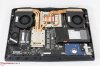
If it doesn't, there are other things you can do to increase pressure, like using thinner thermal pads, bending the arms up, and pushing down on the heatsink when screwing it in. -
For some reason, my heatsink has got a different layout of the heatpipes:
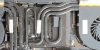
However, I have solved the heatsink's pressure via the copper plate.
For that reason, I am - at least for my F5 - no longer looking into bending arms or inserting paperclips. -
Can someone point me to an idiot proof guide to OCing the 7700k. It's delidded. Not familiar with OCing on a laptop and I don't want to toast my computer.
-
knows who bios supports RTX quadro 3000 4000 5000 mxm ? hp zbook
-
There are some guides available if you search the forum as well as the net, just do it gradually and test stability until you hit one of the max points. Taking good notes will definitely help in this regard.
-
Hey guys, a couple of days ago my laptop speakers started acting weird : cracking, popping, sound randomly cutting off. Last night I literally had no sound at all anymore.
This weird behaviour starts with windows booting up, and the popping and cracking continues even with headphones plugged-in but doesn't come from headphones themselves if that makes sense. Only laptop speakers are affected.
I have tried most fixes suggested online :
- Realtek drivers reinstall as well as Microsoft ones.
- Changing audio quality
- Removing all audio enhancements
- System restore
- Windows update
Any ideas? I am currently traveling in New-Zealand for a few months so this is really bad timing
-
Trying it now but I have no clue what I'm doing.
-
From bro @Mr. Fox Download and read it Mr.Fox.TF5.OC.PDFFrozenLord, Donald@Paladin44 and Mr. Fox like this.
-
Be very careful with frequencies and voltages, as your laptop might be unable to boot if the selected frequency requires a higher voltage.
It's easily corrected by resetting the bios via unplugging the bios battery, however to do that you need to disassemble your laptop or install the battery extension mod.
To be safe, I would suggest starting with Throttlestop to overclock.
This way, if your device crashes, the faulty settings will not be part of your bios settings and your laptop can boot after a crash ;-)
And be wary, as always, of your CPU's temperature as the 7700K is running quite hot on stock.
When overclocking, you are usually putting out additional heat and that might be too much for your cooling system. -
Okay so I'm going to follow @Mr.Fox guide. Is there any other changes I need to make or settings I need to tweak outside of the PDF? I'm using ThrottleStop and it's a delidded 7700k I had SiliconLottery do. Right now with no OC it's getting about 98 degrees max on the 256MB TS bench,
-
hey guys, so last night i was cleaning my laptop and accidentally the heatsink touched a small surface of the GPU and there was a spark. after that the laptop wont post anything.
i took the picture of the card and it seems the component is fried i think. Can someone look at the picture and tell me if its dead or there is some hope? thanks.
i'll be taking it to repair center after the weekend. but i heard GPUs can not be reliably repaired.
This is the image. https://imgur.com/8PAPRUu
-
If it was just on that SMD, then it's the current measurement on the 19.5V, replace it and check voltage presence.
No POST means no image or no reaction at all?
Could he that it took some input MOSFETS. -
I send my laptop to MSI service so they can change rumbling fans for silent one. They send me laptop with these fans, but numbers on em doesnt sounds familiar. Any chance that they're these new better version?
![[IMG]](images/storyImages/djQYngW.jpg)
![[IMG]](images/storyImages/3nu7vYn.jpg)
-
Are you able to unmount those fans and provide a photo of the sticker on the bottom?
There should be a type label on there that gives a manufacturer as well as the type description. -
yes the spark/contact was only on the graphics card, i have sent it to a repairing center for now.
It did turn on and everything seemed normal, fans turned on aswell , but there was no image just black screen when last i checked. -
Did you not unplug the laptop AC adapter *AND* Battery after opening it?
-
did unplug the power but not battery, i wasn't really removing much, it seems the padding near the gpu on heatsink has worn out and it touch it once it. tho the laptop has serve its purpose for me so not too worried about it. its almost 3.5years now.
-
HI.
Long time no chat!
So, I'm really in need to move out of my GTX 1080, it hits limits easily with resident evil 3 remake... lol
Any recommendations for a 2020 eGPU box to go with a 2080Ti?
My laptop got the 8700K CPU over a year now without issues running 4.4Ghz daily. 64GB Ram and 3TB SSD (1 NVMe, 1 M.2 and 1 Sata 3).
Sad to see @Talon laptop dead.Talon likes this. -
Did you do some kind of cooling for the power circuits (vrm) ?
-
Thanks bud, unfortunately it's toast. I have it sitting in original shipment box from Eurocom. It made it about 3 years so it definitely served me well. Unfortunately it was still a beast and played games great and I wish it was working so I could at least sell it. Luckily I found a decent deal on a BGA book and I really do love it's portability and weight. Unfortunately I find myself gaming very little on the road and would actually get by fine with a cheap $500 laptop. I might even look at a cheap-o Zen 2 APU based book with just enough power for some light gaming.Huniken likes this.
-
I knew VRMs will get hot because no air movement due to bottom holes, I put tape to cover bottom holes mod up to 90% and leaving 10% gap space to let the GPUs breath, I turn my moded Asus fans up to max power, VRMs stay in high 70s under load, CPU around low 80s under load and GPU is 88 to 92c depending on game load.
Good luck to you amigo. Any suggestions for an EGPU box that will go well with the EVOC laptop?
Hey here is mine from today's one hour gaming session in Star Citizen.
See screenshot.
Running my Asus fans at max speed, 5500 RPM for GPU side, 4700~4500 RPM on CPU side.Attached Files:
-
-
I tried to turn them on to the maximum, it is very noisy. It's even a little scary that the fans won't last so long
-
Hello all!
I hope everyone is doing good and are safe during this crazy time in our world!
The short of this is, after not using my computer for awhile, I went to fire it up and no go.
Would love some help thinking through things that might be the issue, as I have tried a lot and I am kind of at the end of the rope. Below are a lot more details and the steps I have taken.
It's been a long time since I have posted in here and really kept up with it. Hope all has been great and y'all have been being awesome with your little beasts! I will say that, just scrolling through here, I have already seen some upgrades that have happened and some awesome stuff with these power houses.
So what happened...
History of use of the computer
Other than the heavy gaming I did on it right after I bought it, for a long time during the year or two prior to last March, this laptop pretty much sat at my desk at the office and I would take it home very occasionally to play some games or something. But it worked great and was way more powerful than was needed for that, but was nice to never have it bat an eye at anything! I did think about even posted in here a bit about selling it but just never did it. I ultimately like the macOS world and the niceties it provides, especially with things between my iPhone and iPad. So I was wanting to get a MBP after selling this one, but just could not get around the awesomeness of the power of this one and kept it.
But last March I changed jobs and this one was a LOT more mobile in the regards of in and out of meetings and taking my laptop home to work every night. It's not the most mobile of laptops. lol
Shortly after I started, someone left and they had a company computer, so I got that and put this one on the shelf in my closet. Hasn't been turned on or really even touched since probably sometime in April of last year.
Fast forward to this week and recently I have been missing the power of this computer and it handling everything I throw at it. The laptop I have been using just does not keep up with the web design stuff I am doing across two external monitors and it's screen open, just showing like my messages and Spotify, but still pushing pixels to it. So it's really been on the struggle bus, especially recently with all the zoom calls!
I was like, I have a super awesome computer just sitting in the closet and I can get around some interface differences and probably even not getting to have messages on my computer. lol
What was being experienced
So I dug it out and got it all plugged in, I did let it sit for a bit, as I knew it probably would need to get some juice in that battery. I went to turn it on and the power light was blinking, but nothing was happening and after a bit of time the light went off. Weird, but maybe still just needs some time.
Tried again after several hours of it being off and on the charger and same thing happened. Well crap...
I dove deep into research and did just some typical steps of being a nerd and knowing what needs to be done. Luckily his thread is a wealth of resources to look back on but everything I was finding was stuff I had tried or did not work.
Just as a detail, the extent of nothing is really nothing.
Like the fans don't come one, which I haven't replaced them since I bought the computer so they have pretty much failed. Right before I stopped using it I could still push full rev button is and blow a little air in the vent to give them a jump start. lol
But at this point that button won't even illuminate, screen doesn't come on, backlight or anything. Even shining a light at it, shows no picture, plugging in an external monitor to the Mini Displayport or HDMI port do nothing, can't get into BIOS or boot menu of any kind, no keys work or anything. Literally nothing.
Steps tried
I have done an immense amount of combos of troubleshooting and this is a list of them (provided I did not miss any).
- Upon every step I would disconnect the power from it while doing these things and would be the last thing I put back in when trying to turn it on.
- Took the battery out.
- Took the CMOS battery out. (I have the CMOS extension so that is a lifesaver, thank you to @Donald@HIDevolution for that suggestion)
- Took them both out
- Let the computer set for a couple of hours with no CMOS, battery or power connected.
- Have held down every button that was recommended to hold to for misc. activities. The power button, the del key, the rest button on the back.
- All of those holding down have also been with the power connected and with it not, with the batteries (main and CMOS) connected and with it not, with it "on" and with it not. lol Y'all get the idea.
- I had seen and know from past that even though it's really not supposed to do this that a dead CMOS battery could cause boot problems. I have a little Intel NUC that I accrued from somewhere for the past few years. So I took the CMOS out of it and put it in there and still nothing.
- The CMOS battery that I just took out of there, I put into the NUC and booted it. It booted up fine and there was something about the CMOS that flashed up, but I didn't catch it in time. When I tried to reboot it several times to see it, the message has not displayed again.
- I took the M.2 HD (only drive in the computer) and put it in the NUC and it booted right to my login screen just fine. So I put it back in the laptop.
What's happening now
At some point in the batteries out and reset buttons that the behavior did change.
In some instances for the better and for some the worse but still not a big deal.
At first the LEDs on the front edge of the computer worked, when I very first plugged it in, the battery light came on and the HD light would occasionally blink.
But now those don't do anything at all, this is the not big deal part of it. I can live without front notification LEDs.
The power light now stays on constantly after it's pressed as if the computer is actually on, but it's not.
The fan button and keyboard backlight options are working.
I push the fan button and give the fans a kick start and they spin up to full and stay there.
I push the keyboard backlight button and one section will come on and then the full keyboard will come one and then go back off.
Just plane white and pressing other buttons does not illuminate keys, like the num lock, etc.
Everything else is the same.
There is nothing happening on the screen, no backlighting on and when shining a light to it, there is is no image seen.
Connecting monitors does nothing, either Mini Displayport or HDMI.
Keyboard presses do not alter the behavior, if the keyboard is not lit up then num, caps or scroll lock does not light up when you press it and the LEDs on the front edge do not come on for them either.
You cannot hold or rapid press any special keys (F buttons, DEL or anything like that) to get into any menus or boot screens.
No audio is being played, although I could not remember if there would even be any audio in a regular boot like that.
It really is like it now turns on with the ability to control fan and keyboard lighting, but that is literally it and everything else is blank or doesn't do anything.
The only step I have not tried is removing or moving the RAM. I had them put it on the keyboard side during build so that I could just add modules on the back easily if I wanted to down the road. That seems to have been a bad choice if that if a step that needs to be taken, but I am up for trying. It seemed like doing that solved other issues so I didn't go to that extreme before at least getting some opinions.
Begging for help. haha
But really, any help or tips that anyone has would be beyond great!! I cannot imagine what happened to this thing while sitting in the closet, but I just want to throw up. It's the first and only computer for a VERY long time (unless sold and save money with it) that I will have of this caliber and cost. So to think that it's dead after a few years of very light to no use, just makes my stomach hurt!
So I'm down to try anything y'all can think of!
Let me know thoughts and hope y'all have an awesome Easter weekend and that you stay safe and healthy! -
Remove one stick of RAM.
Then hold the power button down for 60 seconds. Release it, power off, then press it normally once and then wait about 3 minutes.Papusan likes this. -
1. Are you using a modded BIOS?
2. Have you ran memtest? -
Well, that’s the thing is I have not tried anything with ram since I had them install it on the keyboard facing side.
I was trying to think through the doing the upgrades the easiest way when I bought this. So I had them put the current ram on that side and a cmos battery extension in, in the hopes of note having to tear it apart unnecessarily.
But I can go through the process of doing that and while I have it apart I’ll probably move both sticks to the back just in case something like this happens again. I may do that late this evening.
Do you know of some “shortcuts to taking it apart entirely? Like are there some miscellaneous ways to keeps different parts attached to the motherboard and remove it all at once? Or is it truly a everything comes all apart?
1. I am using whatever BIOS came from HIDEvolution. I doubt it’s modded. I really never got into all the overclocking and stuff. I mainly got this for a more portable option for some awesome and upgradeable power. I wanted to at some point, but haven’t yet.
2. No I cannot do anything with it. -
Hi Guys,
Been a while... I miss my lil' F5 so much, I am thinking about the buy another one I like it during summertime, as it is so easy to carry
Is there anybody who's willing to sell? I prefer 1070/1080 version all other parts are less important
cheersPapusan and Kevin@GenTechPC like this. -
Im looking to repaste my delided i7 7700k with LM on IHS, but still not sure how should i approach it since all laptop guides are focused on BGA chip.
I know about kapton tape - but what else you recommend to make it as safe as possible? -
Well.. I went through the process of moving the ram to the accessible slots and have tried every combo of them in and out of the slots with and without cmos battery, holding power / reset buttons and everything in between.
Same result, I can "power it on" where I can control the fans and the keyboard backlight but nothing else happens. Any other thoughts? -
Give MSI a call to have it serviced (even if it's not warranty), sometimes we don't know the actual details without doing a full and thorough inspection.
-
That means the board is dead.
Perhaps you can send it over to @Khenglish who may be able to fix it for you for a small fee? He would be one of the few people with enough knowledge, but I think he specializes in video cards.Papusan and Kevin@GenTechPC like this. -
He is specialized in video cards yes.
MSI boards usually do not have schematics so it will be harder to debug and fix. -
You think I should reach out to MSI or HIDEvolution since it's the EVOC custom build from them?
That is a big load of suck!
So weird for it to go from fully functioning to my closet self and then dead after 6 months.
You think that it's for sure the motherboard, even with the functions with the fans and the keyboard backlighting control working? -
You should try, if it's worth the cost, why not?
-
Oh I’ll for sure try. I meant do you think I would have more luck reaching out to MSI or HIDEvolution?
-
MSI is factory-direct, you won't need to go through anyone to do this one since the unit is already out of warranty.
-
Morning,
Has anyone experienced weird issues with the right side of the keyboard changing colors or randomly flickering on and off? I thought it was hardware related because at times if I press on the palm area it will make the lights flicker, but other times it doesn't do it at all. I am trying to determine if this is a potential software issue or physical keyboard issue (assuming with the ribbon cable). Unfortunately because of how much a PITA this thing is to tear apart if I go that route I will probably just buy a new keyboard to be safe.
Any thoughts? -
I don't think so. Only issue I've had is where sometimes it'll reset the colors but that's most likely KLM.
Anyone getting an SCM error though? It just refuses to open at all.
EDIT: Reinstalling it helped if anyone encounters this issue.Last edited: May 6, 2020 -
Its for 99% hardware issue. After 2-3 years i saw many posts that keyboard start to do that. At some point it will stop glowing at all. Only way is to swap keyboard.
*** MSI 16L13 (Eurocom Tornado F5)/EVOC 16L-G-1080 15.6" Owner's Lounge ***
Discussion in 'MSI Reviews & Owners' Lounges' started by Diversion, Oct 14, 2016.