Problems? See this thread at archive.org.
Hi everyone do you think is it possible to upgrade the cpu with i7 8700k?
PS: I apologize in advance for my bad english.
-
yes its possible.
-
Hi Rahego thanks for the reply, do you know what are the steps to follow for updating to 8700k?
Forgive my ignorance about it.
Please could someone explain to me how to upgrade from i7 7700k to 8700k ?Last edited: May 10, 2020 -
Hello everyone, I have MSI MS-16L1. My laptop has a dsanke BIOS. 9700K processor, NVIDIA Quadro P5000 graphics card, VBIOS 86.04.3a.00.15. I tried to connect an external DELL P2314H monitor using the “Lenovo Mini-DisplayPort to DisplayPort” cable, but the monitor is not receiving a signal! Please tell me why “Mini-DisplayPort” does not work ?!
-
Hey there,
I have recently started looking into the different drivers available for this device and am struggling finding an up to date Realtek audio driver.
Some Realtek drivers simply refuse to install, while others install just fine but will (seemingly) not be able to use the integrated subwoofer.
When I uninstall the Realtek drivers and simply let Windows install the best default driver, I end up with two audio devices:
- one being the two speakers on the top (left and right)
- one being the subwoofer
The only driver which (seemingly) works fine, is the very old one hosted by Eurocom.
But that one is quite dated - version 6.0.1.7841 from 03.06.2016.
Is there any newer version that is compatible with the subwoofer and the speakers?
Or is there a known way how to mod newer drivers to address the speakers as well as the integrated subwoofer?
Thank you for any hints or ideas
-
Did someone actually tried the water-cooling on the Tornado F5 with GTX1070??? Some temps/benchmarks will be nice. Sorry but got lost in the thread about dozen of pages after page 1063.
I know @Huniken was trying hard to mod it for the 1080, but sounds like mission impossible.
Have the crazy idea to do a ghetto water-cooling with this mold + fountain pump+ big bottle of distilled water + 360 radiator (Eventually) + put 9700k and unlock the GTX1070 to 200W. Just to revive this hell of a 4 year old terminator. -
Hi all,
I'm still running the original Tornado F5. I've run into an issue that hopefully I can get sorted out. I bought 2 sticks of RAM (16GB total) to upgrade my single 8GB chip. When I installed both new sticks, the laptop powers on but all I get is a black screen. Both memory sticks work individually, but not together. Whats weird is that if I install one new stick and the old, it works and confirmed it shows 16GB. What could be the problem? The new memory doesn't seem to work dual channel. Or better yet, if someone can recommend some working 16GB memory
Link to memory:
https://www.amazon.com/gp/product/B07QMMZ79V/ref=ppx_yo_dt_b_asin_title_o00_s01?ie=UTF8&psc=1
Thanks in advance.Last edited: Sep 11, 2020 -
Sometimes in MSI this could mean some issue with BIOS (i.e. saw issues with something similar but for all 4 dimm slots, where could be used only 2 of any 4 slots, 3 or 4 never worked unless BIOS was reflashed).
-
Don't try the lesser expensive RAM for this model. Look for Kingston HyperX, G.SKILL Ripjaws, XPG Flame, Team T-Force Vulcan or Night Hawk, Corsair Vengeance, or Crucial Ballistix
-
I am experiencing something similar with 2x dimms of Micron 3200MHz Ram, i.e. black screen with two dimms and booting with one.
In my case, the reason seems to be a too high frequency for dual channel - either my CPU or the chipset doesn't like it.
My solution is to boot into BIOS with one stick and set custom frequency and timings, then shut off and insert the second stick.
When doing it like that my dual channel setup with the previous black screening dimms does work.
However, I only had to reduce the frequency to 3000MHz, and was able to tighten the timings without any problem.
If you are really trying to use 2666MHz Ram and are already encountering black screens, then I don't have a good idea.
As a shot in the dark: which BIOS do you have on your device? (I am using dsanke's modded BIOS for Coffee Lake alongside the latest EC firmware that Eurocom provides for the Tornado F5)
UPDATE: You need to have enough patience when booting the laptop with two dimms at the wrong frequency.
My laptop falls back to default settings, when it can't boot due to faulty / way too unstable RAM settings, however the default settings will take some time as the device will train the RAM for several minutes before booting with high timings and 3200 MHz.
Therefore, it will boot even with two dimms at 3200MHz, but it will take you some time - just let it sit for half an hour and it should be able to boot.
At least it does in my situation
Last edited: Oct 15, 2020 -
@FrozenLord OMFG ... THANK YOU!!!
I probably have the same sticks 2x16gb 3200mhz CL22. It was all working well with 2 sticks and a custom unlocked BIOS by SVET to support 7700K made in early 2017.
However these days I decided to upgrade to 9700K and flashed the dsanke's bios, but by mistake I flashed Terrance Force bios (thought it is TF5. It worked well but then I figured out I need the GT62 bios thanks to @
DaMafiaGamer
I flashed it with a small hack used to unlock the FPT following SVET's instructions. I managed to flash it successfully but then black screen of death. I was not too worried but my new programmer is still on the way
Just read your post ... removed one of the RAM sticks and it raised from the death
BTW which BIOS do you use? What do you mean by latest EC firmware? My EC chip burned long time ago so I had it replaced and got the EC from Eurocom (T5_EC113). What is the process to flash it without special programmer?
I do not understand why but my options in both of dsanke's bioses are very limited, and this is the reason I had to unlock the FPT the second time I simply cannot get to the PCH options in bios.FrozenLord likes this. -
You're very welcome
And yes, those are the exact same dimms that I have as well.
(If it helps, mine are able to run at 3000MHz and, top to bottom, 18-18-48-18-32-11712-475-15-9-18-0 with T1)
I am using the same dsanke you are mentioning (the newer revision with some supposed power fixes) in the GT62 variant, to have the MSI logo
As for the EC firmware, you seem to be up to date.
Mine came with a pretty old one and I was able to get the EC.113 from Eurocom (they host it in their downloads section) and flashed it with the tools that come with the GT62 EC Update (downloaded from MSI).
This way, you can flash it from within Windows without a hardware flasher.
It's even possible to tweak the fan curve (via Svet's VBIOS tuner) and flash the modded EC firmware back.
As for the limited options in dsanke's BIOS, I have frankly not checked what I got when doing that.
I was initially planning to get a 8xxxK or 9xxxK CPU and have flashed the BIOS for that purpose.
But considering that I am already GPU-limited and that those CPUs seem to only offer marginal FPS improvements over my potato 6700K (I am able to run 4.2GHz on all cores at stock voltage with 55 for Loadline AC/DC - anything lower than that and it will crash), I decided against it.
Cheers -
Hm strange... see my bios options... other menus are even more empty. I also have the MSI logo now.
I also used to modify the RAM settings in bios before. There are other ways but it is more convenient that way.
So you have the same bios for GT62 from the Coffee lake upgrade thread?
I am waiting for the water cooling and will also unlock my 1070 to 200W.
The m.2 extra slot serves as a nice option to plug a Desktop video for extra 50$. So maybe 3070 or Big Navi around Christmas. I used to test a lot of desktop cars on PCI-e x1 before ... even GTX1070 and the performance difference has always been negligible... and this one offers x4 connectivity, which has less losses than TB3 expensive solutions.
In the meantime I am checking with intel because this 9700K has 33 degrees difference between two neighbor cores... This I first tested on a desktop with NH-D14. 3 cores have at least 10-20c difference from the other 5. In the laptop the same problematic cores. I suppose bad TIM.
P.S.
The ram issue seems more serious than I thought. Only one of the two sticks works on only one of the slots. Tested all other configurations (not tested slot 3/4 for obvious reasons)
BTW my adapter - m.2/NGFF to PCI-e (1x to 16x) came today. Quickly tested it on both the laptop and an AMD desktop but the GTX 1060 I use is not found on neither.Attached Files:
Last edited: Sep 21, 2020 -
-
This is the thread I am talking about and where I got my bios from.
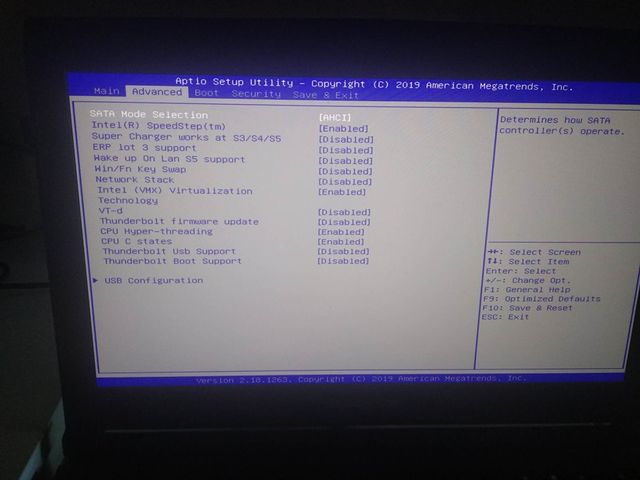
Just to make sure, you are actually unhiding the hidden settings via "Right Ctrl->Right Shift->Left Alt->F2", correct?
If not, then my BIOS is also quite sparsely populated.
And the single RAM dimm is only working in the top slot on my device, i.e. the one that is not next to the board.
If I place the single dimm in the slot right next to the board (and without custom RAM settings), then I am getting a black screen as well.
Thank you very much for sharing those files
I have been using the Prema mod for some time and have recently decided to give the Clevo one a try.
On my device, the Clevo one does spike above 200W in some situations which I am not comfortable with.
However, when I switched back to the Prema VBIOS, I flashed it (successfully according to NVFlash) and did a verify against the ROM.
I had (so far) always relied on NVFlash's status afterwards, and neven given verify a try, but my flash was seemingly unsuccessful.Code:nvflash64.exe --compare Prema_EVOC_1080.ROM NVIDIA Firmware Update Utility (Version 5.353.0) Simplified Version For OEM Only Adapter: GeForce GTX 1080 (10DE,1BE0,1462,11F4) H:--:NRM S:00,B:01,D:00,F:00 Identifying EEPROM... EEPROM ID (C2,2534) : MX MX25U8033E 1.65-2.0V 8192Kx1S, page Reading adapter firmware image... Current - Version:86.04.2B.00.1B ID:10DE:1BE0:1462:11FF GP104 Board (Normal Board) Compare with - Version:86.04.2B.00.1B ID:10DE:1BE0:1462:11FF GP104 Board (Normal Board) ERROR: Mismatch at offset 0x00028AB1. Note: Final InfoROM offset 0x00039600 ( 0x0003A000 ) with length 0x00005000.
Strangely enough, when I tried flashing the same file again, it did give the same error.
In the end, I dumped the newly flashed VBIOS and compared it against Prema's VBIOS in a Hex editor. (there were a few bytes that differed)
Afterwards, I did flash the Prema mod once again and dumped it again - this dump is identical to the previous one, so I assume that either my VBIOS chip is slowly dying or that NVFlash is actually changing some parts around (which does not make much sense when looking at --verify).
Anyway, the laptop does boot and appears to be working...
In addition to the 200+ W that I am not comfortable, I wanted to update my GOP.
I did stumble across this thread that provides some explanations as to how to update the GOP.
However, the tool did output some errors (so I did not even try flashing the file) and around page 33, dsanke mentioned that it would be possible to flash the GOP update by using "nvflash -u".
This fails every time I try it without any error message:
Updating the GOP appears to be necessary to have fully functioning Displayports.Code:nvflash.exe -u nv_gop_GP1xx.efirom NVIDIA Firmware Update Utility (Version 5.620.0) Copyright (C) 1993-2019, NVIDIA Corporation. All rights reserved. Adapter: GeForce GTX 1080 Results: Index | Match | Flash | Name <00> GeForce GTX 1080 (10DE,1BE0,1462,11F4) S:00, B:01 Nothing changed!
Nvidia did offer an update tool (only for desktop cards) to update the GOP, in order to improve compatibility with Displayport 1.3 and 1.4.
However, I did not make any progress on that front.
The only thing I was able to gather is that the GOPs included in the VBIOSes linked above are quite dated (early 2016) and that there are vastly newer ones available.
If anyone has got any idea, as to how to update the GOP or has got a hint on whether the NVFlash Verify mismatch is serious / how to get rid of it, I would be very curious and thankful.Last edited: Sep 21, 2020Mr. Fox likes this. -
OMFG you are a lifesaver, and I feel so dumb/spoiled I did not know that spell but it worked. I can access all advanced options now.
However I cannot solve the 2 slot mystery just yet (haha). Even with custom settings the second slot won't boot (at least both sticks seem to work now). However in my laptop the slots are in reverse - the closer to the MB slot works the other won't, even with single stick set to 2133 mhz cl18.
I should try the settings you provided (Thank You!), but I have suspicion that will not work either
I feel there is something wrong with that bios. I might just flash the Terrance force one.
P.S. Flashed the TF Bios and black screen of death... it won't work with either 9700k/7700k and any ram config Last time ran fine with 7700k and both ram sticks. Hmmm I feel something is wrong with the laptop itself.
Last edited: Sep 22, 2020 -
Just stumbled upon this: https://perfectron.com/products/peripheral-module/mxm-gpu-module/sk2060
This looks to be fitting the Tornado F5/MS-16L1 and had no external power connector.
Any thoughts on this?FrozenLord likes this. -
Looks promising. Any similar card in 2070? I assume bios mod also needed in order to avoid nvidia inf mod, but I am not expert in that field...Last edited: Sep 22, 2020krakr likes this.
-
Short addendum to this: for reasons that I am not yet able to comprehend, the flashing process seems to work in Windows.
However, --verify seems to fail.
I did reboot into safe mode with command line (hold shift when pressing reboot, then click through the menus to the only command line one) and was able to flash there as well.
When doing a --verify from that (safe mode) command line, the flashed VBIOS and the file are identical, i.e. verify successfully. -
I did not find anything on 2070 or 2080 only 2060 from that specific company, also it should be plug and play as physically it fits
:::EDIT:::
I just had a look at the gtx1070 and layout of the PCB of 2060 and they are almost exact.
Except the GPU is mounted vertically on the 2060 but that can be fixed with a thermal pad/paste and 0.5-1mm copper shim, the screws and all of the 1070 heatsink will fit with almost no mods, anyone is up for testing?
Last edited: Sep 23, 2020 -
I am back to business with the Coffee Lake Terrance Force BIOS by dsanke. My programmer finally came so i flashed it directly.
Still I had to lower the memory timings from 3200 (12x133) to 2666 (10x133) in order to get the two memory sticks to work. I tried 3000mhz (15x100) ... did not work with two sticks.
I personally do not see point to put 2060 in this laptop, but it will still be a nice experiment.
I am going to test more extensively the option to use a m.2 NGFF adapter PCIe x4 (50$ on aliexpress), these have only 5-10% performance loss compared to the expensive TB3 boxes and cables which have 20-30% performance losses.
I bought a cheap x1 cable adapter version (7$) just to test if it is working and how exactly to set it up.
I keep my laptop with the bottom cover open anyway for better cooling and If I need to take the laptop with me just put the cover, never screw the nuts.
Waiting for my water cooling parts and will unlock the 1070 to 200W put a 9700K and it will become a chilly beast DTR or more like DDT - Desktop Detronator Terminator.
I will wait for big Navi and maybe for Christmas will buy RTX3070 or AMD variant. -
Its not a 2060 its a 2060 super which is basically a standard 2070 maybe 1-5% less in some games.
So I do see it as a viable upgrade considering its more power efficient overclocks better and lower wattage and has RT cores to play games on the go with ray tracing features.
And benchmarks better than the 1080gtx i have on the laptop right now.Last edited: Sep 27, 2020 -
Has anyone tried the m.2 NGFF eGPU solutions? I bought the cheap 7$ x1 connector just for the test.
I cannot get it to detect the eGPU. I suppose something needs to be changed in BIOS but there are so many settings.
I have played with several laptops and eGPUs 4-5 years ago and it was really easy to get the eGPU at least detected using the mPCIe slot. -
Did you use the R43SG M.2 ?
-
No, I used the cheapest possible solution with USB cable and x1 signaling. Just wanted to test it and see how it works.
Knowing my luck the problem is with the cable, but I would appreciate if someone has any other suggestions as there are so many options in the bios, and I am tired of bricking it. I bricked the BIOS several times, bricked the VBIOS more than 10 times. The system seemed bricked at some point because RAM speed seems incompatible with one of the bios versions for Coffee lake.
Waiting for my water cooling heatsink one of these days, and want to test as much as possible before "fixing" the laptop with the water setup.
So far I unlocked the 1070@200W/215W, successfully ran 9700K in the laptop, figured out that one of the BIOSes does not run with both my RAM sticks@3200mhz. The TF (Terrance Force) BIOS by @dsanke seems to work best with this RAM. The MSI version works with only 1 of the sticks inserted in only one of the slots.
Only thing left is to test the eGPU compatibility over m.2 NGFF.
The 9700K I got is a nice clocker... works great at 5.1Ghz all core but … 3 of the cores overheat terribly- 20-30c difference compared to the other 5(33c difference between core 1 and core 2 is the maximum I saw under load). Intel are unbelievable. I even spoke to their support and asked them to replace the CPU, but all I received was automated messages explaining what the different limits (Current, temperature, etc.) work in their processors. When I told them I know that and their processor works even at 5.1 all core, but the sTIM job is really bad and the CPU throttles due to temperature limit even at default 4.6 all core and Prime95 (AVX) loads, they explained to me that they cannot offer support for overclocked CPUs … WTF Intel?
I tested on both a desktop and a laptop. Delidding is required but since I already killed 2x9900K ES (then moved to Ryzen 3900x setup and forgot about any issue) this 9700k is still under warranty I better not waste my time and just sell it as a desktop bundle to a casual gamer and try my luck with another unit although in the future I will try to stick with AMD.FrozenLord likes this. -
You wouldn't happen to know the steps you took for getting them to work?
At the moment, I am struggling with getting an external GPU dock from Lenovo to work and have got a feeling that it is due to my TB3 firmware.
The Thunderbolt 3 control center is showing my NVM firmware version as version 16.
This does not change when installing any of the MSI GS63VR TB software bundles that I was able to find :-/
I know that the cable as well as the external GPU work, as I am able to use them without problems on an HP laptop. (NVM firmware version 20)
On that device, it was a simple plug&play operation, whereas my Tornado F5 does not recognize the GPU / Thunderbolt device when it is connected.
And as a short heads-up, I have just noticed that Eurocom has provided a new EC-firmware (114) and bios (312) on their website: http://downloads.eurocom.com/support/drivers/models/tF5/
Those seem to have eluded me in the past.
Has anyone given either update a try yet?Last edited: Oct 4, 2020 -
Are we able to upgrade to a RTX 2060 Super? I'm still rocking a 7700K plus GTX1080 and I think its time to start upgrading some the parts on my laptop.
-
I burned my GTX1070 last night … (idiot me decided to bench on a new vbios without both fans) …
Have you quoted a price for the RTX2060s?
Wondering whether I should go for a cheap 970m/980m or this. 1070n is 500$ from china … not worth it
Dumb question: Will any MXM3.0 card display picture and boot into Windows?
Second dumb question: Is there any way to use the CPU GPU? (I know it was hard disabled but worth to try).Last edited: Oct 8, 2020 -
That's a sidegrade, not an upgrade.Papusan and deathwingbg like this.
-
My dead little beasty Still miss it, I could not find any better laptop then that. I would like to buy another 1080 model
-
You should be able to with INF mod to the drivers since the bios on the 1080 model only has up to gtx 1080 devid.
However inf mod should be easy enough
No really its a 2060 super it runs better than the 1080 since its similar to 2070 og performance and you get rt cores.
so it is an upgrade
"Will any MXM3.0 card display picture and boot into Windows?" - most likely yes, if its compatible with the form factor and has adequate power supply from the mxm slot.
the max wattage the mxm slot can supply is 200w the 2060s is 175w and the 1070 gtx heatsink fits it like a glove, so there shouldnt be any issues making it work and post either to internal screen since its lvds and hdmi port since the card and the mxm supports it.
"Is there any way to use the CPU GPU?" yes, enable it in the bios but since the mb is wired to display from the mxm card into the internal screen of the laptop you will only see picture with hdmi or dp port.
is the CLEVO P751DM2-G not better?
-
LOOL. And good luck with amazing performance from RT cores on an 2060 Mobile. Nope, it's an downgrade.
-
I think its obvious the RTX performance without DLSS are going to be ass above 1080p however still its an upgrade leaving RT aside, playing control on the go with DLSS enabled is pretty neat or other titles.
I have 1080p panel on the laptop so it will handle RTX with or without DLSS pretty well, also it has the same clocks and specs of a desktop RTX 2060 super so i am not sure what you're trying to say.
Besides have you seen 2070 vs 2060 super benchmarks, its mostly 1-10% off the 2070 OG.
Also it runs cooler than the 1080GTX, as the thermals on the 1080 are horrible pulling 190w.
Since this laptop has no official upgrades or any upgrades coming in the future having an RTX 2070 similar performance on the go is pretty nice with a laptop which is obsolete at this point.
So i am not sure what point you're trying to make. -
1080p aka Firestrike is for cards as 2060/1080 Mobile.
![[IMG]](images/storyImages/2197802.jpg)
Time Spy for 1440
![[IMG]](images/storyImages/2268987.jpg)
4K is too much
![[IMG]](images/storyImages/2246518.jpg)
Main point. 2060 Mobile in any form or shape is a weaker card. See... A stupid upgrade.Last edited: Oct 11, 2020 -
I think what is stupid is you're showing me benchmarks of a 1080 gtx what am i suppose to do with this information?
It is a fact that 2060 super performs better than 1080 at lower wattage so, what point are you trying to make?
![[IMG]](images/storyImages/2_2.png)
Of course mobile GPU are not going to be 1:1 with desktop however the 2060 super is still faster than the 1080gtx at lower TDP and has RT cores.
With undervolt it will run at better heat output and power draw
With overclock it may run closer to the Desktop version but needs adequate cooling.
So again whats your point?
The 2060 Super costs the same as 1080 GTX used so i can flip my 1080 on ebay so i dont even lose any money?
How a better card is a stupid upgrade? -
You know you post desktop numbers? I post numbers from Notebooks. Your own words... 2060 perform better and is a better option. Please find the good numbers. Here's the link. https://www.3dmark.com/search
Btw. Here is number from 2060 vs. old 1080. The desktop cards. 2060 Mobile will never come close. The Mobile 1080 is closer to the desktop cards.
https://www.guru3d.com/articles_pages/geforce_rtx_2060_review_(founder),13.html -
On desktop, sure. On mobile, GTX 1080 has desktop level TDP, 2060 does not.
-
Old 1080 vs. 2070 Mobile. And 2060 Mobile won't rect 2070
www.notebookcheck.net/Computer-Games-on-Laptop-Graphics-CardsLast edited: Oct 11, 2020 -
2060 super mobile runs with higher TDP than the original 2060 which was 115w this one is 175w (that's what they state in their datasheet).
The card im talking about is not listed in 3dmark since its an industrial card its not used in laptops, its used in gpu computing platforms/systems i dont think they sit in 3dmark comparing scores all day.
By the manufacturer they state in the datasheet that its a 175w TDP MXM card which should be on par with the Desktop variant, unless they are false advertising and posting false information and its an actual 100W TDP card than you're right, however the clocks do not make sense (GPU Clock (max.) 1530 MHz) the Desktop version has boost clock up to 1800~ i dont think that shaving 60w from a card will result in a 300mhz drop it would be far more significant.
In that case if they false advertise that an issue on its own, since what i am basing my conclusion from is that its a 175W mxm card which can pull up to 200W from the MXM slot and its not a BGA low TDP version.
The only conclusion i can come to, whats the point in making a 3.1 MXM card that can pull up to 200W and to make a 2060 super for it that is on par with a cheaper BGA version.
It makes no sense, so that is why i am comparing Desktop performance.
EDIT:
Ill ask then manufacturer to run benchmarks if they can and ill inform you guys if thats a worth upgrade.
Inn the specs and datasheet they might be stating wrong information and in actuality its a 100W TDP card which would be slightly better or on par with the 1080 desktop.
So ill contact them and see what they say.
EDIT 2:
https://www.techpowerup.com/gpu-specs/geforce-rtx-2060-super-mobile.c3549#:~:text=NVIDIA has paired 8 GB,a 256-bit memory interface.&text=Being a mxm module card,rated at 100 W maximum.
If we look at this, its slightly better than the 1080 Desktop and its listed that its 100W TDP the mobile version.
So if in theory they actually do sell the 100W MXM version it still slightly better or equal to the 1080 Desktop.
So it might not be an upgrade but a good cheaper replacement for the 1080 from MSI because the price on that one is steep.
Or sell off the 1080 and replace with 2060 Super, get same or slightly better performance at significantly lower TDP and heat output and also have RT cores to play RTX games on the go in 1080p with average to decent to performance.Last edited: Oct 11, 2020 -
Btw. Passmark software is disgusting and not a trustworthy. It's a reason benchers avoid it as cancer. @Mr. Fox
https://www.videocardbenchmark.net/...(Mobile)-vs-GeForce-RTX-2060-SUPER/4084vs4117Normimb, Mr. Fox and Spartan@HIDevolution like this. -
Had a license a few years back and they blocked it due to a few reinstallations and they wouldn't unblock the license when I contacted them. Horrible company.
-
I think that you're comparing the 2080 mobile (150w) with desktop 2060 super, the 2060 super will be faster.
I requested for the manufacturer to run benchmarks in 3dmark and share them with me (of the 2060 super mobile).
So if the 2060 super is slower than the 1080 i wont replace the card, but if its on par or a little bit better ill replace my 1080gtx and run benchmarks and share my experience with the card over here.
As an experiment on its own it intrigues me.
So from my testing and use of the card it may be informative to whoever owns 16L-G-1080/msi-16l1*/Tornado F5 with 1070 or older card will definitely see this as a possible upgrade since no modding is needed just the 1070 gtx heatsink and you're set.
Basically i will not be losing anything if its slightly better than 1080, runs cooler and quieter since the fans wont go ballistic and has RT cores for either DLSS or RTX. -
I have sold it. I prefer the f5
-
Can you explain how the F5 is better?
Was it the weight or? -
Both are great machines, cooling wise and pure power wise, the clevo is better. However all in all I prefer the F5, as it is lighter, even on max fans is quite compared to the clevo, and a 8700k @4,2Ghz and 1080@150W is still a quite strong machine. And the keyboard is also a lot better imo than the clevo. The only thing which the F5 is lacking is 144hz screen with gsync. 120/144hz managable, I tried both, but you will loose gsync
(one more to the F5, all ports are in the back, so it looks gr8 on the table) -
i see, i was thinking about buying one but it looks bulkier than the F5 so i thought ill skip atm.
-
I've got quote from Perfectron for the RTX2060s. Don't know what I was expecting ...
-
I've got the actual manufacturer datasheet so this can be compared to the Desktop as its a 174W card and not a standard 2060s mxm for laptops.
So this is better than the 1080gtx 150w
-
Its cheaper than the 1070 or on par, so what do you prefer a 1070 or 2060s, would go for the 2060s
-
It is not cheaper ... 1070 = ~500$ ... 2060super=~1000$
*** MSI 16L13 (Eurocom Tornado F5)/EVOC 16L-G-1080 15.6" Owner's Lounge ***
Discussion in 'MSI Reviews & Owners' Lounges' started by Diversion, Oct 14, 2016.