 Problems? See this thread at archive.org.
BIOS may say RAID however, did you create RAID array in RAID BIOS?
-
-
When I hit control-f there are no options to configure the 2 drives to raid 0. How do you access the raid bios?
-
There are options to configure RAID:
Press 2 to define RAID

Press Ctrl+C

use arrow key to select each drive and press Space Bar to assign each drive:
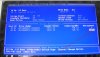
Press any key or Ctrl Y to name your RAID:
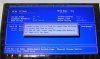
Ctrl Y to confirm erase the drives:
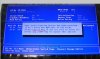
Press any key to use maximum capacity:
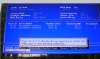
The forum won't allow me to upload more pictures within same post, I'll post more picture in next post. -
Press ESC
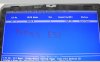
Press Y to reboot
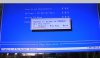
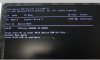
You are done. RAID stays as RAID forever unless you go into RAID BIOS and delete it. You don't need to re-create RAID if you are going to format your hard drive.
-
Hi all
I've just got this laptop and have been playing around with it however I have some questions.
Is there anything I need to do or know from the get go? For example is there any programs I need to remove (Norton will be getting removed asap!), is there any drivers I need to install? or anything else I need to know?
How do I know when a game is using the correct GPU? Can't think of any more questions currently but I'm sure there will be more!
Thanks -
You know the GPU is active when the light turns orange (and from the performance
 ). Best to grab the latest betas from AMD.
-
What light? This laptop is like a christmas tree with all its leds!
Edit: Ah I see, the main one! -
If I want to use full performance when it's not plugged in do I have to change it to Maximize Performance in Power play settings, or is it not affected by using just the battery?
-
Sorry more questions.
I've noticed my wifi speed is considerably slower than my PC even when next to the router. For example on my main pc I download at 10mb/s but on laptop I am getting about 3.6mb/s any ideas? I should mention the PC wired straight to router so its not wifi. -
-
Hah, nothing like the old 683R which had LEDs all around.
-
does higher 3dmark 11 score= higher fps? for example i use a cpu that will bottleneck a gpu and the score is 4.5k and i use another gpu that is better than the previous but on the same cpu the score is 5k. Does it really increase fps of game or 3dmark 11 shows only the average of graphic score and physics score to calculate the overall mark
-
It depends on what game it is, but a higher score usually means higher FPS yes.
-
This really determined by the brand/model of router you're using.
-
Is it Mbps or MB/s?A download speed of 3.6MB/s is very good and depends a lot on the site you're downloading from,time of day and traffic.
There's a lot of variables in wireless networking.
Internet Service
Wireless Router quality and ability
Notebook Wireless Card quality and ability
Number and quality of wireles card antennas
Router Firmware/Setup settings>Band/Channel/Security Type(W7&W8=WPA2)
Wireless Card Driver/Configuration Settings
Signal Strength(Measure in inSSIDer app)
Interference -
It is MB/s I have a 80mb fiber optic connection, I also think it is a good speed but when compared to my PC connected directly to the router there is quite a difference. But it's not a big deal just thought there might be a clearer reason why that would be slower.
Thanks -
What Wifi speeds Your router supports? Because of the nature of wireless communication, there is more "service data" and less actual data transferred through the communication line compared to simple cable connection. If Your router has 150 Mb/s 802.11 n standard, the speed you'll actually get in reality would be something like ~50 Mb/s which translates into 6-7 MB/s in best conditions. I suggest to leave downloads for the cable.
-
Now, my own question : how do you monitor the temperature of 7970 card? I tried most of the GPU/temp reading tools and haven't found any that would show me the dedicated GPU temperature.
-
I hope Enduro works considering it's an all-AMD machine.
![[IMG]](images/storyImages/02.jpg)
![[IMG]](images/storyImages/28.jpg)
![[IMG]](images/storyImages/03.jpg)
![[IMG]](images/storyImages/05.jpg)
![[IMG]](images/storyImages/04.jpg)
![[IMG]](images/storyImages/29.jpg)
-
For me it works correctly. Mostly first time I launch a game it goes on integrated GPU but after that this program appears in the list of recent programs in switchable graphics configuration menu and I can just select to use dedicated gpu for that program.
-
For me, when compared to 13.3 beta 2, this driver brought back the temperature readings in MSI Afterburner
-
have anyone tried undervolting the 7970m? this thread shows a stable undervolt but im not sure if its in the gx 60. Can anyone try it? http://forum.notebookreview.com/sag...ng-periodic-drops-utilization-not-enduro.html
-
Why would You need to undervolt when the main reason for undervolting is saving power/reducing heat when idling and since this notebook uses enduro, when idling, 7970 is totally switched off.
The only reason I can see for undervolting is lower temps when under load to allow for better overclock, but I'll just avoid that for now. Seems like current performance is plenty enough. -
For ppl who game a lot in notebook frequently uses the 7970m. Undervolting is a good choice to expand the life span of the gpu. Since it doesnt cost anything why not try undervolting to maximize the life span of the 7970m?
-
Is undervolting really a proven way to extend the life of something? It may work in some things and do the opposite in others. Lower voltage means it has to draw more current to do the same work. Brownouts or undervoltage on power sources are notorious for damaging electronic.
-
As you lower V, you lower P, so I can stay very similar.
Be VERY careful when talking about "work" with electronics as all energy is wasted as heat, no "useful" work is done unless you are talking about the fan moving or the light emitted from the screen or sound from the speakers, that's about it.
Heat is the biggest electronic killer, reducing it is the major goal, a slight increase in I, would be washed away by the temperature advantage. -
I agree with Meaker. Undervolting helps reduce the input voltage and result in lower temp. BTW lower voltage just make electronics to malfunction properly while overvolting is the main culprit for damaging electronics. And what i mean but undervolting here is to reduce the input voltage at a point where the gpu still function properly which also mean better efficiency.
-
Hi Meaker,
Apologies for not replying sooner. Many thanks for your help, I was able to fix in the end. I now have windows 7 working in raid 0.
I'm just sorting out the drivers now and then the next fun bit starts with getting windows 8 put back on in dual boot!!!
Again, many thanks. -
So I'm about to order this laptop. Seems u guys like it despite the bad reviews I have seen. I am wondering if the new a10 APu will fix and bottlenecking. Even if its only on par with the Intel i5 it would be a huge upgrade. Anyone have. Any info about this. And how hard would upgrading the APu in the gx60 be?
Any pricing info for it avaliabe yet? -
Guys,
I have purchased my GX60, and now I want to buy a SSD to increase system speed, But I dont' know which is better, a 256GB Samsung 840 Pro or two 120 GB Sandisk Extreme in RAID0? What do you think? -
A question about gaming using only the battery.
Have you guys changed your power settings for the graphics while using only the battery? I've noticed the performance is a lot worse when just playing on the battery. Tempted to put the graphic settings on maximum performance at all times. -
GX60 does not support RAID.
-
It is recommended to play game with power adapter connected. You can adjust the power setting but your battery will drain super fast.
-
You can adjust the power settings but the battery of any notebook would melt with a 180W power draw so it will never reach full gaming clocks.
-
Okay thanks guys.
-
It does. Gentech posted RAID 0 configuration few pages ago. Also, some GX60 comes with own SuperRAID inside.
So, any recomendation? Two 120 GB Sandisk in RAID 0 or 256 GB Samsung 840 Pro.
Thanks
-
You can run 3 2.5" drives in raid 5 if you want using the optical bay and they will all be SATA III
-
Wow, that's new to me, but I have just 220 dollars to buy SSDs; so Meaker, will you choose the two small SSD in RAID 0 array or is better a bigger Samsung 840 pro? I want to make a right choose and buy it today...
-
My choice would be a single OCZ Vector 256GB.
About 80% of daily disk access is small file reads and writes of 512k and smaller with most being writes.
The Samsung 840 Pro when tested has slightly better reads but the OCZ Vector is the write champ.
There's also the in production but yet to be released Crucial M500 SSDs coming soon that have been reported to have a lower price point. -
I would get the Samsung, because its not a sandforce or OCZ's own stuff I didn't like. Samsung makes some of the fastest memory too. Samsung, Plextor or Micron/Intel would be my choices and they have 3-5 year warranties
-
I don't see any SSDs in the computers in your signature.
Which SSD(s) do you use daily and can give 1st hand experience about?
Do you have any 1st hand experience with any OCZ SSDs,I have lots starting with an original Vertex.
A near 3 year old Vertex 2(34nm) has 6200 hrs and 2100 starts.
A V3 MI keeps on ticking with zero issues.
Two SanDisk Extremes with SandForce 2281 have been great.
I have had issues with GSkill Falcon,Crucial C300 and few Intel models.
I've owned 11 SSDs so far.
A 512GB Vector or 960GB Crucial M500 will probably be next to grace one of my PCs.
SSD tech is a work in progress and continues to get better
There's many good ones and surely Samsung is among the best.
The probability of having an issue with any SSD is about 3% that applies to almost all hardware.
Most problems are caused by the system the SSD is in,the notebook bios and pilot error. -
Are you an OCZ employee or something? I have tried an OCZ Petrol in my desktop, which failed, later a Samsung 830. The T400 actually now has a Plextor M3, and the DM1z has a Samsung 830. Does that make you happier to know that I own and use 3 SSDs? I could care less about the peak transfer rates, its all relative, meaning, its all way faster than the platter drives, and my laptops have slower SATA links anyway. My Desktop is actually recently updated and the 256GB Samsung 830 is no slouch. When I was looking, Sandforce was notorious for failure, so I went with non-Sandforce and longest warranties. The OS may be biggest factor for having issues as OCZ doesnt seem to like WinXP, or maybe any SSD, and my T400 is Vista, vs Win7 with trim on the DM1z and desktop. But OCZ said you shouldnt even do quick format on anything by Win7, then you could load another OS.
-
AMD Mobility Catalyst 13.3 Beta3 [for systems supporting AMD PowerXpress™ (Enduro) Technology]
http://www2.ati.com/drivers/beta/AMD_Catalyst_13.3_Mobility_Beta3.exe -
To all gx60 users with windows 8. Can PSCHECK work in windows 8?????
-
Nope, neither the AMD Overdrive software !
-
I have pscheck + w8 . But how do you know its working or not. Cause pscheck says the 4 cores are running on 2.7 ?
-
is there an interface? if its working u can adjust the frequency and check it with cpuz and see if its correct
-
Yeah there is an interface and i made an 2700MHz profile . PSCheck says they are al on 2.7GHz so i could check it with cpu-z and make a screenshot. Gonna be tonight , working atm
-
If its working can u do a benchmark using cinebench 11.5 with force 2.7 ghz and a 3dmark 11 test?
-
On my laptop (win8 x64), the software is lauching in the task manager and its memory allocation is constantly increasing (after a couple of minutes its reaching nearly 2 go !). But no PSCheck's window appearing at all ! Which version are you using ?
*The Offical MSI GX60 Owners Lounge*
Discussion in 'MSI Reviews & Owners' Lounges' started by layjohn, Oct 12, 2012.


