Problems? See this thread at archive.org.
Exactly...we have to be realistic and minor architecture tweak wont result in miraculous gain in CPU performance...
-
-
I posted my bench earlier in this topic with 2.7GHz forced to 2700 points. If i can get a 5750M forced to 3300 points on my machine its a big gain for me... also imo 10% is a good gain for ,what u call, a minor architecture tweak

-
use hwinfo64. msi afterburner u can monitor when u activate ur 7970m.
-
After updateing i get annoyed by one thing.After i wake up my laptop from sleep the fan shoots to max rpm for 1-3 seconds it didnt do that before.
Anyone else has same issue? -
I noticed that on boot yes and it didnt do that before .
-
Please, someone can upload the original wallpaper red dragon that comes by default on the gx60 ? THAAANKS
-
@Col100, randomice
well I noticed it only at firt run after update. But I didnt run it anymore else. Guys, I hope it will work like that cause its very good for our lappys. It just clears our fans from dust -
I'm in a very serious situation, to make the 6 recovery discs to restore the system when the disk 4 was not recorded well.
Someone can upload the ISO 4 creating it with the Recovery MSI program and upload it to MEGA, for example?
I will save alive.
If you need to pay, but it is very urgent: ( -
W8 or W7 >?
-
W8
Thaaanks
-
Mine came with W7 so i cant help you. Maybe some1 else may be of assistance
-
You are best off doing a clean install anyway, grab a legal download and install. Your key is integrated into the bios and all drivers can be found on the included disk or better the MSI website.
-
yea even if you reformat your primary hard disk u can still recover your original state of os as the recovery partition contains all stuff you need
-
@Dezmenn and randomice - thank you . I can see the temperature for the CPU now, but I still can not set the temperature monitoring of HD7970. HW64info shows only HD7660 , and do not see the 7970 (probably because it is not active in 2D mode). The question is - how to force action of HD7970 in 2D mode to set the monitor of temperature ? I tried to set high performance for web browser to activate the 7970, but the LED is still white ...
-
hwinfo64 only detects the 7970 when its in use, so your LED has to be orange before you launch hwinfo64 or it wont show up. Just launch a stress test or GPU-Z will activate the 7970 also.
-
Try configure program to use the 7970m in amd control vision and relaunch msi after burner or hwinfo64 to see the 7970m temperature
-
guys if i wanted to convert to mbr from gpt, i know i have to format the whole hard drive. But is the recovery partition and efi system partition included or only the primary hard disk? btw can i open the bottom cover? theres a warranty sticker
-
Create a set of backup disks and it wont matter. The warranty sticker is really there as agreeing that any physical damage in there once it has been removed is down to you, if it was left and there was physical damage they would likely not hold you accountable.
-
If I removed the sticker, and if the parts are faulty, is the warranty voided?
-
I would like to add an SSD to laptop but i couldn't find the 2nd mounting bracket in the box....it should be provided right?
-
I didn't receive one either. I did cut the one holding the hd in half and so i could lock my hd and ssd
-
I had mine provided, I order mine in the states. Depending on what model you have you're second bay might be designed for SUPER raid which is just two mSATA ports for mSSD drives.
-
Wow..you cut it with a saw?
i see..i thought the super raid msata is an adapter from a sata port to 2 msata ports....
when i opened my gx60 back cover, the second hard drive bay is empty...in any case, i have sent an email to MSI Aus for clarification.... -
I did cut it with an ,dunno the english word for it,cutter for electric wires. I contacted msi europe but they couldnt be of wny assistance though. They said ebay and those thing are 35 euro, just to much for a bracketholder imo
-
No the mSATA adapter takes two SATA (electrical) to 2 mSATA, that little post has 2 sata lanes to it (the two SATA III from the chipset, which is why the other bay is only SATA II), there is just not space for 2x2.5" drives there.
-
its called caddy case
-
Guys,
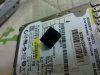
Any of you know if this rubber cube is from GX60 interior? I've found it in my room, I don't remember seeing it before, but I disassembled my GX60 last Friday, so maybe it came from inside.
If any know, please tell me, I don't want to disassembly my GX60 and discover it did not came from it.
Thanks!
-
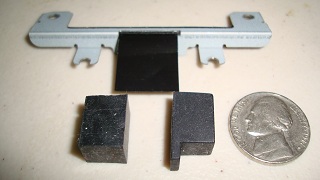
That's the same hard rubber block I got in the box with my MSI notebook.
MSI has the metal bracket or 2 different styles of the hard rubber block that securely holds a hard drive or SSD in place by squeezing in between the wall of the drive bay and the end edge of the drive.
A block can be made at home from a hard eraser.
A bracket kit purchased at an MSI notebook service center for $10.00US contained the metal bracket,hard rubber block w/step and 4 screws.Attached Files:
-
-
Thanks! I think I can sleep well after all! hahahaha!!
Yeah, It came with the caddy, and maybe it fell from the plastic bag when I mount the SSD. I don't remember seeing it before, but now I see where it comes from. I'll try to put in in SSD area this week!
Thanks a lot! You've saved me the disassembly job! -
It's not called a caddy.
A caddy is the person that carries Tiger Woods golf bag during events
or
It's a tray for a hard drive or SSD that fits into the optical drive bay in place of the DVD/BD
The new GX60 Hitman comes with an empty caddy in the optical bay and not a DVD/BD in the model sold here in Seoul.An optical disk drive is a paid option.
Pictured below is a caddy that sells here for about $6.00US
This one has a SATA To SATA connector,
![[IMG]](images/storyImages/1549707_1.jpg)
-
I dont get what you mean. You mention that its not called caddy and you mention it as caddy
-
You quoted before I could edit out parts of the link so it only pictured the caddy.
A bracket is screwed onto a hard drive and then screwed into the drive bay.
The rubber block is used as a bracket replacement.
The caddy is a slide in bay that holds a hard drive or SSD and fits into the place where the DVD multi or Blu ray player/recorder would normally be.
The 12.7mm height is the standard size but caddies also come in 9mm height for thinner notebooks.. -
mine comes with a warranty sticker. Can i remove it to add ssd?
-
I am truly disturbed by the cooling fans behaviour.It shoots to max rpm when i wake it up and runs constantly i mean ALL THE TIME with different rpm-s but it never shuts off like it did in the previous firmware version.
I will roll back to 16FKEMS2.401 -
Why did you upgrade the bios in the first place? Never upgrade the bios unless you are trying to fix some specific problem or you are having problems with the pc.
-
i think my gx60 LCD has uneven backlight issue...
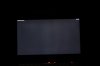
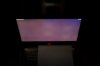
It's only obvious when the room is dark, displaying dark solid colours, and when viewing the LCD from an indirect angle...
Am I getting a defective screen or it's not a big deal?
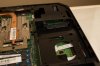
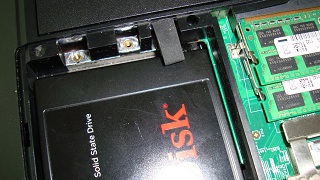
Anyway, this is the port at my 2nd hdd bay...it's a SATA port that a 2.5 hdd/ssd would fit right? been researching about SATA port but i got kinda confused... -
You should have had a little bracket to fix it, it takes a standard height 2.5" drive and is SATA III speed capable.
-
I am about a week away from getting a new gaming lappy. I am going to use it solely for gaming but would like to get the gx60 with the newer a10-5750. Does anyone know when this will be released for sale in the states?
-
Darn....mine didn't come with the bracket...guess have to wait for MSI Aus's reply on how to get 1...
How about the screening illumination issue? any comments?
Edited: MSI Aus quoted me $55 + $20 shipping for the bracket...that's insane.. -
I had the same with msi europe. Just cut the bracket in half
-
Yeah guess so...$75 for a bracket? they must be out of their mind....
-
Hey guys, I just recently bought a GX60 (since it was cheap).
Was installed with Windows 8.
However, I've come across the problem where Realtek HD won't recognise my headset when I plug it in.
I've tried updating the audio drivers, but still no detection on the device (Razer Kraken Pro).
If anyone could help it would be most appreciated. -
Do you have the Realtek HD Audio Manager icon in the taskbar?
When you plug a device into the audio port that has a headset symbol(port closest to front edge) do you get a popup about a device being plugged in?
Realtek HD Audio driver version 2.71 build 6873 is the newest.
Realtek drivers Audio
Device Manager>Sound>Realtek HD Audio>General>This device is working properly.
EDIT:is your sound from the onboard speakers OK when no device is plugged into the audio out port? -
No I don't get a popup. However when I do plug in the microphone in, I get a popup about a device being plugged in but in device managers it still shows as not being plugged in.
Driver I'm using is 6.0.1.6873.
Device also is working properly
And sound from onboard speakers is fine when theres no device plugged in -
Yes I do have realtek HD audio manager on the taskbar.
When I plug in the device, only thing that gets recognised is the microphone, but in device managers it shows the microphone port as being unplugged, same as headphones.
The Driver i have installed atm is 6.0.1.6873 which I downloaded from the link u provided, is this the right driver?
All devices are working properly, and the sound from onboard speakers is fine. -
Which sound device are you plugging in?
Does it use a single 3.5mm jack for a stereo sound connection??
Does it work in any other notebook. -
I have similar problem with headset. But i give up to it. The diffrence is that Realtek manager recognize it with popup menu and after but the THX manager still doasnt, so I have to switch there manually to headset. Its annoyin cause when plugged before manualy switching there are not sound everywhere and the procedure, open and switch works so slow due to slow THX manager reaction.
-
I'm plugging in a Razer Kraken Pro.
And yes it does use a single 3.5mm jack, that goes into a small black circular thing which then splits into the two different cords (microphone+headphones).
It seems to work fine on my other laptop.
Could it possibly be because I recieved a disc with the drivers, but manually installed CCC where it didn't detect an audio driver, and then only later did i actually realise i had this disc and install the audio drivers? -
Make sure you are set to 2.1.
-
Sorry I don't understand what you mean by this.
Not sure how you set it to 2.1 also =S.
The link provided above only gave 6.0.1.6873 versions.
*The Offical MSI GX60 Owners Lounge*
Discussion in 'MSI Reviews & Owners' Lounges' started by layjohn, Oct 12, 2012.