Problems? See this thread at archive.org.
Anyone have any idea on how to overclock the 7660g? Since you cant run amd overdrive directly, is there a way to enable overdrive options in ccc?
-
Some people have said installed overdrive to another directory has made it work, are you win7 or win8?
You can also use msi afterburner then u must edit the afterbuner.cfg file using notepad. you are looking for allow unoffical overclocking add or change the 0 to a 1, save it. open msi after burner you should be able to oc the core clock of the igp. For me i find that after burner does something wired when i open it initaly it will allow me to oc my video card to say 780 mhz if i close and reopen it i get a much higher clock speed to choose from. -
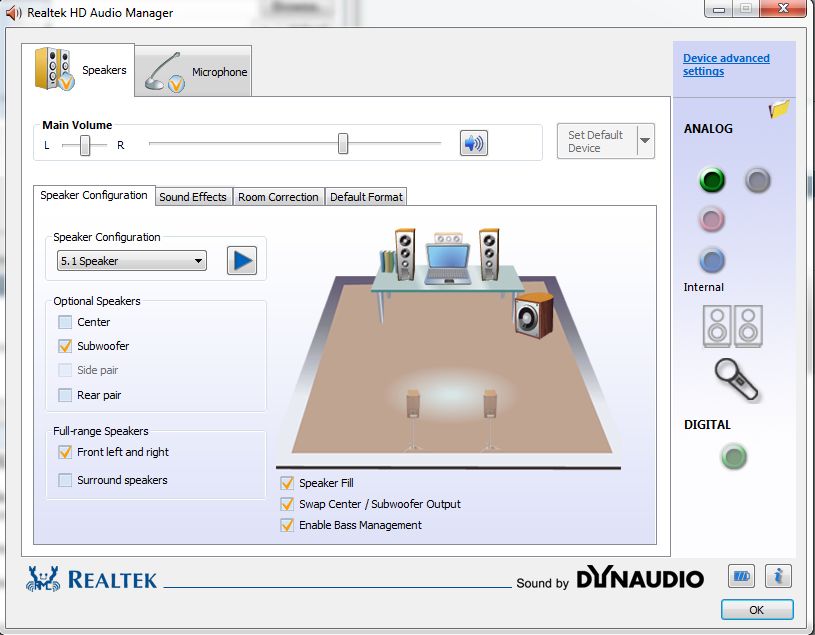
He means make sure the output in whatever manager you are using it set to 2.1, you have options like Speakers, Headset, 2.1, 5.1, 7.1 its reference to your output setup.
-
Mine came with only stereo, quadraphonic, 5.1 and 7.1 in Realtek....the default out of the box was 7.1....everything works ok though...
-
im on windows 7. The msi afterburner only let me to oc the 7970m after editing the notepad. How do you choose to oc from the 7970m or the 7660g?
-
As far as I know there's no 2.1 setting,at least not in mine,in the HD Audio manager.
The Stereo setting is a 2 speaker setting.
If you want a subwoofer to work the HD Audio Manager needs to be set to 5.1 and some settings changed.Then click on each speaker,R,L and Sub to test there's sound output.Attached Files:
-
-
Hi everyone!
I don't know if I'm crazy, but my GX60 has been acting crazy since this morning. For some reason it all started when I wanted to turn on the webcam. Pressing the Fn button + webcam button didn't do it. Didn't think much of it. Then I restarted the computer a few hours ago, and I was unable to connect to my WiFi network. The laptop detects the networks around me, but does not connect to them. Moreover, the LED switch toggle for the WiFi doesn't light up when I press it. I restarted the laptop, to see if that would cure the problem and now, the touchpad seems to be disabled as well. Also the turn off screen button and eject disc dont work either. I don't if I am going crazy or what. Maybe I just pressed the windows key and something random that disabled all those things? Anybody got any suggestions?
I did update a bunch of stuff from the MSI website a week ago, but it had been working perfectly until I attempted to turn on my webcam.
Help?
Update: Windows says I have a driver issue. I reinstalled all the drivers to no avail. The WiFi switch now miraculously works but I don't know what's the problem, since I am able to see the networks.. But I never connect. It stays at limited. This happens both for my router as well as for my mobile hotspot.
I have tried the netsh resets to no avail. I have no clue as what is causing this. Windows tells e it's the Atheros wireless adapter because of its driver. I have changed it. Installed the ones from MSI website, all of them regarding Wi-Fi and Bluetooth. My level of frustration is just too high, since this just started out of the blue. I was browsing the web, then turn off the laptop. Come back an hour later.. And I get this. I am currently debating hurling this laptop out my window or selling it like junk. No solution I find on the internet for "limited connectivity" has worked!
Any suggestions? -
Try installing the Trial version of Cyberlink YouCam or Arcsoft Web Companion and see if you get the Cam to work.
Webcam Recording Software - Capture Webcam Video and Image by WebCam Companion 4 | ArcSoft
. YouCam 5 Free Trial Download | CyberLink
I like the Web Companion better -
I apparently fixed all that interface thing. I had disabled "SCM" from running because it was giving me error messages every 20 minutes. My real and only persistent problem is the "limited connectivity" I have tried all I could find. Drivers, network shell resets, settings modifications... Nothing. I fear it's something not even a Factory reset would fix.
And I'm sure it's not my router. It does the same for my Thomson modem/router Netgear Router and android Hotspot from my Nexus 4. The wireless is dead and refusing to be resurrected. Netsh resets are supposed to fix this. -
Which wireless card did you get?
Try removing the power from the router for a few minutes to clear the cache.
Reset the router to defaults.
I've had Netgear 3700v2,3800,4500 and now R6300 and they all worked well.
EDIT:
AMD has reported the financial results of its first quarter, showing a substantial year-over-year drop of 31-percent. The company saw its gross margin grow by 41-percent bcause of a $20 million sales of inventory benefit, while its Computing Solutions dropped 9-percent over the last quarter and 38-percent year-over-year.
http://phx.corporate-ir.net/phoenix.zhtml?c=74093&p=irol-newsArticle&ID=1808428&highlight= -
Try connecting a to your LAN port and see what happens, see if its an internal or external problem.
Cheers! -
how can i run overdrive to ccc? i have no overdrive options there
-
This feature its not compatible with this APU-4600M

I remember with my old hp DV7 with apu A6-3410MX processor if that was possible overclock with overdrive from ccc
-
Best you can do is lock the CPU to certain turbo frequencies.
-
I checked, my laptop is effectively internet free. The wireless doesn't connect and neither does the Ethernet LAN cable. Both say limited connectivity. I don't know if it is just a Windows problem or something with the network adapter and drivers on my GX60.
I have done the following:
-All updates from MSI's official driver downloads.
-Do as many netsh resets I could find on the internet using the command prompt with administrative rights.
-Try to let windows solve the problem.
-Factory reset my router and my router/modem. Neither works with wireless or wired.
-Don't allow the wireless and wired adapters to turn off to save power on the configuration from the control panel.
-renewed my MAC address.
I am just going crazy. I didn't do any configuration changes or anything, and it just stopped working randomly as I turned on the laptop yesterday afternoon.
Anyone had a similar problem or have a suggestion as what may be causing this? And or how to solve it?
I have the Atheros AR1111 WB-EG and the Killer e2200 adapters. -
Guys I need a favor
Can someone dump his MSI 7970m vbios? I need it for some testing I'm doing. Rename the file based on it's version
Thank you
Sent from my GT-N7100 using Tapatalk 2 -
If you don't have it already installed,I suggest installing the FREE inSSIDer program and see if your router is broadcasting your network and it's signal strength.If the channel is heavily used >change to best open channel.
The wireless icon down by the clock>how does it appear?All white bars?Yellow?Red?
When you put your mouse cursor on the icon does your network SSID appear?
Is the router set to WPA2 AES
Are you testing wireless connectivity while in the same room as the router?
_________________
Atheros Wireless driver v10.0.0.239 released for W7/W8
Atheros & Zidas drivers
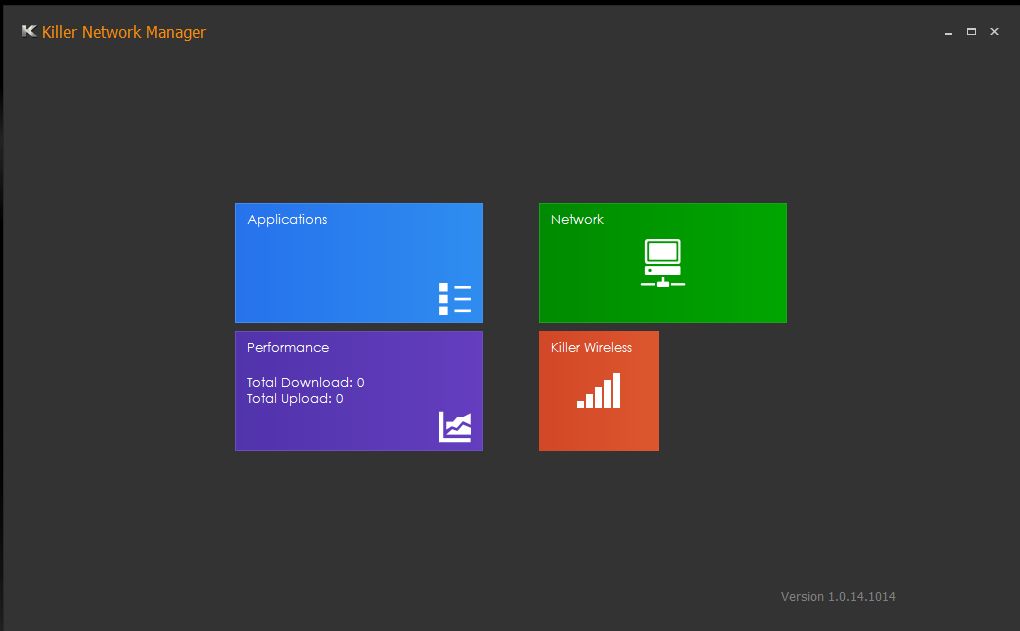
Killer Drivers:Version: 1.0.14.1014 BETA
Killer Gaming :: Support :: Driver Downloads
Uninstall the Qualcomm Atheros E2200 driver/software in Control Panel>Programs and Features before installing the new driver.
New Network Manager Interface:Attached Files:
-
-
all i want is to overclock the 7660g. Is there any way i can do it?
-
its compatible or else there would be not overclocking on those hp notebooks with a10 4600m. The problem is this gx60 runs on 2 gpu making software like msi afterburner detects only the main gpu and not the igpu
-
Why would you want to? The only way I got access was to disable the dedicated in the bios but it gets a bit silly at that point.
-
maybe he thinks about gaming on the go (e.g. bus, train), using the HD 7660G will save battery life.
-
Well the you can only expect to get 5% increase in performance from overclocking according to many reports on the 7660G and you cannot really base that on the OC or just per luck when bench marking. You're best way to improve IGP performance is your memory timings and bus speed.
You should also check that when on battery apparently the IGP in the trinity will down the memory BUS to 1300Mhz instead of 1600Mhz which obviously slows down the IGP performance. -
Also anyone else get random clicking on their WD750GB drive in the laptop? This has started to happen infrequently since I've installed my SSD and set it as a media drive.
Along with error scans, deep surface scans using spinrite and SMART utility read outs all point to it being within operational thresholds and working correctly.
I've heard of drives who do this clicking as a safety mechanics of resting the head to stop any damage to the discs when free fall is detected or vibrations.
In any case I don't remember this before my SSD, and I'm sure its not normal on the brand of WD we have but I've never used a black edition.
In anycase any feedback would be nice.
Cheers! -
Interesting having an SSD as a media rather than boot drive.... clicking is usually a bad sign with HDDs, make sure (as always) you have a backup.
-
Yes of course I've always backed up my stuff regardless, thanks for reassuring me as I thought that it was a sign of pending failure, though I've had drives like this last for years before failing.
Sorry I meant to say the HDD is the media drive SSD is the boot lol.
EDIT: Now the better question is can I RMA just my drive to MSI or should I RMA it to WD? Now that were on that topic the WD has a 5 year warranty but the laptop has a 2 year warranty problems here or what? -
I have the same click issue with my WD750GB hdd from my brand new laptop now.... asked for a HDD replacement and it is shipping to me now... hope it will be alright
-
on less intensive games+not really demanding graphics game i always uses the 7660g with the lowest settings. This is to increase the 7970m life spend.
-
Even a little performance increase is good enough. I just need to know a way to overclock
-
How can i do that? btw the lesser u use the 7970m, the longer the life spend of the card. On less demanding game i always uses the 7660g on lowest graphics setting
-
If you won't OC your 7970m it won't die anytime soon.
I always game on 7970m no matter what game, only when my GX60 is idle I make sure my power button is white and 7970m doesn't use any power and the powerbrick does not generate unneeded heat by powering 7970m that is not in use. -
but still the lesser u use the longer life spend it has. Btw when u use the 7970m, u can see the temperature increase in the cpu+7660g which means both is at high temperature. When temperature is high, the lesser the lifespend of the cpu+igpu. But when u use the 7660g, it doesnt affect 7970m since its a dedicated gpu.
-
That is correct, the less you use the HD 7970M, the longer it stays alive. But in general, a graphics card should not die within a few years (even 4years are not much lifetime for a GPU). The GPU normally is still alive when the Notebook it self is way too slow for acutal games
As long as you keep the Temperature of the GPU down, and the voltage as low as possible (--> no overvolting) the graphics card will enjoy a long long live :thumbsup: -
But when i uses the 7970m, it will reach max 84 degrees on constant 99% utilisation for long hours of gaming. Its still better to use the 7660g when the 7970m is not needed
-
And 7970m is made in 28 nm process, so it should generale much less internal heat -> more life for the GPU
-
Notebook components are used to higher temperatures then their desktop versions. You are of course right, but me personally, I wouldnt mind using the HD 7970M in every game, as long as the HD 7660G is not capable of handling that game in max settings. It is a gaming Notebook and designed for that.
-
So laptop gpu's can handle more heat than a desktop gpu? is there any link i can refer to?
-
Back in 2008 when people used to game on 8600m from Nvidia, they could reach temps like 95 C on the GPU and nothing bad happened
-
But i dont think the laptop can last even 2 years
-
With proper maintnance and monitoring of the temps GX60 will last for years.
I still wonder about Kaveri... will it fit into GX60? -
I'm using ATI 4650m...reaches 95 deg C at full load...running since Dec 2009..
By the way, is it possible to run Pscheck on Win 8? -
Well the 8600 was notorious for failing due to the solder issue, but that was more to do with heating and cooling.
-
i saw a thread where adding xcl on afterburner enables overdrive in ccc. Is that right?
-
Only in non enduro systems.
-
Is there any simple way to make the laptop stay in full performance mode when unplugged from the power supply? I want to show a demo of some games to work colleagues but without having to plug it to a power source.
-
You could try but I can tel you your battery would probably melt, you cannot run at 100% while on battery because you're battery cannot draw 180W, sorry mate bring your AC next time.
-
Did you send in your 750GB drive first or did they send you one before hand?
-
where to order gx60 hitman edtion ...i cant find it in amazon or any other site?
and is it big difference between A10-5750M and A10-4600 ? -
in games like crysis 3,ac3 and hitman absolution you will only see 2 to 3 fps increase. While graphic intense games like tomb raider, bf3, sniper ghost warrior 2, its almost the same fps.
-
can any 128gb ssd fit on the gx60? is the caddy provided in the stock gx60?
-
Have you thought about a cooling pad? I'm using the Zalman NC3000 - max 77 C for long gaming sessions. Most of the time 69-74 C in demanding games , and 62-65 in the games like Fifa , Race ON and olders titles . This is not a large temperature as a laptop for gaming . Even 84C is not to high imo . 7660 also heats up in the game . I play on 7970 - that is why I bought it - just to play on high settings
Not damaged gpu should last for several years. Anyway, now they do not produce machines for years. So if not gpu - something else may goes wrong.
*The Offical MSI GX60 Owners Lounge*
Discussion in 'MSI Reviews & Owners' Lounges' started by layjohn, Oct 12, 2012.