Problems? See this thread at archive.org.
AMD Graphics Drivers & Software this will help m8
-
Yeah. I know where to go on AMD to find a new driver, I just don't want to download the wrong one. Read about people getting BSOD when updating the 7970m. That is why I am asking for a GX60 owner to post an actual link with the driver they used and the steps they took before installing it.
-
13.4 and you are good to go of course for netbook and hd 79xxxM
 uninstall the old drivers from the sys and install new one
-
At the bottom of the 13.4 Driver Page it says "This tool is not for notebooks with switchable graphics, which the gx60 7970m is. Do you have GX60 and have you downloaded any of these drivers?
I would like to point out that I have tried to run AMD's auto-detect and I see it running under task manager but it doesn't do anything or show anything on my screen, I am not sure if other GX60 owners have ran into this issue. -
AMD Catalyst and yes i have gx60 and these drivers
-
How did you uninstall your old drivers before your new ones?
I see that AMD has a uninstall utility. -
open control panel- uninstal a program -Amd catalys install manager end uninstall express reboot the system install new ones
-
Thanks for your opinion, I appreciate you taking your time. I am going to see what a few more members have to say about installing new drivers before I make the step don't want to get BSOD.
-
m8 is this your first gaming notebook (pc) i don't have BSOD all i working fine GX60 on 13.4 pc is in 13.5 beta
all GOOD
-
AMD Radeon HD 7660G video card benchmark result - AMD A10-4600M,Micro-Star International Co., Ltd. MS-16FK score: P5161 3DMarks here is the proof new drivers(13.4) are working just fine
-
Does anyone got experience playing Dota2 on GX60? Will stock MSI GX60 8gb RAM provide solid fps during the whole game? And what bout SSD necessity...
-
007poland how does your graphics score on 3DMark have 2000 more points than mine AMD Radeon HD 7660G video card benchmark result - AMD A10-4600M,Micro-Star International Co., Ltd. MS-16FK score: P4311 3DMarks
-
i was overclocking the hd7970m
-
= /. Does switchable graphics still work with that new driver you gave me?
-
yes its still working as as it should
-
Does my score sound fine for non OC 7970m?
Also did you use a driver cleaner or them AMD uninstall tool or just an uninstall through remove programs on windows before you installed your new driver? -
the score should be about 4800pts in total 3dmark11 not 4311pts just uninstall through remove programs on windows and afther that new drivers
-
If it should be about 4800, what could be the issue?
-
all must be set up for maximum performance in switchable graphic applications setting 3dmark11 exe must be high performace system must be rebooted so the orange light must be on (7970m) is working from begining
-
hmmm all the programs are set to maximum performance under switchable graphics as is 3dmark11 exe. What orange light are you referring to?
" the orange light must be on (7970m) is working from begining" what do you mean? -
where the power button is you have white light at beginning when 7970m is working the light goes to orange
-
Yup mine is orange when running. I just ran 3D Mark11 again and still 4353 score not near 4800 = (, what could be the issue.
When I am on my desktop the light is white when I open a program like 3DMark 11 it goes Orange.
Is there any other settings you change in the Catalyst Graphics Control Panel? -
i have also dxinfo.exe as high performance
-
I also have that set to high performance.
-
have you reboot the system after setting up all to high performance(all power plan as well )
-
Yes. I am not sure what is going on. I have done all that. Maybe I need to update the GPU driver? I have yet to do that.
-
You really should post the compare link, the overall score is not enough to know what is going on.
If your integrated GPU was the one doing it you score would be around 1000 so we know the DGPU is on
-
Which link would that be?
-
3dmark 11, the compare link has all the different tests in it, each reveal different information.
-
Hey Meaker,
Question: To upgade GPU drivers on the GX60 is it just a simple uninstall through control panel - > restart - > install new ones.
This is the only link I am provided after running the test
http://www.3dmark.com/3dm11/6534215 -
I would just install the new ones over the old ones, that's how they are designed to work.
-
hmm. I thought even AMD mentions not to do that because it can run into problems.
can you confirm this is the latest
http://support.amd.com/us/gpudownload/windows/Pages/radeonmob_win7-64.aspx -
Most releases have been made to be a progressive update, so you just install over what you have and the driver installation takes care of the rest.
Those drivers are indeed the latest driver release, both for APU or standalone. -
I just need to download the one on the bottom that says latest beta driver not the one at the top of that page that says Driver Verification Tool correct?
-
Glad to hear 13.5 beta are working for you
Let us know how it fares performancewise and it if it's stable enough with your games!
-
Qualcomm Atheros WHQL wireless driver/software v10.0.0.242 for Windows 7/8 _ 32/64 bit
Qualcomm, Atheros, Zidas, Attansic, Intellion drivers, firmwares -
13.5 is a more stable and more optimised driver for all games. Trust me
-
What version ? 13.5 beta 3 or beta 2 ? I remember that beta2 , my GX60 crash in black screen
The 13.5 beta 3 works well on Win 8 ? -
im using win7
-
13.5 beta3 worked for me in Win 8...however my 3d mark 11 was reduced compared to 13.4, and the brightness adjustment didn't work...
So i went back to 13.4.... -
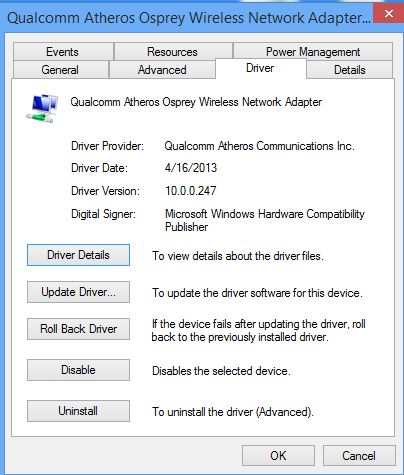
Another Qualcomm Atheros wireless driver/software surfaced today.
This one,v10.0.0.247,is just for Windows 8
There's no setup.exe so the driver needs to be updated through Device Manager.
This driver also works on the leaked Windows 8.1(Blue) build 9385
Also works for Killer wireless 1103,1102 and 1202 since the driver from Killer gaming doesn't work in Windows 8.1 kernel 6.3
Qualcomm, Atheros, Zidas, Attansic, Intellion drivers, firmwaresAttached Files:
-
-
Greetings! I just bought one of these with the upgraded CPU. The A10-5750m. Haven't had any real time to test it out. But so far I like it.
-
Where did you find one of these? Is it the GX60 or the new GX70?
-
from chinese forum GX60 1AC upgraded A10-5750m ES
ÖÕÓÚÍê³ÉÁËÔÚGX60 1AC-003CNÉý¼¶5750M[½öÏ޲ο¼×ÔÐÐÉý¼¶ºó¹û×Ô¸º](¹ØÓÚ1866ÄÚ´æ ¸üÐÂ)_΢ÐÇGϵÁÐ
GX60
OC 4.0GHz
GX60 -
from chinese forum GX60 1AC upgraded A10-5750m ES
ÖÕÓÚÍê³ÉÁËÔÚGX60 1AC-003CNÉý¼¶5750M[½öÏ޲ο¼×ÔÐÐÉý¼¶ºó¹û×Ô¸º](¹ØÓÚ1866ÄÚ´æ ¸üÐÂ)_΢ÐÇGϵÁÐ
GX60
OC 4.0GHz
GX60 -
i thought the MSI GX60 has no backlit keyboard?
Did he build in a GT60 backlit keybord or what did he do? -
I just ordered mine yesterday. The new MSI GX60 is available on NewEgg.
Newegg.com - MSI GX Series GX60 3AE-216US Notebook AMD A-Series A10-5750M(2.50GHz) 15.6" 8GB Memory DDR3 1600 750GB HDD 7200rpm BD-ROM AMD Radeon HD 7970M -
Its the GX60 that comes with the hitman game. Got it from newegg. http://www.newegg.com/Product/Product.aspx?Item=N82E16834152394
Sent from my Nexus 7 using Tapatalk 2 -
It's a shame they didnt stick the 8 radeon series in there. Why not MSi? Guess ill wait for the GX70.
-
so the GX60 Hitman Edition comes with backlit keyboard? (this is not mentioned directly)
*The Offical MSI GX60 Owners Lounge*
Discussion in 'MSI Reviews & Owners' Lounges' started by layjohn, Oct 12, 2012.