Problems? See this thread at archive.org.
Anyone got pics of how temps are shown for the APU and all hardware? I am curious!
-
-

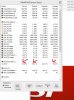
The 7970M is showing 0 because it is not engaged, when i play a game it pops right up. You can select either the 7660 or the 7970, the apu is never more than a degree off off the CPU cores, so I leave the meter on the 7970.
This is with 2 external monitors attached, I've noticed the temps are a few degrees lower when only using the built in screen. -
Nice little program, what is that?
-
8gadgetpack.bplaced.net/
It takes some tweaking to get working, but it has widgets like android. Lots of choices, some are just silly though. The CPU meter can use coretemp (the best) or PC meter by the same company as the widget packs. The GPU meter uses PCmeter only. You can run mutiple instances of the GPU to cover both the integrated and dedicated. -
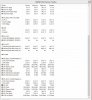
here's a Hwinfo64 screenshot.. -
Sorry for the very late response, I'm finally back in town

First off: Needed to test that the 7970 works! Everyone and their mother has WC3TFT, with no need for internet just to test things! And TFT dota has LAN
Yes, I did exactly that, and set war3 to "High Performance", made no difference.
So last night I finally got around to installing steam, and tested Payday: The Heist. Without any effort on my part, it automatically launched using the 7970m. So that's good news ! No idea why it won't launch with TFT, I don't need it to, I'm just worried that something's wrong..
On a side note, in Device Manager -> Display Adapters, I've noticed the driver for the 7970m date is 08-Aug-2012, while the one for the 7660 is much newer: 28-Mar-2013. Is that right, or should I be updating the drivers differently?
Aside from my little OCD on this, I would rate the GX60 a sweet 10/10, would purchase again, etc.. Loving it!
(Win 8 though? Kinda meh so far) -
I'm running Windows 8. Been reading about a brightness bug when using non-MSI drivers, so I'm trying to avoid that..
-
Here's mine.
![[IMG]](images/storyImages/hwinfosensorupdated2.jpg) Uploaded with
ImageShack.us
Uploaded with
ImageShack.us
You can see the difference my cpu is showing a max of 109° yet under acpi it only gets to 60°C.
I know it's not hitting 109°C because all hell would be breaking loose with the machine shutting down, parts melting etc. Besides the outlet air from the fan is quite cool.
With yours I notice your cpu temp and your acpi cpu temp tend to match where mine has this huge variable under load.
I'm not sure what's going on but 109° isn't right..
Thanks for posting your image to compare. :thumbsup: -
I know its a bit off topic talking about the GX70 model... but i found some good information regarding the bigger / new model;
MSI Notebook Official Website - Product Preview Page -
Hmm..that is odd indeed. Did any other temperature softwares gave you a correct reading?
If not, then i guess it could be 1 of the temperature probes is not working properly... -
Yeah it did seem weird.
I installed Company of Heroes and ran the benchmark at 1920x1080 and had everything on maximum to get the 7970 running as hard as I could and with the system running at full power those temps were 73.1° cpu and 72° under acpi.
So whatever it was seems to have sorted itself out.
BTW the benchmark score for CoH at full settings was 115fps average. :thumbsup: -
I´ve the same problem with temperature in my GX60-1AC
![[IMG]](images/storyImages/image.jpg)
subeAttached Files:
-
-
In a few days, who has the new GX60 with APU Richland A10-5750M, you can download updated AMD drivers from Official MSI Website . for now the links do not work
MSI Global â Download Center -
Hey guys, I'm a new gx60 user
Have it for 3 months now but recently I plugged a second screen into the hdmi output, after which worked well with extended display. After unplugging the second screen my laptop screen does not turn on after the display turns off. The laptop is still running but display won't turn back on.
The only way is to force shut down and start up again. But the second display will work when plugged in again and wake up but the laptop won't.
Tried power settings.
Help? -
Make sure your internal display is primary when unplugging the monitor.
-
Hey all,
I just purchased this laptop (3 months used, but with newegg's extended accidental damage protection warranty) for $750! I've been doing a lot of research and reading/watching reviews of different gaming laptops from MSI, Sager, and Alienware. I read this whole thread because the GX60 sounded like a very affordable and best bang for your buck gaming laptop for me to use when I deploy this August. I was initially going to buy the Sager 9370, but I didn't pull the trigger because I would have to wait and see if Haswell was worth the wait and the price was well over $1000. Since I already have a nice Desktop I built for gaming, I didn't really need another expensive rig. I travel often, but not too much to the point that I would need to shell out close to $2000.
It was definitely a good deal and the money I saved is going towards a SSD and headset. Hopefully the newer and faster CPUs from AMD will be compatible so I can upgrade a year or two from now! -
For user which have problems with the brightness control under Windows 8 with the newest Version of the graphics Driver from AMD. Try this http://forum.notebookreview.com/hp-...ort-about-brightness-issue-windows-8-a-4.html.
I hope it will be help. -
Thanks prexu , but not rule in GX60 in my Win8 with 13.4
-
Have you try it with the last mobile catalayst beta 13.5 ? I have try it this morning and it works, important is the reboot after you edited the registry. (This Version I have used... http://www2.ati.com/drivers/beta/amd_catalyst_13.5_mobility_beta3.exe)
-
Nope ! Now i try it
-
WORKS PERFECTLY WITH LAST BETA
Thanks ! -
I just tried this and it worked. How ever the registry is in the 0000 and 0001 folder on mine. I edited the one in the 0000 folder and it didn't work. Tried the one in the 0001 folder and I was able adjust the brightness.
Sent from my Galaxy Nexus using Tapatalk 2 -
Driver installs do tend to create successive driver entries in the registry.
-
the 0001 did the trick thanks!
-
Been playing witcher 2 for a while now...but i notice sometimes the fps is low while the CPU and GPU usage are not high...

Attached Files:
-
-
-
Hmm...only in certain scene where there's more action going on....i thought it was CPU bottleneck, but the CPU usage was not 99%...
it seems like the CPU/GPU didn't ramp up the usage although the scene is demanding....
at the particular scene i posted above, the fps was in 20s, GPU usage 60%, Temp 78degC...
CPU usage 59%, Temp 73degC.. -
It could be the game is poorly optimsed
-
Slightly off topic but based on the recent news of the PS4 and Xbox One internals how do you think the GX60 will fare in future games? I'm hoping that due to them having a similar CPU architecture that gaming performance will actually improve for the likes of the GX60 as developers will be utilising multi threading in games much more. What do you think? Do you think we'll see more of a bottleneck of the CPU or less in future games?
-
APU is the future
-
Even though the nextgen consoles will be based using a x86 architecture, PC and consoles will be two seperate beasts. Even then it will come down to the developer on how they develop their product for the PC. Hopefully the GX series will continue their AMD focus and continue to see iteration of the processors. If so, then the next round of GX laptops with a Kaveri CPU in it should be some magic as that should resolve the bottleneck that the current round of processors are facing.
-
The problem would be solved instantly if the CPU was unlocked :/
-
just curious, how do they lock a CPU? hardware or software lock?
-
They blow fuses inside the cpu.
Back in the late 90's you were able to reinstate those fuses using the graphite from pencils.
That would only work with AMD processors.
The good old days... -
Oops. Mods could you please delete?
-
I wonder how high you could go with fan turbo turned on
-
The people over at the chinese forum overclocked their a10-5750m ES to near 4GHz on 4 cores...
http://benyouhui.it168.com/thread-4131011-1-1.html -
Woah, at OC A-10 boosts overall score to P5800 area, that is over 1000 pts more than non tweak A-10. I wonder, if the CPU has stable temps when on 4 Ghz...
-
May I ask, is it okay if I play games while the battery is fully charged? I own a MSI GX60 3AE
-
If you got the powerbrick plugged in, the battery is no longer charged when at 99-100% so don't worry, you can leave the battery inserted at all times.
-
When I was playing Company of Heroes I noticed the apu would only turbo to 3.2GHz on battery and when it's plugged in it would turbo two cores up to 3.5GHz.
Not sure if that was an accidental finding by me or that the laptop/apu are hard coded to downclock like that. -
The battery cannot supply enough wattage for full performance
-
thanks for the reply. so it's okay if I just play games while I plugged in the charger and the battery is fuly charged right?
-
Yes, it is completely fine. -
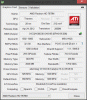
may I ask what is the crossfire available for? and why it is disabled? sorry am kinda new here.. -
HI may i ask which catalyst version is the recommended one for the gx 60?
I realized i've downloaded the wrong one thnx to the live update 5.
I don't know what i should do ... -
MSI Live Update 5 is not for Notebooks.
Catalyst 13.5 beta 3
http://www2.ati.com/drivers/beta/amd_catalyst_13.5_mobility_beta3.exe
AMD Catalyst
Official Catalyst 13.4 WHQL
AMD Catalyst 13.4 WHQL Download -
I have this laptop and have noticed during gaming that the 4600m is always around 2.2ghz on at least one core, how can I lock the speed on all cores to 2.7ghz or something.
PScheck isn't working on windows 8 I don't think and amd overdrive just crashes my system. What other software can I use?
This cpu is a massive bottleneck on the 7970m, if we can increase the speed of the 4600m the gx60 will be awesome.
Thanks in advanced for any help
-
Corssfire is used to match dual GPU in the system so they work together to render your games etc. Usually you find it available with notebooks like some Sagers or Alienware that pair up dual graphics (2 x HD7970m for example).
Since the GX60 uses its main GPU for gaming, you don't need to worry about crossfire, it's correct that it is disable as the notebook can't fit dual gpus
-
13.6 Beta is out
AMD Catalyst
*The Offical MSI GX60 Owners Lounge*
Discussion in 'MSI Reviews & Owners' Lounges' started by layjohn, Oct 12, 2012.


![[IMG]](http://imageshack.us/photos/my-images/839/hwinfosensorupdated2.jpg/)