Problems? See this thread at archive.org.
by now, we dont know how to lock CPU clocks on win8.
-
What about if i dual boot with windows 7, will ps check work then?
-
Seems like 13.6 beta is a no go for me....
Stuck at detecting hardware during installation......back to 13.4...... -
for me works perfectly , the problem with color in Far Cry 3 was solved

-
The Registry mod for brightness doesn't work anymore for me with B13.6 :/ Any ideas?
cheers
Edit: Nevermind, changed the 0000 enty this time, now it works. -
Anyone else who did the Catzilla benchmark? I'd love to compare results especially with the Hitman Edition/A10-5750m
-
With my GX60 1AC results in 720p
![[IMG]](images/storyImages/Captura.png)
subir fotos online -
@istojanovic: The "Cat"-preset? Which driver?
-
The latest AMD CPUs run on 4ghz easily on air cooling, even the 8 core variants. Of course, they consume alot of power. The idea would be to have a fully unlocked CPU, with an even lower end integrated GPU almost consuming no power, and upping the TDP up to 55w. That way we could have very powerful stock CPUs while unlocking for massive potential.
-
I see now thanks for the reply. By the way, when I'm playing Crysis 3, I noticed that my gpu1 usage is only at 40-50%. How do I get it to work to its maximum usage like other games I played?
-
If it's running smooth the actual usage shouldnt bother you, but it' probably cause the Cpu can't keep up...
-
If someone from MSI or AMD is watching this: Please help us get A10-4600M to run at 2,7Ghz on Win8 continously. Can't be a TDP issue without Crossfire imho.
No wonder I'm stuck with 13Fps in Hitman...
-
Can anyone guide me on how to setup msi afterburner on this msi gx60? I'm using driver 13.6 at the moment. Thanks in advance.
-
Here's mine with A10-5750m
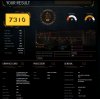
What's the difference between Cat test and Kitty test? -
The Cat-type uses higher resolution, it's just a different preset.
Will try that too
7310 looks quite good! -
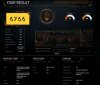
here's 1 with cat preset...
-
Hey dude, how do you fix the brightness? I cant seem to find a solution for my brightness. it just stays the same bright when I lower and increase it
-
change in 0001
-
Anyone else get a complete system-freeze when exiting Hitman:Absolution with the new beta driver?
-
May have found a way to overclock the 4600m by about 5% and add some other options:
MSI G-Series Unlocked BIOS
This will allow us to unlock the bios of the gx60. I am not going to do it yet because i have exams and need this laptop, cant afford a brick, and plus i have already voided warrenty ;(
If anyone has the guts to try, go ahead, and please post results back here.
Good luck! -
at which registry should I edit it>.<
-
just search for 'enablebrightnessinterface' under local machine->system->current control set.
-
For those who need to fix the brightness here is the fix, i just did it.
In: HKEY_LOCAL_MACHINE -> SYSTEM -> ControlSet001 ->Control -> Class -> {4d36e968-e325-11ce-bfc1-08002be10318} -> 0000
I found: KMD_EnableBrightnessInterface2 REG_DWORD 0x00000000 (1) <---- I then changed the 1 to a 0.
Rebooted, and it finally worked! -
thanks! my brightness is fixed, actually I have to change both enablebrightnessinterface2 in 0001 and 0000. anyway have any of u tried overclocking the gpu 7970m? I tried with MSI Afterburner and put the clock to 930 and memory 1400 but I don't see any fps improvements in games, only in benchmarks :/
-
as already mentioned, the A10 bottlenecks the HD 7970M much.
Notebookcheck: Review MSI GX60 Notebook - NotebookCheck.net Reviews
Compared to a system with HD 7970M and I7 it loses around 60% performance in games.
OC your CPU, or at least fixing the turbo of the cpu will bring you an additional boost in performance. -
I just reinstalled windows 7 rather than 8 so i could use pscheck. I have locked all cores at 2.7ghz and am working on pushing 2 cores up to 3.2ghz. Noticed MUCH smoother gameplay in games like black ops 2. i will test more later, need to install drivers.
I now have windows 8 and 7 dual booted, windows 7 is on a 256gb samsung ssd, and 8 on the 750gb hd. trying to get rid of bottleneck now.
For anyone who is getting annoyed of the bottleneck, revert to windows 7 and use pscheck, until it is compatible with windows 8. -
In my GX60 , all clocks in stock , i have 60-70 fps in Black ops 2 , all in ultra
-
Have the backlight keyboard into my GX60 and it goes without problems.
Also KLM Manager works. is superAttached Files:
-
-
Did anyone tride that unlocked bios what manishman001 said?
-
You overclocked A10-4600M or A10-5750M? From what I know you can only overclock 4600M :/ mine is 5750m.. it is locked from what I heard somewhere in overclock forums :/
-
Locking core speed to its turbo state is not the same as overclocking...
-
I like it! I want to buy the keyboard, but I'm waiting the Windows 8 one.
What about touch button near to power button? Works o nothing happen? -
Anybody here knows how to switch on the crossfire? ALso I need to know if the gx60 That came from the factory by default has a crossfire bridge?
-
Crossfire between what? The 7970 and the inbuilt gpu? I dont think you can do that.
And you can also lock the A`0-5750m to the turbo speed using pscheck on windows 7. i think it goes to 2.9ghz -
ok.... SO um.. May i ask How can i lock it on turbo Speed?
-
Please read that thread, there is the solution on your question.
I´ll give you a hint: Even on this page (189) the name of the programme has been used. It is annoying to answer the same question over and over again.... -
Why not create a thread with all the known solutions to GX60 common questions so that users can direct to the first post? Sometimes reading an extensive thread can be time consuming
-
Stop being a d-bag and just answer his question. You probably spent more time complaining than it would have taken to just help him out.
Sent from my SCH-I535 using Tapatalk 2 -
Wasnt me but ill help.
Install windows 7 (program only works on windows 7, not 8)
Install pscheck 3.4.1, here is a link:
http://www.overclockers.com/wp-content/uploads/2011/11/PST_3_4_1.zip
Go to the help tab and READ THE GUIDE FIRST.
Configuire the cores to ony enable the speeds you want like 2.7ghz or 2.2
DONT ENABLE 3.2GHZ IT JUST CRASHES THE COMPUTER
i take no responsibility for any damage, etc
good luck -
Most of your questions are already answered in this thread. If you are really interested in understanding this machine, just take your time to read it through from page 1 onwards. Thats what I did when i get the laptop. Feel free to ask me any questions
-
I am having trouble with the minidisplayport. I bought a minidisplay to hdmi cable and my asus vs238h-p is not being picked up. Anyone have any solutions or recommendations? also my laptop is making a funny noise... wonder if its normal
-
PLEASE DO ANYONE IN YOUR GX60, Im, like 3 people but we did, and we now have a brick.
I've opened a rma.
It is to warn you, please dont flashing your GX60
-
Ok thank you for letting us know, and we wish your laptop a speedy recovery
I also have the problem with the display port, using a hdmi to display port. also i cannot have 3 screens running at once (vga, hdmi and built in screen) one is always disabled. -
Thanks you two, Much appreciated
-
In order to run 3 displays, first one of them must be through the display port. Also if you use an adapter, make sure it is an "active" adapter, the cheaper ones just dont work. I had the built in screen plus 2 tvs running just fine, but they were different resolutions, so i switched to just the 2 tvs. Also you have to gothrough the CCC to set it up, windows cant do it on its own.
Also I must ammend my statement about Coretemp RC5, it is causing a driver (ALSysIO64.sys) crash during startup. Just don't have it start with windows, and wait until startup is finished, then start Coretemp. -
Someone can try on your GX60-3AE , the some next games for compare the bottleneck with the A10-4600M , please ?
NFS Most Wanted - 19fps in GX60-1AC
Assasains Creed 3 - Unplayable in GX60-1AC
Crysis 3 - 18-25fps in GX60-1AC
Perhaps it is worth upgrading to Richland
THANKS ! -
This is from quite an early GX60 so you will want to submit an updated one for modding.
-
If you are getting that kind of FPS for that game then it is really worth to upgrade to the latest apu 5750m lol
I got msi GX60 3AE and for the games
NFS Most Wanted - 20-40 everything on, high
AC3 - 10-30 unplayable in boston haha
Crysis 3 - 30-50 texture resolution very high and specs high, cant afford very high on specs. but runs very smooth on medium -
I have flashed it and my GX60 works fine after changing RAID to AHCI. Anyway there are nothing to overclock there. I hope this bios valid other CPUs
-
Thanks , thanks and thanks !
*The Offical MSI GX60 Owners Lounge*
Discussion in 'MSI Reviews & Owners' Lounges' started by layjohn, Oct 12, 2012.