 Problems? See this thread at archive.org.
Most welcome!
And one more thing, I just installed Grid 2.
Tested with ultra settings.
Runs very smooth at constant 35-40fps!
-
-
Hey Gang!
Got my Hitman Edition Gx60 today (got it at a steal because it was unboxed for a SC2 Tourney!)
I've spent the last week scouring all 100 pages of this Thread, wealth of knowledge thanks for putting it together. I'm currently running windows 8 (so no CPU locking), 13.6 beta drivers with the updated bios)
I'm really happy with the performance (Bioshock- infinite all settings maxxed 60fps at quiet times down to 35 in heat of battle).
Having the a10 5750m must ease the CPU bottle-neck a little but with no surprises its still there, my question for you all (seeing as we are all in the same boat):
What game settings do you think have some impact on the work the CPU has to do? taking games from full graphics to minimum I often see improvements of like 35fps -> 40fps, which hardly justifies losing so much detail.
Specifically, have we figured out what settings ie AA, textures, shadows, atmospherics, draw distance or anything actually substantially increases CPU work? or is it just a tiny bit of improvement with every setting?
I would love any pointers in the right direction otherwise I'll get back to dropping each setting and attempting to spot the difference in fps (near on impossible I've found!)
Thanks for any light you can shed on this.
p.s. I'm about to give Razer Game Booster a go, I'll let you know if I notice any improvements -
Yeah even a 45w model would be a huge jump in performance.
AMD are obviously going after midrange notebooks with long battery life which these apu's do really well at but this is a gaming machine. Granted I've yet to come across a game that I can't play so there's the argument that what we have is good enough..
I think it's MSI that needs to push AMD for a 45w chip. AFAIK MSI are the only ones building AMD gaming machines so they should have the push to do it. Lets face it there's nothing hard about making 45w chips. It's only microcode and a different fuse to blow to get us higher clocked chips.
If I force high performance mode in windows my Richland is mostly in turbo with 2 cores running at 3.5GHz or 4 cores at 3.2GHz. No need for W7 and PScheck.
-
Man, with the 4600M I only get an average 2.1Ghz on heavy Cpu-load.... what load do you have when your 5750M is clocking like that?
It's really nasty that my 4600m starts throttling when reaching 60°C, which is basically nothing for a gaming machine...the i5 in my GE60 runs at full turbo till 85°C. -
Have you had no luck locking it to 2.7ghz then?
-
The 5750M throttles at 70c rather than the 60c the 4600M throttles at, so that's probably where the difference is.
Usually in games my 5750M bounces between 2.7GHz and 3.2GHz. -
@Meaker:
I'm on Win8, and really dont wanna downgrade right now, I'm in the middle of exams and can't afford 2 days off till everything is up and running again.
2,7Ghz only works until the Cpu reaches 60°C, then it throttles as if it was about to burn..despite Tjunction being 105°C iirc, lol.
@sniffin: yeah, those 10°C probably make that huge difference, even under stress (prime95 & furmark) the Cpu doesn't go over 62°C...I'm really getting pissed at how this is set up in the firmware.... -
Have you tried repasting the CPU and applying high performance 0.5mm pads to help?
-
yes, arctic silver all the way, the original therma-lpaste-job was a mess....
findings so far with prime95:
-> 1 thread: 2,7Ghz on all cores with some drops to 2,3Ghz
-> 2 threads: 2,7Ghz with more drops to 2,3Ghz
-> 3 threads: drop to 2,3Ghz after only 30sec, with some boosting, avg: 2,3Ghz
-> 4 threads: immidiate drop to 2,1Ghz on all cores, no boosting at all, avg 2,1Ghz.
Max Temp read by HWinfo: 62°C....
34 Minutes with 3 threads i prime95.
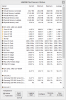
-
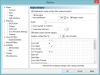 May I know is the core speed 3.17Ghz shown there is true speed? Cause it says there Maximum speed is 2.5Ghz? :/
-
That`s true, taskmanager does't show the boosted value, but the highest unboosted frequency (=2,5Ghz on the 5750m).
Your 3,17Ghz are absolutely legit, may I ask what happens to the Cpu-freq if you run 1(!) prime95 thread parallel to kombustor? -
I don't think upgrading to the 5750m yelds any sense... unless done very cheaply.
The GX70 with 8970m and A-10 5750m often delivers only 3-5 more fps compared to GX60 in demanding games... -
shure, but 22 or 25fps make quite a difference...If there's a 5750m up on ebay again, it shall be mine
-
Wait for Kaveri, slight chance they will fit in our sockets.
-
Got myself one of the a10-5750m engineering sample chips from uk ebay and some ic 24 carat diamond thermal paste (though need to get some decent 0.5mm heat pads for the gpu - some of the gpu ram chips were only 2/3 covered by the pads).
Is AMD overdrive the best option for overclocking the 5750m... seems a bit twitchy so far. It clocks the 5750m to 4Ghz on 4 cores on a very quick test with the cpu voltage bumped up from 1.215 iirc to 1.26. 1 or 2 cores flicker occasionally to 800mhz; not sure if it's a matter of thermal throttling as cpu was only at about 62c on the cores
I'll try and do some proper testing later to see where it's stable. -
Did you get the 5750m last wednesday? I was too late for the auction -.-
I thought Kaveri will need a new socket (FM2+ or whatever) -
Yea, but FM2+ APUs are believed to support FM2 aswell. We will learn more as Kaveri gets close to it's release.
-
Hah, I can't wait
-
Kaveri would be a nice jump in performance, hopefully they will be compatible as that has been AMD's strength in general.
-
It is theoretically possible for Kaveri to support FM2, and the mobile variant socket. The Steamroller cores are still of the same architecture so the pinout should be the same there, and although the GPU is entirely different, most of the differences should be internal and external I/O differences limited to possible additional memory access. Now, if the memory controller were for GDDR5 or DDR4, then you would be screwed, but there have been rumors AMD does not have GDDR5 controller in Kaveri. I expect DDR3-2133 support though, full dual channel or even triple channel would be sweet.
-
Well the desktop variant is going for FM2+, which historically means compatibility with the socket with reduced capability like memory controller etc.
Lets hope for the best! -
Report: AMD Kaveri APUs Will Work in Upcoming FM2+ Socket
Odd this article should appear given the current conversation... -
It shouldn't be throttling at 60°, not that I'm questioning you.
I would get in touch with MSI support and see if they can do something about lifting that limit, in the past MSI have sent me new bioses to play with but that has been for desktop hardware.
The problem here is that MSI seemed to have forced this limit. AMD Steamroller cores can easily run at those temps. Heck My old A8 Llano used to run at 85° as a max temp.
Don't worry about what Prime and Furmark do, they are unrealistic scenarios otherwise known as power viruses.
what you really need to know is if the cpu is throttling when you're gaming. Which it sounds like what must be happening in your case.
Are you forcing High Performance mode in windows before starting a game?
Are you using the power brick? Mine will only go as high as 3.2GHz on battery.
I have an i7 3770K desktop and that darn thing just switches off when it hits 85°C, no throttling and it even stays in turbo.. That's frustrating! Grrrr. -
GCN won't force a socket change but the new hUMA memory architecture might.
We will have to wait and see on that one.
AMD might move to DDR4 next year but it's more likely to be 2015. (In my opinion) -
Wait.... you overclocked the 5750m in the gx60 to 4ghz?
With amd overdrive?
AOD doesnt even work with 4600m, just crashes my computer.
how did you get AOD to work? -
I guess he is on Win7, on Win8 AOD works for me, but I can't do nothing with it except lock the cpu to 2,3Ghz which is kinda lame...
-
The keywords are "engineering sample"...
-
There was a link here somewhere that in China they OC'ed that ES A-10 5750m and reached score around P5800.
-
I also have the mentioned 5750M ES, but installing AOD cause crash at windows startup. The only way I can overclock the CPU is the overdrive inside Catalyst Control Center. Any suggestion how to get AOD work?
-
I belive AOD started working working for me with the 13.5&13.6Beta Drivers. (Win8 btw)
-
So Beta drivers allow the use of overdrive for this system? Interesting.
-
Issit true o.o? AOD doesn't crash your system with 13.6 beta drivers? Last time I use AOD was on 13.4whql driver windows 8 64bit. And it crashes my system on startup. So I had to restore back to the last point to fix the crash
But that was with 13.4 driver. Do you think it will work on 13.6beta? I need more response before trying..
-
what do you need AOD for? OC it with PSCheck. AOD gonna OC GPU only
-
I tried AOD with both 13.5b3 and 16 beta, but its crashing. Interesting with uninstalled vga driver AOD is working, unfortunately without graphics driver laptop is not too good.
Using Pscheck with ES version, cause crash already at 3GHz and cannot lock the cores. The overdrive in Catalyst Control Center, can lock the CPU cores at 3.2GHz with 1.125V and speed boost is very obvious. See my earlier posts here. -
For those looking, another 5750M has popped up on UK eBay:
New AMD Quad-Core Mobile A10 5750M 2.5Ghz Socket FS1- AM5750DEC44HL | eBay
HTH -
bought *lol*
Now I only need the aluminium Display Cover to have my own built Hitman Edition ^^ -
You mean it was already sold or you bought it?
-
I bought it
-
Cool, be sure to make benchmarks on GX60 with A10 4600m before the upgrade and then on A10 5750m once you upgrade your GX60, to have a comparsion for us.
Foremost, do a comparsion of turbo'ed 4600m and 5750m. -
Those are the benchmarks I did with the 4600M:
3D Mark 11: ~ 438x with 13.6Beta;
~ 474x with 13.4
Allbenchmark (Catsetting): 6800 (cant' remember which driver I used for that)
Passmark Performancetest: 1816 (where the RAM scored really badly imo, will try some 1866 when I get them.) -
hey guys, is there any real performance difference between then 8970m and the 7970m I'm seriously torn between the gx60 3ae and the gx70. I would prefer the package of the gx60 due to the fact I have to travel often, but I would miss a backlight keyboard and the 8970m (unless the difference is almost non-existant) All I could find on the differences is a 50 mHz clock increase on the 8970m
-
If you don't mind the extra cash, then go with the GX70.
15.6 vs 17 isn't that much imo, plus you get the 5750M, the nicer displaycover and the weight should be much different.
just my 2 cents.
-
I believe the gx60 3ae (hitman edition) does have the 5750m, mostly concerned about if the there is much added bonus to the 8970m vs 7970m.
-
I do not believe that you will notice a difference in performance, for cpu-intennsive games the A10 is still a bottleneck, and for everything else the 7970m has more power than enough.
Crysis3 runs maxed out on my GX60 if I don't use MSAA. -
The difference between 7970m vs 8970m is abysmal when you have A-10 CPU.
GX60 with 7970m and A-10 5750m is the way to go, as GX70 only has backlit keyboard and 8970m for more $, so if you don't care about such toys as backlit keyboard then go fot Hitman GX60 and save some cash witch you can spend to buy yourself a nice mouse + cooler pad! -
Cooler pad wont do much good though, better off raising the back of the machine a little with some bottle caps
-
Good to hear others have picked up the 5750m ES. My experience so far is that it's twitchy overclocking it in both PS check or amd overdrive. It doesn't seem to lock the cores properly - some cores keep switching down to 800 or 900MHz. I'm not sure whether it's power throttling (I suspect so as in intel burn test it'll run 2 cores at 3.9 or whatever and the other 2 at 900MHz then switch the 900MHz up to 3.9GHz and vice versa). I think the cores are truly stepping down as scores in amd overdrive benchmark test are worse than when locked to 3.2GHz.It doesn't help that different programs (aod, coretemp etc) show the cores running at different speeds!
Also, my gx60 is running the corsair vengeance 2x4gb sticks of 1833MHz CL10 RAM I got as 1600CL9... do I need to upgrade the mobo bios to run 1833MHz?? Considering sending them back under dsr if i can't get them running at their proper speed. -
Oh, and I was also getting crashes on startup with aod (i use W7 and 13.5beta drivers for 7970m) and had to revert to last good startup. Though seem to have got it installed okay now (touchwood).
-
8970m and 7970m are essentially the same card....it still has a 850mhz base core clock with a 50mhz turbo boost as you have noticed...so the key things to consider really are down to backlit keyboard and weight...
-
So I played Skyrim for the first time in ages today, first time with the GX60.
Holy crap. Has Bethesda optimized this lately? Runs absolutely perfectly which is the opposite of what I expected seeing as how lightly threaded and supposedly Intel biased the game is. Even in towns it's quite decent. Not really sure how a mobile Piledriver chip is running it so well seeing as how FX chips weren't great at playing it at release. Bethesda have been busy I am assuming.
*The Offical MSI GX60 Owners Lounge*
Discussion in 'MSI Reviews & Owners' Lounges' started by layjohn, Oct 12, 2012.


