Problems? See this thread at archive.org.
There is no cpu bottleneck when the GPU utilization hits 99%...so unless you have a much stronger GPU, ultra settings would be choppy...
GX60 still manage to run Arma 3 at ~30fps at high settings, GPU utilization at about 80%..
Since the game is still in alpha, entering beta, just see how it goes...there's are plenty on threads around regarding Arma 3's poor hardware utilization, plaguing even desktops...
-
-
u cant compare score with fps. Compare ur combined test fps. with 5750m 12.9fps, 4600m 12.6fps. That is what we really want to compare
-
Agree. The cpu only bottlenecks at point which theres a lot of physics like moving grasses, AI crowds and eg. Other than that, there is NO BOTTLENECK.
-
Ehh, on my GX60 with A-10 4600m on Win 7, by using PSCheck I get over P4850 in 3Dmark11 and 2.25 in Cinebench...
Guess A-10 5750m is not much of a improvement... and since you got Win 8 you can't force turbo with PSCheck.
So, if anyone has Win 8 and thinks about upgrading to 5750m, then it's pointless as we can see. -
I'm not comparing score with FPS...just stressing the comparison has to be apple with apple, orange with orange....
-
The margin of improvement is about the same, without pscheck from 4600m to 5750m and with pscheck from 4600m to 5750m...
I guess the person who would see the biggest improvement is a person who upgrade from 4600m on win 8 to 5750m on Win 7 with PScheck..
But with that said, it is not worth the upgrade if you already have 4600m, unless you can find ES version that allows you to overclock...
Atom Ant did several tests to show how much difference between stock 4600m, stock 5750m and pscheck 5750m...
http://forum.notebookreview.com/har...-strongest-amd-a10-5750m-es-richland-apu.html -
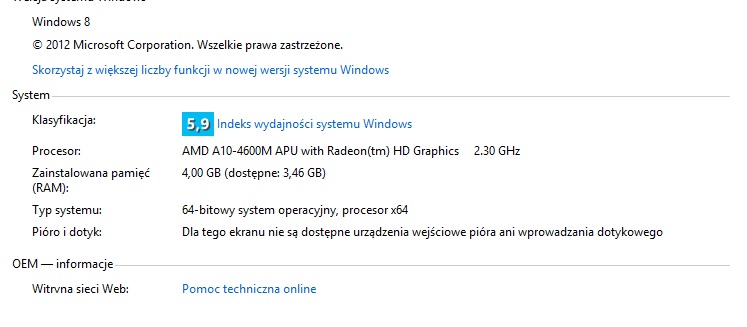
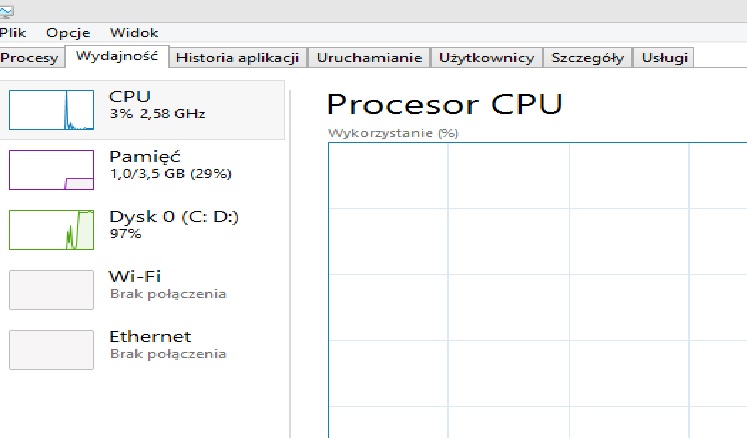
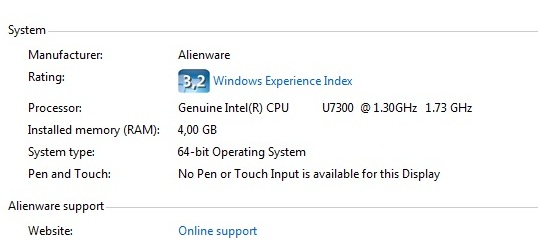
The problem is that in another computer with Windows 7 64 bit control panel shows 4gb of RAM with no information how much is available. You can see it on the screen shots. Also I do not know why the task manager shows only 3.5 gbof RAM on MSI . And yes - I'm asking about the difference between 4 and 3,56 GB of RAM . And by the way - I have only 4GB of ram because I do not think I need more for the game I play
 .
.
As for the black bars problem - the maximum native resolution in the game NFS Most Wanted 2004 is 1024/1280 . When I set this resolution ( 1024/1280) on the desktop - also have black bars on the sides .Attached Files:
-
-
I think the difference in RAM is due to 7660G...it will take up some system RAM.....
My 8650g is taking up 768mb of RAM, which tallies with task manager showing i have 7.2gb of RAM instead of 8gb... -
screw it, I'm going Win7 now.
-
please dont forget about us and share your expiriences with A10 5750m on win7
-
of course not, doing updates and stuff right now, so benchmarks should follow soon.
-
My 3DMark11 score jumped from P4987 to P5066 after upgrading to the 5750m
-
Well, the benchmark improvement is abysmal.
Let's hope in-game performance is much more noticable. -
first benchmarks: AMD Radeon HD 8650G video card benchmark result - AMD A10-5750M,Micro-Star International Co., Ltd. MS-16FK score: P5236 3DMarks
Now I will try to tickle it a bit and squezze the last bit out of it, bsod ho!
-
Got a question for the people that installed a backlit keyboard. Does it let you change through all the colors? I just installed one and the only colors the lights up are the blues, purples and reds. No greens ,yellow or orange. I know it's not fully supported but I wanted to know if it's just my laptop.
-
You have to install the KLM software. The lights and its behaviour is software controlled.
-
I have KLM installed
-
All the available colours in the application is available for me. All the features work as well.
-
This confirms what i have been trying to tell all along...good job for going all out!
-
Good job j_kut!
So it is worth to upgrade! Thanks so much. -
Thx Highwind,
I'll revert to Win8 now, not having the radio switch isn't worth the little gain performance, plus I also get crazy latency spikes from acpi.sys which cause me some usb-streaming buffer-underruns.
Still it's nice to have the 5750M, and the the spare 4600M will go into some cheap on-the-go laptop.
(thinking bout a thinkad 535, but I would really like a 13"model, any suggestions) -
its nice idea. APU is good for the small laptops.
guys with switched backlit keyboard:
does the touch key, to switch backliting - lefto to the power button - works for you? -
Touch key doesn't work on mine at least. Could be a firmware issue or some. There is a firmware update for the GX70 for " backlit keyboard support " . Don't know if this will fix anything or bricked it. -
Hey j_kut
How do you install new amd driver? Do you uninstall the old driver? I need guide here or the steps to install new driver..
And which version of amd driver suit best for 7970m? Or what driver are you using. Im currently on 13.6 -
I would not take a risk of flashing GX70 EC to GX60 before someone other try it. I suppose it will brick. I am interested in switching the keyboard but I think the 100$ is still a little to much to add the disco detail by now. Especialy that the non-backlit that I already own is rly nice too. I'll just wait for the moment that I will have the free cash to spend for kebabs with option for something else and I'll decide to have some fun on a disco floor.
-
Usually I deinstall the old driver and install the newer afterwards, but just installing the new driver over the old one has not given me any issues as well.
Your choice i'd say. -
OT: Chrome rated MSI.com as a Malwarehoster, lol. Obviously they got hacked...
-
Thanks , I wanted to be sure. None of you playing in older games? Really nobody has a problem with the full screen mode in these games ??
-
I see. how do u uninstall old drivers? and do u use driver sweeper? btw what version of amd driver u use.
-
I uninstall from Windows, the amd-cleaner tool messed up my registry....
driver is 13.6b2. -
i think this issue has to do with how the game scales with different resolution...Whether it stretches to fill the screen or just occupy part of the screen...and happens more on older games as the screen resolution is beyond what the game has...
I encountered that before when i was trying to play witcher 2 on my old laptop...1024x768 on a 1366x768 screen...the game didn't stretch so i ended up with black bars -
I can't get pscheck to start up.
All the process does is causing high CPU load and eats up memory like crazy but not even an icon in the taskbar is shown...
I read there are others having the same problem but couldn't find a solution (Win8 x64). Anyone able to help? -
it simply does not work on win8.
-
I found some posts claiming that PSCheck works fine on win8... so I was wondering. But since PSCheck is really outdated... *shrugs*
How come there is no alternative to PSCheck? -
There is a third party launcher that fixes the resolution. I use it no problem. Just google "nfsmw resolution fix"
-
You know if you can play Watch Dogs, the game in our GX60 ?
-
where did you buy the keyboard? Im looking into one myself.
-
YES! My A10-5750M just arrived.. Just came back from a short holiday, so going to build it in tom.. happy!
-
I can't find out how to disable the webcam through Win8. I can't find it in the device manager or anywhere in the Programs and Features control panel window. Am I going to have to take the cover off of the the screen area and unplug it manually? Has anyone had any luck finding the webcam in their device manager? I have the GX60 1AC. Not sure if the other GX60 models will have different webcams or drivers.
-
Only press " FN + F6 "
-
Yes that will turn it on and off. Is there any way to remove the device though?
-
There should be an entry called USB 2.0 Webcam Device under the Imaging devices tab.
That's how I disabled it. -
Ahhh ok. It wasn't showing up for me in the device manager. The webcam has to be enabled first for it to show up in the device manager (FN + F6). After that, it appears, and from there can be controlled within windows.
After enabling the webcam, then disabling or uninstalling the driver for it in device manager, and enabling it again with FN + F6, it just reinstalls automatically as a device anyways. I guess that means the only true way to get rid of the webcam will have to be taking off the cover and unplugging it.
Here we go... I hope this case isn't too brittle to handle it being taken apart and put back together just to unplug the webcam. -
Just build in the 5750M.. Started a few games and wow! Games run smoother, faster.. Started SC2, one of the sp missions where u have to control alot of zerglings and banelings.. With the old 4600M it was choppy, but not anymore! I also tried tombraider, on ultra on the 4600M it was choppy sometimes. Not anymore, was playing smooth.. Havent get the chance to test some more games.. but i really notice the performance increase!
-
Thanks, I know this fix , but I'm looking for universal solution . There is no problem with nVidia grafic cards - I played on entire screen regardless of the resolution . As I can see with AMD is not so easy ...
-
You should be able to fix that under the scaling options in the driver.
-
I've also done some longtime stresstest on the 5750M now, and I'm impressed.
Where my 4600m would throttle to an avg 2.2Ghz the 5750m remains at a avg. 2,9-3.1Ghz on all cores.
only on 100% load it`ll stay at base clock (2,5Ghz). -
Agreed. There is a noticeable difference in games vs. the 4600m.
You can also use PSCheck to lock the core speed to 3.2 - 3.5Ghz. Compared to the 4600m which you can safely lock at only 2.7Ghz. -
is the richland ES on ebay the one that owns Atom Ant? ;p I am almost sure
-
@Meaker: if you read this, could I order and lcd-cover from the hitman edition at your store, the german MSI support/shop can't get one as single part.
*The Offical MSI GX60 Owners Lounge*
Discussion in 'MSI Reviews & Owners' Lounges' started by layjohn, Oct 12, 2012.